
News is moving fast on the Log4J vulnerability, also known as “Log4shell”. It was first discovered in the video game Minecraft, developers realized hackers could exploit the vulnerability to gain access to the targeted computer and take it over. They quickly released a patch but also made a disclosure that brought the exploit to the public’s view.
The Cybersecurity & Infrastructure Security Agency (CISA) has now made a running repository that lists all of the software and devices vulnerable to this exploit. There you will find guidance on patching the effected products.
So, what is the Log4J vulnerability and what does it do?
It all stems from the building blocks that are used when a programmer is creating their code. Programmers will take bits of code that commonly available and used to act as a foundation for the program they’re trying to write, and in this case one of those foundational bits of code was Log4J. Log4J is used by Java to create a log of activity for the device it’s running on. It copies everything that happens as the program runs, and it makes sense that the vulnerability was initially discovered in Minecraft (a Java based game).
This communicative bit of code is found in many different programs, which is why it could be devastating if it was widely exploited. Hackers would be able to send a message to the “Log4J” effected product giving it commands. This would essentially allow them to take over the device and have full access.
Minecraft Isn’t the only thing based in Java either, Java is an extremely popular programming language and bits of it can be found in almost everything. Created in 1995, Java can be found on everything from your own personal laptop to the supercomputers used to solve complex scientific equations. 9937 companies openly report including Java in their tech stack, including Google, Airbnb, Amazon and more.
Java is also the preferred language for mobile applications, such as Android. Any business interested in having a mobile facing application (which they absolutely should considering mobile devices command the highest percentage of the worldwide web traffic at 54.8%) will need to utilize Java to accomplish it.
This is so much to say, Java is in nearly everything which makes an exploit that targets a common component of it a recipe for disaster.
All is not lost however, now that the exploit has been discovered many businesses are working furiously on patches and notifying their customers. You can check the CISA link found at the beginning of this article to keep track of what’s being done by specific businesses.
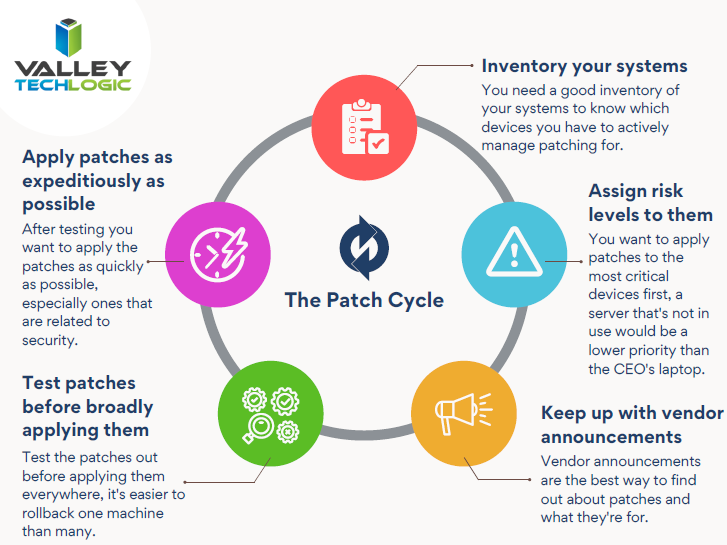
This ordeal is a good reminder to stay up to date on patches that are offered by the software you utilize, but if you’re running a business, orchestrating patching across many different devices company wide can be much more difficult.
Valley Techlogic offers preventative maintenance in all of our service plans, as well as disaster recovery services if the unthinkable does occur. Learn more today by scheduling a short consultation with us.
Looking for more to read? We suggest these other articles from our site.
-
Hackers and the holidays, US government warns ransomware doesn’t take days off
-
It’s Not Your Imagination, Ramsonware is On the Rise
-
Our Top 5 Favorite Outlook Tricks & Tips as a Technology Provider
-
The Solar Winds Rabbit Hole: What’s happened and what’s next?
This article was powered by Valley TechLogic, IT service provider in Atwater, CA. You can find more information at https://www.valleytechlogic.com/ or on Facebook at https://www.facebook.com/valleytechlogic/ . Follow us on Twitter at https://x.com/valleytechlogic.