

Tag: microsoft outage

  • This weeks Microsoft outage brought down Teams, Outlook and more for several hours

    This weeks Microsoft outage brought down Teams, Outlook and more for several hours

    In major outage news, this week Microsoft had an outage that lasted over 6 hours and brought down Teams, Outlook and Exchange and more – grinding some workplace activities to a halt until the services came back. The outage affected Microsoft 365 customers worldwide.

    Services resumed yesterday morning although there were residual issues for some customers regarding logins and more. Most of the affected services were the online versions of the product, if you have a desktop accessible version of the Microsoft 365 products you may have noticed less of a disruption (other than Teams being unavailable).

    The cause of the outage was announced on Twitter:

    We’ve determined that a recent deployment contained a broken connection to an internal storage service, which has resulted in impact. We’re working to direct traffic to a healthy service to mitigate impact. Additional information can be found in the admin center under TM402718.

    — Microsoft 365 Status (@MSFT365Status) July 21, 2022

    By afternoon Thursday July 21st the Microsoft service health page (which can be found here) indicated that all services were up and running as usual.

    Valley Techlogic is a Microsoft shop by and large and we’re major proponents of the Microsoft 365 suite of services. As we mentioned, those who currently had a Microsoft 365 plan with access to the desk top versions were, or would have been, less affected by this week’s outage.

    Here’s a quick guide to the Microsoft 365 plans we recommend to our customers and why in a nutshell (note: this pricing is after discount for an annual commitment).
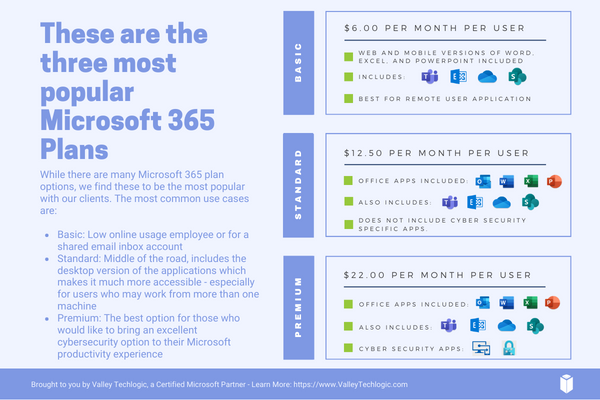
    Microsoft 365 Plan Chart

    Basic is a good product, but to make the most of your Microsoft 365 subscription plan we generally recommend spending a little more for Standard or Premium. For our security conscious clients in particular, the Premium subscription is an excellent value.

    Microsoft Business Premium comes with advanced cybersecurity protections built into the product, even if you’re not taking any other steps to protect your business from a cyberattack – switching to Microsoft Business Premium will give you major benefits for a very reasonable price (just $22 per user per month).

    Microsoft Business Basic is perfect for an extremely light user experience, say a shared email inbox for a specific billing purpose or for an employee who doesn’t perform many online tasks. For everyone else, we highly recommend upgrading.

    As we mentioned, we’re a Microsoft shop and a certified Microsoft partner and can assist you directly with your Microsoft products, especially choosing a Microsoft 365 subscription that will be the best fit for your business. Learn more today with a quick consultation.

    Looking for more to read? We suggest these other articles from our site.

    This article was powered by Valley Techlogic, an IT service provider in Atwater, CA. You can find more information at https://www.valleytechlogic.com/ or on Facebook at https://www.facebook.com/valleytechlogic/ . Follow us on Twitter at https://x.com/valleytechlogic.


  • What to Do When a Service You Use is Down; 5 Tips on How to Survive a Tech Outage

    What to Do When a Service You Use is Down; 5 Tips on How to Survive a Tech Outage

    If you were using any Microsoft products on Monday (March 15th) you may have been party to the outage that took down services such as Office 365 and Teams worldwide.

    The outage was caused by an Azure authentication error (you can learn more here) and lasted roughly 14 hours. Whether you experienced this particular outage or not we have all experienced an outage that took out a tech service that is critical to doing our job or supporting the systems we use every day.

    Here are our top 5 tips to surviving a tech outage that is impacting your business:

    1. First of all, don’t panic. Outages are normal in the tech world, and sometimes even necessary if it’s a planned downtime event. Usually planned events will occur at times that are less inconvenient for most workplaces (late at night typically), and you will probably get some kind of notice, so you know to expect it.

    2. Determine that the outage is outside of your control. If a service is down, it’s a good idea to determine whether it’s on your end or truly due to the service provider. If it’s a popular well-known service (such as in the Microsoft case) you can usually check Google as an outage will be news. Another good place to check is their social media pages to see if there’s any mention of the outage by their team; Twitter especially seems to be the place many businesses convey outage news.

    3. If you’ve come to the conclusion it’s not on your end, reach out to their customer service. They may be swamped if it’s a large outage but if it’s just something to do with your particular instance they can probably assist you in getting back up. If you have a technology service provider you work with they can help manage this task for you.

    4. Reach out to your tech team if you have one. If you have an in-house tech team or a technology service provider behind your business, they can troubleshoot the outage for you and determine next best steps to getting your services back up.

    5. Check the post-outage documentation. It often helps to know why an outage occurred, especially if it was due to an update that may have changed things within the service.

    Outages are a good case in point for having a tech team behind your business, they can help navigate the issue for you and if your case does need to be escalated, they will know exactly who to contact.

    If you’re on your own trying and to Google fixes it can often lead you down a rabbit hole where the recommendations may not even be relevant to your particular instance.

    In general, we don’t recommend trying to navigate severe issues on your own, especially if the affected program host critical data or systems for your business. The “fix” you try may be worse than the problem that was causing the outage in the first place.


    If you have been looking for a team that can support your business in navigating tech outages and more, Valley Techlogic is a seasoned technical service provider and we have plans that can fit every business. You can learn more by booking a free consultation here.

    Looking for more to read? We suggest these tech articles from the last week.

    This article was powered by Valley TechLogic, an IT provider in Atwater, CA. You can find more information at https://www.valleytechlogic.com/ or on Facebook at https://www.facebook.com/valleytechlogic/ . Follow us on Twitter at https://x.com/valleytechlogic.