
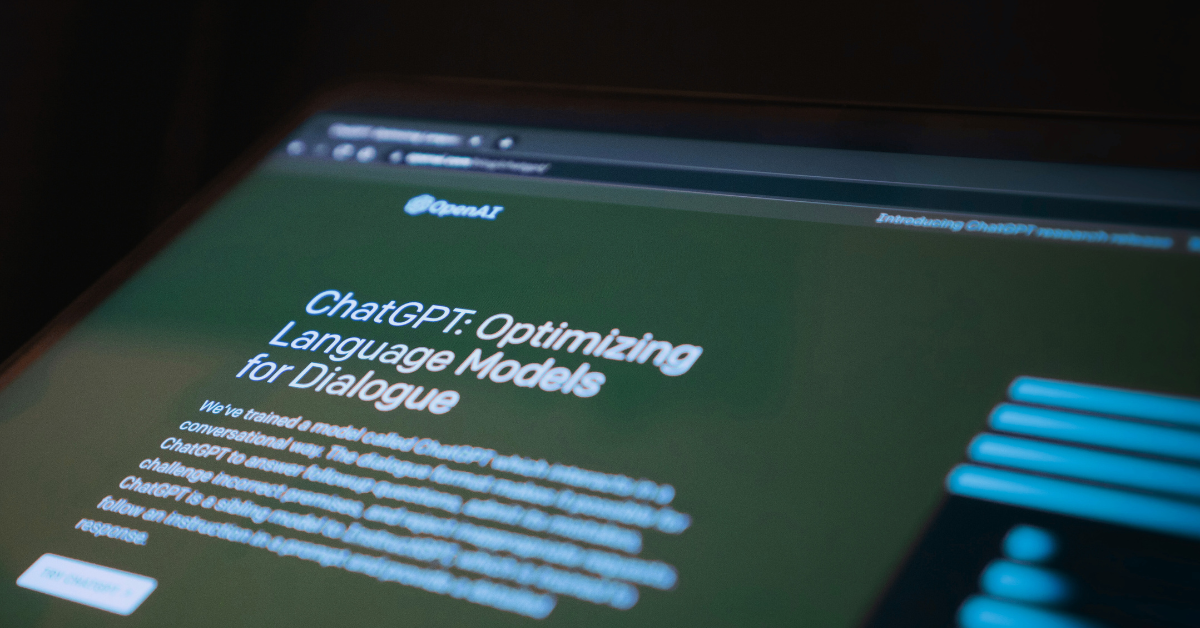
Tag: open AI

  • Chat GTP-5 is here, and opinions are mixed, we talk new features and why some users say 4 was the better version

    Chat GTP-5 is here, and opinions are mixed, we talk new features and why some users say 4 was the better version

    We reported on ChatGTP-5, code named Project Strawberry at the time, nearly one year ago today. The reported update was supposed to boost reasoning capacity and begin the transition of introducing self-learning to AI versus requiring vast swaths of data scrubbed from the internet (a distinction likely aimed to combat the obvious problems when you randomly collect data from unknowing and many times unwilling sources).

    With a potentially industry changing copyright lawsuit filed just this week, the race to set AI apart as a distinct tool separate from the data it was built on is in full swing and as usual OpenAI’s ChatGPT product is leading the charge.

    New features include the ability to handle text ,images, voice and video all within a single conversation, so there’s no longer a need to switch between text chats and chats when you would like to analyze files. It’s also being reported so far that the answers users are receiving are more accurate, especially for technical questions and that it can now answer with much greater detail.

    Although it should be noted some of this improved reasoning is locked behind a paywall, with free users receiving the “basic” version of the model or ChatGPT-5 mini as dubbed by OpenAI themselves. Plus users will receive an improved version with one caveat, when load is high the company has said all users will only have access to the mini version to keep services afloat.

    It’s not all sunshine and rainbows however, some users aren’t thrilled with the update and have even requested the ability to return to Chat-GPT4. Common complaints are that Chat-GPT5 is much slower than 4 was and there is more frequent crashing (whether it be within the client itself or ChatGPT crashing user’s browser tabs).

    There have also been complaints that the model is more patronizing now, with users receiving praise for every query and even changing the personality or directly requesting it to leave the compliments out is outright is mostly ignored by the model at the time of reporting.

    We aren’t sure what the outcome of a successful copyright lawsuit will mean for the future of AI but as a technology provider we suspect it will stick around in some capacity regardless of the success or failure of ongoing litigation. While the creative uses for AI such as image generation may be more at play the key functionality for businesses as a means of increasing productivity are what we like to focus on. Here are three ways you can utilize AI in your business today:

    1. Inbox & customer-support copilot
      What it does: summarizes long threads, drafts tailored replies, and suggests next steps so you clear the queue quicker.
      Try this prompt (paste an email thread under it):
      “Summarize this thread in 3 bullets, list the customer’s main concern, and draft a friendly 120-word reply that (a) acknowledges the issue, (b) proposes a solution, and (c) offers a next step. Keep it on-brand: helpful, concise, no jargon.”
      Pro tip: Save a few tone/style notes once and reuse them for consistent replies.
    2. SOPs, checklists, and onboarding in minutes
      What it does: turns rough notes into step-by-step procedures, checklists, and quick-start guides for new hires.
      Try this prompt (paste your messy process notes):
      “Turn this into a clear SOP with: purpose, prerequisites, step-by-step actions (numbered), decision points, common pitfalls, and a 5-question quiz to confirm understanding. Make it skimmable.”
      Pro tip: Ask for a one-page version and a printable checklist for the wall.
    3. Spreadsheet/data sidekick (Excel/Sheets)
      What it does: writes formulas, cleans lists, and gives quick insights so you stop hunting Stack Overflow.
      Try this prompt (describe your sheet):
      “I have columns: Date, Lead Source, Deal Size, Status. Give me (1) a formula to count won deals per month, (2) a chart I should make and why, and (3) three insights I can present in one sentence each.”
      Pro tip: Paste a few sample rows so it can generate formulas that fit your exact layout.

    Ready to turn AI into real productivity? At Valley Techlogic, we can help you plug Chat GPT-5 into the tools you already use, Microsoft 365/Teams, Outlook, SharePoint (or Google Workspace so it drafts emails, turns rough notes into SOPs, and tames spreadsheets right where work happens. Learn more today with a consultation.

    Looking for more to read? We suggest these other articles from our site.

    This article was powered by Valley Techlogic, leading provider of trouble free IT services for businesses in California including Merced, Fresno, Stockton & More. You can find more information at https://www.valleytechlogic.com/ or on Facebook at https://www.facebook.com/valleytechlogic/ . Follow us on X at https://x.com/valleytechlogic and LinkedIn at https://www.linkedin.com/company/valley-techlogic-inc/.

  • Code named “Strawberry”, OpenAI’s latest update aims to boost reasoning capacity in their AI model

    Code named “Strawberry”, OpenAI’s latest update aims to boost reasoning capacity in their AI model

    Initially labeled Q* for Q Star, Project Strawberry is set to become ChatGPT5 and OpenAI is prepared to launch this update any day now at the time of writing.

    AI competition continues to stiffen up, but many would argue OpenAI has a commanding lead in the AI space with it’s a comparatively more mature model that many believe is more accurate than competitors such as Google’s Gemini and Microsoft’s CoPilot.

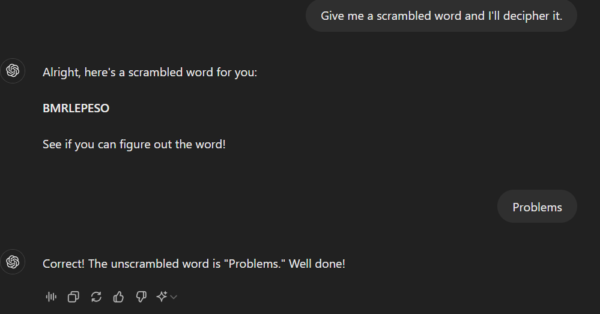
    However, as with most AI tools on the market, errors and just general wonkiness are part of the experience and OpenAI and other AI tool providers hope to continue to improve in that arena, providing more accurate results to users without errors and sometimes comical mistakes or “problems” as in the inaccurate word scramble below.

    Hint, no actual words can be spelled with all the letters given.

    OpenAI’s claims Project Strawberry will have “human-like” reasoning skills and answer questions that have stumped the algorithm so far, especially complex math and programming problems.

    This update is also leading up to the larger project for OpenAI, codenamed “Orion” this future tool will be an entirely new AI model and it’s going to be trained entirely via ChatGPT5/Project Strawberry. The hope with using AI to train AI rather than training it via data found online is that we will see a reduction in “AI hallucinations” (or incorrect predictions) and also speed up the rate at which AI can be improved without having to feed it large amounts of online data.

    This would also help OpenAI and other AI competitors avoid the murkier topic of privacy concerns when it comes to where AI is getting it’s data from.

    If you’re considering investing time in AI solutions for your business, we have 4 considerations for you to mull over first (and the first does relate to the data security topic we just mentioned):

    1. Data Security: For most of the AI tools on the market, it’s a known fact that any data you feed into it will also feed into the models they use. We would suggest if you’re considering implementing AI solutions in your business you do so with this factor in mind. Even if a tool claims your data will be secure and not accessible to other users (we’re looking at you CoPilot) AI is still realistically in its infancy. We suggest using an abundance of caution when it comes to data that is proprietary to your business.
    2. Cost (especially Time Cost): AI when used correctly can save your business time and money but using it correctly can be a high barrier to entry. For example, if copy writing is a core facet of your business AI is an excellent tool for sourcing ideas that your team can then spin off into their own creations. If your business is word-of-mouth based cabinetry sales, AI may not be very useful to you at this point in time.
    3. User Experience: Consider the human experience, especially for your customers, when implementing AI solutions. AI chatbots exist but should they replace a real person answering questions on your business’s behalf? Or instead does it make sense to utilize it half way (IE the chatbot answers common questions) with a human representative ready to take over if the questions get more complicated.
    4. AI is not magic: AI will not replace human ingenuity, as outlined above it’s not a perfect solution by any means at this point in time and that’s unlikely to change anytime soon. AI should be used to build upon existing structures in your business (like adding more capacity to your marketing capabilities for example) not with the expectation it’s going to replace those structures entirely.

    Considering implementing AI solutions in your business or hoping to hone in on advancements in technology to your advantage? Valley Techlogic continues to stay at the forefront of new innovations in tech, and we utilize our expertise on behalf of our customers. Reach out today for a consultation.

    Looking for more to read? We suggest these other articles from our site.

    This article was powered by Valley Techlogic, leading provider of trouble free IT services for businesses in California including Merced, Fresno, Stockton & More. You can find more information at https://www.valleytechlogic.com/ or on Facebook at https://www.facebook.com/valleytechlogic/ . Follow us on Twitter at https://x.com/valleytechlogic and LinkedIn at https://www.linkedin.com/company/valley-techlogic-inc/.

  • Bing’s ChatGPT Chatbot had some unexpected conversations with customers this week, plus 3 Chatbots we CAN recommend for your website

    Bing’s ChatGPT Chatbot had some unexpected conversations with customers this week, plus 3 Chatbots we CAN recommend for your website

    While Microsoft has been somewhat hush hush on the exact amount of their investment into the creator of ChatGPT, OpenAI (with some estimates nearing $10 billion).  It is clear that they’re going all in on AI and looking towards the future by already integrating it into their search engine Bing, via a new chat bot feature.

    The results have been, to say the least, unexpected. While in the majority of cases the bot responds appropriately to the prompts and provides helpful information, there were some instances this week where the opposite happened.

    Including a conversation about the new movie Avatar: Way of the Water in which case the bot got confused about what year it was and insisted it was still 2022, punctuating it’s arguments with the user with “I’m a good Bing bot”.

    In another case, a New York Times writer hearing about the unusual way the bot was sometimes responding, led him to holding a conversation with it for over 2 hours. The bizarre results of the lengthy conversation culminated in the bot trying to convince him they were in love and that he should leave his wife.

    This highlights the complex nature of AI in its current form, many think AI is advanced hardware working at full capacity to create something brand new to human-kind. When in reality it’s a vast collection of what humans have already put onto the internet scrambled together and supported by algorithms to be readily available upon a human prompt. You have to imagine having the full capacity of the internet at your fingertips – both the good and the bad.

    That’s why AI has been able to pass the Bar exam and also why it has also responded very strangely to simple prompts as in the Bing example, because like the internet it’s a mixed bag.

    In response to the news Microsoft has limited their chatbot to prevent more unsettling conversations, with 5 user prompts on the same topic the bot will now respond with “I prefer not to talk about this topic.”.

    AI can be very useful but it’s definitely not a replacement for all human led activity, especially when it comes to engaging with your customers.

    That’s why we have our top 3 picks for live chat options that will improve customer engagement (with no unexpected results):

    1. LiveChat: This is the one we personally use and we enjoy the features it has including an “attention grabber” which is an animated .gif that grabs customers attention and the ability to instigate conversations with visitors. It also keeps a record of who has tried to chat and allows customer service agents to “take over” a conversation when it’s appropriate to. It also includes customizable branding (all of the chatbots on our list do).
    2. Olark is another good option, like LiveChat it keeps track of the conversations happening on your website but it also offers analytics based on those conversations so you can track customer outcomes. It also offers many integrations with popular products such as Google Analytics, Hubspot, Mailchimp, Salesforce and more.
    3. Tawk.to is a free live chat option that still has some very nice features, including monitoring customers on your website and being able to answer chats from a mobile device. You can even share your screen if you’re trying to assist a customer in finding something.

    We believe in answering customers live which is why we have Live Chat available to our customers, with live service reps on our website and a dedicated dispatcher to answer customer phone calls. Technology advice like what’s provided in this article is just one of the ways we help our clients, if you would like to learn more about obtaining technology support for your business schedule a consultation with us today.

    Looking for more to read? We suggest these other articles from our site.

    This article was powered by Valley Techlogic, an IT service provider in Atwater, CA. You can find more information at https://www.valleytechlogic.com/ or on Facebook at https://www.facebook.com/valleytechlogic/ . Follow us on Twitter at https://x.com/valleytechlogic.