
Tag: patches

  • If you’ve never heard of the Log4J vulnerability, you’re probably at risk

    If you’ve never heard of the Log4J vulnerability, you’re probably at risk

    News is moving fast on the Log4J vulnerability, also known as “Log4shell”. It was first discovered in the video game Minecraft, developers realized hackers could exploit the vulnerability to gain access to the targeted computer and take it over. They quickly released a patch but also made a disclosure that brought the exploit to the public’s view.

    The Cybersecurity & Infrastructure Security Agency (CISA) has now made a running repository that lists all of the software and devices vulnerable to this exploit. There you will find guidance on patching the effected products.

    So, what is the Log4J vulnerability and what does it do?

    It all stems from the building blocks that are used when a programmer is creating their code. Programmers will take bits of code that commonly available and used to act as a foundation for the program they’re trying to write, and in this case one of those foundational bits of code was Log4J. Log4J is used by Java to create a log of activity for the device it’s running on. It copies everything that happens as the program runs, and it makes sense that the vulnerability was initially discovered in Minecraft (a Java based game).

    This communicative bit of code is found in many different programs, which is why it could be devastating if it was widely exploited. Hackers would be able to send a message to the “Log4J” effected product giving it commands. This would essentially allow them to take over the device and have full access.

    Minecraft Isn’t the only thing based in Java either, Java is an extremely popular programming language and bits of it can be found in almost everything. Created in 1995, Java can be found on everything from your own personal laptop to the supercomputers used to solve complex scientific equations. 9937 companies openly report including Java in their tech stack, including Google, Airbnb, Amazon and more.

    Java is also the preferred language for mobile applications, such as Android. Any business interested in having a mobile facing application (which they absolutely should considering mobile devices command the highest percentage of the worldwide web traffic at 54.8%) will need to utilize Java to accomplish it.

    This is so much to say, Java is in nearly everything which makes an exploit that targets a common component of it a recipe for disaster.

    All is not lost however, now that the exploit has been discovered many businesses are working furiously on patches and notifying their customers. You can check the CISA link found at the beginning of this article to keep track of what’s being done by specific businesses.
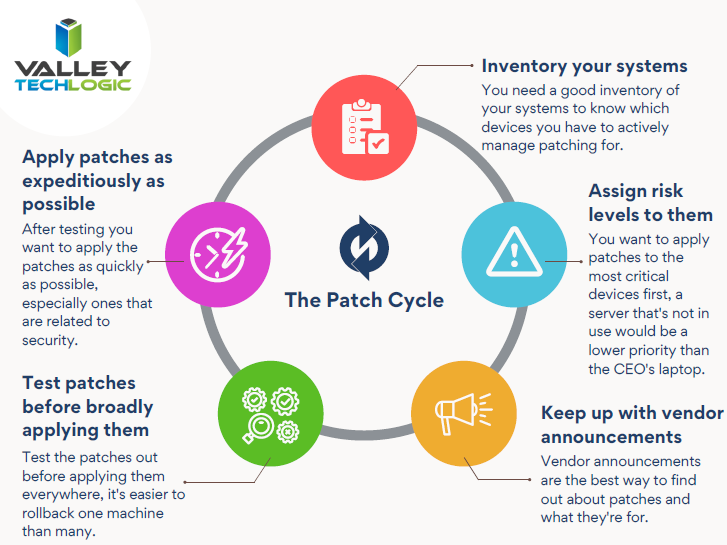
    Click to open the full size version.

    This ordeal is a good reminder to stay up to date on patches that are offered by the software you utilize, but if you’re running a business, orchestrating patching across many different devices company wide can be much more difficult.

    Valley Techlogic offers preventative maintenance in all of our service plans, as well as disaster recovery services if the unthinkable does occur. Learn more today by scheduling a short consultation with us.

    Looking for more to read? We suggest these other articles from our site.

    This article was powered by Valley TechLogic, IT service provider in Atwater, CA. You can find more information at https://www.valleytechlogic.com/ or on Facebook at https://www.facebook.com/valleytechlogic/ . Follow us on Twitter at https://x.com/valleytechlogic.


  • Have a Dell laptop or computer? This vulnerability is one to watch out for.

    Have a Dell laptop or computer? This vulnerability is one to watch out for.

    Vulnerabilities that can broadly attack major systems or specific retailers are especially problematic. Many of these vulnerabilities are quietly patched before you’re even aware there was a problem but sometimes things can fly under the radar for a while.

    Such is the case in an affected Dell driver that has been pushed out to machines for the last 12 years. It was recently discovered this driver can allow bad actors to possibly gain more access to the affected Dell systems. It’s estimated hundreds of millions of Dell computers, laptops and tablets could have the affected driver and be at risk.

    While it’s not considered critical at the moment because the affected computers would already have to be compromised in some way for it to be used, it’s still problematic because it could make removing malware or other system infections more difficult. These drivers would potentially allow them unrestricted to the affected machines in the event the user is hacked.Tech News #9

    There are currently no recorded cases of this exploit being used, however now that it’s been made public that may change. Researchers have held back the details of the exploit to allow users time to patch, and Dell has issued a security advisory regarding the driver. However, they have not as of writing revoked the affected driver.

    This is another reminder as to the importance of maintaining updates on your machines. Even with security measures in place, no system is perfect. Vulnerabilities can be discovered years later with varying levels of severity. By maintaining patching, you won’t be caught off guard or risk having your machines exploited by a vulnerability.

    Here are 5 patching best practices:

    1. Automate. If you can, automate the process. Schedule your patches to happen at a time you won’t be busy working on your computer.
    2. Plan your approach. If you’re managing patching for your business, you want to plan how you’ll approach patching company wide. It may be prudent to patch overnight or patch in waves if your business is open extended hours.
    3. Test patches. Test patches on a single machine before rolling them out company wide, sometimes patches can create problems that might necessitate a rollback and that might hinder your business if everyone in the office is down.
    4. Maintain patch levels. The last thing you want to do is fall seriously behind on patches. Patching will be a lengthy process as you try and catch up, and your machines may be left vulnerable in the interim.
    5. Get Help If You Need It. Patching your home machines is a fairly straight forward process usually but patching from a business perspective can have many intricacies beyond just “apply patches”. When in doubt, leave it up to the professionals.

    If you need help with patching or the myriad of other items that keep your office machines in tip top shape and safe from malware, Valley Techlogic is here for your business. You can schedule a free consultation here.

    Looking for more to read? We suggest these tech articles from the last week.

    This article was powered by Valley TechLogic, an IT provider in Atwater, CA. You can find more information at https://www.valleytechlogic.com/ or on Facebook at https://www.facebook.com/valleytechlogic/ . Follow us on Twitter at https://x.com/valleytechlogic.

  • What to Do When a Service You Use is Down; 5 Tips on How to Survive a Tech Outage

    What to Do When a Service You Use is Down; 5 Tips on How to Survive a Tech Outage

    If you were using any Microsoft products on Monday (March 15th) you may have been party to the outage that took down services such as Office 365 and Teams worldwide.

    The outage was caused by an Azure authentication error (you can learn more here) and lasted roughly 14 hours. Whether you experienced this particular outage or not we have all experienced an outage that took out a tech service that is critical to doing our job or supporting the systems we use every day.

    Here are our top 5 tips to surviving a tech outage that is impacting your business:

    1. First of all, don’t panic. Outages are normal in the tech world, and sometimes even necessary if it’s a planned downtime event. Usually planned events will occur at times that are less inconvenient for most workplaces (late at night typically), and you will probably get some kind of notice, so you know to expect it.

    2. Determine that the outage is outside of your control. If a service is down, it’s a good idea to determine whether it’s on your end or truly due to the service provider. If it’s a popular well-known service (such as in the Microsoft case) you can usually check Google as an outage will be news. Another good place to check is their social media pages to see if there’s any mention of the outage by their team; Twitter especially seems to be the place many businesses convey outage news.

    3. If you’ve come to the conclusion it’s not on your end, reach out to their customer service. They may be swamped if it’s a large outage but if it’s just something to do with your particular instance they can probably assist you in getting back up. If you have a technology service provider you work with they can help manage this task for you.

    4. Reach out to your tech team if you have one. If you have an in-house tech team or a technology service provider behind your business, they can troubleshoot the outage for you and determine next best steps to getting your services back up.

    5. Check the post-outage documentation. It often helps to know why an outage occurred, especially if it was due to an update that may have changed things within the service.

    Outages are a good case in point for having a tech team behind your business, they can help navigate the issue for you and if your case does need to be escalated, they will know exactly who to contact.

    If you’re on your own trying and to Google fixes it can often lead you down a rabbit hole where the recommendations may not even be relevant to your particular instance.

    In general, we don’t recommend trying to navigate severe issues on your own, especially if the affected program host critical data or systems for your business. The “fix” you try may be worse than the problem that was causing the outage in the first place.


    If you have been looking for a team that can support your business in navigating tech outages and more, Valley Techlogic is a seasoned technical service provider and we have plans that can fit every business. You can learn more by booking a free consultation here.

    Looking for more to read? We suggest these tech articles from the last week.

    This article was powered by Valley TechLogic, an IT provider in Atwater, CA. You can find more information at https://www.valleytechlogic.com/ or on Facebook at https://www.facebook.com/valleytechlogic/ . Follow us on Twitter at https://x.com/valleytechlogic.