
Tag: technology planning

  • The 6 roles you would you need to fill to match the services delivered by an outsourced IT vendor

    The 6 roles you would you need to fill to match the services delivered by an outsourced IT vendor

    Has your business grown to the point you’re now looking to improve the IT solutions you have available, including possibly adding additional staff? Or maybe you’re currently the go-to person for providing technical support for your users (we see this a lot) and you’re realizing you need additional help to ensure things continue to run smoothly.

    It can be difficult to determine whether it makes sense to bring onboard additional in-house resources or if it’s perhaps a better idea to outsource the task to a company whose sole purpose is providing those services. When considering your options here are the six roles you would need to fill to match the services provided by an outsourced IT service provider as well as their average salary requirements:
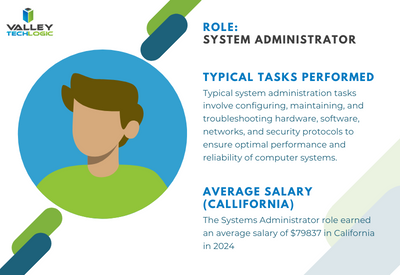
    Systems Administrator: Responsible for the overall maintenance, configuration, and reliable operation of computer systems and networks within the organization. They ensure that systems are secure, updated, and performing optimally.
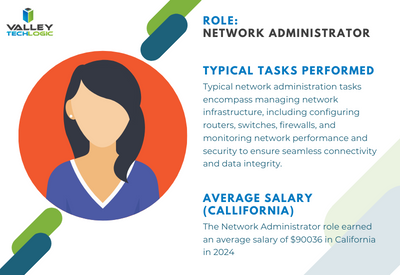


    Network Administrator: Manages and maintains the organization’s network infrastructure, including LAN, WAN, and internet connectivity. They oversee network security, troubleshoot network issues, and optimize network performance.
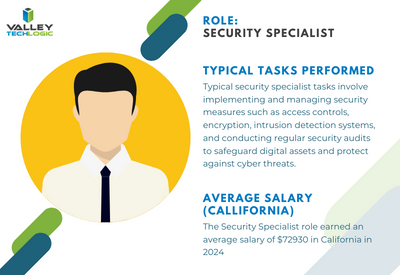


    Security Specialist/Analyst: Focuses on protecting the organization’s IT assets
    from security breaches, cyber threats, and unauthorized access. They implement security measures such as firewalls, intrusion detection systems, and encryption protocols, and they monitor for security incidents.
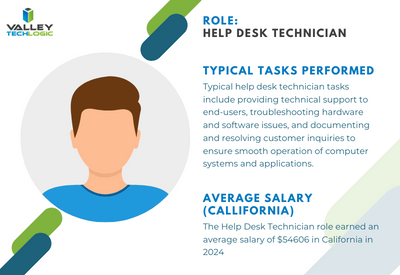
     

    Help Desk/Support Technician: Provides frontline technical support to end-users, troubleshooting hardware and software issues, resolving technical problems, and providing guidance on IT-related queries. They may also handle user account management and software installations.
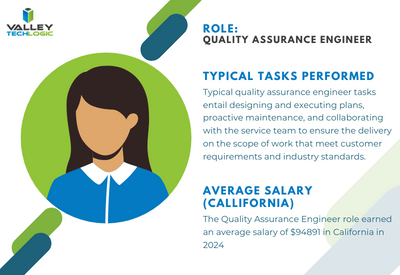
     

    Quality Assurance (QA) Engineer: Tests software applications and systems to ensure they meet quality standards, functional requirements, and performance expectations. QA engineers identify bugs, conduct regression testing, and contribute to software quality improvement efforts.
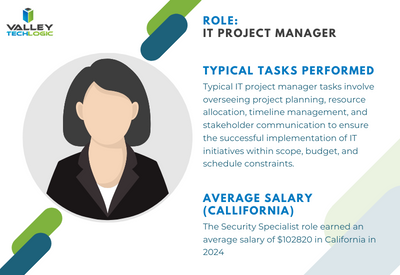
     

    IT Project Manager: Oversees IT projects from initiation to completion, ensuring they are delivered on time, within budget, and according to specifications. Project managers coordinate resources, manage risks, and communicate project status to stakeholders


    To contrast, with a managed IT service solution you’re usually looking at a fraction of the cost of the salary for just one of these staff members while still having access to all of these roles individually to support your business. Additionally, you won’t need to worry about the hiring process or all of the overhead that comes with hiring new employees.

    We can’t say what the right choice is for your business, and for some businesses it’s not an either-or situation. Sometimes it makes sense to hire one onsite staff member as a go to person while still outsourcing to provide better coverage and meet your long-term technology improvement goals.

    We can’t speak for other providers but for Valley Techlogic we have plans available to cover a variety of technology setups, whether we’re offering a co-managed solution and working alongside an existing staff resource or whether we’re taking over the technology side of your business in it’s entirety so you can focus on everything else. Learn more today.

    Looking for more to read? We suggest these other articles from our site.

    This article was powered by Valley Techlogic, an IT service provider in Atwater, CA. You can find more information at https://www.valleytechlogic.com/ or on Facebook at https://www.facebook.com/valleytechlogic/ . Follow us on Twitter at https://x.com/valleytechlogic.


  • 10 Questions Your New IT Provider Should Be Asking YOU During Onboarding

    10 Questions Your New IT Provider Should Be Asking YOU During Onboarding

    Much of our content is focused on what you should be asking your existing or future IT provider – from what services they cover, what cyber security protections they offer and how they will deploy their solutions to meet the needs of your specific office environment.

    The flipside of the coin though is the information they need to gather from you to best meet your needs, and if your IT provider hasn’t asked you any of the following questions, we would definitely consider that a red flag. How can their solution be tailored to your needs if they have no idea what those needs are?

    Here are the top 10 questions your IT provider should be asking you during onboarding or in your first year of service with them:

    1. What specialized business software do you use? As an IT provider it’s important we establish a relationship with your existing software vendors (especially for specialized business software) early on to help manage these tools on your behalf.
    2. How many devices does your business have? How many are used outside the office? This is a dual question with one purpose, we need to know about these devices so we’re making sure to cover the basic support items needed to keep them running, including backups and updates. Devices used remotely also need to be counted but the setup for those may involve getting in touch with those employees directly to deploy the solutions we use.
    3. How many servers do you have (including virtual machines)? Again, if we don’t know about it, we cannot support it and we even find in our client assessments they may have servers running that they weren’t even aware of. Any device on your network that’s internet connected and not receiving regular maintenance is a potential threat vector and we can make recommendations to discontinuing devices not in use.
    4. What was something your previous IT vendor provided that you would like us to continue? Regardless of the reasons you may have for switching IT providers (and if you’re thinking about doing so but aren’t sure how to get started, we have a kit available to help) there were probably some aspects of the service they provided that you feel were beneficial. This might include a certain kind of reporting they provided or a preference for how meetings are conducted. It’s good to establish the groundwork for continuing these preferences early on so your new provider can adapt routines to meet these preferences.
    5. What was something your previous IT vendor did that you did not like? Again, it helps us to know what your experiences have been in engaging with IT vendors and how we can best support your business. Maybe you didn’t like how they went about billing you for services or how they handled ticketing, whatever it was its invaluable information for your new provider.
    6. What projects do you have in the works? Whether it’s just an idea or something that was started and never finished, your new IT provider will want to help you meet your project goals.
    7. Do you have any cyber security frameworks or compliance goals your business must meet? Whether it be HIPAA, CMMC or you would just like to beef up your cyber security in 2024, it’s good to discuss this topic individually especially if your organization must meet specific cyber security requirements.
    8. Who provides your telecom and internet services? Networking support and phone maintenance is often included in many technology plans, it is helpful for us to know who provides these services for you. If you’re not happy with the current providers we can also offer recommendations for alternative solutions and we have even helped customers save money on these bills if we find they’re being overcharged.
    9. How often would you like to meet to discuss the services we provide for your company and any upcoming goals? At Valley Techlogic we host what we call a Technology Business Review (TBR) at the minimum annually, but we can also have these more frequently if the client desires.
    10. What minimum service requirements would you like us to adhere to? Whether it be our response time to tickets, how often we provide updates or specific tools you would like us to provide or help your company utilize – ideally your IT vendor will tailor your plan to YOU.

    Which is something Valley Techlogic does for our clients, our IT service plans are tailored to meet our clients’ needs and their specific setups. If you would like to learn more you can get started here.

    Looking for more to read? We suggest these other articles from our site.

    This article was powered by Valley Techlogic, an IT service provider in Atwater, CA. You can find more information at https://www.valleytechlogic.com/ or on Facebook at https://www.facebook.com/valleytechlogic/ . Follow us on Twitter at https://x.com/valleytechlogic.

  • 5 Reasons to have an annual meeting with your IT service provider and how to make the most of it

    5 Reasons to have an annual meeting with your IT service provider and how to make the most of it

    If you’re a small business owner and you work with an outsourced IT provider you’re not alone, statistics vary but it’s estimated up to 60% of small businesses utilize a third-party resource for their IT.

    This can look different depending on your particular size and needs, for some businesses it can look like support for existing IT staff, for other businesses their entire IT needs are shifted onto a third party IT resource. There is no one size fits all solution, the needs of your business are unique and your IT support provider should be a resource for helping you grow your business and keep up with the technology demands of modern work places.

    That is why it’s so important you meet with your IT team at the minimum annually, although we really could make a strong argument for quarterly (especially during times of intense growth or change within your business). Keeping them in the loop allows them to provide for your business adequately and on the opposite end you can learn about their recommendations for your business, which are often times free or low-cost solutions and improvements to your technology infrastructure and security.

    Even for recommendations that carry a cost you can plan for these things in advance rather than having it come up as an unpleasant surprise later on, an example would be let’s say their reporting has discovered your on-premises server is struggling to keep up with your demand or even showing signs of failure. This could be talked about in a meeting ahead of time but instead it might become a major headache when the server fails spontaneously and has to be replaced on the spot. Maybe you would have thought about making the move to the cloud this year or could have planned out your hardware purchases to coincide with more favorable timing, you’ll never know but hindsight is 20/20 and you will probably make a different choice going forward.

    So, what are the 5 reasons to have an annual meeting with your IT service provider?

    1. Future Planning: As we outlined in the scenario above, having this meeting allows you to create a plan for the year ahead. If your business has a busy season (most of us do) you can schedule any maintenance or downtime during the off-season. You can plan out hardware purchasing, software upgrades, cybersecurity improvements and more.
    2. Review Documentation: Your annual meeting is also a great time to review any reports your IT service provider has created for your business. At Valley Techlogic we’re constantly tracking items we’re doing on the back end for our clients, the regular maintenance, our 24/7 cyber security monitoring, backup and data services we provide just to name a few.
    3. Project Planning: We also suggest touching on any projects you would like to complete, such as switching out your traditional landline system to VoIP, security cameras (if they provide that service) and any installation or infrastructure projects. Even if you’re not ready to commit to them now, keeping your IT provider in the loop will allow them to plan for these projects on their end as well and keep them in mind when doing their own scheduling.
    4. Service Delivery Improvements: Whether you’re currently happy with your IT providers’ services or not, are they aware of it? Your annual meeting is a great time to review the services you have with your provider and whether they’re currently meeting your expectations (if they’re not, maybe it’s time to make a change and our Switching IT providers kit can help you do it).
    5. Reviewing Past Work: In the same vein, this annual meeting should also be used for reviewing the work they have done for you this last year and any follow-up requests. Despite all the tools and widgets we use in the IT industry, we’re still not omnipresent and sometimes a request is better delivered verbally. They will probably have in their meeting notes items they wish to go over and revisit to make sure you were satisfied with the outcome as well.

    We could address even more benefits of having this an annual meeting with your provider but these five will greatly improve the services they’re able to provide for your business and get you the most value out of the service you’re paying for.

    If you’re working with an IT service provider who doesn’t give you the option of meeting annually, it would be our recommendation you look for a new provider. Our Switching IT Provider’s kit makes it easy to switch (we even provide you with a template letter for discontinuing your service) and if you’re looking for an IT service provider who makes meeting with clients regularly a priority, than why not give Valley Techlogic a shot by clicking here or the image below.

    Looking for more to read? We suggest these other articles from our site.

    This article was powered by Valley Techlogic, an IT service provider in Atwater, CA. You can find more information at https://www.valleytechlogic.com/ or on Facebook at https://www.facebook.com/valleytechlogic/ . Follow us on Twitter at https://x.com/valleytechlogic.

  • Can outsourcing your IT save you time and money? 4 proven benefits to outsourcing your IT

    Can outsourcing your IT save you time and money? 4 proven benefits to outsourcing your IT

    Where and how to spend your technology budget is often a constrained topic for our clients and prospects, often the need to improve things is apparent by the time they’re having a discussion with us but there’s still a hesitancy that’s difficult to overcome.

    Investing in your business requires a lot of thought and consideration even when it’s a topic you know well, but for many the topic of IT is a somewhat intimidating subject even during the best of times. When IT is causing you woes it can feel like an insurmountable task to evaluate a solution to solve it given how many different paths there are to take.

    Is it hardware being finicky or failing, a recent cyber scare, ongoing data loss causing you consternation and keeping you up at night? Even minor technology conflicts such as keeping up with ongoing maintenance or replacing a device for an employee can demand hours of research and head banging and still not land you in a place where you feel totally confident in your choices.

    If you have an IT person in your company or one you work with it can still be difficult to keep up with it all in modern workplaces. Devices fail, the maintenance is never ending, and choices will have to be made. There is no one and done solution to it but outsourcing your IT to a company who does this as their bread and butter can not only save you a lot of time and hassle – it can even save you money.

    It may seem counterintuitive as there will be a cost to outsourcing your IT, but there is no avoiding making an investment when it comes to technology in 2024. Below are 5 proven benefits to outsourcing your IT.

    1. No hiring, training, or managing additional staff: Anyone who’s been involved in onboarding a new employee knows what a time sink it is, from the initial search to interviews to training. With a provider like Valley Techlogic we handle hiring and training technical staff members and have a rigid standard for those we work with so only the best people represent the face of our business to our clients.
    2. Teamwork and combined experience: IT like many other career paths covers a whole spectrum of knowledge that would be impossible for one person to master in totality. We have a team of qualified people who specialize in a wide variety of topics and decades of combined experience. For many small businesses hiring for all of these roles would be extremely cost prohibitive but under one service plan with us you have access to our full team.
    3. Many solutions under one umbrella: We also invest heavily in solutions that we provide to our clients, again for one flat monthly fee. Many of these solutions are not available other than through a provider like us and are beyond your typical anti-virus solutions that only scratch the surface. Ongoing, real-time monitoring and threat detection. Backup solutions that include immutable access (so they cannot be tampered with) and more real-time your needs exactly: We tailor our plans to fit your needs exactly and can scale up or down with you. We base our solutions on how many users we’re supporting, so as you grow our plan will grow with you providing exactly the right amount of coverage.
    4. Ongoing risk prevention: Our plans include all of your IT maintenance, so if something is amiss such as a device failing, we can offer our recommendation for replacing it before it becomes an issue – this is especially noteworthy when it comes to critical devices such as an onsite server.

    In total if you looked at each facet of a solution like ours compared to trying to invest time or money to replicate it bit by bit on your own, the costs would be exorbitant. This is why we see so many businesses who have inadequate solutions for IT and who try to cut corners, this is not a category where you should try to go it alone.

    Reach out today to learn more about what Valley Techlogic can do for your specific business by clicking here or the image below.

    Looking for more to read? We suggest these other articles from our site.

    This article was powered by Valley Techlogic, an IT service provider in Atwater, CA. You can find more information at https://www.valleytechlogic.com/ or on Facebook at https://www.facebook.com/valleytechlogic/ . Follow us on Twitter at https://x.com/valleytechlogic.

  • 7 Tech New Year’s Resolutions to Accomplish in 2024

    7 Tech New Year’s Resolutions to Accomplish in 2024

    Happy New Year! It may not feel like 2024 yet to you (it certainly doesn’t to us) but the new year is upon us and with that comes a renewed opportunity to address some of the tech items that have been pushed under the rug to deal with “later”.

    Whether you’re committed to trying to up your game this year or clean up areas of your business where the tech has fallen behind, we have 7 New Year’s resolutions that will push your business forward and maximize your efficiency and growth in 2024.

    1. New Year, New Tech? Starting off, the start of the year is a great time to do some housekeeping and figure out what devices may be holding you and your staff back. Vendors like Dell, Lenovo and more often have start of the year sales and dragging that aging PC or laptop through another year versus starting clean with a new device (with vastly superior hardware) just doesn’t make sense.
    2. There’s an app for EVERYTHING. Next, it’s a good idea to see what processes you’re still trudging through manually and evaluate whether some of those manual tasks could instead be modernized with an app. Whether it be pen and paper calendar or planner (Microsoft Outlook has both built in!) or tools for managing budgets, inventory, scheduling and more – going digital with your processes in 2024 is the smart choice.
    3. Connect with your customers. When it comes to engaging with your clients, reaching them where they are is a powerful tool. For a lot of business owners stepping out from the shadows and putting more of themselves online is a scary thought, but many customers want to identify with your brand or with you directly not just with your product. Who better to promote your brand than you? Improving your online presence for your business and yourself is a powerful sales tool you should take advantage of in 2024.
    4. Are you cyber aware or cyber scared? If cybersecurity has been a topic you’ve been avoiding or interacting with as little as possible, it’s really past time to change that. The threats to your business aren’t going away and a little proactive maintenance in this area can have a HUGE impact. One thing you can do today (as in right now) to bolster your protection? Turn on multi-factor authentication on all the accounts where it’s available. This simple action will give you over 50% improvement in protecting your accounts from being compromised vs not having it.
    5. In the same vein, data loss is not inevitable. We get it, we’re all inundated with news of this breach or that data leak where everyone’s information was dumped into the internet ether – we just would argue that this scenario is NOT an inevitability. In fact, in 2024 we would also guess many insurance companies would agree as rules for being covered continue to grow stricter. If you don’t have a plan for your backups and data in 2024 you need to make one, STAT.
    6. Tech improvements can have a positive effect on your ROI. Whether it be ditching traditional telecom in favor of VoIP (our customers have paid as little as a 10th of what they were spending for phones with our solution), utilizing digital training to increase your employees confidence and performing, or deploying communication tools in your business that allow for more efficient back and forth – there are a lot of areas where tech won’t just make your business run better it will also make your business more profitable.
    7. You can’t do it alone, take this piece of advice. If nothing else the best resolution you can make regarding your tech in 2024 is acknowledging that it might be too much for one person, whether that’s you or a non-technical staff member that’s trying to help out – to keep up with maintenance alone is often times not a one-person job let alone making improvements. The best bang for your buck in 2024 will be bringing in additional assistance.

    If your business is located in the Central Valley that’s where Valley Techlogic can assist. We provide support for ALL the topics we’ve listed above and more, and when you sign up with us you will have access to our whole team – often times for much less than it would be to hire a single dedicated IT staff person.

    If you’re curious what we can do for your business we’re also offering $100 cash to business owners that simply hear what we have to offer, no strings attached. Click on the image below to get started.

    Looking for more to read? We suggest these other articles from our site.

    This article was powered by Valley Techlogic, an IT service provider in Atwater, CA. You can find more information at https://www.valleytechlogic.com/ or on Facebook at https://www.facebook.com/valleytechlogic/ . Follow us on Twitter at https://x.com/valleytechlogic.