News about the Twitter rival, Threads, exploded last week as 100 million people signed up so far just as Twitters traffic plummeted from recent changes.
Twitter announces that the number of tweets that users could view would go from infinite to a set amount depending on the type of account you have. Considering the main purpose of most social media platforms is to keep users engaged and scrolling – this has tanked their web traffic and further worsened the opinion users have them as a whole.
On the other end, Threads (a Meta product) which is directly integrated with Instagram, have smartly made the sign up as easy as possible. If you search for “Threads” in Instagram you will be prompted to download the application and it will be connected to your Instagram account, from there you can import all of your settings and even accounts you follow from Instagram. This includes business accounts as well.
As far as using Threads is concerned, it’s very similar to Twitter in format, with users being limited to an image and a small paragraph. There is cross platform integration in the form of Threads posts being advertised in Instagram and vice versa.
Now, whether it’s worthwhile to engage on Threads in your business really depends on the type of business you have. For those whose businesses thrive on exposure (like restaurants and other food venues, consumer driven products etc). It’s definitely worthwhile to maintain a presence on any booming social media app.
For Business to Business (B2B) types of commerce it may be less worthwhile to devote a lot of time to apps like Threads or Twitter, but it’s still a good idea to claim your business name on them and post occasionally as this activity can still contribute to your web traffic and online presence.
However, you don’t need to sign up for every social media app that comes along as there have been a number of Twitter rip offs for example that did not survive past launch or even if they still exist have abysmal traffic. Even for Twitter itself unless things turn around it the traffic you might get from there will probably not be worth the effort it takes to add original content to the platform.
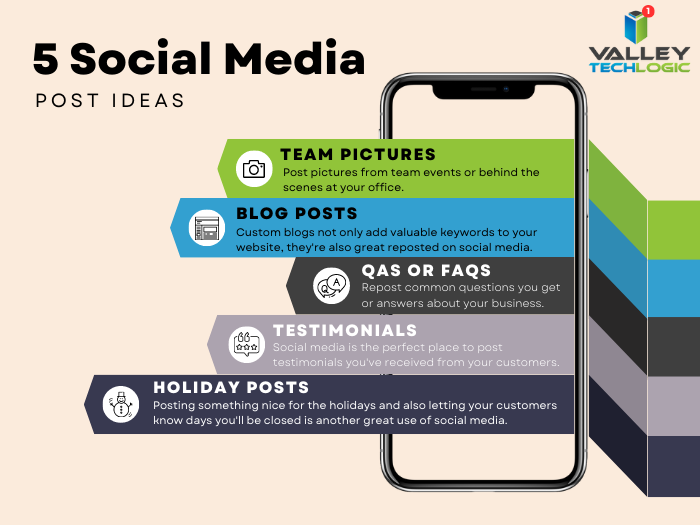
For social media apps that are still thriving here are 5 content ideas you can start out with to grow your online presence:
We also wanted to list out the five main benefits to maintaining a social media presence for your business, since after all you want to see an ROI for the effort put into making that content. Benefits include:
- Engaging with your customers 1-on-1. Social media can get your message through to your customers at a much higher rate than other avenues of advertising (such as email).
- Promote your message. You can use it to promote your company message, how you do business, specific product launches and more.
- You can maintain your reputation on your terms. Nowadays customers will look to your company pages to learn more about your business and how it aligns with their own values before making a purchase. They may also check these pages to see other customers’ reviews before buying.
- It also acts as lead generation. Just like your website, your company social media pages are an online billboard for your business.
- It helps humanize your brand. People want to buy from people, not faceless corporations. If you work on posting original content that includes behind the scenes elements of your business such as company social events or just you or your employee’s day to day, your business as a whole will feel more relatable.
Another good way to maintain your reputation online is to have clear and consistent communication with your customers, and to protect the data you collect from them in the course of doing business. On that front, Valley Techlogic can help.
We are a technology service provider that provides technical support and assistance to businesses in the Central Valley. If you would like to learn more, schedule a consultation with us today.
Looking for more to read? We suggest these other articles from our site.
-
Top 10 Tips for Managing Your Social Media Presence
-
The US has declared a $10 million dollar bounty for more information on this ransomware
-
Reddit experienced a major outage yesterday, and our 5 tips for what to say to customers when your website goes down
-
On average, your information is shared 747 times a day according to a new study
This article was powered by Valley Techlogic, an IT service provider in Atwater, CA. You can find more information at https://www.valleytechlogic.com/ or on Facebook at https://www.facebook.com/valleytechlogic/ . Follow us on Twitter at https://x.com/valleytechlogic.