Tag: windows 7 eol

  • Another blow for Windows 7 and 8 hold outs, Steam announces they’re ending support for these devices January 1st 2024

    Another blow for Windows 7 and 8 hold outs, Steam announces they’re ending support for these devices January 1st 2024

    You might be thinking, why is Valley Techlogic a business IT service provider reporting on this? While it’s true, most of our content is aimed at our client base which is business owners, there is of course some overlap between that community and the gaming community. There is also the looming topic of what this signifies for those continuing to use outdated versions of Windows – business owners and gamers alike.

    The latest news from Steam officially announcing they’re cutting off support Windows 7, 8 and 8.1 devices on January 1st 2024. On that date the Steam client, which is how users access their games, will stop working on these devices. That’s because portions of the Steam client rely on a version of Chrome that has also ceased support for those versions of Windows as of February of this year.

    While Steam users still using Windows 7/8/8.1 are a minority at less than 3% of the total client base, around 7% of the population is still using devices featuring these operating systems (which doesn’t sound like a lot but represents millions of people). For context, Windows ended support for 7 as of January 2020 and for 8 and 8.1 January 2023.

    One of the obvious downsides which is connected to today’s news, beyond being unsupported by Microsoft themselves these operating systems will no longer be supported by the software platforms you use regularly, and they may cease functioning on those platforms altogether.

    There is also consequences to remaining on these operating systems that can fall way beyond losing access to your favorite games, without Microsoft support these devices are subject to more severe and more frequent security threats than modern operating systems that are still being actively supported.

    The WannaCry ransomware is one obvious example of ransomware that’s targeted these devices, infecting an estimate 16 million devices so far. The fix for this ransomware is restoring the device but that may be difficult on older machines still running Windows 7 and 8. You also run the risk of your device failing just because the components have reached their maximum lifespan.

    We always recommend replacing older devices BEFORE they fail because recovering the data on them is never a guarantee (especially without expert help).

    This especially includes servers, with support for Windows Server 2012 R2 ending October 10, 2023. Recovering the data from a server that has failed or been compromised can only be accomplished by experts – and the data recovery for servers is often lengthy and expensive.

    If you’re not sure of the end of life dates for your Microsoft products are coming up, here’s a chart you can keep as a reference:
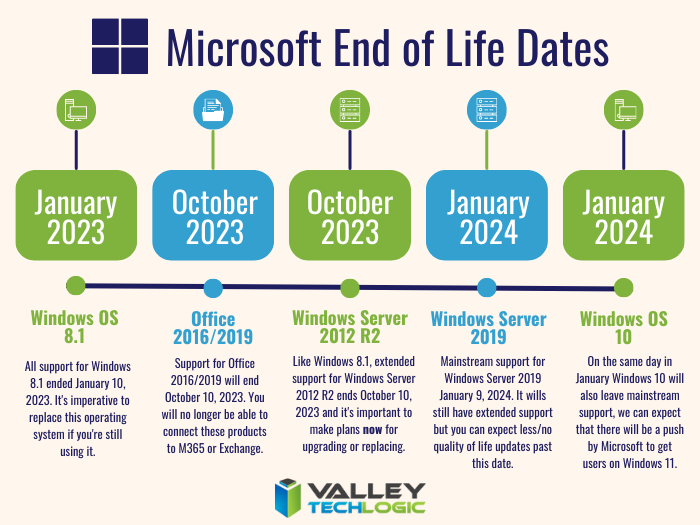
    Microsoft End of Life Dates Coming up in 2023/4.

    It can be difficult to know whether you should update your device to the latest operating system, or if it needs to be replaced altogether. Your devices may technically run Windows 10 but if you have an older hard drive, or the device is more than 8 years old it probably makes sense to replace it instead.

    For businesses looking to replace older devices, we have partnered with both Dell and Lenovo and can help you navigate the process as well as give you access to the discounts and special offers available to us. Reach out today for a consultation.

    Also stay tuned, next week we’ll dive into whether it’s worth upgrading or replacing your on premises server or if it makes sense to move your data to the cloud and bypass a hardware purchase altogether.

    Looking for more to read? We suggest these other articles from our site.

    This article was powered by Valley Techlogic, an IT service provider in Atwater, CA. You can find more information at https://www.valleytechlogic.com/ or on Facebook at https://www.facebook.com/valleytechlogic/ . Follow us on Twitter at https://x.com/valleytechlogic.

  • With Windows 11 out now, how many people are still using Windows 7?

    With Windows 11 out now, how many people are still using Windows 7?

    Windows 11 arrived this year to a somewhat muted response that mostly can be attributed to a tempered rollout – many machines that would have been eligible for a Windows software upgrade in the past were deemed not eligible for the enhanced requirements found in Windows 11. The end-of-life date for Windows 10 is still a way off (October 14, 2025) but a surprising number of people are still using Windows 7 which had it’s end of life event over two years ago now, on January 14th, 2020.

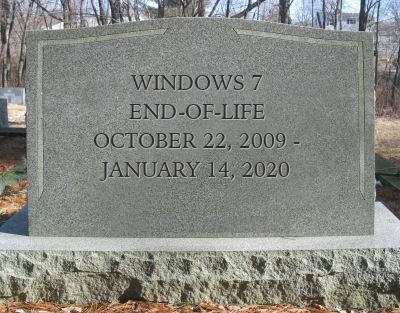
    Microsoft 7 EOL Tombstone

    However, according to GlobalStats Windows 7 still has an almost 12% operating market share. While many of those are probably unused machines that still equates to a large percentage of Windows 7 users over 2 years past it’s end of life date.

    When an operating system is discontinued by Microsoft that means they stop providing support and updates for it, including security updates that protect users from ongoing threats. Even the FBI has strongly warned against continuing to use Windows 7 as it can make you an easy target for cybercrime.

    It can be challenging to move away from a system you know well and at this point upgrading probably means also purchasing new hardware, which during the microchip shortages exacerbated by the pandemic could be no small task (or expense). However, there are deals to be had on hardware now in 2022.

    It can be also difficult to find software that’s supported on an older operating system as updates are made to make them compatible with the latest generation of operating systems.

    We know that for some of our clients it’s actually the reverse, they’re utilizing a line of business software that no longer is being maintained or updated by the provider, but it still functions for their business. The caveat being they must use it on an older machine that hasn’t been updated.

    There are several inherent risks to this, including the first one being that that machine is an obvious choice as a threat vector for would be bad actors. The tenuous relationship between that software and the hardware that deploys it is also ripe for failure the longer you wait to replace it. Securing older hardware to be able to continue to use a discontinued line of business software will also be a significant challenge as time goes on.

    We’ve touched on comfort and convenience between prime motivation to continue using an unsupported operating system, but there’s also the technology challenge of deploying new hardware and software within your business. A major rollout is best left to the experts who can smoothly retrieve the data from your devices and help you make the transition to newer hardware.

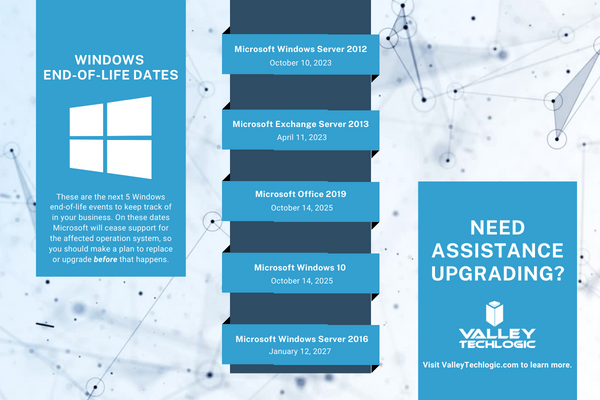
    At Valley Techlogic, we can even help you with procuring that hardware and making the best software choices for your business. This includes servers as well. Here is a list of the next 5 Windows end-of-life dates that you should be keeping an eye out for.

    Microsoft EOL Dates That Are Coming Up

    If for some reason you just can’t part with an outdated operating system at this time, here are three tips that will make it slightly safer until you are able to replace those devices:

    1. Make using an anti-virus and firewall a priority. This won’t offer you complete protection as many threats will seek to undermine the unsecured status of the device, but it’s better than being completely unsecured.
    2. Login to important accounts from another device if possible. We would not suggest logging into sites such as your banking website from a device this far out of date from updates.
    3. Utilize network-based mitigation strategies. This is again not foolproof strategy but separating your Windows 7 or other end-of-life devices from the rest of network will offer a slight buffer in the event the device(s) are compromised.

    Need assistance migrating away from devices that have reached their end-of-life date? Valley Techlogic can help, we’re a certified Microsoft partner and experts in all things Windows. Reach out to us today for a quick consultation to learn more.

    Looking for more to read? We suggest these other articles from our site.

    This article was powered by Valley Techlogic, an IT service provider in Atwater, CA. You can find more information at https://www.valleytechlogic.com/ or on Facebook at https://www.facebook.com/valleytechlogic/ . Follow us on Twitter at https://x.com/valleytechlogic.