Tag: windows updates

  • Windows 10 reaches EOL October 2025, and those who don’t upgrade may have to pay

    Windows 10 reaches EOL October 2025, and those who don’t upgrade may have to pay

    Windows operating system end of life events are a big deal, with 1.6 billion active Windows devices as of 2024 Microsoft still holds a commanding lead over any other operating system provider. Even though Windows 11 was released almost 4 years ago at this point, it still only represents 28% of the global Windows market share (with 70% still using Windows 10).

    There are a lot of reasons for this, from users being comfortable with the Windows 10 interface to many devices that simply aren’t Windows 11 ready (interested in a Windows 11 device in 2025? Here’s our guide).

    Users hanging onto a previous version of Windows until the bitter end is nothing new for Microsoft, Windows 7 still had a 12% market share when Windows 11 was released October 2021 (almost 2 years since it’s own EOL date occurred).

    In the past, Microsoft has released critical security updates even for systems no longer receiving support. Users could also purchase optional extended support plans for devices that can’t be upgraded for one reason or another (the keyword being “optional”).

    Now Microsoft has announced for the first time ever that consumers looking to extend the life of their Windows 10 devices – or just remain on the operating system they prefer – will have to $30 for a single year of Extended Security Updates (ESU).

    Businesses will be charged even more for ESU, $61 for the first year with the price increasing steeply every year beyond 2025 – $122 for the second year and $244 for the third year respectively. This does not grant Windows 10 users the ability to receive support from Microsoft for these devices, it only means they will still receive critical and important security updates.

    Microsoft has been pushing Windows 11 adoption and we will likely see a stronger market share as consumers replace older devices especially as more AI ready devices become available on the market and Microsoft users look to also take advantage of Co-Pilot.

    There are also some compelling reasons not to use a device that’s reached EOL that go beyond user preference (and the first is covered by this article):

    1. Lack of Security Updates: EOL devices no longer receive critical security patches, leaving them vulnerable to cyberattacks and malware.
    2. Compliance Risks: Using outdated devices can lead to non-compliance with industry regulations, potentially resulting in fines or reputational damage.
    3. Performance Issues: EOL devices may struggle with newer applications and workloads, leading to inefficiencies and reduced productivity.
    4. Increased Maintenance Costs: Aging hardware is more prone to failures and often requires costly repairs or workarounds to maintain functionality.

    If navigating Windows 10 EOL in your office in 2025 keeps you awake at night, Valley Techlogic can assist. Whether it be evaluating whether your office devices are Windows 11 ready or procurement assistance, we are experts at helping our clients make strategic choices in the technology hardware used by their business. Reach out today to schedule a consultation.

    Looking for more to read? We suggest these other articles from our site.

    This article was powered by Valley Techlogic, leading provider of trouble free IT services for businesses in California including Merced, Fresno, Stockton & More. You can find more information at https://www.valleytechlogic.com/ or on Facebook at https://www.facebook.com/valleytechlogic/ . Follow us on Twitter at https://x.com/valleytechlogic and LinkedIn at https://www.linkedin.com/company/valley-techlogic-inc/.
  • Windows 11 updates as the fall release rapidly approaches

    Windows 11 updates as the fall release rapidly approaches

    While it hasn’t been made official yet, all sources seem to indicate an October 2021 release of Windows 11 is eminent. That date would track with previous release schedules and merges nicely with the big feature updates that always occurs around that time for mainstream Microsoft products.

    As we inch closer, and the beta versions reveal new details we want to continue our coverage of new features that are being announced as well as specification requirement updates that may impact your future device purchases (or device upgrades).

    For example as of August 2021 here are the minimum specifications to run Windows 11:

    • Processor:1 gigahertz (GHz) or faster with at least two cores on a compatible 64-bit processor or SoC
    • RAM:4GB
    • Storage: 64GB
    • Graphics Card:DirectX 12 or later with WDDM 2.0 driver
    • Display:720p, 8-bit per color channel, at least 9-inch diagonal

    These requirements are published by Microsoft but are still subject to change as the release nears. Also, computers currently running Windows 10 may not have the upgrade available to them as soon as October hits. It seems likely that new machines will be released featuring Windows 11 at that time but the free upgrade for Windows 10 running machines may come later in 2022.

    Tech News #12

    If you would like to try Windows 11 for free right now you can do so by joining the Microsoft Insider program. This program allows you to preview you Windows releases before they’re pushed out to the market, and you can take part in the Microsoft community to see what others are saying about Windows 11 in real time.

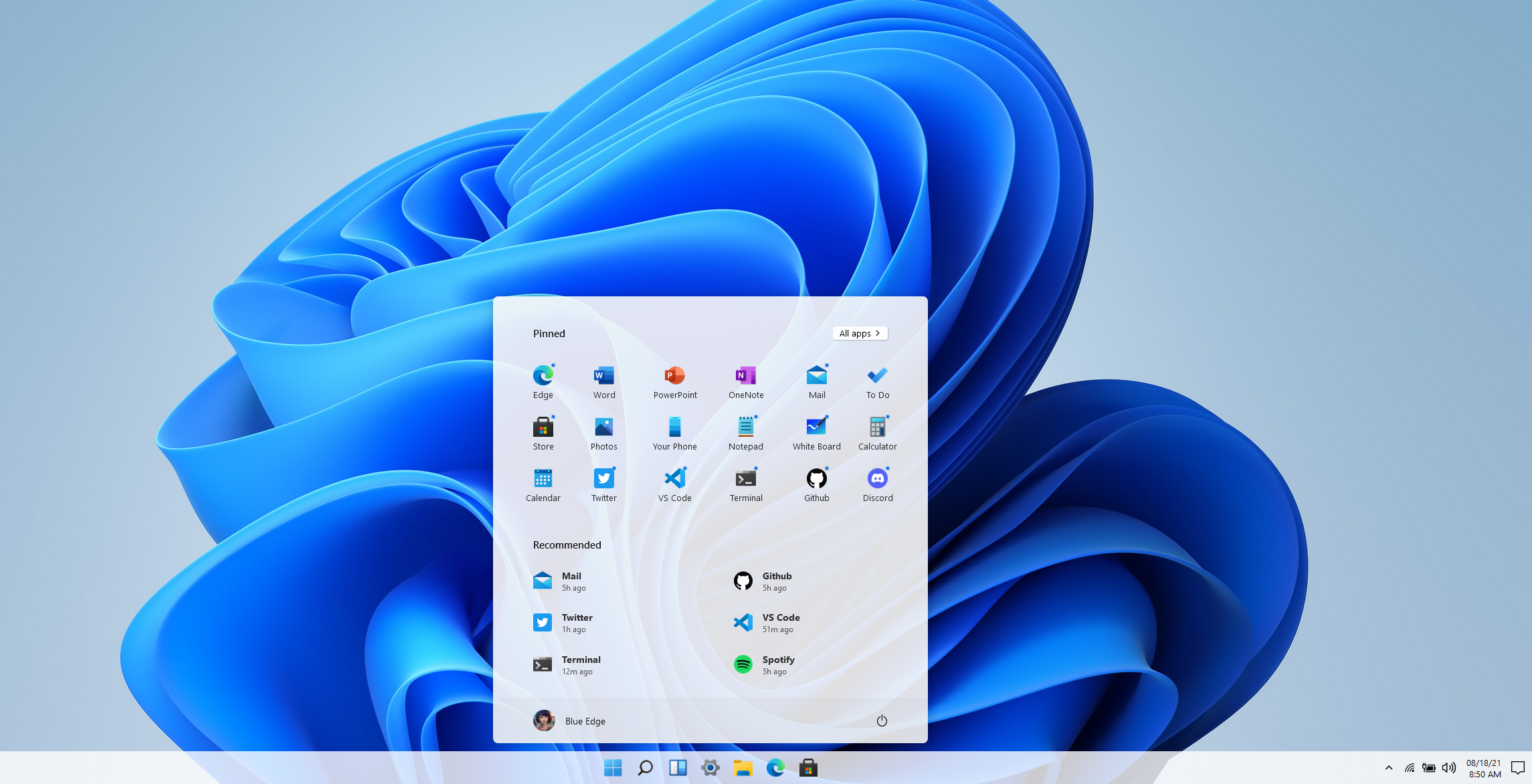
    Another option if you would just like to get a feel for the UI without downloading anything is a widget that was created by Github user BlueEdgeTechno. This Windows 11 simulator lets you access all the UI navigation elements and even browse through the new Microsoft Store. You can find it here: win11.blueedge.me/

    Also making a comeback in Windows 11 are Windows widgets. These widgets are AI determined, meaning your use of Windows 11 will help Microsoft dynamically choose widgets that will give you a customized Windows experience. Widgets such as weather and news as well as 3rd party widgets that you may have available on your Android and OS devices will all be possible options.

    Windows 11 is also making it much easier for users (even those not technically inclined) to keep track of the health of their device. With the new health check feature you can see at a glance how your machine is performing including applications that may have higher than normal battery usage or how much space is available on your SSD.

    Windows 11 is expected to be a free upgrade from Windows 10. If you’re still using Windows 7 or 8 on your device, we urge you to make the jump to Windows 10 while it’s still available as a free upgrade. You can learn how to take advantage of that here. We realize upgrading can be a complex task for businesses, especially if a number of machines are involved. You can schedule a consultation here and we can help you create a plan to bring your office computer software current.

    Looking for more to read? We suggest these tech articles from the last week.

    This article was powered by Valley TechLogic, an IT service provider in Atwater, CA. You can find more information at https://www.valleytechlogic.com/ or on Facebook at https://www.facebook.com/valleytechlogic/ . Follow us on Twitter at https://x.com/valleytechlogic.

  • Why you SHOULD upgrade to Windows 11, but not necessarily Windows Server 2022

    Why you SHOULD upgrade to Windows 11, but not necessarily Windows Server 2022

    It feels like Windows 11 news is everywhere at the moment following the official announcement on June 24th. We covered that announcement in our post found here.

    More details will continue to be released as we move toward the estimated fall release of Windows 11. It’s going to be a free upgrade for Windows 10 users, and we think making the move to Windows 11 will be a smart choice for most customers so long as they’re running newer hardware (which to be fair is a big caveat). We’ll be covering the hardware required for Windows 11 in next weeks post as it’s an ongoing situation.

    In this week’s article we want to cover servers instead, and specifically whether Windows 2022 will be the smart choice for business’s when it’s officially released. It’s been out for preview for Azure Virtual Machines since March of this year, but the commercial release is estimated for later this year. It’s seems it will closely coincide with the estimated release of Windows 11.

    That’s pretty much where the similarities between the two operating systems ends. Servers are a different beast both in their hardware requirements and their intention.

    Many very small businesses get by without a physical server and by just relying on cloud backups for their data. There are some downsides to that, we talk more about moving to the cloud in this article.

    If you already have a server (or even more than one) in place for your business though you may have an understanding of the undertaking that is upgrading your Windows Server version. It’s not quite as cut and dry as it is with upgrading your desktop version of Windows, which is usually just a few clicks of the mouse.

    There are usually vendor considerations in place with a Windows Server upgrade. Some clients even have proprietary software that will not work with an updated version of Windows Server that necessitates having a plan in place to mitigate the issues that come from having an older version, many of those cyber security related.

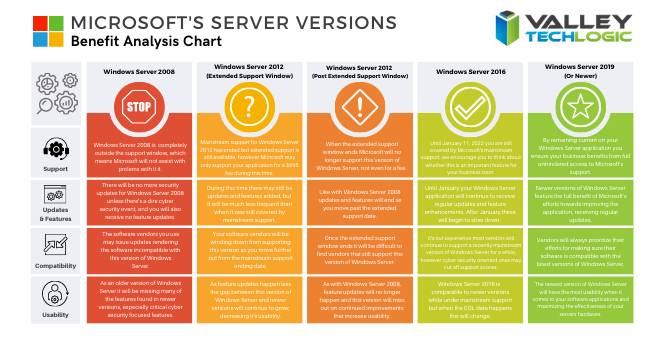
    We’ve made a chart that shows the risk level with various versions of Windows Server as you move out from their End of Life date as well as from their Extended Support date.

    Windows Server Chart Small

    It’s a good idea to keep as current as you can but we don’t necessarily advocate for jumping onto the newest server version immediately. Like we said there are vendor considerations and also the compatibility with software you use in your business, it can take a while for developers to create patches and drivers that make the usability of the newest version of Windows Server the same as what you’re used to.

    Also, like with the desktop version of Windows there are hardware considerations. Upgrading server hardware is always a significant expense for your business and can result in significant downtime. We help our clients mitigate this downtime but it’s still a consideration especially if you’re navigating this topic without a good IT team behind your business.

    We would never discourage anyone from upgrading when the time is right, aging hardware that fails suddenly can also result in significant downtime, much longer than an upgrade would take before you reached that point. We recommend reaching out to an IT professional and having them run diagnostics on your current server as that will help you make an informed choice.

    If you find yourself trying to navigate this topic and other IT service related topics, Valley Techlogic can help. As a Windows partner, we’re well versed in everything Windows and have navigated even the most complicated server setups. Like we mentioned, we even help clients mitigate downtime when it comes to performing necessary upgrades. You can reach us for a consultation here to get started.

    Looking for more to read? We suggest these tech articles from the last week.

    This article was powered by Valley TechLogic, an IT provider in Atwater, CA. You can find more information at https://www.valleytechlogic.com/ or on Facebook at https://www.facebook.com/valleytechlogic/ . Follow us on Twitter at https://x.com/valleytechlogic.

  • Windows 10 End of Life is Coming, and It’s Sooner Than You Think

    Windows 10 End of Life is Coming, and It’s Sooner Than You Think

    While Windows 11 (code name Sun Valley) hasn’t officially been introduced to the public, it’s created enough of a stir that the topic of Windows 10 support ending has been pushed to the forefront of the tech news cycle. Windows 10 will officially end mainstream support on October 14, 2025.

    Back in 2015 it was circled around that Microsoft 10 would be the “last Windows release”, indicating Windows would follow the route of Apple and just continuously update this version in perpetuity. We would have said that was unlikely back then and it seems we would have been right.

    While the comment that initiated that rumor can be tied back to one Microsoft employee, Microsoft didn’t exactly dismiss the notion at the time. They have been moving forward since then into the “as a service” model, especially with their service Microsoft 365 replacing Office 365 as it was known.

    Most of us can remember a time when you paid a one-time fee to use the Office suite of software, but Microsoft has fully moved to a subscription model only under Microsoft 365. “As a service” is basically the de facto model in tech at this point, with Adobe also being another example (remember when you could just buy Photoshop?).

    Businesses like Google always operated under an “as a service” model. So, it makes us question if the roll out of Windows 11 will look the same as past releases.

    Especially for businesses, instead of pricey one-time licensing fees will we be looking at a monthly charge potentially? And how would that work when Windows 11 eventually went end of life?

    Tech News #13

    Microsoft has operated under two models for end of life so far, fixed and what they now call the modern lifecycle. Under the fixed lifecycle there weren’t really too many restrictions for support, as long as you kept your version up to date you would receive some level of support for 10 years.

    Now, they operate on a regular update cycle. With a feature update usually arriving in October, a year end update in November and a mid-year update in June or July. While you can expect regular updates between those dates, major feature updates are now condensed.

    Customers are encouraged to perform at least one of these updates a year to stay current. Failing to update with one of these major releases may make your version ineligible for next year’s releases.

    More news about Windows 11 may be arriving next week in an event announced by Microsoft, you can attend the live stream here on June 24th at 11 AM Eastern Time. We’re looking forward to summarizing the details of this event in next weeks blog.

    Beyond Windows 10 for PCs, there will probably be a significant update to Windows Server as well. Server updates tend to happen more often, with Windows Server 2022 following just 3 years after Windows Server 2019 (it’s been in preview since March of this year).

    If your business needs help navigating the ever-changing landscape of Windows or if you’re trying to figure out how to get outdated, unsupported versions back to mainstream support, we’re here for you. Valley Techlogic is a Microsoft Partner and we’re experts when it comes helping businesses manage their Microsoft products, whether it’s Windows or Microsoft 365. Connect with us today to learn more.

    Looking for more to read? We suggest these tech articles from the last week.

    This article was powered by Valley TechLogic, an IT provider in Atwater, CA. You can find more information at https://www.valleytechlogic.com/ or on Facebook at https://www.facebook.com/valleytechlogic/ . Follow us on Twitter at https://x.com/valleytechlogic.