
It was recently revealed that Google’s Salesforce database was breached, exposing data for over 2.5 billion users at the time of reporting.
Initially it was being reported that the leak would primarily effect only their business users as the data found in Salesforce mostly pertains to those accounts. However that was quickly dispelled as Gmail users reported increased attacks against their accounts, with some users reporting they even received a call from alleged Google employees notifying them of the breach of their account.
We want to make it clear that no password data was leaked in this data breach (at least at the time of writing) instead the data is being used to increase the effectiveness of phishing attacks leveled at Gmail users. One example of the attacks that are occurring includes users being told to initiate an account reset wherein the bad actor intercepts the password and locks the original user out.
Another attack being initiated is what Google calls “dangling bucket takeover” where the attacker essentially has access to a link connected to the users Google storage and uses it to hijack their account. Google outlines the four ways you can protect against this kind of attack in the page linked.
While company based accounts might be the most prime targets – and this goes for phishing in general – that doesn’t mean individual users are safe. Spear phishing, a popular variant of phishing that involves researching and gaining access to user accounts outside of their prime target such as an employees close to the company lead, could be a motivator for the current rise in attacks related to this breach. They would then use those accounts to increase the legitimacy of phishing attempts leveled at the primary target (by sending messages as the compromised user).
It is paramount in 2025 that users practice good safety hygiene when it comes to their online data, especially in an age where the onslaught of data breach news can feel overwhelming and increase a sense of helplessness. Even though data breaches are not rare, users can still protect themselves in the following ways:
- Enable Two-Factor Authentication (2FA)
- Turn on Google 2-Step Verification.
- Use an authenticator app (Google Authenticator, Authy, or similar) instead of SMS, since text messages can be intercepted.
- For even stronger protection, consider a hardware security key (e.g., YubiKey).
- Use a Strong, Unique Password
- Avoid reusing passwords across multiple sites.
- Use a password manager (Bitwarden, 1Password, LastPass, etc.) to generate and store long, random passwords.
- Change your password immediately if you suspect any compromise.
- Regularly Review Account Activity
- Check Gmail’s “Last account activity” (bottom right of inbox) for unusual logins.
- Review the Google Account Security page to see devices that have accessed your account.
- Remove old or unused devices and apps with account access.
- Be Proactive Against Phishing
- Always verify the sender’s address before clicking links.
- Hover over links to confirm they point to legitimate Google domains.
- Turn on Gmail’s Enhanced Safe Browsing in account security settings for extra phishing protection.
Email remains the number one entry point for cyberattacks, from phishing scams to ransomware. At Valley Techlogic, we take a proactive approach to keeping your inbox safe. Our team helps businesses implement advanced spam filtering, real-time threat detection, and encryption to safeguard sensitive communications.
Beyond just tools, we provide continuous monitoring, security awareness training, and rapid response in the event of a breach. With Valley Techlogic as your partner, you can rest easy knowing your organization’s most critical communication channel is protected. Learn more today with a consultation.

Looking for more to read? We suggest these other articles from our site.
-
What is a reply all “email storm” and how can you prevent it?
-
5 Smart Data Retention Policies and 3 Data Saving Pitfalls Costing Your Business Money
-
McDonald’s AI “McHire” platform was breached, allowing for the potential exposure of 64 million applicants private data
-
Hacking group Scattered Spider is making waves for disrupting retailers and corporate America despite recent arrests
-
Staying secure on the 4th, why phishing attacks increase during holiday weekends
This article was powered by Valley Techlogic, leading provider of trouble free IT services for businesses in California including Merced, Fresno, Stockton & More. You can find more information at https://www.valleytechlogic.com/ or on Facebook at https://www.facebook.com/valleytechlogic/ . Follow us on X at https://x.com/valleytechlogic and LinkedIn at https://www.linkedin.com/company/valley-techlogic-inc/.

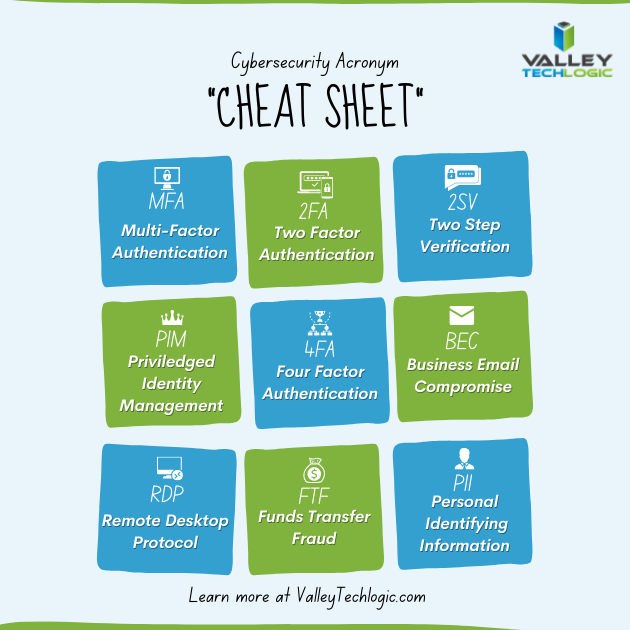 With breaches being ever more common, having that additional step past just a password before a hacker can access your account can make all the difference. A password you use across multiple website (which is also a bad idea) may be leaked without you even being aware of it, and the prompt from a multi-factor authentication application may even be your first clue that your accounts are being accessed by someone other than yourself.