

Tag: asymmetrical internet

  • Is Starlink still the best choice for rural or remote internet? We discuss your options for internet in 2025

    Is Starlink still the best choice for rural or remote internet? We discuss your options for internet in 2025

    If you’re in a more rural or remote location, internet options can be scant even in 2025. Even in a state as populous as California there are still areas that do not have access to cable or fiber internet and the cost to establish it can be exorbitant. Your city may even have cable available but due to your own buildings location the cost burden of establishing the “last mile” connection (IE the one to your building directly) can be placed on the customer. This cost can be in the many thousands of dollars.

    Aside from cable or fiber options, many rural or remote customers turn to DSL or 4G internet options which can get you online but may not have the bandwidth to facilitate adequate backups if you utilize a cloud solution.

    This is where Starlink has had the edge, Starlink can get speeds comparable to cable (up to 220 Mbps) and business class customers receive priority support. The increased speeds and customer support does come at a cost, with their business plans starting at $165 per month and the kit that includes the satellite dish starting at $599.

    Still, there are a lot of considerations when choosing an ISP (internet service provider) for your business. Below are the five main options for internet for your business:

    1. Fixed Wireless Internet
    • How it works: Internet is beamed from a tower to an antenna installed at the user’s location.
    • Pros: Faster than satellite, low latency, suitable for video streaming and remote work.
    • Cons: Requires line of sight to the tower; speed can vary by weather or terrain.
    • Best for: Areas within range of a local wireless provider.
    1. Satellite Internet (e.g., Starlink, HughesNet, Viasat)
    • How it works: Internet is delivered via satellite to a dish on the user’s property.
    • Pros: Available virtually anywhere; great for very remote areas.
    • Cons: Higher latency (though Starlink is improving this), data caps, can be costly.
    • Best for: Extremely rural or mountainous regions with no other infrastructure.
    1. DSL (Digital Subscriber Line)
    • How it works: Delivered via existing telephone lines.
    • Pros: Widely available in older rural areas, affordable, no special equipment needed.
    • Cons: Slower speeds than cable or fiber; signal weakens over distance.
    • Best for: Areas with old telephone infrastructure but no cable/fiber.
    1. Cellular Internet / Mobile Hotspots (e.g., Verizon, AT&T, T-Mobile)
    • How it works: Uses 4G/5G signals via a mobile device or dedicated hotspot.
    • Pros: Portable, easy to set up, faster than satellite in strong coverage areas.
    • Cons: Limited by data caps or throttling; reliant on cell signal strength.
    • Best for: Users in areas with decent mobile coverage but no wired options.
    1. Wired Cable Internet
    • How it works: Internet is delivered through coaxial cable infrastructure, often alongside TV service.
    • Pros: Fast and reliable with higher speeds than DSL or satellite; typically includes unlimited data.
    • Cons: Availability is limited in rural areas; installation can be expensive if the infrastructure isn’t already present.
    • Best for: Rural towns or neighborhoods where cable lines have already been laid or are close by.

    If you need assistance in navigating internet service for your business or anything else in the technology space, reach out to Valley Techlogic for a consultation today.
    Looking for more to read? We suggest these other articles from our site.

    This article was powered by Valley Techlogic, leading provider of trouble free IT services for businesses in California including Merced, Fresno, Stockton & More. You can find more information at https://www.valleytechlogic.com/ or on Facebook at https://www.facebook.com/valleytechlogic/ . Follow us on X at https://x.com/valleytechlogic and LinkedIn at https://www.linkedin.com/company/valley-techlogic-inc/.

  • Internet service terminologies explained and our top 10 recommendations for business internet

    Internet service terminologies explained and our top 10 recommendations for business internet

    If you’ve ever shopped for internet service for your home or business, you’re probably aware that it’s a little difficult to tell what you’re really buying due to the marketing efforts most providers have that are more about wooing you with their “blazing fast speeds” or “reliable up times” and less about explaining the actual service.

    In today’s article we aim to change all that by dispelling some notions that having a higher download speed is better (for businesses especially upload really matters) or that all the bells and whistles providers try to sell you are really worth it. For example, you’re not saving money if you sign up for a phone plan with your internet service if your office currently utilizes a VoIP solution – you’re just spending money on a service you don’t want or need.

    Speed and reliability do matter but it’s a good idea to look at the whole picture, let’s start with download speed.

    Internet speeds can come in two forms, symmetrical where the download and upload speeds are the same or asymmetrical where one speed (typically download) is higher. Download speeds matter when you’re trying to receive data to you. So, downloading files, web surfing, viewing videos etc. Asymmetrical internet service is typically less expensive than symmetrical internet service. That’s because it’s easier for a provider to service you with data than to take your data and send it somewhere else.

    For most businesses, download speeds are not as important. The files you receive are typically smaller and you’re not using the internet for gaming, or movie watching which are activities that benefit from a higher download speed.

    Upload speeds affect the data your device is sending, so sending files, uploading backups, video conferencing, all of these are directly affected by your upload speeds.

    Most of the time, internet service being marked as “business internet” is symmetrical and comes with a higher cost. It may be tempting to save money and just get your business connected with an asymmetrical consumer internet plan, but you may pay for it in the form of reduced reliability and impingement on your backups (which can have a catastrophic effect in a disaster recovery scenario).

    It also might feel like you’re getting ripped off if the plan with 1000 Mbps down and 10 Mbps up is a fourth of the cost of that 50 / 50 asymmetrical business plan – but for businesses the upload speed is often the thing that really matters.

    We’ve also found that for business internet users internet companies will allow you to be on your own circuit. To break this down, typical internet service is daisy chained. This means that your connection is connected to your neighbor’s connection which is connected to their neighbor’s connection – and so on and so forth. If one of your neighbors decides to download 3 terabytes of video one day your internet speeds will suffer.

    When you’re on your own circuit, the only one who can change the effectiveness of your internet connection is you.

    Another thing to consider is the type of internet, most people are familiar with cable which has been around for decades but there are actually more options available now. Such as:

    1. Fiber: This is similar to cable but can be seen as an upgrade, usually higher speeds are available via a fiber connection. It might also be helpful to note that many traditional cable providers (Comcast, Spectrum, AT&T etc) actually utilize fiber now in many cases and are in the process of upgrading lines all across the United States.
    2. DSL: If you’re more rural, DSL is often the only thing available to you and can be a viable solution if your office is small and/or does not utilize much data.
    3. Wireless: Similar to your phone service, wireless technology has grown leaps and bounds over the years and the speeds can often be comparable to cable. Wireless is a great option for businesses who have larger or outdoor facilities to provide internet services to employees who may be working further away from the main office.
    4. Satellite: This is another great option for rural businesses, there can be a higher cost to initiate service, but the speeds will be much better than those found with DSL.

    You can also consider merging some of these services for greater reliability. For example, we’ve helped clients acquire a symmetrical fiber plan that includes a free wireless backup. While the internet plan we choose was extremely reliable, that extra piece of mind that even if they had an outage to the primary internet service, they would still be able to connect via the wireless backup was something they didn’t know they needed but really appreciated having.

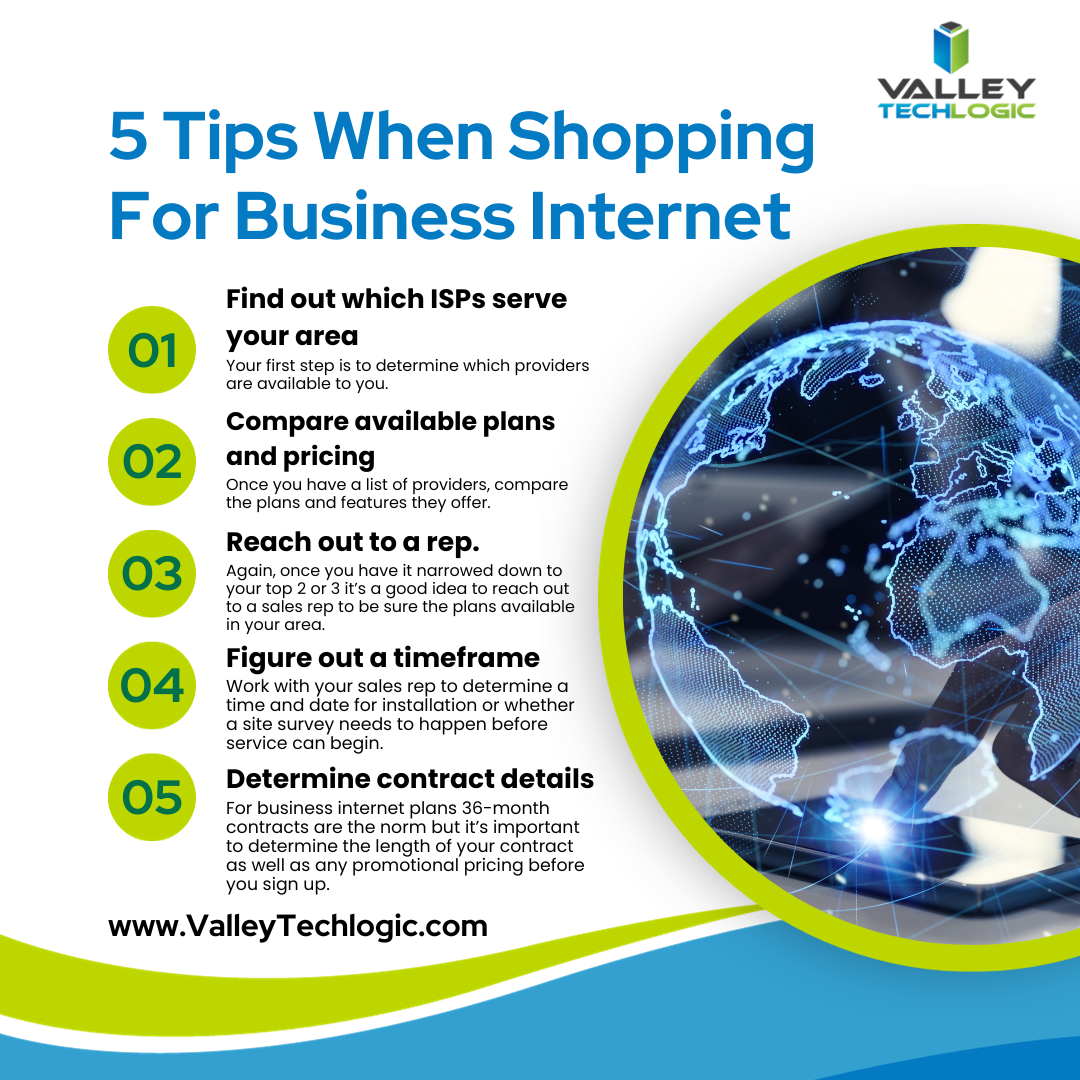
    Here are a few other tips when looking for a business internet service plan:

    Need assistance in selecting a provider or with looking for a new internet provider? Valley Techlogic can help, as we mentioned this is just a snapshot of some of the perks of being a Valley Techlogic client which includes expert tech advice, support and technology service, project planning and more. Set up a meeting with our expert sales consultant today to learn more.

    Looking for more to read? We suggest these other articles from our site.

    This article was powered by Valley Techlogic, an IT service provider in Atwater, CA. You can find more information at https://www.valleytechlogic.com/ or on Facebook at https://www.facebook.com/valleytechlogic/ . Follow us on Twitter at https://x.com/valleytechlogic.