Tag: cyber security

  • It’s Not Your Imagination, Ramsonware is On the Rise

    It’s Not Your Imagination, Ramsonware is On the Rise

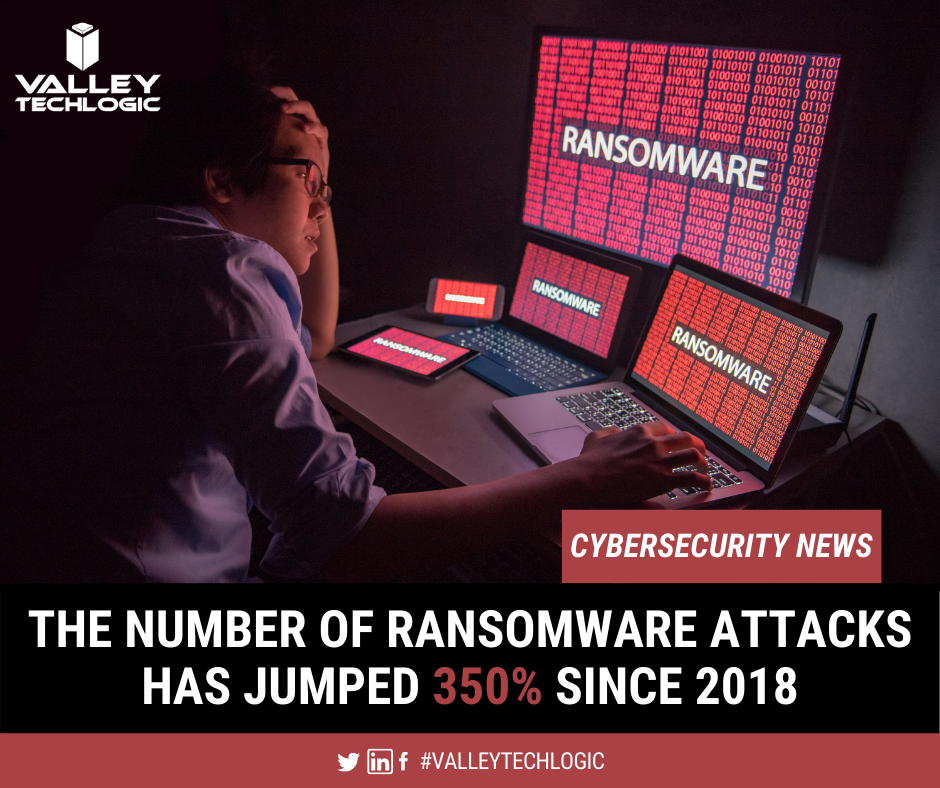
    We have talked about several major ransomware events over the past year, but these were far from unique. Ransomware and cyber security events have been on the rise lately and it’s been made abundantly apparent that NO ONE is immune to them.

    From the yet to be officially validated Kia Motors attack, to the narrowly avoided disaster with a Florida Water Plant. No attack had more widespread coverage for a while (including by us) than the SolarWinds breach that seems to go deeper and deeper. These are just a few in a massive list of growing ransomware events that have happened to companies of all sizes. If you think your business is too small to be a target think again.

    According to this Datto report, one in five small businesses will experience a ransomware event. While larger businesses may be eyed as prized targets by hackers, most of the time they also have the staff and resources to put up a better defense against cyber security threats. This makes them much harder for hackers to infiltrate.

    A lackadaisical attitude towards being hit by a ransomware can cost your business big time. Ransomware extortion amounts continue to skyrocket, with the average demand in Q3 2020 being $233,817 according to the cybersecurity firm Coveware.

    If you’re thinking a demand like that could bankrupt your business, you’d be correct in that fear. 60% of small businesses will go out of business within 6 months of a cyber security attack.

    We have made an infographic with statistics on cyber security threats in 2021 so far.
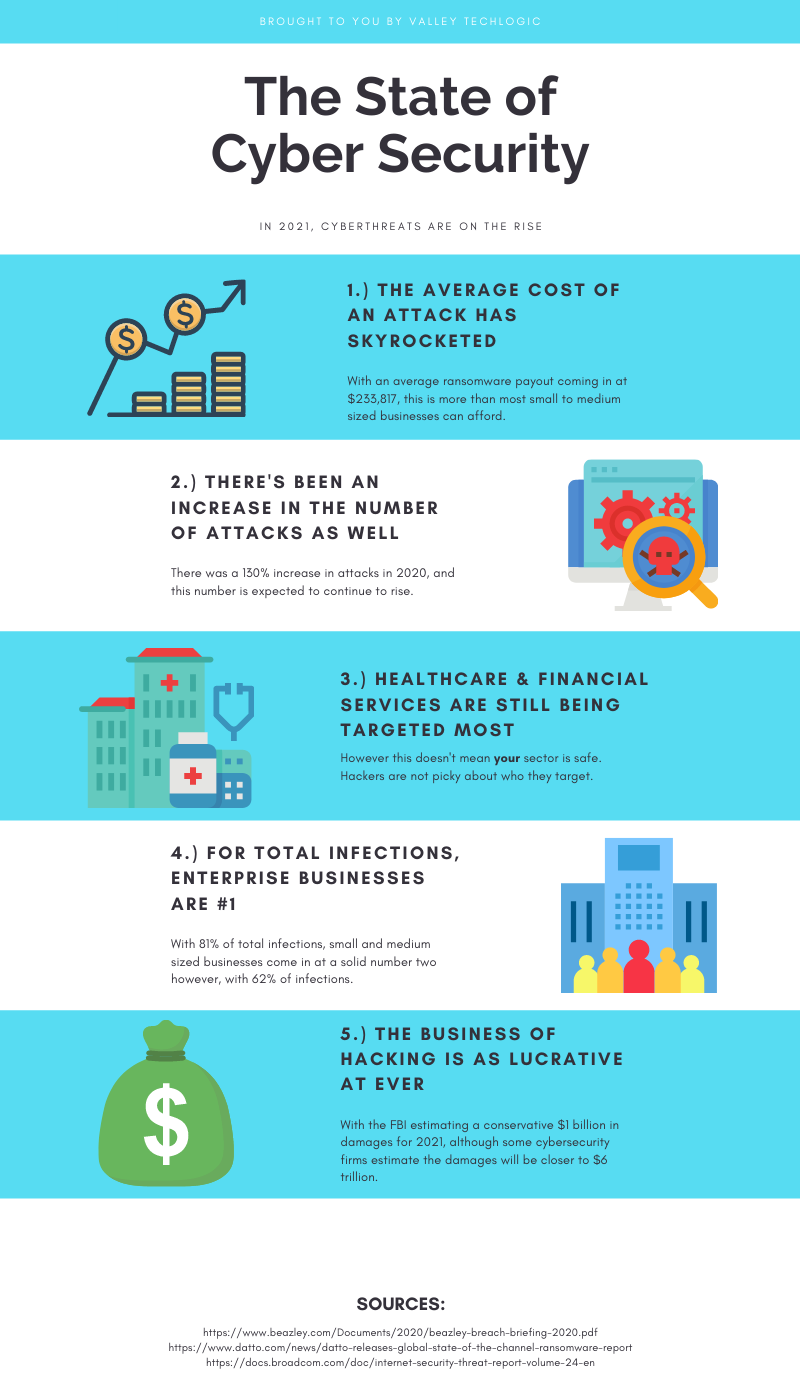
    Infographic on Cyber Security

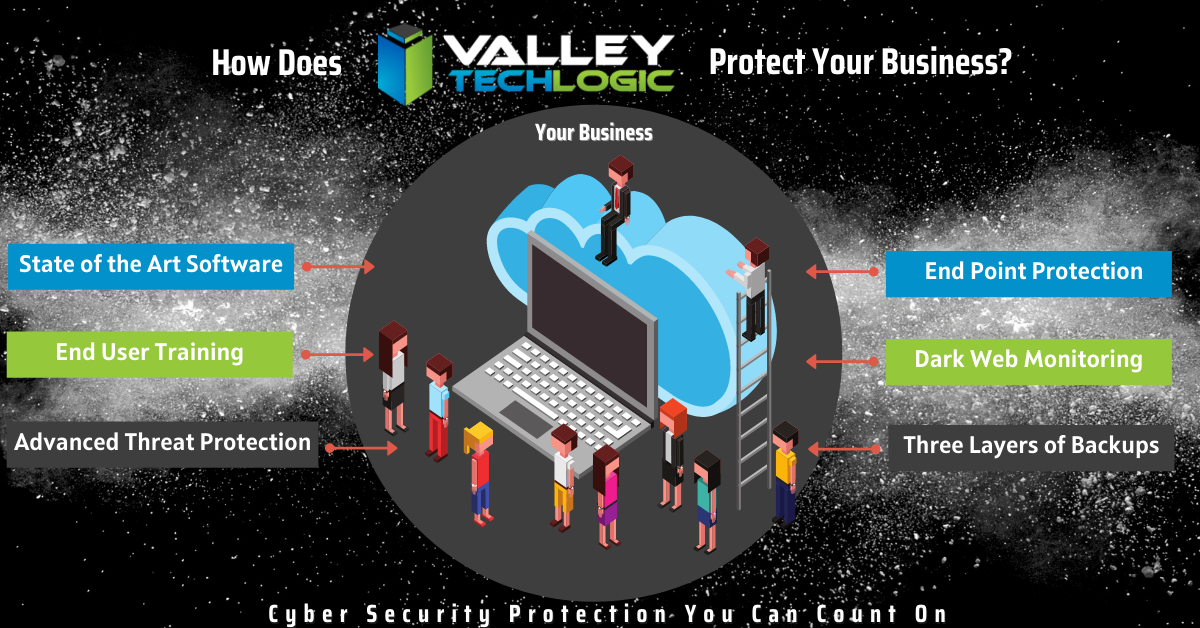
    We’re not presenting this facts to you in an effort to make you feel hopeless, there is a way to prevent an attack from hitting your business in the first place. The ONLY way to avoid a serious cyber security threat is to have proactive cyber security prevents in place. Many business owners cannot achieve this on their own.

    Cyber security prevention is an ongoing process, it’s not just installing a virus scanning software and configuring a firewall and calling it good. Business level cyber security protections can be complex to configure and manage.

    Your business has more hardware, more data and more assets to protect. Comparing it to what’s needed to protect a home PC network is apples and oranges. If you’ve just been crossing your fingers that it won’t happen to you that’s NOT a good idea, because statistically there’s a good chance that it will.

    If your business needs assistance in a cyber security plan that’s not just about checking boxes or relying on hope but actually protecting all of the valuable systems you need to run your day-to-day operations, reach out to Valley Techlogic today.

    Looking for more to read? We suggest these tech articles from the last week.

    This article was powered by Valley TechLogic, an IT provider in Atwater, CA. You can find more information at https://www.valleytechlogic.com/ or on Facebook at https://www.facebook.com/valleytechlogic/ . Follow us on Twitter at https://x.com/valleytechlogic.
  • The Solar Winds Rabbit Hole: What’s happened and what’s next?

    The Solar Winds Rabbit Hole: What’s happened and what’s next?

    In most situations where a massive hack or breach has occurred, trying to get a handle on what has been compromised or even what is still compromised can be a challenge.

    It’s unfortunately been our experience that in most cases things almost end up being worse than they initially look. Hackers are smart and if they can remain in your systems for a long time, they can get more to either use against you in a ransomware attempt or even leave breadcrumb behind to get back in your systems and hit you again.

    This is why we will always say prevention is key, but sometimes despite your very best efforts a breach occurs. We think this is certainly what has happened in the case of the massive Solar Winds breach that is still being unraveled weeks later.

    CyberSecurity NewsEven detection’s put in place by the NSA failed to detect this hack in time, and as of this week Microsoft was even included in it as it’s been exposed that some of their source code was revealed in the breach.

    Hackers grow more and more sophisticated by the day and it requires a full-scale team effort to prevent your business from either an attack aimed at it specifically, or as the case has been with Microsoft, being looped into a breach that’s occurring to a vendor you may use.

    Attacks from foreign bodies aren’t even very rare, international hacker networks are taking a growing lead in cyberwarfare. While most of these attacks are acts of espionage, if the payoff is lucrative enough hackers will strike anywhere.

    It’s unknown what the real damage from the Solar Winds hack will end up being, or what if anything will come from the exposure of Microsoft source code, but we think this should serve as a wakeup call to anyone who doesn’t take the topic of cybersecurity seriously.

    Here are some things you can begin to do to make your business more secure in 2021.

    1. Have a Hardware Firewall like SonicWall. A hardware firewall makes it easier to have universal rules for your whole network versus having to configure rules for each device.
    2. Enable Core Isolation and Trusted Platform Module (TPM) on your Windows 10 Devices. These protocols will work in tandem to help stop malware and ransomware on your Windows 10 Devices.
    3. Also Enable Group Policy Settings with the Group Policy Editor. With group policy settings you can stop employees from doing things like opening attachments or random .exe files. You can also use group policy to prevent unknown USB devices from being used on work devices. Basically, group policy can prevent a lot of the activities that lead to ransomware or malware in the first place.
    4. Use Next Level Multi-Factor Authentication with a Hardware Key. We believe strongly in Multi-Factor Authentication (MFA) and the next step to that could be introducing the use of hardware keys to your business, a hardware key is a token that won’t allow you to unlock a device without it. Most hardware keys will also work in conjunction with software MFA like LastPass.
    5. You should Vet your Vendors, Even the “Bigger” Ones. As this Solar Winds breach has shown us, big or small a breach can happen to anyone. While you’re working on handling cybersecurity on your end you should also question the vendors you use as to what their cybersecurity policies are and what their plan is if a breach were to occur.

    This is by no means an exhaustive list but like we usually say, starting is a great first step. If you’d like an information packet of the Cyber Security services Valley Techlogic can provide, reach out to us today! Our comprehensive Cyber Security plan addresses all these topics and many more.

    Looking for more to read? We suggest these tech articles from the last week.

    This article was powered by Valley TechLogic, an IT provider in Atwater, CA. You can find more information at https://www.valleytechlogic.com/ or on Facebook at https://www.facebook.com/valleytechlogic/ . Follow us on Twitter at https://x.com/valleytechlogic.

    Looking for IT Services in Fresno, Modesto, Stockton, Ceres, Atwater, Merced, Visalia or Lodi? We cover all these areas and more!

  • The ransomware attack crippling a major repair firm that no one’s talking about

    The ransomware attack crippling a major repair firm that no one’s talking about

    Dell, Lenovo, even Apple brand computer and device repairs might be seeing major repair delays at the moment as a top repair firm they use was hit by a ransomware attack that ground their operations to a complete halt.

    This has been seemingly squashed as a news worthy event for the moment but we think customers should be made aware that if they send their desktop or laptop in for a repair at this time they face major delays in getting it back. In fact, there may be a delay in even getting a box to send the machine back in as even shipping has also been affected by this ransomware.

    Reported briefly by ItWire, this attack aimed at the security firm Symantec has taken down a number of systems across the country. From the attackers’ view point they were able to disable one of the end point protections allowing access, and to make matters worse the software was up to date at the time, leading to major questions as to how this was able to occur at all.

    CSAT, used by Dell, Lenovo, Apple and more was hit just over a week ago and customers have been facing problems ever since.

    We haven’t been able to confirm that any customer data was leaked, however, according to the ItWire article a number of screenshots of computer directories were placed online.

    If the General Data Protection Regulation (GDPR) that governs in the UK applied in this case, these companies should have reported any exposed customer data within 72 hours. It’s possible no customer data was leaked but the scope of this apparent ransomware has us questioning whether that’s true.

    We’re uncertain if business support class customers are facing the same delays as home users however as with most things there may be a trickle-down effect.

    The ransomware that allowed this to occur was called NetWalker and it’s been responsible for 10 major breaches just this year. It’s clear to us ransomware as a service is not going anywhere soon when the payouts are so lucrative.

    Released in April 2019, the average payout on a NetWalker attack is $175,000 in bitcoin following each successful campaign. One of the highest payouts was $1.14 million from the University of California. It’s estimated the NetWalker ransomware gang has made $25 million in all.

    This latest attack shows that it’s not only a loss of data and having to pay a hefty sum that come as side effects from being hit with ransomware, the affected security firm and repair firm are also experiencing a major loss of credibility with customers that they may never fully recover from.

    You may think your business is too small to be hit with a ransomware attack, but the fact is ransomware as a service has made orchestrating these attacks easier than ever. Even a small payout of a few thousand dollars may be worth it to some individuals with low moral standing just looking for some quick cash.

    Or maybe they’re not interested in your money at all, maybe they’re interested in your data which may be more lucrative for them. Also, many hackers commit their attacks just for the thrill of it and will think nothing of dismantling your technology operations and leaving you stranded.

    We don’t think this should happen to anyone; we can help businesses located in the Central Valley beef up their cyber security provisions to stop ransomware gangs in their tracks.

    VTL Cyber Security

    Looking for more to read? We suggest these tech articles from the last week.

    This article was powered by Valley TechLogic, an IT provider in Atwater, CA. You can find more information at https://www.valleytechlogic.com/ or on Facebook at https://www.facebook.com/valleytechlogic/ . Follow us on Twitter at https://x.com/valleytechlogic.

    Looking for IT Services in Fresno, Modesto, Stockton, Ceres, Atwater, Merced, Visalia or Lodi? We cover all these areas and more!


  • What’s the difference between a regular data backup and an archival backup?

    What’s the difference between a regular data backup and an archival backup?

    We regularly tout the necessity of data backups, but there’s one kind of backup we really haven’t spent much time on, and that is archival backups.

    Backing up your data is an ongoing task or at least it should be. Whether it’s done daily or weekly, regular snap shots of your data make it easy in a data loss event to pull the most recent backup and get back to business as usual.

    Archival backups are much different. With these your data is pulled once and then stored in a safe location or online. Since these backups aren’t updated it’s not going to feature any recent changes but when it comes to cyber security safety in particular, they’re a great tool for protecting your data.

    Another great feature of these backups is that they’re immutable/write once read many
    (WORM), that means to make any changes to them is nearly impossible (this includes bad actors trying to do so!).

    In the event your network is compromised that may mean the hackers have gained access to your regular backups as well, they may even be holding your accounts hostage in a ransomware attempt. If you have an archival data backup this may be the key to gaining access to your accounts again without paying the ransomware.

    Also, because this backup is separate from your network it will be almost impossible for it to become compromised.

    While we’re explaining the difference between regular backups and archival backups it might be a good time to also explain the different daily/weekly backups that can be performed.

    1. Full backups – A full backup entails all of your data being backed up every day. This will take more time and is in most cases not necessary but if you want a more detailed record of your files you may choose to do this.
    2. Incremental Backups – Incremental backups will only copy data that has changed since the last backup. Your backup application will track and record the details of that backup and update the files that have been changed or modified in some way.
    3. Differential Backup – This is similar to incremental backups, but the difference is it will pull a full backup once and then if things have changed since that backup it will again pull another full backup of those files. This will pull less data then a full backup but more data than an incremental backup.

    If you have a small set of data then a full daily backup may make sense for your business, if you have a lot of data incremental or differential data backups may be a better fit. Each situation is unique and it’s a good idea to have an evaluation done of your specific circumstances.

    Any kind of backup is better than no backups at all but one that falls short of your needs may still leave your business in the lurch if a data loss event occurs.

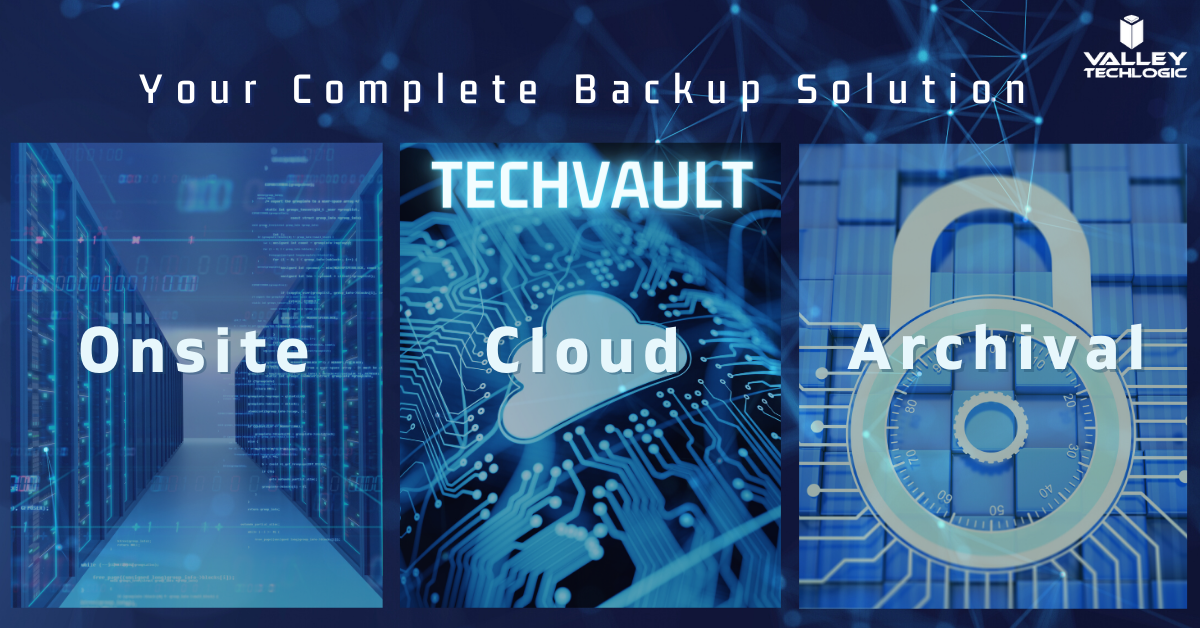
    Also figuring out where to store your data can be a complex topic too. At Valley Techlogic we’re recommending a triad approach to data storage. With onsite, cloud and archival data backups the businesses we support can rest assured their data is absolutely safe and retrievable.

    This all sounds very complex but once the solution is in place, you’ll feel better that you have it. Also, the integrity of your backups should be monitored regularly by your tech team as even a backup can fail. If you need some assistance in choosing the right backup solution to you we would be happy to have a consultation with you.

    Techvault


    Looking for more to read? We suggest these tech articles from the last week.

    This article was powered by Valley TechLogic, an IT provider in Atwater, CA. You can find more information at https://www.valleytechlogic.com/ or on Facebook at https://www.facebook.com/valleytechlogic/ . Follow us on Twitter at https://x.com/valleytechlogic.

    Looking for IT Services in Fresno, Modesto, Stockton, Ceres, Atwater, Merced, Visalia or Lodi? We cover all these areas and more!


  • Business Email Compromise (BEC) and Phishing – How Do You Combat It?

    Business Email Compromise (BEC) and Phishing – How Do You Combat It?

    Business email compromise (BEC) and phishing are not new ways to scam, as soon as email rose to popularity as a dominant form of communications scammers saw a lucrative window and took advantage.

    Before we explain how to avoid it we should explain what Business Email Compromise (BEC) is. BEC is when a legitimate business is sent an email that looks like it’s coming from another legitimate business, but it’s not. It’s actually a scammer spoofing that email identity. This is the most popular form of phishing but it’s far from the only version. Scammers can even spoof your own domain, so an email looks like it’s coming from within your own organization.

    How do you combat something so insidious? The top way is training, by training yourself and your employees properly on what to look for then you can avoid these scams which cost people located in the US $57 million last year.

    Here are some of the things we look for when determining is an email is a phishing attempt.

    1. It may contain a generic greeting such as “Hello sir or madam” or “Hi Dear” a company you do business with or a person you know would probably know your name.
    2. The email mentions some kind of fraudulent activity on your account and has a link asking you to confirm your private details to unlock or otherwise reinstate your account. This is a VERY common scam.
    3. The links in the email are NOT from the business the email is purporting to be when you hover over them.
    4. The email may contain spelling errors and sentences that sound strange grammatically.
    5. The logos in the email may be of a poor resolution because these scammers do not have access to the real company assets.
    6. The email is coming from a CEO or President of a large organization and is asking you to wire money in exchange for a lump sum in return later. These emails may not have spelling errors or strange links but ask yourself – would any CEO or President of a large company be asking you to wire them money?

    That last one is key, if all the obvious methods of detection fail you may have to rely on just asking yourself if the request in the email makes sense. If the email looks like it is coming from someone you know personally, reach out to them via phone or in person to ask about it. Most of the time, victims who have had their emails compromised or spoofed have no idea it’s even going on.

    Beyond training on knowing what to look for in a phishing email these are our top 3 things to protect yourself from scams across the board.

    1. Keep the software on your devices completely up to date.
    2. Use Multi-factor or 2 Factor Authentication on your accounts.
    3. Backup your data regularly so on the off chance something happens, you’re covered.

    If you receive an email you suspect is a phishing attempt, the best thing to do is not respond to it and report it. You can report suspected phishing emails to the FTC here.

    For businesses located in the Central Valley, we offer cyber security training as part of our managed service plans (which includes comprehensive training on how to avoid phishing attacks).

    Phishing training available

    Looking for more to read? We suggest these tech articles from the last week.

    This article was powered by Valley TechLogic, an IT provider in Atwater, CA. You can find more information at https://www.valleytechlogic.com/ or on Facebook at https://www.facebook.com/valleytechlogic/ . Follow us on Twitter at https://x.com/valleytechlogic.

    Looking for IT Services in Fresno, Modesto, Stockton, Ceres, Atwater, Merced, Visalia or Lodi? We cover all these areas and more!

  • 3 Reasons You Want to Offer Cyber Security Training to Your Employees

    3 Reasons You Want to Offer Cyber Security Training to Your Employees

    Our blog is no stranger to the topic of cyber security. We’ve covered recent breaches, malware, and easy things you can do to stay safe on the internet and keep your devices free of viruses.

    But what about the human element? It’s estimated that 90% of data breaches are caused by human error. We know that sounds high and you may be thinking how that can be possible.

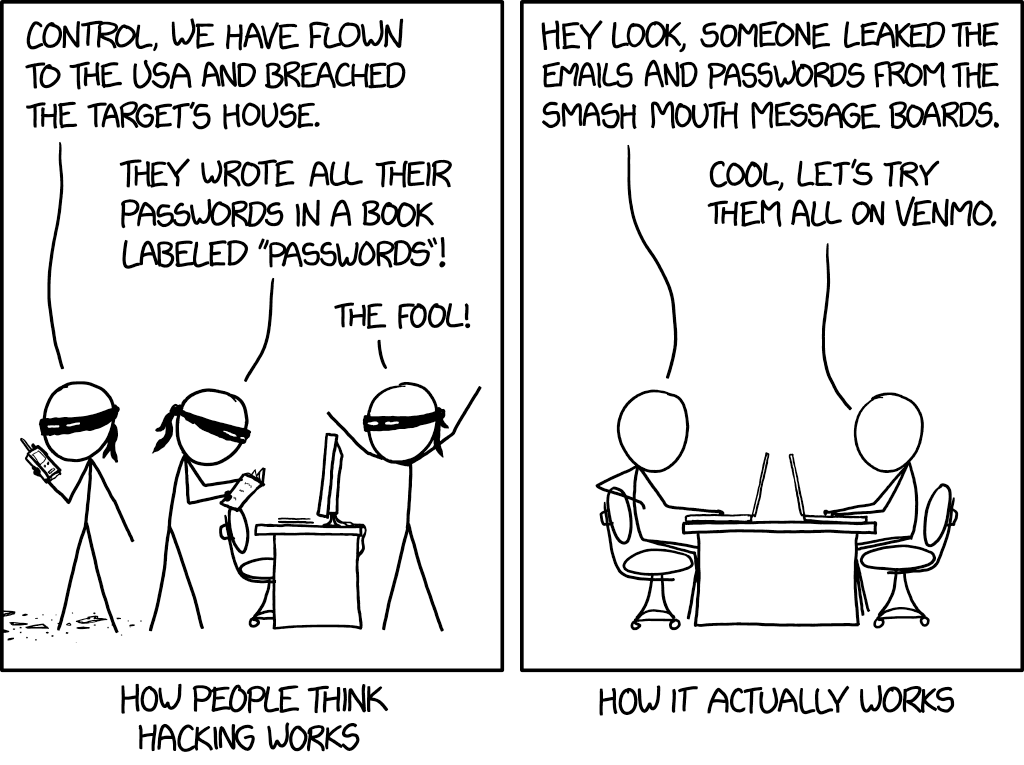
    How hacking works
    Credit to xkcd.

    We’re all aware of the trope of the genius hacker who can hack someone’s machine without them knowing AND without them doing anything on their side. For the most part this is just not true. There are ways for them to access your machine undetected by you, but most of the time you will be involved in some way

    An example would be a sneaky malware attached to innocuous looking file (like an executable disguised as a PDF that looks like it’s coming from a coworker or friend whose email they spoofed). Examples like this are exactly how most bad actors are getting into the victim’s system.

    What’s worse, they may not act right away. They may wait weeks or months gathers as much data as possible before striking, so they don’t just take YOU down but your business as well.

    Another way is shown in the above comic, if a data breach happens on a site you frequent they will have your credentials for that site. The hacker will then go on to try those credentials on other sites such as email providers and banking websites.

    This is why cyber security training is so important, you can have the best software in place to try to mitigate the human element, but bad actors will always be doing their very best to thwart that software. Having your team prepared properly is the only way to fully protect you and your business from a cyber-attack.

    That training will cover topics such as good password hygiene (vary your passwords!) or how to use 2 factor authentication as just two examples. Some cyber security training providers will even conduct simulated phishing attempts so you can see first hand how easy it is to fall victim to one and how to avoid it.

    To sum it up here are the 3 reasons we think cyber security training is a great idea.

    1. It protects your business. Your employees will make the right choices if they receive a sketchy email or link to download something (such as forwarding it to your IT team instead of clicking on it).
    2. It will make the software and programs you have in place for cyber security already more effective if your employees know how to properly use them (instead of possibly ignoring or even bypassing them).
    3. It will allow you and your employees to stay up to date on recent or emerging threats so if there is something out there that is hard to avoid, you will know how to handle it.

    You may be wondering where to go for cyber security training, and to be honest the best place to start is your IT Team. They should be taking the time to explain the systems they’re putting in place and how to use them in layman’s terms for you and your team.

    We even create free resources for our clients such as our one page cyber security checklist (found here).

    Your IT Team may even have a recommendation for the best online training you and your employees can attend. Two that we have personally worked with are ID Agent and Breach Secure Now. They both offer online training and even dark web monitoring.

    In whatever way you go about it making cyber security training a necessary element in your business is taking a proactive stance against cyber-attacks.

    Looking for more to read? We suggest these tech articles from the last week.

    This article was powered by Valley TechLogic, an IT provider in Atwater, CA. You can find more information at https://www.valleytechlogic.com/ or on Facebook at https://www.facebook.com/valleytechlogic/ . Follow us on Twitter at https://x.com/valleytechlogic.

    Looking for IT Services in Fresno, Modesto, Stockton, Ceres, Atwater, Merced, Visalia or Lodi? We cover all these areas and more!

  • QSnatch Malware and the Safety of Network Attached Storage (NAS)

    QSnatch Malware and the Safety of Network Attached Storage (NAS)

    The QSnatch malware was first detected in October of last year, the goal of it appears to be in most cases to grab the credentials of the Network Attached Storage (NAS) it infects. It was also determined it has the capability to download further instructions from online servers, making it an extremely versatile malware.

    In October it was reported that 7000 devices had been infected with this malware, however recently it was confirmed by CISA that in June of 2020 that had jumped to 62,000 devices, making it clear this malware is now being used more prolifically. We also have learned more about its capabilities. That includes:

    • Credential scraper
    • SSH Backdoor – This allows the hacker to execute code on the device
    • Exfiltration – When run it allows QSnatch to steal a predetermined list of files
    • CGI Password Logger – This allows the malware to install a fake version of your device’s login page, allowing them to steal your credentials
    • Webshell functionality for remote access

    That seems like a scary list of abilities and makes it clear that enacting security measures in all your devices but especially those that contain important data is imperative.

    If you already use NAS you probably know the benefits, but for those that don’t or are considering it here is what’s beneficial about employing NAS devices in your organization:

    1. More storage space, in most cases NAS devices are used instead of or in addition to regular servers.
    2. Private cloud, a NAS device can be used to have a private cloud network in your business or even your home.
    3. Media Servers, there are many NAS devices especially aimed as functioning as a media server.
    4. Automated backups, a NAS device can function as your backup device or in addition to your primary backup device for more redundancy.
    5. Lower costs, NAS devices tend to be much cheaper than traditional servers.

    This is just a small list of the benefits but as with most devices there are specific measures required to keep them safe from a cyber-attack. This includes having a good plan for password security in your business – a hacker getting the password to one of these devices may be handing them the keys to the kingdom.

    Also, as the name implies this is “network” attached storage, so you must have a secure network in place. You also want to make sure you’re regularly updating the firmware for this and any other devices you use.

    Network attached storage devices are an excellent option for many businesses, as long as the proper protocols are followed to keep it safe.

    Looking for more to read? We suggest these tech articles from the last week.

    This article was powered by Valley TechLogic, an IT provider in Atwater, CA. You can find more information at https://www.valleytechlogic.com/ or on Facebook at https://www.facebook.com/valleytechlogic/ . Follow us on Twitter at https://x.com/valleytechlogic.

    Looking for IT Services in Fresno, Modesto, Stockton, Ceres, Atwater, Merced, Visalia or Lodi? We cover all these areas and more!

  • This Malware is on Fire – Literally

    This Malware is on Fire – Literally

    There is a new malware out there that can trick your phones power brick into catching on fire.

    Cellphones and fires are not a new phenomenon, we all remember the debacle that was the Samsung Note 7. Due to the so called “aggressive” battery design, phones worldwide were exploding. This led to a swift recall and caused quite a dent in their public image.

    However, the fires being started right now are at no fault to the manufacturers and not tied to a single brand. A recently discovered malware being called by the lab that discovered it “BadPower” is causing cellphone power bricks across various brands to start on fire.

    Melted Cellphone
    An example of one of the affected phones. Attribution Nathanial Stern via Flickr

    It works by tricking the adapter into sending more electricity to the phone then it can handle, which over time will melt the internal components and start a fire. Xuanwu labs tested the BadPower malware with 35 different power bricks and they discovered 18 of those were vulnerable to the attack.

    What’s even worse, if your phone fell victim to this attack there would be no external signs that it was happening, your power brick would just start on fire.

    As with many things the solution to this problem is a firmware update provided by your cellphone manufacturer and this is yet another solid reminder to always keep the software on your devices updated.

    Cellphones are not the only things vulnerable to attacks that may damage hardware. While most malware on computers is directed at stealing information, it’s technically possible for a malware to cause your personal computer to overheat, thereby damaging its CPU.

    We may be entering a new age of malicious malware that’s aimed purely at destruction and not of the financial kind that we’re accustomed to.

    In this case the best defense is a good offense, and if you’re a business located in the Central Valley, Valley Techlogic would love to be your strategic partner in protecting your business. Reach out today for a free cyber security assessment, in less than 30 minutes over the phone we can give you a place to start.

    If you’re not ready for the assessment, we also have our free one-page cyber security checklist that was recently updated for 2020. We think it’s a great resource for your business.

    Looking for more to read? We suggest these tech articles from the last week.

    This article was powered by Valley TechLogic, an IT provider in Atwater, CA. You can find more information at https://www.valleytechlogic.com/ or on Facebook at https://www.facebook.com/valleytechlogic/ . Follow us on Twitter at https://x.com/valleytechlogic.

    Looking for IT Services in Fresno, Modesto, Stockton, Ceres, Atwater, Merced, Visalia or Lodi? We cover all these areas and more!


  • Are Home Routers Safe?

    Are Home Routers Safe?

    We’re talked about router safety before, but are routers marketed to home users safe in general?

    Germany’s Fraunhofer Institute for Communication (FKIE) recently conducted a study on 127 routers from 7 different brands and the results were shocking.

    They found that 46 hadn’t had an update in over a year, and that many routers are affected by hundreds of known vulnerabilities.

    Many routers are powered by Linux, which releases security patches and updates throughout the year, but vendors are just not applying them. What’s worse is many routers are being shipped with known vulnerabilities and firmware updates that do not address them.

    With so many working from home using an unsafe router is one more risk that you shouldn’t have to take, especially with a brand-new router. As we mentioned in our last article on the topic, similarly to other technical products routers do reach an end of life period. However, this is typically not for at least 3 years.

    So which router brands performed the best in the study? They found that ASUS and Netgear routers performed better than other brands in the home market. There is also the option of going for a pro router which may have more features and better access to updates.

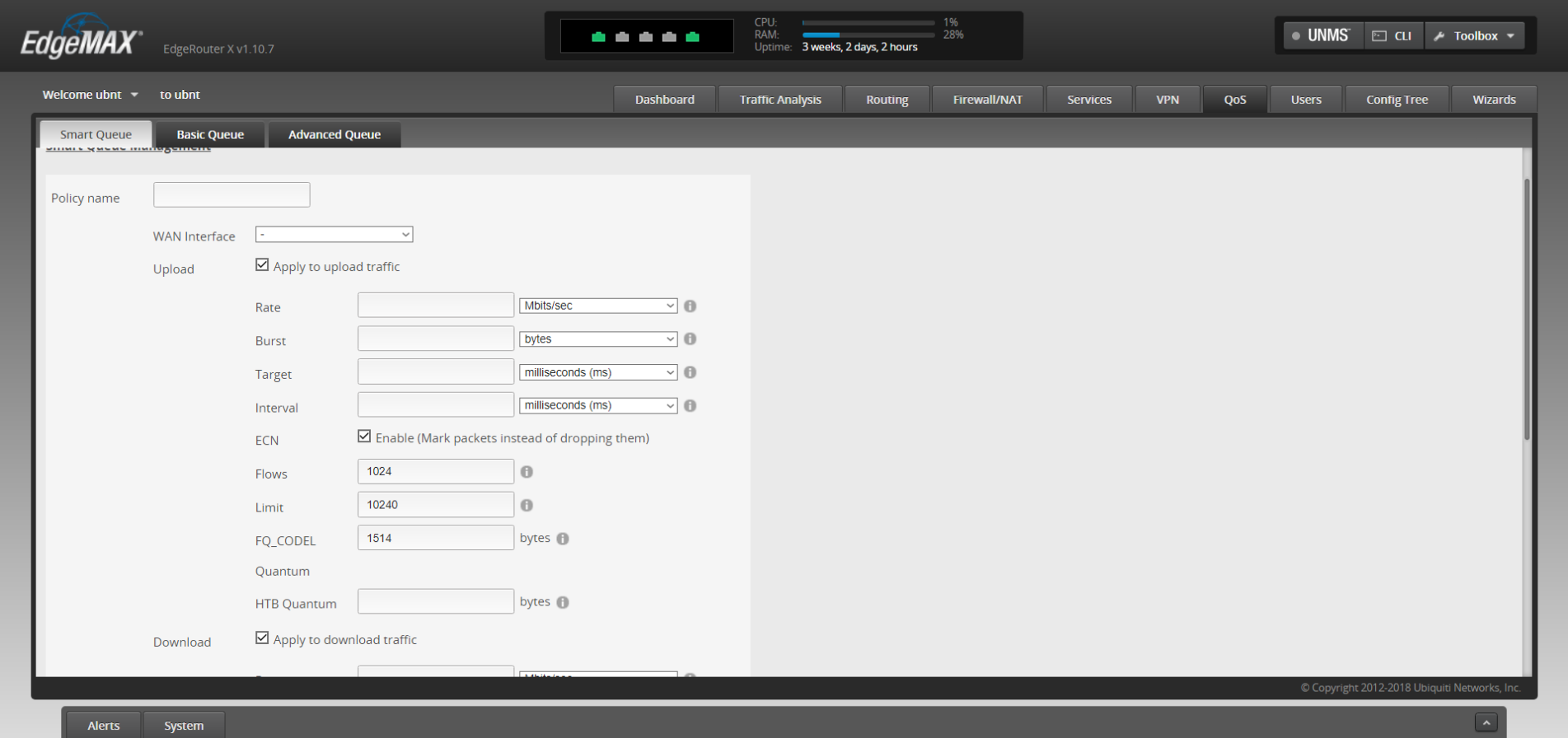
    Ubiquiti routers are one option in the pro market that we recommend. You’ll have the ability to customize quality of service rules which lets you prioritize certain kinds of traffic, like streaming video over HTTP downloads. Or it’s possible to have a guest networks so you can have a segregated LAN for guests, children or even your security cameras.

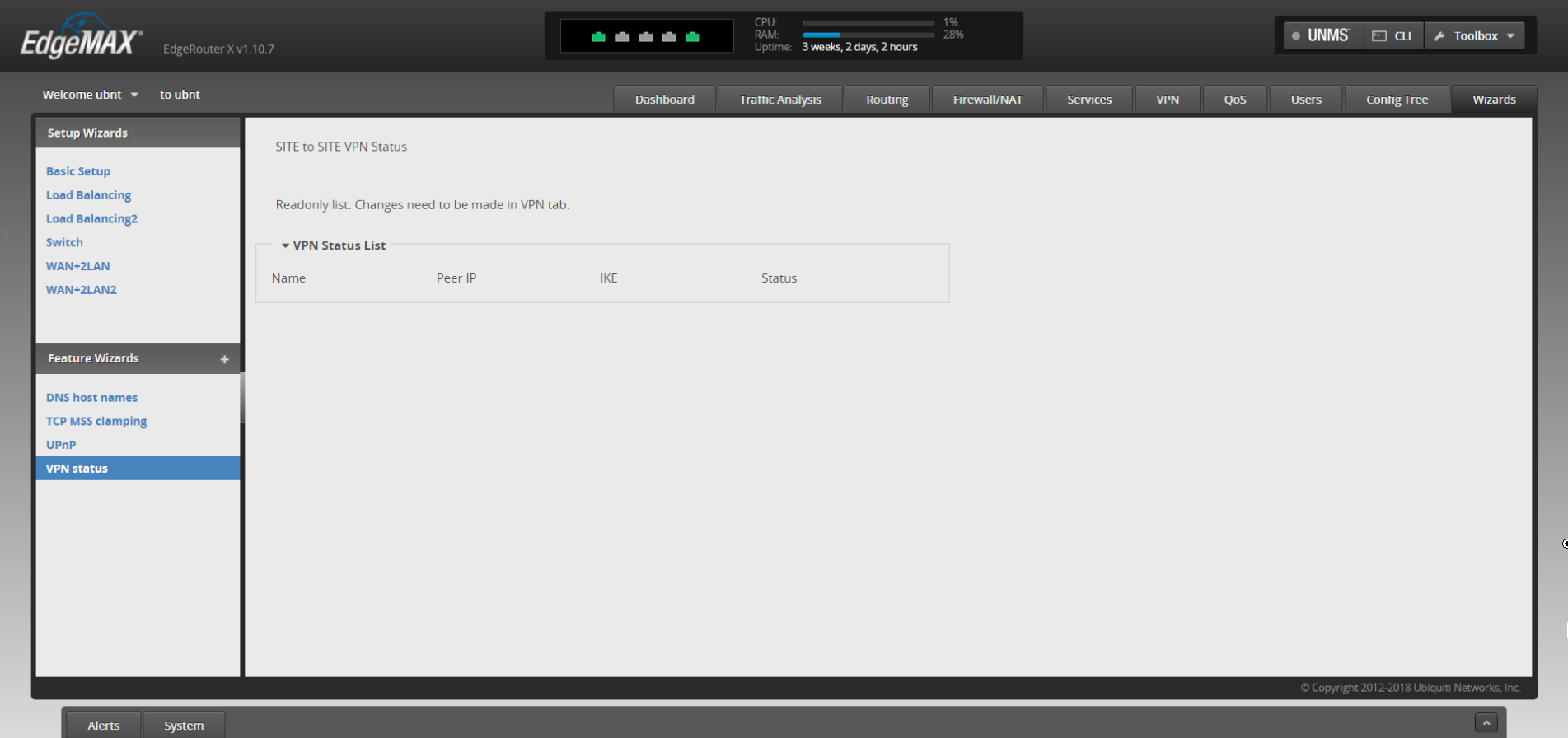
    It’s also possible to have site to site VPN, so you can access your office computer securely from home without using a third-party VPN or remote desktop service, it’s just router to router.

    There may be a sharp learning curve however when trying to implement these things yourself but updating the firmware shouldn’t be a different experience from what you’re used to from home routers.

    In general router brands need to do a much better job of securing their routers against vulnerabilities, both known and unknown – but there’s especially no excuse to leave known vulnerabilities unchecked.

    If you need assistance or have questions about routers or other technical topics, feel free to reach out! Our knowledgeable techs would be more than happy to answer your questions.

    Looking for more to read? We suggest these tech articles from the last week.

    This article was powered by Valley TechLogic, an IT provider in Atwater, CA. You can find more information at https://www.valleytechlogic.com/ or on Facebook at https://www.facebook.com/valleytechlogic/ . Follow us on Twitter at https://x.com/valleytechlogic.

    Looking for IT Services in Fresno, Modesto, Stockton, Ceres, Atwater, Merced, Visalia or Lodi? We cover all these areas and more!

  • Our Top 3 Picks for Password Managers

    Our Top 3 Picks for Password Managers

    The topic of 2 factor authentication (2FA) comes up A LOT. You’re probably already aware a password manager is the easiest place to start and will even make using your devices more convenient. However, this space is so loaded with choices now you may not know where to start.

    We’ve written a lot about what makes for a good password but what should you look for in a password manager?

    It depends on what your goal is. All password managers will help you with password safety, things like not re-using passwords and having stronger passwords because you won’t have dozens to remember.

    Some password managers only store your database locally, meaning it’s only on your own machine. The benefit of this is you’re in charge of your own security. The downside is if the device is lost or compromised, your database may be lost as well.

    There are also cloud storage password managers, meaning the password manager company will store your password database for you. We think for most users this is the better choice, however you are trusting your data to that company.

    So, what are our picks for password managers that are convenient to use but also have a good track record?

    1. LastPassThis is no brainer; we use this one! It’s free, straightforward, and compatible with many different browsers – even across Mac, Windows and Linux. They also offer 1 GB of secure document storage, meaning everything you need securely store will also be conveniently at your fingertips.
    2. 1Password1Password is a great mobile option. It began as an Apple centric product but has since branched out to include iOS, Android, Windows and ChromeOS. An extra bonus feature is it can act as an authentication app for programs like Google Authenticator. We also like its travel mode option, which allows you to delete sensitive data with one click while you travel and then restore it when you’re back home.
    3. DashlaneOur final pick is Dashlane. Dashlane is the newest of this bunch but they have a lot of slick features, including Dark Web reporting. The free version is somewhat limited but if you pay a low cost of $4.99 a month you unlock a host of features, including a free VPN and the ability to sync between devices. They also let you choose whether you want to store your database on your device or locally.

    One more thing, while your browser can somewhat perform as a password manager, that’s really not what it’s meant for. Browsers focus most of their development on being a better browser, not being a better password manager. Also the passwords they generate are not much better than “password” or “123456” (the most popular passwords 7 years running).

    Storing your passwords in a secure password manager is one of the best and easiest ways to improve your security online, so no matter which password manager you go with you’re making the smart choice.

    Looking for more to read? We suggest these tech articles from the last week.

    This article was powered by Valley TechLogic, an IT provider in Atwater, CA. You can find more information at https://www.valleytechlogic.com/ or on Facebook at https://www.facebook.com/valleytechlogic/ . Follow us on Twitter at https://x.com/valleytechlogic.

    Looking for IT Services in Fresno, Modesto, Stockton, Ceres, Atwater, Merced, Visalia or Lodi? We cover all these areas and more!