Tag: hardware

  • Is your older computer holding you back? We have a year-by-year breakdown on how your computer can breakdown with age

    Is your older computer holding you back? We have a year-by-year breakdown on how your computer can breakdown with age

    Computers and laptops are a significant investment, especially for business owners who need to supply staff with devices to work on (hardware costs typically represents a significant portion of many business owners technology budgets). You may be wondering how long that investment will last?

    Computers degrade in performance over time due to both hardware aging and software advancements that demand more resources. Here’s a year-by-year breakdown of how a computer can become less effective with age:

    Year 1

    • The computer performs optimally, handling tasks efficiently.
    • Software updates run smoothly, and the latest applications are fully compatible.
    • Cooling systems and thermal paste are fresh, keeping temperatures stable.

    Year 2

    • Newer software and OS updates begin requiring more RAM and processing power.
    • Dust accumulation in cooling fans may lead to slightly higher temperatures.
    • Battery capacity (for laptops) starts to degrade, reducing overall battery life.

    Year 3

    • CPU and GPU thermal paste may start to dry out, slightly increasing temperatures.
    • Hard drives (HDDs) may experience minor slowdowns due to wear and fragmentation.
    • Newer software and updates may introduce features that run slower on older hardware.
    • RAM usage increases, causing occasional lag in multitasking.

    Year 4

    • SSDs may start to show signs of wear (if heavily used), and HDDs may begin failing.
    • Newer graphics-intensive software and games may struggle to run efficiently.
    • The latest OS updates might no longer be fully optimized for the older hardware.
    • More frequent crashes or errors may occur due to aging components.

    Year 5

    • The cooling system may degrade, causing overheating issues and possible thermal throttling.
    • Some critical software may no longer support the aging hardware.
    • Motherboard capacitors may start to degrade, leading to instability.
    • More frequent hardware failures (e.g., failing RAM, storage corruption).

    Year 6+

    • The system may struggle with basic tasks, especially if newer web technologies or software updates demand higher specs.
    • The risk of complete hardware failure (motherboard, power supply, storage) increases.
    • Finding compatible hardware upgrades (RAM, CPU, GPU) becomes difficult.
    • Some online services and applications may no longer support the system.

    Beyond Year 7+

    • The computer may only be viable for very light tasks (e.g., basic web browsing, document editing).
    • Certain hardware components may have reached end-of-life and might not function reliably.
    • Many newer peripherals (e.g., printers, webcams) may no longer have drivers for the aging system.
    • Major security vulnerabilities arise due to the inability to install the latest OS updates.

    Regular maintenance, such as cleaning the cooling system, replacing thermal paste, upgrading RAM or storage, and switching to lightweight software, can extend the usability of an aging computer. However, at some point, upgrading to a new system becomes the more cost-effective solution.

    That’s where Valley Techlogic can help, we have offer procurement services exclusively for our customers. We can help you pick out the best devices for yourself and staff to make the most of your technology investments. Learn more about our procurement services here or reach out today for a consultation.

    Looking for more to read? We suggest these other articles from our site.

    This article was powered by Valley Techlogic, leading provider of trouble free IT services for businesses in California including Merced, Fresno, Stockton & More. You can find more information at https://www.valleytechlogic.com/ or on Facebook at https://www.facebook.com/valleytechlogic/ . Follow us on X at https://x.com/valleytechlogic and LinkedIn at https://www.linkedin.com/company/valley-techlogic-inc/.


  • Hardware Shortages May Continue Into 2022, So What Can Consumers Do About It?

    Hardware Shortages May Continue Into 2022, So What Can Consumers Do About It?

    COVID related hardware shortages and merchandising shortages in general are not new, since the beginning of the pandemic we have seen shortages in food, toilet paper, cleaning products and even personal protective equipment (PPE) frontline workers desperately needed to stay safe.

    Many of these shortages have been solved by an uptick in production. However, computer and electronic related shortages have been some of the worst hit and so far, the longest lasting with many experts saying we won’t see an end to them until 2022.

    At the beginning of the pandemic as schools closed and many jobs went remote the shortages when it came to laptops and desktops made sense, students and workers needed devices to continue to learn and work on.

    We saw that these shortages were solved when popular PC makers ramped up production and pushed forward new product launches to entice this entirely new market of PC consumers – many of which had abandoned bulkier hardware in favor of small and portable smart phones in years prior. It was common during this time for households to go from a single PC in the home to several.

    Now as we’ve stepped into 2021, we’re seeing shortages when it comes to the components these devices are made of. Especially when it comes to computer chips otherwise known as semi-conductors.

    We’re going to get a little technical here, a semi-conductor (or integrated chip) is a series of electronic circuits printed onto a conducting material, usually silicon. These chips form the brain of your electronic equipment. Tech News #3

    have been reported well before the pandemic hit (and are certainly be making things even worse). These silicon shortages don’t just effect PCs and laptops, cellphones, gaming equipment, even cars.

    Our growing demand for electronics has created the silicon shortage and we don’t as of yet have a solution that would allow us to keep our current breakneck pace when it comes to new electronic product launches. Many solutions center around increasing the longevity of existing products and ending planned obsolescence by allowing outside vendors to fix OEM products without voiding a customer’s warranty (as an example).

    On top of the silicon shortage, Bitcoin and Bitcoin related mining has also seen a resurgence in popularity. Powerful Graphical Processing Units (GPUs) are needed to make Bitcoin mining as efficient and productive as possible and as such we’re seeing GPUs skyrocket in price, many selling for several times their MSRP.

    It’s expected that it will take until 2022 for vendors and factories to catch up and prices to begin to stabilize. If you’re in the market for a new computer or laptop in the interim, you may find yourself in for a wait and a price hike.

    If you run or own a business, having a technology service provide like Valley Techlogic behind you can assist you in your business’s hardware needs. We have special relationships with our vendors and can use those to our customers advantage, saving them both time and money.

    If you’re a business owner located in the Central Valley and your office is due for a hardware upgrade, reach out today to find out what we can do for you.

    Looking for more to read? We suggest these tech articles from the last week.

    This article was powered by Valley TechLogic, an IT provider in Atwater, CA. You can find more information at https://www.valleytechlogic.com/ or on Facebook at https://www.facebook.com/valleytechlogic/ . Follow us on Twitter at https://x.com/valleytechlogic.

  • Taxes & Technology – What Can Help Your Business RIGHT Now

    Taxes & Technology – What Can Help Your Business RIGHT Now

    To say this year has had a lot of twists and turns is an understatement, and for many that includes financial hurdles they couldn’t have foreseen.

    Today we want to cover the topic of business loans that are available for companies struggling in in the onslaught of this current pandemic, as well as tax solutions that will help lighten the load of the business purchases you still need to make even as the current situation rages on.

    Now you may be saying to yourself, aren’t you a technology company? Why are you talking about taxes?

    While this may be true, as a business ourselves AND one that helps businesses of all shapes and sizes, we felt we could offer a new perspective on this topic that you maybe hadn’t considered. As well as our own unique input on how we’re putting these tips into practice.

    Besides that, technology is linked to many different systems, including the financial system. Unless you’re a stickler for mailing things in, it’s hard to argue against the quickness and convenience of electronic filing in most cases as an example.

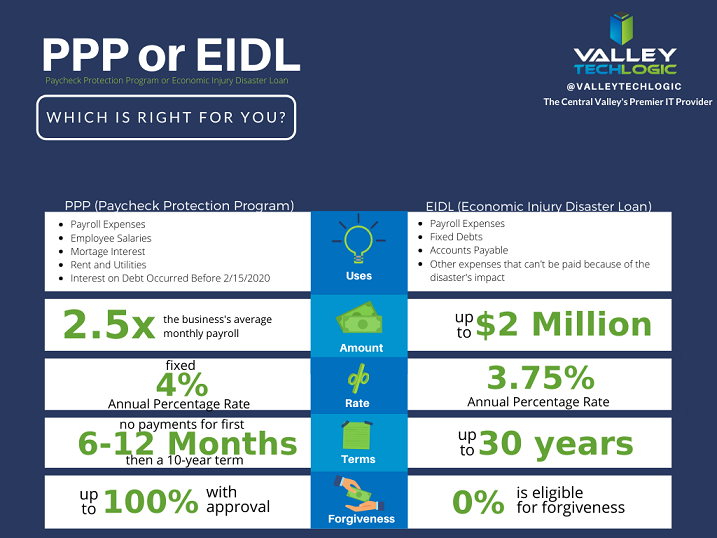
    With that said let’s start with our initial topic of discussion, PPP funds. PPP or the Paycheck Protection Program has been in the news a lot recently, but what does it cover? And how does it compare to the EIDL (Economic Injury Disaster Loan)?

    PPP vs EIDL Chart

    As you can see from our chart, they have different benefits and downsides, and it’s hard to say at first glance what may be right for your business. In either case you’ll probably be adding to the liquidity of your business which will probably help you continue to fund other day to day necessities, including your technology budget. For more information on PPP click here, the Small Business Association will always have the most up to date information on this topic.

    The deadline for applying for PPP is August 8th, so you must hurry if you want to apply for it. While an extension might happen (it did before) why risk it?

    There are also talks in the works by Congress of an additional bill that would forgive PPP loans less than $150k automatically without documentation (basically turning them into grants). You can learn more about this proposed addition to the CARES act here. For many businesses this could make a massive difference in their ability to stay afloat in these difficult times.

    Aside from that if you are planning on a technology upgrade soon, we have a tax tip that may save you thousands on those purchases.

    Every year businesses across the country take advantage of a certain tax deduction called Section 179. To put it briefly, Section 179 allows you to deduct business related expenses of tangible property and equipment. This can include new computers and servers that will allow you to run your business more effectively.

    For example, if you’re still trying to get your at-home work force up and running then it may make sense to furnish those employees with company laptops. They will be significantly safer than using their own devices and it may help them do their jobs much more effectively.

    Or perhaps you need a server you can use as a private cloud so you can conduct your business from home, Section 179 can help with that purchase too. At the end of the year those savings can be lost, or you can reap the benefits of getting your necessary purchases at a significant discount after the tax savings.

    We have updated our Section 179 Guide for 2020, you can learn more here. As always, work with your attorney or accountant when trying to take advantage of these beneficial programs for your business, they will have the best method for applying them to your situation.

    Looking for more to read? We suggest these tech articles from the last week.

    This article was powered by Valley TechLogic, an IT provider in Atwater, CA. You can find more information at https://www.valleytechlogic.com/ or on Facebook at https://www.facebook.com/valleytechlogic/ . Follow us on Twitter at https://x.com/valleytechlogic.

    Looking for IT Services in Fresno, Modesto, Stockton, Ceres, Atwater, Merced, Visalia or Lodi? We cover all these areas and more!


  • Routers and Their Safety – How to Easily Improve Your Network

    Routers and Their Safety – How to Easily Improve Your Network

    It was recently reported by ZDnet (https://www.zdnet.com/article/unpatched-vulnerability-identified-in-79-netgear-router-models/) that 79 Netgear routers from as far back at 2007 and across 758 different firmware versions had an unpatched vulnerability that would let a hacker take over the device remotely.

    We rely on routers as our literal gateway to the internet – so how can you be sure the one you’re using is safe? Also, how can you keep it that way?

    As the above article has shown one of the ways is just to be cognizant of news regarding the devices you use. An emergency patch was issued, and a more permanent patch is planned for later this month. Even if you normally shy away from the nitty gritty technical aspects of any news cycle it’s a good idea to keep an eye out for news regarding your specific devices.

    It’s always a good idea to keep up to date on patches for all your devices. In the case of routers these normally come in the form of firmware updates.

    This may seem intimidating but here are the steps for making sure your routers firmware is up to date.

    1. Type your routers IP address into the search bar of your preferred web browser to access it’s web portal. It’s usually on the box or even on the router itself, it can also be found here (https://whatsmyrouterip.com).
    2. Enter your username and password. If this is your first-time logging in again the information can usually be found on the router itself. This is also a good time to change the password!
    3. Locate the firmware or update tab. The location may vary depending on which model router you have, referring to the instructions of your router is probably a good idea.
    4. Go to your router manufacture’s website to find the firmware update file. You can usually find it by searching for your routers model on their site.
    5. Download the update and apply it through the router’s web portal. Again, the router’s web portal is found by it’s IP address.
    6. Reboot the router to ensure the update is applied.

    By following these steps, you can be sure your router has the most up to date software version and is the most protected from bugs and malware.

    What if you can’t find a firmware update for your router? If it’s a newer model there may not be one out yet, however if your router is on the older side it may have reached it’s end of life. Every brand is different, Cisco for example has a policy of supporting routers on the software side for 3 years and the hardware side for 5 years.

    Most technical companies will provide advance notice if they have a product reaching end of life. It’s a good idea to keep track of this information for all your devices, as a device that’s not receiving regular updates may be less safe to use on the internet.

    This article was powered by Valley TechLogic, an IT provider in Atwater, CA. You can find more information at https://www.valleytechlogic.com/ or on Facebook at https://www.facebook.com/valleytechlogic/ . Follow us on Twitter at https://x.com/valleytechlogic.

    Looking for IT Services in Fresno, Modesto, Stockton, Ceres, Atwater, Merced, Visalia or Lodi? We cover all these areas and more!

  • 2020 is Here – Here’s your Technology and Cybersecurity Forecast

    2020 is Here – Here’s your Technology and Cybersecurity Forecast

    It’s 2020 and the start of a new decade. Technology has changed a lot since the beginning of the last decade. Inexpensive computer options like Raspberry Pi and Chromebook became available, the first iPad was released.

    Computing also got a lot faster, the first 8 core processors were released, solid state drives became a lot more widespread, and graphic cards reached new heights for computer gamers shattering the previously achievable FPS (frames per second) and ushering in a new era of high-end gaming.

    The previous decade also brought new records on cybersecurity issues but unfortunately not in a positive light. Malware became more sophisticated and harder to track, ransomware became widespread (it’s estimated it cost the US $7.5 billion in 2019). So, what’s on the horizon for 2020 and beyond in the realms of technology and cybersecurity?

    As wearable technology advances increase, we will see even more of it aimed at integrating tech with the world around us. Augmented reality devices will probably become more accessible and affordable. Sensor technology will continue to increase which will have a positive effect on healthcare and our ability to detect health scares before they advance to something serious (see watches now aimed at keeping track of our blood pressure and heart rate).

    Needless to say it will be something to look out for as our society becomes more dependent on the IoT (Internet of Things), for good and for bad.

    What about the field of cybersecurity? While it’s probably true hackers won’t stop trying to gain access to our private information – especially as it pertains to our financials – even the most layman user of technology is becoming keen to protecting their privacy.

    Consumers will demand corporations be made accountable for leaks of private data and businesses not wanting to shoulder the financial burden of an attack (or the bad press) will utilize the tools available to thwart would be bad actors in their tracks.

    On that front we can help. At Valley Techlogic we are on a mission to have the most comprehensive and effective cybersecurity tools available to protect our clients. We also offer 24/7 help desk so no matter when you have a problem, we’re on it.

    If you’re in the Central Valley or surrounding area reach out today for a free security audit and begin this new decade tackling your business’s technology needs.

    This article was powered by Valley TechLogic, an IT provider in Atwater, CA. You can visit us on Facebook at https://www.facebook.com/valleytechlogic/ . Follow us on Twitter at https://twitter.com/valleytechlogic.

  • Windows 7 End of Life: Upgrade your existing machine or start fresh?

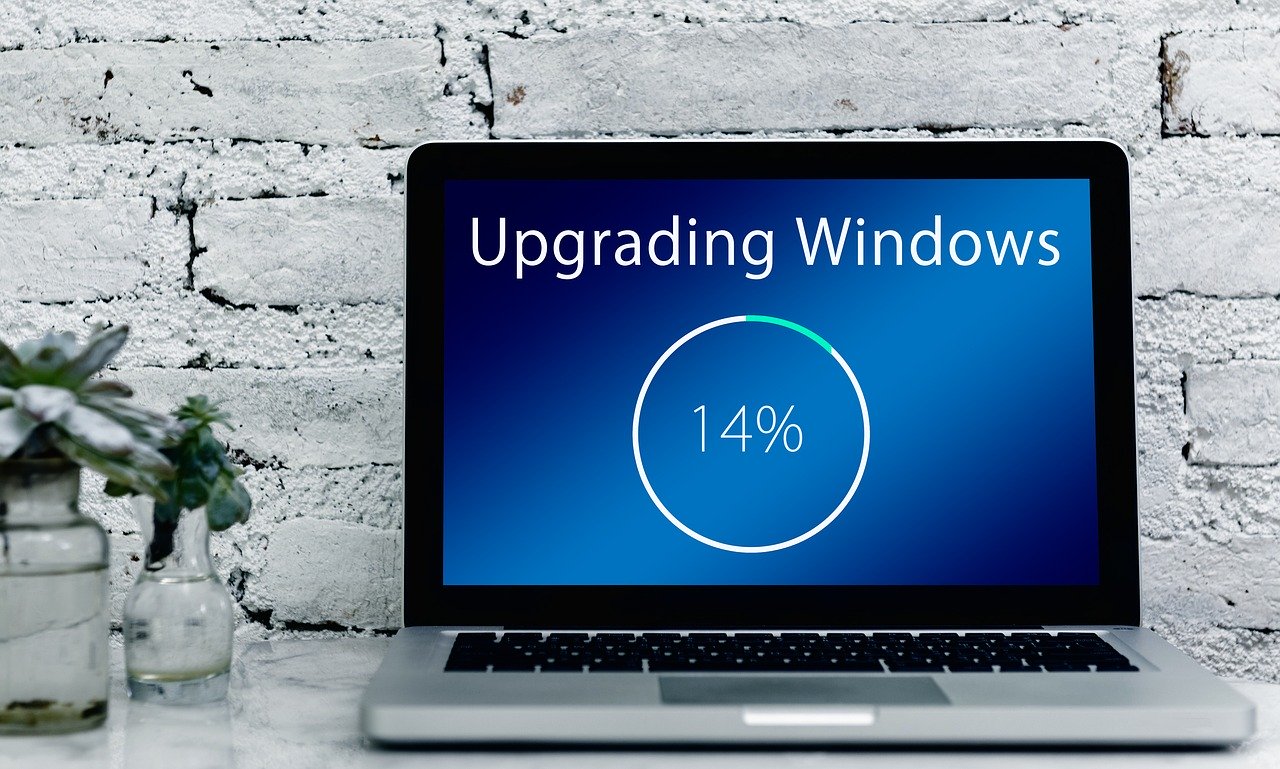
    A laptop upgraded windows.January 14th, 2020 looms ever closer and you may be scrambling for a solution to one problem: Does it make sense to upgrade your existing machine or purchase a new one?

    I can’t say for certain which one is the better option for you or your business, but one thing is for certain, remaining on Windows 7 after support ends is a dangerously ill-advised idea.

    Windows 10 released July 29, 2015, so chances are if your machine is still running Windows 7 it’s older than the 3 years I personally recommend a machine be replaced by. We know this is not always feasible so here are the minimum specs we recommend for an upgrade to Windows 10:

    • In my experience your machine will need at least 8 GBs of ram to run Windows 10 relatively smoothly, but ideally it will have at least 16 GBs at this point in time so it has enough power to run the operating system and all the processes you may use day to day.
      Something else to consider is whether your ram is soldered (very common in laptops), if it is an upgrade will not be possible.
    • Your CPU is something else to consider when upgrading or buying, here at Valley TechLogic we recommend Intel CPU’s and more specifically at least Core i-5 or Core i-7, both will run Windows 10 effectively but Core i-7 will be much more future proof.
    • A Solid State Drive, many older machines still use highly failure prone mechanical hard drives. A solid state drive will be less prone to hardware failure and it loads much faster. On average solid state drives load 5 to 20 times faster than a mechanical drive.
    • You may also need to purchase the Windows 10 license, at the present time that will run you $199.99 for a Pro license (what we recommend in a business setting).
    • There also may be a cost to having these upgrades performed for you if you don’t currently have an all encompassing Managed IT Plan in place (learn more here). This cost can really add up if you own a business with more than one outdated machine.

    Depending on your situation the costs associated with upgrading an existing machine may not make sense in the long run. Purchasing a new machine is an investment, and when done thoughtfully it will last many years into the future.

    It’s also possible to transfer your existing computer files from the old machine to the new one – even system settings – making the switch painless.

    Here at Valley Techlogic we work with our customers to come up with a solution that makes sense for their business, whether they’re upgrading existing computers with new hardware or helping them purchase a new one through our affiliates.

    We work to minimize downtime and through our comprehensive Managed IT Department plan upgrading is a covered project. If you’re in the Central Valley reach out today to see if we can help you with this end of life event, or any other IT projects you may have coming up.

    This article was powered by Valley TechLogic, an IT provider in Atwater, CA. You can visit us on Facebook at https://www.facebook.com/valleytechlogic/ . Follow us on Twitter at https://www.twitter.com/valleytechlogic .