

Tag: laptop

  • Need a new work laptop? Here are five features to focus on

    Need a new work laptop? Here are five features to focus on

    Selecting a new work device is a personal choice, there are factors a lot of buyers focus on. Sizing, screen type, track pad feel or material, keyboard type. All of these peripheral factors that go into choosing the perfect laptop to complete your work on.

    We want to dig specifically into what you should consider when it comes to the specs of your work laptop. What you do and how you do it will greatly affect whether a laptop is the right choice for you, from smaller footprint lower cost models that work perfectly for light duty to robust, graphic and memory intense models that can handle high use scenarios such as graphic design or multi-tasking.

    Here are the five things we consider most important when it comes to the use of your laptop for work.

    1. Battery Life. Battery life may not be as important if you intend to dock your computer at a desk and leave it there primarily. If you need your laptop on the go, however battery life is hugely important and what’s available varies widely. One thing to remember is that higher specs usually correlate to less battery life, so if your job is light duty but on the go it may be better to look for a lighter, less powerful laptop.
    2. RAM/Memory. No matter what we recommend at least 16 GBs in your laptop (or the ability to upgrade). This is because Windows itself uses quite a bit of memory, so if you opt for less memory in your work laptop you may find it struggles to keep up. 8 GBs might be okay for very, very light usage but for heavy users 16 or 32 GBs is preferable.
    3. Storage. Again, because Windows does use up some of the storage available for its installation we want to look for more capacity if possible. For light users 500 GBs is fine, but for most users we would recommend at least 1 TB.
    4. Video Card. When you think video cards you might think gaming, but a good video card is also used by your computer for certain processes, especially graphically intense one. If video editing or graphic design is part of your workflow, we suggest looking for a work laptop with a better video card even if it’s a laptop that’s marketing is aimed at gamers. As a bonus these laptops will usually have a better quality screen as well.
    5. CPU. We can’t overlook the CPU quality In the laptop buying process. More CPU power means more capacity to run programs or have a lot of tabs open in your browser.

    Of course, if you’re buying for many users within your organization, it can be difficult to customize your buying to specific users. At Valley Techlogic we’re able to make recommendations for laptops that will meet the needs of your workforce while also keeping budget in mind.

    Through Valley Techlogic’s procurement services we can help you buy new equipment for your office through our vendors with more choices than are usually offered through their brick-and-mortar presence. We have relationships with Dell, Lenovo, HP and more that we can use to your advantage.

    Valley Techlogic also offers installation services if you need help setting up your new equipment and getting it ready for your employees.

    Learn more about our procurement services today by clicking the banner below to get started, or click here to schedule a consultation.
    Looking for more to read? We suggest these other articles from our site.

    This article was powered by Valley Techlogic, an IT service provider in Atwater, CA. You can find more information at https://www.valleytechlogic.com/ or on Facebook at https://www.facebook.com/valleytechlogic/ . Follow us on Twitter at https://x.com/valleytechlogic.

  • Taxes & Technology – What Can Help Your Business RIGHT Now

    Taxes & Technology – What Can Help Your Business RIGHT Now

    To say this year has had a lot of twists and turns is an understatement, and for many that includes financial hurdles they couldn’t have foreseen.

    Today we want to cover the topic of business loans that are available for companies struggling in in the onslaught of this current pandemic, as well as tax solutions that will help lighten the load of the business purchases you still need to make even as the current situation rages on.

    Now you may be saying to yourself, aren’t you a technology company? Why are you talking about taxes?

    While this may be true, as a business ourselves AND one that helps businesses of all shapes and sizes, we felt we could offer a new perspective on this topic that you maybe hadn’t considered. As well as our own unique input on how we’re putting these tips into practice.

    Besides that, technology is linked to many different systems, including the financial system. Unless you’re a stickler for mailing things in, it’s hard to argue against the quickness and convenience of electronic filing in most cases as an example.

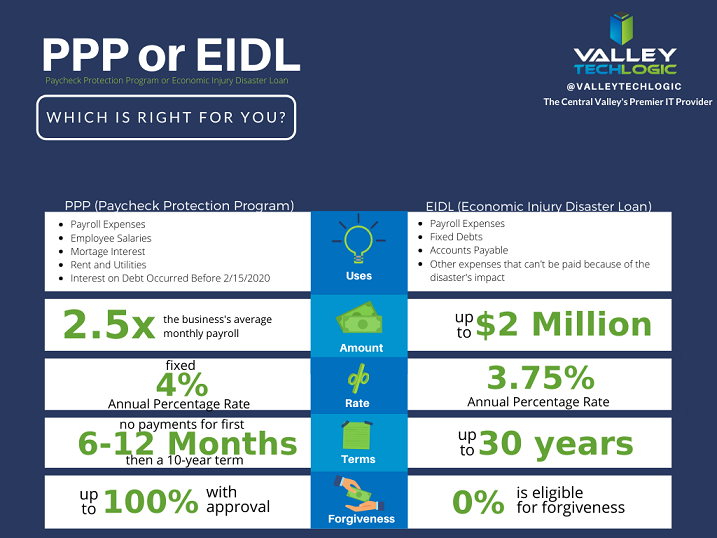
    With that said let’s start with our initial topic of discussion, PPP funds. PPP or the Paycheck Protection Program has been in the news a lot recently, but what does it cover? And how does it compare to the EIDL (Economic Injury Disaster Loan)?

    PPP vs EIDL Chart

    As you can see from our chart, they have different benefits and downsides, and it’s hard to say at first glance what may be right for your business. In either case you’ll probably be adding to the liquidity of your business which will probably help you continue to fund other day to day necessities, including your technology budget. For more information on PPP click here, the Small Business Association will always have the most up to date information on this topic.

    The deadline for applying for PPP is August 8th, so you must hurry if you want to apply for it. While an extension might happen (it did before) why risk it?

    There are also talks in the works by Congress of an additional bill that would forgive PPP loans less than $150k automatically without documentation (basically turning them into grants). You can learn more about this proposed addition to the CARES act here. For many businesses this could make a massive difference in their ability to stay afloat in these difficult times.

    Aside from that if you are planning on a technology upgrade soon, we have a tax tip that may save you thousands on those purchases.

    Every year businesses across the country take advantage of a certain tax deduction called Section 179. To put it briefly, Section 179 allows you to deduct business related expenses of tangible property and equipment. This can include new computers and servers that will allow you to run your business more effectively.

    For example, if you’re still trying to get your at-home work force up and running then it may make sense to furnish those employees with company laptops. They will be significantly safer than using their own devices and it may help them do their jobs much more effectively.

    Or perhaps you need a server you can use as a private cloud so you can conduct your business from home, Section 179 can help with that purchase too. At the end of the year those savings can be lost, or you can reap the benefits of getting your necessary purchases at a significant discount after the tax savings.

    We have updated our Section 179 Guide for 2020, you can learn more here. As always, work with your attorney or accountant when trying to take advantage of these beneficial programs for your business, they will have the best method for applying them to your situation.

    Looking for more to read? We suggest these tech articles from the last week.

    This article was powered by Valley TechLogic, an IT provider in Atwater, CA. You can find more information at https://www.valleytechlogic.com/ or on Facebook at https://www.facebook.com/valleytechlogic/ . Follow us on Twitter at https://x.com/valleytechlogic.

    Looking for IT Services in Fresno, Modesto, Stockton, Ceres, Atwater, Merced, Visalia or Lodi? We cover all these areas and more!