

Tag: microsoft tools

  • Make the Most of Your Microsoft 365 Subscriptions: 7 Productivity Hacks You Might Be Missing

    Make the Most of Your Microsoft 365 Subscriptions: 7 Productivity Hacks You Might Be Missing

    Microsoft 365 is packed with powerful tools designed to help businesses stay productive, collaborative, and organized—but many users barely scratch the surface of what’s available. If you’re only using Microsoft 365 for email and basic file storage, you’re likely leaving a lot of value on the table.

    Here are 7 productivity hacks to help you get the most out of your Microsoft 365 subscription:

    1. Use Microsoft Search to Navigate Faster

    Microsoft Search is a powerful, built-in tool across Outlook, OneDrive, SharePoint, and Teams that helps you quickly find emails, files, conversations, and even people in your organization. Instead of digging through folders or threads, type a keyword into the search bar—Microsoft Search will pull relevant results instantly from across all connected apps.

    Pro Tip: You can even search using natural language—like “files shared by John last week”—to find what you need faster.

    1. Streamline Repetitive Tasks with Power Automate

    Power Automate (formerly Microsoft Flow) lets you create custom workflows between apps to save time and reduce manual work. You can automate common tasks like saving email attachments to OneDrive, posting Teams alerts when a SharePoint list is updated, or sending approval requests.

    Example: Set up a flow to automatically notify your team in Teams when a new file is uploaded to a project folder.

    1. Collaborate in Real-Time with Co-Authoring

    Microsoft 365 makes real-time collaboration seamless. Whether you’re in Word, Excel, or PowerPoint, multiple users can work on a document at the same time. Changes are saved automatically and version history lets you review or restore earlier versions with ease.

    Bonus: Use @mentions in comments to get a colleague’s attention instantly.

    1. Organize Your Thoughts with OneNote

    OneNote is the hidden gem of Microsoft 365. Use it to capture meeting notes, brainstorming ideas, project plans, and more. Notebooks are searchable, can be shared across your team, and sync across all your devices.

    Use Case: Create a shared notebook for your team to store agendas, meeting recaps, and to-do lists in one central place.

    1. Turn Emails into Tasks with Microsoft To Do and Outlook Integration

    If your inbox is your to-do list, Microsoft To Do can help bring order to the chaos. With seamless integration into Outlook, you can flag emails to automatically turn them into actionable tasks.

    Tip: Use the My Day feature in To Do to focus only on what you need to accomplish today.

    1. Secure Your Data with Built-In Tools

    Microsoft 365 comes with strong security features that are often underused. Data Loss Prevention (DLP), sensitivity labels, and multi-factor authentication (MFA) can all help keep your data protected without requiring advanced setup.

    Security Tip: Admins should regularly review security and compliance reports in the Microsoft 365 Security Center to stay ahead of potential issues.

    1. Integrate Third-Party Apps into Teams

    Microsoft Teams isn’t just for chat and video calls—it’s a hub for productivity. You can integrate hundreds of apps directly into your Teams channels, from project management tools like Trello and Asana to CRM systems and custom Power Apps.

    Efficiency Hack: Pin your most-used apps to the sidebar for easy access during daily work.

    Whether you’re a power user or just getting started, Microsoft 365 has tools to help you work smarter—not harder. With a little exploration and some setup, you can automate workflows, improve collaboration, and protect your data—all within the apps you already use.

    Need help unlocking Microsoft 365’s full potential for your team? Contact Valley Techlogic today and let’s optimize your digital workspace together.

    Looking for more to read? We suggest these other articles from our site.

    This article was powered by Valley Techlogic, leading provider of trouble free IT services for businesses in California including Merced, Fresno, Stockton & More. You can find more information at https://www.valleytechlogic.com/ or on Facebook at https://www.facebook.com/valleytechlogic/ . Follow us on X at https://x.com/valleytechlogic and LinkedIn at https://www.linkedin.com/company/valley-techlogic-inc/.

  • 10 Microsoft 365 tools you need to take advantage of TODAY

    10 Microsoft 365 tools you need to take advantage of TODAY

    Most of our clients are Microsoft 365 customers and enjoy the tools and applications they receive through their Microsoft 365 subscription. Many of these same clients were long time Office customers and were already familiar with the software benefits – such as Word, Office, Outlook, Powerpoint and Excel. These are staple products in the business community and chances are if you’ve been in business long enough you’ve had some exposure to them throughout your career.

    We have had clients who miss the days when Office was a standalone product only. While you still can purchase Office 2021 for a one-time fee, many have to weigh the value of a pretty substantial upfront cost when purchasing for many employees for a product that will at some point expire vs the subscription model that is now favored by many software companies. This is a discussion onto itself, but in a nutshell many clients choose to go with a Microsoft 365 subscription.

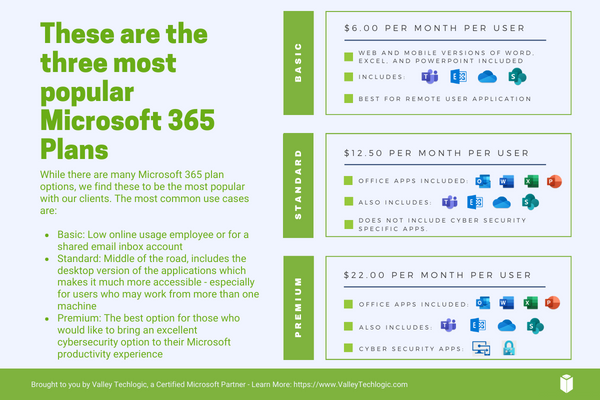
    There is an obvious benefit to doing so right off the bat if you choose to go with Microsoft 365 Business Premium, the security benefits of this plan are well known and touted throughout the technology industry as being the crème de la crème of security suites for Windows machines.

    However, there are many benefits to your Microsoft 365 subscription that many users are not even aware of. Microsoft 365 is much more than just an Office subscription – your plan comes with business utility programs that can make organizing and running your business better.

    Here are 10 tools you can take advantage of TODAY if you have a Microsoft 365 subscription:

    1. Microsoft OneNote: OneNote is Microsoft’s digital notetaking app, it’s a step way above NotePad with the ability to organize multiple notes (with colored tabs) and collaborate and share your notes with other.
    2. Microsoft Intune: Intune allows you to control and manage all of the Microsoft endpoints within your business from one place. This one might need an IT pro when it comes to setup and management but once you get it going it really can simplify many IT tasks for your team.
    3. Microsoft Forms: Did you know that you can create surveys, quizzes and polls with a Microsoft product? You can with forms, you can even export the data to Excel and share the forms you create on your website or social media platforms.
    4. Microsoft List: With Microsoft 365 you don’t have to go off platform when it comes to managing even the somewhat more mundane aspects of your business, Microsoft Lists is Microsoft’s solution for keeping track of well, everything. Also just like with Forms you’re able to export these lists to Excel with a click of a button.
    5. Microsoft Bookings: Microsoft Bookings is Microsoft solutions to having a public calendar where clients or colleagues can book a meeting with you, and it’s tied right to your Outlook calendar. Another benefit of Bookings is it can be added to your website for prospective clients to book time with you and eliminating the cost of an outside calendar application.
    6. Microsoft To Do: If you or your employees struggle with staying on task, Microsoft To Do is the solution for you. You can plan out your days in advance and Microsoft To Do will be your one stop place for keeping things on track.
    7. Microsoft Viva: Microsoft Viva is an addition to Microsoft Teams that adds a lot of functionality not usually found in a chat program, Microsoft Viva is a multi-faceted platform but in a nutshell it allows you to set goals for your business, provide training to your employees and see insights into their workday, as well as offering them to provide feedback to you all in the Teams application they already use.
    8. Microsoft Streams: If you already use Teams for your video conference calls then you’re familiar with how reliable Microsoft is when it comes to video streaming. Microsoft Stream takes that a step further and allows you to broadcast video outside your organization with up to 1000 participants.
    9. Microsoft Power BI: Microsoft Power BI provides a snapshot of your business’s data in the form of charts and graphs, so you can see how the data your business creates evolves and changes over time.
    10. Microsoft Planner: Finally, we bring it all home with Microsoft Planner, it’s exactly what you would expect it to be a simple visual tool for planning out meetings, business goals, marketing pitches and more all found at your fingertips with your Microsoft 365 subscription.

    Of course, if you’re considering signing up for Microsoft 365, you do have to take the cost into account. Here are the costs for the most popular plans (these costs factor in a discount for committing to an annual subscription, the costs are approximately 20% higher when you choose a monthly term).

    Interested in learning more about Microsoft 365? Valley Techlogic is a Microsoft partner, and we can walk you through the process of buying and making the most of your new subscription. Learn more today with a consultation.

    Looking for more to read? We suggest these other articles from our site.

    This article was powered by Valley Techlogic, an IT service provider in Atwater, CA. You can find more information at https://www.valleytechlogic.com/ or on Facebook at https://www.facebook.com/valleytechlogic/ . Follow us on Twitter at https://x.com/valleytechlogic.