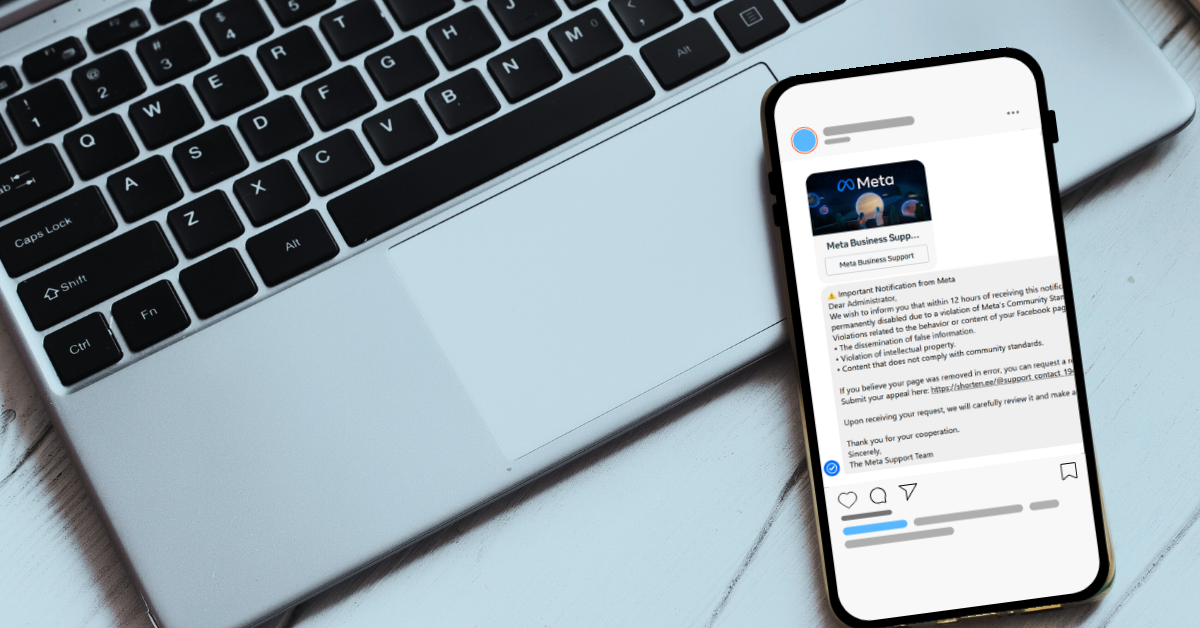
If you have a public facing Facebook page, such as a fan account page or business page, then you’ve probably been inundated with messages that look something like this:
Of course, this contains all the hallmarks of a phishing scam. The false sense of urgency, the request for personal information, the legitimate looking branding, and the link that leads anywhere but an actual legitimate Facebook page.
As Facebook has tried to crack down on the bots, users are now receiving emails with the same messaging. Whether the emails are pretending to be Facebook support or a law firm trying to collect on a copyright claim, the format is the same. You’re in violation and you must act now to avoid any issues.
These emails and messages may even contain real information from your page, such as a real post they’re claiming is in violation or your Facebooks account ID (which is public information).
This is also a self-feeding scam; the same users that fall for it are also being used to conduct the scam via the accounts that are compromised (sometimes the scammer does not even bother to change the username or profile picture to something Meta/Facebook related).
The best course of action if you receive one of these messages is to report it to your email provider or Facebook themselves.
As to the heart of why these messages have been so ubiquitous, you need only look to Facebooks userbase. At 3.1 billion active users as of writing across the world (outpacing its other platform Instagram with 2 billion users and its competitors such as Tiktok, WhatsApp, and X by a large margin). They are the largest social media platform, which unfortunately puts a bigger target on their back for scammers.
Here are four other ways you can avoid phishing scams (including the one we’re talking about here):
- Multi-Factor Authentication: It goes without saying, the number one way to protect most of your accounts from intrusion is the multi-pronged approach you receive from multi-factor authentication (MFA). Intruders who have your password will hit a wall when they realize they also need your phone and/or access to your email to login.
- Don’t Ignore Red Flags: Sense of urgency? Check. Asking for personal information? Check. Generic greetings (think Dear Sir/Madam)? Check. Always pause and look for red flags when it comes to emails/messages you receive.
- Don’t click on links, period. If you aren’t sure if the email is legitimate, NEVER click on the links. Need more evidence? Hover over links you receive, even if a link says Facebook.com it may really be directing you to the scammers own website to try and collect your personal information or install malware on your device.
- Verify the Sender: Would a Facebook email originate from @gmail.com account? No. Same with Facebook messages, legitimate messages from Facebook/Message will arrive in a distinct way that makes it easy to tell they’re legitimately from Meta support. If the message you’ve received just looks like any regular Facebook message aside from the content, it’s a scam.
At Valley Techlogic, we offer coverage that helps prevent these type of phishing scams from causing an intrusion into your business, including advanced protection for email spam and best in class cybersecurity solutions that stop attackers in their tracks. Learn more today with a consultation.
Looking for more to read? We suggest these other articles from our site.
-
Make the Most of Your Microsoft 365 Subscriptions: 7 Productivity Hacks You Might Be Missing
-
Viral video showcases AI theft detection in real time, everything you need to know about AI enhanced security cameras
-
23andMe just filed for bankruptcy and if you’ve ever used their service you need to delete your data right now (we tell you how)
-
If you’re an Outlook or Gmail user, you’ll want to be aware of this ransomware warning just issued by the FBI
-
8 Tips for Practicing Good Cybersecurity Hygiene in your Business
This article was powered by Valley Techlogic, leading provider of trouble free IT services for businesses in California including Merced, Fresno, Stockton & More. You can find more information at https://www.valleytechlogic.com/ or on Facebook at https://www.facebook.com/valleytechlogic/ . Follow us on X at https://x.com/valleytechlogic and LinkedIn at https://www.linkedin.com/company/valley-techlogic-inc/.