
Tag: remote work

  • 5 Remote Workforce Trends to Follow in 2021

    5 Remote Workforce Trends to Follow in 2021

    There has been a lot of debate surrounding when things will get back to “normal” and what normal will even look like, but one thing we think is here to stay is the remote workforce.

    While many jobs will go back to the office, the benefits of working from home and having a remote work staff cannot be downplayed. For the employees it has meant less time commuting to and from the office leading to an increase in the coveted work/life balance. In addition to that, many have found they can focus better away from the hustle and bustle of a busy office building and for many this has led to an increase in productivity.

    For employers there’s simply less overhead, when staff work from home all the costs associated with maintaining and running an office are no longer a factor. In fact, it’s been speculated what this may mean for the future when it comes to office building spaces and their demand.
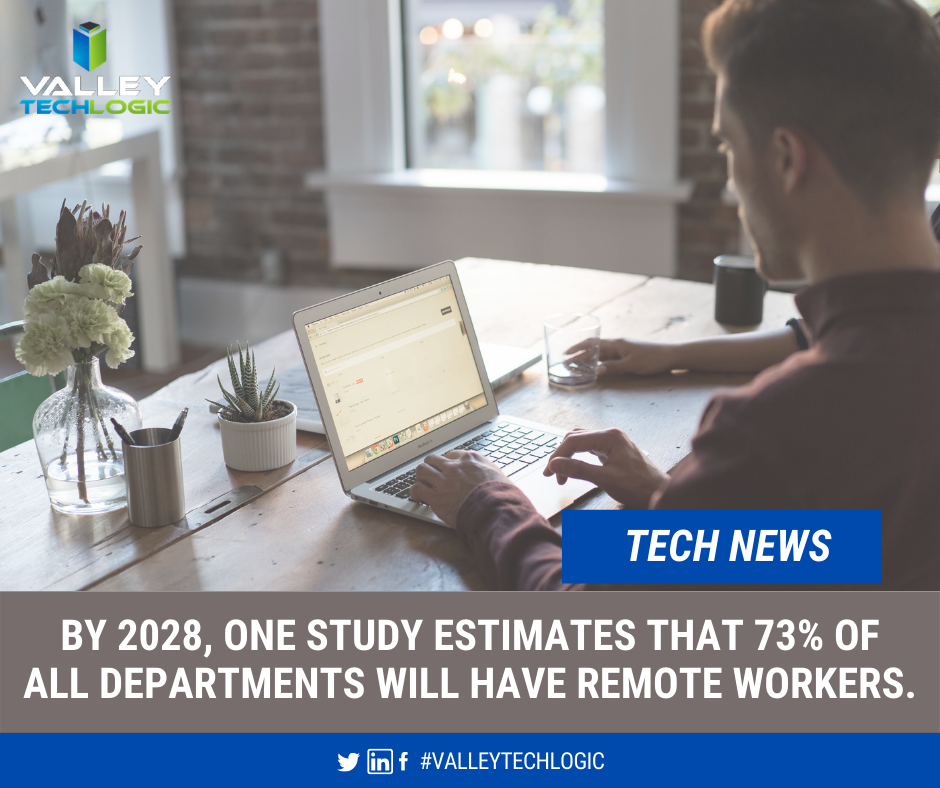
    Tech News About Remote Workers

    There’s no doubt a great many will return to the office, and as the article we linked above mentioned, for those new to working or working in a specific field there’s a great benefit to the on the job learning that can only be facilitated in person.

    If you are finding yourself working from home at the moment, are you making the most of it? What will working from home look like in 2021? Here are 5 trends we think will make 2021 the year that really cements the viability of having a dedicated remote work staff.

    1. Having the ability to select your own work equipment. In an office setting, usually work devices are one size fits all. All the way down to the peripherals you use such as a keyboard and mouse, many employees do not get much say in what’s selected. If you work from home though, you can usually opt to use your own devices or at least your own peripherals. Picking out devices that make sense for the kind of work you do could make your job easier, which in turn will increase your productivity.
    2. Working from anywhere. A remote workforce can work from anywhere, for employers this could mean increased flexibility in hiring. While we’ll always be a proponent for supporting our local economy, sometimes finding the talent you need might be easier when you can cast a wider net.
    3. Virtual meetings aren’t going away. In the same vein as number 2, virtual meetings are here to stay. The flexibility of being able to set a quick meeting to connect with a client or customer that no one must travel for is undeniable.
    4. Online training will make expanding and maintaining your skills easier to do. Online training has always been available and popular, but that popularity has grown. From webinars to online courses, or even mini quizzes to test your existing skills on a whole range of topics. We think increased popularity and availability of online courses is one of the more positive things to come out of last year.
    5. Applications and software driven at assisting the remote workforce. This was a big one, virtual tools aimed at facilitating remote work exploded in popularity last year and we don’t think this trend is going anywhere anytime soon. Zoom and Teams are notable calls out for making remote meetings and classes possible for millions of people, but they’re at the top of a very long list and we expect that list to continue to grow in 2021.

    This is by no means an exhaustive list. There are also some risks associated with the remote workforce we do not want to downplay, however with a team of tech experts behind your business those risks can be greatly mitigated if not eliminated completely.

    Are you still trying to establish your remote workforce? Are there areas that could use some improvement, or you need advice or assistance with the cyber security aspects associated with working from home? Valley Techlogic can assist your business with these topics and more.

    Looking for more to read? We suggest these tech articles from the last week.

    This article was powered by Valley TechLogic, an IT provider in Atwater, CA. You can find more information at https://www.valleytechlogic.com/ or on Facebook at https://www.facebook.com/valleytechlogic/ . Follow us on Twitter at https://x.com/valleytechlogic.

    Looking for IT Services in Fresno, Modesto, Stockton, Ceres, Atwater, Merced, Visalia or Lodi? We cover all these areas and more!


  • Microsoft Teams is changing, can it catch up to Zoom in popularity?

    Microsoft Teams is changing, can it catch up to Zoom in popularity?

    There’s no question that Zoom is a behemoth in the video call making space, from its massive growth back in March to the re-energized vigor as schools across the nation are using it to conduct virtual lessons now in August. Zoom has a commanding 42.8% of the web conferencing market and it doesn’t seem like they’re losing any steam.

    Platforms such as Google, Microsoft and Cisco are trying to re-invent their web conferencing platforms to capture more of that lucrative pie. Today’s article is going to focus on the changes coming to Microsoft Teams as well as its existing features and evaluate whether it might be the better platform for your business.

    Microsoft Teams was released in 2017, it came 6 years off the massive acquisition of Skype by Microsoft (the once popular video chat software now languishes, a shadow of its former glory). Teams solved Microsoft’s problem with Skype being P2P (Peer to Peer) and gave a business facing option to all the companies already using their Office 365 platform.

    Before Zooms rising popularity Microsoft’s main competitor in this space was Google, with Google Hangouts being another popular option in the video conferencing space (now called Google Meet). Google is still an excellent choice, especially for companies who use the Google suite primarily within their businesses. Where Google falters in our eyes may be their habit of constantly pursuing new targets versus improving upon existing services (see the Google Graveyard for more of what we mean).

    Zoom has taken over the market mostly for it’s easy of use, you don’t even need to download it. Also, with zero cost to entry and a paired down UI even those who are less tech savvy can find their way around using it. If you want to set up a meeting with someone all you have to do is send them a link and you’ll be good to go.

    So why would a company want to switch to Teams? Microsoft Teams comes out ahead in the collaboration space, a one-off Zoom meeting is great for external meetings (say a sales call with a potential client) but for meeting with your in-house staff Teams is really the better option.

    Both have scaled up the number of users you can have on a call (100 in the paid for version of Zoom, 5000 on Teams). Both have a good chat system and the privacy enhancing benefit of blocking out your background (although we’d argue Teams does this a little better).

    Credit: Microsoft

    Where Teams comes out ahead for internal use is its integration with Office 365. When you create a new team of users to work collaboratively on the platform, it will create shared versions of One Point, Share Point and Plan. You can also have separate channels so you can easily distinguish who is working on what and organize your work more effectively.

    On top of that, Microsoft is now allowing Teams to have integrations with other applications, including Zoom. Allowing third party applications on the platform could further expand their popularity and allows third party designers to bring new solutions and tools that will greatly expand its usability.

    Microsoft is even allowing users to log into Teams with a personal account as well, encouraging people to use the platform for calls with family and friends. At a time when video conferencing is so crucial to staying connected, it doesn’t hurt to have more options.

    Microsoft Teams is a robust answer to the question of conducting office collaboration and Zoom is the quick and easy option for an impromptu meeting on the fly for colleagues and prospects alike. In our mind when it comes down to which is better for your business between Zoom or Teams, the answer may very well be both.

    Looking for more to read? We suggest these tech articles from the last week.

    This article was powered by Valley TechLogic, an IT provider in Atwater, CA. You can find more information at https://www.valleytechlogic.com/ or on Facebook at https://www.facebook.com/valleytechlogic/ . Follow us on Twitter at https://x.com/valleytechlogic.

    Looking for IT Services in Fresno, Modesto, Stockton, Ceres, Atwater, Merced, Visalia or Lodi? We cover all these areas and more!

  • Distance Learning and The Ways We as a Technology Leader Think It Can Be Improved

    Distance Learning and The Ways We as a Technology Leader Think It Can Be Improved

    For many of us back to school has arrived, although it’s in a way that is drastically different than we’re used to. Technology is making it possible for schools and colleges across the country to teach children and adults from their homes as the global pandemic continues to .

    Primary schools and colleges have some of the same hurdles and v some that are drastically different, but this article will be mostly aimed at parents finding themselves in the position of navigating virtual learning with their children.

    The success of distance learning is intricately tied to both having access to the technology required and being instructed on how to use it properly.

    Access to the technology needed has been woefully inadequate thus far for many schools. Chromebooks, often the computer of choice for schools both for their ease or use and because they’re inexpensive, have been in high demand and production has not been able to keep up.

    However, if you’re a parent waiting on a Chromebook from your school and you have access to other technology such as a laptop you no longer use, know that it will work just fine for distance learning. The device of choice does not HAVE to be a Chromebook and forgoing receiving a device in a time when many schools don’t have adequate stock may help free one up for a family who will otherwise not have access to a computer.

    If you have the means to purchase a new device for your student(s) the following minimum specifications are what we’re recommending.

    • 250 GB hard drive or higher
    • 4 GB RAM or higher
    • 2.0 GHz Intel or AMD processor
    • Windows 10 or MAC OS 10.10 or later
    • Microsoft Edge, Firefox 48 or later
    • Safari 11 or later
    • Anti-virus program (updated regularly)
    • Computer microphone and speakers
    • Web Camera

    Once you have your device it’s time to begin preparing it for the distance learning school year ahead. Every state and district will have their own suite of software and websites they’re recommending and using to conduct classes. One constant we’ve seen so far is in the continued use of Zoom as the meeting software du jour.

    We’ve written a few times on the safety of Zoom (you can view those articles here & ), general good password hygiene is still at the forefront of operating all the accounts you may have to juggle during a distance learning situation.

    I think we’ll find it’s up to schools and local governments to close the divide on distance learning, making it as accessible as possible across the board and providing the flexibility needed for families.

    “Teachers in two separate surveys estimated that only about 60% of their students were regularly participating or engaging in distance learning. (Individual district reports of daily “attendance” varied widely, as districts defined the term so differently.)

    Two-thirds to three-quarters of teachers said their students were less engaged during remote instruction than before the pandemic, and that engagement declined even further over the course of the semester.

    A survey of teenagers in late March found that most were in contact with their teachers less than daily, with a quarter saying they were in contact less than once a week.” –  Chalkbeat.

    Engagement will be a challenging hurdle for most schools and it’s one technology can address if tackled in the right way. As this quote illustrates attendance is a sore point and many parents are finding it difficult to impossible to juggle both work and the complexities that come with distance learning. Improvements in the technologies used to deliver the educational experience to students as well as flexible options for parents is crucial for beginning to solve this dilemma.

    We all have a desire for a time when we can get back to normal and kids can get back to school, but by not preparing ahead of time for a lasting remote learning situation many districts are left cobbling together different technologies in the hope of providing a cohesive learning experience.

    We need educational programs that are custom tailored to a remote learning situation, and these may not resemble the traditional in school paradigm we’re so used to as much as we want it to.

    Moving forward it will be imperative that we find the right ratio of both serving the educational needs of the children in our country during this immensely difficult time and allowing for grace when things do not go as we plan.

    Looking for more to read? We suggest these tech articles from the last week.

    This article was powered by Valley TechLogic, an IT provider in Atwater, CA. You can find more information at https://www.valleytechlogic.com/ or on Facebook at https://www.facebook.com/valleytechlogic/ . Follow us on Twitter at https://x.com/valleytechlogic.

    Looking for IT Services in Fresno, Modesto, Stockton, Ceres, Atwater, Merced, Visalia or Lodi? We cover all these areas and more!

  • What to Look for in a Work from Home Job – and Scams to Avoid

    What to Look for in a Work from Home Job – and Scams to Avoid

    As a service provider we normally tailor our content towards businesses, but as an IT company I feel it’s important to touch on public safety issues and advice from time to time. Now more than ever people are working from home, and jobs of that nature may become more prevalent in our society as a result of the current pandemic.

    Why does allowing employees to work from home make sense for an employer? The first reason is reduced overhead, office buildings and all the expenses associated with them can really add up. The second reason is flexibility, as has been recently highlighted, the more mobile your workforce the more successful you can be given any kind of situation. Third is employee satisfaction, many people are just happier working from home and that can translate to increased motivation towards their job duties.

    What types of jobs can typically be performed from home? Here are our top 10.

    1. Virtual Assistant
    2. Medical Transcriptionist
    3. Translator
    4. Web Developer
    5. Travel Agent
    6. Freelance Writer
    7. Social Media Manager
    8. Data Entry
    9. Call Center Representative
    10. Blogger

    This is by no means an exhaustive list but hopefully provides a jumping off point for those looking to work from home. However, there is one pitfall to looking for a work from home job, and that is scams. Historically work from jobs have been plagued by scams and now more than ever you must be careful. What can you do to avoid a scam when looking for a work from home job?

    • Research – You must do a lot of research into the position, and if it sounds too good to be true it probably is.
    • Ask for References – Ask to speak to others who already work from the company and can share their experience.
    • Finally, really be careful if they ask you to shell out any money to start, a lot of scams in this sector really begin with a high “startup” cost being the gateway to working.

    Working from home can be a life changing event for many people, just do your due diligence and get your resume out there!

    This article was powered by Valley TechLogic, an IT provider in Atwater, CA. You can find more information at https://www.valleytechlogic.com/ or on Facebook at https://www.facebook.com/valleytechlogic/ . Follow us on Twitter at https://x.com/valleytechlogic.

  • Tips for Using Zoom Safely

    Tips for Using Zoom Safely

    Dogs on ZoomMost of us are finding ourselves working from home either altogether or at least part of the time, and with that change also comes conducting work meetings from home. While we all probably had at least an awareness of video client tools such as Microsoft Teams and Skype, a new contender came through and became the working from home meeting tool du jour – I’m talking of course about Zoom.

    Zoom has added 2.22 million users so far in 2020 (the previous year they gained 1.99 million for the entire year). Unfortunately, with such unprecedent growth also comes growing pains in the form of unauthorized users jumping onto calls and even cyber security issues. So how can you use Zoom safely, and what led to it becoming such a popular option in the first place?

    Unlike many of its competitors Zoom allows you to see multiple participants at once, rather than one at a time while they’re talking. It also has the unique functionality of allowing users to join from a browser which lets participants avoid downloading the client if they don’t wish to or are unable to.

    You can also host an unlimited number of meetings with up to 100 participants with only the free client (up to 500 participants and concurrent meetings being paid features). Screensharing is also possible and a nice feature.

    With that said there have been some draw backs, call quality may be somewhat unpredictable compared to more seasoned products in this arena (although I think it would suffice to say they’ve all had some troubles in these heretofore unheard-of times). Users have also reported issues with scheduling and adding meetings to their calendars. The biggest issues though, have been in the avenue of security.

    Starting with so called “Zoom Bombers” – which have been one of the most publicized issues – it is described as having uninvited users join your private video call and start spamming unsavory materials either in the chat or via voice and/or video.

    Many of these intruders gained access via businesses posting the video chat link to their public social media accounts. The best method of protection against this by far is adding a password to your Zoom chats and not posting them publicly.

    It’s also come to light that there are some critical cyber security issues with Zoom, especially regarding user data.  500,000 Zoom user accounts and passwords were recently found for sale on the dark web due to a data breach by a cyber security firm.

    This serves as a good reminder to keep your passwords varied, change them periodically and use a password manager. You can check the whimsically named site https://haveibeenpwned.com/ to see if you’ve been a victim to this breach or any others.

    Suffice to say despite its faults Zoom is probably here to stay for the foreseeable future, especially as the country’s workforce continues to work from home. Taking some necessary steps will keep your work meetings intruder free and safe.

    This article was powered by Valley TechLogic, an IT provider in Atwater, CA. You can find more information at https://www.valleytechlogic.com/ or on Facebook at https://www.facebook.com/valleytechlogic/ . Follow us on X at https://x.com/valleytechlogic.