
Tag: routers

  • Google blocked the largest DDoS attack ever, peaking at 46 million requests per second

    Google blocked the largest DDoS attack ever, peaking at 46 million requests per second

    While it’s just now being reported on, the DDoS attack on Google Cloud occurred on June 1st and lasted for 69 minutes – reaching a peak of 46 million requests per second.
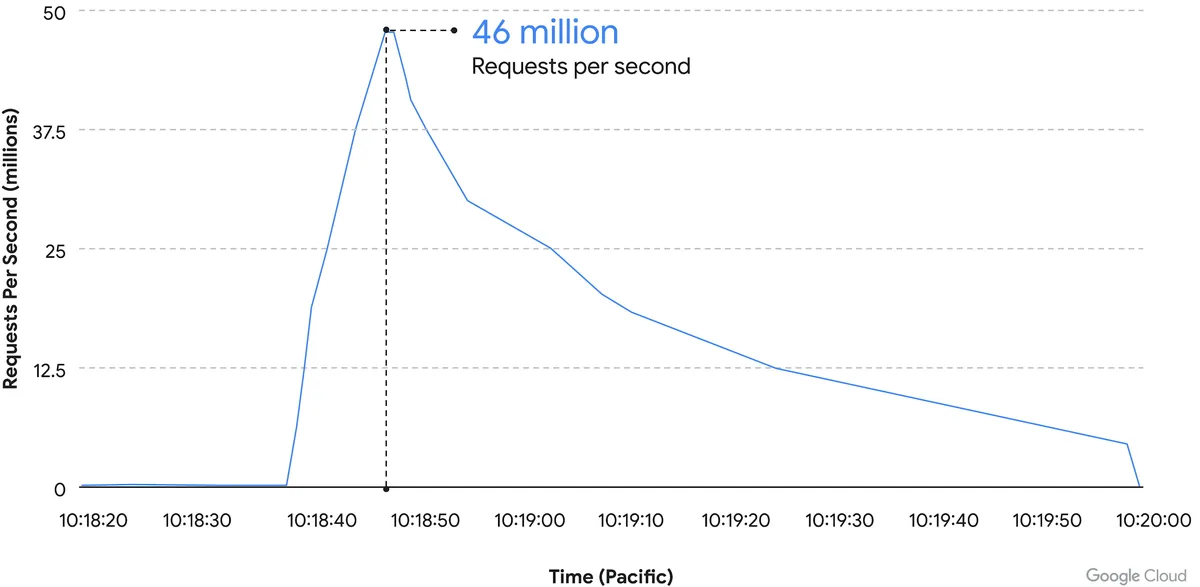
    Source: Google Cloud

    We’ve covered Distributed Denial of Service (DDoS) attacks before in this blog, but the scale of this one is mind boggling. It’s nearly twice the size of Cloudflare DDoS attack from last year around this same time, which peaked at 26 million requests per second (sent from just over 5000 devices).

    If you’re wondering where the devices used in these attacks originate from, the answer in this case is unsecured devices. Specifically compromised Mikrotik routers.

    There’s been a number of articles regarding possible compromises to the Mikrotik brand of router including one instance that involved over 200,000 devices. Many in the security space wondered if there would be a fallout from that and now, we have our answer.

    However, what’s more impressive is not the scale of this attack, but the fact that it was successfully blocked by Google.

    Botnet attacks of this nature are not rare, it’s difficult to say exactly how many attacks occur per day but it has been noted they’re on the rise since the Russian invasion of Ukraine. A botnet is essentially an assembly of compromised devices that are used to attack a target. DDoS attacks are one of the most common uses, but they’re also used for phishing, cryptomining, or to bruteforce passwords just to name a few. The largest botnet ever recorded belonged to Russian BredoLab and consisted of 30,000,000 devices.

    Would be bad actors can even purchase DDoS as a service for as little as $5 per hour which should give you an indication how prevalent and common they are as an attack vector.

    Google blocked this attack by leveraging their Cloud Armor product, a network security service directly aimed at preventing DDoS attacks. If they were looking for a powerful case study for the effectiveness of this product, we can think of no better example then effectively blocking the largest DDoS attack in history (so far).

    Part of blocking a DDoS attack is early detection. DDoS attacks ramp up, if you can detect an incoming flux of peculiar traffic to your network you can block the attack before it’s able to scale up and cripple your network.

    Besides blocking potential attacks, the other side of the coin is not becoming an unwilling participant in a botnet through a compromised device in your home or business.

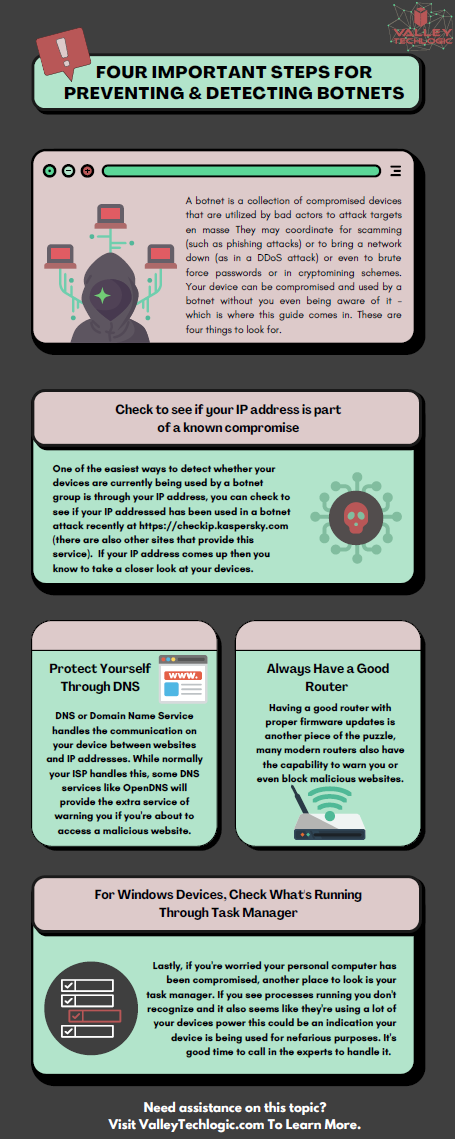
    The sinister part of it is you may not even be aware your device is compromised and it’s not just mobile devices and personal computers that can be affected, even IoT (Internet of Things) devices can be hacked. There are a few things you can do to prevent your devices from being taken over by hackers as we outline in the chart below:
    If your business needs assistance with protecting from any potential attacks or making sure your devices stay uncompromised, Valley Techlogic can help. All of our plans include robust cybersecurity protections at no additional charge, including assisting in your cyber security training goals (after all, human error is the #1 cause of data breaches). Schedule a consultation today to learn more.

    Looking for more to read? We suggest these other articles from our site.

    This article was powered by Valley Techlogic, an IT service provider in Atwater, CA. You can find more information at https://www.valleytechlogic.com/ or on Facebook at https://www.facebook.com/valleytechlogic/ . Follow us on Twitter at https://x.com/valleytechlogic.

  • Are Home Routers Safe?

    Are Home Routers Safe?

    We’re talked about router safety before, but are routers marketed to home users safe in general?

    Germany’s Fraunhofer Institute for Communication (FKIE) recently conducted a study on 127 routers from 7 different brands and the results were shocking.

    They found that 46 hadn’t had an update in over a year, and that many routers are affected by hundreds of known vulnerabilities.

    Many routers are powered by Linux, which releases security patches and updates throughout the year, but vendors are just not applying them. What’s worse is many routers are being shipped with known vulnerabilities and firmware updates that do not address them.

    With so many working from home using an unsafe router is one more risk that you shouldn’t have to take, especially with a brand-new router. As we mentioned in our last article on the topic, similarly to other technical products routers do reach an end of life period. However, this is typically not for at least 3 years.

    So which router brands performed the best in the study? They found that ASUS and Netgear routers performed better than other brands in the home market. There is also the option of going for a pro router which may have more features and better access to updates.

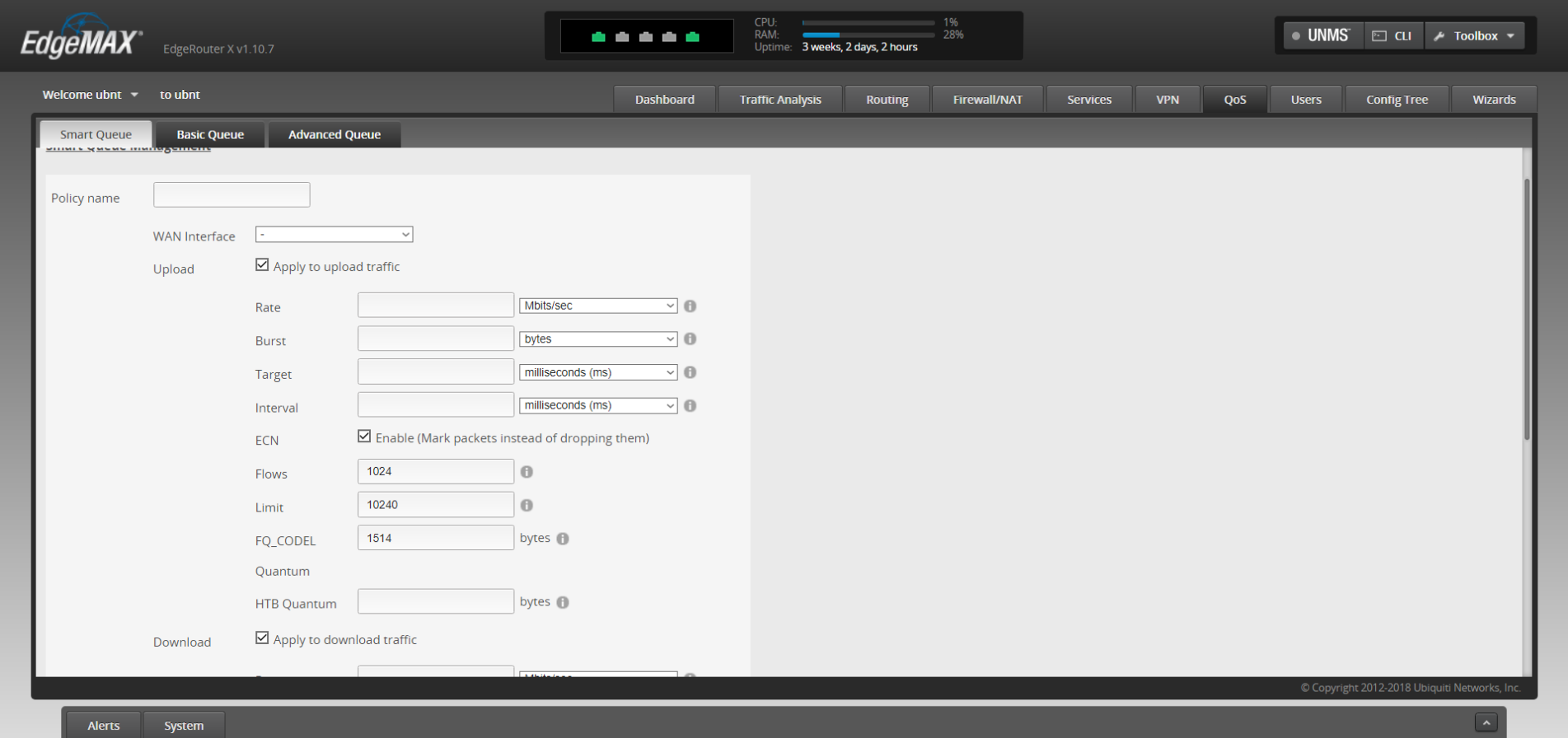
    Ubiquiti routers are one option in the pro market that we recommend. You’ll have the ability to customize quality of service rules which lets you prioritize certain kinds of traffic, like streaming video over HTTP downloads. Or it’s possible to have a guest networks so you can have a segregated LAN for guests, children or even your security cameras.

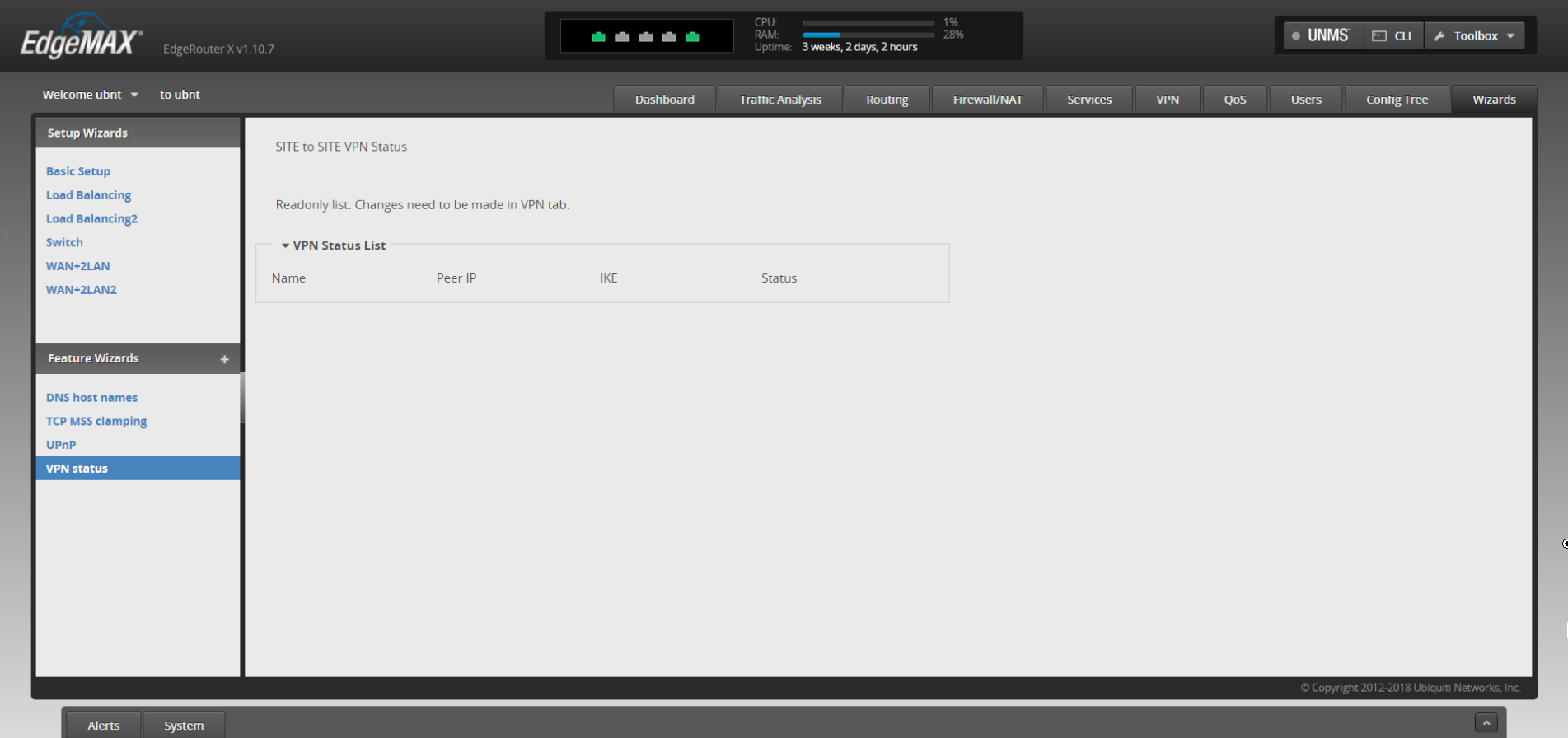
    It’s also possible to have site to site VPN, so you can access your office computer securely from home without using a third-party VPN or remote desktop service, it’s just router to router.

    There may be a sharp learning curve however when trying to implement these things yourself but updating the firmware shouldn’t be a different experience from what you’re used to from home routers.

    In general router brands need to do a much better job of securing their routers against vulnerabilities, both known and unknown – but there’s especially no excuse to leave known vulnerabilities unchecked.

    If you need assistance or have questions about routers or other technical topics, feel free to reach out! Our knowledgeable techs would be more than happy to answer your questions.

    Looking for more to read? We suggest these tech articles from the last week.

    This article was powered by Valley TechLogic, an IT provider in Atwater, CA. You can find more information at https://www.valleytechlogic.com/ or on Facebook at https://www.facebook.com/valleytechlogic/ . Follow us on Twitter at https://x.com/valleytechlogic.
    Looking for IT Services in Fresno, Modesto, Stockton, Ceres, Atwater, Merced, Visalia or Lodi? We cover all these areas and more!

  • Routers and Their Safety – How to Easily Improve Your Network

    Routers and Their Safety – How to Easily Improve Your Network

    It was recently reported by ZDnet (https://www.zdnet.com/article/unpatched-vulnerability-identified-in-79-netgear-router-models/) that 79 Netgear routers from as far back at 2007 and across 758 different firmware versions had an unpatched vulnerability that would let a hacker take over the device remotely.

    We rely on routers as our literal gateway to the internet – so how can you be sure the one you’re using is safe? Also, how can you keep it that way?

    As the above article has shown one of the ways is just to be cognizant of news regarding the devices you use. An emergency patch was issued, and a more permanent patch is planned for later this month. Even if you normally shy away from the nitty gritty technical aspects of any news cycle it’s a good idea to keep an eye out for news regarding your specific devices.

    It’s always a good idea to keep up to date on patches for all your devices. In the case of routers these normally come in the form of firmware updates.

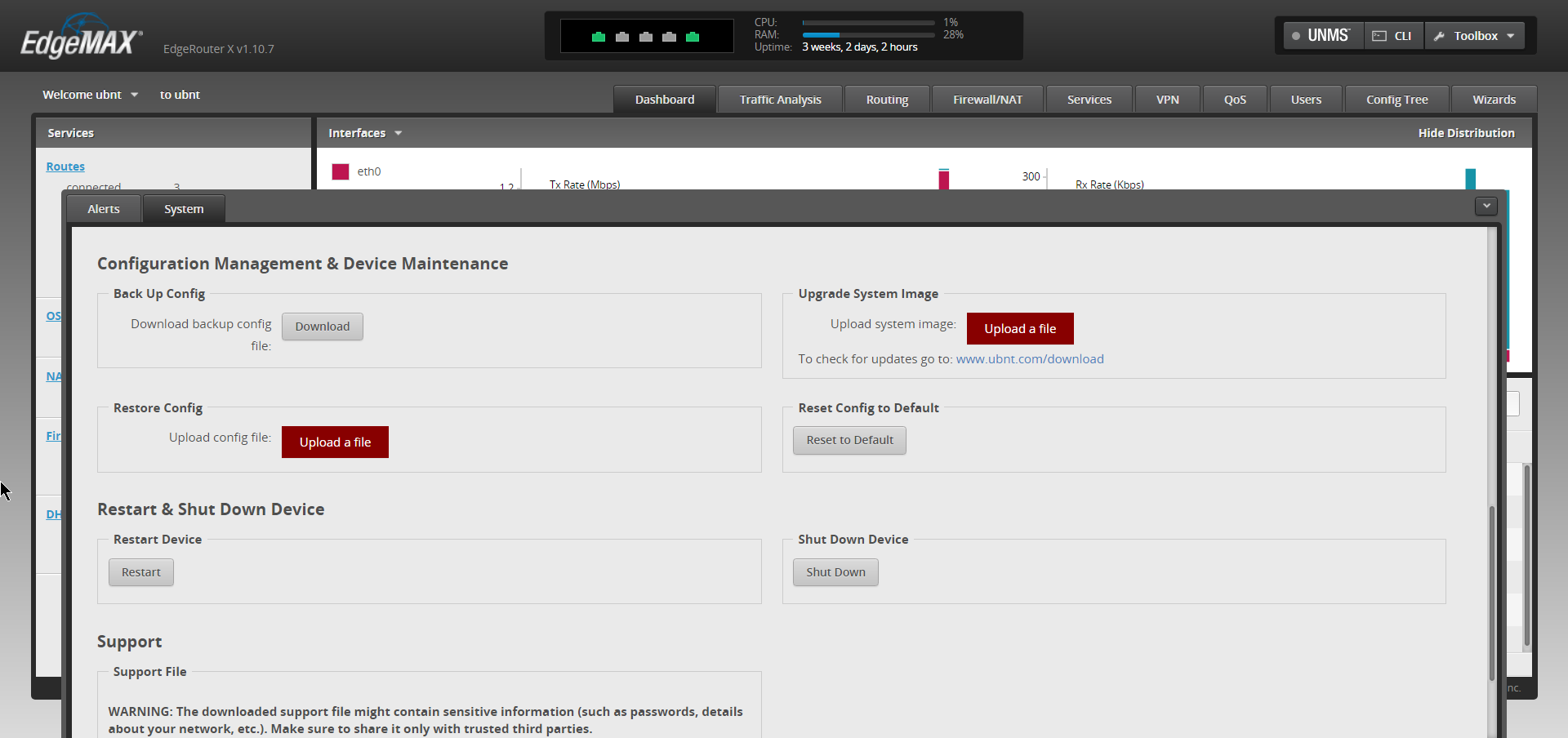
    This may seem intimidating but here are the steps for making sure your routers firmware is up to date.

    1. Type your routers IP address into the search bar of your preferred web browser to access it’s web portal. It’s usually on the box or even on the router itself, it can also be found here (https://whatsmyrouterip.com).
    2. Enter your username and password. If this is your first-time logging in again the information can usually be found on the router itself. This is also a good time to change the password!
    3. Locate the firmware or update tab. The location may vary depending on which model router you have, referring to the instructions of your router is probably a good idea.
    4. Go to your router manufacture’s website to find the firmware update file. You can usually find it by searching for your routers model on their site.
    5. Download the update and apply it through the router’s web portal. Again, the router’s web portal is found by it’s IP address.
    6. Reboot the router to ensure the update is applied.

    By following these steps, you can be sure your router has the most up to date software version and is the most protected from bugs and malware.

    What if you can’t find a firmware update for your router? If it’s a newer model there may not be one out yet, however if your router is on the older side it may have reached it’s end of life. Every brand is different, Cisco for example has a policy of supporting routers on the software side for 3 years and the hardware side for 5 years.

    Most technical companies will provide advance notice if they have a product reaching end of life. It’s a good idea to keep track of this information for all your devices, as a device that’s not receiving regular updates may be less safe to use on the internet.

    This article was powered by Valley TechLogic, an IT provider in Atwater, CA. You can find more information at https://www.valleytechlogic.com/ or on Facebook at https://www.facebook.com/valleytechlogic/ . Follow us on Twitter at https://x.com/valleytechlogic.
    Looking for IT Services in Fresno, Modesto, Stockton, Ceres, Atwater, Merced, Visalia or Lodi? We cover all these areas and more!