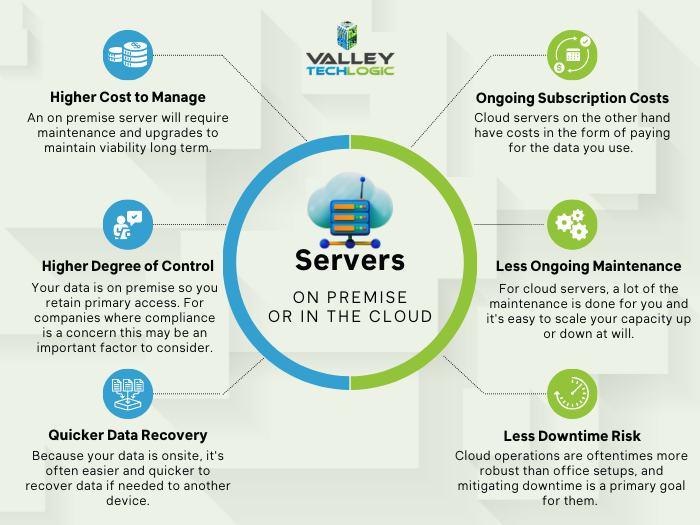
There’s no debate, when it comes to buying an on-premises server for your office it’s a big decision where cost is absolutely a major factor. The word “refurbished” sometimes causes our clients to recoil, we’ve all had bad experiences purchasing refurbished electronics that were DOA (dead on arrival) or perhaps were cosmetically or functionally dubious.
With servers it’s a little different. Typically, what we see from servers is that one was sent back to the retailer very early on into its life span. Sometimes it’s because the configuration just wasn’t right for the purchaser or because they come from a sector that has very rigorous standards for server replacement (some sectors look to replace servers every 3 years). These servers will still have a lot of life left in them and the big server manufacturers (Dell, IBM, HP etc) will reset them, add some new components, and bring them back up to practically like new conditions.
If you have a very specific goal in mind for your on-premises server and know you need the latest and greatest hardware components to meet that goal, then we definitely recommend purchasing new. If your goal is to replace an existing aging server or your needs for capacity are more minimal, refurbished is a great option.
Here are three pluses when buying a new server.
- Warranty – New servers will have the longest warranty available; we typically see 5 years being the standard.
- Customizable – When you buy a new server you get to customize the hardware and storage, with a refurbished server you’re purchasing what the manufacturer has available.
- Modern Features – A new server will have all the latest features, have the highest performance, and be compatible with modern software.
There also pluses when considering refurbished:
- Cost Saving – Of course, the first plus is the cost saving benefits. We often find a refurbished server is substantially less than a new server. You could save as much as 80% compared to buying a new server.
- Still Effective – A refurbished server will still be almost as effective as a new server, and for many of our clients there is no noticeable difference between new and refurbished for their use case.
- Still Includes a Warranty – While it won’t come with a manufacturer’s warranty, Valley Techlogic offers a 1-year warranty for clients who purchase a refurbished server through us.
Of course, there are things to consider when doing a server upgrade in general. Here is a chart with the benefits you will receive when replacing an aging on-premises server:
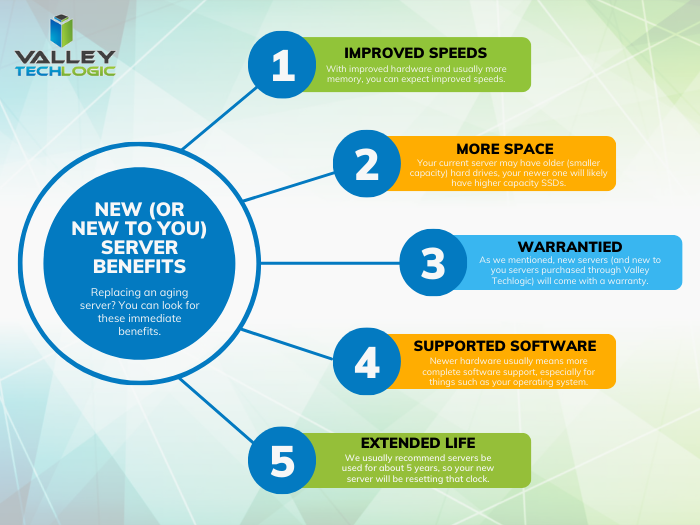 Another thing to consider is if your current server is compatible with your existing line of office software a refurbished server may be more compatible, sometimes being on the bleeding edge of technology can have its downsides especially when it comes to legacy software.
You also want to keep in mind that lead times will vary as well, refurbished servers are often more available while a server customized for your business could take longer to get. If your current server is on it’s last leg or has even died, refurbished may not be your best option but your only option.
There are a lot of things to consider when it comes to buying a server, and Valley Techlogic can help. We not only offer in-house procurement services we also can do an assessment of your specific situation and offer the best buying advice for your business. Reach out today to learn more.
Looking for more to read? We suggest these other articles from our site.
-
RAID Arrays Explained, What is it and do you need one?
-
Reddit experienced a major outage yesterday, and our 5 tips for what to say to customers when your website goes down
-
BYOD (Bring Your Own Device) in the workplace, 5 policies to have in place for 2023
-
5 Ways to Establish your Business Presence Online
This article was powered by Valley Techlogic, an IT service provider in Atwater, CA. You can find more information at https://www.valleytechlogic.com/ or on Facebook at https://www.facebook.com/valleytechlogic/ . Follow us on Twitter at https://x.com/valleytechlogic.