Tag: TechAdvisory_draft

  • Tips for Using Zoom Safely

    Tips for Using Zoom Safely

    Dogs on ZoomMost of us are finding ourselves working from home either altogether or at least part of the time, and with that change also comes conducting work meetings from home. While we all probably had at least an awareness of video client tools such as Microsoft Teams and Skype, a new contender came through and became the working from home meeting tool du jour – I’m talking of course about Zoom.

    Zoom has added 2.22 million users so far in 2020 (the previous year they gained 1.99 million for the entire year). Unfortunately, with such unprecedent growth also comes growing pains in the form of unauthorized users jumping onto calls and even cyber security issues. So how can you use Zoom safely, and what led to it becoming such a popular option in the first place?

    Unlike many of its competitors Zoom allows you to see multiple participants at once, rather than one at a time while they’re talking. It also has the unique functionality of allowing users to join from a browser which lets participants avoid downloading the client if they don’t wish to or are unable to.

    You can also host an unlimited number of meetings with up to 100 participants with only the free client (up to 500 participants and concurrent meetings being paid features). Screensharing is also possible and a nice feature.

    With that said there have been some draw backs, call quality may be somewhat unpredictable compared to more seasoned products in this arena (although I think it would suffice to say they’ve all had some troubles in these heretofore unheard-of times). Users have also reported issues with scheduling and adding meetings to their calendars. The biggest issues though, have been in the avenue of security.

    Starting with so called “Zoom Bombers” – which have been one of the most publicized issues – it is described as having uninvited users join your private video call and start spamming unsavory materials either in the chat or via voice and/or video.

    Many of these intruders gained access via businesses posting the video chat link to their public social media accounts. The best method of protection against this by far is adding a password to your Zoom chats and not posting them publicly.

    It’s also come to light that there are some critical cyber security issues with Zoom, especially regarding user data.  500,000 Zoom user accounts and passwords were recently found for sale on the dark web due to a data breach by a cyber security firm.

    This serves as a good reminder to keep your passwords varied, change them periodically and use a password manager. You can check the whimsically named site https://haveibeenpwned.com/ to see if you’ve been a victim to this breach or any others.

    Suffice to say despite its faults Zoom is probably here to stay for the foreseeable future, especially as the country’s workforce continues to work from home. Taking some necessary steps will keep your work meetings intruder free and safe.

    This article was powered by Valley TechLogic, an IT provider in Atwater, CA. You can find more information at https://www.valleytechlogic.com/ or on Facebook at https://www.facebook.com/valleytechlogic/ . Follow us on X at https://x.com/valleytechlogic.


  • 10 Tips for Staying Safe Online When Working from Home

    Woman working at desk

    In light of the ongoing health crisis many of us are placed in the unusual position of working from home. While you may have concerns about keeping up your usual level of productivity and being able to communicate effectively with your coworkers while working in separate places there may be one issue flying under the radar, how do you stay safe online while working from home?

    It’s unfortunately not a given, in many work places you have an IT team that maintains (or should!) a high level of security for your office computers and network. These same measures are not in place on your home network or on your home computer.

    With so many of us working from home hackers may be seeing this as an opportunity to access your company’s private data via unsecured personal computers and home networks. These 10 tips will prevent this from happening.

    1. Don’t reuse passwords. If you’re able to choose your own work passwords it’s important they’re varied, if hackers get access to one of your accounts and you use the same password for everything then they have access to all of them.
    2. Practice good password safety. It’s imperative that passwords for your work accounts follow good password safety practices. Hackers may be able to use your work accounts to access the rest of your company’s data. If you set your own password make sure it follows the rules of 16 characters in length, mixing characters and avoiding dictionary words if possible.
      Also destroy any written copies of your password, real life phishing exists! Use a password manager like LastPass instead.
    3. Secure your home network. It’s shocking how many home networks don’t have a password at all, or if they do it’s a single word with no mixed characters or even your router’s default password.
      This is not a good idea! Hackers can use your network to access your home machine, and from there it may be game over. Like the tip above practice good password safety when it comes to your router’s password.
    4. Enable 2-factor authentication if it’s available to you. Many laptops these days feature security measures such as facial recognition or fingerprint readers that will help keep your device safe. Don’t forget to enable the same feature on your phone!
    5. Speaking of 2-factor authentication. You may find that your workplace uses 2-factor authentication to secure the applications you use on a daily basis to do your job, if they don’t bring it up! This will further prevent people from accessing your company data.
    6. Install updates. At work your IT team is probably installing updates for you, on your home device you’re responsible for doing so. In general, you shouldn’t be ignoring updates but while accessing your company accounts it’s even more important.
    7. Practice good online safety. The security measures enabled on your company network may prevent a total takeover in the case of someone accidentally downloading malware, this is not so at home.
      Don’t open attachments from senders you don’t know. Be careful which websites you visit, and always have your firewall enabled!
    8. Be careful with public networks. During this time, it might be tempting to get out and at least work outside at a café or somewhere with public Wi-Fi. However, this public Wi-Fi may leave your machine vulnerable, especially if you’re not practicing some of the safety measures above.
    9. Make sure your work is backed up. You’ll probably need some help from your IT team for this one but ensure the work you’re doing is backed up to your office servers or saved in some way. Recovering lost data from your home machine alone may be more difficult.
    10. Last but not least, use an anti-virus software. Find out which anti-virus software your company IT team recommends, or if you need a recommendation reach out to us. It’s extremely important for staying safe online.

    We hope these tips help. For those not working remotely or for tips on staying safe while in public right now, we recommend referring to the CDC Website for the most up to date information: https://www.cdc.gov/coronavirus/2019-ncov/index.html

    This article was powered by Valley TechLogic, an IT provider in Atwater, CA. You can visit us on Facebook at https://www.facebook.com/valleytechlogic/ . Follow us on Twitter at https://twitter.com/valleytechlogic.

  • 2020 is Here – Here’s your Technology and Cybersecurity Forecast

    2020 is Here – Here’s your Technology and Cybersecurity Forecast

    It’s 2020 and the start of a new decade. Technology has changed a lot since the beginning of the last decade. Inexpensive computer options like Raspberry Pi and Chromebook became available, the first iPad was released.

    Computing also got a lot faster, the first 8 core processors were released, solid state drives became a lot more widespread, and graphic cards reached new heights for computer gamers shattering the previously achievable FPS (frames per second) and ushering in a new era of high-end gaming.

    The previous decade also brought new records on cybersecurity issues but unfortunately not in a positive light. Malware became more sophisticated and harder to track, ransomware became widespread (it’s estimated it cost the US $7.5 billion in 2019). So, what’s on the horizon for 2020 and beyond in the realms of technology and cybersecurity?

    As wearable technology advances increase, we will see even more of it aimed at integrating tech with the world around us. Augmented reality devices will probably become more accessible and affordable. Sensor technology will continue to increase which will have a positive effect on healthcare and our ability to detect health scares before they advance to something serious (see watches now aimed at keeping track of our blood pressure and heart rate).

    Needless to say it will be something to look out for as our society becomes more dependent on the IoT (Internet of Things), for good and for bad.

    What about the field of cybersecurity? While it’s probably true hackers won’t stop trying to gain access to our private information – especially as it pertains to our financials – even the most layman user of technology is becoming keen to protecting their privacy.

    Consumers will demand corporations be made accountable for leaks of private data and businesses not wanting to shoulder the financial burden of an attack (or the bad press) will utilize the tools available to thwart would be bad actors in their tracks.

    On that front we can help. At Valley Techlogic we are on a mission to have the most comprehensive and effective cybersecurity tools available to protect our clients. We also offer 24/7 help desk so no matter when you have a problem, we’re on it.

    If you’re in the Central Valley or surrounding area reach out today for a free security audit and begin this new decade tackling your business’s technology needs.

    This article was powered by Valley TechLogic, an IT provider in Atwater, CA. You can visit us on Facebook at https://www.facebook.com/valleytechlogic/ . Follow us on Twitter at https://twitter.com/valleytechlogic.

  • Windows 7 End of Life: Upgrade your existing machine or start fresh?

    A laptop upgraded windows.January 14th, 2020 looms ever closer and you may be scrambling for a solution to one problem: Does it make sense to upgrade your existing machine or purchase a new one?

    I can’t say for certain which one is the better option for you or your business, but one thing is for certain, remaining on Windows 7 after support ends is a dangerously ill-advised idea.

    Windows 10 released July 29, 2015, so chances are if your machine is still running Windows 7 it’s older than the 3 years I personally recommend a machine be replaced by. We know this is not always feasible so here are the minimum specs we recommend for an upgrade to Windows 10:

    • In my experience your machine will need at least 8 GBs of ram to run Windows 10 relatively smoothly, but ideally it will have at least 16 GBs at this point in time so it has enough power to run the operating system and all the processes you may use day to day.
      Something else to consider is whether your ram is soldered (very common in laptops), if it is an upgrade will not be possible.
    • Your CPU is something else to consider when upgrading or buying, here at Valley TechLogic we recommend Intel CPU’s and more specifically at least Core i-5 or Core i-7, both will run Windows 10 effectively but Core i-7 will be much more future proof.
    • A Solid State Drive, many older machines still use highly failure prone mechanical hard drives. A solid state drive will be less prone to hardware failure and it loads much faster. On average solid state drives load 5 to 20 times faster than a mechanical drive.
    • You may also need to purchase the Windows 10 license, at the present time that will run you $199.99 for a Pro license (what we recommend in a business setting).
    • There also may be a cost to having these upgrades performed for you if you don’t currently have an all encompassing Managed IT Plan in place (learn more here). This cost can really add up if you own a business with more than one outdated machine.

    Depending on your situation the costs associated with upgrading an existing machine may not make sense in the long run. Purchasing a new machine is an investment, and when done thoughtfully it will last many years into the future.

    It’s also possible to transfer your existing computer files from the old machine to the new one – even system settings – making the switch painless.

    Here at Valley Techlogic we work with our customers to come up with a solution that makes sense for their business, whether they’re upgrading existing computers with new hardware or helping them purchase a new one through our affiliates.

    We work to minimize downtime and through our comprehensive Managed IT Department plan upgrading is a covered project. If you’re in the Central Valley reach out today to see if we can help you with this end of life event, or any other IT projects you may have coming up.

    This article was powered by Valley TechLogic, an IT provider in Atwater, CA. You can visit us on Facebook at https://www.facebook.com/valleytechlogic/ . Follow us on Twitter at https://www.twitter.com/valleytechlogic .

  • Window’s 7 EOL of Life Is Coming Soon, But There’s Still Time to Prepare

    14th on a Calendar
    The January 14th is almost here.

    January 14, 2020 will be here in less than three short months, and there are probably many out there that haven’t prepared to make the switch off Windows 7 (or Windows Server 2008 which also ends support on the same day). In fact, an estimated 32.8% of all PCs running Windows are still running Windows 7.

    We know it can seem like a hassle to upgrade and you may be thinking what’s the harm in leaving my computer as is? We’d like to explain why that’s a bad idea and simple steps you can take to make the migration off Windows 7 easier.

    If you stay on Windows 7 after support ends your PC will still work, but it will be more vulnerable to malware and other security risks. Regular Windows updates provide crucial protection to exploits that may especially exploit vulnerabilities in your operating system or programs run by that operating system.

    Hackers may also choose to target those who have decided to stay with Windows 7 after January 14th. You may find yourself up creek without a paddle if something happens to your PC after Windows support ends.

    It doesn’t have to be this way though, making the switch from Windows 7 will probably not be as difficult as you may be expecting. In fact, a Windows 7 client upgrade may take an hour – or less – if your computer has a solid state drive (SSD).

    If you have an older mechanical drive it may take a bit longer, but it is probably not the multi-day event you may have been expecting.

    You shouldn’t attempt an update from Windows 7 to Windows 10 without a backup, and this is an excellent time to review your backup plan in general (especially if you don’t have one!). You most likely will not lose any files though and should find yourself up and running the same day with a brand new and more secure operating system.

    We’d like to take the time to note that migration from Windows 2008 server to newer editions of Windows server is a more complicated process that should not be attempted without professional help.

    If you own or work for a business in Central California, Valley TechLogic can assist you with this task. Reach out to us today at 209-357-3121.

    This article was powered by Valley TechLogic, an IT provider in Atwater, CA. You can also reach us on Facebook at https://www.facebook.com/valleytechlogic/ or on Twitter at https://www.twitter.com/valleytechlogic.

  • Cybersecurity Facts in 2019

    NCAM Banner
    October is National Cyber Security Awareness Month

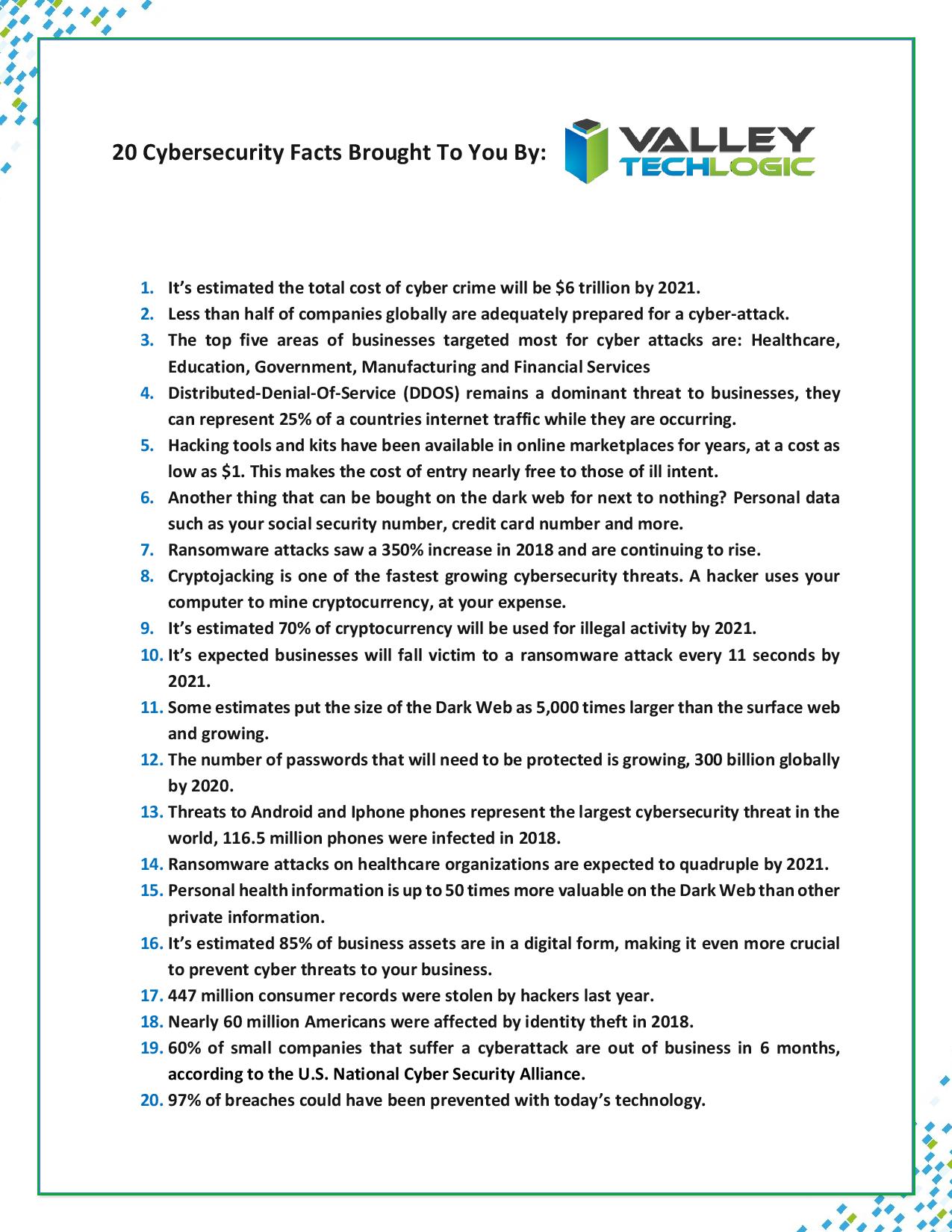
    Cybersecurity Awareness Month Is Almost Over, Here Are 20 Cybersecurity Facts Everyone Should Know

    October is Cybersecurity Awareness month, the theme this year is Own IT. Secure IT. Protect IT. Continuing from our article earlier this month we’d like to give our readers 20 facts that underscore just how crucial it is to do everything you can to be safe online.

    For more information on how to do that check out the official website for Cybersecurity Awareness Month from the Department of Homeland Security: https://niccs.us-cert.gov/national-cybersecurity-awareness-month-2019 . It has guides on being safe on social media, what to do in the event of identity theft and more.

    Cyber Security Facts Page
    20 Cybersecurity Facts


    This article was powered by Valley TechLogic, an IT provider in Atwater, CA. You can find more information at https://www.valleytechlogic.com/ or on Facebook at https://www.facebook.com/valleytechlogic/ . Follow us on Twitter at https://twitter.com/valleytechlogic .

    Sources and for more information: https://tinyurl.com/yxvsa28a , https://tinyurl.com/y5q79x7f , https://tinyurl.com/y2t4j2jq
  • October Is National Cybersecurity Awareness Month

    October Is National Cybersecurity Awareness Month

    [img src=”/wp-content/uploads/2019/10/blog_191004_05.jpg” class=”aligncenter”]

    Every October National Cybersecurity Awareness Month (NCAM) is held to promote awareness of cybersecurity issues and allow government and other agencies to provide resources to the general public so they may be safer and more secure online.

    The theme this year is Own IT. Secure IT. Protect IT. and the focus will be on key areas including citizen privacy, consumer devices, and ecommerce security.

    In our own effort we will be covering topics related to cybersecurity and promoting resources we use to keep our clients data secure. To start with here is the homeland security website on this topic: https://niccs.us-cert.gov/national-cybersecurity-awareness-month-2019

    It covers in depth topics on online privacy, multi factor authentication, cybersecurity while traveling and more. There’s even a trivia game you can use in your organization as a fun and accessible way to introduce cybersecurity tips to your employees.

    Cybersecurity can be an intimidating topic, especially from a business standpoint. It’s important to do what you can to start implementing measures as soon as possible. Here is the checklist we personally use as a kicking off point to get you started.

    [img src=”/wp-content/uploads/2019/10/Untitled-Extract-Pages-page-001_01.jpg” class=”aligncenter”]

    This article was powered by Valley TechLogic, an IT provider in Atwater, CA. You can find more information at https://www.valleytechlogic.com/ or on Facebook at https://www.facebook.com/valleytechlogic/ . Follow us on Twitter at https://twitter.com/valleytechlogic.

  • 5 Things your employees need to do to combat cyberattacks

    5 Things your employees need to do to combat cyberattacks

    The common perception around cybersecurity is that IT departments are solely responsible for it. As such, it’s commonly considered a technical and administrative issue that employees play little or no part in. Unfortunately, its this perception that’s leaving so many businesses exposed to cyberattacks.

    Almost all data breaches start with a social engineering attack, typically delivered by email or over social media, targeted towards employees. Anyone can be a target, and all these attacks have something in common — rather than exploiting vulnerabilities in technology itself, they exploit human ignorance and unpreparedness. That’s why employees must develop good security habits, like the ones below.

    #1. Keep software up to date

    Although social engineering presents by far the biggest threat, outdated software gives hackers an easy way to infiltrate business systems. For example, a lot of ransomware attacks exploit outdated operating systems. Other attacks deliberately target victims who have failed to install a critical security update.

    There’s no denying that regular updates can be irritating, especially when you receive constant notifications to update whenever you open an app. While many modern apps keep up to date automatically, some require confirmation and additional steps. Employees should always be ready to install these updates to reduce the likelihood of cyberattacks.

    #2. Create stronger passwords

    The average US email address is associated with 130 online accounts ranging from internet banking to social media to online shopping and more. That’s a whole lot of login credentials to look after, so it’s perhaps hardly surprising that most people just use the same password for everything. Recycling passwords leaves you with many single points of failure. What’s more, a weak password is also easy to hack using a brute force attack, which guesses all possible character combinations until it finds the right one.

    Employees should be adequately trained in the use of passwords. This means they need to be setting longer and more complex passwords that contain a mixture of letters, numbers, and symbols. They should also enable multifactor authentication to add an extra layer of protection on your accounts in the form of temporary verification codes sent to your phone or biometric authentication (e.g., fingerprint scans and facial recognition).

    #3. Back up data regularly

    It has become commonplace for employees to work from home or on the move, typically using their own devices rather than those provided by the company. One of the biggest challenges of workforce mobility is that you can easily end up with important business data spread out across a huge range of different devices, therefore making it vulnerable to loss or theft.

    No one should ever underestimate the importance of backing up their data, and employees need to be aware of your backup and disaster recovery policy. If they’re not, it’s not worth the paper it’s printed on. Another option is to have your employees use cloud-hosted apps where all data is stored online and kept in a secure off-site facility.

    #4. Identify phishing scams

    Given the fact that most cyber incidents stem from human error, untrained employees are usually the weakest link when it comes to information security and compliance. This also means your brand’s reputation rests on your employees’ shoulders. Even a seemingly minor mistake, such as downloading attachments or clicking on suspicious links in an email, can lead to a far more serious incident. Regularly training employees to be critical of every website or email they encounter online can prevent a slew of cyberattacks from spreading in the first place.

    #5. Follow security policies

    Security policies are worth nothing if they’re not thoroughly understood by everyone in your organization and enforced as necessary. Your security policies should cover every digital asset and the employees who use them. It’s something everyone on your team needs to be fully aware of and onboard with.

    By following security policies to a T, employees will know exactly what constitutes the acceptable use of your company’s information resources, and they’ll know what to do during a cybersecurity incident. This helps create a culture of accountability and turn your employees from the weakest link into the first and last line of defense.

    Valley Techlogic provides network security services, cutting-edge solutions, and expert advice to help your business fend off the latest threats. Call us today to keep your most critical assets safe and sound.

  • 5 Key takeaways from Marriott’s massive data breach

    5 Key takeaways from Marriott’s massive data breach

    In November 2018, global hotel chain Marriott disclosed one of the biggest data breaches of all time where the records of half a billion customers were stolen. The misappropriated data included personally identifiable information, payment card details, and passport numbers. Aside from the immense scope of the attack, what also made it so notable was the fact that Marriott took three months to disclose the breach. Here’s what business owners in Atwater should learn from the event:

    #1. Don’t be fooled again
    Shortly following its acquisition by Marriott in 2015, Starwood reported a relatively minor data breach that targeted its point-of-sale systems used in various shops and restaurants. Although it remains unknown whether the two breaches were connected, what it does demonstrate is that victims of cybercrime can be targeted more than once.

    Hackers often target the same companies because they know them to be easy targets. However, some smaller attacks are actually carried out as smokescreens to draw attention away from more severe breaches.

    #2. Traditional security measures still play a role
    One of the first things you often hear from technology vendors and cybersecurity experts (including us!) after a severe breach is that victims should hurry to modernize their security infrastructures. That’s usually good advice considering how often hackers rely on exploiting old or unsupported systems. However, this doesn’t tell the whole story.

    A primarily proactive approach towards information security should still be accompanied by more traditional, reactive measures. Although things like training and next-generation antivirus are critical, conventional firewalls still play a role.

    #3. Mergers and acquisitions present serious technical challenges
    Mergers and acquisitions come with enormous technical challenges. These bring together two starkly different infrastructures, which inevitably creates incompatibility issues and information silos. During the process, security often ends up being compromised.

    For example, following the $13 billion purchase of Starwood, Marriott found itself needing to merge disparate reservation systems and loyalty programs with data stored in multiple databases. That’s why data migrations — whether large and small — need to proper planning and expert guidance.

    #4. Encryption keys should always be kept away from encrypted data
    The precise number of records compromised in the Marriott data breach remains unknown to this day and the approximation has been revised several times. The main reason for this is that the hackers encrypted the data they gained access to before misappropriating it. It was extremely difficult to identify which records had been stolen, since Marriott’s data loss prevention system couldn’t pick them up. To guard against such incidents, it’s necessary to store encryption keys on a network separate from the data itself.

    #5. Rapid detection and response planning are critical
    Because of the catastrophic data breach of 2018 and their failure to disclose it immediately, Marriott is now facing multiple class-action lawsuits. Breach notification laws require that companies disclose incidents within a given time frame, which is typically 45 days. They are also legally obligated to maintain an up-to-date and documented security policy and to take all reasonable precautions to protect customer data in the first place.

    In the end, the Marriott data breach should serve as a wake-up call to every organization, regardless of its size or industry, that a multilayered approach to information security is essential in this day and age. Everything from preventative measures to response procedures and 24/7 monitoring solutions should be included.

    Valley Techlogic serves businesses in Central California with dependable technology advice and solutions that help boost information security, enhance scalability, and reduce risk. Call us today to get the support you need.

  • 6 Fantastic things a great MSP can do for your business

    6 Fantastic things a great MSP can do for your business

    With businesses spending between 1.5 and 7.2 percent of their yearly revenues on technology, leaders are always looking for ways to improve cost efficiency and ensure the success of their digital transformation initiatives. But, with limited budgets and technical expertise being in short supply, it’s often a difficult task. Partnering with the right managed services provider (MSP) can overcome these challenges and maximize your investment in IT.

    #1. Boost your adaptability to changes in the market

    Markets are more volatile than ever due to the rapid evolution of modern technology and the changing customer habits that come with it. The fact that many brands, some of which were once household names, have vanished is testament to how failure to innovate quickly leads to a hasty demise. The shift towards technology as a service allows businesses to adapt and innovate faster instead of trying to capitalize on opportunities long after their competitors have taken over.

    #2. Scale with demand to budget more efficiently

    In-house IT departments can be incredibly expensive to maintain, and the increasing demands often turn into an overwhelming burden. However, that’s not to say you should do away with in-house IT entirely. By partnering with an MSP, you can scale back and forth with demand, without having to worry about enrolling new full-time employees who might end up spending long periods with nothing to do. Outsourcing also lets you tap into new computing resources as and when you need them.

    #3. Empower your workforce with greater mobility

    Flexible working environments are the new norm in a world where employees have the freedom to work from home or elsewhere. The cloud empowers workforces with greater mobility and flexibility while allowing businesses to reach out to talent from around the world. In fact, an increasing number of startups are entirely location independent. With the right technology partner, you can reduce your office space and hardware requirements and boost productivity by letting your staff work in an environment that suits them best.

    #4. Access proven, cutting-edge technology

    A computer quickly becomes obsolete from the moment you walk out of the store with it. While that might be an exaggeration, there’s no denying that businesses need access to the newest hardware to keep up with their competitors. Combined with regular maintenance, the constant need to upgrade presents a huge cost burden on companies. However, with an MSP, you effectively rent your computing resources, which are normally hosted in the cloud. That means no more unpredictable costs and no need to worry about upgrades.

    #5. Add value to your entire business

    The right technology can add value to every facet of your business. Marketing teams can use customer relationship management to better keep track of customer needs and communicate more effectively. Support teams can offer better service by leveraging collaborative support platforms. Payroll teams can use automation to prevent discrepancies. Human resources can reach out to the best talent through online collaboration platforms. Employees can co-author documents in the cloud. The list goes on. All these things improve efficiency, therefore adding value to your business.

    #6. Meet and surpass your compliance obligations

    The demands of data security, privacy, and compliance places a heavy burden on businesses, and things aren’t getting any easier as reliance on technology increases. Security expertise is also difficult to come by, with millions of unfilled positions around the world. Partnering with an MSP can do much more than add an external layer of protection to your network with remote monitoring and management. It can also help you choose compliant vendors and services and decrease your level of risk to turn the burdens of compliance and security into a competitive advantage.

    Valley Techlogic is Central California’s one-stop shop for all your business technology needs. We’re a leading MSP that’s dedicated to optimizing your IT. Call us today to start getting the solutions and support you need to grow your organization.