Category: Cyber Security

  • Social engineering scams on Facebook, LinkedIn and Twitter are increasing: what to look out for

    Social engineering scams on Facebook, LinkedIn and Twitter are increasing: what to look out for

    Some fraudsters have abandoned the awkward, obvious emails of the past decade in favor of a new gambit, this one focus on social media. Today, they operate where your business already lives: in your LinkedIn inbox, your Facebook admin panel, and your Twitter DMs. The scams are polished, convincing, and growing fast.

    Social engineering attacks rely on manipulation rather than malware. Instead of breaking through your firewall, criminals exploit the one vulnerability no software patch can fix: human trust. In 2024 and into 2025, that manipulation has migrated aggressively onto social media platforms, targeting professionals, business owners, and marketing teams who use these networks as core business tools.

    Understanding how these scams are constructed is the first line of defense. Here is a closer look at what is circulating on each major platform and what warning signs to watch for.

    LinkedIn: fake job offers and recruiter impersonation

    First, The fake job offer scam.One of the fastest-growing threat vectors on LinkedIn involves fraudulent job opportunities delivered via connection requests and direct messages. Attackers create convincing recruiter profiles, complete with employment histories, endorsements, and professional headshots, before reaching out to targets with lucrative-sounding roles at legitimate companies.

    Once contact is established, the “recruiter” moves the conversation off-platform to WhatsApp or email and eventually asks for sensitive information under the guise of onboarding: copies of identification documents, bank account details for direct deposit setup, or payment for background checks and equipment deposits. In some cases, victims are sent fraudulent checks and asked to forward a portion of the funds before the check bounces.

    Luckily there are a few common red flags you can look for to spot this one, such as:

    • The recruiter’s profile was created recently and has few connections or activity.
    • The job offer arrives unsolicited with an unusually high salary and vague responsibilities.

    Also, a more targeted variant involves attackers creating near-duplicate profiles of a company’s senior executives or trusted colleagues. The impersonator connects with employees and then requests urgent wire transfers, gift card purchases, or credential resets, exploiting the authority of the mimicked identity. Because the message arrives through LinkedIn rather than email, many recipients lower their guard.

    LinkedIn has acknowledged the scale of fake profile activity on its platform and introduced detection tools, but sophisticated actors continue to slip through. Treat any out-of-character financial or credential request from a connection with immediate skepticism, regardless of how authentic the profile appears.

    Facebook: business account threats and fake admin messages

    Businesses running Facebook Pages and advertising accounts have become prime targets for a scam that impersonates Meta support. The attack typically begins with a message, often arriving via Messenger or a business inbox, warning that the page violates community standards and faces imminent suspension. Targets are urged to click a link and “verify” their account to avoid action.

    Those links lead to convincing phishing pages that harvest Facebook credentials, two-factor authentication codes, and in some cases payment information linked to the ad account. Once attackers gain access, they drain advertising budgets, lock out legitimate admins, or sell the established account to other bad actors.

    Common red flags for this one are:

    • Urgent language around page violations sent through Messenger rather than through Meta’s official support system.
    • Links that route to domains that are not facebook.com or meta.com.

    A related tactic involves fraudulent invitations to become a page or group administrator. Business owners receive what appears to be a legitimate Facebook notification asking them to accept an admin role for a page they do not recognize. Accepting grants the attacker reciprocal admin access to the victim’s own pages by exploiting Facebook’s cross-admin trust structure. The scammer can then post spam, remove the original owner, or use the page for further fraud.

    Meta will never request login credentials or payment information through Messenger. Any urgent policy warning that arrives as a direct message, rather than through the official Meta Business Suite notification system, should be treated as fraudulent until verified directly through Meta’s help center.

    Twitter (X): impersonation, verification badge scams, and crypto fraud

    Since the overhaul of the platform’s verification program, bad actors have exploited user confusion around the blue checkmark by sending direct messages claiming the recipient’s account requires action to maintain its verified status or avoid suspension. These messages direct targets to external sites that steal credentials or payment details.

    A parallel scam targets business accounts with messages purporting to be from the platform’s trust and safety team, warning of copyright violations or policy breaches and requesting immediate login through a provided link. The urgency and official-sounding language make these messages disproportionately effective against small business owners managing their own accounts.

    Again, common red flags are:

    • Direct messages claiming to be from platform support, since X does not use DMs for official account actions
    • Requests to “re-verify” through a third-party link rather than within the native app settings

     Also, we want to be clear, do not overlook email: phishing remains the dominant threat and it’s also always constantly evolving.

    While social media scams command growing attention, it would be a significant mistake to treat email phishing as a solved problem. Email-based attacks remain by far the most prevalent form of social engineering, accounting for the majority of successful business data breaches year after year. Modern phishing emails have evolved far beyond the broken-English missives of the early 2000s: today’s attempts accurately mimic bank correspondence, software license renewal notices, internal HR communications, and delivery notifications, often using the target’s actual name, employer, and recent activity pulled from public or previously compromised data.

    Business email compromise, a targeted phishing variant in which attackers impersonate executives or vendors to authorize fraudulent payments, cost U.S. businesses billions of dollars annually. The threat is consistent, scalable, and disproportionately effective against organizations that have not established clear verification procedures for financial requests.

    Staff who know to question a suspicious LinkedIn message may still instinctively trust an email that appears to come from their bank or their own CEO. Awareness training must address both channels with equal rigor.

    A local managed service provider like Valley Techlogic is your first line of defense.

    Recognizing individual scam tactics is valuable, but the threat landscape shifts faster than most business owners can track. A local managed service provider like us brings dedicated security expertise, advanced email filtering and phishing simulation tools, and ongoing employee awareness training that keeps your team current with the latest social engineering techniques crossing every channel, from LinkedIn inboxes to email spoofing campaigns. We can also establish clear internal protocols for verifying unusual requests, configure multi-factor authentication across your accounts, and monitor for credential exposure before attackers can exploit it. Partnering with a trusted local provider means that when the next convincing scam lands in your inbox or your social feed, your business has both the technology and the training to recognize it before it does damage. Learn more today with a consultation.

  • Government backed cybersecurity agency CISA down to just 38% of its optimal staffing levels after funding cuts, what it means for your business

    Government backed cybersecurity agency CISA down to just 38% of its optimal staffing levels after funding cuts, what it means for your business

    CISA which stands for Cybersecurity & Infrastructure Security Agency is a federally recognized and funded cybersecurity agency that works to protect the United States from cyber threats, their mission statement reads:


    We lead the national effort to understand, manage, and reduce risk to our cyber and physical infrastructure.”


    CISA collects, analyzes, and shares threat intelligence so organizations can act before damage occurs. This includes vulnerability alerts, Known Exploited Vulnerabilities (KEV) catalog updates, and joint advisories with partners like the FBI and NSA. The goal is simple: shorten the time between “threat discovered” and “defenses updated.”


    Now due to federal cuts initiated by the Trump administration they’re operating at just 38% of their necessary staffing levels, these cuts included staff that worked under programs such as the counter-ransomware initiative and one that oversaw efforts to promote secure software development. Many of their employees were also reassigned to other agencies such as the Department of Homeland Security as funding and efforts are shifted to the administration’s immigration crackdowns.


    CISA has also been without a permanent director since Trump took office, leaving the agency both without the necessary manpower and crucial leadership guidance. While the agency continues to exist, it’s hard to ignore that these cuts may have a real time effect on our country’s national security. Business owners in particular should be wary of an increase in potential threat as bad actors may take advantage of this gap.


    Cuts to government programs such as these can trickle down to business owners, the effects will not be immediate but sustained cuts to CISA can quietly increase cyber risk, slow federal support, and shift more responsibility (and cost) onto businesses and their MSPs. These are four trickle down affects you should be aware of:

    1. Slower and shallower threat intelligence

    CISA is one of the primary pipes pushing timely threat intelligence to the private sector. If funding drops, you often see:


    • Fewer or slower vulnerability advisories
    • Less frequent updates to the Known Exploited Vulnerabilities catalog
    • Reduced joint analysis with FBI and NSA
    • Less sector-specific guidance

    Business impact:
    Owners and MSPs get less early warning. That increases dwell time for attackers and raises breach probability over time.


    2. Reduced free security services

    Many organizations (including SMBs, schools, local governments, and some private entities) rely on CISA’s no-cost services such as:

    • Cyber Hygiene scanning
    • Vulnerability disclosure coordination
    • Remote penetration testing (for eligible businesses)
    • Phishing campaign assessments

    If budgets tighten, these programs are often first on the chopping block or become capacity-constrained, leaving you optionless when you need their support.


    Business impact:

    • Fewer free scans available
    • Longer wait times
    • More reliance on paid security assessments
    • MSPs must fill the gap

    3. Weaker critical infrastructure resilience

    CISA plays a coordination role across sectors like healthcare, energy, water, and transportation. Funding cuts can mean:

    • Fewer field advisors
    • Less regional engagement
    • Reduced ICS/OT security work
    • Slower cross-sector coordination

    Business impact:

    Even if you think of yours as “just a small business,” you depend on these sectors. Increased fragility upstream can mean:

    • More outages
    • More supply chain disruptions
    • Higher cyber insurance pressure
    • More third-party risk exposure

    This is the second-order effect many owners miss.

    4. Slower incident response support at scale


    For large or multi-organization incidents, CISA helps coordinate national response. With fewer resources:

    • Surge capacity drops
    • Federal assistance may triage more aggressively
    • Recovery guidance may lag during major events

    Business impact:

    Most business owners do not call CISA directly. But during widespread campaigns (think mass exploitation events), weaker federal coordination can mean:

    • Longer active threat windows
    • More widespread compromise
    • Slower ecosystem-wide containment

    The bottom line, cuts such as these carry consequences, some that you can anticipate and some that you can’t.  Either way, it’s of the utmost importance that in 2026 you have protections in place that specifically cover your business from threat actors, regardless of what protections may be in place nationwide. All Valley Techlogic plans include cybersecurity protections (including 24/7 threat detection and monitoring) by default. Learn more today through a consultation.


  • The biggest risk to your business might be a past employee, our guide to offboarding a past employee properly
  • Starting next month, you’ll need photo ID to fully access Discord and users are not happy
  • The Verizon outage that left more than a million without cell service yesterday is fixed, but what caused it?
  • Microsoft 365 Business Premium with Copilot Included? This new SKU makes integrating AI into your business more affordable and accessible
  • This article was powered by Valley Techlogic, leading provider of trouble free IT services for businesses in California including Merced, Fresno, Stockton & More. You can find more information at https://www.valleytechlogic.com/ or on Facebook at https://www.facebook.com/valleytechlogic/ . Follow us on X at https://x.com/valleytechlogic and LinkedIn at https://www.linkedin.com/company/valley-techlogic-inc/.

  • McDonald’s AI “McHire” platform was breached, allowing for the potential exposure of 64 million applicants private data

    McDonald’s AI “McHire” platform was breached, allowing for the potential exposure of 64 million applicants private data

    For employers, sorting through applications is ordinarily a tedious but necessary part of the hiring process. Enter AI, with artificial intelligence employers can now have AI tools sort candidates based on specific prompt criteria, shortening the time it takes to sort through dozens or even hundreds of applications and propelling the most worthy candidates to the top of the list for human review.

    Or at least, that was the idea. However recently for McDonald’s that idea backfired with a simple mistake, a security flaw in their AI hiring platform dubbed “McHire” or McHire.com allowed attackers to access the logs of any user in the system simply by using the account and username “123456”.

    This allowed access to an administrator account for Paradox.ai, the vendor behind the creation of the McDonald’s AI hiring platform, and the ability to query “Olivia”. Olivia is is the chatbot potential applicants would chat with as they submitted their application.

    The data they were able to access included applicants’ names, emails, addresses and phone numbers. In total there were 64 million records accessible in the system at the time the breach occurred.

    Luckily, the security flaw was discovered by researchers instead of true bad actors. The breakdown of how it was discovered can be found on the blog by security researchers Ian Carroll and Sam Curry. We have reported on their research before when they discovered a major flaw with Kia and other car brand manufacturers allowing for remote access to vehicles (even while they’re actively being driven).

    It’s a sharp reminder that just because AI solutions may make things easier, doesn’t mean that best practices are automatically being followed. The human review is still an important component when deploying any system that will gather large amounts of PII (Personally Identifiable Information) and it’s important to know the rules and restrictions you must follow when collecting that data for your business.

    Below are three rules we recommend following when collecting PII in your business:

    1. Collect Only What’s Necessary (Data Minimization)

    Only gather the PII that is absolutely essential for the purpose at hand. Avoid collecting excess or sensitive data unless it is required. This reduces risk in the event of a data breach and shows respect for user privacy.

    1. Clearly Inform and Obtain Consent

    Be transparent about what data is being collected, why it’s needed, how it will be used, and with whom it might be shared. Always obtain informed consent before collecting any PII, especially for sensitive data like health, financial, or biometric information.

    1. Protect the Data with Strong Security Measures

    Use up-to-date encryption, access controls, and secure storage practices to protect PII from unauthorized access, loss, or misuse. Regularly audit systems and train employees on proper data handling procedures.

    These rules not only build trust with users but also help ensure compliance with regulations like GDPR, CCPA, HIPAA, CMMC and more. If compliance or data protection is a concern for your business, Valley Techlogic can be your go-to partner in creating secure data collection and safeguarding practices alongside deploying industry leading cyber security preventions within your business. Reach out today to learn more.

    Looking for more to read? We suggest these other articles from our site.

    This article was powered by Valley Techlogic, leading provider of trouble free IT services for businesses in California including Merced, Fresno, Stockton & More. You can find more information at https://www.valleytechlogic.com/ or on Facebook at https://www.facebook.com/valleytechlogic/ . Follow us on X at https://x.com/valleytechlogic and LinkedIn at https://www.linkedin.com/company/valley-techlogic-inc/.
  • Hacking group Scattered Spider is making waves for disrupting retailers and corporate America despite recent arrests

    Hacking group Scattered Spider is making waves for disrupting retailers and corporate America despite recent arrests

    Scattered Spider, otherwise known as UNC3944 gained notoriety during the infamous attack on MGM (which we reported in in 2023) which was estimated to have cost the company around $100 million dollars. The group has kept up its momentum while targeting financial institutions in particular such as PNC Financial Group, Synchrony Financial, Truist Bank and more.

    It’s estimated the cost of cyber crime has risen to $793 billion per month with groups like Scattered Spider contributing to this bottom line. The group has also been in the news for its unusual makeup, with most arrests being teenagers to young adults. This is not the hardened group of long-time professional hackers most people think of when they think of breaches on this scale.

    A set of recent arrests were made of two 19-year-old men, a 17-year-old boy and a 20-year-old woman in the UK, with the bad actors being charged with blackmail, money laundering and ties to a criminal organization as of writing. One of the alleged leaders of the group, 23-year-old Tyler Buchanan, was also arrested in May of this year and has been extradited to California to face charges where he faces up to 47 years behind bars.

    Ransomware/Malware-as-a-service (RAAS/MAAS) becoming more ubiquitous means that someone doesn’t even have to be extremely tech savvy to pull a cyber attack, expanding the reach of bad actors looking for financial gain from attacks on anyone convenient. It has never been more true than it is now in 2025 that no one is safe from cyber threats. Your business Isn’t too small or too remote to be a target.

    The group has also focused on tactics that are more social engineering than directly technical, with phishing being a primary driver as we saw in the MGM attack. Here are 5 ways hacking groups like Scattered Spider are pulling off cyber attacks:

    1. Social Engineering and Impersonation

    Scattered Spider is notorious for tricking employees into giving up credentials. They often:

    • Impersonate IT or help desk personnel
    • Call or message employees to reset passwords or approve MFA prompts
    • Use public info (like LinkedIn profiles) to craft believable stories
    1. SIM Swapping

    They hijack a victim’s mobile number by convincing the phone carrier to transfer it to a SIM card they control. Once they do this, they can:

    • Bypass MFA (multi-factor authentication)
    • Receive SMS-based codes for password resets
    1. Exploiting Identity & Access Management (IAM) Systems

    They target systems like Okta or Microsoft Azure AD to escalate privileges and gain access across an organization. Once inside:

    • They move laterally across systems
    • Create persistent backdoors
    1. Abusing Remote Access Tools

    Scattered Spider leverages legitimate tools like:

    • Remote desktop software
    • VPNs and virtual desktop infrastructure (VDI)
      They often enter using stolen credentials and hide in plain sight by mimicking normal user activity.
    1. Ransomware Deployment & Data Theft

    After gaining sufficient access, they:

    • Exfiltrate sensitive data
    • Deploy ransomware (often in partnership with ransomware-as-a-service groups like ALPHV/BlackCat)
    • Threaten double extortion: demanding payment to both unlock systems and not leak data

    At Valley Techlogic, we help businesses of all sizes stay protected against advanced threats from hacking groups like Scattered Spider by combining proactive cybersecurity strategies with enterprise-grade tools. Our team monitors for suspicious activity, implements strong identity and access controls, and trains your staff to recognize social engineering attempts, closing the gaps these groups exploit. With layered protection and rapid response capabilities, we keep your systems secure and your data safe. Get started with a Valley Techlogic service plan today to protect your business from future threats.

    Looking for more to read? We suggest these other articles from our site.

    This article was powered by Valley Techlogic, leading provider of trouble free IT services for businesses in California including Merced, Fresno, Stockton & More. You can find more information at https://www.valleytechlogic.com/ or on Facebook at https://www.facebook.com/valleytechlogic/ . Follow us on X at https://x.com/valleytechlogic and LinkedIn at https://www.linkedin.com/company/valley-techlogic-inc/.
  • Best of Cybersecurity: 5 Must-Read Blogs to Protect Your Business

    Best of Cybersecurity: 5 Must-Read Blogs to Protect Your Business

    In today’s digital world, staying informed about cybersecurity is crucial for every organization. We’ve rounded up five of our top cybersecurity blogs that offer actionable insights, expert advice, and practical steps to strengthen your defenses.

    Whether you’re a small business owner or an IT leader, these articles cover everything from phishing prevention to disaster recovery. Dive in and level up your cybersecurity knowledge:

    Six Ways Continuous Monitoring Keeps You a Step Ahead in Your Cyber Security Efforts

    One of the most effective strategies for safeguarding business assets and sensitive information is continuous monitoring. Here are six ways continuous monitoring benefits businesses when seeking comprehensive cyber security solutions. Read it here: https://www.valleytechlogic.com/2024/06/six-ways-continuous-monitoring-keeps-you-a-step-ahead-in-your-cyber-security-efforts/

    Cyber Security Training Is More Accessible Than You Think

    When many people think cyber security training, they think of something they’ll have to spend hours on. Long form videos with wordy explanations in tech-speak that doesn’t resonate or get absorbed by the intended audience. That’s simply not the case in 2025. Read it here: https://www.valleytechlogic.com/2021/04/cyber-security-training-is-more-accessible-than-you-think/

    8 Tips for Practicing Good Cybersecurity Hygiene in your Business

    We all know about good hygiene practices for ourselves and our homes, but what about practicing good cybersecurity hygiene? What does the word hygiene mean when applied to a digital context? Read it here: https://www.valleytechlogic.com/2025/03/8-tips-for-practicing-good-cybersecurity-hygiene-in-your-business/

    10 Scary Cybersecurity Statistics Business Owners Need to Know

    Cybersecurity is something we all know we need to do more about but also don’t like to think about, however for business owners’ avoidance won’t make the threats any less real. Read it here: https://www.valleytechlogic.com/2021/10/10-scary-cybersecurity-statistics-business-owners-need-to-know/

    5 Ways “Tribal Knowledge” Sabotages Your Cybersecurity Efforts

    Tribal knowledge is anything in your workplace that is common knowledge and is not documented. If the rules are posted somewhere it goes from being tribal knowledge to policy, and when it comes to the technology in your business, it is much more secure to rely on policy than tribal knowledge. Read it here: https://www.valleytechlogic.com/2021/10/5-ways-tribal-knowledge-sabotages-your-cybersecurity-efforts/

    Want more cybersecurity insights? Our cybersecurity kit found here has the latest strategies, tools, and trends to help keep your business safe. Not sure how to act on this advice in your business? Valley Techlogic has supported businesses in their endeavors to increase cybersecurity protection and offer coverage and solutions for complex challenges such as security awareness with employees, disaster recovery planning, regulatory compliance and more. Reach out today for more information

    Looking for more to read? We suggest these other articles from our site.

    This article was powered by Valley Techlogic, leading provider of trouble free IT services for businesses in California including Merced, Fresno, Stockton & More. You can find more information at https://www.valleytechlogic.com/ or on Facebook at https://www.facebook.com/valleytechlogic/ . Follow us on X at https://x.com/valleytechlogic and LinkedIn at https://www.linkedin.com/company/valley-techlogic-inc/.

  • Received a Facebook copyright infringement email or message? You’re not alone, the evolution of the Facebook copyright scam and how to avoid falling for it

    Received a Facebook copyright infringement email or message? You’re not alone, the evolution of the Facebook copyright scam and how to avoid falling for it

    If you have a public facing Facebook page, such as a fan account page or business page, then you’ve probably been inundated with messages that look something like this:

    Of course, this contains all the hallmarks of a phishing scam. The false sense of urgency, the request for personal information, the legitimate looking branding, and the link that leads anywhere but an actual legitimate Facebook page.

    As Facebook has tried to crack down on the bots, users are now receiving emails with the same messaging. Whether the emails are pretending to be Facebook support or a law firm trying to collect on a copyright claim, the format is the same. You’re in violation and you must act now to avoid any issues.

    These emails and messages may even contain real information from your page, such as a real post they’re claiming is in violation or your Facebooks account ID (which is public information).

    This is also a self-feeding scam; the same users that fall for it are also being used to conduct the scam via the accounts that are compromised (sometimes the scammer does not even bother to change the username or profile picture to something Meta/Facebook related).

    The best course of action if you receive one of these messages is to report it to your email provider or Facebook themselves.

    As to the heart of why these messages have been so ubiquitous, you need only look to Facebooks userbase. At 3.1 billion active users as of writing across the world (outpacing its other platform Instagram with 2 billion users and its competitors such as Tiktok, WhatsApp, and X by a large margin).  They are the largest social media platform, which unfortunately puts a bigger target on their back for scammers.

    Here are four other ways you can avoid phishing scams (including the one we’re talking about here):

    1. Multi-Factor Authentication: It goes without saying, the number one way to protect most of your accounts from intrusion is the multi-pronged approach you receive from multi-factor authentication (MFA). Intruders who have your password will hit a wall when they realize they also need your phone and/or access to your email to login.
    2. Don’t Ignore Red Flags: Sense of urgency? Check. Asking for personal information? Check. Generic greetings (think Dear Sir/Madam)? Check. Always pause and look for red flags when it comes to emails/messages you receive.
    3. Don’t click on links, period. If you aren’t sure if the email is legitimate, NEVER click on the links. Need more evidence? Hover over links you receive, even if a link says Facebook.com it may really be directing you to the scammers own website to try and collect your personal information or install malware on your device.
    4. Verify the Sender: Would a Facebook email originate from @gmail.com account? No. Same with Facebook messages, legitimate messages from Facebook/Message will arrive in a distinct way that makes it easy to tell they’re legitimately from Meta support. If the message you’ve received just looks like any regular Facebook message aside from the content, it’s a scam.

    At Valley Techlogic, we offer coverage that helps prevent these type of phishing scams from causing an intrusion into your business, including advanced protection for email spam and best in class cybersecurity solutions that stop attackers in their tracks. Learn more today with a consultation.

    Looking for more to read? We suggest these other articles from our site.

    This article was powered by Valley Techlogic, leading provider of trouble free IT services for businesses in California including Merced, Fresno, Stockton & More. You can find more information at https://www.valleytechlogic.com/ or on Facebook at https://www.facebook.com/valleytechlogic/ . Follow us on X at https://x.com/valleytechlogic and LinkedIn at https://www.linkedin.com/company/valley-techlogic-inc/.
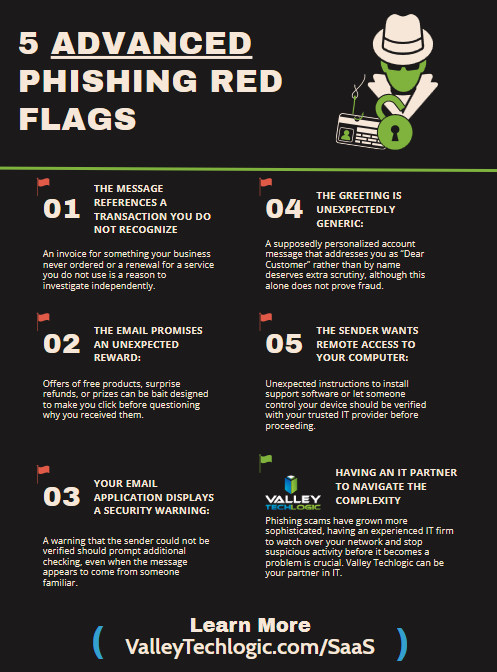
  • If you’re an Outlook or Gmail user, you’ll want to be aware of this ransomware warning just issued by the FBI

    If you’re an Outlook or Gmail user, you’ll want to be aware of this ransomware warning just issued by the FBI

    A new ransomware targeting Gmail, Outlook and other popular email providers has made enough waves for the FBI to issue a warning about it. In addition to targeting these email providers bad actors have narrowed their search to those in specific fields like medical and tech.

    The ransomware is called “Medusa” and it first came on the scene in 2021, emerging as part of a new group of ransomware found under the “Ransomware-as-a-Service (RaaS) umbrella. This means the hacker are not necessarily the creator of the ransomware but are instead utilizing scripting created by others as a means to profit from ransoms paid in lieu of getting your data back.

    The creators of Medusa have been linked back to a group called Spearwing, which are particularly ruthless in that they try to extort victims twice. First, they steal your data and extort payment to not expose it and they also encrypt it and will not provide victims with a method to decrypt it until they receive a second payment. Spearwings ransom demands have ranged from $100,000 all the way up to $15 million.

    There hasn’t been a definitive answer as to how the latest breaches were conducted, so it’s uncertain at this time whether the attacks were accomplished due to user error or through another method of breach. As such the FBI and CISA have recommendations as to how users can protect themselves from the Medusa ransomware that include:

    1. Mitigate known vulnerabilities by ensuring operating systems, software, and firmware are patched and up to date within a risk-informed span of time.
    2. Segment networks to restrict lateral movement from initial infected devices and other devices in the same organization.
    3. Filter network traffic by preventing unknown or untrusted origins from accessing remote services on internal systems.

    Proactive services (including cyber security) are a keystone offering for Valley Techlogic. With ransomware threats becoming more sophisticated and lucrative year over year, you need a team behind you to protect against outside threats. Below are five ways Valley Techlogic approaches cybersecurity protection for our clients:

    1. 24/7 Threat Monitoring & Incident Response – We provide continuous monitoring of networks, endpoints, and cloud environments to detect and respond to threats in real time.
    2. Advanced Endpoint Protection (EPP) & Endpoint Detection and Response (EDR) – We deploy antivirus, anti-malware, and behavioral analytics tools on all endpoints and use EDR solutions to detect, analyze, and remediate suspicious activities on client devices.
    3. Security Awareness Training & Phishing Simulations – Our security awareness training educates employees on cybersecurity best practices and how to recognize social engineering attacks. We also run weekly phishing simulations to assess and improve employee readiness against cyber threats.
    4. Regular Security Audits & Compliance Management – We can conduct penetration testing, vulnerability assessments, and risk audits to identify security gaps at the client’s request. We also offer specialized support for compliance with industry regulations like GDPR, HIPAA, NIST, or CMMC to avoid penalties and data breaches.
    5. Consistent and Layered Approach to Backups – Our backup program TechVault is our multifaceted approach to backups, which includes separate backups for Microsoft (including Outlook), daily backups for servers, and an immutable copy that is write once read only. This approach gives us a wider array of options should a breach or data loss event occur.

    Interested in learning more? Schedule a consultation with us today.

    Looking for more to read? We suggest these other articles from our site.

    This article was powered by Valley Techlogic, leading provider of trouble free IT services for businesses in California including Merced, Fresno, Stockton & More. You can find more information at https://www.valleytechlogic.com/ or on Facebook at https://www.facebook.com/valleytechlogic/ . Follow us on X at https://x.com/valleytechlogic and LinkedIn at https://www.linkedin.com/company/valley-techlogic-inc/.
  • 8 Tips for Practicing Good Cybersecurity Hygiene in your Business

    8 Tips for Practicing Good Cybersecurity Hygiene in your Business

    We all know about good hygiene practices for ourselves and our homes, but what about practicing good cybersecurity hygiene? What does the word hygiene mean when applied to a digital context?

    When we think of hygiene for cybersecurity it’s the essential items needed to practice the bare minimum in cyber threat prevention, we’re strong advocates for advanced cybersecurity threat prevention and believe you can never be too protected – however these 8 items will in many cases prevent the vast majority of outside threats. As a bonus? The only thing you’ll need to spend to enact these in your business today is a little time.

    1. Use Strong and Unique Passwords
      Implement complex passwords and enable multi-factor authentication (MFA) for added security. We have a guide for what a strong password looks like and how to utilize MFA here.
    2. Regularly Update Software and Systems
      Keep your operating systems, applications, and antivirus software up to date to patch vulnerabilities.
    3. Educate Employees on Cybersecurity Best Practices
      Train staff on recognizing phishing scams, suspicious emails, and safe browsing habits. Interested in cybersecurity training for your business? Valley Techlogic includes it (at no additional cost) in all of our plans.
    4. Limit Access to Sensitive Data
      Implement role-based access controls and grant permissions only to those who need them.
    5. Enable Firewalls and Antivirus Protection
      Use firewalls, antivirus programs, and other security tools to prevent unauthorized access.
    6. Backup Data Regularly
      Perform frequent backups and store them in secure, off-site locations to prevent data loss from ransomware attacks.
    7. Monitor Network Activity
      Use intrusion detection systems and regularly review logs for unusual activity.
    8. Implement Secure Wi-Fi and VPN Usage
      Use encrypted Wi-Fi networks and require VPN usage for remote employees to protect data transmission.

    Implementing these 8 cybersecurity threat preventions will protect your business from most attacks, but if you’re looking to go a little further below are 4 cybersecurity benefits included with all Valley Techlogic service plans:

    Want to learn more? Schedule a consultation with us today.

    Looking for more to read? We suggest these other articles from our site.

    This article was powered by Valley Techlogic, leading provider of trouble free IT services for businesses in California including Merced, Fresno, Stockton & More. You can find more information at https://www.valleytechlogic.com/ or on Facebook at https://www.facebook.com/valleytechlogic/ . Follow us on X at https://x.com/valleytechlogic and LinkedIn at https://www.linkedin.com/company/valley-techlogic-inc/.

  • If you have a K-12 aged student in your household, the hack on educational software PowerSchool is one you need to be aware of

    If you have a K-12 aged student in your household, the hack on educational software PowerSchool is one you need to be aware of

    As of January 24th very little has come out about the hack on the nationwide cloud-based software solution provider, PowerSchool, which provides tools to school districts in the form of staff management, attendance taking, enrollment, grade information and more.

    According to their website, this attack occurred on December 28th, 2024. They were alerted to the breach when the exportation of data began and there was no other indication prior to that such as systems being down. The company has offered to provide credit monitoring services for the students and staff whose data was leaked in the breach.

    This data includes, grade and school information, addresses and phone numbers, email addresses, social security numbers and more. 6,505 school districts data were leaked in the attack, and it’s estimated 62 million students could be affected. This not only affects students in the US but Canada as well.

    According to Bleeping Computer, PowerSchool has also paid a ransom to the attackers in a yet to be known sum to stave off the release of data. This Isn’t usually a worthwhile tactic, it’s estimated 92% of businesses that pay the ransom don’t get their data back in the end (as was the case for Apple when Apple Watch and MacBook Pro blueprints were stolen in 2021).

    There are some concrete reasons not to pay the ransom in the event your data is stolen by bad actors:

    1. No Guarantee of Data Recovery: Paying the ransom does not ensure that attackers will decrypt your data or return it. Many victims have paid and never received their files back.
    2. Encourages Future Attacks: Paying a ransom signals to attackers that their tactic works, potentially making your business and others a target for future attacks.
    3. Funds Criminal Activity: The ransom you pay could fund other illegal activities, such as drug trafficking, human trafficking, or furth er cybercrimes
    4. Reputational Damage: If it becomes public knowledge that your business paid a ransom, it could harm your reputation, as customers and partners may view it as a sign of vulnerability.
    5. Potential for Higher Demands: After paying, attackers might demand additional payments, holding you hostage repeatedly.

    If your business has been, or is currently the victim of a ransomware attack, Valley Techlogic can help. We have helped businesses remediate ongoing cyberthreats and have been able to introduce systems and cybersecurity measures that can help prevent future attacks. Even if you business has never suffered a cyber attack, why continue to risk it with attackers continuously evolving their strategies year over year?

    Investing in technology protection today ensures your business will continue to thrive tomorrow, 60% of small businesses close after a significant cyber attack. Don’t be a statistic, protect your business today.

    Looking for more to read? We suggest these other articles from our site.

    This article was powered by Valley Techlogic, leading provider of trouble free IT services for businesses in California including Merced, Fresno, Stockton & More. You can find more information at https://www.valleytechlogic.com/ or on Facebook at https://www.facebook.com/valleytechlogic/ . Follow us on X at https://x.com/valleytechlogic and LinkedIn at https://www.linkedin.com/company/valley-techlogic-inc/.
  • As Biden is set to leave office in a matter of days, he released an executive order aimed at bolstering US cyber defense

    As Biden is set to leave office in a matter of days, he released an executive order aimed at bolstering US cyber defense

    In what is truly the 11th hour (inauguration day for President Trump is January 20th, 3 days from now at the time of writing), the Biden administration announced an executive order that looks to strengthen US cyber defenses against outside influence, particularly from Russia and China.

    Described as a “sweeping” move, the executive order covers topics from cyber threat vulnerabilities to guidance on consumer electronics and even outer space.

    The order gives enhanced authority to CISA (Cybersecurity and Infrastructure Security Agency) to hunt for threats on federal networks, likely a response to the recent news that President Trumps communication with Vice President JD Vance may have been compromised by Chinese hackers.

    The order also covers additional protections for Federal agencies, including implementing end-to-end encryption for all video and email communication and stating  that by 2027 any internet connected devices purchased for federal use must have a “cyber trust mark” indicating they meet current cyber standards. Internet connected devices have a wide range of criteria in 2025, everything from home security systems to our appliances has an internet connected option in our modern world.

    The order also covers requiring enhanced cybersecurity measures for our space systems, likely in response to Russia targeting Ukraine’s satellite systems in the ongoing invasion.

    The order even takes aim at Microsoft specifically, citing a host of errors that allowed Chinese attackers to breach their networks in 2023 which had downstream consequences for our federal government (senior US officials email accounts were allegedly breached in the aftermath of the attack).

    Trump’s team has not yet responded to the new executive order so it’s unclear how much follow through will be had on it once he regains office next week, however the Biden team is optimistic on its longevity as bolstering US cyber defense was also a goal during the initial Trump administration (CISA was created in 2018 under Trump’s first term).

    As our government looks to shore up their cybersecurity practices in 2025, what are you doing to ensure your business is protected from ongoing threats?

    Cyberthreats are not limited to large scale attacks on larger businesses, small businesses are often seen as “easy targets” and can also be swept up in the aftermath of an attack aimed at someone else.

    Implementing strong cybersecurity measures, such as secure passwords, regular software updates, employee training, and robust data encryption, not only protects the business but also builds trust with customers. It is clear, in 2025 cybersecurity is no longer a topic that can be pushed off until a later time. The threats are here now and the time to act is before your business is compromised, because afterward it might be too late.

    Valley Techlogic includes cybersecurity protection as a core offering in all of our customized service plans. Learn more today with a free consultation.

    Looking for more to read? We suggest these other articles from our site.

    This article was powered by Valley Techlogic, leading provider of trouble free IT services for businesses in California including Merced, Fresno, Stockton & More. You can find more information at https://www.valleytechlogic.com/ or on Facebook at https://www.facebook.com/valleytechlogic/ . Follow us on X at https://x.com/valleytechlogic and LinkedIn at https://www.linkedin.com/company/valley-techlogic-inc/.