Category: eTechTip

eTechTip

  • 4 Ways to Secure Your IoT (Internet of Things) Devices

    4 Ways to Secure Your IoT (Internet of Things) Devices

    Love it or hate it, internet connectivity in everyday devices is here to stay. Whether you’re a staunch believer that “smart” devices are unnecessary or if you are just waiting for the day when the 1999 Disney movie “Smart House” becomes a reality (minus the over reactive AI of course) – chances are you have some devices in your home or office that are connected to the internet just like your laptop or desktop computer is and that means they need to be managed in almost the same way from a cyber threat perspective.

    You might be thinking, there’s no way my smart fridge has the same capacity as my laptop for being a cyber security threat vector, it’s not powerful enough? Unfortunately, you would be wrong in that assertion. Even if you turn off the “smart” functionality in your devices they’re still internet facing and should be secured or maintained.

    Here are our 4 tips for securing your IoT (Internet of Things) Devices:

    1. Create Network Segmentation: This sounds complicated, but all this just means creating groups within your router for your various devices (most routers have a guide for doing this).
    2. Update Firmware: IoTs devices also need regular updates (and as with computers a lot of these updates are security related). If you connect to the device through your phone updates can usually be managed in their app.
    3. Utilize MFA (Multi-Factor Authentication): While the IoT device itself may not have the option of MFA, your phone or computer that you use to interact with it will for many of the sites you use. This will make it a little safer to continue using those devices to interact with the IoT device.
    4. Consider Whether You Need the Internet Connectivity: Many ordinary devices come with internet connected features these days, but if you want your fridge to be a fridge and not a smart fridge we recommend just disabling them.

    Even in offices, smart devices are becoming a more common place in the form of lighting, thermostats and sensors. Securing these devices in an office setting is even more important and you may need expert help in making sure all IoTs devices are accounted for and secured properly.

    Valley Techlogic can assist in your networking and cybersecurity goals, learn more with a consultation today.

    Looking for more to read? We suggest these other articles from our site.

    This article was powered by Valley Techlogic, leading provider of trouble free IT services for businesses in California including Merced, Fresno, Stockton & More. You can find more information at https://www.valleytechlogic.com/ or on Facebook at https://www.facebook.com/valleytechlogic/ . Follow us on Twitter at https://x.com/valleytechlogic and LinkedIn at https://www.linkedin.com/company/valley-techlogic-inc/.


  • Are IT audits part of your technology business planning? 5 tips for completing a technology audit on your business

    Are IT audits part of your technology business planning? 5 tips for completing a technology audit on your business

    If technology audits aren’t a regular part of your business planning or you’re not sure where to begin, today’s article will include advice on both the process of conducting a technology audit and what your technology audit report should include when you’re done.

    Before we touch on those topics though we should cover what a technology audit is in a nutshell and why they’re important. A technology audit is a comprehensive evaluation of your IT infrastructure and systems. During the audit process you can document your equipment, discover shortcomings in your cybersecurity planning, review your disaster recovery processes, and evaluate what steps you should take to improve your technology landscape as a whole.

    So where do you begin with the process of conducting a technology audit for your business?

    1. Define the Scope and Objectives: Before you can begin the process of the audit you need to outline what items will be evaluated. We suggest the following as a baseline but depending on your business sector and compliance requirements more items may need to be added. 1. Device Inventory (Computers, Laptops, Servers Etc. > 2. Software Licensing > 3. Security Measures > 4. Network Equipment & Subscriptions > 5. Data & Backup Procedures is a good baseline to start with when it comes to categorizing your report.
    2. Assemble the Team: Next you will have to determine who is the best team for completing this audit. We find that customers prefer to take a step back from the IT process and “leave it to the experts” but in this case you know your business best and it’s a good idea to work in tandem with your existing IT. You can have them assemble the report and leave the door open to any questions they have as the process progresses.
    3. Conducting the Audit: We suggest beginning the audit with a full inventory of your technology hardware, this allows you to take note of devices that are working as expected, devices that could use a replacement and even devices that are still powered on in your office but no longer being used (and could potentially be a threat vector if they’re also no longer being maintained).
    4. Continuing the Audit: Next your technicians can segue into evaluating your software licensing (also a great time to eliminate unnecessary tech spending on licenses that are no longer used), as well as your backups and data management.
    5. The Final Piece: Finally, they can evaluate your cyber security processes and disaster recovery planning, and if you don’t have a disaster recovery plan in place then creating one as part of your audit process is a good idea.

    At the end you should have a report that fully encompasses the full scope of the technology your business uses. We recommend conducting comprehensive audits like these annually for the best results and you will be able to refer to previous years’ audits to better plan for your technology spending year over year.

    If the thought of doing this on your own is overwhelming, we don’t blame you. Conducting a comprehensive technology audit is best left to the pros and if you’re a Central Valley business owner, Valley Techlogic can provide this service for you alongside our other preventative technology maintenance at no additional cost. Learn more today.

    Looking for more to read? We suggest these other articles from our site.

    This article was powered by Valley Techlogic, leading provider of trouble free IT services for businesses in California including Merced, Fresno, Stockton & More. You can find more information at https://www.valleytechlogic.com/ or on Facebook at https://www.facebook.com/valleytechlogic/ . Follow us on Twitter at https://x.com/valleytechlogic and LinkedIn at https://www.linkedin.com/company/valley-techlogic-inc/.

  • Our top 10 best tricks for using Microsoft Outlook every user should know

    Our top 10 best tricks for using Microsoft Outlook every user should know

    Microsoft Outlook is a feature found in their Office line of software and can be used standalone or as part of your overall Microsoft 365 subscription package. It can be used as a mobile app, a desktop app or even within your browser and has many competitive features that make managing your business’s email easier such as tie ins to your Microsoft calendar automatically (including the ability to schedule Teams meetings right from Outlook) and automatic access to OneDrive to make sending files you’re actively working on more convenient.

    Beyond those core features though we have our top 10 tips and tricks you may not be aware of for making using Microsoft Outlook even easier to use.

    1. Organize Your Inbox with Folders and Categories: You probably knew you could create folders, but did you know you can also use color-coded categories to keep your inbox organized? Color coding makes it easier to sort through emails in your inbox at a glance.
    2. Set Up Email Signatures: Create a professional email signature with your contact information and company logo. There are even tools that integrate with Outlook to create a professional looking signature that will always be present on your outgoing emails. At Valley Techlogic we use (and recommend) Exclaimer.
    3. Use Email Templates: Did you know you can create email templates in Outlook? If you have an email message you send frequently to clients or prospects you can create a template to easily send it on the fly, just get the email ready one more time than navigate to File > Save As and in the Save as type list you’ll see the option for “Outlook Template”. Simply name the template and then it will always be right at your fingertips for future use.
    4. Integrate with Other Apps: It’s probably a given but we highly recommend connecting Outlook with other Microsoft Office apps (like OneNote, Teams, and SharePoint) for seamless productivity.
    5. Sync Across Devices: You should also make sure your Outlook is synced across all your devices for easy access to your emails and calendar on the go.
    6. Use Mail Merge for Bulk Emails: Use the Mail Merge feature to send personalized bulk emails to multiple recipients, to start navigating to MailingsStart Mail Merge > E-mail Messages and select the template you want to use. From there you can set up your mailing list (if you don’t have one saved you can create one as you set up your mail merge). Mail merge is an excellent way to send marketing and promotion emails or updates to your customers without needing to send dozens of individual emails and without the use of a CRM (Customer Relationship Management tool).
    7. Set Out of Office Replies: Going on vacation? Configure automatic replies when you are out of the office. Just navigate to File > Automatic Replies to set one up for your desired dates.
    8. Use the Calendar Efficiently: You probably know you can schedule meetings and set reminders with your Outlook calendar, but did you know you can also share your calendar with colleagues? Just right click on your calendar and select “Share Calendar” and choose the person you’d like to share it with, it’s as easy as that.
    9. Utilize Quick Steps: Set up Quick Steps to automate repetitive tasks, like moving emails to a folder or creating a new meeting request. You can find it by selecting Home in the top tool bar and it will be towards the right end of the bar labeled Quick Steps. From there you can customize the steps you would like Outlook to complete automatically on your behalf.
    10. Archive Old Emails: Use the Archive feature to keep your inbox clutter-free without deleting important emails. You just select the emails you’d like to Archive and right click to send them to the Archive folder, thereby cleaning up your inbox but keeping them available just in case.

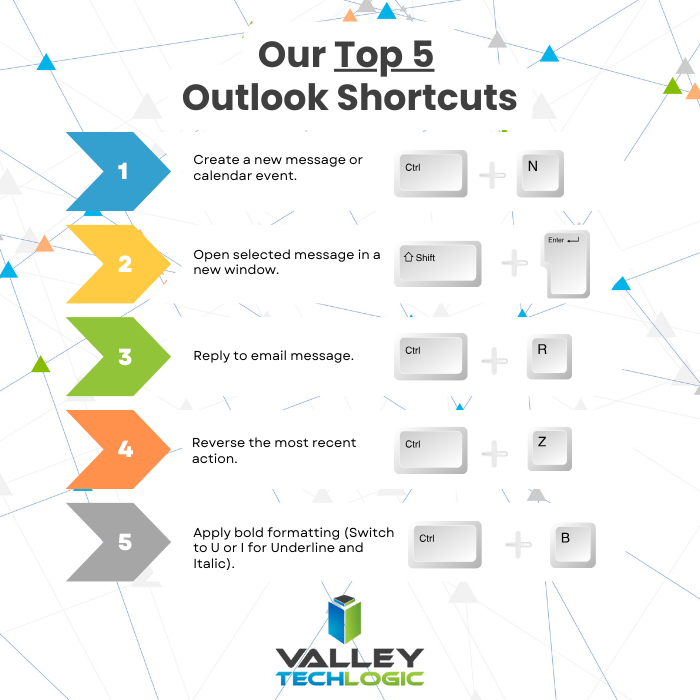
    These aren’t our only Microsoft Outlook tips, we also wanted to share our top 5 Outlook shortcuts in the graphic below.

    Do you need assistance in getting the most out of Microsoft Outlook or your Microsoft 365 subscriptions? Valley Techlogic is a certified Microsoft partner and we’re experts in all things Microsoft and Windows related. Learn more with a free consultation today.

    Looking for more to read? We suggest these other articles from our site.

    This article was powered by Valley Techlogic, leading provider of trouble free IT services for businesses in California including Merced, Fresno, Stockton & More. You can find more information at https://www.valleytechlogic.com/ or on Facebook at https://www.facebook.com/valleytechlogic/ . Follow us on Twitter at https://x.com/valleytechlogic and LinkedIn at https://www.linkedin.com/company/valley-techlogic-inc/.
  • Purchased a new laptop? Five steps on how to set it up to maximize your productivity.

    Purchased a new laptop? Five steps on how to set it up to maximize your productivity.

    If you’ve purchased a new laptop recently (or if you’re in the market) you may be wondering what to do with the fresh new start you now have on your hands.

    However, there is the matter of your old laptop before you do anything with your new one, before you send it to e-waste or hand it off to the next person you want to make sure any files you’ll need now or in the future have been taken off of it and stored either directly onto your new device, into cloud storage, or even onto a portable hard drive. Once all of the files have been backed up and you can then safely wipe it to ensure no personal data remains (or have your IT team handle this if you’re unsure).

    Now that the matter of your old laptop has been settled, we can move on to our five tips for maximizing your new laptops potential and setting it up as a new productive workspace:

    1. Perform Any Necessary Updates: Nothing is worse than getting settled in and ready to use a new device only to be prompted that you need to update RIGHT NOW. That’s why we suggest getting this out of the way and performing any necessary updates right out of the box, it may seem a little counterintuitive that a brand-new device would need updates right away but generally they’re packed up by manufacturers with just what you need to get it turned on – all the configuring comes later.
    2. Uninstall What You DON’T Want: This is also a good time to uninstall any pre-configured programs that you don’t want, like an anti-virus program that’s different than the one your company uses or programs that are really more of an advertisement for the manufacturer. Again, reach out to your IT team for assistance if you’re unsure what’s okay and not okay to remove.
    3. Set Up Backups for This New Device: If you’re using Microsoft 365 or Google Workspace your office probably has backups that would cover your new device, so you’ll want to set these up so any files you bring over or create on your new laptop are backed up as well.
    4. Install Your Productivity Software: Microsoft 365, Adobe, your preferred browser, applications for your VoIP provider, anything you need to do your job day to day can safely be installed at this point in the process.
    5. Finishing Touches: Lastly, you can setup your laptop in appearance, setting up dark mode where applicable, changing your background, setting your preferred font size. All the finishing touches that will make working from this new device feel streamlined and familiar (but with the added boost of having a newer, more capable device).

    On the back end, your IT team should be setting up the tools needed to keep your new device safe such as end point protection, virus scans, malware detection and more. They may want to perform these updates right after any necessary updates to the operating system have been completed or they may want to as soon as your device will be connected to your office network. It’s a good idea to work with your IT team on setting up your new device in a way that’s both productive AND secure.

    If you don’t currently have an IT team or the one you work with does not provide new device support, reach out to Valley Techlogic today. In addition to customized procurement advice and support, setting up new client devices is an included service in all of our support plans. Setup a consultation with us today to learn more.

    Looking for more to read? We suggest these other articles from our site.

    This article was powered by Valley Techlogic, leading provider of trouble free IT services for businesses in California including Merced, Fresno, Stockton & More. You can find more information at https://www.valleytechlogic.com/ or on Facebook at https://www.facebook.com/valleytechlogic/ . Follow us on Twitter at https://x.com/valleytechlogic and LinkedIn at https://www.linkedin.com/company/valley-techlogic-inc/.

  • You have cloud backups for your business, but are you wasting money on storage you don’t need? 5 ways to tidy up your cloud storage

    You have cloud backups for your business, but are you wasting money on storage you don’t need? 5 ways to tidy up your cloud storage

    The worst backup situation to have as a business owner is no backups at all, so if you’ve made keeping backups of your data a priority in your business, we want to encourage you to keep the effort up. Having data backups is crucial for making a full recovery in the event of device failure, cyber security breaches and more.

    With that said, the cost of storage and in particular cloud storage is something to be considered when formulating a plan for backups. With physical hardware you have a tangible wall that prevents storage costs from ballooning out of control, but with cloud storage no such wall exists. Your provider will likely sell you as much data storage as you need and if your backups aren’t set up in an efficient way you may find the costs continue to rise while not being entirely sure as to why.

    Here are five ways to setup efficiency for your cloud backup solution and keep costs under control:

    1. Implement Data Archiving Policies: Regularly archive older, infrequently accessed data to cheaper, long-term storage solutions. This reduces the cost of more expensive, high-performance storage.
    2. Use Tiered Storage Solutions: Take advantage of cloud providers’ tiered storage options. Store critical, frequently accessed data in high-performance storage and less critical data in more economical storage tiers.
    3. Automate Backup Schedules and Policies: Set up automated backup schedules to ensure data is backed up regularly without human intervention. Use policies to manage retention, ensuring outdated backups are deleted after a certain period.
    4. Compress and Deduplicate Data: Use data compression and deduplication techniques to reduce the amount of storage required. Compression reduces file size, while deduplication eliminates duplicate copies of data.
    5. Monitor and Optimize Storage Usage: Regularly review storage usage and costs. Use analytics and reporting tools provided by cloud providers to identify unused or underused resources and optimize storage allocation accordingly.

    By implementing these strategies, business owners can effectively manage their cloud storage costs and maintain an organized, efficient backup system.

    Did you know backups are a core feature of Valley Techlogic’s service offering? Not only can we assist you in maintaining your existing backups, we also will keep our own backup of your data as part of your service plan with us.

    You can learn more about our backup program here, but in a nutshell whether you want to keep your current backups and utilize ours as an additional copy or erase that expenditure from your billing and let us handle it – Valley Techlogic can support your business’s backup planning in addition to the other ways we support your business.

    Learn more today by scheduling a meeting with one of our experienced

    Looking for more to read? We suggest these other articles from our site.

    This article was powered by Valley Techlogic, leading provider of trouble free IT services for businesses in California including Merced, Fresno, Stockton & More. You can find more information at https://www.valleytechlogic.com/ or on Facebook at https://www.facebook.com/valleytechlogic/ . Follow us on Twitter at https://x.com/valleytechlogic and LinkedIn at https://www.linkedin.com/company/valley-techlogic-inc/.

  • AI updates for 2024 and what they mean for you, including the addition of multimodal for Google Gemini & ChatGPT and Amazon’s new AI Alexa service

    AI updates for 2024 and what they mean for you, including the addition of multimodal for Google Gemini & ChatGPT and Amazon’s new AI Alexa service

    AI (Artificial Intelligence) continues to try and proliferate the space in which we live, from innovations aimed at simplifying our work activities and increasing productivity, to enhancements to our devices that will make using AI in our homes more accessible. It’s impossible to ignore that Google, Amazon and other major players in the tech space want to make AI part of our daily lives.

    But what does this really mean for you and are the advancements coming to AI in 2024 really going to be useful for the average person? In today’s article we’d like to look at some of the AI announcements that have made major headlines and break down what they mean for you.

    Multimodal AI: First of all, what is multimodal AI? Traditionally at the moment you input one type of content request into AI models, such as a text prompt asking for an image or written text, and it provides you with an answer based on the prompt that covers whichever content you requested (IE written OR visual).

    With multimodal AI you won’t be limited to one form of output, instead you can enter a prompt that requests a mix of medias, such as a report that includes text AND images that align with the report.

    Multimodal AI will pull from several different data inputs to give you a more complete pictures without the need to enter separate prompts for different types of media. Also, because all of this is being processed at the same time you will likely see more cohesive results. Both ChatGPT and Google Gemini have begun to offer a multimodal AI experience and we expect the technology behind this type of AI will continue to improve in the coming months.

    AI comes to Amazon’s Alexa: Amazon made the announcement that a subscription based Alexa service will be rolling out sometime this year and will provide a better user experience, with more intuitive answers to questions and a conversational approach to requests to keep up with the current trends (search queries have become more conversational overall and it’s largely attributed to AI).

    Pricing has yet to be announced but Amazon has stated it will not be included with Amazon Prime. Amazon will use it’s own large language model, Titan, to power the upgrade.

    AI for Marketing?: The Google Marketing Live 2024 event was this week and unsurprisingly AI the feature focus for the tech giant. With enhancements announced to immerse consumers in AI powered ads and an “AI readiness tool” that will be available sometime this year.

    Highlights included the ability to take a static “hero asset” and turn it into a video with a realistic 3D animated background, the ability to use AI to recreate and retool existing ad creatives, and enhancements to search that allow consumers to buy a product they find as a solution to a search query directly from the same browser window.

    Generative AI lets you continuously improve your AI experience: Finally, increased improvements to generative AI, which is AI that learns the patterns and structure of your input, will make using AI to create cohesive content for your business even easier. From allowing your employees to seek out answers to questions without an exhaustive web search to aiding in crafting articulate responses to your clients and more. With generative AI your voice is an additional component to your AI experience. Microsoft, Google, LinkedIn and ChatGPT continue to include enhancements to the generative AI experience. You can even add a background prompt to give additional context to your AI program of choice (such as information about your business or yourself) so the responses you receive are uniquely tailored to you.

    Looking to improve your business with AI strategies or take advantage of AI advancements in cyber security including enhanced monitoring, threat detection and real time solutions? Valley Techlogic remains at the fore front of new technologies, and we can assist you in navigating AI solutions for your business. Learn more today.

    Looking for more to read? We suggest these other articles from our site.

    This article was powered by Valley Techlogic, leading provider of trouble free IT services for businesses in California including Merced, Fresno, Stockton & More. You can find more information at https://www.valleytechlogic.com/ or on Facebook at https://www.facebook.com/valleytechlogic/ . Follow us on Twitter at https://x.com/valleytechlogic and LinkedIn at https://www.linkedin.com/company/valley-techlogic-inc/.

  • Are your emails not getting through? Changes to Google and Yahoo DMARC Policy might be to blame

    Are your emails not getting through? Changes to Google and Yahoo DMARC Policy might be to blame

    Email deliverability can be tricky to guarantee, and now with recent changes to Google and Yahoo’s DMARC policies getting your emails delivered to your customers and prospects may be even more difficult.

    First, we should start out by explaining what DMARC is, DMARC or Domain Based Message Authentication is the process that checks to make sure the email that’s being sent is being sent from the domain it’s proclaiming to be. Its main purpose is to protect against email spoofing, which is when you have an email that says it’s from @yourdomain.com but is really from @notyourdomain.com.

    Why is that important? Ideally you do not want potentially bad actors being able to masquerade as you on the web and contact your customers or potential customers. The hiccup is that setting up DMARC and the provisions that go into it (SPF or Sender Policy Framework and DKIM or DomainKeys Identified Mail) are not for the faint of heart.

    SPF and DKIM are the groundwork that is then checked by DMARC, and we apologize for throwing all of these acronyms at you, but we promise they’re important if you are a business who relies on email (and who in the current day and age doesn’t?). Especially if most of your customers have Gmail or Yahoo emails.

    Gmail and Yahoo have both updated their policies to take a tougher stance on emails being sent without these policies set in place. To put it simply, if you don’t have these setup your emails are going to be sent to the spam box or not reach your target at all.

    So how do you begin setting up, SPF, DKIM, and DMARC for your business?

    SPF (Sender Policy Framework):

    1. Access your DNS records: Log in to your domain registrar or DNS hosting provider where your domain’s DNS records are managed.
    2. Create or edit your SPF record: Locate your domain’s DNS settings and add a TXT record. If you already have an SPF record, you’ll need to edit it. If not, create a new one.
    3. Define your SPF policy: In the TXT record, specify which servers are authorized to send emails on behalf of your domain. This is done by listing the IP addresses or domain names of your authorized email servers. For example, if you use Google Workspace for your email, your SPF record might include something like: “v=spf1 include:_spf.google.com ~all”. This indicates that Google’s servers are allowed to send emails for your domain.
    4. Test your SPF record and Publish your SPF Record: Use SPF testing tools to verify that your SPF record is correctly configured. There are various online tools available for this purpose. Once you’re confident that your SPF record is set up correctly, save the changes in your DNS settings. It may take some time for the changes to propagate across the internet.
    5. Monitor and maintain: Periodically review your SPF record to ensure it remains accurate. If you change your email infrastructure, update your SPF record accordingly.

    DKIM (DomainKeys Identified Mail)

    1. Generate DKIM keys: You’ll need to generate a pair of DKIM keys – a private key and a public key. The private key will be used to sign outgoing emails, and the public key will be published in your domain’s DNS records for email receivers to verify the authenticity of your emails. This tool can be used to generate DKIM keys for you.
    2. Add DKIM DNS record: Log in to your domain registrar or DNS hosting provider where your domain’s DNS records are managed. Add a new TXT record to your DNS settings. This record should contain your DKIM public key along with some DKIM-related tags that specify the version, the domain, and the selector for your DKIM keys.
    3. Configure your email server: Set up your email server to sign outgoing emails using the private key you generated earlier. Most email servers have built-in support for DKIM signing, and you’ll usually need to specify the location of the private key and the DKIM selector.
    4. Test DKIM: Send a test email from your domain and verify that it’s properly DKIM-signed. You can use various online DKIM validation tools to check if your DKIM setup is correct.
    5. Monitor and maintain: Regularly monitor your DKIM setup to ensure that it’s functioning correctly. If you change your email infrastructure or rotate your DKIM keys, remember to update your DKIM DNS record accordingly.

    DMARC (Domain-based Message Authentication)

    1. Create a DMARC policy: Determine what action you want email receivers to take when they receive emails that fail DMARC authentication. Options include monitoring (no action), quarantining (sending suspicious emails to spam folders), or rejecting (blocking suspicious emails).
    2. Publish your DMARC record: Log in to your domain registrar or DNS hosting provider and add a TXT record to your domain’s DNS settings. This record contains your DMARC policy along with additional information such as the email address where DMARC reports should be sent.
    3. Monitor and maintain based on DMARC reports: Configure your email system to generate DMARC reports and send them to the specified email address. These reports provide valuable information about how your domain is being used for email, including details about SPF and DKIM alignment.

    We hope the breakdown of how to setup these policies was helpful, but if you’re looking at this list and thinking there’s no way I can implement this on my own then that is where Valley Techlogic can help.

    We have helped our clients navigate domain challenges and answer technical questions such as how to improve email deliverability on top of providing IT solutions that help navigate other day to day technological challenges. Get started with us today.

    Looking for more to read? We suggest these other articles from our site.

    This article was powered by Valley Techlogic, an IT service provider in Atwater, CA. You can find more information at https://www.valleytechlogic.com/ or on Facebook at https://www.facebook.com/valleytechlogic/ . Follow us on Twitter at https://x.com/valleytechlogic.

  • 7 Tech New Year’s Resolutions to Accomplish in 2024

    7 Tech New Year’s Resolutions to Accomplish in 2024

    Happy New Year! It may not feel like 2024 yet to you (it certainly doesn’t to us) but the new year is upon us and with that comes a renewed opportunity to address some of the tech items that have been pushed under the rug to deal with “later”.

    Whether you’re committed to trying to up your game this year or clean up areas of your business where the tech has fallen behind, we have 7 New Year’s resolutions that will push your business forward and maximize your efficiency and growth in 2024.

    1. New Year, New Tech? Starting off, the start of the year is a great time to do some housekeeping and figure out what devices may be holding you and your staff back. Vendors like Dell, Lenovo and more often have start of the year sales and dragging that aging PC or laptop through another year versus starting clean with a new device (with vastly superior hardware) just doesn’t make sense.
    2. There’s an app for EVERYTHING. Next, it’s a good idea to see what processes you’re still trudging through manually and evaluate whether some of those manual tasks could instead be modernized with an app. Whether it be pen and paper calendar or planner (Microsoft Outlook has both built in!) or tools for managing budgets, inventory, scheduling and more – going digital with your processes in 2024 is the smart choice.
    3. Connect with your customers. When it comes to engaging with your clients, reaching them where they are is a powerful tool. For a lot of business owners stepping out from the shadows and putting more of themselves online is a scary thought, but many customers want to identify with your brand or with you directly not just with your product. Who better to promote your brand than you? Improving your online presence for your business and yourself is a powerful sales tool you should take advantage of in 2024.
    4. Are you cyber aware or cyber scared? If cybersecurity has been a topic you’ve been avoiding or interacting with as little as possible, it’s really past time to change that. The threats to your business aren’t going away and a little proactive maintenance in this area can have a HUGE impact. One thing you can do today (as in right now) to bolster your protection? Turn on multi-factor authentication on all the accounts where it’s available. This simple action will give you over 50% improvement in protecting your accounts from being compromised vs not having it.
    5. In the same vein, data loss is not inevitable. We get it, we’re all inundated with news of this breach or that data leak where everyone’s information was dumped into the internet ether – we just would argue that this scenario is NOT an inevitability. In fact, in 2024 we would also guess many insurance companies would agree as rules for being covered continue to grow stricter. If you don’t have a plan for your backups and data in 2024 you need to make one, STAT.
    6. Tech improvements can have a positive effect on your ROI. Whether it be ditching traditional telecom in favor of VoIP (our customers have paid as little as a 10th of what they were spending for phones with our solution), utilizing digital training to increase your employees confidence and performing, or deploying communication tools in your business that allow for more efficient back and forth – there are a lot of areas where tech won’t just make your business run better it will also make your business more profitable.
    7. You can’t do it alone, take this piece of advice. If nothing else the best resolution you can make regarding your tech in 2024 is acknowledging that it might be too much for one person, whether that’s you or a non-technical staff member that’s trying to help out – to keep up with maintenance alone is often times not a one-person job let alone making improvements. The best bang for your buck in 2024 will be bringing in additional assistance.

    If your business is located in the Central Valley that’s where Valley Techlogic can assist. We provide support for ALL the topics we’ve listed above and more, and when you sign up with us you will have access to our whole team – often times for much less than it would be to hire a single dedicated IT staff person.

    If you’re curious what we can do for your business we’re also offering $100 cash to business owners that simply hear what we have to offer, no strings attached. Click on the image below to get started.

    Looking for more to read? We suggest these other articles from our site.

    This article was powered by Valley Techlogic, an IT service provider in Atwater, CA. You can find more information at https://www.valleytechlogic.com/ or on Facebook at https://www.facebook.com/valleytechlogic/ . Follow us on Twitter at https://x.com/valleytechlogic.

  • In 2023 some of the biggest cyber-attacks were orchestrated with “low tech” methods

    In 2023 some of the biggest cyber-attacks were orchestrated with “low tech” methods

    Whether you’re “tech aware” or not, most of us know that the human element is one of the riskiest elements of our business when it comes to our data being compromised.

    2023 proved that in spades with many of the largest attacks of the year being orchestrated with “low tech” methods – whether that be social engineering as we saw with MGM or literally low tech as with the attack on Rockstar that was conducted with a cellphone, TV and an Amazon Firestick.

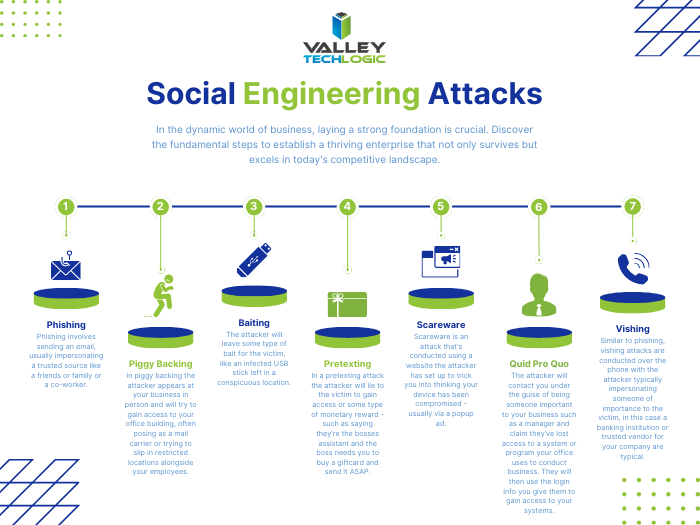
    Attacks such as the one on MGM are conducted with social engineering and the attacker doesn’t need to possess any particularly strong tech skills to pull an attack of that nature off. These attacks are usually accomplished through persistence – the attacker sometimes researches their target and reaches out to decision makers or those close to decision makers to try and gain access through Vishing, Phishing, and other methods (see our chart below for examples).

    They may also “bruteforce” their way in though not in the typical way you might think, compromised credentials are often found very cheaply on the web and many people use the same password for everything. The bad actor will again look for specific targets and then try to purchase credentials that will match their target.

    A common social engineering attack is orchestrated as follows:

    1. The attacker will research their target. This includes trying to figure out who is a decision maker or close to a decision maker. They may also look for details about you found on social media (such as family and friends names they can use to make their attack appear more legitimate).
    2. The attacker will reach out to the victim using what they have learned or try any credentials they’ve managed to find. They may pose as someone you trust and can even spoof that person’s email.
    3. They will use their access to infiltrate your systems or use your account to continue pursuing their target. They may not immediately make themselves known – many attacks are orchestrated over months or years to produce a bigger payout.
    4. Once they have successfully infiltrated your systems the attack may proceed in a variety of ways, whether that be trying to ransom back your compromised data or systems, threatening to release stolen data online if they don’t receive a payout, posing as you to your clients to expand their reach and more.
    5. The attack only ends when you can successfully remediate/remove their access.

    This attack is the end game for many attackers but not all attacks have this level of energy put towards them, phone scams and simple email phishing scams can look to steal your credit card or banking info for a quick payout and these sorts of attacks are conducted en masse often by attackers located overseas. Scams like these are still a variety of social engineering and quite effective – and again any data they manage to get in the process can also be sold on the dark web allowing these attackers to “double dip” on the profits they receive from their nefarious efforts.

    As we mentioned above many attackers are not conducted on a quick timeline, attackers know they can receive a bigger payout the more enmeshed they are in with the victim’s systems and data. Your system could be compromised right now, and you may not even know it.

    Data loss remediation and protection is just two of the cyber security offerings Valley Techlogic provides to help us protect our clients from social engineering and other cyber based attacks. Reach out today to learn more.

    Looking for more to read? We suggest these other articles from our site.

    This article was powered by Valley Techlogic, an IT service provider in Atwater, CA. You can find more information at https://www.valleytechlogic.com/ or on Facebook at https://www.facebook.com/valleytechlogic/ . Follow us on Twitter at https://x.com/valleytechlogic.

  • 7 Gadgets you shouldn’t leave home without this Holiday Season

    7 Gadgets you shouldn’t leave home without this Holiday Season

    The holidays are truly upon us and for many of us that means traveling to friends and family and enjoying some time spent away from work and in our loved one’s company.

    However, for business owners being on the go doesn’t mean the work stops and we often carry our work devices with us to keep a watchful eye on things even from afar. We have 7 gadget recommendations that can facilitate working on the go or keeping in touch with those you’ve left in charge as you try to unwind a bit this holiday season.

    Our 7 tech gadget recommendations will make traveling with your tech easier on the go.

    1. Luggage trackers: The first step is making sure your tech makes it to your target destination, and luggage trackers will help you keep track of your belongings while you’re on the go. We recommend Tile Pro for Android users and AirTags for Apple. These trackers use Bluetooth to communicate to other devices in the area and will pinpoint the location of your luggage should you lose track of it. Our Recommendation: Airtag and Tile Pro.
    2. Battery banks: Another way to make working on the go easier is having additional battery power at your fingertips, battery banks are inexpensive and can power multiple devices simultaneously. Our Recommendation: Anker Magnetic Battery 5,000 mAH
    3. Portable monitors: Portable monitors have come a long way, for $200 or less you can get a decent secondary monitor that will make working away from your home office much more convenient. Our Recommendation: UPERFECT Portable Monitor
    4. Cord organizing case: We have all pulled out a knot of cables we then have to untangle before we can begin charging our travel depleted devices, there is a better way. Our Recommendation: MATEIN Cable Organizer Bag
    5. Laptop stand: In another effort to bring the comforts of home with you we recommend a good quality laptop stand that will make working on whatever open surface you can find much more pleasant. Our Recommendation: OMOTON Ergonomic Laptop Riser
    6. Privacy screen: If you’re planning to work in any public spaces this holiday season you might want to consider a privacy screen, this will make it so passersby’s can’t take a peek at what you’re doing and most of them reduce blue light as well. Our Recommendation: Acer 2-Way Privacy Filter
    7. Portable door lock: If your travel plans involve a hotel or shared AirBNB we recommend adding additional protection with a portable door lock. This will keep out unexpected and uninvited guests and leave any belongings you might have in your room (such as your laptop) more protected. Our Recommendation: Winchy Portable Door Lock

    Tech advice like this is just one of the services we provide to our customers, and right now we’re offering $100 just for meeting with us and hearing about our services. Time is running out on this offer, click this link or on the image below to get started.

    Looking for more to read? We suggest these other articles from our site.

    This article was powered by Valley Techlogic, an IT service provider in Atwater, CA. You can find more information at https://www.valleytechlogic.com/ or on Facebook at https://www.facebook.com/valleytechlogic/ . Follow us on Twitter at https://x.com/valleytechlogic.