Category: Managed IT Services

  • The No-Headache Way to Create a Written Information Security Plan (WISP)

    The No-Headache Way to Create a Written Information Security Plan (WISP)

    If you’re a CPA firm, financial professional, or any SMB that handles sensitive client data, creating a Written Information Security Plan (WISP) is not optional. It’s a critical part of staying compliant with federal and state regulations and protecting your clients’ trust. But if the idea of drafting one sounds overwhelming, you’re not alone.

    First of all, what is a WISP and why do you need one?

    A WISP is a formal document that outlines how your business safeguards sensitive data, including personal information, tax records, payroll data, or anything that could be used for identity theft or fraud.

    Key Reasons You Need a WISP:

    • Compliance – Regulations like the FTC Safeguards Rule, GLBA, and California’s data privacy laws require a WISP for many businesses.
    • Risk Reduction – It forces you to identify vulnerabilities before a breach happens.
    • Client Confidence – Client’s trust businesses that take data security seriously.
    • Incident Response Readiness – A WISP outlines who does what if something goes wrong.

    Step 1: Identify What Data You’re Protecting (and the People in Charge of Protecting It)

    Start with the following:

    • Identify your Data Security Coordinator (DSC) and Public Information Officer (PIO), they will oversee your WISP implementation.
    • What types of sensitive data do you collect? (Tax records, SSNs, bank info, etc.)
    • Where is it stored? (Local servers, cloud services, employee laptops?)
    • Who has access to it? (Employees, contractors, vendors?)

    Step 2: Assess the Risks

    Once you know what you’re protecting and who is overseeing that protection, identify how that data could be compromised. Common risks include:

    • Phishing attacks or social engineering
    • Ransomware or malware infections
    • Lost or stolen devices
    • Weak or shared passwords
    • Unpatched software

    Step 3: Define Your Security Policies

    This is the “meat” of the WISP. Your plan should spell out:

    • Access controls – Who can access what data and how access is granted/revoked.
    • Password & MFA (Multi-Factor Authentication) requirements – Strong password policies, multi-factor authentication required for all users.
    • Data encryption – For data at rest and in transit.
    • Remote work & BYOD (Bring Your Own Device) policies – How employees can safely access company resources offsite.
    • Backup & recovery – How often backups are performed, where they are stored, and who can restore them.
    • Vendor management – How you vet third-party providers who handle your data.

    Step 4: Train Your Team

    Even the best WISP fails if your employees aren’t on board. Run regular cybersecurity training on:

    • Phishing recognition
    • Safe password habits
    • Proper handling of client data
    • Reporting suspicious activity

    When employees understand the “why” behind security, they become your strongest defense. This will also help you update and implement your Employee Code of Conduct (a necessary WISP component).

    Step 5: Test, Monitor, and Update Regularly

    A WISP is not a “set it and forget it” document.

    • Schedule annual reviews (or more often if you experience major changes like a cyber incident or new regulations).
    • Perform exercises to test your incident response plan.
    • Keep policies up to date with evolving threats.

    How We Can Help

    We know your priority is running your business, not getting buried in compliance paperwork. Here’s how we make WISP implementation painless:

    • Customized WISP Templates – No generic documents, we tailor them to your industry and size.
    • Ongoing Monitoring & Support – Continuous protection, so your WISP stays relevant.
    • Employee Training & Simulated Phishing – Build a security-aware culture and ensure compliance across the board (and document these goals in your Employee Code of Conduct).

    Building a WISP doesn’t have to be stressful or time-consuming, especially with a trusted partner like Valley Techlogic. Learn more today with our step-by-step roadmap on WISP preparedness here and book a free WISP consultation.

    Looking for more to read? We suggest these other articles from our site.

    This article was powered by Valley Techlogic, leading provider of trouble free IT services for businesses in California including Merced, Fresno, Stockton & More. You can find more information at https://www.valleytechlogic.com/ or on Facebook at https://www.facebook.com/valleytechlogic/ . Follow us on X at https://x.com/valleytechlogic and LinkedIn at https://www.linkedin.com/company/valley-techlogic-inc/.

  • 6 Reasons to Choose a Managed Service Provider (MSP) Over Hiring an In-House IT Team

    6 Reasons to Choose a Managed Service Provider (MSP) Over Hiring an In-House IT Team

    When small businesses begin to grow, their technology needs quickly follow. At some point, every business owner faces a critical decision: should you hire in-house IT staff or outsource your technology support to a Managed Service Provider (MSP)? At Valley Techlogic, we’ve seen time and time again that choosing an MSP offers compelling advantages for small and midsize businesses. Here are six key reasons why.

    1. Cost Efficiency Without Compromise

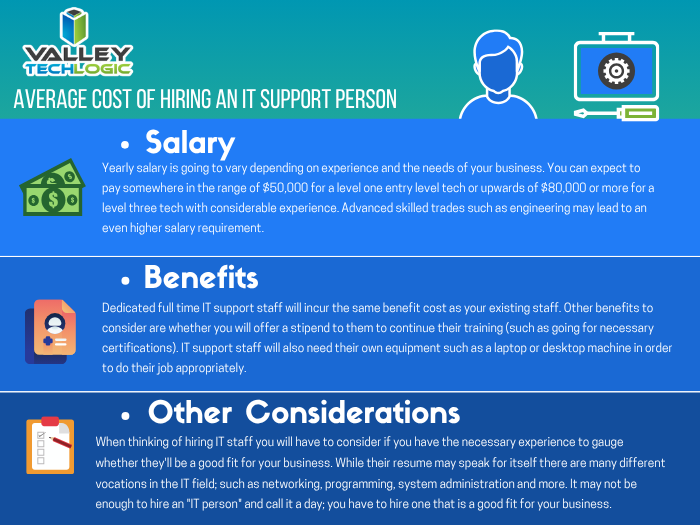
    Hiring internal IT staff comes with a hefty price tag—salaries, benefits, training, equipment, and ongoing development all add up. And if your tech needs change, adjusting your team isn’t easy. MSPs like Valley Techlogic offer flexible, scalable support at a predictable monthly cost. You get expert-level service without the overhead of full-time hires.

    1. Access to a Full Team of Experts

    No single IT professional can master every area of technology. When you partner with Valley Techlogic, you gain access to a full team of specialists across cybersecurity, cloud infrastructure, network management, compliance, and more. This means no skill gaps and faster resolution to complex problems.

    1. 24/7 Monitoring and Support

    Tech issues don’t stick to business hours, and neither do we. Our clients benefit from 24/7 monitoring and support, reducing downtime and catching issues before they disrupt operations. With an MSP, you’re never left waiting for someone to return from vacation or respond after hours.

    1. Faster Response Times

    Our clients value speed, and they get it. Valley Techlogic offers clearly defined service level agreements (SLAs) and ticketing systems to ensure rapid response and resolution. Unlike relying on one in-house staff member who might be overwhelmed, our team is ready to act when you need us.

    1. Enterprise-Level Security and Continuity

    Today’s cyber threats are more advanced than ever. We provide enterprise-grade security tools, proactive threat detection, secure backups, and disaster recovery solutions. Valley Techlogic also helps ensure regulatory compliance for industries like healthcare, finance, and professional services, something a lone IT hire may struggle to maintain.

    1. Stay Focused on Growing Your Business

    Your team didn’t sign up to troubleshoot printers or stress over software updates. With Valley Techlogic as your IT partner, you can redirect internal resources to focus on what truly matters: serving your clients and scaling your business. Let us handle the tech, so you don’t have to.

    For small businesses, the choice between building an in-house IT team and working with a Managed Service Provider is about more than just cost, it’s about capability, reliability, and peace of mind. At Valley Techlogic, we specialize in helping Central Valley businesses thrive with customized IT solutions designed for growth.

    Ready to explore what an MSP can do for your business?
    Contact us today to schedule a free consultation and see how we can become your trusted technology partner.

    Looking for more to read? We suggest these other articles from our site.

    This article was powered by Valley Techlogic, leading provider of trouble free IT services for businesses in California including Merced, Fresno, Stockton & More. You can find more information at https://www.valleytechlogic.com/ or on Facebook at https://www.facebook.com/valleytechlogic/ . Follow us on X at https://x.com/valleytechlogic and LinkedIn at https://www.linkedin.com/company/valley-techlogic-inc/.

  • Technology that you can build on, supporting your construction business through tech

    Technology that you can build on, supporting your construction business through tech

    We’re continuing from last week where we touched on how technology integrates with the field of dentistry, we want to switch gears from a business sector that helps us maintain our tooth structure to one that helps us maintain our societal structure. We’re looking at how technology can help those in the construction.

    Our construction clients are used to taking on big projects and creating comprehensive plans for tackling those projects with their teams. They aren’t always nailed down to one location, being out in the field and having employees logging in from remote offsite locations is part of their norm.

    Documentation is important for the work they do. They often have a dedicated server that keeps track of all the reports that come with having a construction business. Planning data, financials, insurance information – all of that must be available at a click of a button so they can run their business as smoothly as possible.

    If you’re in construction, ask yourself if any of these tech related items would be applicable to your business:

    1. Slow or non-existent internet on work sites. As we mentioned above, your employees aren’t logging in from one location, they go where the work is that day. You need support for your connectivity that’s flexible for the way you do business.
    2. Equipment that goes “missing”. Like us, you have expensive equipment that needs monitoring and logging. Our construction clients need solutions for making sure their equipment doesn’t “walk off” the job site. Security cameras solutions with the ability to save and review the data they collect are crucial for these clients.
    3. Regulatory compliance concerns. If you work in the government sector (or would like to) you’re probably aware of the ongoing attempt to secure our national data through CMMC (Cybersecurity Maturity Model Certification).

      There’s also the documentation you must do for every portion of your business, because if something goes wrong you need that documentation to back you up. If your documentation goes missing or can’t be retrieved because an outdated server has “malfunctioned”, or your backup solution was inadequate – it can spell trouble for your business.

    The long and short of it is, having a technology solution that supports your business is as crucial as having supports structures in a building to keep it from collapsing. A pillar may not look like much on it’s own but it could be the only thing keeping back a catastrophic collapse.

    At Valley Techlogic, we see ourselves as the pillar that not only keeps your technology equipment running as it should, but also keeps out any intrusions to your business (17.7% of all cyber attacks are aimed at your business model which is second only to the financial sector).

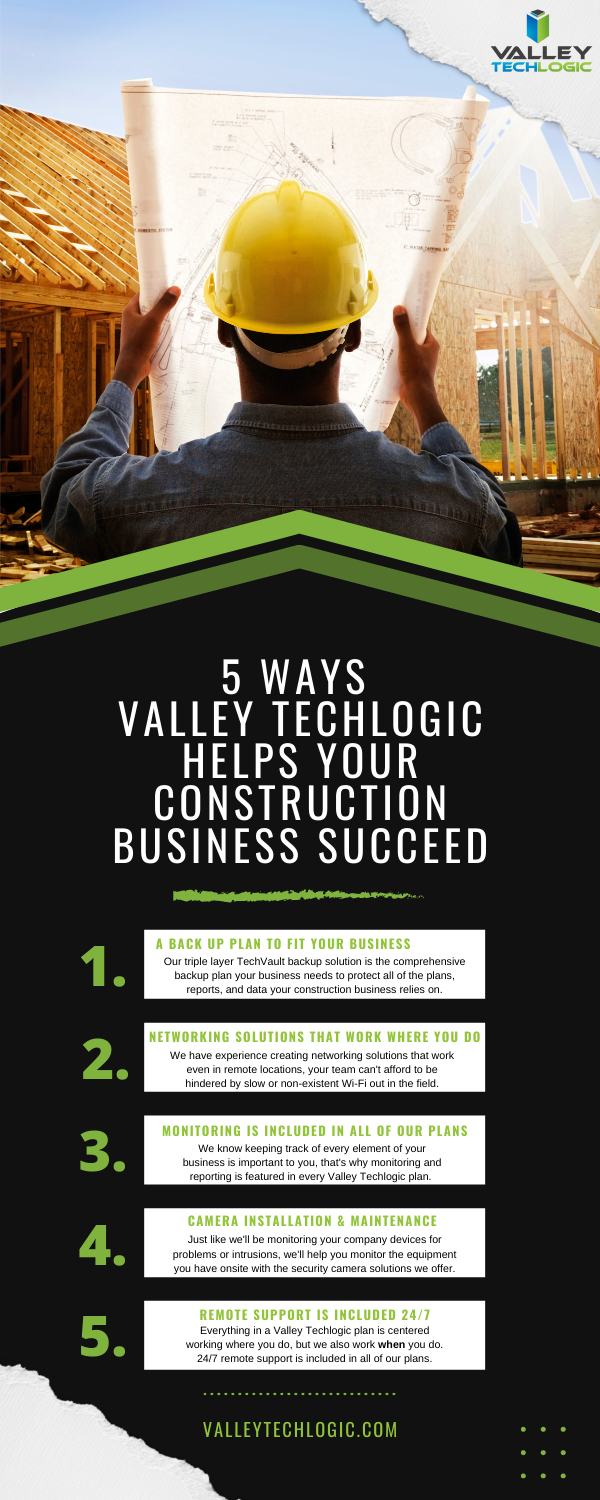
    Here is a chart with 5 ways Valley Techlogic specifically supports our construction clients:

    5 Ways VTL Supports Your Construction Business

    Still on the fence? Why not have a conversation with us directly, book a quick consultation with us here.

    Looking for more to read? We suggest these other articles from our site.

    This article was powered by Valley TechLogic, an IT service provider in Atwater, CA. You can find more information at https://www.valleytechlogic.com/ or on Facebook at https://www.facebook.com/valleytechlogic/ . Follow us on Twitter at https://x.com/valleytechlogic.

  • 10 Tips for Staying Safe Online When Working from Home

    Woman working at desk

    In light of the ongoing health crisis many of us are placed in the unusual position of working from home. While you may have concerns about keeping up your usual level of productivity and being able to communicate effectively with your coworkers while working in separate places there may be one issue flying under the radar, how do you stay safe online while working from home?

    It’s unfortunately not a given, in many work places you have an IT team that maintains (or should!) a high level of security for your office computers and network. These same measures are not in place on your home network or on your home computer.

    With so many of us working from home hackers may be seeing this as an opportunity to access your company’s private data via unsecured personal computers and home networks. These 10 tips will prevent this from happening.

    1. Don’t reuse passwords. If you’re able to choose your own work passwords it’s important they’re varied, if hackers get access to one of your accounts and you use the same password for everything then they have access to all of them.
    2. Practice good password safety. It’s imperative that passwords for your work accounts follow good password safety practices. Hackers may be able to use your work accounts to access the rest of your company’s data. If you set your own password make sure it follows the rules of 16 characters in length, mixing characters and avoiding dictionary words if possible.
      Also destroy any written copies of your password, real life phishing exists! Use a password manager like LastPass instead.
    3. Secure your home network. It’s shocking how many home networks don’t have a password at all, or if they do it’s a single word with no mixed characters or even your router’s default password.
      This is not a good idea! Hackers can use your network to access your home machine, and from there it may be game over. Like the tip above practice good password safety when it comes to your router’s password.
    4. Enable 2-factor authentication if it’s available to you. Many laptops these days feature security measures such as facial recognition or fingerprint readers that will help keep your device safe. Don’t forget to enable the same feature on your phone!
    5. Speaking of 2-factor authentication. You may find that your workplace uses 2-factor authentication to secure the applications you use on a daily basis to do your job, if they don’t bring it up! This will further prevent people from accessing your company data.
    6. Install updates. At work your IT team is probably installing updates for you, on your home device you’re responsible for doing so. In general, you shouldn’t be ignoring updates but while accessing your company accounts it’s even more important.
    7. Practice good online safety. The security measures enabled on your company network may prevent a total takeover in the case of someone accidentally downloading malware, this is not so at home.
      Don’t open attachments from senders you don’t know. Be careful which websites you visit, and always have your firewall enabled!
    8. Be careful with public networks. During this time, it might be tempting to get out and at least work outside at a café or somewhere with public Wi-Fi. However, this public Wi-Fi may leave your machine vulnerable, especially if you’re not practicing some of the safety measures above.
    9. Make sure your work is backed up. You’ll probably need some help from your IT team for this one but ensure the work you’re doing is backed up to your office servers or saved in some way. Recovering lost data from your home machine alone may be more difficult.
    10. Last but not least, use an anti-virus software. Find out which anti-virus software your company IT team recommends, or if you need a recommendation reach out to us. It’s extremely important for staying safe online.

    We hope these tips help. For those not working remotely or for tips on staying safe while in public right now, we recommend referring to the CDC Website for the most up to date information: https://www.cdc.gov/coronavirus/2019-ncov/index.html

    This article was powered by Valley TechLogic, an IT provider in Atwater, CA. You can visit us on Facebook at https://www.facebook.com/valleytechlogic/ . Follow us on Twitter at https://twitter.com/valleytechlogic.

  • 2020 is Here – Here’s your Technology and Cybersecurity Forecast

    2020 is Here – Here’s your Technology and Cybersecurity Forecast

    It’s 2020 and the start of a new decade. Technology has changed a lot since the beginning of the last decade. Inexpensive computer options like Raspberry Pi and Chromebook became available, the first iPad was released.

    Computing also got a lot faster, the first 8 core processors were released, solid state drives became a lot more widespread, and graphic cards reached new heights for computer gamers shattering the previously achievable FPS (frames per second) and ushering in a new era of high-end gaming.

    The previous decade also brought new records on cybersecurity issues but unfortunately not in a positive light. Malware became more sophisticated and harder to track, ransomware became widespread (it’s estimated it cost the US $7.5 billion in 2019). So, what’s on the horizon for 2020 and beyond in the realms of technology and cybersecurity?

    As wearable technology advances increase, we will see even more of it aimed at integrating tech with the world around us. Augmented reality devices will probably become more accessible and affordable. Sensor technology will continue to increase which will have a positive effect on healthcare and our ability to detect health scares before they advance to something serious (see watches now aimed at keeping track of our blood pressure and heart rate).

    Needless to say it will be something to look out for as our society becomes more dependent on the IoT (Internet of Things), for good and for bad.

    What about the field of cybersecurity? While it’s probably true hackers won’t stop trying to gain access to our private information – especially as it pertains to our financials – even the most layman user of technology is becoming keen to protecting their privacy.

    Consumers will demand corporations be made accountable for leaks of private data and businesses not wanting to shoulder the financial burden of an attack (or the bad press) will utilize the tools available to thwart would be bad actors in their tracks.

    On that front we can help. At Valley Techlogic we are on a mission to have the most comprehensive and effective cybersecurity tools available to protect our clients. We also offer 24/7 help desk so no matter when you have a problem, we’re on it.

    If you’re in the Central Valley or surrounding area reach out today for a free security audit and begin this new decade tackling your business’s technology needs.

    This article was powered by Valley TechLogic, an IT provider in Atwater, CA. You can visit us on Facebook at https://www.facebook.com/valleytechlogic/ . Follow us on Twitter at https://twitter.com/valleytechlogic.

  • Windows 7 End of Life: Upgrade your existing machine or start fresh?

    A laptop upgraded windows.January 14th, 2020 looms ever closer and you may be scrambling for a solution to one problem: Does it make sense to upgrade your existing machine or purchase a new one?



    I can’t say for certain which one is the better option for you or your business, but one thing is for certain, remaining on Windows 7 after support ends is a dangerously ill-advised idea.

    Windows 10 released July 29, 2015, so chances are if your machine is still running Windows 7 it’s older than the 3 years I personally recommend a machine be replaced by. We know this is not always feasible so here are the minimum specs we recommend for an upgrade to Windows 10:

    • In my experience your machine will need at least 8 GBs of ram to run Windows 10 relatively smoothly, but ideally it will have at least 16 GBs at this point in time so it has enough power to run the operating system and all the processes you may use day to day.
      Something else to consider is whether your ram is soldered (very common in laptops), if it is an upgrade will not be possible.
    • Your CPU is something else to consider when upgrading or buying, here at Valley TechLogic we recommend Intel CPU’s and more specifically at least Core i-5 or Core i-7, both will run Windows 10 effectively but Core i-7 will be much more future proof.
    • A Solid State Drive, many older machines still use highly failure prone mechanical hard drives. A solid state drive will be less prone to hardware failure and it loads much faster. On average solid state drives load 5 to 20 times faster than a mechanical drive.
    • You may also need to purchase the Windows 10 license, at the present time that will run you $199.99 for a Pro license (what we recommend in a business setting).
    • There also may be a cost to having these upgrades performed for you if you don’t currently have an all encompassing Managed IT Plan in place (learn more here). This cost can really add up if you own a business with more than one outdated machine.

    Depending on your situation the costs associated with upgrading an existing machine may not make sense in the long run. Purchasing a new machine is an investment, and when done thoughtfully it will last many years into the future.

    It’s also possible to transfer your existing computer files from the old machine to the new one – even system settings – making the switch painless.

    Here at Valley Techlogic we work with our customers to come up with a solution that makes sense for their business, whether they’re upgrading existing computers with new hardware or helping them purchase a new one through our affiliates.

    We work to minimize downtime and through our comprehensive Managed IT Department plan upgrading is a covered project. If you’re in the Central Valley reach out today to see if we can help you with this end of life event, or any other IT projects you may have coming up.

    This article was powered by Valley TechLogic, an IT provider in Atwater, CA. You can visit us on Facebook at https://www.facebook.com/valleytechlogic/ . Follow us on Twitter at https://www.twitter.com/valleytechlogic .

  • Window’s 7 EOL of Life Is Coming Soon, But There’s Still Time to Prepare

    14th on a Calendar
    The January 14th is almost here.

    January 14, 2020 will be here in less than three short months, and there are probably many out there that haven’t prepared to make the switch off Windows 7 (or Windows Server 2008 which also ends support on the same day). In fact, an estimated 32.8% of all PCs running Windows are still running Windows 7.

    We know it can seem like a hassle to upgrade and you may be thinking what’s the harm in leaving my computer as is? We’d like to explain why that’s a bad idea and simple steps you can take to make the migration off Windows 7 easier.

    If you stay on Windows 7 after support ends your PC will still work, but it will be more vulnerable to malware and other security risks. Regular Windows updates provide crucial protection to exploits that may especially exploit vulnerabilities in your operating system or programs run by that operating system.

    Hackers may also choose to target those who have decided to stay with Windows 7 after January 14th. You may find yourself up creek without a paddle if something happens to your PC after Windows support ends.

    It doesn’t have to be this way though, making the switch from Windows 7 will probably not be as difficult as you may be expecting. In fact, a Windows 7 client upgrade may take an hour – or less – if your computer has a solid state drive (SSD).

    If you have an older mechanical drive it may take a bit longer, but it is probably not the multi-day event you may have been expecting.

    You shouldn’t attempt an update from Windows 7 to Windows 10 without a backup, and this is an excellent time to review your backup plan in general (especially if you don’t have one!). You most likely will not lose any files though and should find yourself up and running the same day with a brand new and more secure operating system.

    We’d like to take the time to note that migration from Windows 2008 server to newer editions of Windows server is a more complicated process that should not be attempted without professional help.

    If you own or work for a business in Central California, Valley TechLogic can assist you with this task. Reach out to us today at 209-357-3121.

    This article was powered by Valley TechLogic, an IT provider in Atwater, CA. You can also reach us on Facebook at https://www.facebook.com/valleytechlogic/ or on Twitter at https://www.twitter.com/valleytechlogic.

  • 6 Fantastic things a great MSP can do for your business

    6 Fantastic things a great MSP can do for your business

    With businesses spending between 1.5 and 7.2 percent of their yearly revenues on technology, leaders are always looking for ways to improve cost efficiency and ensure the success of their digital transformation initiatives. But, with limited budgets and technical expertise being in short supply, it’s often a difficult task. Partnering with the right managed services provider (MSP) can overcome these challenges and maximize your investment in IT.

    #1. Boost your adaptability to changes in the market

    Markets are more volatile than ever due to the rapid evolution of modern technology and the changing customer habits that come with it. The fact that many brands, some of which were once household names, have vanished is testament to how failure to innovate quickly leads to a hasty demise. The shift towards technology as a service allows businesses to adapt and innovate faster instead of trying to capitalize on opportunities long after their competitors have taken over.

    #2. Scale with demand to budget more efficiently

    In-house IT departments can be incredibly expensive to maintain, and the increasing demands often turn into an overwhelming burden. However, that’s not to say you should do away with in-house IT entirely. By partnering with an MSP, you can scale back and forth with demand, without having to worry about enrolling new full-time employees who might end up spending long periods with nothing to do. Outsourcing also lets you tap into new computing resources as and when you need them.

    #3. Empower your workforce with greater mobility

    Flexible working environments are the new norm in a world where employees have the freedom to work from home or elsewhere. The cloud empowers workforces with greater mobility and flexibility while allowing businesses to reach out to talent from around the world. In fact, an increasing number of startups are entirely location independent. With the right technology partner, you can reduce your office space and hardware requirements and boost productivity by letting your staff work in an environment that suits them best.

    #4. Access proven, cutting-edge technology

    A computer quickly becomes obsolete from the moment you walk out of the store with it. While that might be an exaggeration, there’s no denying that businesses need access to the newest hardware to keep up with their competitors. Combined with regular maintenance, the constant need to upgrade presents a huge cost burden on companies. However, with an MSP, you effectively rent your computing resources, which are normally hosted in the cloud. That means no more unpredictable costs and no need to worry about upgrades.

    #5. Add value to your entire business

    The right technology can add value to every facet of your business. Marketing teams can use customer relationship management to better keep track of customer needs and communicate more effectively. Support teams can offer better service by leveraging collaborative support platforms. Payroll teams can use automation to prevent discrepancies. Human resources can reach out to the best talent through online collaboration platforms. Employees can co-author documents in the cloud. The list goes on. All these things improve efficiency, therefore adding value to your business.

    #6. Meet and surpass your compliance obligations

    The demands of data security, privacy, and compliance places a heavy burden on businesses, and things aren’t getting any easier as reliance on technology increases. Security expertise is also difficult to come by, with millions of unfilled positions around the world. Partnering with an MSP can do much more than add an external layer of protection to your network with remote monitoring and management. It can also help you choose compliant vendors and services and decrease your level of risk to turn the burdens of compliance and security into a competitive advantage.

    Valley Techlogic is Central California’s one-stop shop for all your business technology needs. We’re a leading MSP that’s dedicated to optimizing your IT. Call us today to start getting the solutions and support you need to grow your organization.

  • Four cost-effective alternatives to hiring more IT staff

    Four cost-effective alternatives to hiring more IT staff

    With the costs of running an in-house IT department easily running into seven-figure numbers even for smaller organizations, business leaders are constantly looking for ways to reduce the impact of technology on their bottom lines. When high-level executives like CIOs command a typical salary of over $142,600 per year, it’s easy to see why. As the world of enterprise technology gets increasingly complex, the expenses only seem to keep on coming.

    If your IT department is struggling to keep up with demand, or ailing infrastructure is leading you to miss out on new market opportunities, then it’s definitely time to rethink your technology strategy. Fortunately, for most small- to medium-sized businesses, hiring extra IT staff is rarely necessary. There are many other options for managing your IT without breaking the bank, such as the following:

    #1. Remote monitoring and management (RMM)

    RMM is the process of controlling and monitoring IT systems remotely from a centralized web-based dashboard. With specialized RMM software, administrators can maintain visibility into their technology infrastructures through real-time insights. It greatly simplifies management as well by automatically detecting new devices and the installation of new software. Using RMM software provides benefits in four key areas: service availability, cybersecurity, maintenance, and productivity.

    Being a proactive measure for optimizing and protecting your network and its endpoints, RMM helps reduce costly downtime and detect and resolve problems before they disrupt business operations. This, in turn, improves productivity by reducing the need for staff to find temporary workarounds. Furthermore, RMM can handle many routine maintenance tasks, such as patch management, malware-scanning, and file synchronization.

    #2. Automation and simplification

    As a general rule, anything that can be automated should be automated. Business computing isn’t getting any easier, so you should consider anything that simplifies your IT infrastructure as an opportunity to add value to your business and reduce costs. By automating routine tasks, your existing IT staff can focus more on strategic initiatives rather than getting overburdened with repetitive workloads. This also boosts morale and productivity, while reducing the risk of costly human error.

    One of the best ways to simplify your computing infrastructure is to migrate to the cloud. With cloud-hosted apps and desktops, you no longer need to worry about hardware upgrades, and many routine maintenance tasks will also be taken care of by your service provider. Moreover, cloud-hosted resources are accessible from anywhere, which makes it possible to work with remote employees and tap into the best talent from around the country and beyond.

    #3. IT project consulting

    Technological innovation requires careful planning and expertise. There’s far more to it than simply chasing after the latest trends just because that’s what everyone else seems to be doing. Choose the wrong technologies, or those which you’re not adequately equipped to use and implement, and you can easily end up in a worse situation than before. If your IT department can’t handle the extra workload or doesn’t have the necessary skillset, there’s a good chance you’ll end up being stuck with dated technology that can’t keep up with demand.

    IT project consultants don’t come cheap, but they can provide quick returns on investment. A dependable consultancy firm has a vested interest in learning about your company’s goals and priorities and matching them with the right IT solutions. Given this, your existing staff will be able to focus on core business functions, and you’ll be able to tap into economies of scale while keeping any disruption to your everyday operations to a healthy minimum. Add ongoing help desk support into the mix, and you’ll have everything you need to put your innovation on autopilot.

    #4. Help desk support

    If you have a small IT department, helpdesk support is a great option. By outsourcing tedious support jobs to help desk technicians, your in-house IT staff can spend more time managing important projects that add value to your business. What’s more, help desk support companies pride themselves on quick response times and same-day ticket resolutions. This means you can expect IT issues to be handled promptly and professionally, keeping downtime to an absolute minimum.

    Valley Techlogic provides expert advice and managed IT services to help your business enjoy more out of technology without the high cost burden. Call us today to start getting the support your organization deserves.