

Tag: byod

  • BYOD (Bring Your Own Device) in the workplace, 5 policies to have in place for 2023

    BYOD (Bring Your Own Device) in the workplace, 5 policies to have in place for 2023

    Last week we touched on tips for buying new tech for your business in 2023, but for some offices BYOD (Bring Your Own Device) is the norm.

    What is BYOD? Bring your own device is where an employee uses their personal device (usually a laptop) for work purposes. There are different ways to go about this, for some offices there employees using an already owned device. For others, they can use a device they own but they must log into a virtual machine to do their work. A third option is that the business still purchases the device an employee uses but because they work remotely from home the same rules of BYOD still apply even though it’s a company owned device.

    During the pandemic we saw more articles related to BYOD and remote working and how to still manage a secure workspace even if your employees aren’t coming into the office. Even with workplaces now open again many are operating on a hybrid model and advice surrounding security of devices that don’t stay in one location is still very relevant.

    Business owners themselves also often take their devices home with them at the end of the day and aren’t immune to the same pitfalls that can happen if you don’t have policies in place to help protect your office network and data. BYOD offers work places a lot of flexibility as long as security measures are adhered to.

    Here are our tips for smart BYOD policies to have in 2023:

    1. First and foremost, have a good password policy. Especially for company websites and other logins. See our chart below for what makes a good password.
    2. Determine what data can be accessible from home or a BYOD. Some data should be restricted to in office/office devices only, especially anything client sensitive. You can also utilize a company SharePoint to share files without having them be locally stored on devices.
    3. Have time-based lock-out procedures to limit long sessions, especially if a device is idle. An idle device left in an unfamiliar place is a potential vector for hacker access. Time-based lockouts will make devices used offsite much more secure.
    4. Utilize the same security stack on BYOD as you do on company or office devices. Many cybersecurity tools don’t require devices to be in the same building, it’s a good policy to have your IT provider install the same tools on BYOD and other devices that leave the office. If your company uses Windows you can also consider something like Microsoft’s Intune for easier management of all of your endpoints no matter where they’re being used from.
    5. Have a policy for wiping company data off a BYOD. Especially if the device is employee owned, you shouldn’t assume that it will always be a smooth hand off. Having policies for this in writing is crucial.

    Like we said the first step is having a good password policy is step one to a good BYOD plan for your business, and we might argue it’s the first step in a good security plan overall. Here are our tips on what makes a good password:
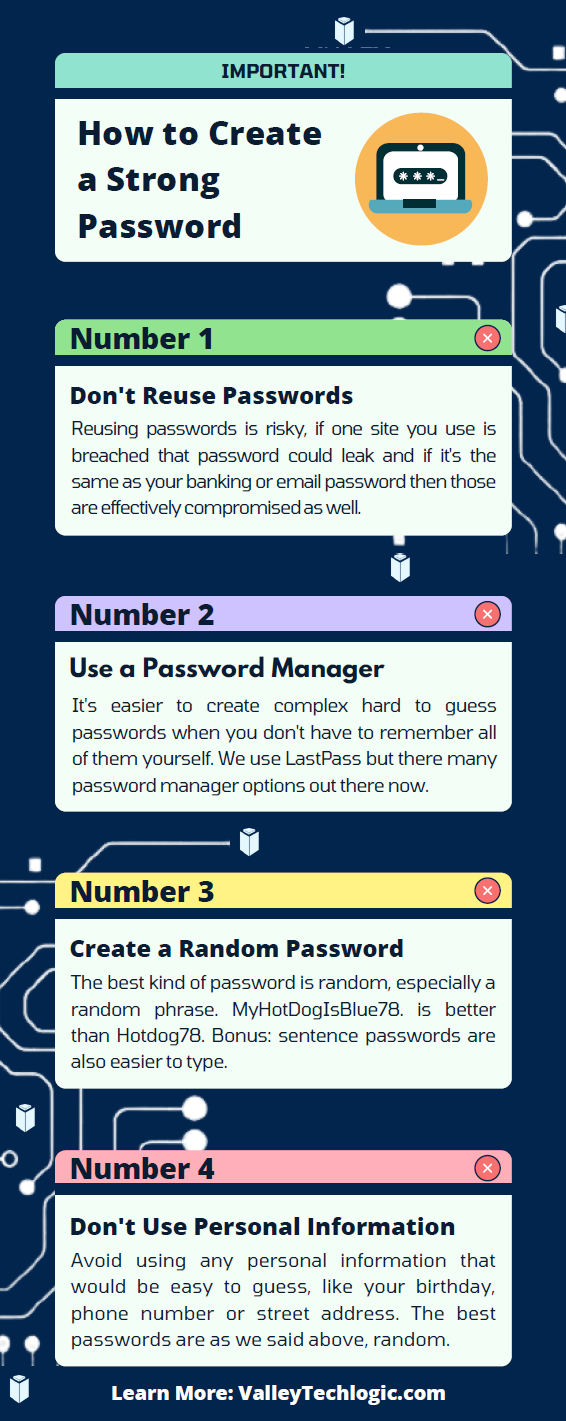
    Click to grab the full size version.

    If you need help with device management in your business, Valley Techlogic can create a plan of action that encompasses both flexibility and security into a package with functionality at the forefront. Reach out today to learn more.

    Looking for more to read? We suggest these other articles from our site.

    This article was powered by Valley Techlogic, an IT service provider in Atwater, CA. You can find more information at https://www.valleytechlogic.com/ or on Facebook at https://www.facebook.com/valleytechlogic/ . Follow us on Twitter at https://x.com/valleytechlogic.

  • Thinking about buying new tech for your business in 2023? Here are our top 10 tips

    Thinking about buying new tech for your business in 2023? Here are our top 10 tips

    We recently touched on the tax savings benefits for making technology purchases before the new year, however maybe you’re only in the beginning stages of thinking about replacing equipment in your business and aren’t ready to go ahead and buy before 2022 is over.

    We’re a fan of making big technology purchases in bulk when it comes to our clients, instead of a mish mash of devices that all have different warranty times, hardware capabilities and software available to them you have one set of devices that can be managed in much the same way for their entire life span because they all came from the same place at the same time.

    While that Isn’t always achievable, you can accomplish almost the same goal by buying in sections as well. Maybe management devices get replaced first, followed by team 1 and team 2. Just any kind of organizational system to your technology buying beats the technology clutter of having everyone working on something different.

    Of course there are different considerations if your business BYOD (bring your own device) which we’ll touch on next week. Besides trying to make your technology purchases at roughly the same time here are 10 more tips for business technology buying in 2023.

    1. Research is key. Not all laptops for example are created equal (and the same goes for every other device) you want devices that will more than cover the requirements of Windows 10 or 11 and still perform well.
    2. On the same token, look up reviews. Sometimes a product SKU is problematic, it would be bad to read reviews about your chosen laptop having a problem with premature device failure AFTER you’ve bought 10 of them.
    3. Consult your employees. Your employees may have opinions about what is crucial to them in a work device, for example if you have one employee who handles your graphic design they may need extra memory or a better video card added to their particular device to do their job effectively.
    4. Spend a little extra on the extended warranty. You want these devices to last a long time for your business as they’re a big investment, it’s worth it to purchase the extended warranty (Dell offers up to 5 years for example).
    5. Look into what kind of support the company offers if you do encounter a problem. On the same page as the last tip, you want to make sure if one of the devices breaks or encounters a problem you can easily have it fix. Lenovo is another vendor we work with and they offer onsite repair of devices at a low additional cost.
    6. Consider consulting your software vendors. If you use a proprietary software in your business it’s especially important to make sure your chosen device will work with it (especially if we’re talking about replacing an onsite server).
    7. To follow up on that, if you’re considering replacing your server it might be a good time to consider the cloud. Onsite servers are a very expensive investment, we have seen more clients move to the cloud in 2022 than ever before. If your server has come up for replacement it might be worth researching before making that purchase.
    8. If you do want to purchase another onsite server, consider refurbished. Ordinarily we shy away from refurbished but when it comes to servers it can be a smart investment and we’ve found they perform just as well as new, we have saved clients thousands of dollars when they choose this option.
    9. You can choose the cloud for employee devices as well. If you have a BYOD format but still want the uniformity and security of having everyone connect from a similar machine, we recommend Windows 365. It’s a cloud PC your employees would connect to from their current device, it can give them the benefit of using a PC with more powerful hardware if you chose and you can manage these devices under one platform.
    10. Work with your IT provider to take advantage of their partnerships. Finally, if you have an IT provider it’s worth asking if they have partnerships with any vendors that can help you get a better deal. We have partnerships with Dell and Lenovo and utilize them to benefit our clients regularly. You can learn more about that here.

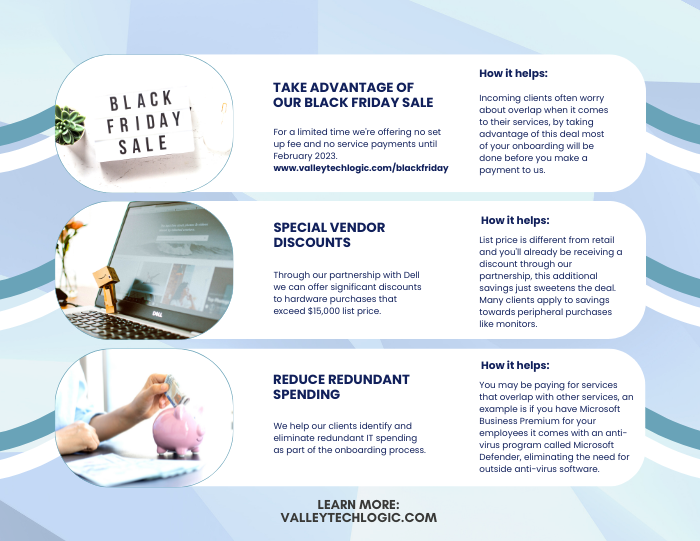
    Here are three ways you can save right now on your technology spending:

    Three additional money savings tips.Procurement services is something we reserve for clients. If you’d like to learn more about how we can help you purchase new devices and maintain them, click here to schedule a consultation.

    Looking for more to read? We suggest these other articles from our site.

    This article was powered by Valley Techlogic, an IT service provider in Atwater, CA. You can find more information at https://www.valleytechlogic.com/ or on Facebook at https://www.facebook.com/valleytechlogic/ . Follow us on Twitter at https://x.com/valleytechlogic.