

Tag: chrome

  • Chrome browser extensions we recommend, and ones to avoid

    Chrome browser extensions we recommend, and ones to avoid

    Whether you use Chrome, Edge, Firefox, Opera or something else for your day to day browsing, there are browser extensions (or add-ons) that can make that browsing better – but which ones?

    All browser options these days have a dedicated section in your settings options to find extensions that are compatible with that particular browser. See our chart below for the steps to finding it in each of the browser options mentioned above.
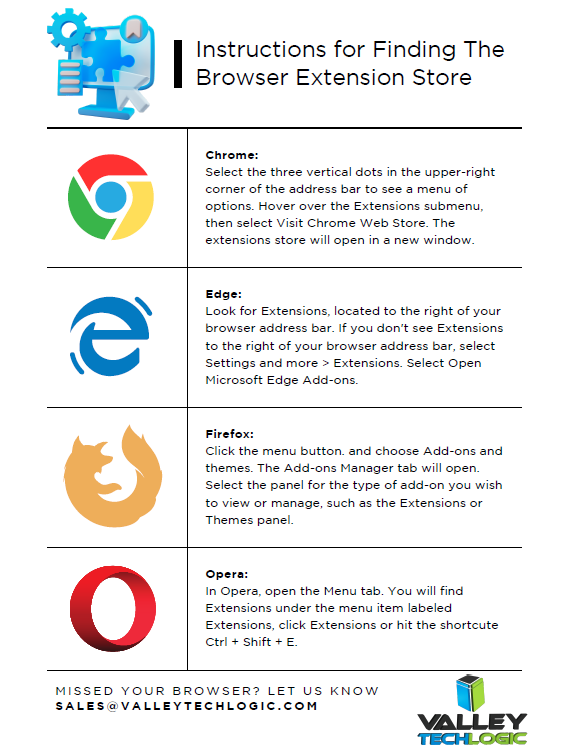
    Reaching the extension store is really just the first step, actually choosing extensions that will make browsing more pleasant or more efficient for you is a whole other ball game. There are extensions for changing the appearance of your browser, adding functionality (like highlighting specific tabs) blocking ads and more.

    Since Chrome dwarfs the competition in market share (with a whopping 63.56% of traffic worldwide coming from Chrome) we’re going to focus on Chrome, but in most cases there will be a direct analog for these found in other browsers.

    Top 5 Chrome Browser Extensions We Recommend (And Actually Use Ourselves):

    1. LastPass: LastPass is a subscription-based password storage vault, and it has an extension that makes logging into your accounts super easy. For one low annual fee they will safeguard all of your passwords and via the extension, you can autofill those into sites you use to login. It will also alert you if you’re usually a duplicated password (giving you the option to make better choices there) and if you want to change that duplicated password – it also comes with a password generator built in.
    2. Ghostery: There are a lot of adblocker options available, but Ghostery is unobtrusive and also blocks something many of the other ones miss, trackers. If you’ve ever had an ad seemingly follow you around it’s because websites will deposit a “cookie” onto your computer through your browsing that then allows you to be tracked across the web. Ghostery puts these sneaky ads in their place and blocks that practice altogether.
    3. Loom: If you’ve ever wanted to quickly show staff how to navigate a website or service you use in your business, Loom can help. Loom lets you quickly record video and screen captures directly from your Chrome browser. You can also file share via Loom so you can send the videos you make directly via the same extension.
    4. Buffer: Managing your social media content and enacting a strategy that allows you to be consistent is harder than it sounds. When you get into the grind of your day it’s very easy to forget that daily Facebook post or to check in on that new LinkedIn campaign you started. Buffer allows you to publish, review analytics, add content ideas to a calendar and review social engagement all under ONE platform found directly in your browser.
    5. Dark Reader: This is a Chrome extension your retinas will appreciate. As a dark mode fan it can be glaring when you hit a website that doesn’t have a dark mode option, luckily there’s a Chrome extension that adds the Chrome Dark Theme to every site you visit.

    So now that we’ve covered some extensions we do recommend, what about ones we don’t? In general, it’s good to think of the extension stores as being similar to the application stores found on your mobile phone. These are added by independent developers and as with the Android/Apple shops there can be unscrupulous additions included with the intended features, like collecting your data or abusing your systems resources.

    As such we suggest using your best judgement when downloading and if you’re ever unsure, reach out to your tech support team to confirm. If you need guidance for this or other technology topics in your business, Valley Techlogic is here to help.

    We’ve been providing our technical expertise to businesses in the Central California area since 2004, reach out today to schedule a consultation.

    Looking for more to read? We suggest these other articles from our site.

    This article was powered by Valley Techlogic, an IT service provider in Atwater, CA. You can find more information at https://www.valleytechlogic.com/ or on Facebook at https://www.facebook.com/valleytechlogic/ . Follow us on Twitter at https://x.com/valleytechlogic.


  • Unsure if the person you’re interacting with may be a fake? This Chrome extension can detect fake profile pictures with 99.29% accuracy

    Unsure if the person you’re interacting with may be a fake? This Chrome extension can detect fake profile pictures with 99.29% accuracy

    As we discussed last week, financial scams may be on the rise in 2022. Social engineering is a pretty common tactic utilized by scammers when it comes to siphoning funds from unwitting victims, but there are some tools you can use to combat it.

    Recently a company called V7 Labs has released an extension for Chrome that’s able to detect artificially generated profile pictures, such as those created by Thispersondoesnotexist.com (see below for an example).Examples of "ThisPersonDoesNotExist"

    The Fake Profile Detector extension can help you detect if a social media profile picture is a fake just by right clicking on it, it’s able to zero in on things you may miss at first glance – such as a pupil that’s not in the right place or clothing that appears to be bleeding into the skin. The extension does not work with video (yet). Also, just to note you should always verify an extension is from a trusted source before downloading it to your browser.

    Social engineering scams aren’t limited to just financial scams, they’re also utilized to gain information or to spread misinformation. As AI tools have grown more sophisticated it’s not easy to rely on someone’s profile picture to give you a good indication of who you’re talking to online.

    It’s also very easy to create fake profiles using real pictures, even pictures of people you may actually know. It’s typical for the scammer to start the conversation off with they got “locked out” of their main account and would like you to add their new one. You should also confirm with your friends and family before accepting a request from a new account.

    Or maybe it was their actual social media account, but a scammer was able to gain access. Sometimes scammers may even leave the password alone. The victim then may not know they have an intrusion, and the scammer just monitors and deletes messages of the conversations they’re having without the victim’s knowledge.

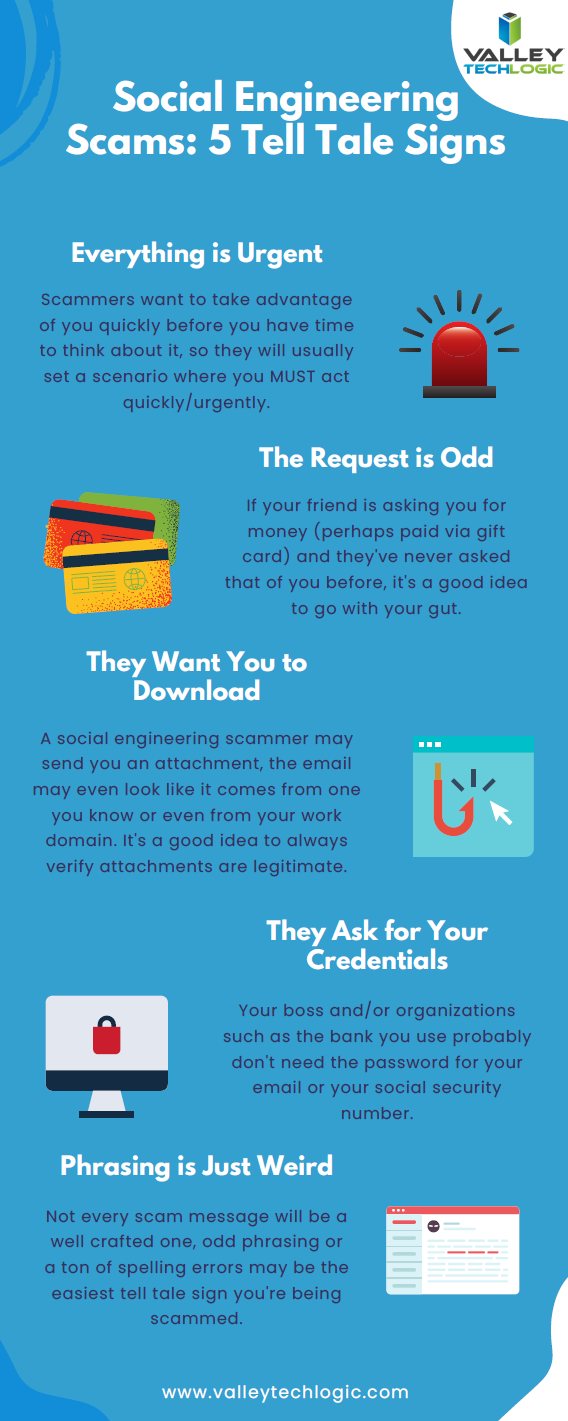
    We have created this chart of the top five things you should watch out for when it comes to social engineering scams.

    Click to download the full size version.

    Social engineering is not limited to just social media sites such as Facebook and Twitter. The most common type of social engineering are phishing attacks, and scammers setting their sites on businesses to take advantage of may have an easier time of convincing a user they are who they say they are when it comes to the more casual relationships we tend to have with colleagues.

    We wrote a blog explaining what to look out for when it comes to phishing emails, but at Valley Techlogic we also think this issue can be tackled from a software and training perspective.

    The tools we utilized will make sure that much of that suspicious spam never makes it to your end user, and the training we offer to our clients can help them make sure that if an employee does get a spoofed phishing email – they know exactly what to do about it.

    To learn more, schedule a free consultation with our sales team today.

    Looking for more to read? We suggest these other articles from our site.

    This article was powered by Valley TechLogic, IT service provider in Atwater, CA. You can find more information at https://www.valleytechlogic.com/ or on Facebook at https://www.facebook.com/valleytechlogic/ . Follow us on Twitter at https://x.com/valleytechlogic.
  • Distance Learning and The Ways We as a Technology Leader Think It Can Be Improved

    Distance Learning and The Ways We as a Technology Leader Think It Can Be Improved

    For many of us back to school has arrived, although it’s in a way that is drastically different than we’re used to. Technology is making it possible for schools and colleges across the country to teach children and adults from their homes as the global pandemic continues to .

    Primary schools and colleges have some of the same hurdles and v some that are drastically different, but this article will be mostly aimed at parents finding themselves in the position of navigating virtual learning with their children.

    The success of distance learning is intricately tied to both having access to the technology required and being instructed on how to use it properly.

    Access to the technology needed has been woefully inadequate thus far for many schools. Chromebooks, often the computer of choice for schools both for their ease or use and because they’re inexpensive, have been in high demand and production has not been able to keep up.

    However, if you’re a parent waiting on a Chromebook from your school and you have access to other technology such as a laptop you no longer use, know that it will work just fine for distance learning. The device of choice does not HAVE to be a Chromebook and forgoing receiving a device in a time when many schools don’t have adequate stock may help free one up for a family who will otherwise not have access to a computer.

    If you have the means to purchase a new device for your student(s) the following minimum specifications are what we’re recommending.

    • 250 GB hard drive or higher
    • 4 GB RAM or higher
    • 2.0 GHz Intel or AMD processor
    • Windows 10 or MAC OS 10.10 or later
    • Microsoft Edge, Firefox 48 or later
    • Safari 11 or later
    • Anti-virus program (updated regularly)
    • Computer microphone and speakers
    • Web Camera

    Once you have your device it’s time to begin preparing it for the distance learning school year ahead. Every state and district will have their own suite of software and websites they’re recommending and using to conduct classes. One constant we’ve seen so far is in the continued use of Zoom as the meeting software du jour.

    We’ve written a few times on the safety of Zoom (you can view those articles here & ), general good password hygiene is still at the forefront of operating all the accounts you may have to juggle during a distance learning situation.

    I think we’ll find it’s up to schools and local governments to close the divide on distance learning, making it as accessible as possible across the board and providing the flexibility needed for families.

    “Teachers in two separate surveys estimated that only about 60% of their students were regularly participating or engaging in distance learning. (Individual district reports of daily “attendance” varied widely, as districts defined the term so differently.)

    Two-thirds to three-quarters of teachers said their students were less engaged during remote instruction than before the pandemic, and that engagement declined even further over the course of the semester.

    A survey of teenagers in late March found that most were in contact with their teachers less than daily, with a quarter saying they were in contact less than once a week.” –  Chalkbeat.

    Engagement will be a challenging hurdle for most schools and it’s one technology can address if tackled in the right way. As this quote illustrates attendance is a sore point and many parents are finding it difficult to impossible to juggle both work and the complexities that come with distance learning. Improvements in the technologies used to deliver the educational experience to students as well as flexible options for parents is crucial for beginning to solve this dilemma.

    We all have a desire for a time when we can get back to normal and kids can get back to school, but by not preparing ahead of time for a lasting remote learning situation many districts are left cobbling together different technologies in the hope of providing a cohesive learning experience.

    We need educational programs that are custom tailored to a remote learning situation, and these may not resemble the traditional in school paradigm we’re so used to as much as we want it to.

    Moving forward it will be imperative that we find the right ratio of both serving the educational needs of the children in our country during this immensely difficult time and allowing for grace when things do not go as we plan.

    Looking for more to read? We suggest these tech articles from the last week.

    This article was powered by Valley TechLogic, an IT provider in Atwater, CA. You can find more information at https://www.valleytechlogic.com/ or on Facebook at https://www.facebook.com/valleytechlogic/ . Follow us on Twitter at https://x.com/valleytechlogic.

    Looking for IT Services in Fresno, Modesto, Stockton, Ceres, Atwater, Merced, Visalia or Lodi? We cover all these areas and more!