

Tag: disaster recovery planning

  • Inclement weather, solar flares, earthquakes – how disaster proof is your businesses technology?

    Inclement weather, solar flares, earthquakes – how disaster proof is your businesses technology?

    We’ve written quite a bit about cyber security disasters and disaster recovery in that context (here are just a couple options Why every business needs a documented backup and disaster recovery strategy and Data Breached? 5 ways to reduce the impact on your business), but what about a disaster that’s truly out of your hands?

    Depending on where you live there are different types of types of disasters to worry about, and some disasters such as solar flares or geomagnetic storms are a global concern.

    While it’s been hyped by certain news outlets that a solar storm of spectacular magnitude could wipe out our global network and cause nationwide blackouts, solar events of the level required to cause mass destruction are spectacularly rare. Nasa rates solar flare levels on a scale that includes B Class which is the smallest, through C, M and X class which is the biggest. Within each scale there is a rating from 1-9 for the first three levels of solar flares and X class flares can be rated up to 17.

    X-class flares actually occur fairly frequently, with there being 11 so far in 2023 at the time of writing. These flares are strong enough to disrupt satellite signals or deliver a minor dose of radiation to passengers on an airplane when they occur.

    The best defense against solar events such as these is to advocate for improving our electricity grids, above ground electricity components are the most vulnerable if a significant solar flare were to occur. We do want to stress again though that an event of that nature would be exceedingly rare.

    Let’s now take a look at events that are much more common, such as inclement weather or for California based businesses such as ours, earthquakes.

    While you most likely have insurance that would cover your physical property including your office building, hardware and office furniture, it might be important to ask your insurance broker if it will also cover intangible assets.

    It is likely you’ll need a cyber liability policy to provide coverage for your data, below is a chart for what we typically see is covered (and not covered) by cyber liability coverage.
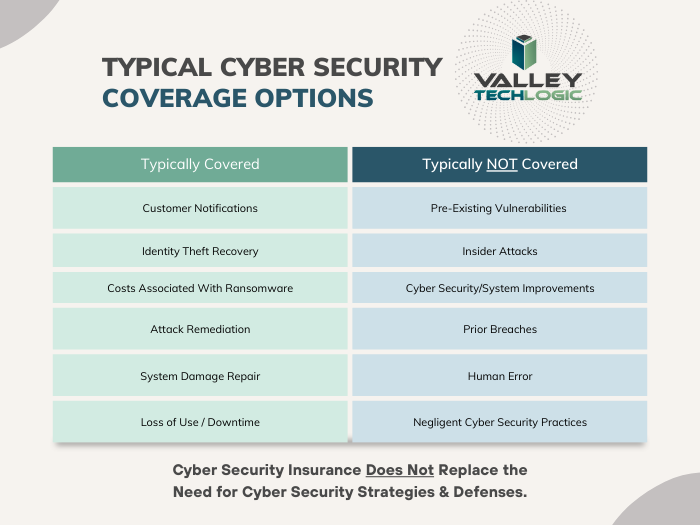
    As you can see most cyber liability policies cover business interruptions and data loss even if the cause is not cyber security related. What’s often not covered is events that fall within your control (such as the human element we’re always mentioning when it comes to common hacking techniques such as phishing).

    Another good way to protect your data from disaster events that may impact your business is to have most of your data located off premises in the cloud.

    While the cloud is often construed as a nebulous concept, really hosting your data in the cloud just means it’s on a server somewhere else. If your on-premises server is subject to catastrophic system failure for any reason, the cloud copy of your data would be safe.

    There are many low cost or free cloud options you can take advantage of for your data, we have a guide to the best way to use the free OneDrive storage that comes with your Microsoft 365 subscription here.

    Also, if you work with a managed IT provider such as Valley Techlogic, backups and backup maintenance is often included as part of your service plan. We have information about our own back program, TechVault.

    If disaster proofing your business in 2024 is on your to-do list, why not collaborate with us? We have experience in creating plans for businesses to make sure we avoid all preventable downtime and to protect your data from catastrophic events. If you’ve already suffered a data breach or other system outage and need assistance in data recovery that is also a service Valley Techlogic can provide. Reach out today for more information.

    Looking for more to read? We suggest these other articles from our site.

    This article was powered by Valley Techlogic, an IT service provider in Atwater, CA. You can find more information at https://www.valleytechlogic.com/ or on Facebook at https://www.facebook.com/valleytechlogic/ . Follow us on Twitter at https://x.com/valleytechlogic.

  • Five Must Have Features in a Business Continuity Plan

    Five Must Have Features in a Business Continuity Plan

    While business continuity plans should cover topics that extend beyond the realm of technology, it makes sense that technology naturally moves to the forefront when much of the focus of a good business continuity plan focuses on the ability to perform business functions as normal.

    Business continuity is defined as “”the capability of an organization to continue the delivery of products or services at pre-defined acceptable levels following a disruptive incident”, and disruptive event can have many meanings. It could be a natural disaster, a cyberthreat, or even a short-term outage situation like if your office loses power or internet access.

    You should have plans for both short-term and long-term outages written into your plan. However some studies have shown that as high as 51% of businesses globally do not have a business continuity plan in place at all, and what’s worse – only 10% of businesses who experience a disaster and do not have a business continuity plan survive.

    Who should make plans for your business if not you? If you have no continuity plan in place you may find that you’re scrambling to make decisions under duress and attempting to delegate to third party vendors who have their bottom line in mind, not yours.

    So, how do you start in creating that plan? The first step is to have an honest look at your businesses risk factors. This includes environmental factors, does your area face brown outs when the heat starts to peak in the summer? Or snow that prevents employees from reaching the office in the winter at times?

    Maybe there are some things that are individual to you, such as touch and go internet access in your office building or phonelines that are less than reliable. Do you have a server on its last legs that’s been acting finicky? Its eventual failure should be written into your continuity plan.

    You also need to look at your cyber risks, if your employees aren’t being training on cybersecurity safety then that’s a huge factor that must be addressed and planned for. You need to ask yourself what you would do if your data was breached, or an employee email was compromised.

    It’s overwhelming but as with most things starting the process is the hardest part and having a candid look at your business could mean eliminating certain risk factors (like moving data away from the server on it’s last legs into a cloud solution).

    You may even find ways to make your business more efficient, if you know brown outs are common where your office building is located in the summer perhaps you would make a plan to have employees work from home more during that time. Or having your internet service provider address the issue of frequent outages rather than just rolling with them as they occur.

    All in all, these are the five things we would suggest you focus on as you make your business continuity plan:

    1. Technology – How will employees continue to work if your office operations have been waylaid.
    2. Power – If power goes out what kind of backup plan will you need to have in place, such as a generator to keep your server online.
    3. Communications – Do you have a standard way with communicating with your employees? If you need to get a message out quickly to all of them, could you presently do that?
    4. Vendors – Inform your vendors of the provisions you’ve put in place in case a disaster were to occur, and inquire what plans they have in place on their end (because a disaster for them could be a disaster for you).
    5. Data Protection – Most businesses require an online presence to continuing operations, you will need provisions for if your data is compromised or inaccessible. At Valley Techlogic we suggest having a multi-layer backup approach, so if one backup is compromised you will have the others to fall back on.

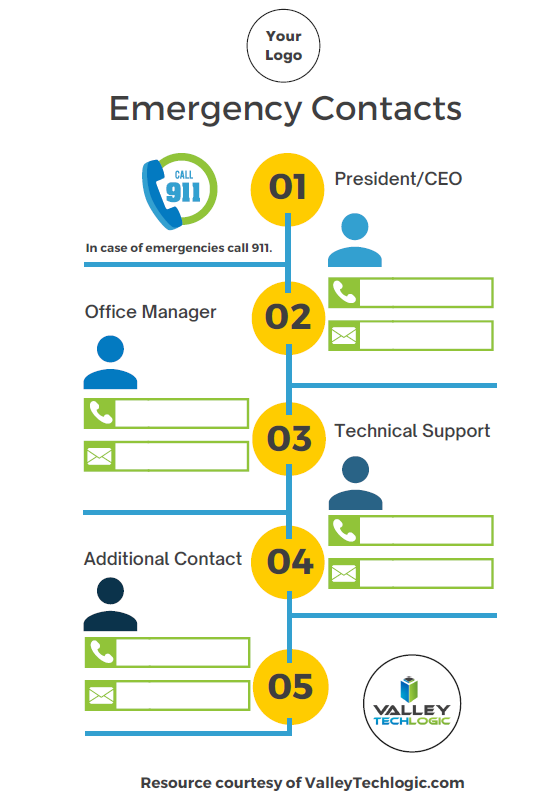
    To get you started, we’ve prepared this emergency contact worksheet for your employees. You can fill in who they should begin to reach out to and what steps they should take if an emergency occurs. If you would like us to personalize it with your logo just let us know.

    Click to grab the full size version for your business. Need it personalized? Contact us.

    Valley Techlogic can help you to begin establishing a business continuity plan and also help you with mitigating risks to your business, learn more today.

    Looking for more to read? We suggest these other articles from our site.

    This article was powered by Valley TechLogic, IT service provider in Atwater, CA. You can find more information at https://www.valleytechlogic.com/ or on Facebook at https://www.facebook.com/valleytechlogic/ . Follow us on Twitter at https://x.com/valleytechlogic.

  • DDoS Attack or Not? Yesterday’s Outage Left Many Systems Down for Hours

    DDoS Attack or Not? Yesterday’s Outage Left Many Systems Down for Hours

    Yesterday, an outage stemming from T-Mobile left many major systems down. Affected websites included T-Mobile itself, Instagram, Comcast, Sprint and Chase Bank. Was it a massive DDoS attack or just a server misconfiguration as they’re claiming?

    First, it’s probably a good idea to explain what a DDoS attack or Distributed Denial-of-Service attack is and what it aims to do.

    A DDoS attack is a cyber attack where the perpetrator or group of perpetrators seeks to make a server or network unavailable by attacking its connection to the internet. They typically do this by flooding the affected systems with traffic, overloading them and causing them to go down.

    These attacks can happen to a single computer, an office, or even on a global scale. The website https://digitalattackmap.com/ attempts to track these DDoS attacks on a global level, however it’s somewhat controversial among cyber security experts as they question the veracity of it’s data.

    Many time these outages are made apparent by the website https://downdetector.com/ which accurately tracked the cascading wave of websites that went down in yesterdays event.

    Down Detector is a reliable source for tracking whether the connection issues you’re having are stemming from your network or the website or service you’re trying to access is truly down.

    So, was yesterday’s event a DDoS attack or just an error? The public will probably never know. However as cyber crime continues to ramp up – purported to be a $6 trillion dollar industry by 2021 – it’s a good idea to have the best protections in place so you and your business don’t fall victim.

    A DDoS attack aimed at your systems may expose other vulnerabilities, and the downtime alone can be costly. If your IT team isn’t adequately prepared to defend against this or any of the other varieties of cyber attacks plaguing the technology market, it might be time for a new team.

    This article was powered by Valley TechLogic, an IT provider in Atwater, CA. You can find more information at https://www.valleytechlogic.com/ or on Facebook at https://www.facebook.com/valleytechlogic/ . Follow us on Twitter at https://x.com/valleytechlogic.

    Looking for IT Services in Fresno, Modesto, Stockton, Ceres, Atwater, Merced, Visalia or Lodi? We cover all these areas and more!