
A newly disclosed set of critical security vulnerabilities in PHP, one of the most widely used programming languages on the internet, has prompted urgent warnings to website owners, developers, and IT administrators. The vulnerabilities, collectively known as PHP2Shell, could allow attackers to remotely execute malicious code on affected servers without needing a username or password. Because PHP supports millions of websites and business applications, the potential impact extends well beyond traditional website security.
On October 21, 2026, PHP developers released emergency security updates addressing two vulnerabilities, identified as CVE-2026-109618 and CVE-2026-109619. Both received a critical severity rating of 9.2 out of 10, and security researchers have demonstrated how they can be exploited to execute code on vulnerable systems. According to reporting from BleepingComputer, the vulnerabilities affect multiple PHP server configurations, making prompt patching essential for organizations that rely on the language.
PHP is a server-side programming language responsible for generating dynamic website content, processing forms, managing user sessions, and supporting many popular web applications. Content management systems such as WordPress, Drupal, and Joomla rely on PHP, as do numerous business applications and custom-built platforms. PHP typically runs behind the scenes, so website owners may not even realize their sites depend on it.
The PHP2Shell vulnerabilities involve problems in how PHP manages memory while processing requests. Under certain conditions, an attacker can manipulate these processes to execute instructions on the underlying server, potentially allowing them to access sensitive information, modify website files, or deploy additional malicious software. What makes these vulnerabilities particularly serious is that exploitation may not require an attacker to authenticate, and some affected configurations can be compromised before the website’s own application code begins running.
How do you know if your website is at risk? Any website or application running an affected version of PHP should be evaluated, particularly if it can be accessed over the internet. This includes WordPress websites, e-commerce platforms, customer portals, and internally developed PHP applications. The risk is not limited to public-facing websites, either. Internal business applications that use PHP may also be vulnerable, especially if attackers can reach them through compromised networks or other exposed systems.
Importantly, a website does not become secure against PHP2Shell simply because its particular installation, themes, or plugins are up to date. The vulnerabilities exist within the PHP runtime itself, meaning that fixing them requires updating the underlying PHP environment. Conversely, websites that do not run PHP are not directly affected by these particular vulnerabilities, although their servers, hosting environments, and other software may still have unrelated security risks.
There is also evidence that attackers began attempting to exploit PHP2Shell even before the vulnerabilities were publicly disclosed. On October 22, Infosecurity Magazine reported that Amazon had detected an exploitation attempt four days before disclosure, with additional evidence of attacks taking place in the wild. The widespread use of PHP makes these flaws especially attractive to attackers who can automate their attempts against large numbers of internet-facing systems.
That does not mean every PHP-based website has been compromised, and the presence of a vulnerable PHP version is not proof that an attack succeeded. However, organizations should treat these vulnerabilities as an urgent security issue rather than waiting for evidence of an attack. As The Washington Post reported, the severity of the flaws prompted warnings that some systems unable to receive immediate updates should be temporarily taken offline to reduce exposure.
The first step is determining whether your website or business applications use PHP and identifying which versions are installed. If you use a managed hosting provider, your hosting dashboard may display the PHP version associated with your website, or the provider’s support team can confirm it for you. Businesses hosting their own infrastructure should work with their IT administrator or developer to inventory all PHP installations, including those used by internal applications that may have been overlooked during previous maintenance.
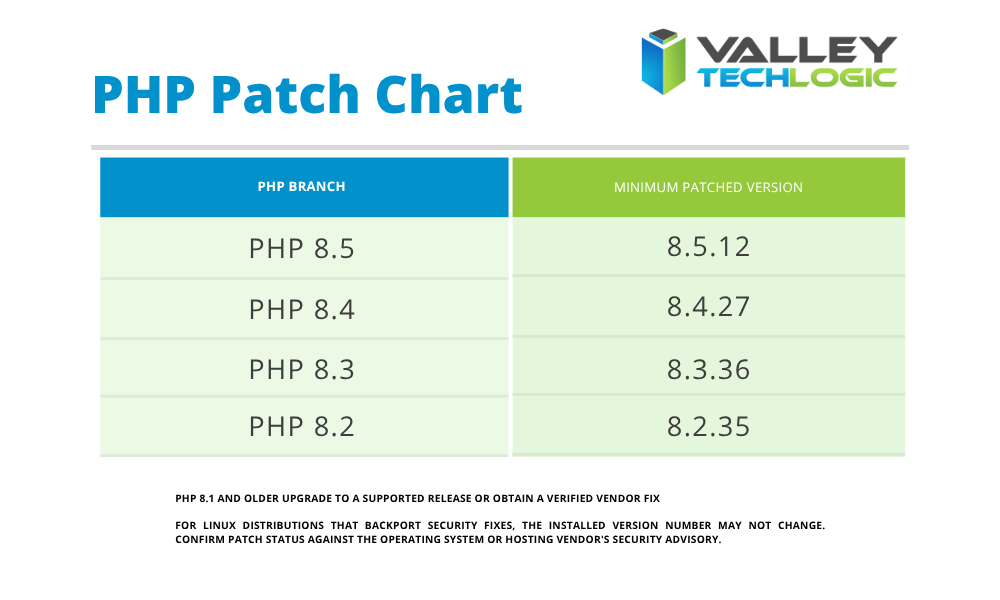
PHP has released patched versions addressing these vulnerabilities, and organizations should verify that their environments are running an appropriate fixed release. The versions containing the emergency fixes are listed below, although newer supported releases may also include the patches. Systems running PHP 8.1 or older require special attention because those branches no longer receive regular upstream security updates, and organizations may need to migrate to a supported version or obtain a verified vendor-maintained patch.
If your website or application uses an affected PHP version, updating the PHP runtime should be your immediate priority. Before making changes, create a verified backup of your website files, application configuration, and databases. Next, check your hosting provider’s control panel for a supported PHP update or ask your developer or IT provider to install the relevant security patches. After updating, restart the affected PHP services if your environment requires it, and test the website or application to confirm that important functionality continues working correctly. A recent report from SecurityWeek confirms that emergency fixes are available for supported PHP branches.
For organizations managing their own web servers, patching should include checking every PHP runtime installed on the system, not just the version displayed by the main website. Older applications, separate hosting environments, and independently managed services may use different PHP installations. If an immediate update is not possible, temporarily restricting access or taking vulnerable services offline may be necessary until they can be secured. Configuration changes, web application firewalls, and additional monitoring can help reduce some risks, but they should not be considered replacements for installing the security updates.
Applying the security update addresses the known vulnerabilities, but it does not automatically reverse any damage caused by an earlier compromise. Organizations should review their web server and PHP error logs for unusual activity, investigate unexpected file changes, and check for unfamiliar administrator accounts or processes. If there is evidence that an attacker accessed the system, additional incident response work may be necessary, including examining affected databases, removing malicious files, and rotating potentially exposed credentials.
This incident is also a useful reminder to review your organization’s broader application maintenance practices. Website security extends beyond updating plugins or occasionally checking whether a site is online. Businesses should maintain an inventory of the software supporting their websites and internal applications, know who is responsible for applying updates, and establish a process for addressing critical vulnerabilities as they emerge. Organization using third-party developers or managed hosting should confirm which security responsibilities belong to their providers and which remain with the business itself.
So, what does this mean for your business? The PHP2Shell vulnerabilities illustrate how a security flaw in a widely used software component can affect thousands of otherwise unrelated products and services. A business may maintain a well-designed website, use strong passwords, and follow good security practices while still being exposed through an outdated server component. The availability of emergency patches provides a clear path to reducing that risk, but businesses need to act promptly and verify that updates have actually been applied.
If your organization relies on a PHP-powered website, customer portal, or business application, now is the time to contact your hosting provider, developer, or IT support team and confirm its patch status. At Geeks for Business, we help businesses identify vulnerable systems, coordinate security updates, and review their environments for potential exposure.
Knowing what software your business depends on and keeping it properly maintained remains one of the most effective ways to prevent avoidable security incidents. Advice for issues like this is one benefit of partnering with a Managed Service Provider (MSP) like Valley Techlogic. If you would like specialized guidance for this issue or any other technology based challenges your business is facing, learn more today through a consultation.

- Email scams have grown more sophisticated and realistic, here are 5 ways you can still tell
- Meta announced Muse and OpenAI announced Dots, are cutesy avatars the way to mass market appeal with real world application or a cheap gimmick?
- 6 Reasons to restrict admin access to company devices
- Is the AI threat overblown? Why OpenAI, Anthropic and more are cautioning we need to “slow down” on AI innovation and focus on safety
- ChatGPT’s Astra (GPT-6) has been released, is it worth the hype?
This article was powered by Valley Techlogic, leading provider of trouble free IT services for businesses in California including Merced, Fresno, Stockton & More. You can find more information at https://www.valleytechlogic.com/ or on Facebook at https://www.facebook.com/valleytechlogic/ . Follow us on X at https://x.com/valleytechlogic