Tag: microsoft news

  • Once the king of voice chat on the web, Skype is shutting down May 5th, 2025

    Once the king of voice chat on the web, Skype is shutting down May 5th, 2025

    Microsoft is no stranger to acquiring programs only to later shut them down (though they pale in comparison to Google’s own graveyard of acquisitions) and now Skype will be the latest casualty with a shutdown date of May 5th, 2025 being officially set.

    Skype, once the leader of online telecommunications and one of the original online video chat programs, began operating in 2022. Skype, which was a shortening of the original project name “Sky peer-to-peer” skyrocketed into popularity in the early 2000’s reaching 100 million users in 2006.

    After a tumultuous fall out with the early founders and buy outs that included eBay, Skype was sold to Microsoft in 2011 for $8.5 billion. Microsoft quickly integrated Skype into their Office platform but with the release of Microsoft Teams in 2017 the writing was on the wall for Skype as to which Microsoft based communications platform would succeed in the long run.

    Skype failed to keep up with competitors during the pandemic when video chat use was at an all time high due to restrictions on in-person activities. Zoom, WhatsApp, Facetime and even Teams itself performed better in the same space – it’s been reported in 2023 just 36 million people still used Skype daily compared to it’s peak of 300 million users which mirrors Teams current daily active users.

    So it makes sense that Microsoft is shuttering Skype in favor of Teams here in 2025, but for those that are new to Microsoft Teams or even those that have already made the switch, what benefits are available that puts it above other communications programs still competing in the space?

    1. Integration with Microsoft 365: Teams naturally integrates very well with Microsoft 365, from booking a Teams meeting right from your Outlook client to creating groups that have a shared SharePoint folder that allows users to share files while they’re chatting about them in real time. If you’re a Microsoft 365 subscriber you’re leaving features on the table if Team is not your communications platform of choice.
    2. Robust Team Collaboration Features: Unlike competitors like Zoom, which is mainly a video conferencing tool, Teams offers extensive team collaboration features like persistent chat, threaded conversations, shared workspaces, and built-in task management with Microsoft Planner and To-Do.
    3. Better Security and Compliance: Teams benefits from Microsoft’s enterprise-grade security, including end-to-end encryption, multi-factor authentication, and compliance with industry standards like HIPAA, GDPR, and ISO 27001.
    4. Unified Communication Hub: Microsoft Teams combines chat, video conferencing, file sharing, and project collaboration in one platform which will not be found in the competition which are largely standalone programs.
    5. Better Pricing for Enterprises: For businesses already using Microsoft 365, Teams is included at no extra cost, making it a more cost-effective solution. Other platforms may charge an arm and a leg for enterprise features such as longer meetings or hosting larger groups.

    Unifying communication in your company can be a game changer when it comes to making sure everyone is on the same page. Whether you’re looking to implement Microsoft Teams or optimize your existing communication tools, Valley Techlogic’s expert IT solutions can help you streamline collaboration, enhance productivity, and keep your business connected—anytime, anywhere. Reach out today for a consultation.

    Looking for more to read? We suggest these other articles from our site.

    This article was powered by Valley Techlogic, leading provider of trouble free IT services for businesses in California including Merced, Fresno, Stockton & More. You can find more information at https://www.valleytechlogic.com/ or on Facebook at https://www.facebook.com/valleytechlogic/ . Follow us on X at https://x.com/valleytechlogic and LinkedIn at https://www.linkedin.com/company/valley-techlogic-inc/.

  • 5 ways to organize your Microsoft 365 files to maximize your productivity this year

    5 ways to organize your Microsoft 365 files to maximize your productivity this year

    If you’re a Microsoft 365 subscriber – or considering it to utilize tools like Word, Excel, PowerPoint and more in your business – you may not be taking advantage of all of the features it has to offer.

    These features include ways to help organize your files and corral your workload under one umbrella, which is useful with the deluge of information many of us are processing each day in the course of performing our job duties.

    Here are five ways to utilize Microsoft 365 to organize your files day to day:

    1. Use OneDrive for Personal Storage – Store and organize personal work files in OneDrive, using folders and tags for easy retrieval. OneDrive also allows for automatic backup and syncing across devices.
    2. Leverage SharePoint for Team Collaboration – Store shared files in SharePoint libraries, where teams can access, edit, and co-author documents with version control and permission settings.
    3. Utilize Microsoft Teams for File Organization – Upload and manage files directly in Microsoft Teams under specific channels, ensuring that relevant documents are easily accessible to team members.
    4. Tag and Search with Microsoft Search – Use metadata, tags, and keywords in file names to make documents easier to find using Microsoft Search across OneDrive, SharePoint, and Teams.
    5. Automate File Organization with Power Automate – Set up workflows that automatically sort, move, or categorize files based on specific triggers (e.g., when a file is uploaded, it moves to a designated folder).

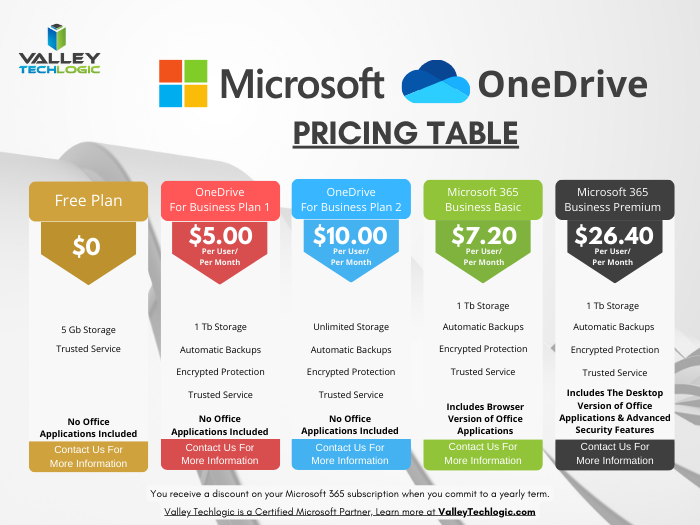
    OneDrive in particular can be very helpful in extending your computers storage and organizing files to share throughout your company and can replace more insecure methods like DropBox or emailing directly. OneDrive can even be purchased as a standalone subscription if you’re not sure about making the switch to Microsoft 365 yet (though we highly recommend it).

    Also, if exploring AI as a tool to increase productivity is one of your 2025 goals, Microsoft’s Copilot and OneDrive work together seamlessly to help you with your automatic file organization goals. Copilot can make suggestions on how you should organize your files based on their content, usage and collaboration history.

    It also gives you a hand with searching for files in a way that’s more intuitive than your average Windows file search function. You can ask it something like “Show me the files I worked on last week” instead of trying to remember specific file names for example.

    Valley Techlogic has been partnering with Microsoft for more than 20 years and we’re experts in providing businesses with cohesive solutions that help them maximize their technology investments, including subscriptions like Microsoft 365. Schedule a consultation with us today to learn more.

    Looking for more to read? We suggest these other articles from our site.

    This article was powered by Valley Techlogic, leading provider of trouble free IT services for businesses in California including Merced, Fresno, Stockton & More. You can find more information at https://www.valleytechlogic.com/ or on Facebook at https://www.facebook.com/valleytechlogic/ . Follow us on X at https://x.com/valleytechlogic and LinkedIn at https://www.linkedin.com/company/valley-techlogic-inc/.

  • Windows Server 2012 R2 End of Life is just a couple months away, are you ready?

    Windows Server 2012 R2 End of Life is just a couple months away, are you ready?

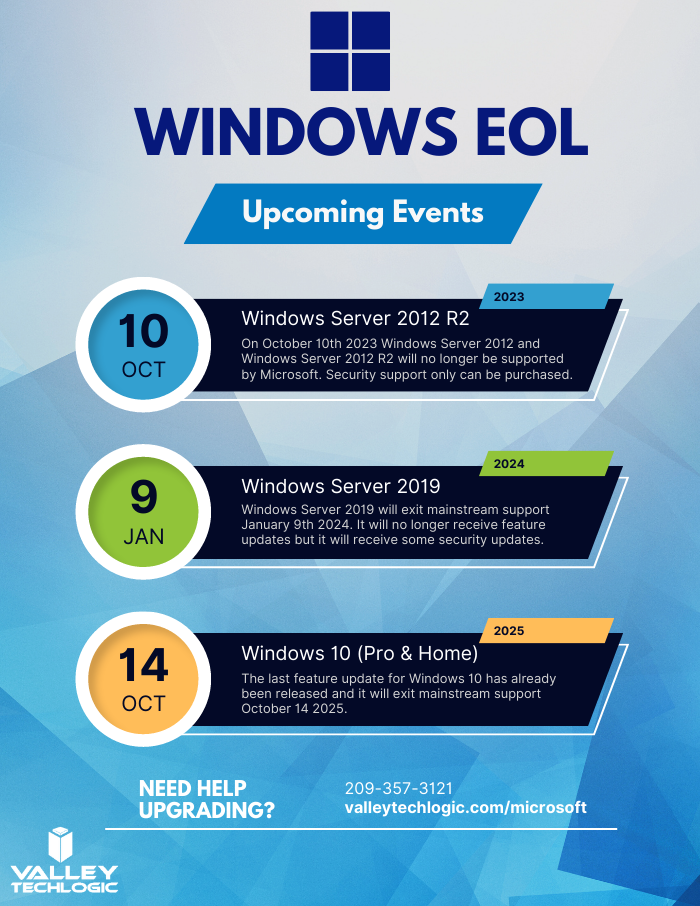
    Windows Server 2012 and Windows Server 2012 R2 are quickly approaching their End-of-Life date of October 10, 2023. This is just over 2 short months away and in the world of data migration (especially as it relates to servers) that doesn’t give you a lot of time if you’re still using this operating system in your business.

    If you’re not in the loop you may be wondering what the big deal is with letting it lapse, it’ll still work right? Well yes and no. The timing of this End-of-Life event coincides with when Microsoft usually does their biggest feature and security updates for the year (typically October).

    This means that those still using Windows Server 2012 will miss out on these updates, and all future updates to come unless you sign up for extended support (at a cost) and even then, that will only provide you with some security updates, there will be no future feature updates for Windows Server 2012.

    You may be on the fence because you aren’t sure if you want to continue using an on-premises server or make the move to the cloud. We actually wrote a detailed article on this topic before and how it relates to the pros and cons of moving to the cloud or remaining with an on-premises server. You can find that article here.

    If you are planning on trying to upgrade soon, we have a couple of steps we can recommend as you prepare:

    1. Decide which operating system you’ll be upgrading to. Typically we recommend upgrading to the most current operating system to give you the longest span of time before an upgrade will be needed again, however depending on your hardware or even specific software you use in your business this may not be feasible. We suggest having your server evaluated to determine which upgrade makes sense (or if an upgrade is even possible.
    2. If you discover your server can’t be upgraded, you’ll need to make plans for a new system. If you have an older server (over 5 years) you’ll need to determine whether an upgrade to the most recent version of Windows Server is even possible. If it’s not, you’ll have to pivot to purchasing a new system instead. There are many benefits to upgrading to a new server and an IT provider like us can help you narrow down your choices based on your business’s needs.
    3. Decide whether a clean installation is possible. If most of the data on your server is backed up elsewhere, for example if you have duplicate copies of your data in the cloud (which we highly recommend) then you can do a clean install without having to worry about the data already on the device.
    4. If a clean installation is not possible, you will need to do a migration. A migration is a slower process of updating your server to the latest version. If you’ve ever upgraded the operating system on your computer, you can probably relate as it’s similar just much longer and with more potential pitfalls. We only recommend a migration be attempted by a qualified IT technician.
    5. Plan for the future now. Scrambling to figure out what to do when an End-of-Life event for your device is coming up is stressful and fortunately, avoidable. Modern versions of Windows Server can perform what’s called an “In-place upgrade” which means an upgrade can occur with very little downtime or stress. Staying on top of your Microsoft and Windows updates and upgrades will mean you have the most secure version of their systems available and much less chance of a catastrophic failure occurring on your devices.

    To help with your planning for Microsoft’s upcoming End-of-Life events, we’ve created this chart with the latest dates to keep track of.

    If you need assistance with upgrading your Windows Server 2012 or Windows Server 2012 R2 device, or have questions about Microsoft products in general, Valley Techlogic can help. We are long time Microsoft partners, and our technicians have a wealth of experience in supporting Windows devices and navigating Microsofts offerings. Schedule an appointment today to learn more.

    Looking for more to read? We suggest these other articles from our site.

    This article was powered by Valley Techlogic, an IT service provider in Atwater, CA. You can find more information at https://www.valleytechlogic.com/ or on Facebook at https://www.facebook.com/valleytechlogic/ . Follow us on Twitter at https://x.com/valleytechlogic.

  • Microsoft layoffs and how the economy is affecting the tech sector

    Microsoft layoffs and how the economy is affecting the tech sector

    It was announced this week that Microsoft will be laying off 10,000 employees in a bid to cut costs in response to “macroeconomic conditions and changing customer priorities”.

    They join the likes of Amazon who also recently laid off 18,000 employees and Meta who cut 11,000 jobs last November. With increasing costs and decreasing sales across many industries amid economic uncertainty, we expect more layoffs to occur both in the tech sector and beyond.

    Satya Nadella, CEO of Microsoft, commented in a recent interview that Microsoft is not “immune to the global changes” and that he expects two years of challenges ahead for the tech sector.

    We’re still seeing hardware shortages stemming from the pandemic and the chip shortages we’ve written about recently. Suffice to say it’s been even more difficult for businesses to navigate maintaining the technology in their office or making needed tech related purchases.

    The worst thing that you can do is hold still and put off making needed upgrades or addressing technology challenges in your business. There are risks associated with outdated technology, they are:

    1. Lack of security compliance: It’s been shown that are on the rise, even faster than before due to malware being more accessible for even those who are not particularly “net savvy”. Even if you thought your business was too small to be a target before, with increased desperation any target might do – including you.
    2. More crashes and downtime: Time is money, especially in this economy. Old devices are more prone to crashing or just giving out completely, at which point you’ll still have to pay to replace them but you’ll have the added cost of the waiting you have to do until the replacement comes in.
    3. Decreased productivity: Your employees are probably your biggest payroll item, do you really want to hinder their productivity by making them use a device that’s sluggish or not working properly? The cost of a new laptop or desktop is a drop in the bucket compared to the cost of wasted time they may spend navigating around issues.
    4. It could put you at a disadvantage to your competitors: The increase of reliance on digital solutions has not been stymied by the current economic landscape, the extra reliance that was exacerbated by the pandemic conditions is there and continues to grow. If your competitors are keeping up with it and you’re not, that will give them an edge you may not want them to have.
    5. Lack of data and transparency: We’ve mostly focused on hardware here but there are significant risks to not making needed software upgrades as well. Modern software is often leaps and bounds ahead in giving you needed data and reports, and we believe knowledge is power. You can’t be sure you’re making the best choices for your business if you’re doing them blindly.

    Now more than ever you need a partner in navigating the technology landscape, and Valley Techlogic can be that partner. We can help you address your technology challenges in a way that still keeps budgetary constraints in mind. We have been in business since 2004 and have experience weathering challenging times. We can even reduce your technology spending in the following ways:

    Click to grab the full size version.

    We’re offering your first service call with us free, because we know you need to be certain when making choices for your business. We know after you try us out you will have the confidence to proceed, you can schedule your first service call here.

    Looking for more to read? We suggest these other articles from our site.

    This article was powered by Valley Techlogic, an IT service provider in Atwater, CA. You can find more information at https://www.valleytechlogic.com/ or on Facebook at https://www.facebook.com/valleytechlogic/ . Follow us on Twitter at https://x.com/valleytechlogic.