Tag: microsoft plans

  • Which Microsoft 365 subscription is right for you in 2024?

    Which Microsoft 365 subscription is right for you in 2024?

    Microsoft cemented its place in businesses with their productivity software suite Office in the 1990’s, combining many existing tools such as Word and Excel and PowerPoint under one umbrella and making it clear that Microsoft was not just it’s operating system Windows but a source for businesses looking to consolidate their work under one platform and expand their tech capabilities as computers became more ubiquitous in modern workspaces.

    Now running your business without utilizing Outlook, Word, Excel, Powerpoint and Sharepoint is unthinkable for many office’s, even today’s article was composed in a Word document before being posted here for your reading (and as we’ve mentioned before, we’re long time Microsoft partners here at Valley Techlogic).

    The landscape for Office has changed since the 90’s, Microsoft has been part of the growing trend to move away from steep one-time software purchases in favor of ongoing subscription models (with ongoing benefits). While it may seem like a better idea to buy your software one time and keep it forever, it’s rarely that simple.

    Software, like hardware, is on a timeline the moment it’s released. Companies will usually offer support for their software for a set number of years and then it will reach a point where they discontinue it in favor of new offerings. Technology is always improving and supporting outdated software is not cost effective for technology companies and risky from a cybersecurity point of view. New software will have the benefit of having protections against modern day threats that older, often buggier software will not have.

    With a subscription model, you are paying over time to constantly receive the latest and greatest offerings available. It’s more expensive overall when compared to paying a one time cost and using something for several years, but in turn for that added expense Microsoft in particular has offered many benefits to their subscription that you cannot get with a stand alone Office software purchase.

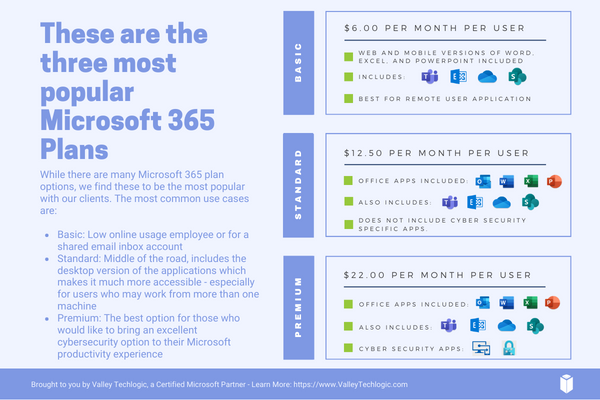
    Here are the benefits found for each of the three most popular Microsoft 365 subscription types, Microsoft 365 Business Basic, Microsoft 365 Business Standard & Microsoft 365 Business Premium.

    1. Microsoft 365 Business Basic: Microsoft 365 Business Basic is Microsoft’s no frills, low cost offering that is perfect for employees who may not be using a computer as often. This subscription type will get them an Outlook email and web versions of Word, Excel and more (so they can still be in the loop on what’s going on in your office) but if you have someone who’s not glued to a desk or are a part-time employee, this level of subscription is our recommendation. Microsoft 365 Business Basic started at $7.20 a month per user.
    2. Microsoft 365 Business Standard: Standard is truly the middle option; it includes the desktop versions of Office software but it’s missing out on the additional cyber security protections found under premium (which we believe are an excellent value). For your average employee Standard is a good option. Microsoft 365 Business Standard started at $15 a month per user.
    3. Microsoft 365 Business Premium: Microsoft 365 Business Premium is we believe, the best value when it comes to Microsoft’s subscription-based offerings. Not only do you get the all the benefits of Office but you also get superior cyber security detection delivered right to your device that’s constantly being updated to keep up with new threats with all the power of Microsoft behind it. It’s an excellent companion piece to your current cybersecurity protections and we believe this subscription is a must have for your management and C-suite level employees. Microsoft 365 Business Premium starts at $26.40 a month per user.

    Also, it’s important to note that Microsoft does offer a discount if you choose to enroll in an annual plan.

    As we mentioned, Valley Techlogic is experts in all things Microsoft and Windows, and we have been a Microsoft partner since 2004. If you would like assistance in choosing the right Microsoft 365 plan for your office, we’d be more than happy to assist. Schedule a consultation with us today.

    Looking for more to read? We suggest these other articles from our site.

    This article was powered by Valley Techlogic, an IT service provider in Atwater, CA. You can find more information at https://www.valleytechlogic.com/ or on Facebook at https://www.facebook.com/valleytechlogic/ . Follow us on Twitter at https://x.com/valleytechlogic.

  • 10 Microsoft 365 tools you need to take advantage of TODAY

    10 Microsoft 365 tools you need to take advantage of TODAY

    Most of our clients are Microsoft 365 customers and enjoy the tools and applications they receive through their Microsoft 365 subscription. Many of these same clients were long time Office customers and were already familiar with the software benefits – such as Word, Office, Outlook, Powerpoint and Excel. These are staple products in the business community and chances are if you’ve been in business long enough you’ve had some exposure to them throughout your career.

    We have had clients who miss the days when Office was a standalone product only. While you still can purchase Office 2021 for a one-time fee, many have to weigh the value of a pretty substantial upfront cost when purchasing for many employees for a product that will at some point expire vs the subscription model that is now favored by many software companies. This is a discussion onto itself, but in a nutshell many clients choose to go with a Microsoft 365 subscription.

    There is an obvious benefit to doing so right off the bat if you choose to go with Microsoft 365 Business Premium, the security benefits of this plan are well known and touted throughout the technology industry as being the crème de la crème of security suites for Windows machines.

    However, there are many benefits to your Microsoft 365 subscription that many users are not even aware of. Microsoft 365 is much more than just an Office subscription – your plan comes with business utility programs that can make organizing and running your business better.

    Here are 10 tools you can take advantage of TODAY if you have a Microsoft 365 subscription:

    1. Microsoft OneNote: OneNote is Microsoft’s digital notetaking app, it’s a step way above NotePad with the ability to organize multiple notes (with colored tabs) and collaborate and share your notes with other.
    2. Microsoft Intune: Intune allows you to control and manage all of the Microsoft endpoints within your business from one place. This one might need an IT pro when it comes to setup and management but once you get it going it really can simplify many IT tasks for your team.
    3. Microsoft Forms: Did you know that you can create surveys, quizzes and polls with a Microsoft product? You can with forms, you can even export the data to Excel and share the forms you create on your website or social media platforms.
    4. Microsoft List: With Microsoft 365 you don’t have to go off platform when it comes to managing even the somewhat more mundane aspects of your business, Microsoft Lists is Microsoft’s solution for keeping track of well, everything. Also just like with Forms you’re able to export these lists to Excel with a click of a button.
    5. Microsoft Bookings: Microsoft Bookings is Microsoft solutions to having a public calendar where clients or colleagues can book a meeting with you, and it’s tied right to your Outlook calendar. Another benefit of Bookings is it can be added to your website for prospective clients to book time with you and eliminating the cost of an outside calendar application.
    6. Microsoft To Do: If you or your employees struggle with staying on task, Microsoft To Do is the solution for you. You can plan out your days in advance and Microsoft To Do will be your one stop place for keeping things on track.
    7. Microsoft Viva: Microsoft Viva is an addition to Microsoft Teams that adds a lot of functionality not usually found in a chat program, Microsoft Viva is a multi-faceted platform but in a nutshell it allows you to set goals for your business, provide training to your employees and see insights into their workday, as well as offering them to provide feedback to you all in the Teams application they already use.
    8. Microsoft Streams: If you already use Teams for your video conference calls then you’re familiar with how reliable Microsoft is when it comes to video streaming. Microsoft Stream takes that a step further and allows you to broadcast video outside your organization with up to 1000 participants.
    9. Microsoft Power BI: Microsoft Power BI provides a snapshot of your business’s data in the form of charts and graphs, so you can see how the data your business creates evolves and changes over time.
    10. Microsoft Planner: Finally, we bring it all home with Microsoft Planner, it’s exactly what you would expect it to be a simple visual tool for planning out meetings, business goals, marketing pitches and more all found at your fingertips with your Microsoft 365 subscription.

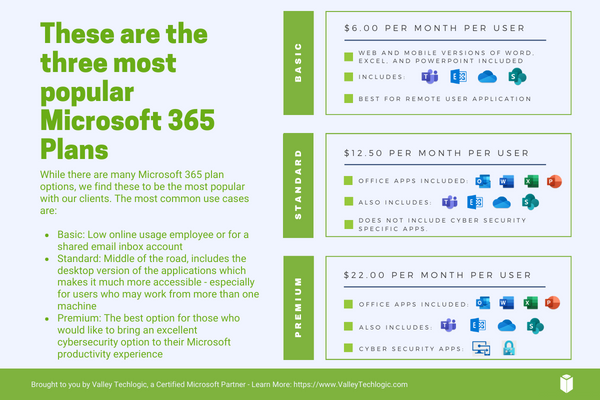
    Of course, if you’re considering signing up for Microsoft 365, you do have to take the cost into account. Here are the costs for the most popular plans (these costs factor in a discount for committing to an annual subscription, the costs are approximately 20% higher when you choose a monthly term).

    Interested in learning more about Microsoft 365? Valley Techlogic is a Microsoft partner, and we can walk you through the process of buying and making the most of your new subscription. Learn more today with a consultation.

    Looking for more to read? We suggest these other articles from our site.

    This article was powered by Valley Techlogic, an IT service provider in Atwater, CA. You can find more information at https://www.valleytechlogic.com/ or on Facebook at https://www.facebook.com/valleytechlogic/ . Follow us on Twitter at https://x.com/valleytechlogic.

  • This weeks Microsoft outage brought down Teams, Outlook and more for several hours

    This weeks Microsoft outage brought down Teams, Outlook and more for several hours

    In major outage news, this week Microsoft had an outage that lasted over 6 hours and brought down Teams, Outlook and Exchange and more – grinding some workplace activities to a halt until the services came back. The outage affected Microsoft 365 customers worldwide.

    Services resumed yesterday morning although there were residual issues for some customers regarding logins and more. Most of the affected services were the online versions of the product, if you have a desktop accessible version of the Microsoft 365 products you may have noticed less of a disruption (other than Teams being unavailable).

    The cause of the outage was announced on Twitter:

    We’ve determined that a recent deployment contained a broken connection to an internal storage service, which has resulted in impact. We’re working to direct traffic to a healthy service to mitigate impact. Additional information can be found in the admin center under TM402718.

    — Microsoft 365 Status (@MSFT365Status) July 21, 2022

    By afternoon Thursday July 21st the Microsoft service health page (which can be found here) indicated that all services were up and running as usual.

    Valley Techlogic is a Microsoft shop by and large and we’re major proponents of the Microsoft 365 suite of services. As we mentioned, those who currently had a Microsoft 365 plan with access to the desk top versions were, or would have been, less affected by this week’s outage.

    Here’s a quick guide to the Microsoft 365 plans we recommend to our customers and why in a nutshell (note: this pricing is after discount for an annual commitment).

    Microsoft 365 Plan Chart

    Basic is a good product, but to make the most of your Microsoft 365 subscription plan we generally recommend spending a little more for Standard or Premium. For our security conscious clients in particular, the Premium subscription is an excellent value.

    Microsoft Business Premium comes with advanced cybersecurity protections built into the product, even if you’re not taking any other steps to protect your business from a cyberattack – switching to Microsoft Business Premium will give you major benefits for a very reasonable price (just $22 per user per month).

    Microsoft Business Basic is perfect for an extremely light user experience, say a shared email inbox for a specific billing purpose or for an employee who doesn’t perform many online tasks. For everyone else, we highly recommend upgrading.

    As we mentioned, we’re a Microsoft shop and a certified Microsoft partner and can assist you directly with your Microsoft products, especially choosing a Microsoft 365 subscription that will be the best fit for your business. Learn more today with a quick consultation.

    Looking for more to read? We suggest these other articles from our site.

    This article was powered by Valley Techlogic, an IT service provider in Atwater, CA. You can find more information at https://www.valleytechlogic.com/ or on Facebook at https://www.facebook.com/valleytechlogic/ . Follow us on Twitter at https://x.com/valleytechlogic.