
Tag: microsoft windows

  • Not ready for Windows 11? Microsoft has announced it’s possible to get free security updates for Windows 10 for a year – but there’s a catch

    Not ready for Windows 11? Microsoft has announced it’s possible to get free security updates for Windows 10 for a year – but there’s a catch

    Microsoft’s end-of-support date for Windows 10 is fast approaching: October 14th, 2025. After this date, regular security updates for Windows 10 will stop, leaving devices potentially exposed to cyber threats.

    But there’s new information that gives businesses a little breathing room. Microsoft has announced that it will offer free security updates for Windows 10 users for one additional year, providing some temporary relief for those not ready to migrate to Windows 11. However, before you put your upgrade plans on pause, you need to understand the catch.

    Historically, when Microsoft ends support for an operating system, businesses must either upgrade to a newer version or pay for Extended Security Updates (ESUs) to keep receiving critical patches. With this announcement, Microsoft is giving users a 12-month extension of free ESUs, allowing them to continue receiving vital security updates through October 2026.

    This is particularly helpful for organizations that:

    • Rely on legacy applications that don’t play well with Windows 11
    • Have hardware not yet compatible with the new OS
    • Need extra time to budget, plan, and test a smooth transition

    However, there is a catch for redeeming the free offer, you need to do one of the following steps:

    • Pay $30 in local currency.
    • Use Windows Backup to sync your settings to the cloud.
    • Redeem 1,000 Microsoft Rewards points.

    So this offer is only free if you utilize Windows Backup or have Microsoft points to redeem, otherwise it’s $30 which is still less than the $61 per user that was originally reported by Microsoft (and us).

    Also, while this free security patch extension buys time, it is not a long-term solution. Once the grace period ends, businesses will need to:

    • Upgrade to Windows 11 or beyond
    • Pay for extended security updates beyond the free year
    • Risk running unsupported devices that are vulnerable to cyberattacks

    It’s also important to note that Microsoft has not promised feature updates or full support during this period, only essential security patches. Outdated software and hardware may still experience compatibility and performance issues, leaving businesses at a disadvantage compared to those who make the switch sooner.

    Microsoft’s free Windows 10 security updates for an extra year are a welcome reprieve, but they’re not a permanent fix. The safest, most cost-effective path forward is to start planning your Windows 11 migration now, rather than waiting for the clock to run out. Contact Valley Techlogic today to schedule your Windows 11 readiness assessment and avoid the risks of running unsupported systems.

    Looking for more to read? We suggest these other articles from our site.

    This article was powered by Valley Techlogic, leading provider of trouble free IT services for businesses in California including Merced, Fresno, Stockton & More. You can find more information at https://www.valleytechlogic.com/ or on Facebook at https://www.facebook.com/valleytechlogic/ . Follow us on X at https://x.com/valleytechlogic and LinkedIn at https://www.linkedin.com/company/valley-techlogic-inc/.

  • Windows 10 reaches EOL October 2025, and those who don’t upgrade may have to pay

    Windows 10 reaches EOL October 2025, and those who don’t upgrade may have to pay

    Windows operating system end of life events are a big deal, with 1.6 billion active Windows devices as of 2024 Microsoft still holds a commanding lead over any other operating system provider. Even though Windows 11 was released almost 4 years ago at this point, it still only represents 28% of the global Windows market share (with 70% still using Windows 10).

    There are a lot of reasons for this, from users being comfortable with the Windows 10 interface to many devices that simply aren’t Windows 11 ready (interested in a Windows 11 device in 2025? Here’s our guide).

    Users hanging onto a previous version of Windows until the bitter end is nothing new for Microsoft, Windows 7 still had a 12% market share when Windows 11 was released October 2021 (almost 2 years since it’s own EOL date occurred).

    In the past, Microsoft has released critical security updates even for systems no longer receiving support. Users could also purchase optional extended support plans for devices that can’t be upgraded for one reason or another (the keyword being “optional”).

    Now Microsoft has announced for the first time ever that consumers looking to extend the life of their Windows 10 devices – or just remain on the operating system they prefer – will have to $30 for a single year of Extended Security Updates (ESU).

    Businesses will be charged even more for ESU, $61 for the first year with the price increasing steeply every year beyond 2025 – $122 for the second year and $244 for the third year respectively. This does not grant Windows 10 users the ability to receive support from Microsoft for these devices, it only means they will still receive critical and important security updates.

    Microsoft has been pushing Windows 11 adoption and we will likely see a stronger market share as consumers replace older devices especially as more AI ready devices become available on the market and Microsoft users look to also take advantage of Co-Pilot.

    There are also some compelling reasons not to use a device that’s reached EOL that go beyond user preference (and the first is covered by this article):

    1. Lack of Security Updates: EOL devices no longer receive critical security patches, leaving them vulnerable to cyberattacks and malware.
    2. Compliance Risks: Using outdated devices can lead to non-compliance with industry regulations, potentially resulting in fines or reputational damage.
    3. Performance Issues: EOL devices may struggle with newer applications and workloads, leading to inefficiencies and reduced productivity.
    4. Increased Maintenance Costs: Aging hardware is more prone to failures and often requires costly repairs or workarounds to maintain functionality.

    If navigating Windows 10 EOL in your office in 2025 keeps you awake at night, Valley Techlogic can assist. Whether it be evaluating whether your office devices are Windows 11 ready or procurement assistance, we are experts at helping our clients make strategic choices in the technology hardware used by their business. Reach out today to schedule a consultation.

    Looking for more to read? We suggest these other articles from our site.

    This article was powered by Valley Techlogic, leading provider of trouble free IT services for businesses in California including Merced, Fresno, Stockton & More. You can find more information at https://www.valleytechlogic.com/ or on Facebook at https://www.facebook.com/valleytechlogic/ . Follow us on Twitter at https://x.com/valleytechlogic and LinkedIn at https://www.linkedin.com/company/valley-techlogic-inc/.
  • AWS vs Azure, what is your best option when choosing a cloud platform?

    AWS vs Azure, what is your best option when choosing a cloud platform?

    We’ve had articles in the past about why you should consider making the move from on-premises to the cloud, but we’ve never specifically addressed which provider you should consider when making this move.

    For many, AWS (Amazon Web Services) and Azure are the main players that they look to when making the jump the cloud. Brand recognition is obviously there for both choices, as well as a history of impeccable uptime. Uptime is a very important factor, obviously you want your data to be available when and how you need it, but there are more things to consider.

    First, let’s look at the players. AWS has been around since 2006 and offers a “pay as you go” model, which means you pay only for the data you actually use. Many of us are familiar with the webstore Amazon, and you’d probably be surprised to learn AWS is a much bigger venture for Amazon, with 74% of their profit coming from AWS.

    Azure was launched in 2010 and is also pay as you go. However, how they differ is that Azure actually lets users access their data through a virtual machine on a Virtual Hard Desk (VHD). This means their interface is slightly more user friendly from the start. For a similar interface in AWS you must rent an EC2 (their version of a virtual machine). EC2 is more customizable but Azures Virtual Machine may more easily work with existing Cloud computing tools.

    Both are similar in that they offer scalable storage solutions; however, their object size restrictions vary slightly, with AWS having a 5 TB object size limit and Azure having a 4.75 TB limit. For most of our customers this would be a very negligible difference, however.

    Both do an excellent job of securing your data, in AWS you customize your security settings on setup. With Azure, they use Microsoft’s Cloud Defender services which are similar to the Windows Defender services you probably already utilize.

    AWS has a dashboard that may be easier to use if it’s your first-time using cloud services when it comes to looking for documentation on how to use the service. Where Azure has them beat though is that Azure keeps all of your user account and information in one place. So, depending on which kind of information you’re looking for, you may prefer one over the other.

    If customizing your cloud experience via code is something you’re after, you probably want to stick with AWS. Through their SageMaker system you can utilize their artificial intelligence (AI) tools to develop a very specific and unique experience when it comes to tracking data, making modifications, and applying updates.

    Azure on the other hand has opted for a “Codeless” interface, even someone with zero coding knowledge can drag and drop pieces to customize their cloud’s AI interface.

    Of course, from a base level you can look at what operating system these are compatible with. AWS is more compatible with Linux while Azure offers compatibility through .net with Linux, Windows and MacOS.

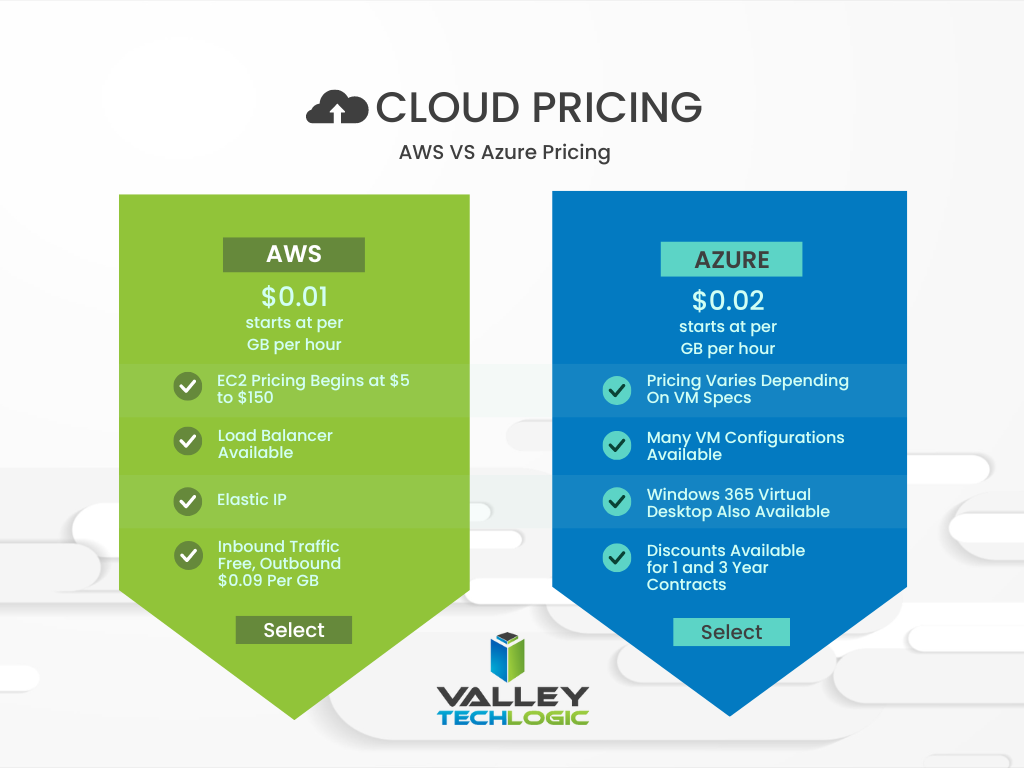
    In a nutshell, these two cloud behemoths are more alike than different but there are some factors that depending on your particular business sector or goals may lead you to shift one way or the other. We also want to spend a moment addressing a pricing breakdown for both AWS and Azure. You can see their pricing models in the chart below. We also want to note that both provide a free introductory period so you can test their services before committing to a plan.

    Are you considering a move to the cloud and aren’t sure which provider to go with, or even how to make it happen? Valley Techlogic can help. We’re experts in cloud computing and have managed many customer cloud migrations. Reach out today to schedule a free consultation.

    Looking for more to read? We suggest these other articles from our site.

    This article was powered by Valley Techlogic, an IT service provider in Atwater, CA. You can find more information at https://www.valleytechlogic.com/ or on Facebook at https://www.facebook.com/valleytechlogic/ . Follow us on Twitter at https://x.com/valleytechlogic.