Tag: outlook

  • 5 Ways Microsoft 365 Business Premium Elevates Your Operations and is the Superior Choice for Your Business

    5 Ways Microsoft 365 Business Premium Elevates Your Operations and is the Superior Choice for Your Business

    In today’s fast-paced digital landscape, having the right tools to streamline your business operations is essential. Microsoft 365 offers a suite of powerful applications designed to enhance productivity, collaboration, and security. Among its offerings, Microsoft 365 Business Premium stands out as the ultimate solution for businesses seeking a comprehensive suite of tools tailored to their needs. In this blog post, we’ll explore the five best ways to leverage Microsoft 365 Business Premium in your business and why it greatly surpasses Microsoft 365 Business Basic and Microsoft 365 Business Standard as our top choice in Microsoft 365 subscription options.

    1. Advanced Security Features

    One of the most compelling reasons we’ve found to opt for Microsoft 365 Business Premium is its advanced security features. With the increasing prevalence of cyber threats, protecting your business data is paramount. Microsoft 365 Business Premium offers built-in threat protection, advanced data loss prevention, and information protection capabilities. Features like Multi-Factor Authentication (MFA), and Advanced Threat Protection (ATP) safeguard your business from phishing attacks, malware, and other malicious activities. By investing in robust security measures, you can mitigate risks and safeguard your sensitive information effectively.

    1. Enhanced Collaboration Tools

    Effective collaboration is the cornerstone of success for modern businesses. Microsoft 365 Business Premium provides a suite of collaboration tools that facilitate seamless communication and teamwork. With Microsoft Teams, employees can chat, meet, call, and collaborate in real-time, regardless of their location. SharePoint Online enables secure document management and file sharing, allowing teams to access important resources from any device. Moreover, features like Microsoft Whiteboard and OneNote promote creativity and idea sharing, fostering a culture of innovation within your organization.

    1. Comprehensive Productivity Applications

    Microsoft 365 Business Premium offers access to a comprehensive suite of productivity applications, including office favorites like Word, Excel, PowerPoint, and Outlook. These applications are essential for creating, editing, and sharing documents, spreadsheets, presentations, and emails. By harnessing these productivity tools, your team can work more efficiently and deliver high-quality results.

    1. Simplified IT Management

    Managing IT infrastructure can be complex and time-consuming, especially for small and medium-sized businesses with limited resources. Microsoft 365 Business Premium simplifies IT management by providing centralized administration through the Microsoft 365 admin center. From one intuitive dashboard, administrators can manage user accounts, devices, security policies, and compliance settings. By streamlining IT management processes, you can focus on growing your business without being burdened by technical complexities. All of this can be set up by your IT provider (looking for an IT provider? Consider Valley Techlogic).

    1. Scalability and Flexibility

    As your business grows and evolves, your technological needs may change. Microsoft 365 Business Premium offers scalability and flexibility to adapt to your organization’s requirements. Whether you’re adding new users, expanding into new markets, or embracing remote work, Microsoft 365 Business Premium provides the flexibility to scale your IT infrastructure accordingly. With a predictable monthly subscription model, you can align your technology expenses with your business priorities and avoid the upfront costs associated with traditional software licensing.

    Why Microsoft 365 Business Premium?

    While Microsoft 365 Business Basic and Microsoft 365 Business Standard offer valuable features, Microsoft 365 Business Premium emerges as the superior choice for businesses seeking an all-inclusive solution that combines advanced security, enhanced collaboration, comprehensive productivity applications, simplified IT management, and scalability. By investing in Microsoft 365 Business Premium, you’re not just adopting a suite of tools – you’re empowering your business to thrive in today’s competitive landscape.

    Microsoft 365 Business Premium offers a compelling value proposition for businesses of all sizes, enabling them to unlock their full potential and achieve greater success. By leveraging its advanced features and capabilities, businesses can enhance productivity, foster collaboration, strengthen security, streamline IT management, and adapt to changing business needs with ease. Embrace the power of Microsoft 365 Business Premium and take your business to new heights. Learn more today by scheduling a consultation with Valley Techlogic.

    Looking for more to read? We suggest these other articles from our site.

    This article was powered by Valley Techlogic, an IT service provider in Atwater, CA. You can find more information at https://www.valleytechlogic.com/ or on Facebook at https://www.facebook.com/valleytechlogic/ . Follow us on Twitter at https://x.com/valleytechlogic.


  • Which Microsoft 365 subscription is right for you in 2024?

    Which Microsoft 365 subscription is right for you in 2024?

    Microsoft cemented its place in businesses with their productivity software suite Office in the 1990’s, combining many existing tools such as Word and Excel and PowerPoint under one umbrella and making it clear that Microsoft was not just it’s operating system Windows but a source for businesses looking to consolidate their work under one platform and expand their tech capabilities as computers became more ubiquitous in modern workspaces.

    Now running your business without utilizing Outlook, Word, Excel, Powerpoint and Sharepoint is unthinkable for many office’s, even today’s article was composed in a Word document before being posted here for your reading (and as we’ve mentioned before, we’re long time Microsoft partners here at Valley Techlogic).

    The landscape for Office has changed since the 90’s, Microsoft has been part of the growing trend to move away from steep one-time software purchases in favor of ongoing subscription models (with ongoing benefits). While it may seem like a better idea to buy your software one time and keep it forever, it’s rarely that simple.

    Software, like hardware, is on a timeline the moment it’s released. Companies will usually offer support for their software for a set number of years and then it will reach a point where they discontinue it in favor of new offerings. Technology is always improving and supporting outdated software is not cost effective for technology companies and risky from a cybersecurity point of view. New software will have the benefit of having protections against modern day threats that older, often buggier software will not have.

    With a subscription model, you are paying over time to constantly receive the latest and greatest offerings available. It’s more expensive overall when compared to paying a one time cost and using something for several years, but in turn for that added expense Microsoft in particular has offered many benefits to their subscription that you cannot get with a stand alone Office software purchase.

    Here are the benefits found for each of the three most popular Microsoft 365 subscription types, Microsoft 365 Business Basic, Microsoft 365 Business Standard & Microsoft 365 Business Premium.

    1. Microsoft 365 Business Basic: Microsoft 365 Business Basic is Microsoft’s no frills, low cost offering that is perfect for employees who may not be using a computer as often. This subscription type will get them an Outlook email and web versions of Word, Excel and more (so they can still be in the loop on what’s going on in your office) but if you have someone who’s not glued to a desk or are a part-time employee, this level of subscription is our recommendation. Microsoft 365 Business Basic started at $7.20 a month per user.
    2. Microsoft 365 Business Standard: Standard is truly the middle option; it includes the desktop versions of Office software but it’s missing out on the additional cyber security protections found under premium (which we believe are an excellent value). For your average employee Standard is a good option. Microsoft 365 Business Standard started at $15 a month per user.
    3. Microsoft 365 Business Premium: Microsoft 365 Business Premium is we believe, the best value when it comes to Microsoft’s subscription-based offerings. Not only do you get the all the benefits of Office but you also get superior cyber security detection delivered right to your device that’s constantly being updated to keep up with new threats with all the power of Microsoft behind it. It’s an excellent companion piece to your current cybersecurity protections and we believe this subscription is a must have for your management and C-suite level employees. Microsoft 365 Business Premium starts at $26.40 a month per user.

    Also, it’s important to note that Microsoft does offer a discount if you choose to enroll in an annual plan.

    As we mentioned, Valley Techlogic is experts in all things Microsoft and Windows, and we have been a Microsoft partner since 2004. If you would like assistance in choosing the right Microsoft 365 plan for your office, we’d be more than happy to assist. Schedule a consultation with us today.

    Looking for more to read? We suggest these other articles from our site.

    This article was powered by Valley Techlogic, an IT service provider in Atwater, CA. You can find more information at https://www.valleytechlogic.com/ or on Facebook at https://www.facebook.com/valleytechlogic/ . Follow us on Twitter at https://x.com/valleytechlogic.
  • 5 Tips for Conquering Email Spam (and Phishing) in 2022

    We’ve posted on how to spot a phishing email before on this website, but what about just thwarting the attempt before it even reaches your inbox?

    Email filtering is a complex topic, too strict and you miss important emails. Too lax, your inbox is flooded with spam and attempts to scam you. At Valley Techlogic, we feel like we have a good regimen for helping our clients get the emails they need and not the ones they don’t.

    On top of that, email phishing is STILL the biggest security threat to your business. In 2021, 83% of businesses experienced phishing attack attempts and 15 billion spam emails occur every day.

    That’s a lot of attempts to circumvent the security features you have in place within your business, or if you don’t have protections in place (especially highly effective ones like multi-factor authentication) then your business may be a sitting duck. All it takes is one employee clicking on the wrong attachment and you have a major security headache on your hands.

    So, to foil those attempts, here are 5 tips for conquering email spam and preventing phishing attempts at the same time:

    1. Mark spam as spam. One of the easiest ways to see less spam in your inbox is to mark spam as spam, email filters learn from you what you’re looking to see in your inbox. While the most egregious spam will still be filtered out by your email provider for the most part, for sophisticated spam attempts your assistance helps. This also blocks the sender from sending future attempts.
    2. Learn the telltale signs. There 5 easy telltale signs an email is spam or phishing. They are: an unrecognizable sender, requesting personal information, an email that doesn’t match the purported sender, it asks you to take immediate action and/or there are a lot of typos.
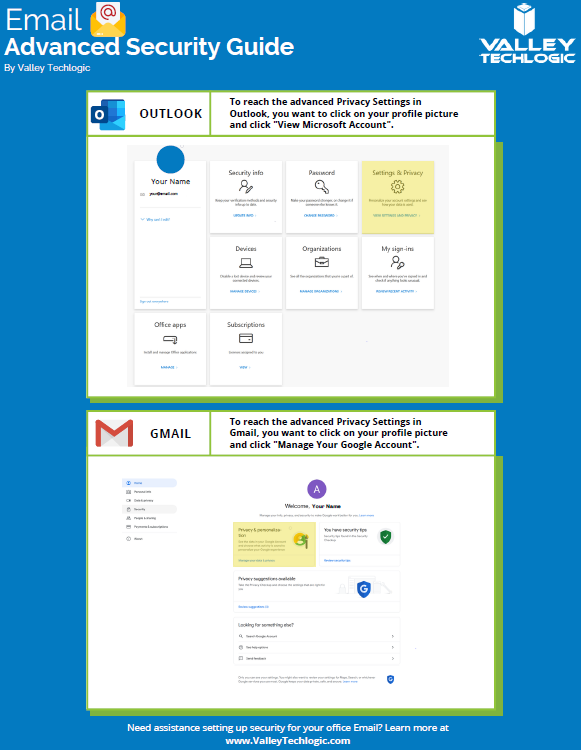
    3. Enable more advanced privacy settings. Many email providers have privacy and security settings to provide more advanced protection. See our guide below for enabling these settings for Gmail and Outlook.
    4. For businesses, don’t go with the obvious choice for email. Many of us use just our first name or our first name and a last initial when creating our work emails, while this helps make our emails more memorable and easier to recite, it also opens us up to spam. If you have a spam problem, it might be best to switch things up in this area.
    5. Unsubscribe from mailing lists, especially the ones you didn’t sign up for. Another good way to combat spam in particular is to unsubscribe from mailing lists, there are rules and regulations that say vendors must respect this request or they’re potentially violating their emailing providers terms and conditions.
      Email Security Guide for Gmail and Outlook
      Click to view the full size version.

      Another way to combat spam and phishing emails is through a tool. There are tools that can be built into your browser or email client, many of them use the SLAM method. With this method they check the sender, the links, the attachments, and the message itself to look for telltale signs it’s a spam or phishing email.

    At Valley Techlogic we provide security awareness training – which is another excellent tool for preventing cyberattacks – and an extension for Outlook that includes the training and spam/phishing testing tool right in your inbox to all of our clients.

    We can also offer simulated phishing attempts so you will know if anyone in your organization could use additional training on the topic. Schedule a consultation today to learn more about how we can help you with your business’s email related goals.

    Looking for more to read? We suggest these other articles from our site.

    This article was powered by Valley Techlogic, an IT service provider in Atwater, CA. You can find more information at https://www.valleytechlogic.com/ or on Facebook at https://www.facebook.com/valleytechlogic/ . Follow us on Twitter at https://x.com/valleytechlogic.

  • Microsoft 365 and Office 365 prices are going up, when and by how much?

    Microsoft 365 and Office 365 prices are going up, when and by how much?

    We’ve been on a roll lately discussing the changes and products being rolled out by Microsoft this year, primarily Windows 11 which should be launched this fall. Last week Microsoft announced a price increase to their ubiquitous business products, Microsoft 365 and Office 365.

    Office has been a business staple since it’s launch in 1989 (although Word predated the Office grouping of products quite a bit, launching in 1983). The original launch set was Word, Excel and Powerpoint but the product line up has exploded since then including other must-have features such as Outlook, Teams, OneDrive and more. For many business users the Office suite of products is their go to collaboration and productivity center.

    Microsoft 365 was announced in 2017 and aimed to take things up a notch and out of just the business productivity center of activity, bringing many Windows specific cyber security features to the table as well as expanding the usability for remote employees.

    It also expanded the ease at which IT administrators can manage their office’s users in a Windows centric environment. The outcome was an all-in-one platform for business users especially that brought functionality, safety and security, and collaborative work processes together in unison all for one easy to budget for monthly fee.

    But as with many online services, fee increases are to be expected (remember when Netflix was just $7.99 a month for the standard package?). Microsoft however has bucked this trend for quite a while, pricing has been the same since Office 365 was launched in 2011.

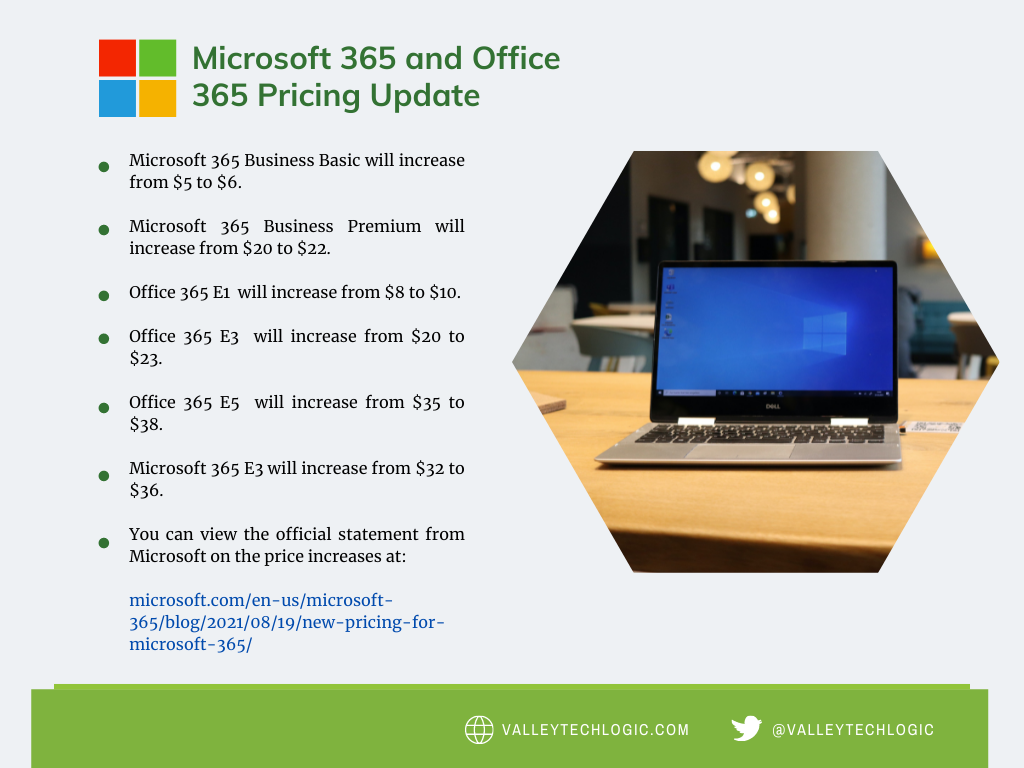
    In that time, they’ve added untold value in the way of product innovation all for no increased monthly fee, so this price increase is both expected and possibly overdue. It’s also expected to be just a few dollars more for each product category, so you won’t need to worry about a drastic price hike. Have a look at our chart below to see what to expect.

    Microsoft Price Increase Chart

    As you can see the price increases are moderate and shouldn’t result in a drastically higher overall IT bill for most users. If you’re in the education sector you won’t have a price increase at all, and consumer products will also stay the same price at this time. These price increases are expected to go into effect March 1, 2022.

    One thing that’s worth mentioning is the program Microsoft has for non-profits, if you own or operate a non-profit organization you can receive your Microsoft products at a deeply discounted rate. This includes Microsoft 365 and Office 365 subscriptions. We have helped our non-profit clients navigate this in the past to great success, if you’re a non-profit in the Central Valley area feel free to reach out to us for more information.

    We also assist businesses with their questions when it comes to the Microsoft line or products or their Windows desktop and server machines, we’re a long time Microsoft partner and consider ourselves experts when it comes to navigating even the most complex setups. We even include the subscriptions we discussed in today’s article within our all-inclusive plans to reduce our customers IT spending to one easy to read monthly bill. Find out more today.

    Looking for more to read? We suggest these tech articles from the last week.

    This article was powered by Valley TechLogic, an IT service provider in Atwater, CA. You can find more information at https://www.valleytechlogic.com/ or on Facebook at https://www.facebook.com/valleytechlogic/ . Follow us on Twitter at https://x.com/valleytechlogic.
  • Our Top 5 Favorite Outlook Tricks & Tips as a Technology Provider

    Our Top 5 Favorite Outlook Tricks & Tips as a Technology Provider

    As a technology provider we’re well versed in supporting the Microsoft suite of products, and Outlook especially is a business staple. Whether you have made a one-time purchase with Office 2019 or are using the subscription model plan with Microsoft 365, both products include Teams, Outlook, OnePoint, SharePoint and Word. In today’s article we will be focusing especially on Outlook and providing you with tips that will make using it that much easier.

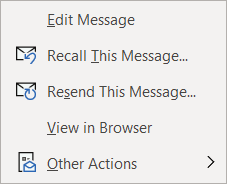
    Our first tip could really help save the day if you miss-send an email, did you know you can actually recall an email? Just open the email you want to send and navigate to the Recall message box in Outlook.Message tab on the ribbon, click on the Action button and then click on Recall Email, if the recipient hasn’t opened the email yet it will be recalled and you can try again.

    The second one is all about efficiency. If you have a certain type of message you send routinely, you can save that message as a template for easy use. Go to File > Save As > Outlook Template to save the template. Then when you’re ready to use it again click on Items > Choose Form > User Templates and select the template you saved. You can also go to the Message tab on the ribbon and click on View Templates to view and create simple templates without formatting to use.

    If you have a long email thread you have been replying to and are finding yourself hunting through your inbox for all the links in the chain to remember what has already been said, our third tip will really help you out. If you go to View > Show as Conversation on the Ribbon all of the messages in that thread will be displayed under the most current email.

    Number four was even new to us until recently, if you hit Ctrl + Shift + N in Outlook it will pull up a sticky note function you can move around. That way if you need to take some notes as you’re parsing through your email that will be conveniently available to you, no pen and paper necessary.Outlook sticky note box.

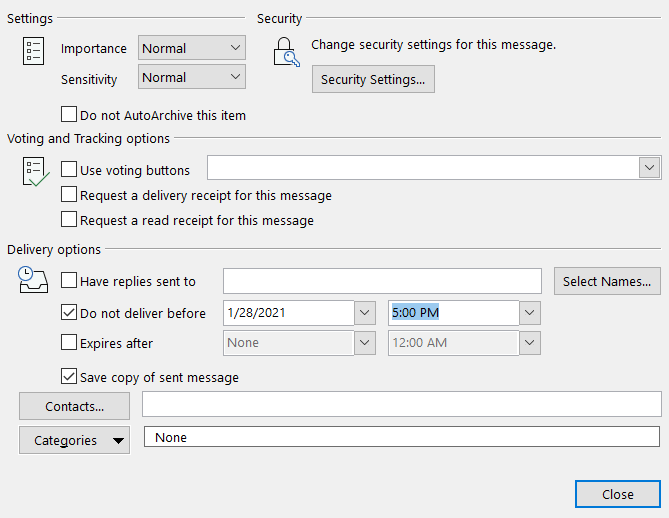
    Our fifth tip is all about timing. If you know there’s an email you need to send out by a certain time, why not avoid the stress and worry that you may forget and schedule it while it’s top of mind? If you go to Options > Delay Delivery > Do not deliver before you can schedule the email to be sent at the exact time and day you want it to be. This is a great option for reminder type emails that you send regularly as well.

    Lastly as a bonus, here’s a list of our top 10 Outlook shortcuts that will simply make navigating Outlook easier:

    1. Create a New Message: Ctrl + Shift M
    2. Insert a File: Alt+N, A, F
    3. Send a Message: Alt + S
    4. Search for An Item: Ctrl + E or F3
    5. Reply to a Message: Alt+H, R, P
    6. Go to Your Calendar: Ctrl+2
    7. Check for New Messages: Ctrl+M or F9
    8. Go to the Home Tab: Alt+H
    9. Go to the Send/Receive Tab: Alt+J, S
    10. Forward a Message: Alt+ H, F, W

    If your office could use some assistance navigating Microsoft 365 we’re here to help, at Valley Techlogic we consider ourselves experts when it comes to Microsoft and Windows based products and can make recommendations to your business. Visit our calendar page here to schedule a consultation to learn more.

    Looking for more to read? We suggest these tech articles from the last week.

    This article was powered by Valley TechLogic, an IT provider in Atwater, CA. You can find more information at https://www.valleytechlogic.com/ or on Facebook at https://www.facebook.com/valleytechlogic/ . Follow us on Twitter at https://x.com/valleytechlogic.