
Tag: password

  • Our UPDATED Guide to MFA (Multi-Factor Authentication)

    Our UPDATED Guide to MFA (Multi-Factor Authentication)

    Last year we had an article on our top picks for 2-factor authentication and we’ve touched on what makes a good password before. We thought it would be a good idea to refresh our advice on this topic and combine our tips into one easy to revisit guide.

    One thing that we surprising haven’t recommended often before but would like to now is implementing Microsoft 365 2-factor authentication on your account. We utilize Microsoft products heavily in our business and we find many of our clients are the same, Microsoft software solutions are deeply woven into their day-to-day business activities. You can find our quick guide to implementing it in last week’s article here.

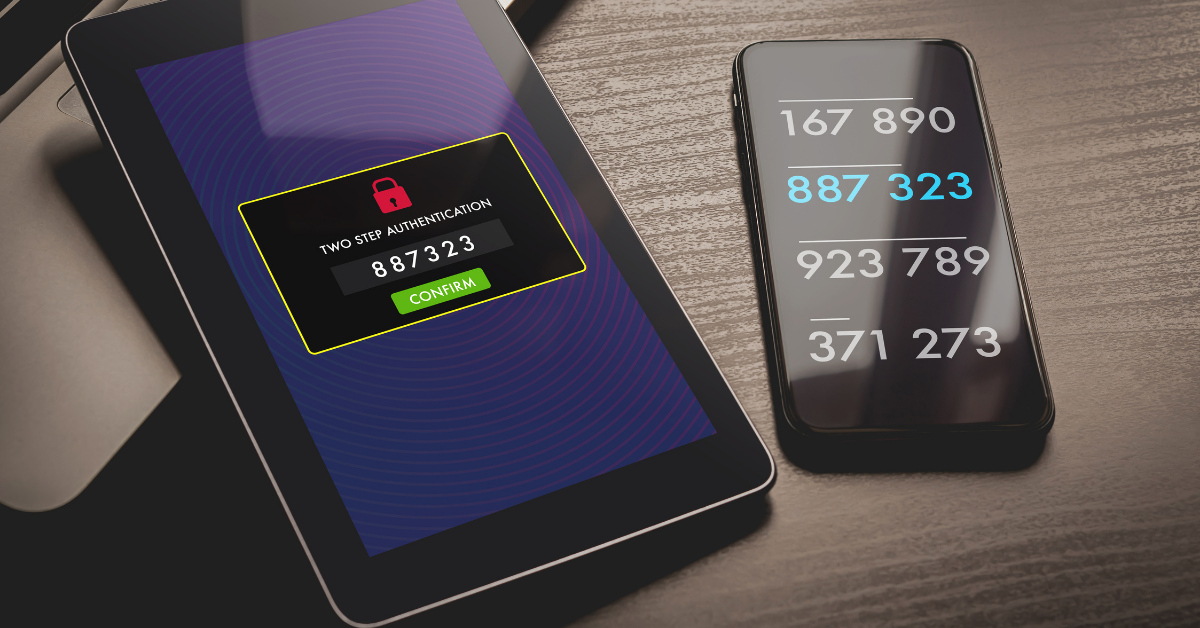
    We’ve also touched on how implementing 2-factor on your Google account could decrease your odds of your account being hacked by half. In many cases it really is as easy as implementing the built in 2-factor settings in the accounts you utilize and you may not even need to install a 2-factor authentication software, you can simply have the codes texted to your mobile device.

    Since this is a guide though we still want to give you a recommendation on that though, for us we’ve utilized Microsoft’s authenticator program for the most part. We also found that Google’s Authenticator and Authy’s Authenticator mobile apps are very easy to use as well.

    It can be a little more convenient to have the 2-factor codes in one place, so you don’t have to request a code be texted every time you login (especially if you have a lot of different login’s you use throughout your workday).

    You may be asking yourself at this point, what’s wrong with just my plain old password? You may have typing it in down to muscle memory and you don’t have to retrieve a code from anywhere. Well, this chart on how long it can take a crack a password based on specific criteria will tell you why:
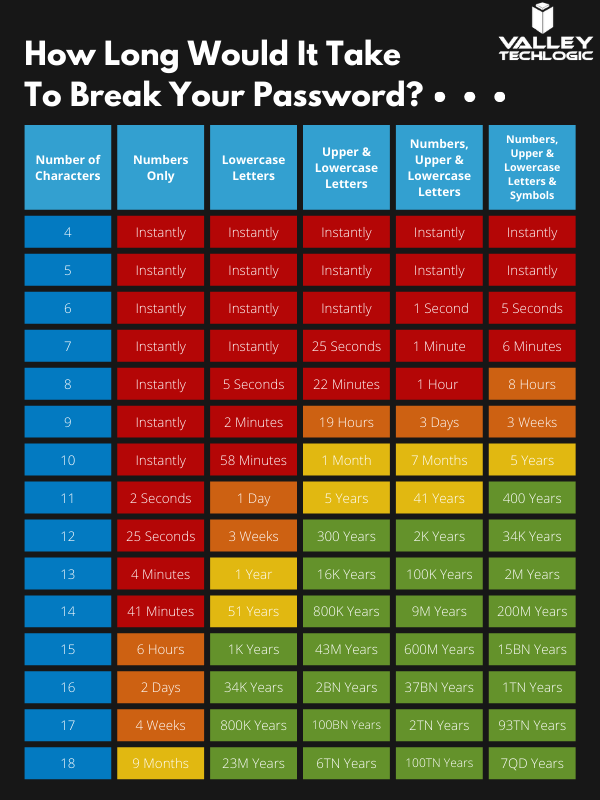
    How long would it take to break your password?

    Of course, the more complex your password is the greater the difficulty in cracking it, that brings us to our next bit of advice – utilize a password manager and have stronger (and varied) passwords.

    Across the board for Valley Techlogic our employees are using LastPass, we like that it’s cross device and cross platform and enjoy the warnings and alerts it gives us if a password has been possibly compromised or if we’re trying to reuse a password we’ve used before.

    However, any reputable password manager is going to be a big improvement over reusing simple passwords or trying to remember complicated ones.

    Even with a password manager, your passwords being compromised online is the main reason you should consider enabling 2-factor or multi-factor on your accounts. You can have strong varied passwords and your passwords may be leaked due a breach that’s outside your control. Webpages are hacked all the time, and if your banking password is part of a data breach it can then become available to bad actors on the dark web.

    With 2-factor enabled however, it won’t matter if they have your password as they would still need your authenticator program or your mobile device to login to the account. We think it’s worth the (very slight) inconvenience of a few seconds to have that level of security.

    If you’re security conscious and want to go even further, you can also use a security token to lock your device (highly recommended for sensitive work devices). That means the device is useless without the security token to be able to unlock it.

    Enabling multi-factor authentication across your business uniformly can be an uphill battle, but it is one we have experience with here at Valley Techlogic. As security regulations increase, this simple change will make a huge difference in your cybersecurity compliance level. Learn more today with a quick consultation.

    Looking for more to read? We suggest these other articles from our site.

    This article was powered by Valley TechLogic, an IT service provider in Atwater, CA. You can find more information at https://www.valleytechlogic.com/ or on Facebook at https://www.facebook.com/valleytechlogic/ . Follow us on Twitter at https://x.com/valleytechlogic.
  • LastPass say they didn’t leak your password, however some users still received alarming alerts

    LastPass say they didn’t leak your password, however some users still received alarming alerts

    Yesterday, a number of LastPass users received alarming alerts in their email inbox that their passwords – including their master password – had been compromised. The news quickly spread across the internet, starting with forums, and then making its way to Twitter where it was picked up by larger news outlets.

    LastPass immediately denied that a breach had occurred within their organization and at first indicated that the alerts were happening to users who were the victims of “credential shuffling”. That means these users had reused their passwords on other websites who may have had a breach in the past, and now bots trolling the internet for compromised accounts have stumbled upon their password vault credentials.

    This didn’t end up being the case either, but it is a good reminder NOT to password shuffle, especially with the master password for your password vault (if any password should be unique – it should be that one).

    As of this morning LastPass determined that the alerts were sent in error by systems that were set up to be too stringent. They’ve indicated they now adjusted the alerts systems so inaccurate alerts will not be sent again. They also clarified that they don’t store user passwords on their own servers, and that they work on a “zero knowledge” security model which means they are not able to see your master password at all.

    The fact that this news took off in a flash may be indicative of the heightened awareness users have around the security of their data, especially those who currently use a password manager as part of their security repertoire. Even if the alerts occurred in error that may be cold comfort to the scare those users experienced.

    To us, it’s a reminder that the best cybersecurity efforts are multi-layered. We believe it’s equal parts implementation of security measures, monitoring of those measures, and behavioral changes on the part of the users.

    Even if the alerts that occurred yesterday were the result of a system issue not a security issue, we think the users that responded had the right idea when they chose to investigate. It’s also a good idea to change your password if you get a security alert, even if it turns out to be a false alarm. It won’t hurt anything to take that extra step to protect yourself, the old adage “Better Safe Than Sorry” rings especially true when it comes to cybersecurity threats.

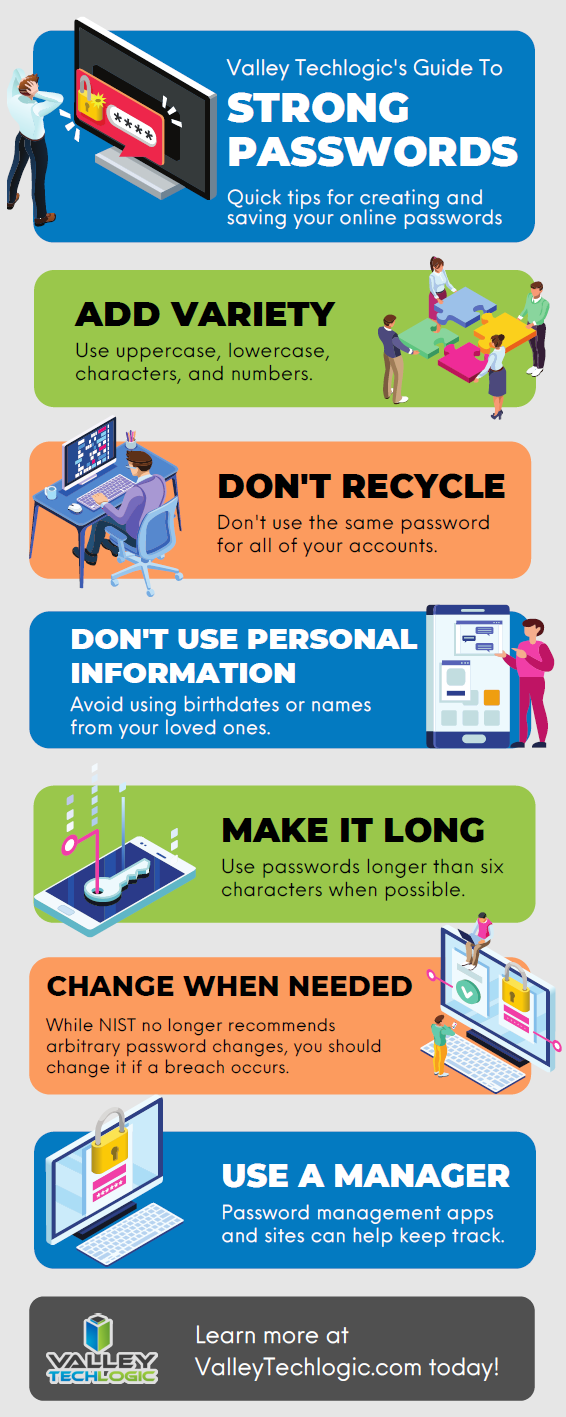
    We created this resource on the topic of good password hygiene that you can keep to review, or even pass along to your co-workers/employees.

    Small Version of the Strong Password IG
    Click to view the full size.

    Finally, even if the unthinkable occurs and your passwords are leaked, again a multi-layered approach will protect you. You should enable 2-factor/multi-factor authentication when and where you can. So if someone does get your password somehow, they still will be blocked from logging in.

    If the security measures in your workplace aren’t up to snuff or you’re interested in cybersecurity training for your employees, Valley Techlogic can help. Boosting the security measures for your business and providing a digestible cybersecurity training program for your employees is included as part of our technology service plans. Schedule a free consultation with us today to learn more.

    Looking for more to read? We suggest these other articles from our site.

    This article was powered by Valley TechLogic, IT service provider in Atwater, CA. You can find more information at https://www.valleytechlogic.com/ or on Facebook at https://www.facebook.com/valleytechlogic/ . Follow us on Twitter at https://x.com/valleytechlogic.
  • This new California law means changes to your devices default passwords

    This new California law means changes to your devices default passwords

    California is used to being ahead of the game when it comes to technology. It comes as no surprise with our state being home to the mecca of technology, Silicon Valley. So of course, in an effort to regulate the Internet of Things (IoT) more seriously, California was the first state to introduce a law doing so.

    Senate Bill 327 (SB-327) is the first law directed at the IoT and most of it’s measures are aimed at improving security of our devices. Cybercrime is a billion-dollar industry, so it makes sense to enact stricter regulations to protect consumers from having their devices hijacked and their networks held ransom.

    Some of its most stringent requirements are aimed at password security. While it’s not mandating passwords at an OS or Software level (these are often set by the user), it is requiring changes be made to default passwords on a firmware level.

    Starting January 2020 passwords on a firmware level must be randomized. The bill states:

    1798.91.04.b Subject to all of the requirements of subdivision (a), if a connected device is equipped with a means for authentication outside a local area network, it shall be deemed a reasonable security feature under subdivision (a) if either of the following requirements are met:

    1. The preprogrammed password is unique to each device manufactured.
    2. The device contains a security feature that requires a user to generate a new means of authentication before access is granted to the device for the first time.

    This means if you purchase a router it can no longer have the Username admin/ Password admin or a similar login convention. Passwords for routers and other connected devices as defined by the bill any device, or other physical object that is capable of connecting to the internet, directly or indirectly, and that is assigned an Internet Protocol address or Bluetooth addressmust have a randomized password and login name.

    This may mean an extra bit of setup on the user’s part when purchasing a new device, and don’t toss that installation guide!

    This gets even more complex when you think of devices such as servers, where rack scripting software may currently rely on every device having the same password to function. IT people will have their work cut out for them setting up new networks with these restrictions.

    However, we applaud all efforts to make the internet a safer place, and we think SB-327 is just the beginning when it comes to regulating devices and the internet as a whole. With so much sensitive data being exchanged every day, it was a given change was coming to do more to protect it.

    Also, while this bill only applies to devices in California it’s likely product developers will opt to have it in effect for other states as well.

    With so many devices in our home and offices connected and listening, it makes sense to give these devices stronger protection with a stricter password to block hackers. We would like to see a bill that goes even further, regulating firmware updates and requiring companies to better support the devices they produce.

    We outlined some of the pitfalls from companies failing update router firmware in this previous blog post.

    As always, if you own a business in the Central Valley and are finding yourself trying to work with the new regulations from SB-327 or anything technology related, reach out to us for help or advice. We’re here to help.

    Looking for more to read? We suggest these tech articles from the last week.

    This article was powered by Valley TechLogic, an IT provider in Atwater, CA. You can find more information at https://www.valleytechlogic.com/ or on Facebook at https://www.facebook.com/valleytechlogic/ . Follow us on Twitter at https://x.com/valleytechlogic.
    Looking for IT Services in Fresno, Modesto, Stockton, Ceres, Atwater, Merced, Visalia or Lodi? We cover all these areas and more!

  • Our Top 3 Picks for Password Managers

    Our Top 3 Picks for Password Managers

    The topic of 2 factor authentication (2FA) comes up A LOT. You’re probably already aware a password manager is the easiest place to start and will even make using your devices more convenient. However, this space is so loaded with choices now you may not know where to start.

    We’ve written a lot about what makes for a good password but what should you look for in a password manager?

    It depends on what your goal is. All password managers will help you with password safety, things like not re-using passwords and having stronger passwords because you won’t have dozens to remember.

    Some password managers only store your database locally, meaning it’s only on your own machine. The benefit of this is you’re in charge of your own security. The downside is if the device is lost or compromised, your database may be lost as well.

    There are also cloud storage password managers, meaning the password manager company will store your password database for you. We think for most users this is the better choice, however you are trusting your data to that company.

    So, what are our picks for password managers that are convenient to use but also have a good track record?

    1. LastPassThis is no brainer; we use this one! It’s free, straightforward, and compatible with many different browsers – even across Mac, Windows and Linux. They also offer 1 GB of secure document storage, meaning everything you need securely store will also be conveniently at your fingertips.
    2. 1Password1Password is a great mobile option. It began as an Apple centric product but has since branched out to include iOS, Android, Windows and ChromeOS. An extra bonus feature is it can act as an authentication app for programs like Google Authenticator. We also like its travel mode option, which allows you to delete sensitive data with one click while you travel and then restore it when you’re back home.
    3. DashlaneOur final pick is Dashlane. Dashlane is the newest of this bunch but they have a lot of slick features, including Dark Web reporting. The free version is somewhat limited but if you pay a low cost of $4.99 a month you unlock a host of features, including a free VPN and the ability to sync between devices. They also let you choose whether you want to store your database on your device or locally.

    One more thing, while your browser can somewhat perform as a password manager, that’s really not what it’s meant for. Browsers focus most of their development on being a better browser, not being a better password manager. Also the passwords they generate are not much better than “password” or “123456” (the most popular passwords 7 years running).

    Storing your passwords in a secure password manager is one of the best and easiest ways to improve your security online, so no matter which password manager you go with you’re making the smart choice.

    Looking for more to read? We suggest these tech articles from the last week.

    This article was powered by Valley TechLogic, an IT provider in Atwater, CA. You can find more information at https://www.valleytechlogic.com/ or on Facebook at https://www.facebook.com/valleytechlogic/ . Follow us on Twitter at https://x.com/valleytechlogic.

    Looking for IT Services in Fresno, Modesto, Stockton, Ceres, Atwater, Merced, Visalia or Lodi? We cover all these areas and more!