
Tag: technology

  • Technology that you can build on, supporting your construction business through tech

    Technology that you can build on, supporting your construction business through tech

    We’re continuing from last week where we touched on how technology integrates with the field of dentistry, we want to switch gears from a business sector that helps us maintain our tooth structure to one that helps us maintain our societal structure. We’re looking at how technology can help those in the construction.

    Our construction clients are used to taking on big projects and creating comprehensive plans for tackling those projects with their teams. They aren’t always nailed down to one location, being out in the field and having employees logging in from remote offsite locations is part of their norm.

    Documentation is important for the work they do. They often have a dedicated server that keeps track of all the reports that come with having a construction business. Planning data, financials, insurance information – all of that must be available at a click of a button so they can run their business as smoothly as possible.

    If you’re in construction, ask yourself if any of these tech related items would be applicable to your business:

    1. Slow or non-existent internet on work sites. As we mentioned above, your employees aren’t logging in from one location, they go where the work is that day. You need support for your connectivity that’s flexible for the way you do business.
    2. Equipment that goes “missing”. Like us, you have expensive equipment that needs monitoring and logging. Our construction clients need solutions for making sure their equipment doesn’t “walk off” the job site. Security cameras solutions with the ability to save and review the data they collect are crucial for these clients.
    3. Regulatory compliance concerns. If you work in the government sector (or would like to) you’re probably aware of the ongoing attempt to secure our national data through CMMC (Cybersecurity Maturity Model Certification).

      There’s also the documentation you must do for every portion of your business, because if something goes wrong you need that documentation to back you up. If your documentation goes missing or can’t be retrieved because an outdated server has “malfunctioned”, or your backup solution was inadequate – it can spell trouble for your business.

    The long and short of it is, having a technology solution that supports your business is as crucial as having supports structures in a building to keep it from collapsing. A pillar may not look like much on it’s own but it could be the only thing keeping back a catastrophic collapse.

    At Valley Techlogic, we see ourselves as the pillar that not only keeps your technology equipment running as it should, but also keeps out any intrusions to your business (17.7% of all cyber attacks are aimed at your business model which is second only to the financial sector).

    Here is a chart with 5 ways Valley Techlogic specifically supports our construction clients:

    5 Ways VTL Supports Your Construction Business

    Still on the fence? Why not have a conversation with us directly, book a quick consultation with us here.

    Looking for more to read? We suggest these other articles from our site.

    This article was powered by Valley TechLogic, an IT service provider in Atwater, CA. You can find more information at https://www.valleytechlogic.com/ or on Facebook at https://www.facebook.com/valleytechlogic/ . Follow us on Twitter at https://x.com/valleytechlogic.


  • The 5 Biggest Mistakes Business Owners Make With Their Technology

    The 5 Biggest Mistakes Business Owners Make With Their Technology

    Running a business requires wearing a lot of hats. You must dabble in a little bit of everything – accounting, management, human resources, technical support.

    We’re all told the best leaders know how to delegate but that can be hard when you’re talking about the business you’ve painstakingly built with your time and effort. Most business owners don’t clock out when the 9-5 day is over, a Gallup poll found that 39% of business owners work more than 60 hours per week.

    Tech News #12

    It’s not just about time logged either, there’s more stress and more on the line. You can’t simply find another job if your business fails, once you’ve owned your own business it can be impossible emotionally to untick that box and work for someone else. That’s not even considering the fallout of a business failing and the mess it leaves behind.

    But enough of the doom and gloom, as a technology company we’re here to support the businesses we take on as clients and lead them down the best possible path. That includes guiding business owners to smarter decisions when it comes to their technology.

    Here are the 5 biggest mistakes we see business owners make from a technology standpoint.

    1. Not keeping your hardware up to date. Look, we get it. Hardware is expensive, especially if you’re making a larger purchase for multiple employees or investing in a new server. However, this is not something you can put off until later. Waiting until your hardware fails will leave you with both the expense of new hardware and the expense of the downtime while you’re waiting for that new hardware to be deployed. We don’t think it makes sense to wait and be double billed, do you?
    2. Not keeping your software up to date either. Updates can feel like a hassle (especially if you’re performing them yourself) but it’s not a good idea to put them off until later. There’s a cumulative effect when you wait. What was once a simple update becomes a complex package of updates that will take longer and leave you with a gap in your coverage that could leave you open to the negative effects those updates were trying to prevent.
    3. Speaking of negative effects, ignoring cyber security. We get the “it will never happen to me” line all the time, and equally as often we hear from those same people later when it The phrase “Don’t be a statistic” is used frequently in cautionary tales and this is no exception. 76% of businesses will experience a cyber-attack and we personally don’t recommend rolling the dice and hoping you’re not part of the majority.
    4. Forgoing any kind of training for employees. In the same vein as #3, some training in technology and how to use the equipment you’re providing employees is a must, and even if you operate on a BYOD (Bring Your Own Device) model you’re not off the hook. Most cyber-attacks happen due to human error. By not training your employees you’re not just giving hackers the keys to your office, you’re holding the door open for them.
    5. Thinking you can do it all yourself. Like we said, the best leaders know when to delegate. If you’re not a technology expert but you’re performing most or all of your own IT services what are you doing? How often does a technology snafu turn into an all day (and night) event? Are things in your business being neglected because you’re the only one that knows how to maintain them?

    There is a better way. Outsourcing is a scary word to many business owners, but the truth is help is out there and it’s local to you. We help business owners across the Central Valley who find that once the technology headache is taken off their plate, they have more time and energy to put back into growing their business. If you would like to find out more, reach out to us for a free consultation here.

    Looking for more to read? We suggest these tech articles from the last week.

    This article was powered by Valley TechLogic, an IT provider in Atwater, CA. You can find more information at https://www.valleytechlogic.com/ or on Facebook at https://www.facebook.com/valleytechlogic/ . Follow us on Twitter at https://x.com/valleytechlogic.

  • 10 Common Tech Questions & Our No-Nonsense Answers

    10 Common Tech Questions & Our No-Nonsense Answers

    We write about a lot of different topics in this blog but today we wanted to take the time as a technology provider to answer the questions that are really at the forefront of our clients’ minds, both from a business standpoint and just from an everyday standpoint.Tech News Number 7

    We’ll be covering our top 5 general technology questions and our top 5 business technology questions as of posting this blog. If you have a question that you’re struggling to get answered – and we all know the rabbit hole Google can send us down trying to search for an answer – don’t hesitate to reach out. Chances are we might have the answer!

    Now onto the general questions first.

    1. How do I keep my Laptop battery in tip-top shape? A good rule of thumb is to keep your laptops lithium-ion battery running longer you’ll want to keep them from overheating, not let them discharge fully to 0% before charging, and not leave them plugged in while they’re at 100% constantly. Batteries have a finite life span but taking care of them will make them last longer, this advice applies to devices like cellphones as well.
    2. Do I actually have to eject a thumb drive or USB device? The short answer is yes, the long answer is because when you go to eject your device your PC finishes up tasks related to that device to improve overall performance. Removing it without ejecting it first may lead to corrupt or unusable data. It’s an easy step so don’t skip it.
    3. What happens when I see a warning on a site I use that it’s been hacked or compromised? If your browser is warning you about a site you’re trying to visit we recommend proceeding with caution, it could be that their security certificates are just expired but it also might be that the site has actually been compromised and visiting it or entering data into it might lead to your own system being compromised as well.
    4. Why does resetting my router sometimes magically fix my internet? Your router is a technology device the same as all your other ones, and sometimes a reboot is all that’s needed to get it back to working as intended. You want to wait at least 10 seconds to plug it back in to allow the capacitors inside it to discharge completely and ensure your reset works as intended.
    5. Do hackers really care about my information? All information has the potential to be valuable on the dark web or other nefarious sections of the internet. It may not seem like a big deal if your name, phone number or email are leaked online but they can use this information to get to the accounts they really want (like your financial accounts). It’s always a good idea to safeguard your information and employ good password practices.

    That covers the general questions we see a lot, what about ones specifically for businesses? Technology and business go hand-in-hand and these are the questions that come up the most.

    1. Do my vendors have to work with my other vendors when it comes to the technology I use? If they care about your business many vendors will try to assist clients as they navigate all the various systems you use to conduct your everyday business, but many will charge a fee to do so and some may refuse.
    2. How do I know if I’m spending too much on technology? New gadgets and software solutions come out every day, it would be impossible for anyone to buy or subscribe to them all. At the same time, it’s unreasonable to believe any piece of hardware will last forever or your business won’t outgrow a software that previously performed adequately. It’s a good idea to try and set a reasonable budget and have your IT team work with you to stay within that budget.
    3. Are backups really necessary? Yes, you may not know how necessary a file is until you go to look for it and it’s gone. Important contracts and records are just a couple of things your business can’t afford to leave to chance, we recommend complete system backups so you never have to worry about losing anything important.
    4. Will my team actually use it? If you’re thinking about giving a specific software or tech solution a try a good question to ask if whether your team has the training required to use it, and why it would be beneficial to your business. One example is two-factor authentication. We know businesses can receive a lot of pushback from their employees when they go to implement this, but the benefits drastically outweigh the hassle it may seemingly pose. Proper training is key when implementing any new technology measures within your business.
    5. How does it benefit the business? It can be hard if you’re not someone who works in the IT field or has a pretty good level of familiarity with it to know how implementing new solutions will benefit your business. That’s why it’s always our recommendation to reach out to someone who does, whether that be your in-house team or a technology provider you’re comfortable with.

    If your business needs help answering these or any other technology related questions, Valley Techlogic is here to help. You can schedule a no-obligation consultation here. If we missed any questions feel free to reach out to our live chat and let us know, we would love to add them to our next article.

    Looking for more to read? We suggest these tech articles from the last week.

    This article was powered by Valley TechLogic, an IT provider in Atwater, CA. You can find more information at https://www.valleytechlogic.com/ or on Facebook at https://www.facebook.com/valleytechlogic/ . Follow us on Twitter at https://x.com/valleytechlogic.

  • The average cost of hiring IT support staff examined

    The average cost of hiring IT support staff examined

    When you’re talking about IT for businesses there’s a wide range of normal, for some businesses their normal is having in-house IT staff. For many though their IT operational needs are such that having a dedicated staff devoted to the job just doesn’t make financial sense.

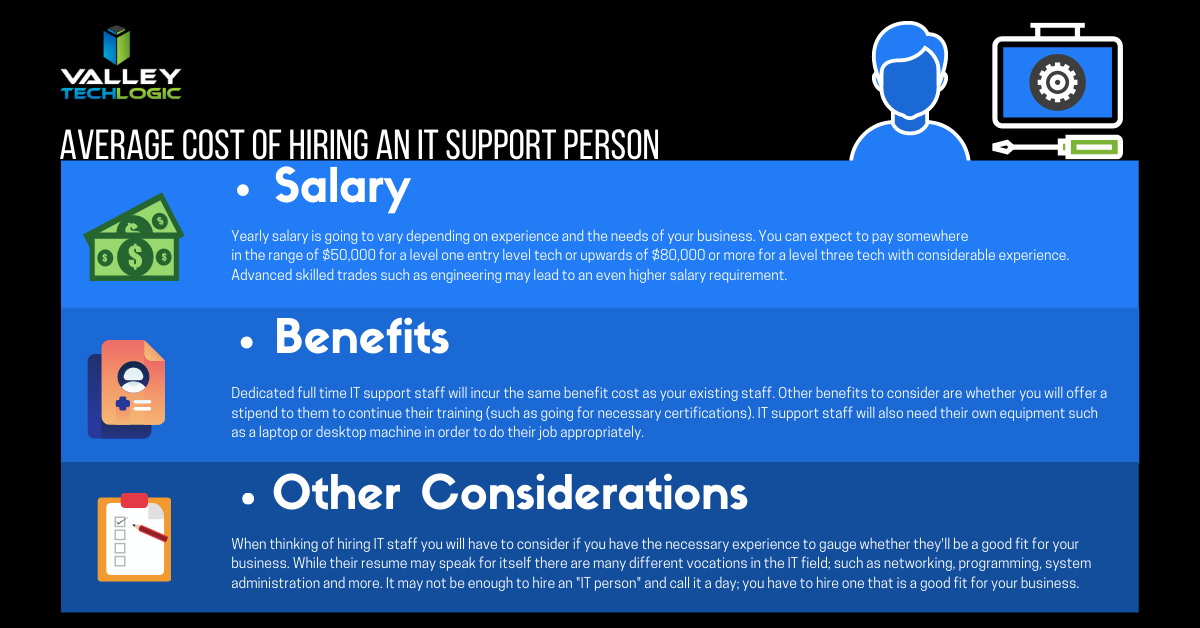
    Average Cost of an IT Support Person
    Click to see the full size version.

    If you look at our chart you can see that the cost of hiring one IT person is quite significant. You also must overcome the usual hiring hurdle of just finding the right person in the first place and dedicating your time to that task is something that should definitely be taken into consideration.

    The benefit of an IT support plan is someone else is doing that job for you, with the right company behind your business you will have an entire team of experienced techs available to you without having to pay a yearly salary for each one.

    Some technology service providers even offer flat monthly cost plans that come with generous or even unlimited support included. We’re proud to be one such company that offer plans that eliminate many of the billing headaches surrounding outsourcing your IT for our clients.

    While our own plans are multifaceted and cover project work, onsite and help desk support, cybersecurity and more – you may be asking what types of plans are usually available in the marketplace.

    1. Full Managed IT Department Support – This is what we offer, we cover everything you could need that’s IT related.
    2. Managed Support Services – This is where remote and help desk support is available but not onsite. Good for getting back into locked email accounts but not ideal for complicated IT issues.
    3. Managed Software as a Service (SAAS) – This is a managed service for one particular type of software. Notable examples include Google Apps, Salesforce, ZenDesk and DocuSign.
    4. Managed Networks and Infrastructure – VPNs would fall into this category, as would managed cloud services such as Amazon Web Services (AWS).
    5. Business Intelligence and Data Analytics – Consulting services that help you with your web presence and the best ways to apply technology to your business would fall into this category of managed services.

    These aren’t the only examples of IT support plans, but we feel they’re the most notable.

    Many small or medium sized business owners also avoid the issue entirely by doing their own IT. We wrote about why that may not make smart business sense here, but in a nutshell it comes down to how much you really value your time and whether your efforts spent there are the best use of it.

    We can offer advice on what the best fit is for your particular business, if you’d like to book a free 10 minute consultation you can find our calendar here. We’re offering easy virtual appointments and even if you don’t choose us, we can help you leave with a plan.

    Looking for more to read? We suggest these tech articles from the last week.

    This article was powered by Valley TechLogic, an IT provider in Atwater, CA. You can find more information at https://www.valleytechlogic.com/ or on Facebook at https://www.facebook.com/valleytechlogic/ . Follow us on Twitter at https://x.com/valleytechlogic.

    Looking for IT Services in Fresno, Modesto, Stockton, Ceres, Atwater, Merced, Visalia or Lodi? We cover all these areas and more!

  • Tech Scalpers and How to Get What You’re Looking For

    Tech Scalpers and How to Get What You’re Looking For

    We’ve all experienced it at some point, you’re looking to buy something that was just released, perhaps as a Christmas gift or just for yourself and can’t find it in the regular channels. You know where you can find it? eBay or some other reseller site – usually for an inflated price.

    Those who enjoy gaming are experiencing it right now. Trying to find the NVidia RTX 3080 card? Gone. Microsoft’s Xbox Series X and Series S as well as Sony PlayStation 5 buyers had a similarly frustrating time trying to get their pre-orders in. Nintendo has been accused for years of “artificial” shortages.

    Is it a lack of stock or is the demand really that great? How much of it is resellers swooping in, buying up all the stock and reselling it for artificially inflated pricing?

    What should you do if the item you’re looking for is out of stock, and how do you avoid being one of many who won’t get their hands on the tech item they’re looking for?

    One thing that appears to be new is the advent of items targeted by bots to buy up all the product for resellers. To say they have an unfair advantage when it comes to making a purchase quickly is an understatement.

    It’s clear more needs to be done to combat the unfairness of scalpers swooping in, and buying limits need to be more strictly enforced on tech items. What are some ways you can still get what you’re looking for anyways?

    1. Be aware of the sales date and be on the website early, websites will often crash in the wake of a launch but most retailers have queuing systems in place so the earlier you’re on there, the more likely you’ll be able to get what you’re looking for.
    2. As a general rule, do NOT refresh your page when you’re in a queue. If you refresh the page most times you will be moved to the back of the queue (it’s the same as getting out of line).
    3. Figure out which retailers are going to have the item you’re looking for and queue up for multiple sites to give yourself a better chance. Just be sure to jump off the additional ones once you’ve purchased your item.
    4. If it seems like your order didn’t go through, don’t despair. Many times, an order that looks like it didn’t go through actually did. Keep this in mind if you go to try and buy it again.
    5. If you did miss the item, instead of buying it from a reseller (and thereby validating the practice) find out when the next launch date it. For popular items it’s probably sooner than you think.

    NVidia, Microsoft and Sony could take a page from companies like Apple who seem to have the buying process down. Apple has scaled up their production for every new launch and those who want their products have no trouble buying them with ease. Nothing is more frustrating to a potential buyer than to have cash in hand ready to buy and end up leaving empty handed.

    They may find if they don’t solve these stock issues more aggressively, that these same buyers will move on to different products.

    Looking for more to read? We suggest these tech articles from the last week.

    This article was powered by Valley TechLogic, an IT provider in Atwater, CA. You can find more information at https://www.valleytechlogic.com/ or on Facebook at https://www.facebook.com/valleytechlogic/ . Follow us on Twitter at https://x.com/valleytechlogic.
    Looking for IT Services in Fresno, Modesto, Stockton, Ceres, Atwater, Merced, Visalia or Lodi? We cover all these areas and more!

  • Distance Learning and The Ways We as a Technology Leader Think It Can Be Improved

    Distance Learning and The Ways We as a Technology Leader Think It Can Be Improved

    For many of us back to school has arrived, although it’s in a way that is drastically different than we’re used to. Technology is making it possible for schools and colleges across the country to teach children and adults from their homes as the global pandemic continues to .

    Primary schools and colleges have some of the same hurdles and v some that are drastically different, but this article will be mostly aimed at parents finding themselves in the position of navigating virtual learning with their children.

    The success of distance learning is intricately tied to both having access to the technology required and being instructed on how to use it properly.

    Access to the technology needed has been woefully inadequate thus far for many schools. Chromebooks, often the computer of choice for schools both for their ease or use and because they’re inexpensive, have been in high demand and production has not been able to keep up.

    However, if you’re a parent waiting on a Chromebook from your school and you have access to other technology such as a laptop you no longer use, know that it will work just fine for distance learning. The device of choice does not HAVE to be a Chromebook and forgoing receiving a device in a time when many schools don’t have adequate stock may help free one up for a family who will otherwise not have access to a computer.

    If you have the means to purchase a new device for your student(s) the following minimum specifications are what we’re recommending.

    • 250 GB hard drive or higher
    • 4 GB RAM or higher
    • 2.0 GHz Intel or AMD processor
    • Windows 10 or MAC OS 10.10 or later
    • Microsoft Edge, Firefox 48 or later
    • Safari 11 or later
    • Anti-virus program (updated regularly)
    • Computer microphone and speakers
    • Web Camera

    Once you have your device it’s time to begin preparing it for the distance learning school year ahead. Every state and district will have their own suite of software and websites they’re recommending and using to conduct classes. One constant we’ve seen so far is in the continued use of Zoom as the meeting software du jour.

    We’ve written a few times on the safety of Zoom (you can view those articles here & ), general good password hygiene is still at the forefront of operating all the accounts you may have to juggle during a distance learning situation.

    I think we’ll find it’s up to schools and local governments to close the divide on distance learning, making it as accessible as possible across the board and providing the flexibility needed for families.

    “Teachers in two separate surveys estimated that only about 60% of their students were regularly participating or engaging in distance learning. (Individual district reports of daily “attendance” varied widely, as districts defined the term so differently.)

    Two-thirds to three-quarters of teachers said their students were less engaged during remote instruction than before the pandemic, and that engagement declined even further over the course of the semester.

    A survey of teenagers in late March found that most were in contact with their teachers less than daily, with a quarter saying they were in contact less than once a week.” –  Chalkbeat.

    Engagement will be a challenging hurdle for most schools and it’s one technology can address if tackled in the right way. As this quote illustrates attendance is a sore point and many parents are finding it difficult to impossible to juggle both work and the complexities that come with distance learning. Improvements in the technologies used to deliver the educational experience to students as well as flexible options for parents is crucial for beginning to solve this dilemma.

    We all have a desire for a time when we can get back to normal and kids can get back to school, but by not preparing ahead of time for a lasting remote learning situation many districts are left cobbling together different technologies in the hope of providing a cohesive learning experience.

    We need educational programs that are custom tailored to a remote learning situation, and these may not resemble the traditional in school paradigm we’re so used to as much as we want it to.

    Moving forward it will be imperative that we find the right ratio of both serving the educational needs of the children in our country during this immensely difficult time and allowing for grace when things do not go as we plan.

    Looking for more to read? We suggest these tech articles from the last week.

    This article was powered by Valley TechLogic, an IT provider in Atwater, CA. You can find more information at https://www.valleytechlogic.com/ or on Facebook at https://www.facebook.com/valleytechlogic/ . Follow us on Twitter at https://x.com/valleytechlogic.

    Looking for IT Services in Fresno, Modesto, Stockton, Ceres, Atwater, Merced, Visalia or Lodi? We cover all these areas and more!

  • Risks with Implementing New Technology in Your Business

    Risks with Implementing New Technology in Your Business

    If you own or operate a business chances are, you’re constantly looking for new ways to improve your processes or become more optimized and efficient. If you run a restaurant this may mean reducing your menu, if you’re manufacturing company owner you may always be on the lookout for new or better hardware.

    What about your technology? Let’s face it, every sector of business these days liberally uses technology both in and out of the sales process. Computers that power your workforce, printers that help you invoice clients, your own laptop that may help you brainstorm new business ideas at 3 A.M.

    Technology is interwoven into our success, but what are the risks associated with implementing a new technology? Either one that’s just new to you or new as a whole. Here’s our list:

    • Integration Issues: New technology always has a learning curve, and you may not find out until you’ve already deployed it that it’s not a good fit for your business.It’s important to research a new technology thoroughly before jumping in feet first.
    • Customer Support Issues: You’re probably aware of how to contact support with any current software or hardware products you have, you also know how quickly they’ll respond to your issue from past experience.With new technology you’ll have to figure out the best way to reach their customer support and over time, learn how responsive they are to you.
    • Deficient Products: Every new technology involves a trial period where you’re figuring out if it’s a good fit, and that includes learning whether it’s a good product in general.In every business there will be periods of buyers remorse with a product that just wasn’t a good fit in the end.
    • Training: Training your employees to use the new technology shouldn’t be a deterrent for making necessary upgrades, but it is something to keep in mind especially if you know your business is going to be really busy.Try to schedule upgrades during slower periods to accommodate a necessary learning period.
    • Scalability: Finally, the technology you’re after may be a good fit in every other way but will it scale to your businesses needs? Are there any limitations on number of users or concurrent sessions for an example often seen in software.It’s imperative that you find these things out before deploying anything new.

    As with most things, if you’re a business owner your IT team should be able to answer all these questions and more for you when they’re implementing something new. If they’re not, maybe it’s time for a new IT team?

    This article was powered by Valley TechLogic, an IT provider in Atwater, CA. You can find more information at https://www.valleytechlogic.com/ or on Facebook at https://www.facebook.com/valleytechlogic/ . Follow us on Twitter at https://x.com/valleytechlogic.

    Looking for IT Support in Fresno, Modesto, Stockton, Ceres, Atwater, Merced, Visalia or Lodi? We cover all these areas and more!

  • Is Your Internet Provider Keeping You Safe?

    Is Your Internet Provider Keeping You Safe?

    In terms of internet security, we often think of what we as individuals can do, like good password security or not opening email attachments. Or what companies who hold our data can do, like notifying us of a breach or having their own measures in place to avoid one in the first place. When it comes to our internet providers, we often think about the internet speeds they provide us and having consistent uptime.

    What about security though? What measures are in places (or not) to keep us safe while using the very thing that connects us all together?

    At the beginning of April, sites like Facebook and Google came to a grinding halt for hours. It wasn’t a hack or a bug, it was a problem with the internet data routing standard known as Border Gateway Protocol, or BGP.

    BGP disruptions usually happen by accident, but they can also be caused by large-scale spying or data interception. Denial of service attacks can be another culprit.

    BGP is like the map the internet uses to connect everything. All our traffic is routed through gateways to various hubs around the world. Or it should be that straightforward. In reality, every ISP provider can decide which routes to take, and not all of them are good.

    Cloudflare, who specializes in Internet Security among other things, has launched the website ISBGPSafeYet. Using this website will test your ISP by offering a legitimate route and an invalid route to load two pages.

    If it catches the invalid route and only loads the page offered by the legitimate route, then your ISP has BGP protections in place. If it loads both they fail.

    While we can’t change the problems with BGP overnight, public awareness is always a good thing. If your ISP fails the test, reach out to them and give them your opinion! Together we can make the internet a safer place for us all to use.

    This article was powered by Valley TechLogic, an IT provider in Atwater, CA. You can find more information at https://www.valleytechlogic.com/ or on Facebook at https://www.facebook.com/valleytechlogic/ . Follow us on Twitter at https://x.com/valleytechlogic.

  • Tips for Using Zoom Safely

    Tips for Using Zoom Safely

    Dogs on ZoomMost of us are finding ourselves working from home either altogether or at least part of the time, and with that change also comes conducting work meetings from home. While we all probably had at least an awareness of video client tools such as Microsoft Teams and Skype, a new contender came through and became the working from home meeting tool du jour – I’m talking of course about Zoom.

    Zoom has added 2.22 million users so far in 2020 (the previous year they gained 1.99 million for the entire year). Unfortunately, with such unprecedent growth also comes growing pains in the form of unauthorized users jumping onto calls and even cyber security issues. So how can you use Zoom safely, and what led to it becoming such a popular option in the first place?

    Unlike many of its competitors Zoom allows you to see multiple participants at once, rather than one at a time while they’re talking. It also has the unique functionality of allowing users to join from a browser which lets participants avoid downloading the client if they don’t wish to or are unable to.

    You can also host an unlimited number of meetings with up to 100 participants with only the free client (up to 500 participants and concurrent meetings being paid features). Screensharing is also possible and a nice feature.

    With that said there have been some draw backs, call quality may be somewhat unpredictable compared to more seasoned products in this arena (although I think it would suffice to say they’ve all had some troubles in these heretofore unheard-of times). Users have also reported issues with scheduling and adding meetings to their calendars. The biggest issues though, have been in the avenue of security.

    Starting with so called “Zoom Bombers” – which have been one of the most publicized issues – it is described as having uninvited users join your private video call and start spamming unsavory materials either in the chat or via voice and/or video.

    Many of these intruders gained access via businesses posting the video chat link to their public social media accounts. The best method of protection against this by far is adding a password to your Zoom chats and not posting them publicly.

    It’s also come to light that there are some critical cyber security issues with Zoom, especially regarding user data.  500,000 Zoom user accounts and passwords were recently found for sale on the dark web due to a data breach by a cyber security firm.

    This serves as a good reminder to keep your passwords varied, change them periodically and use a password manager. You can check the whimsically named site https://haveibeenpwned.com/ to see if you’ve been a victim to this breach or any others.

    Suffice to say despite its faults Zoom is probably here to stay for the foreseeable future, especially as the country’s workforce continues to work from home. Taking some necessary steps will keep your work meetings intruder free and safe.

    This article was powered by Valley TechLogic, an IT provider in Atwater, CA. You can find more information at https://www.valleytechlogic.com/ or on Facebook at https://www.facebook.com/valleytechlogic/ . Follow us on X at https://x.com/valleytechlogic.

  • 10 Tips for Staying Safe Online When Working from Home

    Woman working at desk

    In light of the ongoing health crisis many of us are placed in the unusual position of working from home. While you may have concerns about keeping up your usual level of productivity and being able to communicate effectively with your coworkers while working in separate places there may be one issue flying under the radar, how do you stay safe online while working from home?

    It’s unfortunately not a given, in many work places you have an IT team that maintains (or should!) a high level of security for your office computers and network. These same measures are not in place on your home network or on your home computer.

    With so many of us working from home hackers may be seeing this as an opportunity to access your company’s private data via unsecured personal computers and home networks. These 10 tips will prevent this from happening.

    1. Don’t reuse passwords. If you’re able to choose your own work passwords it’s important they’re varied, if hackers get access to one of your accounts and you use the same password for everything then they have access to all of them.
    2. Practice good password safety. It’s imperative that passwords for your work accounts follow good password safety practices. Hackers may be able to use your work accounts to access the rest of your company’s data. If you set your own password make sure it follows the rules of 16 characters in length, mixing characters and avoiding dictionary words if possible.
      Also destroy any written copies of your password, real life phishing exists! Use a password manager like LastPass instead.
    3. Secure your home network. It’s shocking how many home networks don’t have a password at all, or if they do it’s a single word with no mixed characters or even your router’s default password.
      This is not a good idea! Hackers can use your network to access your home machine, and from there it may be game over. Like the tip above practice good password safety when it comes to your router’s password.
    4. Enable 2-factor authentication if it’s available to you. Many laptops these days feature security measures such as facial recognition or fingerprint readers that will help keep your device safe. Don’t forget to enable the same feature on your phone!
    5. Speaking of 2-factor authentication. You may find that your workplace uses 2-factor authentication to secure the applications you use on a daily basis to do your job, if they don’t bring it up! This will further prevent people from accessing your company data.
    6. Install updates. At work your IT team is probably installing updates for you, on your home device you’re responsible for doing so. In general, you shouldn’t be ignoring updates but while accessing your company accounts it’s even more important.
    7. Practice good online safety. The security measures enabled on your company network may prevent a total takeover in the case of someone accidentally downloading malware, this is not so at home.
      Don’t open attachments from senders you don’t know. Be careful which websites you visit, and always have your firewall enabled!
    8. Be careful with public networks. During this time, it might be tempting to get out and at least work outside at a café or somewhere with public Wi-Fi. However, this public Wi-Fi may leave your machine vulnerable, especially if you’re not practicing some of the safety measures above.
    9. Make sure your work is backed up. You’ll probably need some help from your IT team for this one but ensure the work you’re doing is backed up to your office servers or saved in some way. Recovering lost data from your home machine alone may be more difficult.
    10. Last but not least, use an anti-virus software. Find out which anti-virus software your company IT team recommends, or if you need a recommendation reach out to us. It’s extremely important for staying safe online.

    We hope these tips help. For those not working remotely or for tips on staying safe while in public right now, we recommend referring to the CDC Website for the most up to date information: https://www.cdc.gov/coronavirus/2019-ncov/index.html

    This article was powered by Valley TechLogic, an IT provider in Atwater, CA. You can visit us on Facebook at https://www.facebook.com/valleytechlogic/ . Follow us on Twitter at https://twitter.com/valleytechlogic.