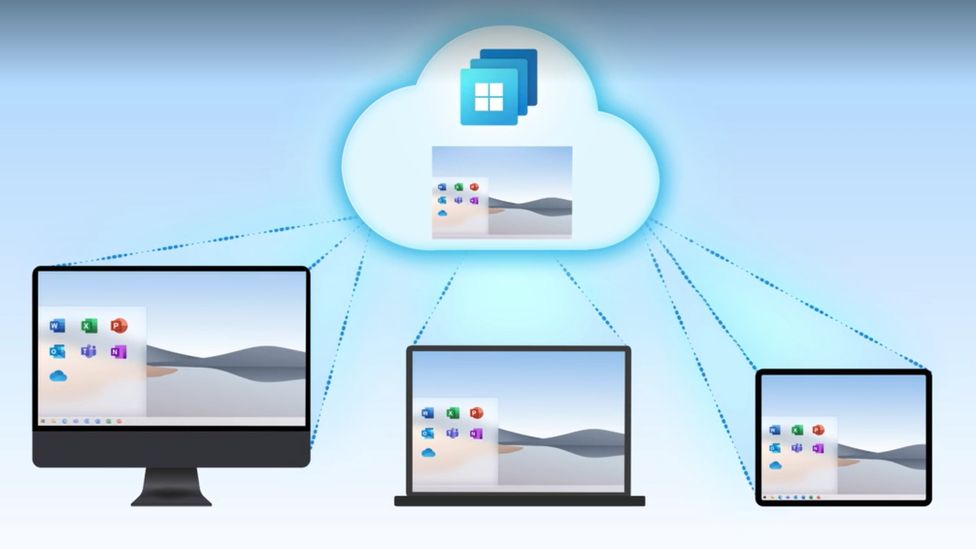
One of the big announcements that coincided with the news around Windows 11 was the arrival of Windows 365, Microsoft’s new cloud PC product.
Windows 365 is an easy to use, cross device cloud computing solution. You log into a Windows 10 virtual PC (Windows 11 should be available soon) and it’s already pre-loaded with the Microsoft 365 suite of tools and ready to go.
The best part is it’s not restricted to whatever device you’re logging into, the Windows 365 instance you log into from work is the same one you can log into from your home device.
You can even access increased computing power. You can configure a Windows 365 instance that has more processing power than the device you’re logging in from. It also includes one of the main benefits of cloud computing, the ability to easily roll back to a previous instance. Accidentally deleted a file you’ve been working on all day? Roll back to an earlier instance to easily recover it.
It’s also beneficial to the security of your business, if you have employees that work from home it can be difficult to manage devices that aren’t under your office network. You can have these employees instead log into their Windows 365 instances and you know that the rules are the same across the board (and that they’re benefitting from the Microsoft 365 advanced security features).
Pricing for Windows 365 starts at $28 per month for a setup that’s best for low intensity office work all the way up to $162 per month for an 8 Core model with 512 GBs of shortage. Pricing leads us to the discussion of the pros and cons to virtualizing your office.
5 Pros of Virtualizing Your Office Are:
- Increased Availability: As we mentioned, your Windows 365 goes wherever you do. The beauty of the cloud is it’s available everywhere and as most cloud computing products have an uptime guarantee.
- Easy to Setup: With Windows 365, many of the applications you use are already preloaded. You can also have your IT team set up the instances ahead of time, so your new employees don’t have to waste a day installing the programs they need to use.
- Data Security: This one applies to servers as well but having a cloud backup for both your devices and office server increases your data security through redundancy.
- Disaster Recovery: On the same topic, if something happens to the device your employee logs in from or your office server, the data is still safe in the cloud which means little to no downtime.
- Efficient: You can apply policies and updates to all of your Windows 365 instances at once, no managing updates one computer at a time.
The cons you may encounter are:
- Start Up Costs: Most of the costs around cloud computing is related to the storage you need, and some of these costs are ongoing. When you buy a device it’s usually a one time purchase, but you also have to think about the costs associated with maintaining the device. With cloud computing, maintenance costs are deferred.
- Availability: While most providers have a guaranteed uptime, there can be times where the service is down. Also, your internet connect will matter a great deal when it comes to connecting to your cloud instance. Backups may take longer if you have a poor internet connection at your office.
- Limitations: You can spec out any kind of machine you like to fit a specific purpose, but with virtualization you are limited to what’s available and setups for the most common use cases are going to be what’s highly available.
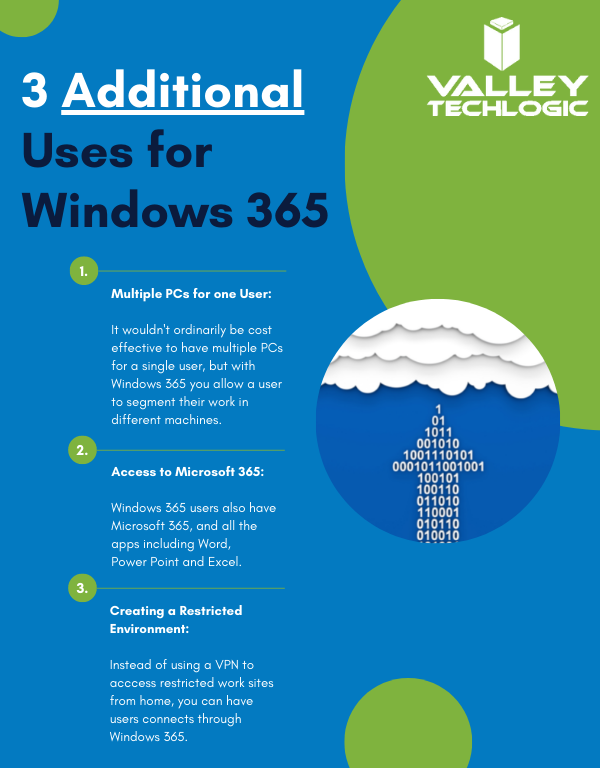
Here are a few other ways you can use Windows 365 in your business:
Interested in learning how Valley Techlogic can help your business create a virtualization plan? Learn more today with a quick consultation.
Looking for more to read? We suggest these other articles from our site.
-
Is it time to call in the reinforcements? 5 benefits to co-managed IT services
-
On average, your information is shared 747 times a day according to a new study
-
College shuttered after 157 years due to ransomware attack
-
Technology that you can build on, supporting your construction business through tech
This article was powered by Valley TechLogic, an IT service provider in Atwater, CA. You can find more information at https://www.valleytechlogic.com/ or on Facebook at https://www.facebook.com/valleytechlogic/ . Follow us on Twitter at https://x.com/valleytechlogic.