Tag: windows server 2022

  • Windows Server 2012 R2 End of Life is just a couple months away, are you ready?

    Windows Server 2012 R2 End of Life is just a couple months away, are you ready?

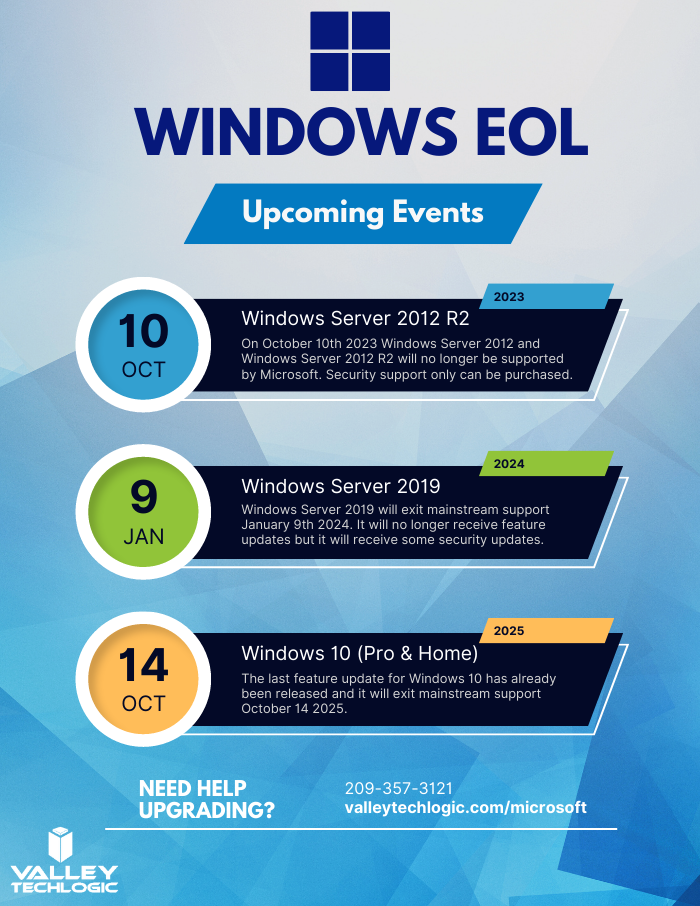
    Windows Server 2012 and Windows Server 2012 R2 are quickly approaching their End-of-Life date of October 10, 2023. This is just over 2 short months away and in the world of data migration (especially as it relates to servers) that doesn’t give you a lot of time if you’re still using this operating system in your business.

    If you’re not in the loop you may be wondering what the big deal is with letting it lapse, it’ll still work right? Well yes and no. The timing of this End-of-Life event coincides with when Microsoft usually does their biggest feature and security updates for the year (typically October).

    This means that those still using Windows Server 2012 will miss out on these updates, and all future updates to come unless you sign up for extended support (at a cost) and even then, that will only provide you with some security updates, there will be no future feature updates for Windows Server 2012.

    You may be on the fence because you aren’t sure if you want to continue using an on-premises server or make the move to the cloud. We actually wrote a detailed article on this topic before and how it relates to the pros and cons of moving to the cloud or remaining with an on-premises server. You can find that article here.

    If you are planning on trying to upgrade soon, we have a couple of steps we can recommend as you prepare:

    1. Decide which operating system you’ll be upgrading to. Typically we recommend upgrading to the most current operating system to give you the longest span of time before an upgrade will be needed again, however depending on your hardware or even specific software you use in your business this may not be feasible. We suggest having your server evaluated to determine which upgrade makes sense (or if an upgrade is even possible.
    2. If you discover your server can’t be upgraded, you’ll need to make plans for a new system. If you have an older server (over 5 years) you’ll need to determine whether an upgrade to the most recent version of Windows Server is even possible. If it’s not, you’ll have to pivot to purchasing a new system instead. There are many benefits to upgrading to a new server and an IT provider like us can help you narrow down your choices based on your business’s needs.
    3. Decide whether a clean installation is possible. If most of the data on your server is backed up elsewhere, for example if you have duplicate copies of your data in the cloud (which we highly recommend) then you can do a clean install without having to worry about the data already on the device.
    4. If a clean installation is not possible, you will need to do a migration. A migration is a slower process of updating your server to the latest version. If you’ve ever upgraded the operating system on your computer, you can probably relate as it’s similar just much longer and with more potential pitfalls. We only recommend a migration be attempted by a qualified IT technician.
    5. Plan for the future now. Scrambling to figure out what to do when an End-of-Life event for your device is coming up is stressful and fortunately, avoidable. Modern versions of Windows Server can perform what’s called an “In-place upgrade” which means an upgrade can occur with very little downtime or stress. Staying on top of your Microsoft and Windows updates and upgrades will mean you have the most secure version of their systems available and much less chance of a catastrophic failure occurring on your devices.

    To help with your planning for Microsoft’s upcoming End-of-Life events, we’ve created this chart with the latest dates to keep track of.
    If you need assistance with upgrading your Windows Server 2012 or Windows Server 2012 R2 device, or have questions about Microsoft products in general, Valley Techlogic can help. We are long time Microsoft partners, and our technicians have a wealth of experience in supporting Windows devices and navigating Microsofts offerings. Schedule an appointment today to learn more.

    Looking for more to read? We suggest these other articles from our site.

    This article was powered by Valley Techlogic, an IT service provider in Atwater, CA. You can find more information at https://www.valleytechlogic.com/ or on Facebook at https://www.facebook.com/valleytechlogic/ . Follow us on Twitter at https://x.com/valleytechlogic.

  • Microsoft 365 pricing changes are coming in 2022, and we have the details

    Microsoft 365 pricing changes are coming in 2022, and we have the details

    Microsoft has had a busy year in 2021. With the release of Windows 11 and it’s continued roll out to more and more eligible users, as well as the quieter release of Windows Server 2022 in August. It looks like they’re not slowing down in 2022.

    We’ve been notified as a Microsoft partner there will be price increases across the board for their powerful suite of office software, Microsoft 365 expected in March 2022.

    While it’s never fun to have an unexpected increase to your overall IT spend, we think Microsoft 365 is still well worth it even at the increased cost. There are also some items that will be rolled into the new subscription model that will absorb some of the price increase while increasing the usability of your Microsoft 365 subscription.

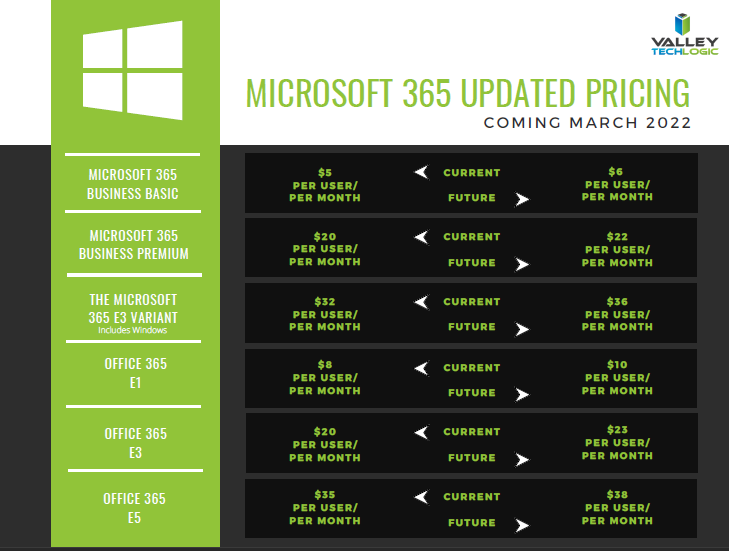
    First, here’s a chart we’ve created that you can save for your records that outlines the expected price increases. These prices may change between now and March but as of writing these are the prices that have been communicated to us by Microsoft directly. We also included the subscription models that are not going to be increased in March. We also want to note the consumer and educational models of Microsoft 365 will not be experiencing a price increase next year.

    Small Version of the Pricing Chart
    Click for the full size version.

    Now, we promised we’d talk about some of the items that are now going to be rolled into your Microsoft 365 subscription that previously had their own cost. One of those items is the ability to call in via Teams. Previously, calling in via Teams was $4 per line but as Microsoft moves to make Teams more accessible for businesses and users alike, they’re now including it in your normal subscription cost.

    This means if you have employees who are out and about during a company meeting, they can still easily call in and participate. It also opens up the opportunity to use Teams for your prospects and clients, even if they don’t currently have it installed. This year we even switched to Teams across the board ourselves and haven’t looked back. We’ve found the call quality and reliability to be phenomenal.

    Some security features will also be rolled into some of the earlier tiers of Microsoft 365 when they were previously featured à la carte. The security and compliance features found in your Microsoft 365 subscription really amount to pennies on the dollar when you consider how expensive it would be to establish the same security stack outside of Microsoft, and it would be less tailored for your own Microsoft use experience to boot.

    These security features include data loss prevention (DLP) for email and documents, as well as encryption for email (we all know email is one of the most common points of entry for bad actors). Microsoft Endpoint Manager has been a critical tool for all of the business’s that now find themselves managing a remote workforce.

    Overall, while a price increase was inevitable, we’re excited to see what new features will be rolled out in 2022 and beyond. If your office is not yet setup with a Microsoft 365 subscription, that’s one of the items we help our clients manage. If you’d like to learn how Valley Techlogic can help your business with Microsoft products and more, click here.

    Looking for more to read? We suggest these other articles from our site.

    This article was powered by Valley TechLogic, adns, n IT service provider in Atwater, CA. You can find more information at https://www.valleytechlogic.com/ or on Facebook at https://www.facebook.com/valleytechlogic/ . Follow us on Twitter at https://x.com/valleytechlogic.

  • Why you SHOULD upgrade to Windows 11, but not necessarily Windows Server 2022

    Why you SHOULD upgrade to Windows 11, but not necessarily Windows Server 2022

    It feels like Windows 11 news is everywhere at the moment following the official announcement on June 24th. We covered that announcement in our post found here.

    More details will continue to be released as we move toward the estimated fall release of Windows 11. It’s going to be a free upgrade for Windows 10 users, and we think making the move to Windows 11 will be a smart choice for most customers so long as they’re running newer hardware (which to be fair is a big caveat). We’ll be covering the hardware required for Windows 11 in next weeks post as it’s an ongoing situation.

    In this week’s article we want to cover servers instead, and specifically whether Windows 2022 will be the smart choice for business’s when it’s officially released. It’s been out for preview for Azure Virtual Machines since March of this year, but the commercial release is estimated for later this year. It’s seems it will closely coincide with the estimated release of Windows 11.

    That’s pretty much where the similarities between the two operating systems ends. Servers are a different beast both in their hardware requirements and their intention.

    Many very small businesses get by without a physical server and by just relying on cloud backups for their data. There are some downsides to that, we talk more about moving to the cloud in this article.

    If you already have a server (or even more than one) in place for your business though you may have an understanding of the undertaking that is upgrading your Windows Server version. It’s not quite as cut and dry as it is with upgrading your desktop version of Windows, which is usually just a few clicks of the mouse.

    There are usually vendor considerations in place with a Windows Server upgrade. Some clients even have proprietary software that will not work with an updated version of Windows Server that necessitates having a plan in place to mitigate the issues that come from having an older version, many of those cyber security related.

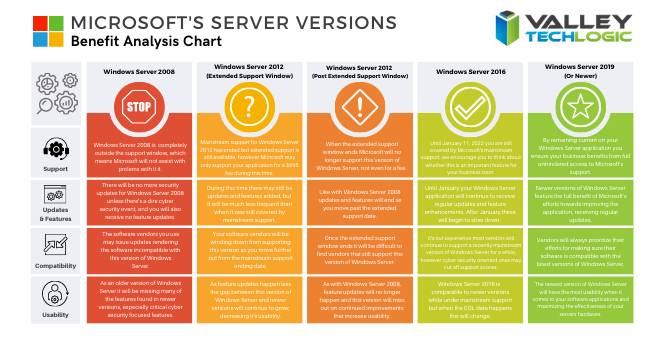
    We’ve made a chart that shows the risk level with various versions of Windows Server as you move out from their End of Life date as well as from their Extended Support date.

    Windows Server Chart Small

    It’s a good idea to keep as current as you can but we don’t necessarily advocate for jumping onto the newest server version immediately. Like we said there are vendor considerations and also the compatibility with software you use in your business, it can take a while for developers to create patches and drivers that make the usability of the newest version of Windows Server the same as what you’re used to.

    Also, like with the desktop version of Windows there are hardware considerations. Upgrading server hardware is always a significant expense for your business and can result in significant downtime. We help our clients mitigate this downtime but it’s still a consideration especially if you’re navigating this topic without a good IT team behind your business.

    We would never discourage anyone from upgrading when the time is right, aging hardware that fails suddenly can also result in significant downtime, much longer than an upgrade would take before you reached that point. We recommend reaching out to an IT professional and having them run diagnostics on your current server as that will help you make an informed choice.

    If you find yourself trying to navigate this topic and other IT service related topics, Valley Techlogic can help. As a Windows partner, we’re well versed in everything Windows and have navigated even the most complicated server setups. Like we mentioned, we even help clients mitigate downtime when it comes to performing necessary upgrades. You can reach us for a consultation here to get started.

    Looking for more to read? We suggest these tech articles from the last week.

    This article was powered by Valley TechLogic, an IT provider in Atwater, CA. You can find more information at https://www.valleytechlogic.com/ or on Facebook at https://www.facebook.com/valleytechlogic/ . Follow us on Twitter at https://x.com/valleytechlogic.
  • Windows 10 End of Life is Coming, and It’s Sooner Than You Think

    Windows 10 End of Life is Coming, and It’s Sooner Than You Think

    While Windows 11 (code name Sun Valley) hasn’t officially been introduced to the public, it’s created enough of a stir that the topic of Windows 10 support ending has been pushed to the forefront of the tech news cycle. Windows 10 will officially end mainstream support on October 14, 2025.

    Back in 2015 it was circled around that Microsoft 10 would be the “last Windows release”, indicating Windows would follow the route of Apple and just continuously update this version in perpetuity. We would have said that was unlikely back then and it seems we would have been right.

    While the comment that initiated that rumor can be tied back to one Microsoft employee, Microsoft didn’t exactly dismiss the notion at the time. They have been moving forward since then into the “as a service” model, especially with their service Microsoft 365 replacing Office 365 as it was known.

    Most of us can remember a time when you paid a one-time fee to use the Office suite of software, but Microsoft has fully moved to a subscription model only under Microsoft 365. “As a service” is basically the de facto model in tech at this point, with Adobe also being another example (remember when you could just buy Photoshop?).

    Businesses like Google always operated under an “as a service” model. So, it makes us question if the roll out of Windows 11 will look the same as past releases.

    Especially for businesses, instead of pricey one-time licensing fees will we be looking at a monthly charge potentially? And how would that work when Windows 11 eventually went end of life?

    Tech News #13

    Microsoft has operated under two models for end of life so far, fixed and what they now call the modern lifecycle. Under the fixed lifecycle there weren’t really too many restrictions for support, as long as you kept your version up to date you would receive some level of support for 10 years.

    Now, they operate on a regular update cycle. With a feature update usually arriving in October, a year end update in November and a mid-year update in June or July. While you can expect regular updates between those dates, major feature updates are now condensed.

    Customers are encouraged to perform at least one of these updates a year to stay current. Failing to update with one of these major releases may make your version ineligible for next year’s releases.

    More news about Windows 11 may be arriving next week in an event announced by Microsoft, you can attend the live stream here on June 24th at 11 AM Eastern Time. We’re looking forward to summarizing the details of this event in next weeks blog.

    Beyond Windows 10 for PCs, there will probably be a significant update to Windows Server as well. Server updates tend to happen more often, with Windows Server 2022 following just 3 years after Windows Server 2019 (it’s been in preview since March of this year).

    If your business needs help navigating the ever-changing landscape of Windows or if you’re trying to figure out how to get outdated, unsupported versions back to mainstream support, we’re here for you. Valley Techlogic is a Microsoft Partner and we’re experts when it comes helping businesses manage their Microsoft products, whether it’s Windows or Microsoft 365. Connect with us today to learn more.

    Looking for more to read? We suggest these tech articles from the last week.

    This article was powered by Valley TechLogic, an IT provider in Atwater, CA. You can find more information at https://www.valleytechlogic.com/ or on Facebook at https://www.facebook.com/valleytechlogic/ . Follow us on Twitter at https://x.com/valleytechlogic.