Author: rory-admin

  • Windows 10 reaches EOL October 2025, and those who don’t upgrade may have to pay

    Windows 10 reaches EOL October 2025, and those who don’t upgrade may have to pay

    Windows operating system end of life events are a big deal, with 1.6 billion active Windows devices as of 2024 Microsoft still holds a commanding lead over any other operating system provider. Even though Windows 11 was released almost 4 years ago at this point, it still only represents 28% of the global Windows market share (with 70% still using Windows 10).

    There are a lot of reasons for this, from users being comfortable with the Windows 10 interface to many devices that simply aren’t Windows 11 ready (interested in a Windows 11 device in 2025? Here’s our guide).

    Users hanging onto a previous version of Windows until the bitter end is nothing new for Microsoft, Windows 7 still had a 12% market share when Windows 11 was released October 2021 (almost 2 years since it’s own EOL date occurred).

    In the past, Microsoft has released critical security updates even for systems no longer receiving support. Users could also purchase optional extended support plans for devices that can’t be upgraded for one reason or another (the keyword being “optional”).

    Now Microsoft has announced for the first time ever that consumers looking to extend the life of their Windows 10 devices – or just remain on the operating system they prefer – will have to $30 for a single year of Extended Security Updates (ESU).

    Businesses will be charged even more for ESU, $61 for the first year with the price increasing steeply every year beyond 2025 – $122 for the second year and $244 for the third year respectively. This does not grant Windows 10 users the ability to receive support from Microsoft for these devices, it only means they will still receive critical and important security updates.

    Microsoft has been pushing Windows 11 adoption and we will likely see a stronger market share as consumers replace older devices especially as more AI ready devices become available on the market and Microsoft users look to also take advantage of Co-Pilot.

    There are also some compelling reasons not to use a device that’s reached EOL that go beyond user preference (and the first is covered by this article):

    1. Lack of Security Updates: EOL devices no longer receive critical security patches, leaving them vulnerable to cyberattacks and malware.
    2. Compliance Risks: Using outdated devices can lead to non-compliance with industry regulations, potentially resulting in fines or reputational damage.
    3. Performance Issues: EOL devices may struggle with newer applications and workloads, leading to inefficiencies and reduced productivity.
    4. Increased Maintenance Costs: Aging hardware is more prone to failures and often requires costly repairs or workarounds to maintain functionality.

    If navigating Windows 10 EOL in your office in 2025 keeps you awake at night, Valley Techlogic can assist. Whether it be evaluating whether your office devices are Windows 11 ready or procurement assistance, we are experts at helping our clients make strategic choices in the technology hardware used by their business. Reach out today to schedule a consultation.

    Looking for more to read? We suggest these other articles from our site.

    This article was powered by Valley Techlogic, leading provider of trouble free IT services for businesses in California including Merced, Fresno, Stockton & More. You can find more information at https://www.valleytechlogic.com/ or on Facebook at https://www.facebook.com/valleytechlogic/ . Follow us on Twitter at https://x.com/valleytechlogic and LinkedIn at https://www.linkedin.com/company/valley-techlogic-inc/.

  • 5 technology predictions for 2025 (and where to invest your tech spend in the New Year)

    5 technology predictions for 2025 (and where to invest your tech spend in the New Year)

    2024 was a busy year in technology, with a lot of the focus shifted to continuing advancements in AI, which job openings even being available for those who can craft the perfect prompt. 2025 is likely to bring even more focus this way, but what other advancements in technology should your business be focusing on in the new year? Here are our predictions:

    1. 5G capability: 5G is not a minor upgrade to 4G, 5G is 10 to 100 times faster and has a fraction of the latency (under 5 milliseconds vs 60-98 milliseconds for 4G – an eternity when it comes to page loading times). 5G also has much greater capacity which will make providing network access to areas previously underserved or underrepresented by cable companies possible.
    2. Edge computing: In conjunction with AI, edge computing brings data much closer to the source. Rather than accessing your data solely from the cloud, edge computing involves having a “edge gateway server” act as the middleman and brings more of your data closer to home, while prioritizing that only the most sensitive or critical data is uploaded to cloudz. AI ties it all together for seamless access on the users end. This is especially important as IoT (Internet of Things) devices become more ubiquitous even in workspaces, as it reduces latency to devices with less processing power.
    3. Zero-trust Architecture: Zero trust was previously thought as an insurmountable hurdle to the day-to-day user experience, making things inaccessible and acting as a roadblock to completing even simple tasks. Now companies have come around to the notion that not every user needs admin level access and the only roadblock it presents is in front of bad actors trying to gain entry to your company data. Simple solutions such as continuous monitoring for threats, enabling MFA and least privileged access are easier than ever to implement for low or no cost to your business.
    4. Quantum Computing: Often dubbed the final evolution in computing capacity – quantum computing advancements will continue to progress in 2025 with it being predicted that the technology will become more readily available to the general public sometime in the future. While it would be difficult to cover what quantum computing is in this snippet – what it will be able to do is enable us to solve complex in seconds, and improve and optimize many other aspects of computing as we know them today.
    5. Artificial Intelligence: As we mentioned, AI advancements were abound in 2024 and this will continue to be the case in 2025. As more advanced generative models are released and AI-powered automation becomes common place in workspaces it will be something to watch in the coming months, especially for business owners looking to use it strategically within their company.

    At Valley Techlogic we try to stay at the forefront of emerging technologies, including AI. We are Microsoft partners and can make recommendations for utilizing Microsoft’s Co-pilot in your business, as well as helping you navigate technology solutions for your business in 2025. Investing some of your tech spend into a partnership with us in 2025 will help your business reach new heights (we guarantee it). Reach out today to learn more and also take advantage of our end of the year offer.

    Looking for more to read? We suggest these other articles from our site.

    This article was powered by Valley Techlogic, leading provider of trouble free IT services for businesses in California including Merced, Fresno, Stockton & More. You can find more information at https://www.valleytechlogic.com/ or on Facebook at https://www.facebook.com/valleytechlogic/ . Follow us on Twitter at https://x.com/valleytechlogic and LinkedIn at https://www.linkedin.com/company/valley-techlogic-inc/.
  • Is physical security a priority for 2025? Our recommendations for choosing security cameras for any scenario

    Is physical security a priority for 2025? Our recommendations for choosing security cameras for any scenario

    As an IT service provider, digital security is a big focus for our business. However, it’s important to also plan for physical security when it comes to protecting your business’s technology and data. Especially in spear phishing attacks (which are attacks targeting a specific individual) there is no better treasure trove of data than a device used by someone with considerable access to company data.

    Physical theft can still present a cyber security risk which is why even cyber security frameworks such as NIST cover physical security as a topic. As such, we have a dedicated team that addresses physical security including the installation and maintenance of security camera systems.

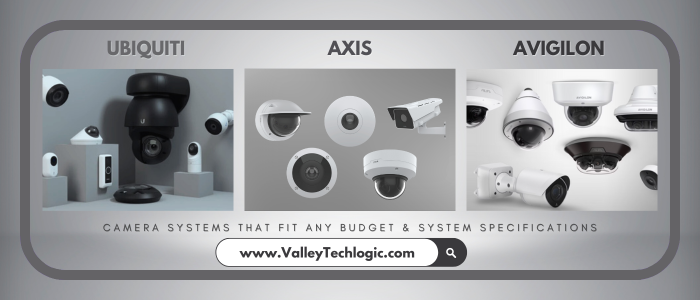
    We have several vendors we work with, with a range of prices to fit any budget. Below are the Good, Better, Best options for security camera systems with Valley Techlogic.

    Beyond choosing a brand, there’s also considerations for the types of cameras to select for your particular business. There is no one size fits all, all three of our preferred vendors have a range of products that can cover different scenarios. Such as low light options, cameras that can capture license plates, cameras packed with AI features such as searching for specific objects or individuals, low profile cameras and more.

    Below our 10 questions you should ask when reaching out for a quote for cameras:

    1. What are the primary goals for installing the system? Is it for theft prevention, monitoring employee activity, or ensuring customer safety? Clearly defining your goals helps narrow down the system features you need.
    2. What type of cameras will you need for your location? Dome, bullet, PTZ (pan-tilt-zoom), or hidden cameras? Different camera types suit different needs and locations.
    3. What resolution and image quality do the cameras provide? Does the system offer high-definition (HD) or 4K resolution? Clear image quality is crucial for identifying details like faces and license plates.
    4. Is the system scalable? Can you add more cameras or integrate with other security features as your business grows? Can you use them in tandem with existing cameras?
    5. What is the storage capacity and method? Does the system use local storage (DVR/NVR) or cloud storage? How long can recordings be retained, and what are the costs?
    6. Does the system have remote access capabilities? Can you monitor cameras in real-time from a mobile app or web browser? How secure is remote access?
    7. What are the power and connectivity requirements? Are the cameras wired, wireless, or PoE (Power over Ethernet)? How reliable is the system’s connectivity?
    8. Does the system include advanced features? Features like motion detection, night vision, facial recognition, or AI-based analytics can greatly enhance functionality.
    9. What is the total cost of ownership? Consider upfront costs, installation, maintenance, subscription fees for cloud services, and potential upgrades.
    10. What support and warranty are included? Is there a warranty on the cameras and system components? What is the availability and quality of customer support?

    If you’re considering a security camera system in 2025, Valley Techlogic can assist. Our technicians have experience recommending cameras to perfectly meet your needs and we also provide expert installation services. Reach out today to learn more.

    Looking for more to read? We suggest these other articles from our site.

    This article was powered by Valley Techlogic, leading provider of trouble free IT services for businesses in California including Merced, Fresno, Stockton & More. You can find more information at https://www.valleytechlogic.com/ or on Facebook at https://www.facebook.com/valleytechlogic/ . Follow us on Twitter at https://x.com/valleytechlogic and LinkedIn at https://www.linkedin.com/company/valley-techlogic-inc/.
  • Meta outage due to “technical issue” knocks out Facebook, Instagram and WhatsApp

    Meta outage due to “technical issue” knocks out Facebook, Instagram and WhatsApp

    When a tech company as big as Meta has an outage, the effects are felt pretty far and wide. Such was the case Wednesday when an outage knocked out a range of Meta services.

    Primarily affecting Facebook and Instagram, other Meta platforms such as Messenger, Threads and WhatsApp also had noticeable issues. The outage began around 9:30 AM PST and services didn’t begin loading again until 2:30 PM with some of the side effects such as messages disappearing or random error messages continuing throughout the day.

    To their credit, Meta did respond quickly to the outage posting a statement on X that reads “We’re aware that a technical issue is impacting some users’ ability to access our apps. We’re working to get things back to normal as quickly as possible and apologize for any inconvenience.”

    As is usually the case though there were no transparent details behind the cause of the outage. This outage pales in comparison to the one we reported on in 2021 where the Facebook.com domain even appeared for sale briefly under Whois lookups.

    When you’re a company as big as Meta you can somewhat get away with less than transparent responses and a “sorry for the inconvenience” but for most businesses, responding to service disruptions is an important part of doing business.

    Here are four ways we recommend responding to service disruptions in a way that still puts customer satisfaction at the forefront (even when you’re dealing with a stressful situation):

    1. Prompt and Transparent Communication
    • What to do: Inform customers immediately about the outage through multiple channels, such as email, SMS, and social media. Clearly state what happened, what is being done to fix it, and provide an estimated timeline for resolution.
    • Why it matters: Transparency builds trust and reassures customers that the company is taking the issue seriously.
    1. Offer Apologies and Show Empathy
    • What to do: Issue a sincere apology acknowledging the inconvenience caused. Use empathetic language to show you understand the impact on customers.
    • Why it matters: Customers are more likely to forgive a company that demonstrates empathy and acknowledges their frustration.
    1. Provide Regular Updates
    • What to do: Keep customers updated throughout the resolution process, even if there are no significant changes. Communicate progress at consistent intervals.
    • Why it matters: Regular updates show that the issue is being actively addressed and reduce customer anxiety and speculation.
    1. Offer Compensation or Goodwill Gestures
    • What to do: Depending on the severity of the outage, offer compensation such as credits, discounts, refunds, or a goodwill gesture like free services for a limited period.
    • Why it matters: Compensation can turn a negative experience into a positive one, demonstrating that the company values its customers’ loyalty and time.

    If technical outages in your business are causing service disruptions for your customer, Valley Techlogic is the solution. We prioritize maintaining our customers’ uptime so that outages don’t affect their bottom line. Reach out today to schedule a consultation and take advantage of our holiday offer going on now.

    Looking for more to read? We suggest these other articles from our site.

    This article was powered by Valley Techlogic, leading provider of trouble free IT services for businesses in California including Merced, Fresno, Stockton & More. You can find more information at https://www.valleytechlogic.com/ or on Facebook at https://www.facebook.com/valleytechlogic/ . Follow us on Twitter at https://x.com/valleytechlogic and LinkedIn at https://www.linkedin.com/company/valley-techlogic-inc/.
  • A look back at the 2024’s 8 most expensive breaches

    A look back at the 2024’s 8 most expensive breaches

    2024 is coming to a close and with it we’re reviewing the year in technology as a whole. While we’ve covered advancements in AI, continued benefits to businesses from vendors like Microsoft 365 helping capitalize on more productivity from their technology, more options in hardware and greater adoption for cyber security especially with more regulations in place all point to positive trends in the technology space, there were still a number of notable negatives especially when it comes to cyber security breaches.

    2024 saw a 76% spike in data theft according to to Crowdstrike’s annual global threat report (we’d be remiss not to mention they also unfortunately had a notable breach themselves over the summer).  However, even with the scale of the Crowdstrike breach it still did not make the list on the top 8 most expensive cybersecurity breaches of 2024.

    Below is that list and the eye watering numbers paid out in ransom, fines and overall reduction to business productivity for these companies to resume business as usual.

    • MGM Resorts: This breach occurred in September 2024, with costs exceeding $100 million due to a ransomware attack that paralyzed operations for weeks. Recovery costs, lost revenue, and fines made it one of the year’s most expensive breaches.
    • MoveIt: A vulnerability in the file transfer software resulted in widespread data breaches for numerous organizations, costing tens of millions collectively. The breach was first reported in June 2024.
    • T-Mobile: A recurring target, T-Mobile faced another breach in February 2024, costing an estimated $150 million, including regulatory penalties and class-action settlements.
    • Latitude Financial: In March 2024, this Australian financial services company suffered a breach exposing millions of customer records, with costs exceeding $76 million, mainly from customer remediation and regulatory fines.
    • Clorox: A cyberattack in August 2024 disrupted operations, leading to a $500 million loss in revenue, with breach recovery costs adding to the financial toll.
    • Capita: This UK outsourcing giant faced a major breach early in 2024, costing approximately $150 million, driven by client compensations and operational disruptions.
    • Tesla Supplier Breach: Hackers targeted a Tesla supplier in mid-2024, compromising proprietary designs and incurring losses in the range of $50-100 million.
    • Western Digital: A breach in early 2024 affected critical business data, with costs reportedly surpassing $100 million, including regulatory fines and lost business.

    Even if you’re a small business, you’re still at risk of data breaches and the effects (including ransomware costs that will cripple your bottom line). Cybersecurity protection, including preventing data breaches, is a core face of every Valley Techlogic service plan. Learn more today and take advantage of our 2024 Holiday Offer.

    Looking for more to read? We suggest these other articles from our site.

    This article was powered by Valley Techlogic, leading provider of trouble free IT services for businesses in California including Merced, Fresno, Stockton & More. You can find more information at https://www.valleytechlogic.com/ or on Facebook at https://www.facebook.com/valleytechlogic/ . Follow us on Twitter at https://x.com/valleytechlogic and LinkedIn at https://www.linkedin.com/company/valley-techlogic-inc/.

  • As you’re doing your holiday shopping online this year be aware of “malvertising”

    As you’re doing your holiday shopping online this year be aware of “malvertising”

    Malicious online ads or “malvertising” is on the rise, and no time is more ripe for online scamming then the busiest shopping season of the year.

    Malvertising is a cyberattack that involves bad actors injecting malicious code into online ads. These ads will appear from a Google search to be a genuine website, but when users click on the ad they are falling into the attackers trap.

    There are several variations on the scam, with some only intending to steal your payment information and others go so far as to try where others get you to download a malicious program and infect your entire computer. They can then use your device to scam people you know or add it to an online botnet user list to carry out other nefarious attacks.

    It can be difficult to defend against this type of attack because these attackers go to great pains to set up a legitimate looking storefront and credible looking ad. These types of ads are even found on major search engines such as Google.

    There are a few ways you can protect yourself though, here are our five recommendations:

    1. Use a Trusted Ad Blocker
    • Install a reputable ad blocker, such as uBlock Origin or AdBlock Plus, to block potentially harmful ads. Ad blockers prevent many ads from being displayed, reducing exposure to malicious ones.
    1. Enable Browser Security Features
    • Keep Your Browser Updated: Ensure your web browser is updated to the latest version, as updates often patch vulnerabilities.
    • Enable Pop-Up Blocking: Most modern browsers have built-in pop-up blockers to prevent intrusive ads.
    • Turn On Safe Browsing: Enable security settings like Google Chrome’s Safe Browsing to get warnings about dangerous sites.
    1. Use Security Software
    • Install and maintain robust antivirus or anti-malware software that includes web protection. Programs like Malwarebytes or Bitdefender can detect and block threats from malvertising.
    1. Be Wary of Suspicious Ads
    • Avoid clicking on ads, especially those offering deals that seem too good to be true, free prizes, or urgent requests to “update” software. Even legitimate-looking ads can redirect you to malicious sites.
    1. Browse Securely
    • Use HTTPS: Stick to websites with HTTPS encryption. These are generally more secure and less likely to host malicious ads.
    • Sandbox or Virtual Environment: For extra protection, use a sandboxed browser session (like in a virtual machine) for risky browsing activities.

    Cyber security protections are a key piece of the services provided by Valley Techlogic under our technology support plans, at no additional cost. For the holidays we’re also offering a free device for new customers, take advantage of great service and a great holiday offer, partner with Valley Techlogic today.

    Looking for more to read? We suggest these other articles from our site.

    This article was powered by Valley Techlogic, leading provider of trouble free IT services for businesses in California including Merced, Fresno, Stockton & More. You can find more information at https://www.valleytechlogic.com/ or on Facebook at https://www.facebook.com/valleytechlogic/ . Follow us on Twitter at https://x.com/valleytechlogic and LinkedIn at https://www.linkedin.com/company/valley-techlogic-inc/.
  • 8 Black Friday Tech Gadgets to Super Charge your Office

    8 Black Friday Tech Gadgets to Super Charge your Office

    Black Friday is just a couple of weeks away but in recent years most retailers have moved away from the model of having deals only available on the day itself, instead opting for a month-long Black Friday extravaganza.

    For buyers you can find a deal on everything from home appliances to furniture, clothing and all other manner of consumer goods but there are still some great deals to be had for businesses especially in the technology space.

    Below are our 8 tech gadget recommendations to super charge your office and bring more efficiency to your workday:

    1. For just $99.99 with free shipping you can upgrade that old clunky office printer with a new HP Envy Inspire 7958e that offers 2 sided printing, an automatic document feeder, scanning and more.
    2. If you’re in the market for a beast of a laptop that can keep up with even the most demanding workload, look no further than the Lenovo ThinkPad X1 Carbon, currently on sale for $1361.88 which is a whopping 48% off the retail price.
    3. All-in-one computers are a popular choice with our clients looking to minimize the footprint of their device while not sacrificing usability. The Dell Inspiron features tech specs that would more than cover the average workload and then some and is currently $200 off for Black Friday.
    4. Sometimes the best way to get things done is to tune the noise out, and these Beats Solo 4 Wireless Headphones will do just that and save you $70 (down to just $129.99 for Black Friday).
    5. Office desk space is usually in short supply, charge all of your gadgets (including the ones we’re recommending) with this Anker MagGo 3-1 Charging Station now on sale for just $82.49 after the 25% coupon.
    6. If a tangible click-clack sound is an absolute non-negotiable quality for your work keyboard then you’ll want to consider the SteelSeries Apex Pro Mini, currently on sale for $128.99 with $51 off for Black Friday.
    7. Standing desks continue to be a trendy item for those looking to add “less sedentary” to their New Years resolutions, this electric option from Amazon is just $119.99 after the $50 coupon.
    8. Apple Air Tag: You might be asking yourself; how can I use an Apple Air Tag in my office? The answer, if you’re an iPhone user and regularly take your work device home or with you as you travel, how can you not? Nobody beats Apple when it comes to peace of mind in being able locate your device by attaching an Apple Air Tag to it or inside your laptop bag if it’s stolen or misplaced and for Black Friday they’re currently on sale for the low, low price of just $19. For Android users we can also recommend the Tile Tracker as a comparable alternative.

    We would be remiss to mention all of these great Black Friday offers and not include our own, for a limited time new customers will receive a new laptop or desktop just for signed up with a technology service plan with Valley Techlogic, our service plans include 24/7 IT support, backup and data recovery, robust cyber security protection and more. You can learn more here or by clicking the link below.

    Looking for more to read? We suggest these other articles from our site.

    This article was powered by Valley Techlogic, leading provider of trouble free IT services for businesses in California including Merced, Fresno, Stockton & More. You can find more information at https://www.valleytechlogic.com/ or on Facebook at https://www.facebook.com/valleytechlogic/ . Follow us on Twitter at https://x.com/valleytechlogic and LinkedIn at https://www.linkedin.com/company/valley-techlogic-inc/.
  • Meeting with your IT provider soon? Here are 5 questions you MUST ask

    Meeting with your IT provider soon? Here are 5 questions you MUST ask

    As a managed IT service provider ourselves, we strongly encourage every business owner to meet with the person and/or business who provides their IT support services at MINIMUM annually (and here are our five reasons why if you’re curious).

    If you already have that annual meeting on the books or are thinking about scheduling it soon to prepare your business for 2025 and beyond, it’s a good idea to go with a few questions that will help you determine if the services you’re receiving are meeting your business’s needs and goals. Lucky for you, today we have the top five questions we would ask if the shoe was on the other foot.

    1. Is our business positioned adequately to ward off cybersecurity threats?
    • Why it’s important: The threat landscape changes rapidly. Ensuring your MSP (Managed Service Provider) is up-to-date with the latest cybersecurity protocols and threat intelligence is critical for safeguarding your data and operations.
    • Follow-up considerations: Inquire about specific measures like endpoint detection, regular patching, and proactive threat monitoring.
    1. Are there new technologies or upgrades we should be considering?
    • Why it’s important: Technology evolves quickly, and new tools can improve productivity, security, and efficiency. Your MSP should keep you informed about beneficial updates or trends.
    • For Example: Ask about cloud services, automation tools, and software that could enhance your business operations.
    1. How are we meeting compliance and regulatory requirements?
    • Why it’s important: Compliance with industry regulations (e.g., GDPR, HIPAA, CCPA, CMMC, NIST) is vital to avoid fines and maintain client trust. Your MSP should ensure your systems align with these standards.
    • Follow-up considerations: Request documentation or reports that show compliance checks and updates.
    1. What was our overall system performance this past year?
    • Why it’s important: Understanding your system’s reliability helps gauge your MSP’s effectiveness and determine if changes are necessary. Consistent performance and minimal downtime are essential for business continuity.
    • Follow-up considerations: Review detailed reports on uptime statistics, issue resolution times, and incident responses. Your MSP should have data available for your review at your meeting.
    1. What is our current backup and disaster recovery (BDR) plan, and has it been tested recently?
    • Why it’s important: A reliable BDR plan is essential for business resilience. Regular testing ensures that it will work in an actual crisis.
    • Follow-up considerations: Verify the frequency of backup tests, ensure that if an outage were to occur your business could be up and running again quickly. If needed, request a simulation test to see how fast the recovery would take and make changes if needed to meet your goals.

    If your annual meeting with your current provider left a lot to be desired, or they dodged having it at all maybe it’s time to make a change. For a limited time, new customers can also take advantage of our holiday offer (see details below).

    Looking for more to read? We suggest these other articles from our site.

    This article was powered by Valley Techlogic, leading provider of trouble free IT services for businesses in California including Merced, Fresno, Stockton & More. You can find more information at https://www.valleytechlogic.com/ or on Facebook at https://www.facebook.com/valleytechlogic/ . Follow us on Twitter at https://x.com/valleytechlogic and LinkedIn at https://www.linkedin.com/company/valley-techlogic-inc/.

  • Technology Planning for 2025: Five Items to Focus on to Grow Your Business in the New Year

    Technology Planning for 2025: Five Items to Focus on to Grow Your Business in the New Year

    It’s November and 2025 is just two short months away, we don’t know about you but for us it felt like 2024 flew by and in that time technology planning for our clients has already changed.

    For example, 2025 will bring the end-of-life date for Windows 10 which is still dominating the market share of Windows devices at 65%. We have also more clients in introducing AI into their business next year, including taking advantage of Microsoft’s Co-Pilot which works in tandem with their existing Microsoft subscriptions (you can see our latest blog on AI here).

    Beyond AI or replacing hardware, what are five ways you can grow your business with technology in 2025? Here’s our suggestions:

    1. Implement a Customer Relationship Management (CRM) System
      A CRM platform (e.g., Salesforce, HubSpot or Keap) helps centralize customer interactions, sales data, and service requests, providing valuable insights into customer preferences and buying behavior. By integrating CRM across your sales, marketing, and service teams, you can improve customer retention, streamline communication, and create targeted marketing campaigns that drive growth.
    2. Leverage Automation to Streamline Operations
      Automating routine tasks such as invoicing, customer service, and lead generation can free up your team to focus on strategic work. Automation tools like RPA (Robotic Process Automation) and workflow automation software can improve efficiency, reduce human error, and cut costs.
    3. Adopt Cloud Solutions for Greater Flexibility and Collaboration
      Cloud-based tools (like Microsoft 365 or Google Workspace) enable teams to collaborate in real-time, regardless of location. They offer flexible storage, data security, and remote access to essential resources, which can increase productivity and support a hybrid workforce.
    4. Boost Marketing Reach with Advanced Analytics
      Using data analytics platforms (e.g., Google Analytics 4, Tableau) lets you gain deeper insights into customer behavior, optimize campaigns, and track ROI. Predictive analytics can also help anticipate customer needs, allowing for proactive engagement and more efficient targeting.
    5. Invest in Cybersecurity to Build Trust and Prevent Losses
      Protecting sensitive customer and business data is vital. Implementing multi-factor authentication (MFA), endpoint security, and regular audits can reduce the risk of data breaches. Prioritizing cybersecurity can build customer trust, prevent financial losses, and safeguard your company’s reputation.

    If you’re looking to increase your technology prowess in 2025, Valley Techlogic is the partner you’re looking for. We stay ahead of advancements in IT to give our customers the best strategic advantage over their competitors. We also have an offer for new customers that you won’t want to miss, see the details below.

    Looking for more to read? We suggest these other articles from our site.

    This article was powered by Valley Techlogic, leading provider of trouble free IT services for businesses in California including Merced, Fresno, Stockton & More. You can find more information at https://www.valleytechlogic.com/ or on Facebook at https://www.facebook.com/valleytechlogic/ . Follow us on Twitter at https://x.com/valleytechlogic and LinkedIn at https://www.linkedin.com/company/valley-techlogic-inc/.

  • 5 Ways to Think Like a Hacker to Protect Your Business

    5 Ways to Think Like a Hacker to Protect Your Business

    As you’re going about your day-to-day activities online, thinking of how a hacker might take advantage of even mundane aspects of your routine probably doesn’t enter into the equation.

    We all sign on to work for the day, check our emails, maybe post an update on social media and chat with our colleagues before getting into the grind of our daily activities. Already when you first log in, you’re potentially being exposed to potential threat activity.

    Here are five ways you can “think like a hacker” and protect your business and yourself from falling victim to scams, malware attempts and more:

    1. As we mentioned, the first thing almost everyone does is check their emails but how closely are you scrutinizing the items in your inbox? Phishing is still the number one-way attackers gain access to personally identifying information and systems in your business. Here’s some advice on spotting phishing emails and how to avoid falling for them.
    2. Sharing on social media? You’re volunteering personal information that anyone can read and take advantage of. It might be nice to post that lunch selfie you took with your colleagues but maybe wait until you’re back at your desk, especially if you’re a business owner as you’re more likely to be targeted by something called spear fishing. By posting that selfie during lunch you’re letting anyone who may be watching know your office computer is unattended.
    3. In the same vein, the more details you post online the more information can be gleaned to target you. If you post that your Aunt Kathy Isn’t feeling well Aunt Kathy’s “friend” may send you a message offering sympathy and describing their own woes and tribulations while perhaps trying to gain your trust. However, when you go to confirm with Aunt Kathy later on you find out she’s never heard of this so called “friend”. Social engineering is a large part of long-term scams, always confirm with your friends and relatives directly before giving credence to any messages you receive online.
    4. Sending something important? Always encrypt! You cannot account for the security awareness of others; by encrypting important files being sent via email you’re at least protecting your side of equation.
    5. Speaking of security awareness, being up to date on the latest threats is exactly what a hacker would do. With security awareness training, you can “think like a hacker” and avoid many of the traps they try and set up to gain access to your business.

    Security awareness training is just one of the features we include with all of our service plans. On top of that you will also gain access to:

    1. 24/7 Endpoint Detection and Threat Monitoring
    2. Automatic Daily Backups
    3. Disaster Recovery Planning
    4. Consistent Patching & Updates
    5. Ticket Response Times in Under 15 Minutes

    With a Valley Techlogic plan you don’t need to think like a hacker to protect your business, learn more today with a free consultation.

    Looking for more to read? We suggest these other articles from our site.

    This article was powered by Valley Techlogic, leading provider of trouble free IT services for businesses in California including Merced, Fresno, Stockton & More. You can find more information at https://www.valleytechlogic.com/ or on Facebook at https://www.facebook.com/valleytechlogic/ . Follow us on Twitter at https://x.com/valleytechlogic and LinkedIn at https://www.linkedin.com/company/valley-techlogic-inc/.