Category: Business

Business

  • Does doing your own IT as a business owner really make sense? We did the math.

    Does doing your own IT as a business owner really make sense? We did the math.

    Business owners have a lot on their shoulders, especially in 2020. Delegating is no easy thing, painstakingly raising a business from the ground up lends itself to naturally being very protective over it.

    There can even be a sense of pride in doing things yourself for as long as you can. Each time you must hire out for a job you previously did yourself there can be a sting to it, as well as a feeling that you’re giving up control (which you are, but it’s a good thing!). We know nothing can feel more worrisome about losing control over than the IT systems that power your business.

    The thought of hiring someone else to do your IT for you can feel like handing over the keys to your kingdom. When it comes to your data and the systems you and your employees work on, keeping these things afloat is often synonymous with keeping your business running.

    While there might be something nice about not spending a weekend on a downed system or having to phone your internet provider yourself when your networks down, is it really worth the concerns that might arise from it not being in your sole control?

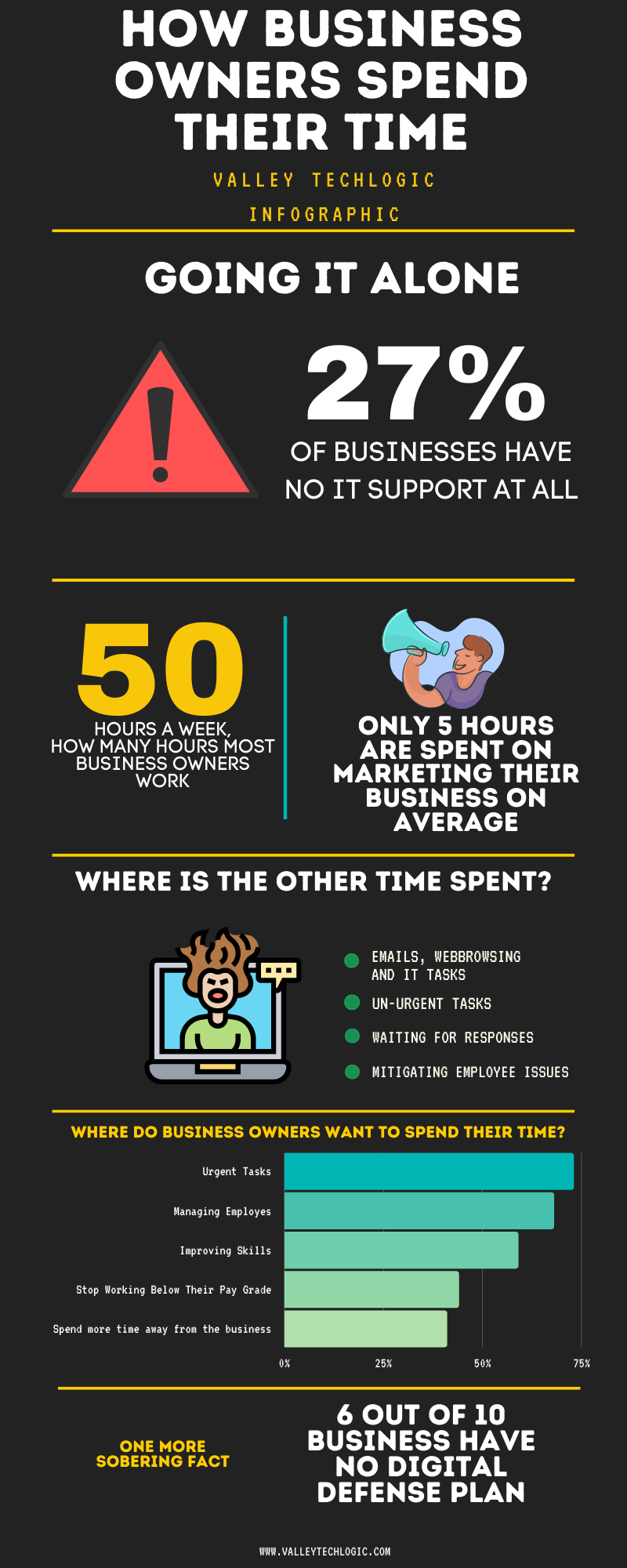
    The statistics say yes. Just take a look at this graphic.

    Doing Your Own IT Chart

    As you can see, business owners are working hard but aren’t spending their time where they would ideally want to. When you get bogged down with the everyday minutia you can lose sight of what made your business the success it is, the effort poured into actually building it.

    Also, while we don’t want to question anyone’s IT prowess if that isn’t your day job there could be things that are overlooked. Cyber security is something we write about a lot here and for good reason, thinking your business won’t be a target for any given reason is just wrong.

    Hackers are opportunists and if there is an opportunity for them to get into your business, they’re going to take it. IT professionals have all the tools necessary to thwart them at their disposal, but they can only do implement them when they’re part of your team.

    As with all things that are recommended to you, it’s good to have an open mind and a critical. These are important decisions you are making for your business after all.

    If you’re located in the Central Valley and would like to have a consultation to find out what your options are, we’d be more than happy to go over them with you.

    Looking for more to read? We suggest these tech articles from the last week.

    This article was powered by Valley TechLogic, an IT provider in Atwater, CA. You can find more information at https://www.valleytechlogic.com/ or on Facebook at https://www.facebook.com/valleytechlogic/ . Follow us on X at https://x.com/valleytechlogic.

    Looking for IT Services in Fresno, Modesto, Stockton, Ceres, Atwater, Merced, Visalia or Lodi? We cover all these areas and more!

  • On the Fence About Outsourced IT? Here are the Top 5 Reasons to Consider it.

    On the Fence About Outsourced IT? Here are the Top 5 Reasons to Consider it.

    Now as a provider of outsourced IT we’re considerably biased, but we also know the value outsourcing some or all of your IT can provide to your business. We wanted to touch on the top reasons you should consider utilizing outsourced IT in your business.

    First though we would be remiss if we didn’t go over the variety of outsourced IT available on the market. From a single person who helps on a contractor like basis to full scale operations that are the same as having an entire IT department, the differences in what’s out there is vast and there’s something available for every business.

    To decide on what variety is right for you, you need to consider what your businesses needs are. Do you already have an IT team and just need some additional assistance with routine tasks hamstringing your business currently? Are you utilizing the “a wish and a prayer” model by having no IT at all? NOT a good idea by the way.

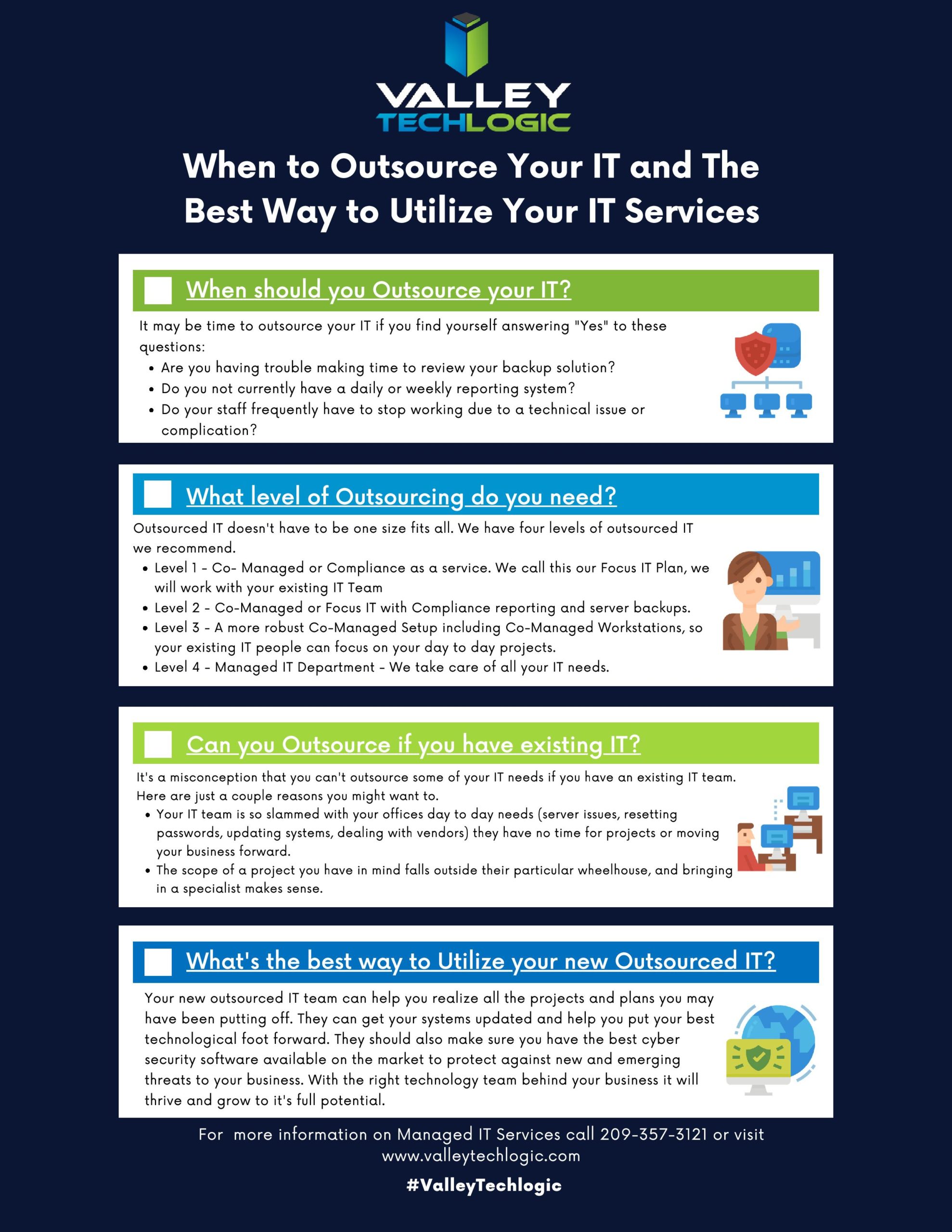
    We developed this chart to help businesses figure out what kind and what level of outsourcing they may need.

    When to Outsource Chart

    In addition to our chart here are 5 examples of how outsourced IT can bring your business to the next level.

    1. Is the cabling in your office currently a nightmare? Do you walk into the server closet and find yourself wondering if it’s up to code or perhaps even a fire hazard? This is one project no one wants to tackle but once it’s done, you’ll wonder how you went so long without it.
    2. Your IT team is great, but they’re so bogged down with the day to day minutia they don’t have time to bring your business to the next level. Do you have upgrades that have been on the back burner forever? Or perhaps they just don’t have time to maintain your backups as well as you would like. Outsourced IT can fill in the gap and give you the footing you need expand your business.
    3. Remote IT, setting this up right can feel like an impossible task. Maybe your workers are regularly stuck unable to do their job due to login issues, or you just aren’t sure how to approach the topic of cyber security with your employees working from home. Outsourced IT can be the extra hands you need to get it going right.
    4. Perhaps you’ve been telling yourself, who needs IT? You’ve gotten by this far without it. We’re sorry to say, that’s just luck, and you don’t want to hang your business on continuing to stay lucky.
    5. Training new IT staff is difficult and expensive, with an experienced IT provider you don’t need to worry about that and can instead focus on your core business.

    This is in no way an exhaustive list of all the ways we think outsourcing IT could be a smart choice for your business. One thing we do want to mention is to vet the company you choose to outsource to carefully, you’re trusting them with your data and network after all.

    Choose a company with good reviews and references and one that guarantees the work they do. Also, if you’re thinking about switching IT providers it’s okay to vet the new company before letting the old one know you’ll be moving on.

    If you need more advice or assistance on this or other technology topics, reach out! At Valley Techlogic we’re here to help.

    Looking for more to read? We suggest these tech articles from the last week.

    This article was powered by Valley TechLogic, an IT provider in Atwater, CA. You can find more information at https://www.valleytechlogic.com/ or on Facebook at https://www.facebook.com/valleytechlogic/ . Follow us on Twitter at https://x.com/valleytechlogic.

    Looking for IT Services in Fresno, Modesto, Stockton, Ceres, Atwater, Merced, Visalia or Lodi? We cover all these areas and more!

  • Returning to the Office? Here’s What You Need to Know.

    Returning to the Office? Here’s What You Need to Know.

    The last few months have been hectic to say the least. A global pandemic has forced us to reconsider our office norms, when working from home became a necessity rather than a rare occurrence – prior to the pandemic only 1.3% of job postings on ZipRecruiter specified working from home.

    The numbers vary but it’s estimated upwards of 50% of the knowledge-based workforce is working from home right now. Tech workers have had to scramble to adjust their security measures to cover employees on their home networks. In some cases, it still hasn’t been enough (Hacking against corporations surges as employees take computers home – Reuters.)

    Now, as many cities and states begin to open, you may be wondering if it’s time to get back to the office. Here’s our steps for doing it smartly and safely.

    • Evaluating devices that have been used at home thoroughly before introducing them back to the work network. Whether it’s their office device or a home device they normally use at work, you want to make sure it won’t function as a Trojan horse to your organization, inviting malware and/or viruses into your office.
    • Make sure these devices are also updated with any software patches and updates that may have been missed while working from home. You want to make sure they have been fully patched when they return to your network.
    • Consider requesting that everyone update their credentials and re-enforcing any efforts into enabling 2 Factor Authentication(2FA). Employees working from home may have let their work machines be used by family members, or otherwise have left these devices unattended in areas where they may have been accessed by others.
      When returning to work we think it’s a good idea to also have a fresh start when it comes to passwords and other credentials, and if you haven’t been already consider requiring 2FA on work devices and work accounts.
    • Finally, we’ll all have to consider germs going forward and for the considerable future. It’s a good idea to have a plan in place for disinfecting these devices safely and consistently.

    This doesn’t cover everything necessary for returning to work safely, but it’s my hope it gives you a place to start when it comes to the technology side of things.

    Whether you’re returning to work or are still working from home, Valley Techlogic can assist you with these topics and more. Feel free to reach out, our brilliant tech team would be happy to assist you.

    This article was powered by Valley TechLogic, an IT provider in Atwater, CA. You can find more information at https://www.valleytechlogic.com/ or on Facebook at https://www.facebook.com/valleytechlogic/ . Follow us on Twitter at https://x.com/valleytechlogic.

    Looking for IT Services in Fresno, Modesto, Stockton, Ceres, Atwater, Merced, Visalia or Lodi? We cover all these areas and more!
  • Zoom is Restricting End to End Encryption to Paid Users, What Does it Mean for You?

    Zoom is Restricting End to End Encryption to Paid Users, What Does it Mean for You?

    Last week, Zoom confirmed that it will only be offering end to end encryption to paid users. So, what does that mean and what should you do about it?

    End to end encryption is a type of encryption that makes it so only the people communicating can read the messages, or in the case of Zoom see or hear the video. This means you can rest assured that your video call is completely private.

    Zoom has been in the news frequently for their security issues, most famously in the case of Zoom bombers (this was where uninvited guests would drop into private calls and spam them). They have been releasing updates at a breakneck pace to tackle these issues as they come up, but some users may still be a little wary of their security while using the service.

    This hasn’t lessened their popularity though. With 200 million daily users and a valuation of 1 billion dollars, Zoom has grown miles ahead of the competition largely because they are a free service.

    But now that end to end encryption is a paid for feature, how will this effect their popularity? How many users will pay to have this protection?

    The reason they’ve cited for making this feature paid is because they want to help law enforcement. With end to end encryption enabled, law enforcement cannot view the streams. Bad actors using Zoom for illegal activities probably won’t want their payment information tied to the site, and with no end to end encryption they’ll be stopped dead in their tracks from using the service as a means for their criminal activity.

    Prison Cell

    How do you know if as a business owner you should you pursue this paid for feature? It depends on a couple of things, if you’re conducting meetings involving private information such as payment details or other secure information you may want that extra layer of security. If you’re not it may not be necessary.

    Also, it’s important to keep in mind you cannot dial into an encrypted call with a phone. If you frequently have users that use their cellphone to reach your Zoom meetings this feature may not be a good fit.

    It’s best to evaluate how you use Zoom and what’s discussed in your meetings, and then go from there to decide if end to end encryption is something your business needs for conducting your meetings.

    This article was powered by Valley TechLogic, an IT provider in Atwater, CA. You can find more information at https://www.valleytechlogic.com/ or on Facebook at https://www.facebook.com/valleytechlogic/ . Follow us on Twitter at https://x.com/valleytechlogic.

    Looking for IT Services in Fresno, Modesto, Stockton, Ceres, Atwater, Merced, Visalia or Lodi? We cover all these areas and more!

  • Risks with Implementing New Technology in Your Business

    Risks with Implementing New Technology in Your Business

    If you own or operate a business chances are, you’re constantly looking for new ways to improve your processes or become more optimized and efficient. If you run a restaurant this may mean reducing your menu, if you’re manufacturing company owner you may always be on the lookout for new or better hardware.

    What about your technology? Let’s face it, every sector of business these days liberally uses technology both in and out of the sales process. Computers that power your workforce, printers that help you invoice clients, your own laptop that may help you brainstorm new business ideas at 3 A.M.

    Technology is interwoven into our success, but what are the risks associated with implementing a new technology? Either one that’s just new to you or new as a whole. Here’s our list:

    • Integration Issues: New technology always has a learning curve, and you may not find out until you’ve already deployed it that it’s not a good fit for your business.It’s important to research a new technology thoroughly before jumping in feet first.
    • Customer Support Issues: You’re probably aware of how to contact support with any current software or hardware products you have, you also know how quickly they’ll respond to your issue from past experience.With new technology you’ll have to figure out the best way to reach their customer support and over time, learn how responsive they are to you.
    • Deficient Products: Every new technology involves a trial period where you’re figuring out if it’s a good fit, and that includes learning whether it’s a good product in general.In every business there will be periods of buyers remorse with a product that just wasn’t a good fit in the end.
    • Training: Training your employees to use the new technology shouldn’t be a deterrent for making necessary upgrades, but it is something to keep in mind especially if you know your business is going to be really busy.Try to schedule upgrades during slower periods to accommodate a necessary learning period.
    • Scalability: Finally, the technology you’re after may be a good fit in every other way but will it scale to your businesses needs? Are there any limitations on number of users or concurrent sessions for an example often seen in software.It’s imperative that you find these things out before deploying anything new.

    As with most things, if you’re a business owner your IT team should be able to answer all these questions and more for you when they’re implementing something new. If they’re not, maybe it’s time for a new IT team?

    This article was powered by Valley TechLogic, an IT provider in Atwater, CA. You can find more information at https://www.valleytechlogic.com/ or on Facebook at https://www.facebook.com/valleytechlogic/ . Follow us on Twitter at https://x.com/valleytechlogic.

    Looking for IT Support in Fresno, Modesto, Stockton, Ceres, Atwater, Merced, Visalia or Lodi? We cover all these areas and more!
  • 2020 is Here – Here’s your Technology and Cybersecurity Forecast

    2020 is Here – Here’s your Technology and Cybersecurity Forecast

    It’s 2020 and the start of a new decade. Technology has changed a lot since the beginning of the last decade. Inexpensive computer options like Raspberry Pi and Chromebook became available, the first iPad was released.

    Computing also got a lot faster, the first 8 core processors were released, solid state drives became a lot more widespread, and graphic cards reached new heights for computer gamers shattering the previously achievable FPS (frames per second) and ushering in a new era of high-end gaming.

    The previous decade also brought new records on cybersecurity issues but unfortunately not in a positive light. Malware became more sophisticated and harder to track, ransomware became widespread (it’s estimated it cost the US $7.5 billion in 2019). So, what’s on the horizon for 2020 and beyond in the realms of technology and cybersecurity?

    As wearable technology advances increase, we will see even more of it aimed at integrating tech with the world around us. Augmented reality devices will probably become more accessible and affordable. Sensor technology will continue to increase which will have a positive effect on healthcare and our ability to detect health scares before they advance to something serious (see watches now aimed at keeping track of our blood pressure and heart rate).

    Needless to say it will be something to look out for as our society becomes more dependent on the IoT (Internet of Things), for good and for bad.

    What about the field of cybersecurity? While it’s probably true hackers won’t stop trying to gain access to our private information – especially as it pertains to our financials – even the most layman user of technology is becoming keen to protecting their privacy.

    Consumers will demand corporations be made accountable for leaks of private data and businesses not wanting to shoulder the financial burden of an attack (or the bad press) will utilize the tools available to thwart would be bad actors in their tracks.

    On that front we can help. At Valley Techlogic we are on a mission to have the most comprehensive and effective cybersecurity tools available to protect our clients. We also offer 24/7 help desk so no matter when you have a problem, we’re on it.

    If you’re in the Central Valley or surrounding area reach out today for a free security audit and begin this new decade tackling your business’s technology needs.

    This article was powered by Valley TechLogic, an IT provider in Atwater, CA. You can visit us on Facebook at https://www.facebook.com/valleytechlogic/ . Follow us on Twitter at https://twitter.com/valleytechlogic.

  • 3 Challenges when implementing new technology, and how to address them

    3 Challenges when implementing new technology, and how to address them

    Every business, no matter its size or industry, faces constant pressure to innovate to keep up with an increasingly dynamic market. However, implementing new technology is always disruptive, and a lack of strategy can easily result in your business being in a worse situation than when it started. Instead of just thinking about the end result, you need to approach any kind of new technology implementation as an ongoing process in staying at the forefront of innovation.

    #1. Aligning people and processes with technology

    One of the most common reasons digital transformation initiatives fail is that many see it as a destination rather than a journey. All too often do technology enthusiasts implement the latest technology just because it’s a popular industry trend without giving much thought to the people who are actually using it.

    Adopting new technology requires strong leadership skills and the transparency needed to achieve buy-in throughout the organization. No one wants to be forced to learn how to use a new system just because it’s new; what matters most is that your technology aligns with the unique needs of your employees and your customers. If there are no clear end-user benefits, adoption rates will be low, and the first casualties will be morale and productivity.

    New technologies should be integrated into existing business processes in a way that keeps disruption to a minimum. Focused implementation tends to be more effective than trying to use one tool to solve every problem for every member of your team. This also reduces the need for additional training. Of course, there will always be some onboarding necessary with any new technology implementation, so be sure to include training costs in your budget.

    More importantly, earn the support of your team by getting them excited about the benefits the tech can bring to their workflows.

    #2. Overcoming compatibility issues with legacy systems

    Few sectors are as hyped up as the world of enterprise technology. The industry has built up an infamous reputation for pushy salespeople who seem to be all about encouraging people to chase after shiny gadgets and do away with every last system they currently have in place.

    Rather than trying to overcome compatibility problems with legacy systems, IT leaders are often encouraged to neglect their old processes and infrastructure entirely. But all these new systems will only end up being replaced by something else before long. This fact reinforces the need to view innovation as a journey rather than a destination, in which you continually adapt your environment to the changing needs of your business.

    Although most businesses are now moving away from in-house IT in favor of more agile cloud technologies, innovation doesn’t have to mean starting from scratch. Rather, it’s about tapping into external expertise and computing resources to augment your existing IT department and infrastructure. That way, your internal team can focus on more strategic initiatives while a dependable third party takes care of things like migration challenges.

    #3. Keeping digital risk to a healthy minimum

    Everyone knows that relying on old and unsupported technology is asking for trouble, but it’s important to remember that implementing new technology also brings security risks. A poorly executed technology implementation can easily leave your business open to threats that weren’t even a factor before. For example, implementing a cloud storage service without thinking about critical factors like data encryption and access control is a recipe for disaster. Some businesses also try to cut corners to save time and money, relying on default installations and hasty migrations.

    When implementing any new technology, cybersecurity should always be a top priority, rather than something that’s just tacked on at the end. Innovation is all well and good, but you must ensure it’s fully protected with multilayered defenses and is compliant with industry standards.

    Valley Techlogic provides the full range of IT services and expertise to businesses in Central California. Call us today to discuss your needs.