Category: eTechTip

eTechTip

  • Is your older computer holding you back? We have a year-by-year breakdown on how your computer can breakdown with age

    Is your older computer holding you back? We have a year-by-year breakdown on how your computer can breakdown with age

    Computers and laptops are a significant investment, especially for business owners who need to supply staff with devices to work on (hardware costs typically represents a significant portion of many business owners technology budgets). You may be wondering how long that investment will last?

    Computers degrade in performance over time due to both hardware aging and software advancements that demand more resources. Here’s a year-by-year breakdown of how a computer can become less effective with age:

    Year 1

    • The computer performs optimally, handling tasks efficiently.
    • Software updates run smoothly, and the latest applications are fully compatible.
    • Cooling systems and thermal paste are fresh, keeping temperatures stable.

    Year 2

    • Newer software and OS updates begin requiring more RAM and processing power.
    • Dust accumulation in cooling fans may lead to slightly higher temperatures.
    • Battery capacity (for laptops) starts to degrade, reducing overall battery life.

    Year 3

    • CPU and GPU thermal paste may start to dry out, slightly increasing temperatures.
    • Hard drives (HDDs) may experience minor slowdowns due to wear and fragmentation.
    • Newer software and updates may introduce features that run slower on older hardware.
    • RAM usage increases, causing occasional lag in multitasking.

    Year 4

    • SSDs may start to show signs of wear (if heavily used), and HDDs may begin failing.
    • Newer graphics-intensive software and games may struggle to run efficiently.
    • The latest OS updates might no longer be fully optimized for the older hardware.
    • More frequent crashes or errors may occur due to aging components.

    Year 5

    • The cooling system may degrade, causing overheating issues and possible thermal throttling.
    • Some critical software may no longer support the aging hardware.
    • Motherboard capacitors may start to degrade, leading to instability.
    • More frequent hardware failures (e.g., failing RAM, storage corruption).

    Year 6+

    • The system may struggle with basic tasks, especially if newer web technologies or software updates demand higher specs.
    • The risk of complete hardware failure (motherboard, power supply, storage) increases.
    • Finding compatible hardware upgrades (RAM, CPU, GPU) becomes difficult.
    • Some online services and applications may no longer support the system.

    Beyond Year 7+

    • The computer may only be viable for very light tasks (e.g., basic web browsing, document editing).
    • Certain hardware components may have reached end-of-life and might not function reliably.
    • Many newer peripherals (e.g., printers, webcams) may no longer have drivers for the aging system.
    • Major security vulnerabilities arise due to the inability to install the latest OS updates.

    Regular maintenance, such as cleaning the cooling system, replacing thermal paste, upgrading RAM or storage, and switching to lightweight software, can extend the usability of an aging computer. However, at some point, upgrading to a new system becomes the more cost-effective solution.

    That’s where Valley Techlogic can help, we have offer procurement services exclusively for our customers. We can help you pick out the best devices for yourself and staff to make the most of your technology investments. Learn more about our procurement services here or reach out today for a consultation.

    Looking for more to read? We suggest these other articles from our site.

    This article was powered by Valley Techlogic, leading provider of trouble free IT services for businesses in California including Merced, Fresno, Stockton & More. You can find more information at https://www.valleytechlogic.com/ or on Facebook at https://www.facebook.com/valleytechlogic/ . Follow us on X at https://x.com/valleytechlogic and LinkedIn at https://www.linkedin.com/company/valley-techlogic-inc/.

  • 5 ways to organize your Microsoft 365 files to maximize your productivity this year

    5 ways to organize your Microsoft 365 files to maximize your productivity this year

    If you’re a Microsoft 365 subscriber – or considering it to utilize tools like Word, Excel, PowerPoint and more in your business – you may not be taking advantage of all of the features it has to offer.

    These features include ways to help organize your files and corral your workload under one umbrella, which is useful with the deluge of information many of us are processing each day in the course of performing our job duties.

    Here are five ways to utilize Microsoft 365 to organize your files day to day:

    1. Use OneDrive for Personal Storage – Store and organize personal work files in OneDrive, using folders and tags for easy retrieval. OneDrive also allows for automatic backup and syncing across devices.
    2. Leverage SharePoint for Team Collaboration – Store shared files in SharePoint libraries, where teams can access, edit, and co-author documents with version control and permission settings.
    3. Utilize Microsoft Teams for File Organization – Upload and manage files directly in Microsoft Teams under specific channels, ensuring that relevant documents are easily accessible to team members.
    4. Tag and Search with Microsoft Search – Use metadata, tags, and keywords in file names to make documents easier to find using Microsoft Search across OneDrive, SharePoint, and Teams.
    5. Automate File Organization with Power Automate – Set up workflows that automatically sort, move, or categorize files based on specific triggers (e.g., when a file is uploaded, it moves to a designated folder).

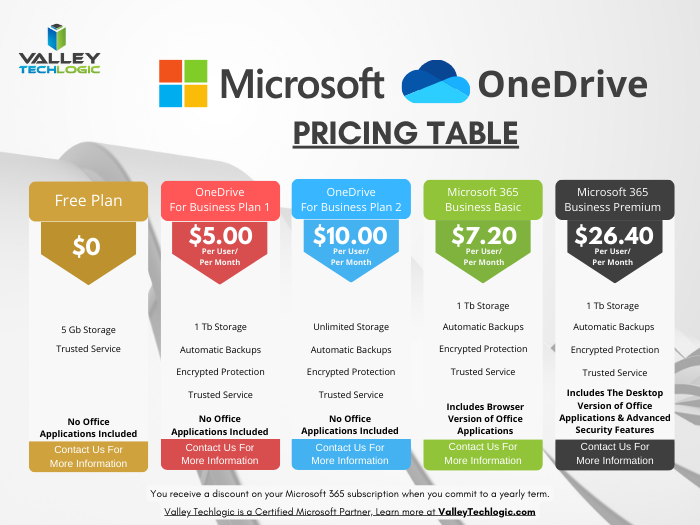
    OneDrive in particular can be very helpful in extending your computers storage and organizing files to share throughout your company and can replace more insecure methods like DropBox or emailing directly. OneDrive can even be purchased as a standalone subscription if you’re not sure about making the switch to Microsoft 365 yet (though we highly recommend it).

    Also, if exploring AI as a tool to increase productivity is one of your 2025 goals, Microsoft’s Copilot and OneDrive work together seamlessly to help you with your automatic file organization goals. Copilot can make suggestions on how you should organize your files based on their content, usage and collaboration history.

    It also gives you a hand with searching for files in a way that’s more intuitive than your average Windows file search function. You can ask it something like “Show me the files I worked on last week” instead of trying to remember specific file names for example.

    Valley Techlogic has been partnering with Microsoft for more than 20 years and we’re experts in providing businesses with cohesive solutions that help them maximize their technology investments, including subscriptions like Microsoft 365. Schedule a consultation with us today to learn more.

    Looking for more to read? We suggest these other articles from our site.

    This article was powered by Valley Techlogic, leading provider of trouble free IT services for businesses in California including Merced, Fresno, Stockton & More. You can find more information at https://www.valleytechlogic.com/ or on Facebook at https://www.facebook.com/valleytechlogic/ . Follow us on X at https://x.com/valleytechlogic and LinkedIn at https://www.linkedin.com/company/valley-techlogic-inc/.

  • China enters the AI race with the release of DeepSeek, prompting conversations about what happens when AI tools take data from each other (rather than just the general public)

    China enters the AI race with the release of DeepSeek, prompting conversations about what happens when AI tools take data from each other (rather than just the general public)

    The race for domination continues to heat up at China’s AI model “DeepSeek” enters the fray, just days after newly inaugurated President Trump announced his plans to invest 500 billion in AI infrastructure during the course of his term.

    Established as a startup under the same umbrella as the quantitive hedge fund High-Flyer, which is primarily owned by AI enthusiast Liang WenFeng (who built his fortune during the 2007-2008 financial crisis), little has been verified about how DeepSeek came to be.

    That has not stopped endless speculation since it’s launch was announced, including how much of it is modeled after existing AI models such OpenAI’s ubiquitous model, ChatGPT.

    Also being questioned is how the chips it was trained on were sourced, chip restrictions were placed in on China in 2019 which continued under President Biden specifically to curtail China’s ability to access infrastructure used in the advancement of AI technology. This restriction not only covered the chips themselves, but the technology used to manufacture them.

    According to Liang, he sourced the the 10,000 Nvidia A100 GPUs prior to the federally imposed ban.

    At present time the founders of DeepSeek are indicating that their goal is to continue the research and advancement of AI infrastructure with their model and not seek commercialization. To back these claims, you can currently download the first series of their model for free open source whether you’re a researcher or a commercial user.

    It should also be noted that DeepSeek has an updated data set as compared to ChatGPT, which is currently capped to data from 2023, what this means is its most recent data is from 2023 and before and anything that occurred in 2024 and beyond would not be available so if you were to example ask ChatGPT “Who won the 2024 Presidential Election?” it may not give you a correct answer.

    There have also been claims that DeepSeek is much cheaper to train, although training costs for existing AI models are largely inflated. These costs are based on the cost of cloud computing rental prices, which have a wide range of variance.

    AI training costs vary wildly depending on a range of factors.

    AI and cloud computing are both worthy investments for businesses looking to strategically position themselves for technology growth in 2025 and beyond, and Valley Techlogic is at the forefront of utilizing these technologies.

    Whether it be initializing AI tools like Microsoft’s Co-Pilot in your business or migrating more of your operations to the cloud to reduce overhead spending on physical hardware, we’ve got you covered. Reach out today for a consultation and learn how you can catapult your business forward with technology advancements through Valley Techlogic.

    Looking for more to read? We suggest these other articles from our site.

    This article was powered by Valley Techlogic, leading provider of trouble free IT services for businesses in California including Merced, Fresno, Stockton & More. You can find more information at https://www.valleytechlogic.com/ or on Facebook at https://www.facebook.com/valleytechlogic/ . Follow us on X at https://x.com/valleytechlogic and LinkedIn at https://www.linkedin.com/company/valley-techlogic-inc/.

  • 8 Black Friday Tech Gadgets to Super Charge your Office

    8 Black Friday Tech Gadgets to Super Charge your Office

    Black Friday is just a couple of weeks away but in recent years most retailers have moved away from the model of having deals only available on the day itself, instead opting for a month-long Black Friday extravaganza.

    For buyers you can find a deal on everything from home appliances to furniture, clothing and all other manner of consumer goods but there are still some great deals to be had for businesses especially in the technology space.

    Below are our 8 tech gadget recommendations to super charge your office and bring more efficiency to your workday:

    1. For just $99.99 with free shipping you can upgrade that old clunky office printer with a new HP Envy Inspire 7958e that offers 2 sided printing, an automatic document feeder, scanning and more.
    2. If you’re in the market for a beast of a laptop that can keep up with even the most demanding workload, look no further than the Lenovo ThinkPad X1 Carbon, currently on sale for $1361.88 which is a whopping 48% off the retail price.
    3. All-in-one computers are a popular choice with our clients looking to minimize the footprint of their device while not sacrificing usability. The Dell Inspiron features tech specs that would more than cover the average workload and then some and is currently $200 off for Black Friday.
    4. Sometimes the best way to get things done is to tune the noise out, and these Beats Solo 4 Wireless Headphones will do just that and save you $70 (down to just $129.99 for Black Friday).
    5. Office desk space is usually in short supply, charge all of your gadgets (including the ones we’re recommending) with this Anker MagGo 3-1 Charging Station now on sale for just $82.49 after the 25% coupon.
    6. If a tangible click-clack sound is an absolute non-negotiable quality for your work keyboard then you’ll want to consider the SteelSeries Apex Pro Mini, currently on sale for $128.99 with $51 off for Black Friday.
    7. Standing desks continue to be a trendy item for those looking to add “less sedentary” to their New Years resolutions, this electric option from Amazon is just $119.99 after the $50 coupon.
    8. Apple Air Tag: You might be asking yourself; how can I use an Apple Air Tag in my office? The answer, if you’re an iPhone user and regularly take your work device home or with you as you travel, how can you not? Nobody beats Apple when it comes to peace of mind in being able locate your device by attaching an Apple Air Tag to it or inside your laptop bag if it’s stolen or misplaced and for Black Friday they’re currently on sale for the low, low price of just $19. For Android users we can also recommend the Tile Tracker as a comparable alternative.

    We would be remiss to mention all of these great Black Friday offers and not include our own, for a limited time new customers will receive a new laptop or desktop just for signed up with a technology service plan with Valley Techlogic, our service plans include 24/7 IT support, backup and data recovery, robust cyber security protection and more. You can learn more here or by clicking the link below.

    Looking for more to read? We suggest these other articles from our site.

    This article was powered by Valley Techlogic, leading provider of trouble free IT services for businesses in California including Merced, Fresno, Stockton & More. You can find more information at https://www.valleytechlogic.com/ or on Facebook at https://www.facebook.com/valleytechlogic/ . Follow us on Twitter at https://x.com/valleytechlogic and LinkedIn at https://www.linkedin.com/company/valley-techlogic-inc/.
  • Meeting with your IT provider soon? Here are 5 questions you MUST ask

    Meeting with your IT provider soon? Here are 5 questions you MUST ask

    As a managed IT service provider ourselves, we strongly encourage every business owner to meet with the person and/or business who provides their IT support services at MINIMUM annually (and here are our five reasons why if you’re curious).

    If you already have that annual meeting on the books or are thinking about scheduling it soon to prepare your business for 2025 and beyond, it’s a good idea to go with a few questions that will help you determine if the services you’re receiving are meeting your business’s needs and goals. Lucky for you, today we have the top five questions we would ask if the shoe was on the other foot.

    1. Is our business positioned adequately to ward off cybersecurity threats?
    • Why it’s important: The threat landscape changes rapidly. Ensuring your MSP (Managed Service Provider) is up-to-date with the latest cybersecurity protocols and threat intelligence is critical for safeguarding your data and operations.
    • Follow-up considerations: Inquire about specific measures like endpoint detection, regular patching, and proactive threat monitoring.
    1. Are there new technologies or upgrades we should be considering?
    • Why it’s important: Technology evolves quickly, and new tools can improve productivity, security, and efficiency. Your MSP should keep you informed about beneficial updates or trends.
    • For Example: Ask about cloud services, automation tools, and software that could enhance your business operations.
    1. How are we meeting compliance and regulatory requirements?
    • Why it’s important: Compliance with industry regulations (e.g., GDPR, HIPAA, CCPA, CMMC, NIST) is vital to avoid fines and maintain client trust. Your MSP should ensure your systems align with these standards.
    • Follow-up considerations: Request documentation or reports that show compliance checks and updates.
    1. What was our overall system performance this past year?
    • Why it’s important: Understanding your system’s reliability helps gauge your MSP’s effectiveness and determine if changes are necessary. Consistent performance and minimal downtime are essential for business continuity.
    • Follow-up considerations: Review detailed reports on uptime statistics, issue resolution times, and incident responses. Your MSP should have data available for your review at your meeting.
    1. What is our current backup and disaster recovery (BDR) plan, and has it been tested recently?
    • Why it’s important: A reliable BDR plan is essential for business resilience. Regular testing ensures that it will work in an actual crisis.
    • Follow-up considerations: Verify the frequency of backup tests, ensure that if an outage were to occur your business could be up and running again quickly. If needed, request a simulation test to see how fast the recovery would take and make changes if needed to meet your goals.

    If your annual meeting with your current provider left a lot to be desired, or they dodged having it at all maybe it’s time to make a change. For a limited time, new customers can also take advantage of our holiday offer (see details below).

    Looking for more to read? We suggest these other articles from our site.

    This article was powered by Valley Techlogic, leading provider of trouble free IT services for businesses in California including Merced, Fresno, Stockton & More. You can find more information at https://www.valleytechlogic.com/ or on Facebook at https://www.facebook.com/valleytechlogic/ . Follow us on Twitter at https://x.com/valleytechlogic and LinkedIn at https://www.linkedin.com/company/valley-techlogic-inc/.

  • Technology Planning for 2025: Five Items to Focus on to Grow Your Business in the New Year

    Technology Planning for 2025: Five Items to Focus on to Grow Your Business in the New Year

    It’s November and 2025 is just two short months away, we don’t know about you but for us it felt like 2024 flew by and in that time technology planning for our clients has already changed.

    For example, 2025 will bring the end-of-life date for Windows 10 which is still dominating the market share of Windows devices at 65%. We have also more clients in introducing AI into their business next year, including taking advantage of Microsoft’s Co-Pilot which works in tandem with their existing Microsoft subscriptions (you can see our latest blog on AI here).

    Beyond AI or replacing hardware, what are five ways you can grow your business with technology in 2025? Here’s our suggestions:

    1. Implement a Customer Relationship Management (CRM) System
      A CRM platform (e.g., Salesforce, HubSpot or Keap) helps centralize customer interactions, sales data, and service requests, providing valuable insights into customer preferences and buying behavior. By integrating CRM across your sales, marketing, and service teams, you can improve customer retention, streamline communication, and create targeted marketing campaigns that drive growth.
    2. Leverage Automation to Streamline Operations
      Automating routine tasks such as invoicing, customer service, and lead generation can free up your team to focus on strategic work. Automation tools like RPA (Robotic Process Automation) and workflow automation software can improve efficiency, reduce human error, and cut costs.
    3. Adopt Cloud Solutions for Greater Flexibility and Collaboration
      Cloud-based tools (like Microsoft 365 or Google Workspace) enable teams to collaborate in real-time, regardless of location. They offer flexible storage, data security, and remote access to essential resources, which can increase productivity and support a hybrid workforce.
    4. Boost Marketing Reach with Advanced Analytics
      Using data analytics platforms (e.g., Google Analytics 4, Tableau) lets you gain deeper insights into customer behavior, optimize campaigns, and track ROI. Predictive analytics can also help anticipate customer needs, allowing for proactive engagement and more efficient targeting.
    5. Invest in Cybersecurity to Build Trust and Prevent Losses
      Protecting sensitive customer and business data is vital. Implementing multi-factor authentication (MFA), endpoint security, and regular audits can reduce the risk of data breaches. Prioritizing cybersecurity can build customer trust, prevent financial losses, and safeguard your company’s reputation.

    If you’re looking to increase your technology prowess in 2025, Valley Techlogic is the partner you’re looking for. We stay ahead of advancements in IT to give our customers the best strategic advantage over their competitors. We also have an offer for new customers that you won’t want to miss, see the details below.

    Looking for more to read? We suggest these other articles from our site.

    This article was powered by Valley Techlogic, leading provider of trouble free IT services for businesses in California including Merced, Fresno, Stockton & More. You can find more information at https://www.valleytechlogic.com/ or on Facebook at https://www.facebook.com/valleytechlogic/ . Follow us on Twitter at https://x.com/valleytechlogic and LinkedIn at https://www.linkedin.com/company/valley-techlogic-inc/.

  • If AI implementation is important to your business’s 2025 goals, you will want to watch the AI chipset market closely

    If AI implementation is important to your business’s 2025 goals, you will want to watch the AI chipset market closely

    With Project Strawberry (the newest iteration of ChatGPT which is touted to boost it’s reasoning capabilities amongst other new features) on the horizon and more and more businesses taking advantage of AI tools such as Microsoft Co-Pilot and Google Gemini, the AI train doesn’t look like it will be slowing down anytime soon.

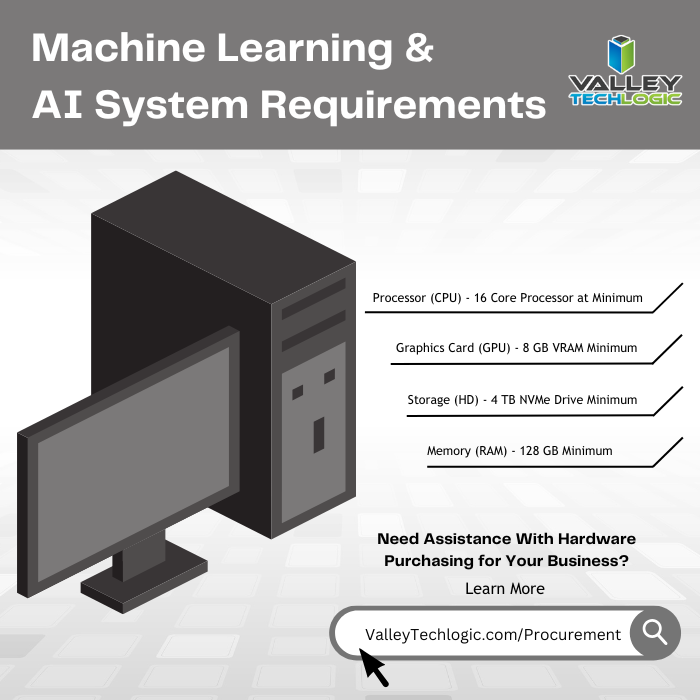
    So, if AI is going to be a priority for your businesses 2025 are you planning on how can you make sure you have devices that can fully take advantage of what AI is capable of? AI workloads can be strenuous on the average machine (see our chart on the minimum specifications we recommend below).

    Why is AI so hardware intensive? AI relies on machine learning to operate, if your computer has to slog through the requests you’re making of it (for example, making presentations, automating tasks and performing searches on your behalf) then that’s going to hinder your ability to use AI to it’s full potential. That may lead to you and your users becoming frustrated and resorting to just returning to prior methods of performing these tasks and stifling the ability to use this emerging innovation in technology.

    Failing to adapt to emerging technologies can be a death knell to many businesses (anyone remember Blockbuster?).

    No one knows more how important keeping up with emerging technologies is than chip makers like Intel, Nvidia and AMD who all have chips set to release next year that will reportedly take full advantage of advancements in AI.

    Nvidia so far has led in this race, with their chips utilizing its own programming language, CUDA (which stands for Compute Unified Device Architecture), which has become standard amongst AI developers. This means they’re dominating this market so far, especially in the data center space. Having direct access to this language from an architecture perspective means that chips made by Nvidia can accelerate processes for AI purposes (thus completing AI tasks more efficiently). Their innovations in the AI space and technology as a whole have led to Nvidia representing 11.7% of the total US GDP.

    AMD hopes to compete with Nvidia and reclaim some of their market share with their new chips, set to be released in early 2025 which will feature their own programing language called ROCm. It’s being said making the switch from CUDA to ROCm will be a painless process and offer more competition in the market (which will only improve things from a cost perspective).

    For example, the current cost of a processor intended for a supercomputer with AMDs new chip set is $14,813 per chip, drastically outside the range of most customers’ comfortable price point for a new device. As competitions and advancements become more common place, we may be getting closer to an age where super computers are not just found in scientific and government settings and there’s no telling how that will change the average workplace in the future.

    There’s also the hardware portion of chip making to consider especially amongst earlier concerns of semiconductors maxing out their capacity for growth and shortages that continued past the height of the pandemic. TSMC also reached a new market share height of over a trillion dollars this week putting fears of that rest for the moment.

    If taking advantage of AI or replacing aging hardware is on your 2025 to-do list, Valley Techlogic can help. We offer tailored advice and procurement assistance as an included feature in our support plans for businesses located in California. Reach out today for more information.

    Looking for more to read? We suggest these other articles from our site.

    This article was powered by Valley Techlogic, leading provider of trouble free IT services for businesses in California including Merced, Fresno, Stockton & More. You can find more information at https://www.valleytechlogic.com/ or on Facebook at https://www.facebook.com/valleytechlogic/ . Follow us on Twitter at https://x.com/valleytechlogic and LinkedIn at https://www.linkedin.com/company/valley-techlogic-inc/.

  • Back to school? 9 cyber safety tips for school devices and more

    Back to school? 9 cyber safety tips for school devices and more

    August and September are big back to school months in the United States and while you’re prepping your children’s backpack for their return with pencils and markers it’s also worth taking the time to go over safety tips for utilizing the internet.

    Schools have become more and more steeped in their usage of technology rather than pen and paper course work, however they may not have the bandwidth to monitor how those devices are used 100% of the time. School IT will do the best they can to bridge the gap but it’s still up to us as parents to make sure our children have the tools they need to safely navigate our interconnected world.

    Whether your schools have handed down iPads, Chromebooks or something else these 9 tips are worth noting as your children get ready for their first day of school:

    1. Does the device have content filtering? While most schools will implement strong content filtering as part of their device roll out plan to prevent students from viewing inappropriate content, it’s still worth reviewing on your own end and reporting if there are any flaws to it with your school’s administration.
    2. Does your child take their mobile phone to school? If your children have a mobile device they bring to school, we recommend taking the same measures you would with your own device and ensuring the lockscreen is enabled. A child is more likely to lose a device and the same rules apply with them as adults in protecting personal data that could be exposed via an unsecured phone.
    3. Also be wary of theft. Theft happens in schools and an unattended phone or laptop could make an appealing target, make sure they know their devices should be with them or in a secure location at all times.
    4. Strong passwords matter for kids too. It’s also not too early to get them started with a good password manager (and useful for you as a parent in maintaining access to your online children’s accounts). Here are our top 3 password manager recommendations.
    5. So do updates. Again, as with your own devices, you should be making sure their devices are up to date on current software or firmware updates. Kids will not be as thorough in investigating something they’re interested in before downloading it (especially with online games). Automatic updates are a must for children’s devices.
    6. Cyber bullying is another consideration. The Global Cybersecurity Forum has found that 72% of children worldwide have been exposed to one type of online cyber threat or bullying.
    7. Children should be aware of online scammers too. If your child is old enough to have access to an email account (to setup a mobile phone you often have to setup an email too) or even if they just have access to text messaging, it’s a good thing to go over the fact that online scams exist and what to look out for.
    8. Kids need backups too. Especially for middle and high school age students, saving their work may not be a given and losing it could be devastating (or at least will feel that way). If multi-page reports are a factor in your child’s life it’s worth making sure they’re writing them on software that will automatically save the draft, such as Microsoft’s Word or Google Docs. Both of these options save your progress as you write automatically.
    9. Teach your children what to share (and what not to share) online. Social media can be a tricky thing to navigate even for adults but for children there are additional safety concerns. If your teen has reached the age that they’re asking to or have already created a social media account, it’s worth reviewing what information they’ve made available on it and checking it continuously. We recommend making sure your teen’s online accounts are made private and they know not to share things like their location or other PII (Personally Identifiable Information) on the web.

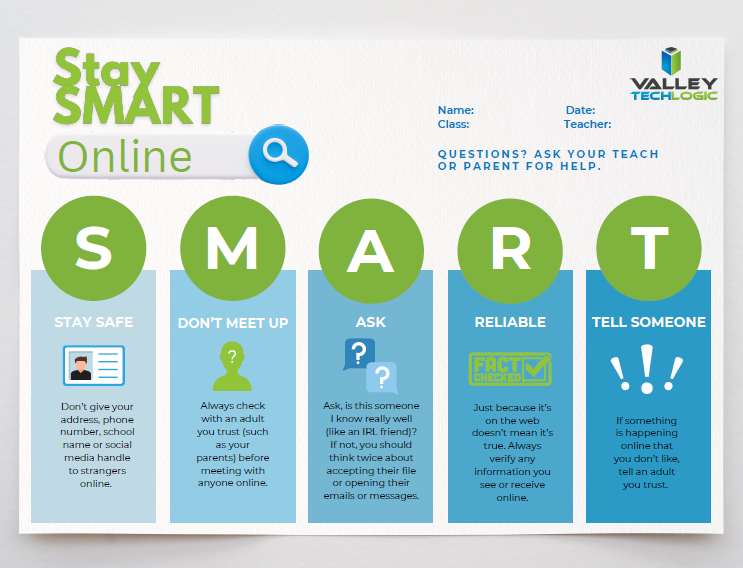
    For parents and educators alike, we recommend following the SMART rules when it comes to online safety for your children and students. See and save the flyer below.

    Stay SMART Flyer VTL 2024

    Valley Techlogic is a technology service provider located in California and we have experience working with a range of businesses (including educational institutions) in support of their technology goals. Learn more with a consultation today.

    Looking for more to read? We suggest these other articles from our site.

    This article was powered by Valley Techlogic, leading provider of trouble free IT services for businesses in California including Merced, Fresno, Stockton & More. You can find more information at https://www.valleytechlogic.com/ or on Facebook at https://www.facebook.com/valleytechlogic/ . Follow us on Twitter at https://x.com/valleytechlogic and LinkedIn at https://www.linkedin.com/company/valley-techlogic-inc/.

  • The 7 most common network issues and how to fix them

    The 7 most common network issues and how to fix them

    “The internet is down” is a phrase no one enjoys hearing. Beyond the disruption to your day, troubleshooting network issues is also a notoriously frustrating experience. Questions like why is it down, is it us or our service provider, when will it come back up? are common place in this universally shared experience. These questions don’t always have easy answers, but we have 7 easy solutions you can try if your internet is out (even if you’re currently looking at this list from your cell phone).

    1. The tried and true, have you tried turning it off and on? When in doubt, a quick router reset is sometimes all it takes to get your network back online. If you’re curious why this works, it’s often because like with a computer resetting the device clears its memory which allows it to run more efficiently.

    2. Do a quick inspection. Is everything plugged in? Even if it looks like everything is plugged in snuggly and securely, we still suggest double-checking cables etc. for loose connections or whether a cable is showing signs of failure (fraying, loose or damaged connectors, things of that nature).
    3. Run a network test. We promise this tip is actually easy even if it sounds complicated. First, open a Command Prompt by typing CMD in the search bar of your device, from there simply cut and paste this command ping -n 100 1.1.1.1 (1.1.1.1 is a public DNS service provided by CloudFlare) and hit enter. Your device will start giving you the ping results, this can also help you if your internet is online but slow as it will tell you if your pings take a long time to reach the service.
    4. Try this command. Before you close that command prompt, we also suggest trying the simple command ipconfig /release followed by ipconfig /renew . What this will do is refresh your computer’s IP address and it may solve the problem if only one device in your office is affected.
    5. See if you’re due for an update. We’ve touched on this before, but small devices like routers and Wi-Fi connectors often fly under the radar when it comes to receiving updates. A firmware update may be all it takes to get you back online, and your device will also be more secure from being updated as an added benefit.
    6. Check if it’s you or your provider. Tried the above steps and still no dice? At this point we recommend reaching out to your internet provider to see if there’s a known issue in your area (this information may also be available online). You can also see if they can reset things on their end to possibly resolve the issue for you if there Isn’t a more widespread outage going on.
    7. Call for backup. If you’ve tried the above steps and your internet is still out, it’s time to reach out to your IT support team for escalating and more complex troubleshooting.

    Don’t currently have an IT support team for your California business? Valley Techlogic can help, networking support and troubleshooting is included in all of our service plans. We have personally assisted customers with persistent network outage situations, developing complex and creative internet connectivity solutions for more remote locations and more.

    Don’t let a bad connection get between you and your ability to run your business, reach out today for a consultation.

    Looking for more to read? We suggest these other articles from our site.

    This article was powered by Valley Techlogic, leading provider of trouble free IT services for businesses in California including Merced, Fresno, Stockton & More. You can find more information at https://www.valleytechlogic.com/ or on Facebook at https://www.facebook.com/valleytechlogic/ . Follow us on Twitter at https://x.com/valleytechlogic and LinkedIn at https://www.linkedin.com/company/valley-techlogic-inc/.

  • Code named “Strawberry”, OpenAI’s latest update aims to boost reasoning capacity in their AI model

    Code named “Strawberry”, OpenAI’s latest update aims to boost reasoning capacity in their AI model

    Initially labeled Q* for Q Star, Project Strawberry is set to become ChatGPT5 and OpenAI is prepared to launch this update any day now at the time of writing.

    AI competition continues to stiffen up, but many would argue OpenAI has a commanding lead in the AI space with it’s a comparatively more mature model that many believe is more accurate than competitors such as Google’s Gemini and Microsoft’s CoPilot.

    However, as with most AI tools on the market, errors and just general wonkiness are part of the experience and OpenAI and other AI tool providers hope to continue to improve in that arena, providing more accurate results to users without errors and sometimes comical mistakes or “problems” as in the inaccurate word scramble below.

    Hint, no actual words can be spelled with all the letters given.

    OpenAI’s claims Project Strawberry will have “human-like” reasoning skills and answer questions that have stumped the algorithm so far, especially complex math and programming problems.

    This update is also leading up to the larger project for OpenAI, codenamed “Orion” this future tool will be an entirely new AI model and it’s going to be trained entirely via ChatGPT5/Project Strawberry. The hope with using AI to train AI rather than training it via data found online is that we will see a reduction in “AI hallucinations” (or incorrect predictions) and also speed up the rate at which AI can be improved without having to feed it large amounts of online data.

    This would also help OpenAI and other AI competitors avoid the murkier topic of privacy concerns when it comes to where AI is getting it’s data from.

    If you’re considering investing time in AI solutions for your business, we have 4 considerations for you to mull over first (and the first does relate to the data security topic we just mentioned):

    1. Data Security: For most of the AI tools on the market, it’s a known fact that any data you feed into it will also feed into the models they use. We would suggest if you’re considering implementing AI solutions in your business you do so with this factor in mind. Even if a tool claims your data will be secure and not accessible to other users (we’re looking at you CoPilot) AI is still realistically in its infancy. We suggest using an abundance of caution when it comes to data that is proprietary to your business.
    2. Cost (especially Time Cost): AI when used correctly can save your business time and money but using it correctly can be a high barrier to entry. For example, if copy writing is a core facet of your business AI is an excellent tool for sourcing ideas that your team can then spin off into their own creations. If your business is word-of-mouth based cabinetry sales, AI may not be very useful to you at this point in time.
    3. User Experience: Consider the human experience, especially for your customers, when implementing AI solutions. AI chatbots exist but should they replace a real person answering questions on your business’s behalf? Or instead does it make sense to utilize it half way (IE the chatbot answers common questions) with a human representative ready to take over if the questions get more complicated.
    4. AI is not magic: AI will not replace human ingenuity, as outlined above it’s not a perfect solution by any means at this point in time and that’s unlikely to change anytime soon. AI should be used to build upon existing structures in your business (like adding more capacity to your marketing capabilities for example) not with the expectation it’s going to replace those structures entirely.

    Considering implementing AI solutions in your business or hoping to hone in on advancements in technology to your advantage? Valley Techlogic continues to stay at the forefront of new innovations in tech, and we utilize our expertise on behalf of our customers. Reach out today for a consultation.

    Looking for more to read? We suggest these other articles from our site.

    This article was powered by Valley Techlogic, leading provider of trouble free IT services for businesses in California including Merced, Fresno, Stockton & More. You can find more information at https://www.valleytechlogic.com/ or on Facebook at https://www.facebook.com/valleytechlogic/ . Follow us on Twitter at https://x.com/valleytechlogic and LinkedIn at https://www.linkedin.com/company/valley-techlogic-inc/.