Tag: data

  • RAID Arrays Explained, What is it and do you need one?

    RAID Arrays Explained, What is it and do you need one?

    RAID arrays or Redundant Array of Independent Disks is a type of storage configuration where your data is saved across multiple hard drives or SSDs. There are a number of benefits to doing this including increased performance and data redundancy. Because your data is saved across multiple drives you have better protection in the event of a drive failure.

    Basically, if one of the drives in your RAID array fails your drives will then go into “rebuild mode” which will allow the remaining drives to recover the data, the failed drive can then be replaced with little downtime for you. A RAID array is not always necessary, we wouldn’t suggest one for regular employee use for example as SSDs are very reliable (especially compared to hard drives with mechanical parts that can fail). You also have the option of cloud storage for devices that don’t have much data to save on a daily basis.

    However, for servers or other systems where data protection is critical, a RAID array is a necessary option to keep that data intact. They are also beneficial for systems that work with very large files as the computer can pull pieces of the file in unison and load them much quicker than a single drive. There are many different configurations for RAID arrays such as:

    1. RAID 0: In the world of data two is one and one is zero, and such is the case with RAID arrays. The first RAID array configuration involves breaking up your data into “stripes” across one or more drives, however it does not provide redundancy like other RAID arrays do. If a drive fails under RAID 0 the data is lost. However, it does improve speeds and can allow you to gain more space on your drives.
    2. RAID 1 provides an exact mirror of your data across multiple drives, which does allow for data redundancy. In the case of a drive failure as long as one drive is functional you will still have access to your data. The pitfall to this is your data storage can only be as big as the largest drive in the array, so if you have a 1 TB drive paired with a 4 TB drive only 1 TB would be usable. This RAID array type also doesn’t really provide a system performance boost, it’s purely a data redundancy setup.
    3. RAID 5 provides good redundancy coverage and improves performance. A RAID 5 array consists of 3 or more drives, this RAID array type splits your data consistently across the board and improves your system performance at the same time. However, for most clients we would suggest the next setup.
    4. RAID 10 combines two RAID 1 arrays with two RAID 0 arrays to provide both greatly improving performance (that falls in line with the RAID 0 benefit) and greatly increasing redundancy (as you get with a traditional RAID 1 set up) for not much more than you would spend to have a RAID 5 installed. For systems that run software in addition to storing data this is the setup we highly recommend.

    Here are some other benefits of having a RAID 10 setup for your server or systems where data is a high priority:
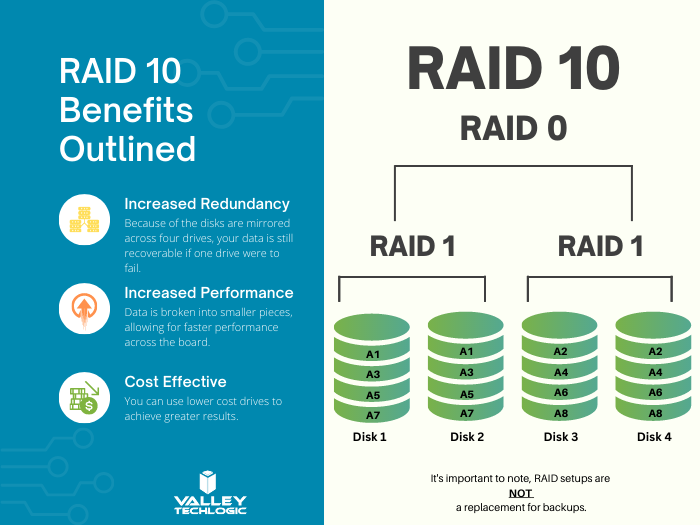
    RAID 10 Benefits ExplainedThere are still other questions that need to be answered beyond just RAID type, like what drive capacity should you be looking for? Would a HDD (Hard Drive Disk) work in this case to have more inexpensive but higher capacity or should you be looking for SDDs (Solid State Drives)?

    These are questions that can be answered by our professional sales team, they’re experts in technical equipment procurement and can help make suggestions and offer buying advice specifically tailored to your business. Learn more today by scheduling a consultation with our sales manager.

    Looking for more to read? We suggest these other articles from our site.

    This article was powered by Valley Techlogic, an IT service provider in Atwater, CA. You can find more information at https://www.valleytechlogic.com/ or on Facebook at https://www.facebook.com/valleytechlogic/ . Follow us on Twitter at https://x.com/valleytechlogic.
  • 5 USB flash drive safety and usage tips, also our 3 recommended drives for 2023

    5 USB flash drive safety and usage tips, also our 3 recommended drives for 2023

    USB flash drives (also known as thumb drives or memory sticks) have grown a lot in the last few years, what was once a handy tool for transporting small files but couldn’t compete with the capacity of CD disks or traditional drives is now available in sizes up to 1 terabyte which makes them a competitive product for even backup purposes.

    While they may have fallen in favor due to cloud services becoming more ubiquitous, many are looking for more tangible ways to backup important files and take them on the go.

    Many users also worry about the safety of these devices. This is because they’re a common vector for drop attacks, which is where a USB drive is left in a conspicuous location for someone to find and try to use not knowing it contains a virus or trojan horse.

    They also can be insecure if left on a desk or somewhere in public. Luckily, there are even options now that offer 2 factor authentication, biometric verification, and encryption. This means even if your flash drive fell into the wrong hands, it would be useless to the thief. You should also be wary of where you plug your flash drive into as the data path is a two way street.

    Here are 5 more safely and usage tips for utilizing a USB flash drive:

    1. Have separate flash drives for work and home. This will reduce the risk of cross-contamination if one of your devices is compromised, it will also make it easier to organize your files.
    2. Be careful where you purchase your flash drives from. There are irreputable sellers online selling fake drives that don’t contain the amount of storage they’re supposed to, or worse they could be infected with malware. Always buy from a reputable source.
    3. Don’t purchase any drives that require software for use. This is unnecessary and again opens up your device to being compromised with malware. USB drives should be “plug and play”.
    4. Think about the physical size of the drive you’re buying. It needs to be able to fit into the device you’re trying to plug it into, and a bulky USB drive may not be compatible with all devices.
    5. Be aware of the lifespan for the device you’re buying. USB flash drives (also solid-state drives and hard drives) have a certain number of write/erase cycles. Longer is better but if you plan to just keep a static backup on it you can get away with a lower number. Typical USB flash drives have 10,000 to 100,000 write/erase cycles.

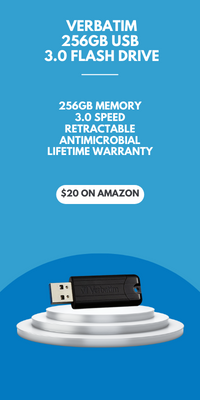
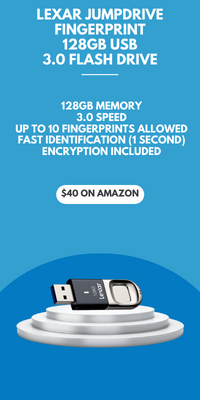
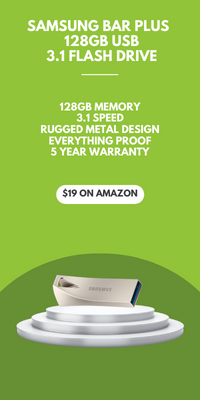
    If we’ve piqued your interest in USB flash drives, you still might not be sure where or what to buy. There are thousands upon thousands of options but here are three options we can recommend. We have one that fits the bill as a budget friendly option for general use, one that has a slim sturdy form factor, and one that meets the requirements if security is a concern.

    Security conscious.
    Slim form factor.
    Budget friendly.


    All of the options we have selected have USB 3.0 speeds, while this is changing all the time this is the minimum we recommend as of writing. You also want to be aware of what kind of connector you’re looking for. USB-A is the most common but there are options for USB-C, MicroUSB and Lightning connectors on the market. You can also use an adaptor if needed.

    If you need hardware buying advice for your business, including the topic of digital storage, Valley Techlogic is happy to help. We can help you select the best option and offer advice on how to secure it. You can learn more about procurement assistance through Valley Techlogic here or schedule a meeting to find out more about our services.

    Looking for more to read? We suggest these other articles from our site.

    This article was powered by Valley Techlogic, an IT service provider in Atwater, CA. You can find more information at https://www.valleytechlogic.com/ or on Facebook at https://www.facebook.com/valleytechlogic/ . Follow us on Twitter at https://x.com/valleytechlogic.
  • Yesterday, Facebook experienced their worst outage since 2008

    Yesterday, Facebook experienced their worst outage since 2008

    Yesterday if you were trying to login to Facebook, Instagram, WhatsApp or even Oculus VR you wouldn’t have had much luck. Facebook experienced their worst outage since 2008 (when a bug caused the site to be down for an entire day). They were down for just over 6 hours as a world that suddenly found themselves with more time on their hands speculated why.

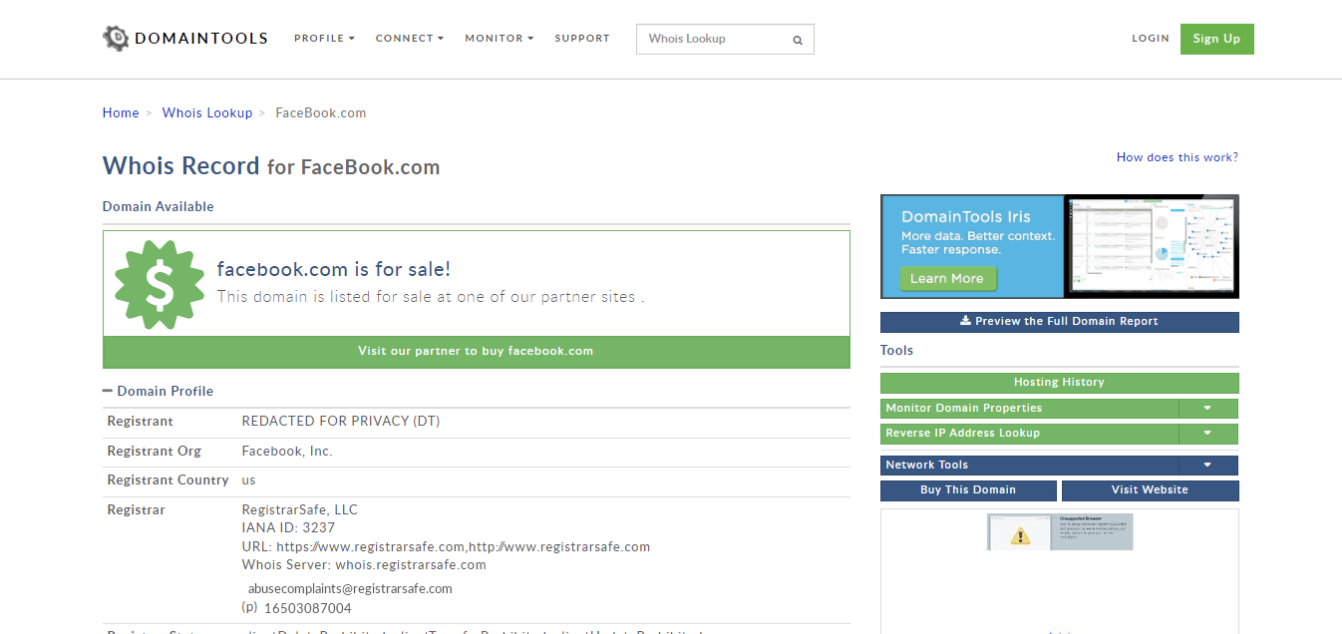
    For a brief period, the domain Facebook.com was even for sale if you performed a search for the domain on a domain name search website.

    While many thought it could be an attack on their networks, such as what’s been happening in the VoIP sector lately, others speculated the outage was related to the fire Facebook has been under lately for their business practices.

    On Sunday, Facebook whistleblower Frances Haugen – a former Facebook project manager – went public on how Facebooks policies prioritize profits over their user’s wellbeing. She was the person responsible for the massive data dump that showed Facebook’s algorithms even optimize for hate speech. She noted these problems also exist at Google and Pinterest, other companies she’s performed similar duties for, but that the problem is much worst at Facebook.

    Mark Zuckerberg Meme
    There have been no shortage of memes taking shots at Facebook founder Mark Zuckerberg following the outage.

    Hearings begin this week analyzing the whistleblower findings, particularly as they relate to children on these sites. Amid the controversy Facebook has shelved plans for an Instagram Kids app, though Facebook claims the delay is so they can better analyze the needs of children and parents before moving forward with the app.

    The main crux of the case has to do with both the deluge of data and how major players such as Facebook (and likely beyond) serve that data to their users. It’s a tricky situation because you don’t want to stifle free speech but promoting hate speech and negative imagery, especially to vulnerable audiences such as children, is also wrong.

    There is so much more to the case then we can get to here but suffice to say hearings such as these play an important role in how we as a society consume and regulate data.

    Back to the topic at hand though, after being down for 6 hours Facebook finally emerged although they did so with little in the way of answers as to why their domains were down to the first place. They’ve issued an apology for the outage but beyond that silence.

    Experts who have weighed in speculate the issue had to do with Facebooks DNS (Domain Name System), and anonymous comments that have surfaced from employees said they don’t think the downtime was caused by an attack.

    Some reports have even said during the outage functions inside Facebook offices ground to a halt, with some employees being unable to even use their keycards which could have also contributed to the lengthy delay in fixing the problem.

    Outages such as these should cause even smaller businesses to take a hard look at their technology practices. If Facebook, with the resources they have available, can be brought to a standstill for hours over potentially a small issue such as DNS how would your business fare when faced with a similar issue?

    Downtime adds up, but it doesn’t have to. Having a partner in technology like Valley Techlogic is the number one way your business can avoid the hassle, expense, and embarrassment of lengthy downtime. Find out more today.

    Looking for more to read? We suggest these other articles from our site.

    This article was powered by Valley TechLogic, adns, n IT service provider in Atwater, CA. You can find more information at https://www.valleytechlogic.com/ or on Facebook at https://www.facebook.com/valleytechlogic/ . Follow us on Twitter at https://x.com/valleytechlogic.