Tag: email phishing

  • What is a reply all “email storm” and how can you prevent it?

    What is a reply all “email storm” and how can you prevent it?

    In 2016 the UK’s National Health Service (NHS) experienced an email storm that crashed their email system and resulted in snowball effect of 168 million emails being sent in a short period of time.

    The cause? A new IT contractor for the company sent out a test email company-wide (the NHS employs 1.2 million people and 840 thousand of them received the test email). Many of them replied to it, wondering why they were receiving such an email using the “reply all” function and it snowballed from there into an email chain of epic proportions, an email storm.

    This email storm crashed their system and angered their employees. What they may not have known is that email storms have been occurring practically since email became the de facto method of communication for businesses around the world. The first one reported by major news and nicknamed “Bedlam” experienced by Microsoft occurred in 1997 resulted in 23 million emails sent in 7 hours, much less than the one experienced by the NHS but the amount of data generated by that storm (an estimated 295 gigabytes) was significant for the time period and the event was highly disruptive.

    Email storms have even hit US government entities like the state department and NASA, the latter of which practically led to the re-institution of the Cybersecurity and Infrastructure Security Agency (CISA) after it’s funding was cut by DOGE.

    So, you may be wondering, what does this have to do with you and your business? Well hopefully we’ve made it clear that email storms can happen to anyone, really at any time, and that they’re highly disruptive. The data generated by large email storms is not significantly different than the data generated by DDoS (Dedicated Denial of Service) attacks although it’s almost always an unintentional consequence of an employee or contractor sending a simple email company wide. What can you do as a business owner to prevent this from happening?

    1. Limit “Reply All” Permissions
    • What to do: Use email settings to restrict who can use the “Reply All” function, especially in large distribution lists.
    • Why it helps: Prevents unnecessary mass replies that trigger storms, especially when someone replies to hundreds or thousands of recipients.
    1. Use BCC for Large Email Lists
    • What to do: Add recipients to the BCC (blind carbon copy) field instead of the “To” or “CC” fields.
    • Why it helps: If people can’t see who else received the email, they can’t reply to everyone, avoiding the risk of a chain reaction.
    1. Implement Group Email Safeguards
    • What to do: Configure email servers (like Microsoft Exchange or Google Workspace) to throttle or block emails sent to large groups when too many replies occur in a short time.
    • Why it helps: Automated tools can detect a storm and shut it down before it escalates.

    While these common sense strategies can be enacted by anyone, managing email is a tricky topic overall. From setup to protections against spam or phishing, having a technology provider like Valley Techlogic can help you strategically create email policies that work and keep your business safe. Learn more today through a consultation.

    Looking for more to read? We suggest these other articles from our site.

    This article was powered by Valley Techlogic, leading provider of trouble free IT services for businesses in California including Merced, Fresno, Stockton & More. You can find more information at https://www.valleytechlogic.com/ or on Facebook at https://www.facebook.com/valleytechlogic/ . Follow us on X at https://x.com/valleytechlogic and LinkedIn at https://www.linkedin.com/company/valley-techlogic-inc/.

  • 5 Holiday Tips for Your E-Commerce Business and 5 for Everyone Else

    5 Holiday Tips for Your E-Commerce Business and 5 for Everyone Else

    It doesn’t matter which e-commerce sector you’re in, the holiday time period is always a big opportunity to increase that year’s sales before the New Year rolls in.

    With online shopping growing in popularity year over year there are specific ways to capture more of that online market – especially around the holidays.

    Here are 10 tips for improving your sales during the holiday season (including 5 that apply to all types of business):

    1. Step up your social media game. Anecdotal evidence from us, when we went from posting inconsistently 3-4 times a week to posting consistently 4-5 times a week our impressions didn’t just go up, they doubled. The holidays are a great time to post more updates about your business on your social media platforms.
    2. Make sure your contact information is rock solid. It would be a tragedy to see sales calls go unanswered, make sure the contact information on your website it up to date and your sales people are ready to answer those calls.
    3. Make sure your website it mobile friendly. This may be a tough one to knock out this year if you haven’t done it yet, but having a mobile friendly website is a must have in 2023. Google even offers a free tool for testing if your website is mobile friendly here.
    4. Release holiday ads. During the holiday season your same old ads may not perform as well as a holiday themed one would as people look for those familiar colors and settings (red and green, blue and white, snow and Christmas trees).
    5. Take advantage of marketing automation. Facebook for example lets you schedule posts and you can update your Google advertising with your holiday messaging and let it run.
    6. If you plan on conducting a big sale, make sure your website is ready for it. If you’re planning on running any holiday “one day sales” make sure your website can handle the potential increased traffic or there’s a game plan in place for if it goes down so you don’t lose your momentum. You can check on your current page speeds with this other Google tool here.
    7. Have a chatbot available. You might get the same questions repeatedly, having an automated chatbot that can answer those questions with the same feel as a sales representative could increase your sales.
    8. Improve your holiday key words ahead of time. If you’re an apparel company for example peppering “holiday themed apparel” or “Chrstimas outfits” into your SEO keyword efforts is a good idea leading up to the holiday season.
    9. Have a holiday themed front page. We’ve talked about having holiday themed ads and social media posts but you should also “dress up” your front page temporarily to clue buyers in that you’re ready for the season. Many website providers have the option of changing out a front page temporarily so you can easily switch it back when the season is over.
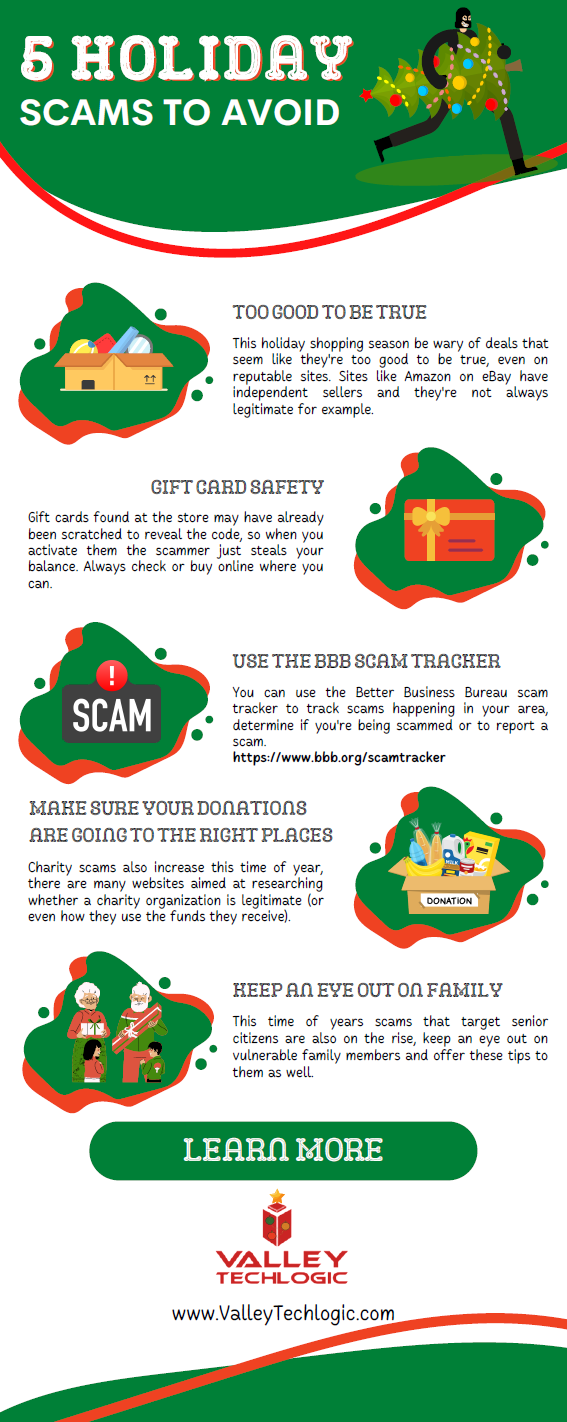
    10. Make sure your buyers know any email marketing is from you. Phishing scams also increase in the holidays, having ways for a buyer to tell emails sales are from your company and not from a scammer is key. Mirror any sales you have directly on your website as well.

    Speaking of holiday phishing scams, here is an infographic on avoiding holiday scams:

    Click to grab the full size version.

    Whether your business is e-commerce or something else entirely, Valley Techlogic can assist with your technology needs in 2023. We have our own holiday sale going on now that will even save your company money on IT support in the new year. Reach out today to learn more!

    Looking for more to read? We suggest these other articles from our site.

    This article was powered by Valley Techlogic, an IT service provider in Atwater, CA. You can find more information at https://www.valleytechlogic.com/ or on Facebook at https://www.facebook.com/valleytechlogic/ . Follow us on Twitter at https://x.com/valleytechlogic.

  • 5 Tips for Conquering Email Spam (and Phishing) in 2022

    We’ve posted on how to spot a phishing email before on this website, but what about just thwarting the attempt before it even reaches your inbox?

    Email filtering is a complex topic, too strict and you miss important emails. Too lax, your inbox is flooded with spam and attempts to scam you. At Valley Techlogic, we feel like we have a good regimen for helping our clients get the emails they need and not the ones they don’t.

    On top of that, email phishing is STILL the biggest security threat to your business. In 2021, 83% of businesses experienced phishing attack attempts and 15 billion spam emails occur every day.

    That’s a lot of attempts to circumvent the security features you have in place within your business, or if you don’t have protections in place (especially highly effective ones like multi-factor authentication) then your business may be a sitting duck. All it takes is one employee clicking on the wrong attachment and you have a major security headache on your hands.

    So, to foil those attempts, here are 5 tips for conquering email spam and preventing phishing attempts at the same time:

    1. Mark spam as spam. One of the easiest ways to see less spam in your inbox is to mark spam as spam, email filters learn from you what you’re looking to see in your inbox. While the most egregious spam will still be filtered out by your email provider for the most part, for sophisticated spam attempts your assistance helps. This also blocks the sender from sending future attempts.
    2. Learn the telltale signs. There 5 easy telltale signs an email is spam or phishing. They are: an unrecognizable sender, requesting personal information, an email that doesn’t match the purported sender, it asks you to take immediate action and/or there are a lot of typos.
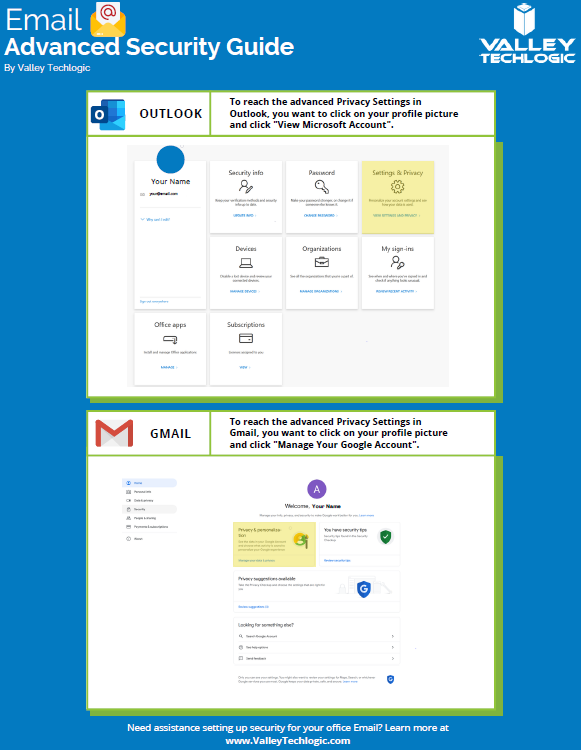
    3. Enable more advanced privacy settings. Many email providers have privacy and security settings to provide more advanced protection. See our guide below for enabling these settings for Gmail and Outlook.
    4. For businesses, don’t go with the obvious choice for email. Many of us use just our first name or our first name and a last initial when creating our work emails, while this helps make our emails more memorable and easier to recite, it also opens us up to spam. If you have a spam problem, it might be best to switch things up in this area.
    5. Unsubscribe from mailing lists, especially the ones you didn’t sign up for. Another good way to combat spam in particular is to unsubscribe from mailing lists, there are rules and regulations that say vendors must respect this request or they’re potentially violating their emailing providers terms and conditions.
      Email Security Guide for Gmail and Outlook
      Click to view the full size version.

      Another way to combat spam and phishing emails is through a tool. There are tools that can be built into your browser or email client, many of them use the SLAM method. With this method they check the sender, the links, the attachments, and the message itself to look for telltale signs it’s a spam or phishing email.

    At Valley Techlogic we provide security awareness training – which is another excellent tool for preventing cyberattacks – and an extension for Outlook that includes the training and spam/phishing testing tool right in your inbox to all of our clients.

    We can also offer simulated phishing attempts so you will know if anyone in your organization could use additional training on the topic. Schedule a consultation today to learn more about how we can help you with your business’s email related goals.

    Looking for more to read? We suggest these other articles from our site.

    This article was powered by Valley Techlogic, an IT service provider in Atwater, CA. You can find more information at https://www.valleytechlogic.com/ or on Facebook at https://www.facebook.com/valleytechlogic/ . Follow us on Twitter at https://x.com/valleytechlogic.

  • How a phishing scam swindled this Shark Tank host out of $400,000

    How a phishing scam swindled this Shark Tank host out of $400,000

    We’ve focused a lot of articles on phishing scams and how no one is immune, even major money moguls like Barbara Corcoran from ABC’s Shark Tank with a net worth estimated at over $100 million fell victim to a phishing scam that wound up costing her $400,000.

    Business owners are a particularly lucrative target for bad actors, and phishing emails continue to grow more sophisticated. In this instance Barbara reports receiving an email that looked like it came from her secretary going to her accountant authorizing the amount to go to a real estate deal.

    Barbara like many business owners has deals going on all the time so the amount and type of authorization wasn’t unusual, allowing it to fly under everyone’s noses and make the scammers involved $400,000 richer. It wasn’t until her accountant sent an email to her real secretary confirming the transaction one last time that the scam was uncovered – and by then it was too late the transfer had already been sent.

    This case proves that even with strong checks and balances in place, phishing scams can happen to almost anyone. While Barbara was able to absorb the hit without it hurting her business – many out there could not.

    While the amount of money lost in this instance is quite substantial, millions of dollars are lost every day to cyber crime. It’s estimated that $1,797,945 is lost per minute according to Risk IQ’s Evil Internet Minute Report.

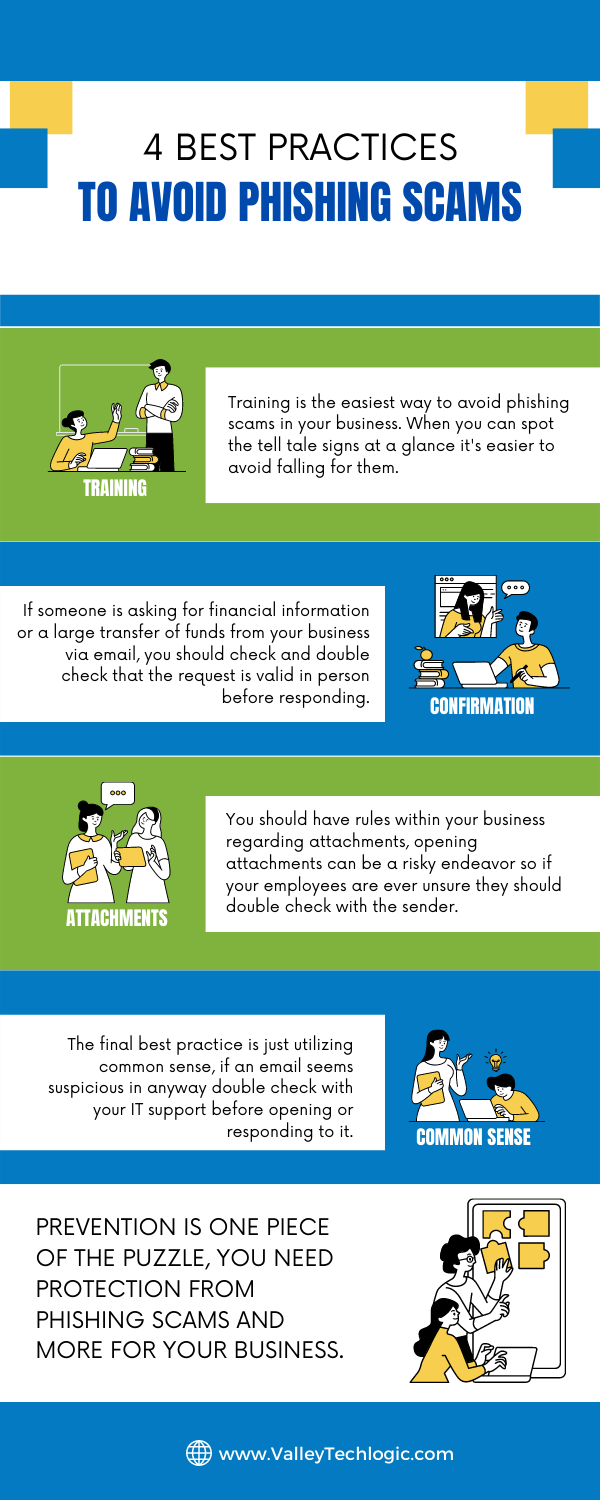
    Even if you think your business is too small to be a target you would be wrong, scammers cast wide nets looking for victims to fall in. Here are 4 things you can have in place that could prevent this kind of scam from happening to you.

    Email Best Practices

    Even with these checks in place it can still be tricky to avoid, especially if your business has become a particular target for a scammer. Another famous example is how Facebook and Google were tricked out of $100 million due to an extended attack phishing attack organized by a scammer located in Lithuania. A little less than half of the money lost was recovered.

    Another famous attack in 2014 saw the early release of four movies produced by Sony Pictures when North Korean hackers, upset about a movie that was being released at the time, sent targeted phishing emails that appeared as if they were coming from Apple to a top Sony executive. The damage that incurred from this attack was estimated to be over $80 million.

    With both of these attacks it’s not just about the money lost either, these attacks are easily searchable to this day and had an untold effect on their reputation at the time. Massive companies like Google, Facebook and Sony can weather the storm, but could your business do the same?

    Education is just one piece of the puzzle, active protection is another crucial element to avoiding the lengthy damage that can arise from a successful phishing campaign. At Valley Techlogic cyber security is a core focus for all of our plans. Learn more today with a quick and easy consultation.

    Looking for more to read? We suggest these other articles from our site.

    This article was powered by Valley TechLogic, an IT service provider in Atwater, CA. You can find more information at https://www.valleytechlogic.com/ or on Facebook at https://www.facebook.com/valleytechlogic/ . Follow us on Twitter at https://x.com/valleytechlogic.