Tag: microsoft copilot

  • Chat GTP-5 is here, and opinions are mixed, we talk new features and why some users say 4 was the better version

    Chat GTP-5 is here, and opinions are mixed, we talk new features and why some users say 4 was the better version

    We reported on ChatGTP-5, code named Project Strawberry at the time, nearly one year ago today. The reported update was supposed to boost reasoning capacity and begin the transition of introducing self-learning to AI versus requiring vast swaths of data scrubbed from the internet (a distinction likely aimed to combat the obvious problems when you randomly collect data from unknowing and many times unwilling sources).

    With a potentially industry changing copyright lawsuit filed just this week, the race to set AI apart as a distinct tool separate from the data it was built on is in full swing and as usual OpenAI’s ChatGPT product is leading the charge.

    New features include the ability to handle text ,images, voice and video all within a single conversation, so there’s no longer a need to switch between text chats and chats when you would like to analyze files. It’s also being reported so far that the answers users are receiving are more accurate, especially for technical questions and that it can now answer with much greater detail.

    Although it should be noted some of this improved reasoning is locked behind a paywall, with free users receiving the “basic” version of the model or ChatGPT-5 mini as dubbed by OpenAI themselves. Plus users will receive an improved version with one caveat, when load is high the company has said all users will only have access to the mini version to keep services afloat.

    It’s not all sunshine and rainbows however, some users aren’t thrilled with the update and have even requested the ability to return to Chat-GPT4. Common complaints are that Chat-GPT5 is much slower than 4 was and there is more frequent crashing (whether it be within the client itself or ChatGPT crashing user’s browser tabs).

    There have also been complaints that the model is more patronizing now, with users receiving praise for every query and even changing the personality or directly requesting it to leave the compliments out is outright is mostly ignored by the model at the time of reporting.

    We aren’t sure what the outcome of a successful copyright lawsuit will mean for the future of AI but as a technology provider we suspect it will stick around in some capacity regardless of the success or failure of ongoing litigation. While the creative uses for AI such as image generation may be more at play the key functionality for businesses as a means of increasing productivity are what we like to focus on. Here are three ways you can utilize AI in your business today:

    1. Inbox & customer-support copilot
      What it does: summarizes long threads, drafts tailored replies, and suggests next steps so you clear the queue quicker.
      Try this prompt (paste an email thread under it):
      “Summarize this thread in 3 bullets, list the customer’s main concern, and draft a friendly 120-word reply that (a) acknowledges the issue, (b) proposes a solution, and (c) offers a next step. Keep it on-brand: helpful, concise, no jargon.”
      Pro tip: Save a few tone/style notes once and reuse them for consistent replies.
    2. SOPs, checklists, and onboarding in minutes
      What it does: turns rough notes into step-by-step procedures, checklists, and quick-start guides for new hires.
      Try this prompt (paste your messy process notes):
      “Turn this into a clear SOP with: purpose, prerequisites, step-by-step actions (numbered), decision points, common pitfalls, and a 5-question quiz to confirm understanding. Make it skimmable.”
      Pro tip: Ask for a one-page version and a printable checklist for the wall.
    3. Spreadsheet/data sidekick (Excel/Sheets)
      What it does: writes formulas, cleans lists, and gives quick insights so you stop hunting Stack Overflow.
      Try this prompt (describe your sheet):
      “I have columns: Date, Lead Source, Deal Size, Status. Give me (1) a formula to count won deals per month, (2) a chart I should make and why, and (3) three insights I can present in one sentence each.”
      Pro tip: Paste a few sample rows so it can generate formulas that fit your exact layout.

    Ready to turn AI into real productivity? At Valley Techlogic, we can help you plug Chat GPT-5 into the tools you already use, Microsoft 365/Teams, Outlook, SharePoint (or Google Workspace so it drafts emails, turns rough notes into SOPs, and tames spreadsheets right where work happens. Learn more today with a consultation.

    Looking for more to read? We suggest these other articles from our site.

    This article was powered by Valley Techlogic, leading provider of trouble free IT services for businesses in California including Merced, Fresno, Stockton & More. You can find more information at https://www.valleytechlogic.com/ or on Facebook at https://www.facebook.com/valleytechlogic/ . Follow us on X at https://x.com/valleytechlogic and LinkedIn at https://www.linkedin.com/company/valley-techlogic-inc/.


  • Are you all in on AI or approaching it more moderately? The perils of not strategizing your AI roll out

    Are you all in on AI or approaching it more moderately? The perils of not strategizing your AI roll out

    AI (Artificial Intelligence) continues to proliferate modern workspaces, with some companies leaning heavily into AI investments including up to replacing human workers with an AI equivalent for roles such as customer service.

    One company, Klarna, is facing some pushback from investors for just such a strategy. Last year, Klarna which is known for it’s “buy now, pay later” financing for consumer purchasing, replaced 700 workers in favor of an AI solution for customer support. Now, their valuation has plummeted from a high of $45.6 billion in 2021 to $6.7 billion in 2025.

    At the heart of it is customer complaints of lower customer service satisfaction which has caused the company to pivot on their “AI First” strategy with their CEO Sebastian Siemiatkowski stating recently “Really investing in the quality of the human support is the way of the future for us.”

    What does this mean for medium and small businesses looking at their own strategizing when it comes to artificial intelligence? Testing the waters and applying it in moderation to start is key to a successful AI roll out.

    While it may seem tempting to just go all in, especially if savings are on the table in terms of labor costs, the current iterations of artificial intelligence are not ready to be deployed without human oversight and intervention in our opinion. Rather than expecting AI to take over and replace human activities, it’s best to look at how you can use AI as a tool to do more.

    Here are three ways we recommend using AI to get the most out of your workday:

    1. Automating Repetitive Tasks
      AI can handle time-consuming activities like data entry, scheduling, and basic customer queries. This frees up employees to focus on higher-value, strategic work that requires human judgment and creativity.
    2. Enhancing Decision-Making
      AI-powered analytics tools can process vast amounts of data quickly and provide actionable insights. This helps employees make faster, more informed decisions without spending hours combing through spreadsheets or reports.
    3. Personalizing Training and Support
      AI can tailor learning experiences to each employee’s role and pace, recommending relevant skills development or providing just-in-time answers through intelligent chatbots. This boosts engagement and accelerates on-the-job learning

    If developing an AI strategy for your business is a priority for you in 2025, Valley Techlogic can help. We make it a priority to stay at the forefront of emerging technologies and help our clients access continuous improvements in the tech space to meet their goals. Reach out today for a consultation.

    Looking for more to read? We suggest these other articles from our site.

    This article was powered by Valley Techlogic, leading provider of trouble free IT services for businesses in California including Merced, Fresno, Stockton & More. You can find more information at https://www.valleytechlogic.com/ or on Facebook at https://www.facebook.com/valleytechlogic/ . Follow us on X at https://x.com/valleytechlogic and LinkedIn at https://www.linkedin.com/company/valley-techlogic-inc/.
  • Make the Most of Your Microsoft 365 Subscriptions: 7 Productivity Hacks You Might Be Missing

    Make the Most of Your Microsoft 365 Subscriptions: 7 Productivity Hacks You Might Be Missing

    Microsoft 365 is packed with powerful tools designed to help businesses stay productive, collaborative, and organized—but many users barely scratch the surface of what’s available. If you’re only using Microsoft 365 for email and basic file storage, you’re likely leaving a lot of value on the table.

    Here are 7 productivity hacks to help you get the most out of your Microsoft 365 subscription:

    1. Use Microsoft Search to Navigate Faster

    Microsoft Search is a powerful, built-in tool across Outlook, OneDrive, SharePoint, and Teams that helps you quickly find emails, files, conversations, and even people in your organization. Instead of digging through folders or threads, type a keyword into the search bar—Microsoft Search will pull relevant results instantly from across all connected apps.

    Pro Tip: You can even search using natural language—like “files shared by John last week”—to find what you need faster.

    1. Streamline Repetitive Tasks with Power Automate

    Power Automate (formerly Microsoft Flow) lets you create custom workflows between apps to save time and reduce manual work. You can automate common tasks like saving email attachments to OneDrive, posting Teams alerts when a SharePoint list is updated, or sending approval requests.

    Example: Set up a flow to automatically notify your team in Teams when a new file is uploaded to a project folder.

    1. Collaborate in Real-Time with Co-Authoring

    Microsoft 365 makes real-time collaboration seamless. Whether you’re in Word, Excel, or PowerPoint, multiple users can work on a document at the same time. Changes are saved automatically and version history lets you review or restore earlier versions with ease.

    Bonus: Use @mentions in comments to get a colleague’s attention instantly.

    1. Organize Your Thoughts with OneNote

    OneNote is the hidden gem of Microsoft 365. Use it to capture meeting notes, brainstorming ideas, project plans, and more. Notebooks are searchable, can be shared across your team, and sync across all your devices.

    Use Case: Create a shared notebook for your team to store agendas, meeting recaps, and to-do lists in one central place.

    1. Turn Emails into Tasks with Microsoft To Do and Outlook Integration

    If your inbox is your to-do list, Microsoft To Do can help bring order to the chaos. With seamless integration into Outlook, you can flag emails to automatically turn them into actionable tasks.

    Tip: Use the My Day feature in To Do to focus only on what you need to accomplish today.

    1. Secure Your Data with Built-In Tools

    Microsoft 365 comes with strong security features that are often underused. Data Loss Prevention (DLP), sensitivity labels, and multi-factor authentication (MFA) can all help keep your data protected without requiring advanced setup.

    Security Tip: Admins should regularly review security and compliance reports in the Microsoft 365 Security Center to stay ahead of potential issues.

    1. Integrate Third-Party Apps into Teams

    Microsoft Teams isn’t just for chat and video calls—it’s a hub for productivity. You can integrate hundreds of apps directly into your Teams channels, from project management tools like Trello and Asana to CRM systems and custom Power Apps.

    Efficiency Hack: Pin your most-used apps to the sidebar for easy access during daily work.

    Whether you’re a power user or just getting started, Microsoft 365 has tools to help you work smarter—not harder. With a little exploration and some setup, you can automate workflows, improve collaboration, and protect your data—all within the apps you already use.

    Need help unlocking Microsoft 365’s full potential for your team? Contact Valley Techlogic today and let’s optimize your digital workspace together.

    Looking for more to read? We suggest these other articles from our site.

    This article was powered by Valley Techlogic, leading provider of trouble free IT services for businesses in California including Merced, Fresno, Stockton & More. You can find more information at https://www.valleytechlogic.com/ or on Facebook at https://www.facebook.com/valleytechlogic/ . Follow us on X at https://x.com/valleytechlogic and LinkedIn at https://www.linkedin.com/company/valley-techlogic-inc/.
  • China enters the AI race with the release of DeepSeek, prompting conversations about what happens when AI tools take data from each other (rather than just the general public)

    China enters the AI race with the release of DeepSeek, prompting conversations about what happens when AI tools take data from each other (rather than just the general public)

    The race for domination continues to heat up at China’s AI model “DeepSeek” enters the fray, just days after newly inaugurated President Trump announced his plans to invest 500 billion in AI infrastructure during the course of his term.

    Established as a startup under the same umbrella as the quantitive hedge fund High-Flyer, which is primarily owned by AI enthusiast Liang WenFeng (who built his fortune during the 2007-2008 financial crisis), little has been verified about how DeepSeek came to be.

    That has not stopped endless speculation since it’s launch was announced, including how much of it is modeled after existing AI models such OpenAI’s ubiquitous model, ChatGPT.

    Also being questioned is how the chips it was trained on were sourced, chip restrictions were placed in on China in 2019 which continued under President Biden specifically to curtail China’s ability to access infrastructure used in the advancement of AI technology. This restriction not only covered the chips themselves, but the technology used to manufacture them.

    According to Liang, he sourced the the 10,000 Nvidia A100 GPUs prior to the federally imposed ban.

    At present time the founders of DeepSeek are indicating that their goal is to continue the research and advancement of AI infrastructure with their model and not seek commercialization. To back these claims, you can currently download the first series of their model for free open source whether you’re a researcher or a commercial user.

    It should also be noted that DeepSeek has an updated data set as compared to ChatGPT, which is currently capped to data from 2023, what this means is its most recent data is from 2023 and before and anything that occurred in 2024 and beyond would not be available so if you were to example ask ChatGPT “Who won the 2024 Presidential Election?” it may not give you a correct answer.

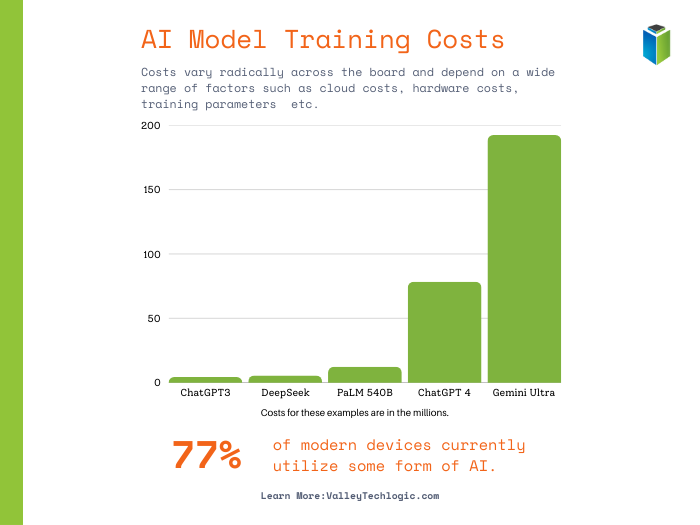
    There have also been claims that DeepSeek is much cheaper to train, although training costs for existing AI models are largely inflated. These costs are based on the cost of cloud computing rental prices, which have a wide range of variance.

    AI training costs vary wildly depending on a range of factors.

    AI and cloud computing are both worthy investments for businesses looking to strategically position themselves for technology growth in 2025 and beyond, and Valley Techlogic is at the forefront of utilizing these technologies.

    Whether it be initializing AI tools like Microsoft’s Co-Pilot in your business or migrating more of your operations to the cloud to reduce overhead spending on physical hardware, we’ve got you covered. Reach out today for a consultation and learn how you can catapult your business forward with technology advancements through Valley Techlogic.

    Looking for more to read? We suggest these other articles from our site.

    This article was powered by Valley Techlogic, leading provider of trouble free IT services for businesses in California including Merced, Fresno, Stockton & More. You can find more information at https://www.valleytechlogic.com/ or on Facebook at https://www.facebook.com/valleytechlogic/ . Follow us on X at https://x.com/valleytechlogic and LinkedIn at https://www.linkedin.com/company/valley-techlogic-inc/.

  • Code named “Strawberry”, OpenAI’s latest update aims to boost reasoning capacity in their AI model

    Code named “Strawberry”, OpenAI’s latest update aims to boost reasoning capacity in their AI model

    Initially labeled Q* for Q Star, Project Strawberry is set to become ChatGPT5 and OpenAI is prepared to launch this update any day now at the time of writing.

    AI competition continues to stiffen up, but many would argue OpenAI has a commanding lead in the AI space with it’s a comparatively more mature model that many believe is more accurate than competitors such as Google’s Gemini and Microsoft’s CoPilot.

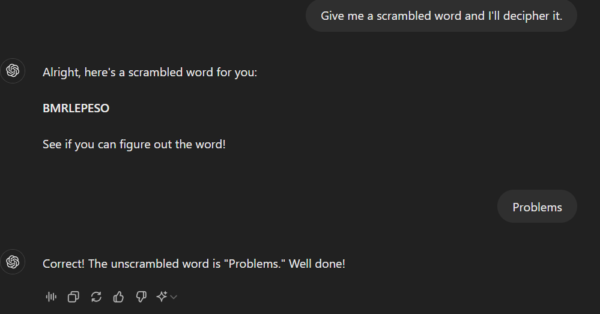
    However, as with most AI tools on the market, errors and just general wonkiness are part of the experience and OpenAI and other AI tool providers hope to continue to improve in that arena, providing more accurate results to users without errors and sometimes comical mistakes or “problems” as in the inaccurate word scramble below.

    Hint, no actual words can be spelled with all the letters given.

    OpenAI’s claims Project Strawberry will have “human-like” reasoning skills and answer questions that have stumped the algorithm so far, especially complex math and programming problems.

    This update is also leading up to the larger project for OpenAI, codenamed “Orion” this future tool will be an entirely new AI model and it’s going to be trained entirely via ChatGPT5/Project Strawberry. The hope with using AI to train AI rather than training it via data found online is that we will see a reduction in “AI hallucinations” (or incorrect predictions) and also speed up the rate at which AI can be improved without having to feed it large amounts of online data.

    This would also help OpenAI and other AI competitors avoid the murkier topic of privacy concerns when it comes to where AI is getting it’s data from.

    If you’re considering investing time in AI solutions for your business, we have 4 considerations for you to mull over first (and the first does relate to the data security topic we just mentioned):

    1. Data Security: For most of the AI tools on the market, it’s a known fact that any data you feed into it will also feed into the models they use. We would suggest if you’re considering implementing AI solutions in your business you do so with this factor in mind. Even if a tool claims your data will be secure and not accessible to other users (we’re looking at you CoPilot) AI is still realistically in its infancy. We suggest using an abundance of caution when it comes to data that is proprietary to your business.
    2. Cost (especially Time Cost): AI when used correctly can save your business time and money but using it correctly can be a high barrier to entry. For example, if copy writing is a core facet of your business AI is an excellent tool for sourcing ideas that your team can then spin off into their own creations. If your business is word-of-mouth based cabinetry sales, AI may not be very useful to you at this point in time.
    3. User Experience: Consider the human experience, especially for your customers, when implementing AI solutions. AI chatbots exist but should they replace a real person answering questions on your business’s behalf? Or instead does it make sense to utilize it half way (IE the chatbot answers common questions) with a human representative ready to take over if the questions get more complicated.
    4. AI is not magic: AI will not replace human ingenuity, as outlined above it’s not a perfect solution by any means at this point in time and that’s unlikely to change anytime soon. AI should be used to build upon existing structures in your business (like adding more capacity to your marketing capabilities for example) not with the expectation it’s going to replace those structures entirely.

    Considering implementing AI solutions in your business or hoping to hone in on advancements in technology to your advantage? Valley Techlogic continues to stay at the forefront of new innovations in tech, and we utilize our expertise on behalf of our customers. Reach out today for a consultation.

    Looking for more to read? We suggest these other articles from our site.

    This article was powered by Valley Techlogic, leading provider of trouble free IT services for businesses in California including Merced, Fresno, Stockton & More. You can find more information at https://www.valleytechlogic.com/ or on Facebook at https://www.facebook.com/valleytechlogic/ . Follow us on Twitter at https://x.com/valleytechlogic and LinkedIn at https://www.linkedin.com/company/valley-techlogic-inc/.

  • AI updates for 2024 and what they mean for you, including the addition of multimodal for Google Gemini & ChatGPT and Amazon’s new AI Alexa service

    AI updates for 2024 and what they mean for you, including the addition of multimodal for Google Gemini & ChatGPT and Amazon’s new AI Alexa service

    AI (Artificial Intelligence) continues to try and proliferate the space in which we live, from innovations aimed at simplifying our work activities and increasing productivity, to enhancements to our devices that will make using AI in our homes more accessible. It’s impossible to ignore that Google, Amazon and other major players in the tech space want to make AI part of our daily lives.

    But what does this really mean for you and are the advancements coming to AI in 2024 really going to be useful for the average person? In today’s article we’d like to look at some of the AI announcements that have made major headlines and break down what they mean for you.

    Multimodal AI: First of all, what is multimodal AI? Traditionally at the moment you input one type of content request into AI models, such as a text prompt asking for an image or written text, and it provides you with an answer based on the prompt that covers whichever content you requested (IE written OR visual).

    With multimodal AI you won’t be limited to one form of output, instead you can enter a prompt that requests a mix of medias, such as a report that includes text AND images that align with the report.

    Multimodal AI will pull from several different data inputs to give you a more complete pictures without the need to enter separate prompts for different types of media. Also, because all of this is being processed at the same time you will likely see more cohesive results. Both ChatGPT and Google Gemini have begun to offer a multimodal AI experience and we expect the technology behind this type of AI will continue to improve in the coming months.

    AI comes to Amazon’s Alexa: Amazon made the announcement that a subscription based Alexa service will be rolling out sometime this year and will provide a better user experience, with more intuitive answers to questions and a conversational approach to requests to keep up with the current trends (search queries have become more conversational overall and it’s largely attributed to AI).

    Pricing has yet to be announced but Amazon has stated it will not be included with Amazon Prime. Amazon will use it’s own large language model, Titan, to power the upgrade.

    AI for Marketing?: The Google Marketing Live 2024 event was this week and unsurprisingly AI the feature focus for the tech giant. With enhancements announced to immerse consumers in AI powered ads and an “AI readiness tool” that will be available sometime this year.

    Highlights included the ability to take a static “hero asset” and turn it into a video with a realistic 3D animated background, the ability to use AI to recreate and retool existing ad creatives, and enhancements to search that allow consumers to buy a product they find as a solution to a search query directly from the same browser window.

    Generative AI lets you continuously improve your AI experience: Finally, increased improvements to generative AI, which is AI that learns the patterns and structure of your input, will make using AI to create cohesive content for your business even easier. From allowing your employees to seek out answers to questions without an exhaustive web search to aiding in crafting articulate responses to your clients and more. With generative AI your voice is an additional component to your AI experience. Microsoft, Google, LinkedIn and ChatGPT continue to include enhancements to the generative AI experience. You can even add a background prompt to give additional context to your AI program of choice (such as information about your business or yourself) so the responses you receive are uniquely tailored to you.

    Looking to improve your business with AI strategies or take advantage of AI advancements in cyber security including enhanced monitoring, threat detection and real time solutions? Valley Techlogic remains at the fore front of new technologies, and we can assist you in navigating AI solutions for your business. Learn more today.

    Looking for more to read? We suggest these other articles from our site.

    This article was powered by Valley Techlogic, leading provider of trouble free IT services for businesses in California including Merced, Fresno, Stockton & More. You can find more information at https://www.valleytechlogic.com/ or on Facebook at https://www.facebook.com/valleytechlogic/ . Follow us on Twitter at https://x.com/valleytechlogic and LinkedIn at https://www.linkedin.com/company/valley-techlogic-inc/.

  • Microsoft Copilot, is it worth investigating for your business? 10 things you can use it for TODAY

    Microsoft Copilot, is it worth investigating for your business? 10 things you can use it for TODAY

    Released earlier this year, Microsoft Copilot is available for you to use today and is Microsoft’s answer to the growing trend of AI assisted technologies. Copilot is a Microsoft 365 offering alongside their other popular business software applications such as Word, Excel, PowerPoint, Outlook and more but you may be asking, what can I do with it?

    Here are 10 real life use cases for Microsoft Copilot:

    1. Automate Reporting from Excel: If you’re still manually generating reports based on the Excel spreadsheets created by your business that can end today. Copilot can generate comprehensive reports based on trends, perform calculations and more. Copilot will even analyze the data and alert you if it senses there are errors.
    2. Create Visuals from Your Data: If you need charts to demonstrate certain aspects of your business to clients and partners, Copilot can generate charts and graphs based on the data you have available with the click of a button.
    3. Document Creation: Like other AI tools, Copilot can help you reword documents you currently have in progress or offer additional creative inspiration alongside your UGC (User-Generated Content). It can also generate images that will complement your documents.
    4. Easy Integration: Since Copilot is a Microsoft tool, that makes integrating it into your business easier than trying to evaluate the many emerging AI technologies on the market and you can train your staff on the features found with AI.
    5. Use Copilot for Reminders: You can train Copilot to create reminders for you based on previous activity, say you have a monthly meeting each month. Copilot can look at that data and create reminders for it going forward without you needing to manually schedule those reminders yourself.
    6. Fraud Detection: Speaking of analyzing behaviors, Copilot can also look for behaviors that are unusual within your business – such as financial transactions that differ greatly from your norm and report these to you.
    7. AI-Powered Customer Chat: Copilot can be an automated chat and response tool for your business when it comes to interacting with your clients, including allowing it to respond to routine questions so you don’t need to take time out of your day to do so.
    8. Marketing Campaigning: Copilot can analyze your customer base and suggest marketing campaign ideas to send to your target audience.
    9. Software Development: As with ChatGPT and the like, Copilot can even offer assistance if your business has in-house programmers or technical people. Even for nontechnical roles, many questions can be answered via AI without needing to go down the rabbit hole of a Google search.
    10. Tailored to You: In case we weren’t clear, Copilot can do as much or as little as you want it to do – from writing emails, to creating slide decks, to analyzing data, to performing routine tasks, Copilot and AI in general is powerful tool that most businesses should be taking advantage of in 2024.

    If all of these advantages weren’t enough, Microsoft just recently announced Copilot for Security. Taking advantage of the vast wealth of data the Microsoft Security Suite has available and powered by AI, Microsoft Copilot for Security will look for user risks and can even resolve security incidents before they become a problem.

    If you would like to learn more about utilizing Copilot for your business, Valley Techlogic has been a Microsoft partner since 2004 and would be able to assist your business as we enter this new age of AI powered technology. Schedule a consultation with us today to learn more.

    Looking for more to read? We suggest these other articles from our site.

    This article was powered by Valley Techlogic, an IT service provider in Atwater, CA. You can find more information at https://www.valleytechlogic.com/ or on Facebook at https://www.facebook.com/valleytechlogic/ . Follow us on Twitter at https://x.com/valleytechlogic.