Tag: phishing

  • How a phishing scam swindled this Shark Tank host out of $400,000

    How a phishing scam swindled this Shark Tank host out of $400,000

    We’ve focused a lot of articles on phishing scams and how no one is immune, even major money moguls like Barbara Corcoran from ABC’s Shark Tank with a net worth estimated at over $100 million fell victim to a phishing scam that wound up costing her $400,000.

    Business owners are a particularly lucrative target for bad actors, and phishing emails continue to grow more sophisticated. In this instance Barbara reports receiving an email that looked like it came from her secretary going to her accountant authorizing the amount to go to a real estate deal.

    Barbara like many business owners has deals going on all the time so the amount and type of authorization wasn’t unusual, allowing it to fly under everyone’s noses and make the scammers involved $400,000 richer. It wasn’t until her accountant sent an email to her real secretary confirming the transaction one last time that the scam was uncovered – and by then it was too late the transfer had already been sent.

    This case proves that even with strong checks and balances in place, phishing scams can happen to almost anyone. While Barbara was able to absorb the hit without it hurting her business – many out there could not.

    While the amount of money lost in this instance is quite substantial, millions of dollars are lost every day to cyber crime. It’s estimated that $1,797,945 is lost per minute according to Risk IQ’s Evil Internet Minute Report.

    Even if you think your business is too small to be a target you would be wrong, scammers cast wide nets looking for victims to fall in. Here are 4 things you can have in place that could prevent this kind of scam from happening to you.
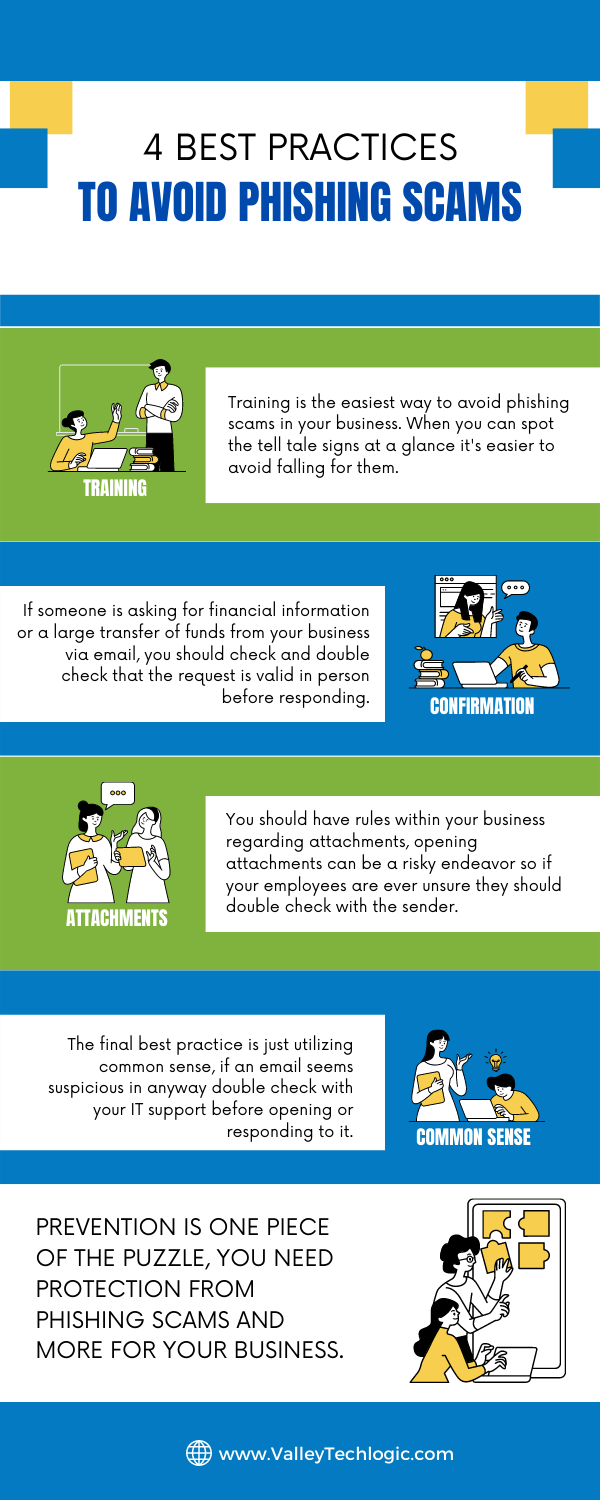
    Email Best Practices

    Even with these checks in place it can still be tricky to avoid, especially if your business has become a particular target for a scammer. Another famous example is how Facebook and Google were tricked out of $100 million due to an extended attack phishing attack organized by a scammer located in Lithuania. A little less than half of the money lost was recovered.

    Another famous attack in 2014 saw the early release of four movies produced by Sony Pictures when North Korean hackers, upset about a movie that was being released at the time, sent targeted phishing emails that appeared as if they were coming from Apple to a top Sony executive. The damage that incurred from this attack was estimated to be over $80 million.

    With both of these attacks it’s not just about the money lost either, these attacks are easily searchable to this day and had an untold effect on their reputation at the time. Massive companies like Google, Facebook and Sony can weather the storm, but could your business do the same?

    Education is just one piece of the puzzle, active protection is another crucial element to avoiding the lengthy damage that can arise from a successful phishing campaign. At Valley Techlogic cyber security is a core focus for all of our plans. Learn more today with a quick and easy consultation.

    Looking for more to read? We suggest these other articles from our site.

    This article was powered by Valley TechLogic, an IT service provider in Atwater, CA. You can find more information at https://www.valleytechlogic.com/ or on Facebook at https://www.facebook.com/valleytechlogic/ . Follow us on Twitter at https://x.com/valleytechlogic.

  • We have updated our most popular resource for 2022 and have an offer you won’t want to pass up

    We have updated our most popular resource for 2022 and have an offer you won’t want to pass up

    As an IT service provider, we’re passionate about cybersecurity because we see the effects having inadequate coverage can have on businesses first hand.

    The devastation that can occur after a cyber attack is staggering, we’ve given you the statistics before, such as:

    1. The cost of cybercrime is predicted to hit $10.5 trillion by 2025
    2. Cryptojacking cases quadrupled in 2021, but the hackers don’t make very much (less than $6 per day), however that doesn’t stop them from trying to gain access to your machines
    3. It takes on average 287 for cybersecurity teams to detect and contain a data breach
    4. Phishing is involved in 36% of data breaches (can you identify the signs of a phishing email?)
    5. DDoS (Distributed Denial-of-Service) attacks are skyrocketing, with 9.75 million occurring in 2021

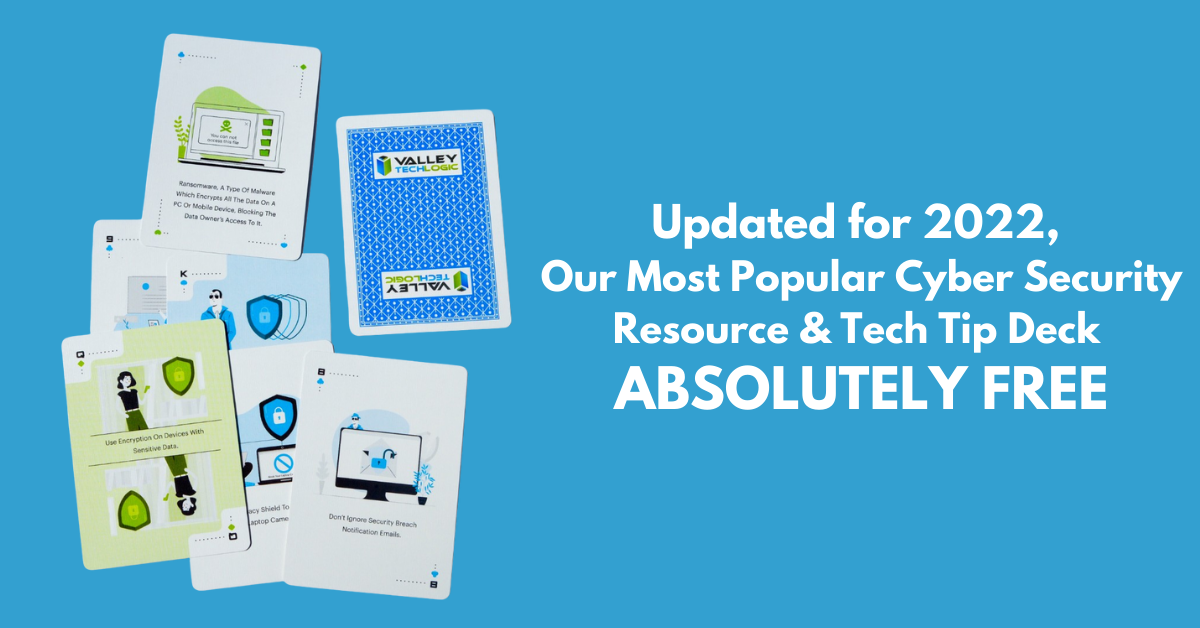
    That’s why we’re thrilled to announce the release of our Tech Tip Card Deck, our deck contains 56 tips for getting your cybersecurity house in order with custom art representing each tip. Best of all, the deck is absolutely free to business owners in our area.

    Beyond providing comprehensive technical support, we also want to support our community in staying safe online. If you’re a business owner in Central Valley and would like to have a set of our card deck for yourself, simply visit TechTipCards.com and request one today and we’ll get it shipped out to you ASAP.

    We don’t believe technology has to be intimidating, each bite sized tip featured in the deck is easy to understand and easy to implement and will create real results for the online safety of yourself, your employees, and your business.

    To up the offer even more, we have updated our most popular for 2022 and are also offering it to you right here, right now. Simply grab it below.


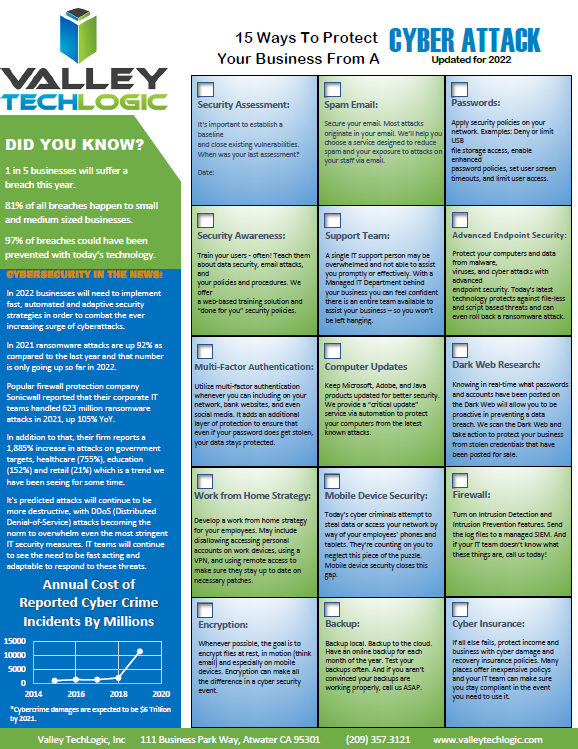
    Valley Techlogics Cybersecurity Checklist
    Click to grab the full size version.

    Both of these are just a small showcase of what’s in store, we know for most people repetition is the key to success. We plan to deliver weekly content including thought provoking reports, eye catching resources that can even be customized for your office, and tech advice that can greatly impact and improve your use of technology within your business.

    If you’d like to learn more, again visit TechTipCards.com or reach out to us for a free consultation today.

    Looking for more to read? We suggest these other articles from our site.

    This article was powered by Valley TechLogic, an IT service provider in Atwater, CA. You can find more information at https://www.valleytechlogic.com/ or on Facebook at https://www.facebook.com/valleytechlogic/ . Follow us on Twitter at https://x.com/valleytechlogic.
  • Unsure if the person you’re interacting with may be a fake? This Chrome extension can detect fake profile pictures with 99.29% accuracy

    Unsure if the person you’re interacting with may be a fake? This Chrome extension can detect fake profile pictures with 99.29% accuracy

    As we discussed last week, financial scams may be on the rise in 2022. Social engineering is a pretty common tactic utilized by scammers when it comes to siphoning funds from unwitting victims, but there are some tools you can use to combat it.

    Recently a company called V7 Labs has released an extension for Chrome that’s able to detect artificially generated profile pictures, such as those created by Thispersondoesnotexist.com (see below for an example).Examples of "ThisPersonDoesNotExist"

    The Fake Profile Detector extension can help you detect if a social media profile picture is a fake just by right clicking on it, it’s able to zero in on things you may miss at first glance – such as a pupil that’s not in the right place or clothing that appears to be bleeding into the skin. The extension does not work with video (yet). Also, just to note you should always verify an extension is from a trusted source before downloading it to your browser.

    Social engineering scams aren’t limited to just financial scams, they’re also utilized to gain information or to spread misinformation. As AI tools have grown more sophisticated it’s not easy to rely on someone’s profile picture to give you a good indication of who you’re talking to online.

    It’s also very easy to create fake profiles using real pictures, even pictures of people you may actually know. It’s typical for the scammer to start the conversation off with they got “locked out” of their main account and would like you to add their new one. You should also confirm with your friends and family before accepting a request from a new account.

    Or maybe it was their actual social media account, but a scammer was able to gain access. Sometimes scammers may even leave the password alone. The victim then may not know they have an intrusion, and the scammer just monitors and deletes messages of the conversations they’re having without the victim’s knowledge.

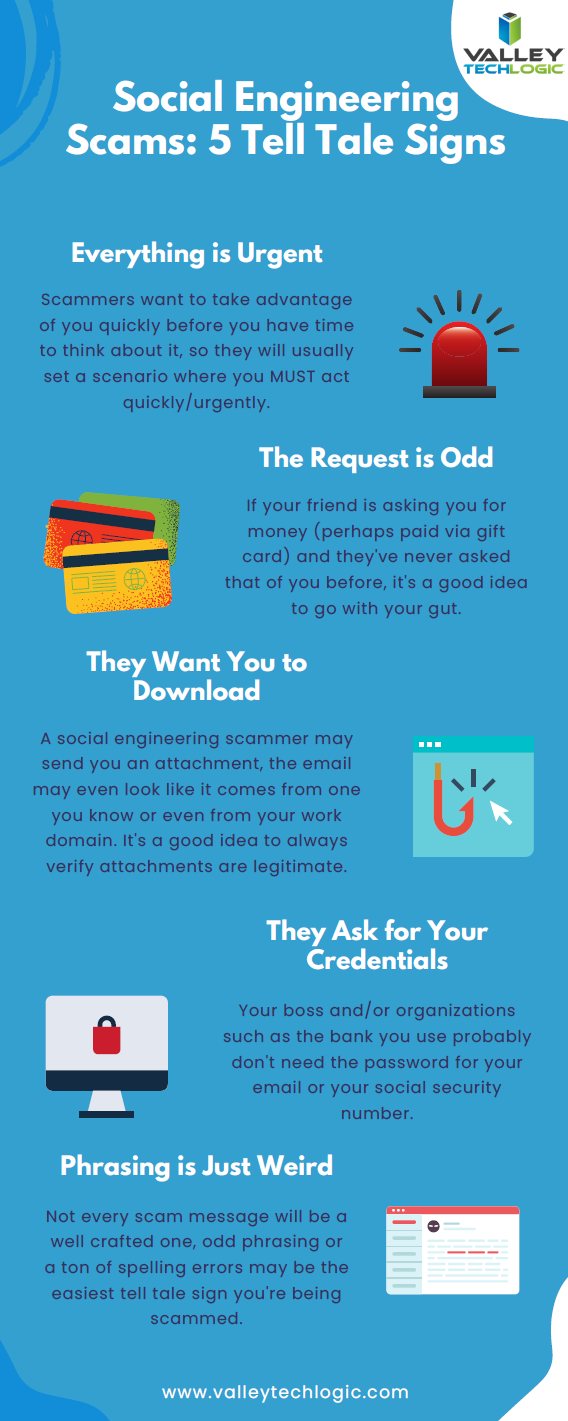
    We have created this chart of the top five things you should watch out for when it comes to social engineering scams.

    Click to download the full size version.

    Social engineering is not limited to just social media sites such as Facebook and Twitter. The most common type of social engineering are phishing attacks, and scammers setting their sites on businesses to take advantage of may have an easier time of convincing a user they are who they say they are when it comes to the more casual relationships we tend to have with colleagues.

    We wrote a blog explaining what to look out for when it comes to phishing emails, but at Valley Techlogic we also think this issue can be tackled from a software and training perspective.

    The tools we utilized will make sure that much of that suspicious spam never makes it to your end user, and the training we offer to our clients can help them make sure that if an employee does get a spoofed phishing email – they know exactly what to do about it.

    To learn more, schedule a free consultation with our sales team today.

    Looking for more to read? We suggest these other articles from our site.

    This article was powered by Valley TechLogic, IT service provider in Atwater, CA. You can find more information at https://www.valleytechlogic.com/ or on Facebook at https://www.facebook.com/valleytechlogic/ . Follow us on Twitter at https://x.com/valleytechlogic.

  • As we feared, Ukraine-Russia crisis leads to a surge in cyber attacks

    As we feared, Ukraine-Russia crisis leads to a surge in cyber attacks

    As we’re nearing a month into the conflict between Russia and the Ukraine, cyber warfare between the two countries is reaching an all time peak. We covered the topic of Ukraine’s “IT Army” recently in this blog, and we mentioned growing concerns we’ve seen from users that there may be a spill over effect when it comes to cyber threats.

    Cyberwarfare was inevitable as conflicts on the ground continue on, and as Russian hackers feel the “pinch” of the effects of sanctions imposed against Russia, we may see an uptick in financial scams. Especially as both countries have turned to cryptocurrency which can often be used as a safe haven for financial transactions taking place outside the public eye. In the case of Russia it’s being used to try and liquidate funds out of the country and in the case of the Ukraine they’re using crypto to bolster support for their economy.

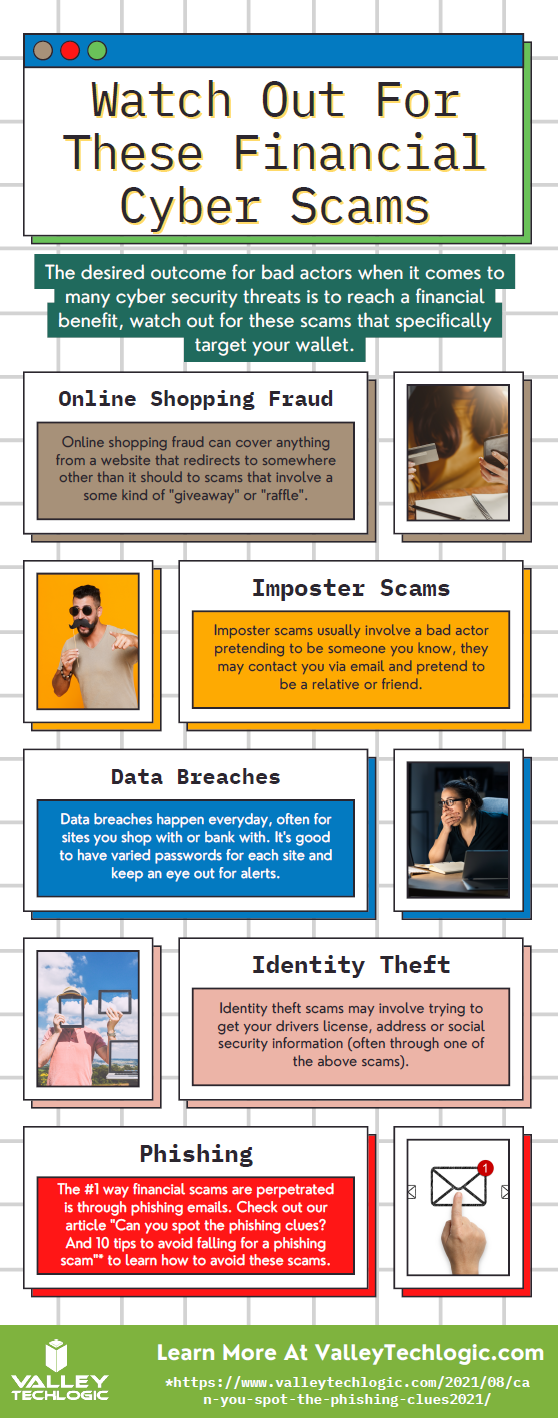
    We have created this chart for the types of financial scams we think may increase in the coming days (though it should be noted, financial scams were already up 70% in 2021).

    Cyber Financial Scams Chart
    Click to download the full size version.

    However, hackers have also represented a beacon in the war of information currently happening between Russia and the Ukraine. Ukraine’s “IT Army” is now over 400,000 people strong, with hackers from all over the world lending their support digitally in Ukraine’s effort to protect their democracy.

    DDoS attacks on government sites with Russian origins as well as document leaks – which includes a 360k file data dump from a Russian federal agency – are continuing to happen regularly. It’s estimate that over 90% of exposed Russian cloud databases have been compromised at this point.

    Also, with access being restricted to sites like Twitter and other social media platforms being restricted in Russia, Squad303 is a website that was created by a group of Polish programmers that can help foreigners relay information to Russian citizens. The website founders say that over 7 million text messages and 2 million emails have been sent through the site so far.

    We again want to say we don’t know what the outcome of this conflict will be, but it seems clear that consumers and businesses should be wary of the ripple effects that will occur throughout the cyber sector, possibly for years to come.

    Business owners who still believe they’re “too small” to be a target should be wary that proceeding with out cybersecurity protections may make them the low hanging fruit for hackers reacting to a state of desperation. Cybersecurity protections are a worthwhile investment in your future and the peace of mind in questionable times is priceless.

    At Valley Techlogic, we’re experts in the field of cybersecurity. We can perform an evaluation of your business and tell you where you are now and where you need to be to not worry that your business is “ripe for picking”. Schedule a consultation today to learn more.

    Looking for more to read? We suggest these other articles from our site.

    This article was powered by Valley TechLogic, IT service provider in Atwater, CA. You can find more information at https://www.valleytechlogic.com/ or on Facebook at https://www.facebook.com/valleytechlogic/ . Follow us on Twitter at https://x.com/valleytechlogic.

  • Can you spot the phishing clues? And 10 tips to avoid falling for a phishing scam

    Can you spot the phishing clues? And 10 tips to avoid falling for a phishing scam

    If you’re not aware, phishing is another word for scams perpetrated over email. It was coined in 1996 and was first associated with hackers attempts to steal America Online (AOL) accounts, and it has not slowed down since then.

    As of 2021 most hacking attempts are phishing scams, the phrase is meant to evoke the image of a hacker literally fishing for their victims by baiting a hook which in this case is a credible looking email from a place you might actually do business from, a colleague or a family member. 94% of malware attempts originate from an email sent to the victim.

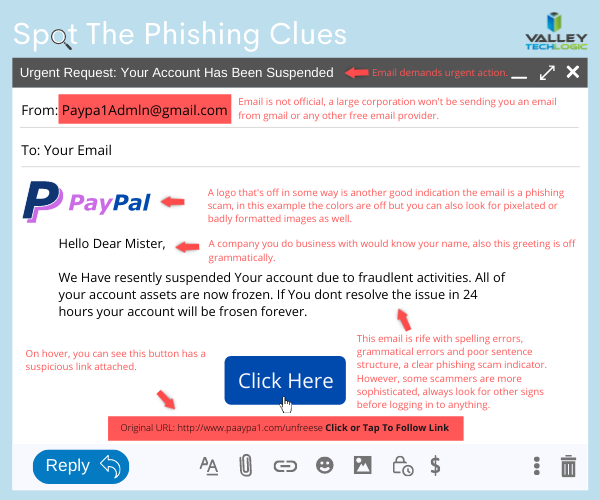
    Well as credible as they can manage, many phishing attempts are poorly worded and grammatically incorrect as the senders are from another country from the victim. In the image below we showcase a phishing email you might receive, click to reveal the answers.

    Spot the phishing clues
    Click to reveal the clues.

    Not all phishing attempts will be so obvious though, here are our 10 tips to avoid falling for a phishing scam.

    1. You are asked to reply with sensitive details. A legitimate business will never ask for your private details via email, if you’re unsure contact the business directly to ask.
    2. The message says you must respond urgently or face dire consequences. Legitimate businesses such as the financial institution you bank with won’t relay an important message over email alone, and they’ll never threaten you.
    3. The email contains a non-standard email attachment. While even standard email attachments can contain malware, a non-standard email attachment is a clear sign something is amiss.
    4. The senders email address doesn’t match the contents. As in our example, a legitimate business (especially a large one) won’t be using a gmail address. You also want to watch out for slight misspellings, such as an email coming from admin@paypa1.com
    5. The email contains an unusual request. You receive an email that looks like it’s from your boss, and he’s saying he wants to reward some key players in your company by gifting them gift cards from a popular big box store. He says not to give them to the players directly, simply reply with the gift card numbers and he’ll handle it. This is just one example of a scam we have unfortunately heard of happening. If the email is requesting large amounts of money be spent in unusual way or private details be sent over email, even if the email looks legitimate you should verify with the supposed sender first.
    6. It has an attachment you weren’t expecting. If receive an email with an attachment and the body suggests you requested information, but you don’t remember doing so, it’s probably a phishing scam.
    7. The email says you won a prize, but you must enter your banking information to claim it. Prizes are a common phishing scam trope; they may also try to get you to download a suspicious attachment.
    8. The URL in the email doesn’t match the business it claims to come from. As in our example, phishing attempts often involve a similar but not quite right URL. Many scammers will try to gain the victims trust by sending them to an “official” looking website where they will login with their legitimate credentials, allowing the scammer to gain access.
    9. The content is canned. Many phishing scammers reuse the materials of others. One example is you receive a suspicious sounding email, such as someone saying you have stolen their copyright images and you must visit a website to confirm. If you Google the email you may find examples of others online who have received that same
    10. The greeting doesn’t match the content. This is a simple one, if you receive an email supposedly from your boss but the greeting starts with “Dear” or another out of character greeting, it’s probably a phishing attempt.

    This is only a start, many phishing attempts are highly sophisticated and difficult to spot but knowing some of the signs will help you be more attentive to things that may be wrong with an email you receive. We also have found for our clients, randomized simulated phishing attempts can help them with training their staff to keep an eye out for phishing attempts.

    Most successful hacking attempts involve a human element, training is your only first line of defense. If you would like to increase your defense against phishing attempts, malware, ransomware and more, Valley Techlogic can help. Schedule an appointment with us today to learn about our comprehensive cyber security packages for businesses.

    Looking for more to read? We suggest these tech articles from the last week.

    This article was powered by Valley TechLogic, an IT service provider in Atwater, CA. You can find more information at https://www.valleytechlogic.com/ or on Facebook at https://www.facebook.com/valleytechlogic/ . Follow us on Twitter at https://x.com/valleytechlogic.
  • Your Information Was Leaked in a Major Breach, Now What?

    Your Information Was Leaked in a Major Breach, Now What?

    In what seemed to be major news for only a brief period of time, over 500 million Facebook account details were leaked last week. The data included things like profile names, Facebook ID numbers, email addresses, and phone numbers. While this data may be online in other forms the combined data together makes it a treasure trove for phishers and scammers.

    The colossal total of 533 million accounts was accessed by hackers exploiting a bug in a Facebook address book contacts import feature. It was confirmed by Facebook that the exploit was patched in August 2019, but it is unclear how many times the bug was used before then. The information featured users from 106 different countries. News Tip About Hackers

    It’s clear from Facebook’s response that this data has been out there for a while, and no one knows how it’s currently being utilized by bad actors to phish and scam people. It hasn’t been released that password data was a part of the breach, but it’s still our recommendation that you change your password any time you hear news of a major breach from a service you utilize. As well as making sure you use different passwords for different sites (if you don’t already).

    But what else can you do? Here are our 5 tips to protect yourself after a breach occurs with a service you use or have used in the past.

    1. Keep an Eye Out for An Alert from The Company Affected. We feel companies should be duty bound to let their users know if a breach has occurred. You should keep an eye out for an email detailing the steps they have taken to protect your data after a breach, what may have been compromised, and what you should do to protect yourself.
    2. Monitor Your Financials. If the breach happened within a financial institution you utilize, or even one we all utilize by default (such as the Equifax breach) you want to take the time to monitor your financials for suspicious activity. Many banking and credit card issuers offer free credit reporting as part of their services now. You can even freeze your credit to be extra sure but keep in mind if you do try to open a new credit card or loan the freeze will affect you as well.
    3. Change Your Passwords. We recommend changing passwords if a major breach has occurred even if the business confirms no password data was leaked, you really can never be too careful. If you need help remembering your passwords for various sites as well as creating stronger passwords, we recommend our article on the top 3 password managers we recommend.
    4. Be Extra Wary of Suspicious Emails. Following a data leak, phishers and scammers will use this newly obtained information to try and reach out and trick you into handing over your financial or other personal information. They may have names of relatives or other people you know to utilize and try to get you to send them money. If you receive a suspicious email it is best to report it to your email provider.
    5. File Your Taxes Early. If your social security number was stolen as part of a breach, you may want to be prepared to file your taxes as soon as possible to avoid having your tax refund stolen by scammers.

    In addition to these five tips if the company that was breached offers assistance in the form of either monitoring your credit or tips on how to safeguard your account, we recommend accepting their offer. Data breaches occur so often now that the public is desensitized but they are still a threat that should be treated seriously.

    Data breaches that affect businesses are a different animal entirely. There is much more to monitor and safeguard and it is not something you should try to tackle alone. Valley Techlogic is experienced in helping businesses recover from data breaches and we can help you recover your data and protect it from further attacks. Visit here to schedule a free consultation to learn more.

    Looking for more to read? We suggest these tech articles from the last week.

    This article was powered by Valley TechLogic, an IT provider in Atwater, CA. You can find more information at https://www.valleytechlogic.com/ or on Facebook at https://www.facebook.com/valleytechlogic/ . Follow us on Twitter at https://x.com/valleytechlogic.

  • Business Email Compromise (BEC) and Phishing – How Do You Combat It?

    Business Email Compromise (BEC) and Phishing – How Do You Combat It?

    Business email compromise (BEC) and phishing are not new ways to scam, as soon as email rose to popularity as a dominant form of communications scammers saw a lucrative window and took advantage.

    Before we explain how to avoid it we should explain what Business Email Compromise (BEC) is. BEC is when a legitimate business is sent an email that looks like it’s coming from another legitimate business, but it’s not. It’s actually a scammer spoofing that email identity. This is the most popular form of phishing but it’s far from the only version. Scammers can even spoof your own domain, so an email looks like it’s coming from within your own organization.

    How do you combat something so insidious? The top way is training, by training yourself and your employees properly on what to look for then you can avoid these scams which cost people located in the US $57 million last year.

    Here are some of the things we look for when determining is an email is a phishing attempt.

    1. It may contain a generic greeting such as “Hello sir or madam” or “Hi Dear” a company you do business with or a person you know would probably know your name.
    2. The email mentions some kind of fraudulent activity on your account and has a link asking you to confirm your private details to unlock or otherwise reinstate your account. This is a VERY common scam.
    3. The links in the email are NOT from the business the email is purporting to be when you hover over them.
    4. The email may contain spelling errors and sentences that sound strange grammatically.
    5. The logos in the email may be of a poor resolution because these scammers do not have access to the real company assets.
    6. The email is coming from a CEO or President of a large organization and is asking you to wire money in exchange for a lump sum in return later. These emails may not have spelling errors or strange links but ask yourself – would any CEO or President of a large company be asking you to wire them money?

    That last one is key, if all the obvious methods of detection fail you may have to rely on just asking yourself if the request in the email makes sense. If the email looks like it is coming from someone you know personally, reach out to them via phone or in person to ask about it. Most of the time, victims who have had their emails compromised or spoofed have no idea it’s even going on.

    Beyond training on knowing what to look for in a phishing email these are our top 3 things to protect yourself from scams across the board.

    1. Keep the software on your devices completely up to date.
    2. Use Multi-factor or 2 Factor Authentication on your accounts.
    3. Backup your data regularly so on the off chance something happens, you’re covered.

    If you receive an email you suspect is a phishing attempt, the best thing to do is not respond to it and report it. You can report suspected phishing emails to the FTC here.

    For businesses located in the Central Valley, we offer cyber security training as part of our managed service plans (which includes comprehensive training on how to avoid phishing attacks).

    Phishing training available

    Looking for more to read? We suggest these tech articles from the last week.

    This article was powered by Valley TechLogic, an IT provider in Atwater, CA. You can find more information at https://www.valleytechlogic.com/ or on Facebook at https://www.facebook.com/valleytechlogic/ . Follow us on Twitter at https://x.com/valleytechlogic.
    Looking for IT Services in Fresno, Modesto, Stockton, Ceres, Atwater, Merced, Visalia or Lodi? We cover all these areas and more!