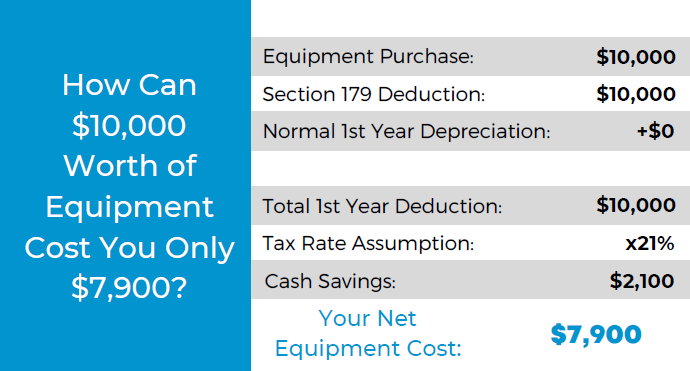
It was announced this week that Microsoft will be laying off 10,000 employees in a bid to cut costs in response to “macroeconomic conditions and changing customer priorities”.
They join the likes of Amazon who also recently laid off 18,000 employees and Meta who cut 11,000 jobs last November. With increasing costs and decreasing sales across many industries amid economic uncertainty, we expect more layoffs to occur both in the tech sector and beyond.
Satya Nadella, CEO of Microsoft, commented in a recent interview that Microsoft is not “immune to the global changes” and that he expects two years of challenges ahead for the tech sector.
We’re still seeing hardware shortages stemming from the pandemic and the chip shortages we’ve written about recently. Suffice to say it’s been even more difficult for businesses to navigate maintaining the technology in their office or making needed tech related purchases.
The worst thing that you can do is hold still and put off making needed upgrades or addressing technology challenges in your business. There are risks associated with outdated technology, they are:
- Lack of security compliance: It’s been shown that are on the rise, even faster than before due to malware being more accessible for even those who are not particularly “net savvy”. Even if you thought your business was too small to be a target before, with increased desperation any target might do – including you.
- More crashes and downtime: Time is money, especially in this economy. Old devices are more prone to crashing or just giving out completely, at which point you’ll still have to pay to replace them but you’ll have the added cost of the waiting you have to do until the replacement comes in.
- Decreased productivity: Your employees are probably your biggest payroll item, do you really want to hinder their productivity by making them use a device that’s sluggish or not working properly? The cost of a new laptop or desktop is a drop in the bucket compared to the cost of wasted time they may spend navigating around issues.
- It could put you at a disadvantage to your competitors: The increase of reliance on digital solutions has not been stymied by the current economic landscape, the extra reliance that was exacerbated by the pandemic conditions is there and continues to grow. If your competitors are keeping up with it and you’re not, that will give them an edge you may not want them to have.
- Lack of data and transparency: We’ve mostly focused on hardware here but there are significant risks to not making needed software upgrades as well. Modern software is often leaps and bounds ahead in giving you needed data and reports, and we believe knowledge is power. You can’t be sure you’re making the best choices for your business if you’re doing them blindly.
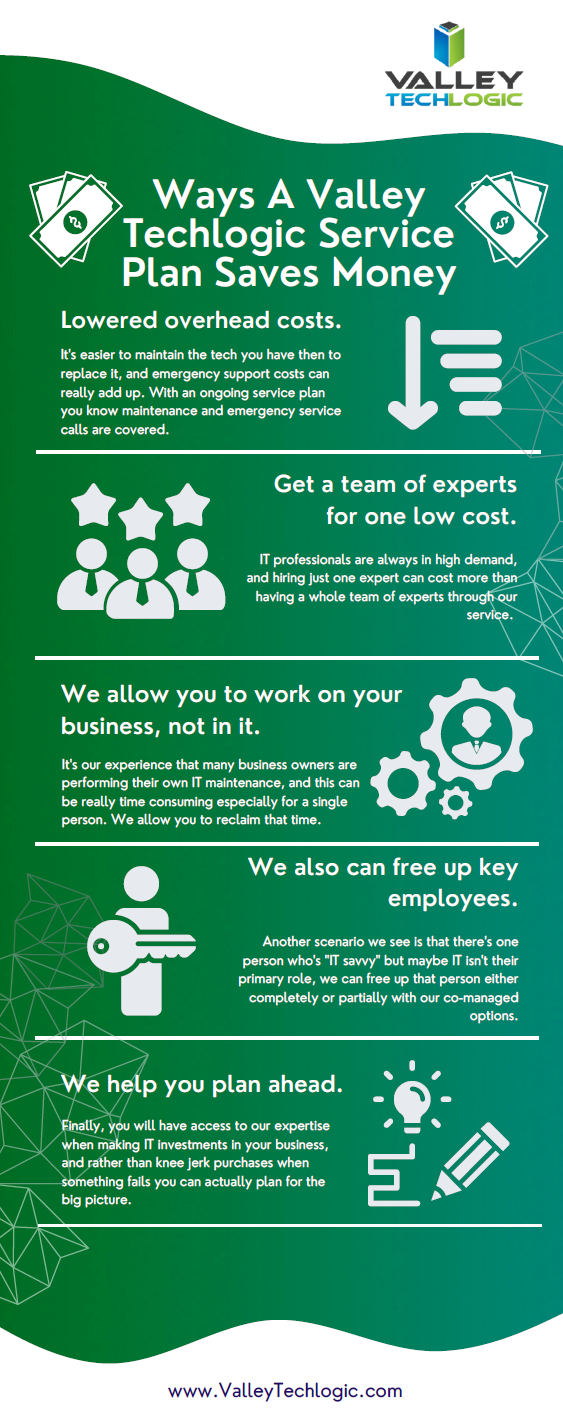
Now more than ever you need a partner in navigating the technology landscape, and Valley Techlogic can be that partner. We can help you address your technology challenges in a way that still keeps budgetary constraints in mind. We have been in business since 2004 and have experience weathering challenging times. We can even reduce your technology spending in the following ways:
We’re offering your first service call with us free, because we know you need to be certain when making choices for your business. We know after you try us out you will have the confidence to proceed, you can schedule your first service call here.
Looking for more to read? We suggest these other articles from our site.
-
ChatGPT is allowing even novice wannabe hackers to construct their own malware
-
New Year’s resolutions for business tech in 2023
-
More data breach woes for LastPass and our recommendations for you on how to deal with it
-
BYOD (Bring Your Own Device) in the workplace, 5 policies to have in place for 2023
This article was powered by Valley Techlogic, an IT service provider in Atwater, CA. You can find more information at https://www.valleytechlogic.com/ or on Facebook at https://www.facebook.com/valleytechlogic/ . Follow us on Twitter at https://x.com/valleytechlogic.