Tag: windows 11 requirements

  • Windows 11 is out, should you upgrade?

    Windows 11 is out, should you upgrade?

    Windows 11 officially came out on October 5th and maybe it just us or perhaps it’s been overshadowed by other tech news this week, but the release has seemed somewhat unceremonious so far.

    Perhaps that’s because it wasn’t released for everyone. In fact, it’s not available for most people.

    How will you know if your PC has the upgrade (which is free by the way) available? Well, there are some steps to take first.

    1. Make sure you’re on Windows 10, you can only receive the Windows 11 free upgrade if you’re already on Windows 10.
    2. Download the free Microsoft Health Check App to see if your device is supported.
    3. Perform a backup of any important files and documents. This is a big upgrade, so you want to make sure your prepared if anything problematic happens during it.
    4. Then head to Settings > Update & Security > Windows Update on your PC.
    5. If the update is available to you, you’ll see it in your update section and can perform the upgrade if you wish to but maybe read on first to see if that’s a good idea.

    For most of us though, the upgrades not available yet and that’s probably a good thing. It can take a bit of trial and error following a release, especially on the level a Microsoft operating system releases at, to get the kinks worked out. Many of the promised features are still not available yet and won’t be for several months.

    Also, for many people their PCs don’t have the required specifications for Windows 11. Especially concerning issues surrounding TPM and secure boot.

    There’s also no rush, Windows 10 will continue to receive mainstream support through October of 2025. Looking at all the features we understand why some are rushing to upgrade ASAP, but for businesses especially a calculated approach to performing this upgrade is a smart idea.

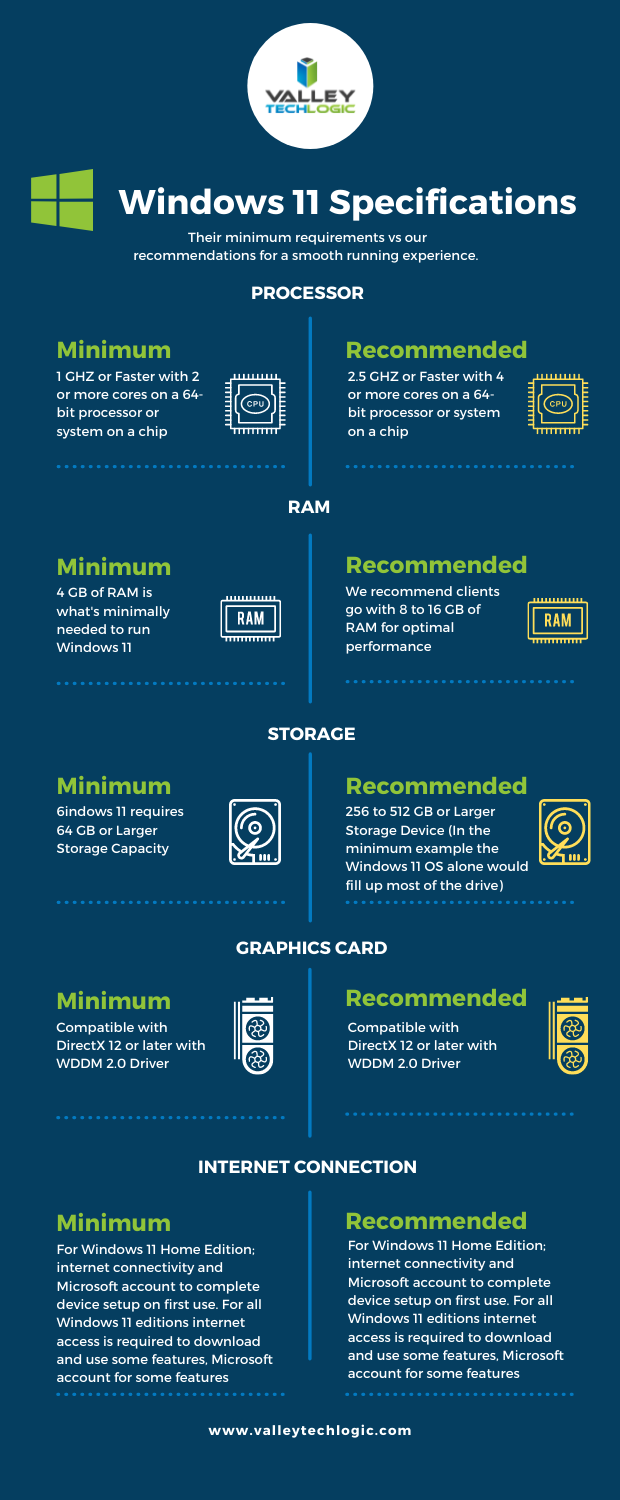
    We’ve talked about the system requirements surrounding making the upgrade to Windows 11 in the past. We’ve even turned the graphics we made for that article into a side-by-side chart you can print out.
    Though the global chip shortage is making it virtually impossible for the average person to easily make a new desktop or laptop purchase at the moment. Even as an IT provider, we’re feeling the pinch.

    If you’re a business owner in the Central Valley and need some advice on upgrading your office computers to Windows 11 (or even to Windows 10) or need help with hardware, we’re here for you. Schedule a discovery call today to learn more.

    Looking for more to read? We suggest these other articles from our site.

    This article was powered by Valley TechLogic, adns, n IT service provider in Atwater, CA. You can find more information at https://www.valleytechlogic.com/ or on Facebook at https://www.facebook.com/valleytechlogic/ . Follow us on Twitter at https://x.com/valleytechlogic.

  • Windows 11 updates as the fall release rapidly approaches

    Windows 11 updates as the fall release rapidly approaches

    While it hasn’t been made official yet, all sources seem to indicate an October 2021 release of Windows 11 is eminent. That date would track with previous release schedules and merges nicely with the big feature updates that always occurs around that time for mainstream Microsoft products.

    As we inch closer, and the beta versions reveal new details we want to continue our coverage of new features that are being announced as well as specification requirement updates that may impact your future device purchases (or device upgrades).

    For example as of August 2021 here are the minimum specifications to run Windows 11:

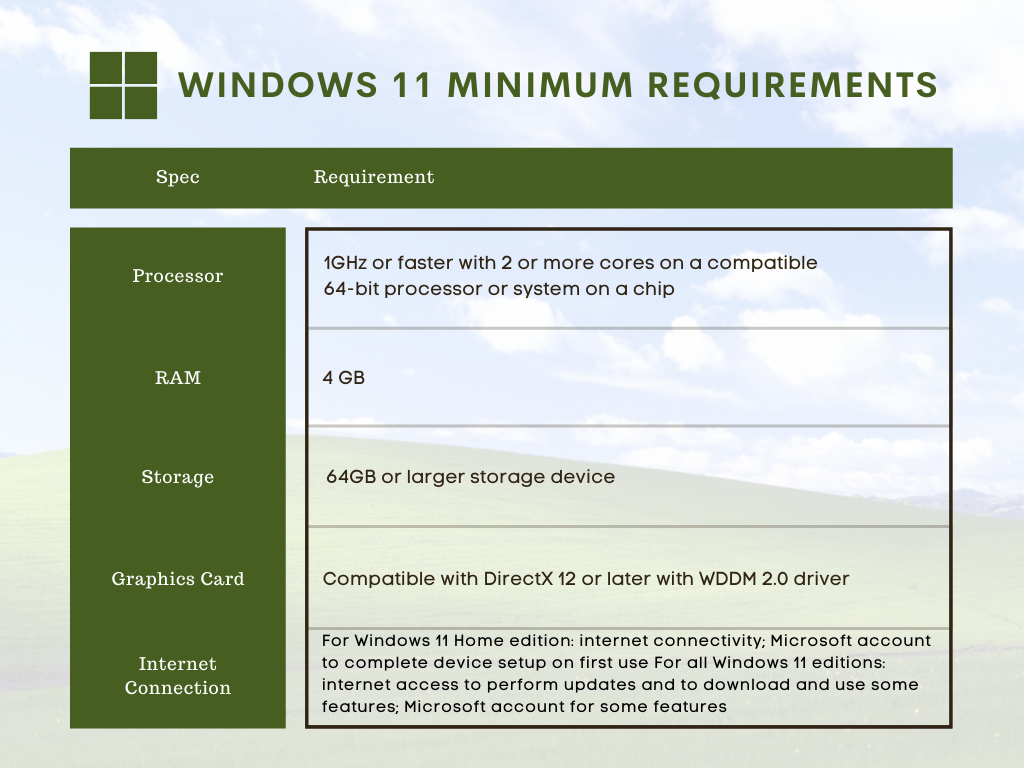
    • Processor:1 gigahertz (GHz) or faster with at least two cores on a compatible 64-bit processor or SoC
    • RAM:4GB
    • Storage: 64GB
    • Graphics Card:DirectX 12 or later with WDDM 2.0 driver
    • Display:720p, 8-bit per color channel, at least 9-inch diagonal

    These requirements are published by Microsoft but are still subject to change as the release nears. Also, computers currently running Windows 10 may not have the upgrade available to them as soon as October hits. It seems likely that new machines will be released featuring Windows 11 at that time but the free upgrade for Windows 10 running machines may come later in 2022.

    Tech News #12

    If you would like to try Windows 11 for free right now you can do so by joining the Microsoft Insider program. This program allows you to preview you Windows releases before they’re pushed out to the market, and you can take part in the Microsoft community to see what others are saying about Windows 11 in real time.

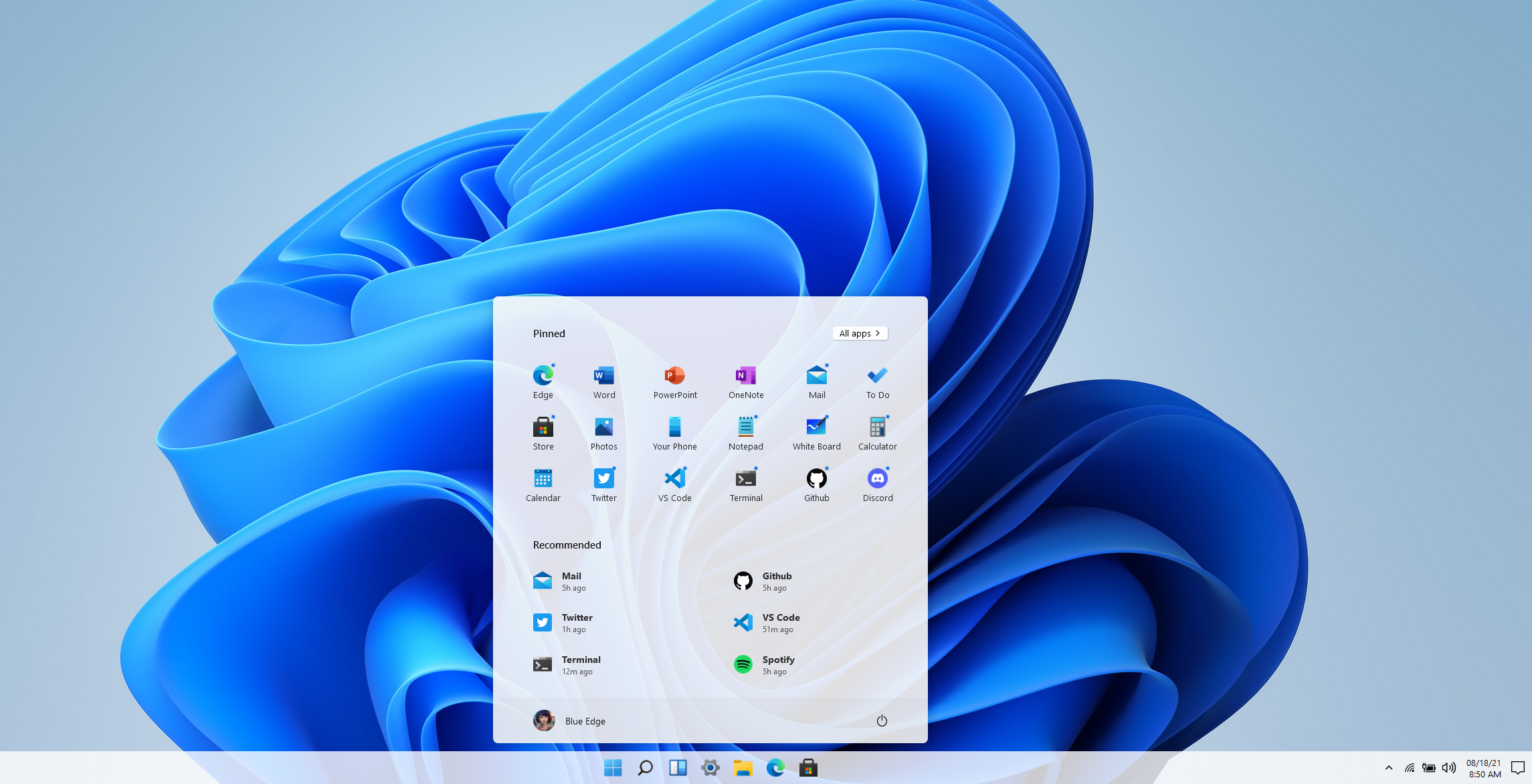
    Another option if you would just like to get a feel for the UI without downloading anything is a widget that was created by Github user BlueEdgeTechno. This Windows 11 simulator lets you access all the UI navigation elements and even browse through the new Microsoft Store. You can find it here: win11.blueedge.me/

    Also making a comeback in Windows 11 are Windows widgets. These widgets are AI determined, meaning your use of Windows 11 will help Microsoft dynamically choose widgets that will give you a customized Windows experience. Widgets such as weather and news as well as 3rd party widgets that you may have available on your Android and OS devices will all be possible options.

    Windows 11 is also making it much easier for users (even those not technically inclined) to keep track of the health of their device. With the new health check feature you can see at a glance how your machine is performing including applications that may have higher than normal battery usage or how much space is available on your SSD.

    Windows 11 is expected to be a free upgrade from Windows 10. If you’re still using Windows 7 or 8 on your device, we urge you to make the jump to Windows 10 while it’s still available as a free upgrade. You can learn how to take advantage of that here. We realize upgrading can be a complex task for businesses, especially if a number of machines are involved. You can schedule a consultation here and we can help you create a plan to bring your office computer software current.

    Looking for more to read? We suggest these tech articles from the last week.

    This article was powered by Valley TechLogic, an IT service provider in Atwater, CA. You can find more information at https://www.valleytechlogic.com/ or on Facebook at https://www.facebook.com/valleytechlogic/ . Follow us on Twitter at https://x.com/valleytechlogic.

  • Windows 11 system requirements – Will your computer be able to run it?

    Windows 11 system requirements – Will your computer be able to run it?

    Continuing our talking points about Windows 11 (which was officially announced June 24th of this year), we would be remiss to not talk about one very important thing – will your computer be able to run it?

    We know for business owners this question is even more loaded as you consider not only your personal machine(s) but also those of your employees. The initial system requirements looked pretty steep, requiring an 8th Gen processor and other specifications that would have phased out a lot of machines that are perhaps not even very old.

    However, Microsoft has since retracted their initially stated requirements in favor of a more modest range of specs that may still leave some very old machines out of the running but for anyone who’s replaced their computer in the last several years (which we recommend anyways) you should be fine. You can see the requirements in the chart below.

    However, minimum requirements are just one piece of the puzzle. By those markers most computers built in the last 5 years can run Windows 11, but what specs would allow it to run well and allow you to have access to the full benefit of all of the new features? Not only that, as we demand more of our computers we really need to consider optimizing them for our current usage.

    For instance, if you frequently are running out of storage space, or if having a lot of tabs open really bogs down your machine, you may find that the enhanced strain caused by a more demanding operating system could make using your machine a hassle to use. Or even just plain unusable.

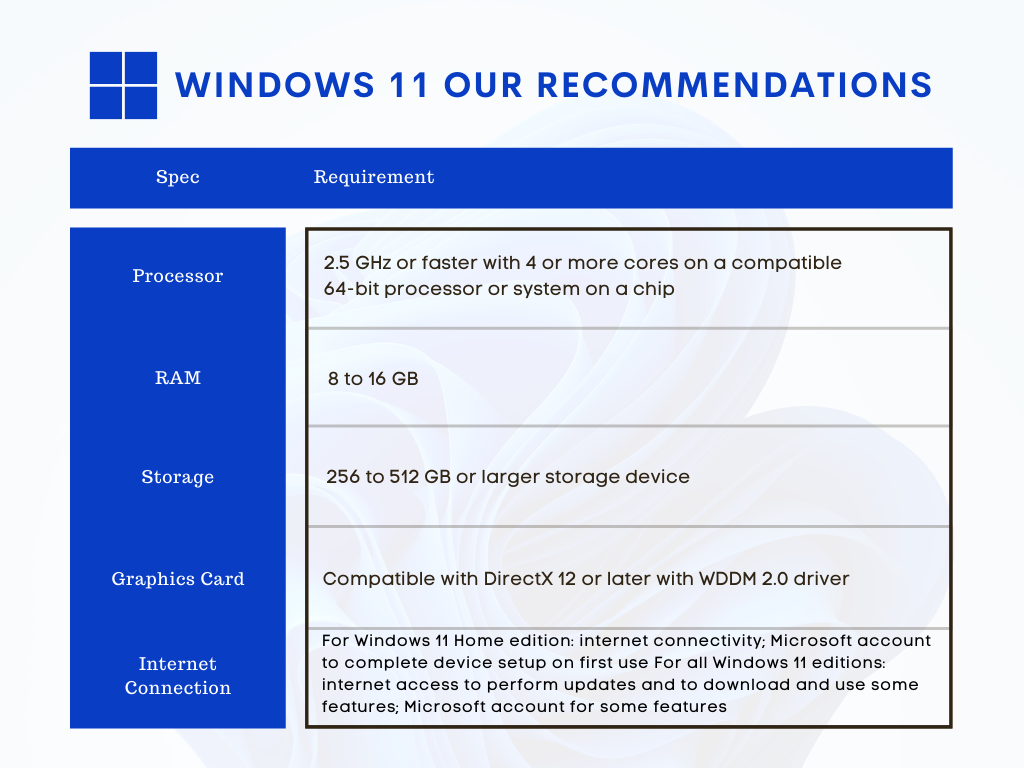
    We decided to list out our recommendations for system requirements that would most benefit when upgraded to Windows 11.

    Windows 11 Our Recommendations

    As you can see some requirements mirrored those set by Microsoft, but we boosted the recommended storage space considerably and also the RAM. When it comes to RAM we really recommend clients lean towards the higher end of the spectrum, 16 GB would be a better option for future proofing your device in our opinion.

    The same goes for the processor, 4 cores is really a bare minimum requirement for a device that runs smoothly and helps you complete your tasks (no matter how demanding).

    Minimum system specs should never be seen as the best option when assessing what level of device will fit your needs, they’re just the base mark software companies must set when considering older devices on the market. The minimum requirements lets consumers know whether what they already have will work with their software.

    Microsoft also has a tool for easily checking to see if your device is ready for Windows 11, PC Health Check, however as of writing it’s currently down as they make changes to it to be in line with the current recommendations they recently set.

    Windows 11 will not be out until later this year and these recommendations may change yet again as they gather data from the version they currently have out in early access. We feel confident our recommendations will hold up and continue to serve as a viable option for anyone in the market for a new PC or laptop.

    If you’re considering upgrading the machines in your business to make them “Windows 11 ready”, we can help. We’re a Microsoft partner and specialize in helping our clients manage their Windows applications and devices on top of a host of other IT services we provide. You can learn more through a free consultation here.

    Looking for more to read? We suggest these tech articles from the last week.

    This article was powered by Valley TechLogic, an IT service provider in Atwater, CA. You can find more information at https://www.valleytechlogic.com/ or on Facebook at https://www.facebook.com/valleytechlogic/ . Follow us on Twitter at https://x.com/valleytechlogic.