Tag: windows end of life

  • When is the best time to buy a new laptop? Plus our top laptop picks by category for 2024

    When is the best time to buy a new laptop? Plus our top laptop picks by category for 2024

    With Amazon’s Prime Day starting next Tuesday we know a lot of people will be interested in taking advantage of any laptop sales the e-commerce giant will have available to refresh an older device or bump up to better hardware, but is this the best time to buy a new laptop?

    There are actually several times throughout the year we see laptop (and devices in general) sales spike, including:

    1. Back-to-School Season (July to September): Retailers often offer discounts to attract students and parents preparing for the school year.
    2. Holiday Sales (November to December): Black Friday (the day after Thanksgiving) and Cyber Monday (the Monday after Thanksgiving) offer significant discounts. Christmas and New Year sales can also be a good time to find deals.
    3. New Model Releases: New laptop models are usually released in the spring (April to June) and fall (September to November). Purchasing a laptop just before or right after new models are released can lead to discounts on older models.
    4. End of Financial Quarters: Retailers and manufacturers may offer discounts at the end of March, June, September, and December to meet sales targets.
    5. Annual Tech Events: Pay attention to major tech events like CES (Consumer Electronics Show) in January. After such events, you might see price drops on older models.

    For Windows devices in particular, we often see a lot of new releases coming around in October when Windows big feature updates for the year typically drops (and if you’re still on Windows 10 which reaches end of life October of next year, this is a great time to upgrade to a Windows 11 or Windows 11 ready device).

    For our personal laptop recommendations, we’re both a Lenovo and Dell partner and recommend the following from each brand, first from Lenovo:

    1. Best 2-in-1: The Lenovo Yoga 7 functions in both laptop and tablet mode and is a great option for creative roles with it’s built in stylus and faster processor.
    2. Best Daily Driver: The Lenovo ThinkPad is an all-around great day to day model with long battery life and rugged components (especially if you spend a little more for the T series models).
    3. Best Workhorse: The Lenovo X1 Carbon is designed with business use in mind and the hardware can be upgraded for even the most demanding load with options for more RAM, faster processors and high powered video cards that will make this laptop work as hard as you do.

    If Dell is your favored brand we have a couple of recommendations for them as well:

    1. Best 2-in-1: In the 2-in-1 category from Dell we have the Dell Latitude, Dell even one ups Lenovo with the ability to fully go tablet mode and remove the keyboard entirely while keeping the same impressive performance capabilities.
    2. Best Workstation: The Dell Precision is Dell’s daily work model, with the focus spent here on providing just enough power to complete all your daily tasks and in whatever form factor you prefer (this model ranges from a travel sized 14 inches up to 17 inches for better viewing capabilities).

    While these are just some of our recommendations in a nutshell, Valley Techlogic clients receive the benefits of our procurement services which include helping them select a device that’s perfect for them and their workflow down to the smallest detail. If you would like to know how Valley Techlogic can assist you with making hardware choices for your business and more, schedule a consultation with us today.

    Looking for more to read? We suggest these other articles from our site.

    This article was powered by Valley Techlogic, leading provider of trouble free IT services for businesses in California including Merced, Fresno, Stockton & More. You can find more information at https://www.valleytechlogic.com/ or on Facebook at https://www.facebook.com/valleytechlogic/ . Follow us on Twitter at https://x.com/valleytechlogic and LinkedIn at https://www.linkedin.com/company/valley-techlogic-inc/.

  • Patch Management 101 – From Neglected to Automated; 5 Tips for Managing Patching in your Business

    Patch Management 101 – From Neglected to Automated; 5 Tips for Managing Patching in your Business

    If we asked a new client what they had in place for patching most of them would answer in one of two ways. Either they’re “pretty sure” patching is happening regularly, or they know patches have mostly been ignored for quite some time.

    Regardless of how they answered, the outcome is usually the same. We usually inherit managing systems that are way behind on patches. That’s because patching doesn’t start out being an automated easy process for most businesses, there is some effort required to get into a good patching process established.

    If patching is left up to employees for their devices, it’s typical for the “Remind Me Later” to become the permanent option when it comes to patching. Depending on their level within your company this can either be a bad idea to very risky (though any device can act as a threat vector when it’s connected to your network). If a device that has admin level access is unpatched and it’s basically handing the keys to your kingdom over to bad actors.

    That’s because many patches are released specifically to address an active security concern. While functionality and quality of life improvements are also addressed via patching, active security concern patches can be released with little notice and should not be ignored.

    We’re also aware many users have a negative association with patching, especially if they’ve installed patches in the past and encountered bugs or issues. While these patches can be rolled back, it may not be simple to do so especially if your machine hasn’t been set up that way.

    There’s also patches for IoT (Internet of Things) and peripheral devices that aren’t as simple as clicking “Update Now”. Many times, patching these devices involves going to the companies website, downloading the patch, and manually installing it. With routers in particular patches are typically released to address a very serious security threat. We reported on a series of Netgear routers which when unpatched could easily be taken over by an intruder.

    Now that we’ve established why patching is important, here are five ways to make it more manageable:

    1. Create an Inventory of Devices Within Your Business: To manage consistent patching across the board you first need to know what you have. It’s a good idea to keep an inventory of all your devices (even peripherals or handheld devices like tablets).
    2. Create Consistency for Work Devices: For devices you or your employees work on, like laptops and desktops, it’s a good idea to try and maintain consistency. Meaning if you’re applying a patch to one of them you should apply it to all of them. That way it’s not a mishmash of various updates across your business. This will also make it much easier to troubleshoot any issues.
    3. Make Sure They’re Running the Latest OS (Operating System) Too: For Windows devices, it’s also important to keep them up to date with the latest OS version. Windows will discontinue patches for operating systems that have reached end-of-life. This doesn’t mean they no longer require patching; in fact, these devices are often targeted by hackers specifically because they can no longer be maintained.
    4. Also, for Windows Devices Have a Group Policy for Patching: This is an advanced tip, but you or your current IT provider can setup a group policy to make sure patches are occurring on a schedule for Windows devices.
    5. Work With a Professional to Create a Patching Plan: Patching is part of ongoing maintenance, and it can be difficult to address it on your own. At Valley Techlogic patching management is provided under every monthly service plan with us.

    Here is a mini report on how Valley Techlogic addresses patching management (as well as other routine maintenance items):

    Interested in learning more? Schedule a consultation with us today.

    Looking for more to read? We suggest these other articles from our site.

    This article was powered by Valley Techlogic, an IT service provider in Atwater, CA. You can find more information at https://www.valleytechlogic.com/ or on Facebook at https://www.facebook.com/valleytechlogic/ . Follow us on Twitter at https://x.com/valleytechlogic.

  • Windows Server 2012 and Server 2012 R2 are approaching end-of-life, what should you do?

    Windows Server 2012 and Server 2012 R2 are approaching end-of-life, what should you do?

    Upgrading your personal computer with the latest Windows can come with some challenges and hesitancy due to changes that are made to every new consumer and business version of Windows for personal computers.

    UI changes and increased specifications both come to the forefront for our customers when making these changes, but for servers that decision process feels even more fraught with danger.

    On October 9th, 2023, Windows Server 2012 and 2012 R2 will be in their end-of-life. What this means is it will no longer be a primarily supported product by Microsoft, who understandably needs to focus their time and energy supporting more current products. What it means for customers still utilizing Windows Server 2012 (or 2012 R2) is that their servers may not receive crucial support updates that often prevent things like your server malfunctioning, software working as intended, or even security updates.

    With just under a year to go that gives you time to consider your options when upgrading to a more current software, or if it makes sense to pay for extended support through Microsoft.

    The Extended Security Updates (or ESU) program does not include any feature updates, the only updates your server will receive will be security updates only, and to expand on that further that will only be important or critical security updates.

    This may mean your server is still vulnerable to intrusion although much less so than devices going unpatched. Often times a device ending support is a green light to hackers to begin working on breaching these older devices now that they’re less secure.

    That problem is not unique to Microsoft either, even smaller devices such as routers or switches can fall under end-of-life and no longer receive critical security patches. Just look at the recent Cisco zero-day security announcement and their stance. They will not be patching the outdated routers to prevent security intrusion; the expectation is that customers that own those routers will need to upgrade to ensure their business is safe.

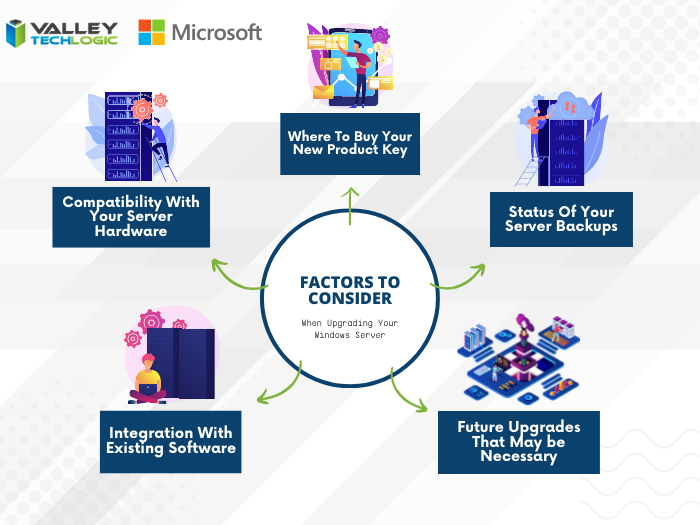
    There are some factors to consider however when it comes to upgrading your Windows serve, see our chart below:

    Five Considerations to Take When Replacing Your Windows Server

    The chart assumes an ideal scenario of either performing the update on a newly purchased server or taking the server offline temporarily. Performing an in-place Windows Server update can be risky and is best left for the professionals to decide whether it’s possible in each unique scenario.

    Purchasing a new server if your current server is too out of date to run the current version of Windows Server is tricky as well, there are more factors to consider with a machine that supports your entire business than with a device that’s only utilized by one or two employees.

    It’s also important no matter which avenue you take that you’ve properly backed up the existing server, if something were to go wrong not having that backup could mean losing all of your data. Which in many cases, is a catastrophic event.

    If we haven’t convinced you yet we’ll say it plainly, this is not a job that should be attempted by someone who’s just “computer savvy”. Upgrading your server requires an expert’s knowledge to execute in a timely manner and without losing your company data. Valley Techlogic can be that expert hand, learn more today with a free consultation.

    Looking for more to read? We suggest these other articles from our site.

    This article was powered by Valley Techlogic, an IT service provider in Atwater, CA. You can find more information at https://www.valleytechlogic.com/ or on Facebook at https://www.facebook.com/valleytechlogic/ . Follow us on Twitter at https://x.com/valleytechlogic.