Tag: windows upgrade

  • Support will end for Windows Server 2012 in October 2023, pros and cons of upgrading, replacing, or transitioning to the cloud

    Support will end for Windows Server 2012 in October 2023, pros and cons of upgrading, replacing, or transitioning to the cloud

    As promised continuing off the back of last weeks article on Steam ending support for Windows 7 and 8 we wanted to talk about the real elephant in the room for businesses coming up this year, Windows Server 2012 end of life date which will occur October 10th, 2023.

    On that date extended support for Windows Server 2012 will end. So, what does that mean for you? In general, we’ve seen that Windows products no longer receiving support from Microsoft have in an increased risk of cyber threats as hackers launch targeted attacks on these devices. In some cases Microsoft has stepped in to release patches in especially severe cases but it’s not a good idea to count on that.

    You can also expect your vendors will end support for Windows Server 2012 in October if they haven’t already, and it also will cause your business to fall out alignment with compliance to agencies like HIPAA or PCI and others. Without vendor or Microsoft assistance it may be difficult to receive support for these devices if they suddenly fail as well.

    All in all, there’s no good reason to do nothing with this news but many of our clients wonder when it’s time to upgrade, replace or even abandon the notion of an on-premises server altogether by moving their data to the cloud.

    There’s no easy answer to this question, we do have one quick suggestion though if October comes around and you’re still debating your options. If it’s possible to take the “walled garden” approach to any device running an outdated version of Windows, we highly suggest it. What this means is getting to a place where you prevent the device from accessing the internet and only access it with other devices via a firewall or some other means of protection. This will allow you to have a little bandwidth to stretch out making a plan to upgrade, replace or remove it.

    If you do feel like you’re reading to make a decision but need some assistance on which way to go, we do have five tips for when it’s time to replace a server:

    1. Warranty: Warranty is a big concern with servers, most servers have a useful life of 5 years though some manufacturers will offer extended renewals (not generally past 7 years though). Replacing hardware in a server is similar to replacing components of a vehicle, it can add up fast.
    2. Slow Running: If your server is a slog to work with, updating the operating system to a newer addition is not going to improve it.
    3. Expired OS: Having an expired operating system is a good reason to replace the server especially if the operating system was relatively new when the server was purchased.
    4. Storage Capacity: Storage capacity and solid state drive technology continues to improve each year, if you have a server with older hard drives or very small hard drives compared to modern standards it may make sense to start fresh with a new server vs trying to transition new drives into the old one.
    5. Software Requirements: If your software requirements have changed since the server was purchased and your old server can’t run your line of business software either well or at all, that’s a good reason to upgrade to a newer server.

    If you answered no to all of the above then it might be worth considering whether upgrading to a supported Windows server is an option for you. We recommend leaving this task up to the professionals, upgrading a server is not the same as upgrading a laptop or desktop device. If the answer to any of the above questions was yes, then we highly recommend replacing, but should you replace your physical server or switch to the cloud? See our chart below for guidance:
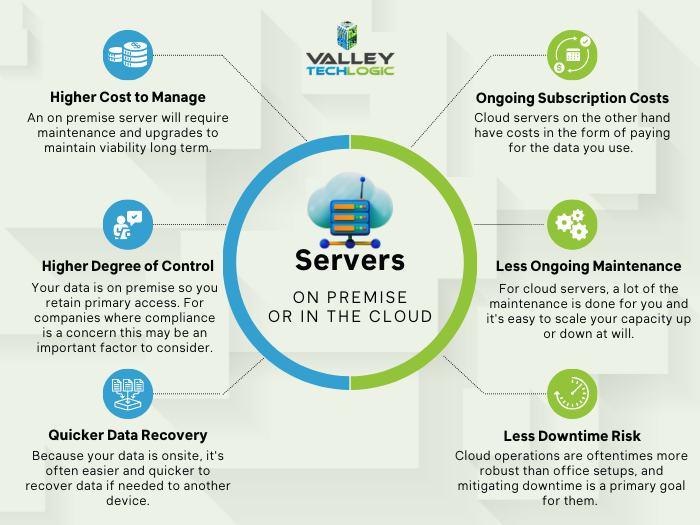
    Cloud or On Premise Server? Still need more help with your Windows Server 2012? Valley Techlogic has been a Microsoft partner since 2004 and we’re experts in all things Windows. Reach out today for a consultation.

    Looking for more to read? We suggest these other articles from our site.

    This article was powered by Valley Techlogic, an IT service provider in Atwater, CA. You can find more information at https://www.valleytechlogic.com/ or on Facebook at https://www.facebook.com/valleytechlogic/ . Follow us on Twitter at https://x.com/valleytechlogic.

  • New Year’s resolutions for business tech in 2023

    New Year’s resolutions for business tech in 2023

    The new year is upon us and with that comes the opportunity to make needed changes to outdated technology within your business.

    Our clients are usually split on when they want to make changes – for some it’s that mad dash towards the end of the year and for others it’s the fresh mindset that comes after the 1st of January. There really is no wrong answer when it comes to a tech refresh and any move you make will have lasting benefits that increased security protection and less chance of an outage bringing your office to a standstill.

    This can mean hardware or software upgrades but usually means both, and with Windows Server 2012’s end-of-life date occurring in October of this year we anticipate there will be many trying to replace their primary office server before that time. If you have a server current running Windows Server 2012 it probably will also need to be replaced (keep in mind the 2012 reflects the year it came out, so even if you bought your server a few years later it will still be older than the 5 year recommended lifespan for most servers).

    We don’t want to only focus on servers though, here are a few other New Years technology resolutions you can make for 2023:

    1. Move away from software that has reached end-of-life or is no longer supported. Windows Server 2012 Isn’t the only operating system that has recently reached end-of-life, Windows 7 is also no longer supported by Microsoft. Even peripherals such as switches or networking gear such as routers can have end-of-life events and will no longer be updated by the manufacturers.
    2. On the same token, consider moving more to the cloud. More and more of our clients are moving away from traditional in office servers by switching to online storage. There can be an upfront cost to doing this but it’s still often less than purchasing a brand new server if your existing one is on the outs. As a bonus all future maintenance will then fall to your cloud provider.
    3. Increase your security measures in the New Year. There’s no better time than the beginning of the year to begin tackling cyber security measures you wanted to put in place last Year over year the risks continue to increase so why not begin 2023 knowing your business is safe from a cybersecurity attack?
    4. Again in the same realm, begin or strengthen employee training on technology topics. As your employees come back from the holidays why not implement short training measures (our tool takes just 15-20 minutes a week) that could drastically reduce your risk?
    5. Finally, don’t let fear of a recession slow your growth. You may be shying away from making hardware purchases due to fear of a recession, but if existing outdated hardware is already slowing your business down from the productivity level you hope to have not replacing it soon could do more harm than good.

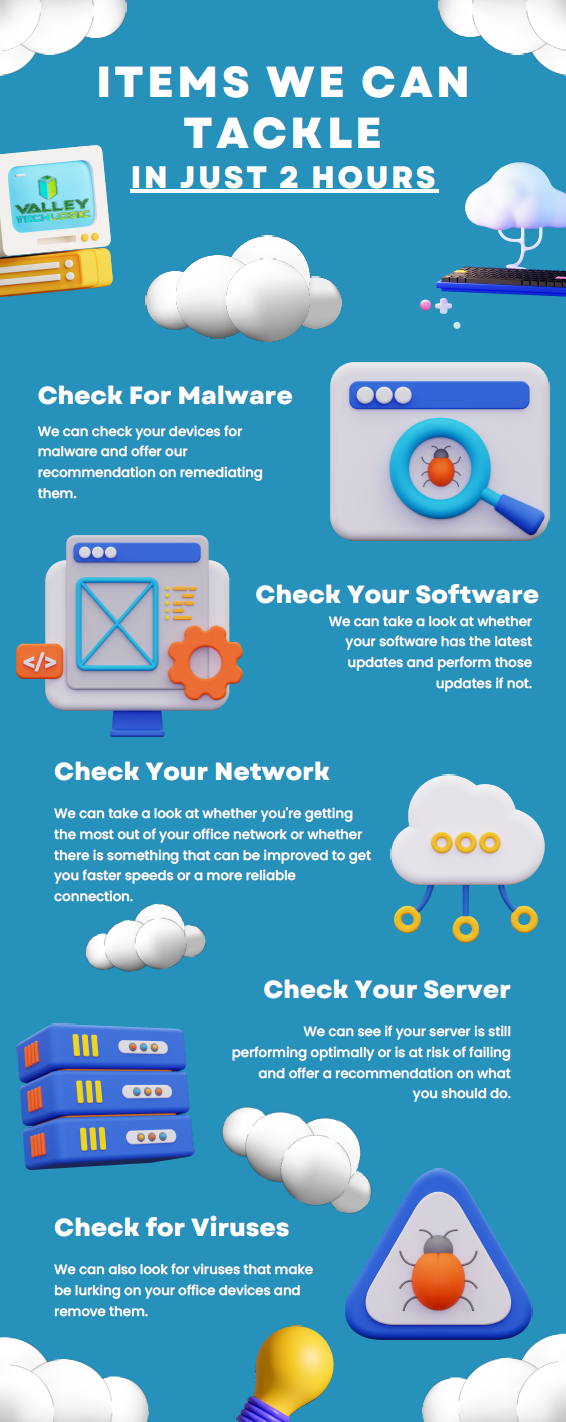
    If you’re not sure where to start with any of these topics, we can help. We’re currently offering a 2-hour service call absolutely free.

    Here are a few ways we suggest using this service call to put your business in a better position in 2023:

    Click to view the full size version.

    If you would like to learn more about our free service call offer, or would like a consultation on our services you can book one here today.

    Looking for more to read? We suggest these other articles from our site.

    This article was powered by Valley Techlogic, an IT service provider in Atwater, CA. You can find more information at https://www.valleytechlogic.com/ or on Facebook at https://www.facebook.com/valleytechlogic/ . Follow us on Twitter at https://x.com/valleytechlogic.

  • With Windows 11 out now, how many people are still using Windows 7?

    With Windows 11 out now, how many people are still using Windows 7?

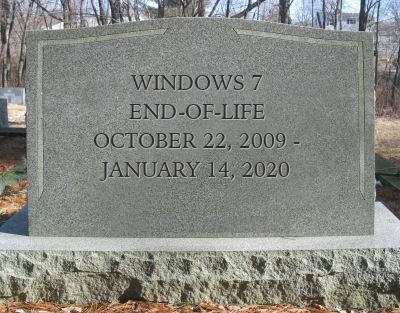
    Windows 11 arrived this year to a somewhat muted response that mostly can be attributed to a tempered rollout – many machines that would have been eligible for a Windows software upgrade in the past were deemed not eligible for the enhanced requirements found in Windows 11. The end-of-life date for Windows 10 is still a way off (October 14, 2025) but a surprising number of people are still using Windows 7 which had it’s end of life event over two years ago now, on January 14th, 2020.

    Microsoft 7 EOL Tombstone

    However, according to GlobalStats Windows 7 still has an almost 12% operating market share. While many of those are probably unused machines that still equates to a large percentage of Windows 7 users over 2 years past it’s end of life date.

    When an operating system is discontinued by Microsoft that means they stop providing support and updates for it, including security updates that protect users from ongoing threats. Even the FBI has strongly warned against continuing to use Windows 7 as it can make you an easy target for cybercrime.

    It can be challenging to move away from a system you know well and at this point upgrading probably means also purchasing new hardware, which during the microchip shortages exacerbated by the pandemic could be no small task (or expense). However, there are deals to be had on hardware now in 2022.

    It can be also difficult to find software that’s supported on an older operating system as updates are made to make them compatible with the latest generation of operating systems.

    We know that for some of our clients it’s actually the reverse, they’re utilizing a line of business software that no longer is being maintained or updated by the provider, but it still functions for their business. The caveat being they must use it on an older machine that hasn’t been updated.

    There are several inherent risks to this, including the first one being that that machine is an obvious choice as a threat vector for would be bad actors. The tenuous relationship between that software and the hardware that deploys it is also ripe for failure the longer you wait to replace it. Securing older hardware to be able to continue to use a discontinued line of business software will also be a significant challenge as time goes on.

    We’ve touched on comfort and convenience between prime motivation to continue using an unsupported operating system, but there’s also the technology challenge of deploying new hardware and software within your business. A major rollout is best left to the experts who can smoothly retrieve the data from your devices and help you make the transition to newer hardware.

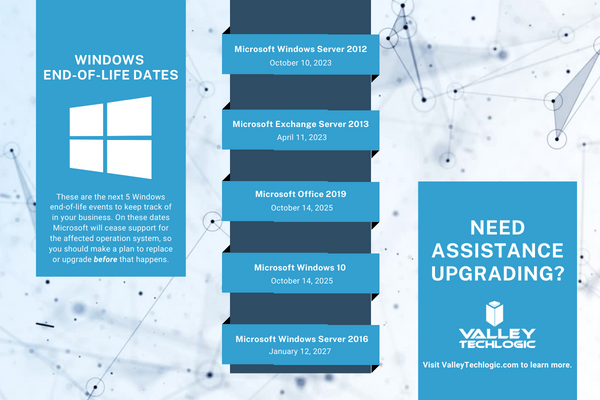
    At Valley Techlogic, we can even help you with procuring that hardware and making the best software choices for your business. This includes servers as well. Here is a list of the next 5 Windows end-of-life dates that you should be keeping an eye out for.

    Microsoft EOL Dates That Are Coming Up

    If for some reason you just can’t part with an outdated operating system at this time, here are three tips that will make it slightly safer until you are able to replace those devices:

    1. Make using an anti-virus and firewall a priority. This won’t offer you complete protection as many threats will seek to undermine the unsecured status of the device, but it’s better than being completely unsecured.
    2. Login to important accounts from another device if possible. We would not suggest logging into sites such as your banking website from a device this far out of date from updates.
    3. Utilize network-based mitigation strategies. This is again not foolproof strategy but separating your Windows 7 or other end-of-life devices from the rest of network will offer a slight buffer in the event the device(s) are compromised.

    Need assistance migrating away from devices that have reached their end-of-life date? Valley Techlogic can help, we’re a certified Microsoft partner and experts in all things Windows. Reach out to us today for a quick consultation to learn more.

    Looking for more to read? We suggest these other articles from our site.

    This article was powered by Valley Techlogic, an IT service provider in Atwater, CA. You can find more information at https://www.valleytechlogic.com/ or on Facebook at https://www.facebook.com/valleytechlogic/ . Follow us on Twitter at https://x.com/valleytechlogic.
  • Windows 11 system requirements – Will your computer be able to run it?

    Windows 11 system requirements – Will your computer be able to run it?

    Continuing our talking points about Windows 11 (which was officially announced June 24th of this year), we would be remiss to not talk about one very important thing – will your computer be able to run it?

    We know for business owners this question is even more loaded as you consider not only your personal machine(s) but also those of your employees. The initial system requirements looked pretty steep, requiring an 8th Gen processor and other specifications that would have phased out a lot of machines that are perhaps not even very old.

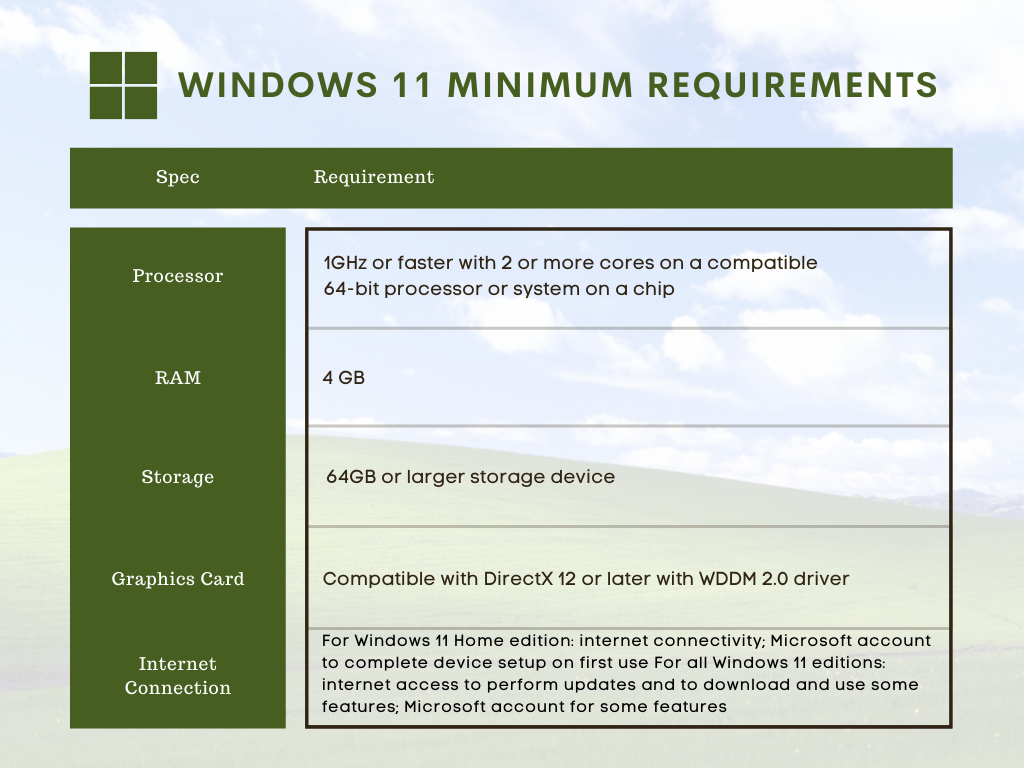
    However, Microsoft has since retracted their initially stated requirements in favor of a more modest range of specs that may still leave some very old machines out of the running but for anyone who’s replaced their computer in the last several years (which we recommend anyways) you should be fine. You can see the requirements in the chart below.

    However, minimum requirements are just one piece of the puzzle. By those markers most computers built in the last 5 years can run Windows 11, but what specs would allow it to run well and allow you to have access to the full benefit of all of the new features? Not only that, as we demand more of our computers we really need to consider optimizing them for our current usage.

    For instance, if you frequently are running out of storage space, or if having a lot of tabs open really bogs down your machine, you may find that the enhanced strain caused by a more demanding operating system could make using your machine a hassle to use. Or even just plain unusable.

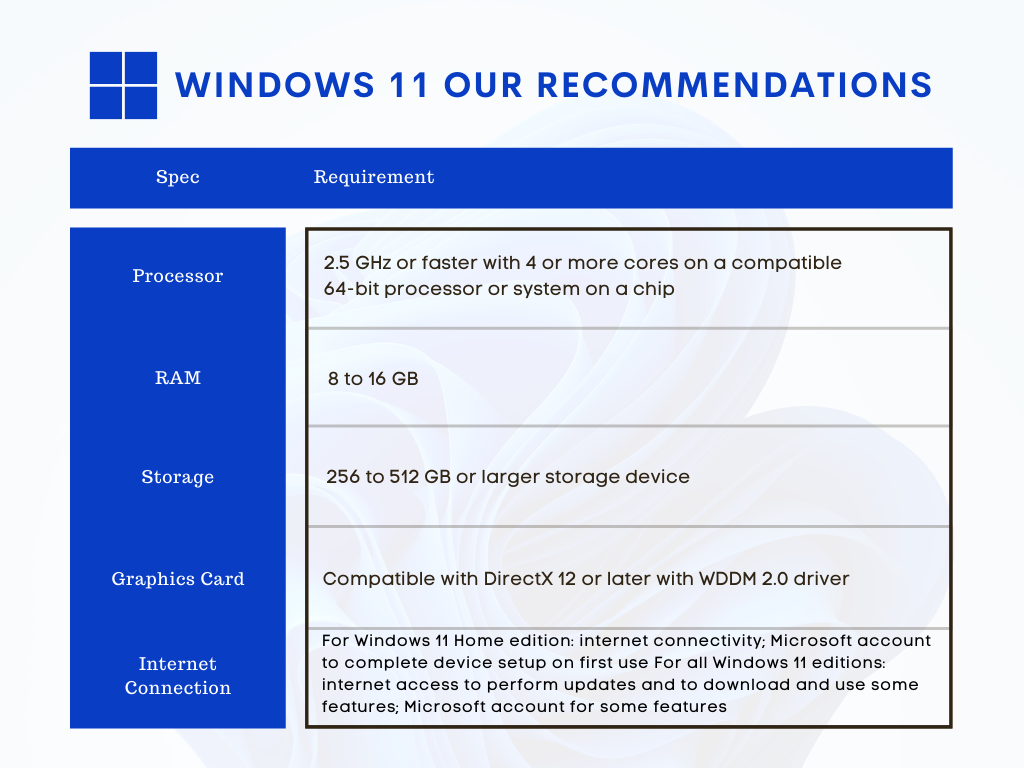
    We decided to list out our recommendations for system requirements that would most benefit when upgraded to Windows 11.

    Windows 11 Our Recommendations

    As you can see some requirements mirrored those set by Microsoft, but we boosted the recommended storage space considerably and also the RAM. When it comes to RAM we really recommend clients lean towards the higher end of the spectrum, 16 GB would be a better option for future proofing your device in our opinion.

    The same goes for the processor, 4 cores is really a bare minimum requirement for a device that runs smoothly and helps you complete your tasks (no matter how demanding).

    Minimum system specs should never be seen as the best option when assessing what level of device will fit your needs, they’re just the base mark software companies must set when considering older devices on the market. The minimum requirements lets consumers know whether what they already have will work with their software.

    Microsoft also has a tool for easily checking to see if your device is ready for Windows 11, PC Health Check, however as of writing it’s currently down as they make changes to it to be in line with the current recommendations they recently set.

    Windows 11 will not be out until later this year and these recommendations may change yet again as they gather data from the version they currently have out in early access. We feel confident our recommendations will hold up and continue to serve as a viable option for anyone in the market for a new PC or laptop.

    If you’re considering upgrading the machines in your business to make them “Windows 11 ready”, we can help. We’re a Microsoft partner and specialize in helping our clients manage their Windows applications and devices on top of a host of other IT services we provide. You can learn more through a free consultation here.

    Looking for more to read? We suggest these tech articles from the last week.

    This article was powered by Valley TechLogic, an IT service provider in Atwater, CA. You can find more information at https://www.valleytechlogic.com/ or on Facebook at https://www.facebook.com/valleytechlogic/ . Follow us on Twitter at https://x.com/valleytechlogic.