Author: rory-admin

  • Our top five strategies for fourth quarter technology planning

    Our top five strategies for fourth quarter technology planning

    The end of the year is nearly here and if your business is anything like ours you might find yourself busier than ever, you may not relish the thought of adding more to an already full to do list but adding these technology related items will put you in a better position this time next year.

    Optimizing your business for technology is more than just purchasing new hardware, in fact some major upgrades have no cost associated with them other than a bit of your time (which we do know is valuable and in short supply).

    Our top three tips that have no cost are:

    1. Take advantage of free security upgrades like Multi-Factor Authentication (MFA). According to InfoSecurity Magazine 90% of attacks can be prevented just by enabling MFA, and enabling it for most accounts just involves a button click.
    2. Evaluate your internet service. You may be overpaying for your current plan or not getting the best service for your money, if you have a legacy plan your internet service might be slower than plans available now. Also, if your contract lapsed a while ago, they might offer significant savings to enroll under another contract. We suggest evaluating your internet service first though before re-signing another contract. In our article from last week, we discuss what to look for when it comes to business internet.
    3. Inventory your existing technology assets. This step will really help you out when it comes to applying our tips for 4 and 5, but it’s also just a good idea. If you don’t know what you have it’s pretty easy for devices to go unaccounted for, and an accounted for device (especially something like a laptop) is a pretty significant threat vector to your business. We suggest creating an inventory worksheet now that includes all of your hardware to start and later on you can look at items such as peripherals which could including networking equipment, monitors etc.

    Of course, some technology upgrades do cost money, but we found making these purchases in quarter four can be really advantageous for a multitude of reasons. One, making technology upgrades now will give you a strong start for next year. Two, there are actually tax benefits you can take advantage of before the end of the year (such as Section 179). Three, you have greater insight into what your budget for spending is because most of us are doing are year-end tallies around this time.

    Our top two tips to make the most out of your technology spending for this year is:

    1. Use that asset list you created to evaluate aging hardware. Aging hardware is risky, they can fail spontaneously and may not have the most up to date security features. Hardware such as an office server that hosts the company backups, or key employee devices that are struggling to keep up with their day-to-day workload are items we suggest replacing ASAP.
    2. Of course, technology services are another area we recommend looking at. Why go into the new year with a service provider you haven’t been thrilled with? Making a change like this now will cement a better 2024 for your business. We have a kit for making the change you can find here.

    If you’re in the Central Valley, Valley Techlogic is also offering for a limited time $100 to any business that takes a meeting with us to hear about our services. See our flyer below to learn more about taking advantage of this offer or you can sign up here to get started.

    Looking for more to read? We suggest these other articles from our site.

    This article was powered by Valley Techlogic, an IT service provider in Atwater, CA. You can find more information at https://www.valleytechlogic.com/ or on Facebook at https://www.facebook.com/valleytechlogic/ . Follow us on Twitter at https://x.com/valleytechlogic.

  • Internet service terminologies explained and our top 10 recommendations for business internet

    Internet service terminologies explained and our top 10 recommendations for business internet

    If you’ve ever shopped for internet service for your home or business, you’re probably aware that it’s a little difficult to tell what you’re really buying due to the marketing efforts most providers have that are more about wooing you with their “blazing fast speeds” or “reliable up times” and less about explaining the actual service.

    In today’s article we aim to change all that by dispelling some notions that having a higher download speed is better (for businesses especially upload really matters) or that all the bells and whistles providers try to sell you are really worth it. For example, you’re not saving money if you sign up for a phone plan with your internet service if your office currently utilizes a VoIP solution – you’re just spending money on a service you don’t want or need.

    Speed and reliability do matter but it’s a good idea to look at the whole picture, let’s start with download speed.

    Internet speeds can come in two forms, symmetrical where the download and upload speeds are the same or asymmetrical where one speed (typically download) is higher. Download speeds matter when you’re trying to receive data to you. So, downloading files, web surfing, viewing videos etc. Asymmetrical internet service is typically less expensive than symmetrical internet service. That’s because it’s easier for a provider to service you with data than to take your data and send it somewhere else.

    For most businesses, download speeds are not as important. The files you receive are typically smaller and you’re not using the internet for gaming, or movie watching which are activities that benefit from a higher download speed.

    Upload speeds affect the data your device is sending, so sending files, uploading backups, video conferencing, all of these are directly affected by your upload speeds.

    Most of the time, internet service being marked as “business internet” is symmetrical and comes with a higher cost. It may be tempting to save money and just get your business connected with an asymmetrical consumer internet plan, but you may pay for it in the form of reduced reliability and impingement on your backups (which can have a catastrophic effect in a disaster recovery scenario).

    It also might feel like you’re getting ripped off if the plan with 1000 Mbps down and 10 Mbps up is a fourth of the cost of that 50 / 50 asymmetrical business plan – but for businesses the upload speed is often the thing that really matters.

    We’ve also found that for business internet users internet companies will allow you to be on your own circuit. To break this down, typical internet service is daisy chained. This means that your connection is connected to your neighbor’s connection which is connected to their neighbor’s connection – and so on and so forth. If one of your neighbors decides to download 3 terabytes of video one day your internet speeds will suffer.

    When you’re on your own circuit, the only one who can change the effectiveness of your internet connection is you.

    Another thing to consider is the type of internet, most people are familiar with cable which has been around for decades but there are actually more options available now. Such as:

    1. Fiber: This is similar to cable but can be seen as an upgrade, usually higher speeds are available via a fiber connection. It might also be helpful to note that many traditional cable providers (Comcast, Spectrum, AT&T etc) actually utilize fiber now in many cases and are in the process of upgrading lines all across the United States.
    2. DSL: If you’re more rural, DSL is often the only thing available to you and can be a viable solution if your office is small and/or does not utilize much data.
    3. Wireless: Similar to your phone service, wireless technology has grown leaps and bounds over the years and the speeds can often be comparable to cable. Wireless is a great option for businesses who have larger or outdoor facilities to provide internet services to employees who may be working further away from the main office.
    4. Satellite: This is another great option for rural businesses, there can be a higher cost to initiate service, but the speeds will be much better than those found with DSL.

    You can also consider merging some of these services for greater reliability. For example, we’ve helped clients acquire a symmetrical fiber plan that includes a free wireless backup. While the internet plan we choose was extremely reliable, that extra piece of mind that even if they had an outage to the primary internet service, they would still be able to connect via the wireless backup was something they didn’t know they needed but really appreciated having.

    Here are a few other tips when looking for a business internet service plan:

    Need assistance in selecting a provider or with looking for a new internet provider? Valley Techlogic can help, as we mentioned this is just a snapshot of some of the perks of being a Valley Techlogic client which includes expert tech advice, support and technology service, project planning and more. Set up a meeting with our expert sales consultant today to learn more.

    Looking for more to read? We suggest these other articles from our site.

    This article was powered by Valley Techlogic, an IT service provider in Atwater, CA. You can find more information at https://www.valleytechlogic.com/ or on Facebook at https://www.facebook.com/valleytechlogic/ . Follow us on Twitter at https://x.com/valleytechlogic.

  • AI explained and 4 simple ways to use it in your business

    AI explained and 4 simple ways to use it in your business

    AI or Artificial Intelligence has been all over the news as online tools have emerged that can do a variety of impressive things in the creative space such as copywriting, writing code, creating videos and images and much more.

    On a more technical level, AI is being used in medical applications for assisting doctors during surgeries or identifying suspicious tissue or masses in diagnostic images. The car you drive may be using AI through GPS to help you navigate a safer or more efficient route or for specific vehicles, autonomous driving. Advances in robotics grow via AI input each day, from minute applications such as cleaning robots to complex sensors that take in data and react to it in real time to make equipment used by a wide variety of sectors much safer or more efficient.

    Even on your mobile device and computer, AI input is found in abundance. The spam filter in your email? Powered by AI. Face recognition on your phone? That’s also AI.

    Our prompt was “Red haired girl sitting at desk with computer and cat.”

    We’ve found AI tends to have a negative association to it as well however, with some worried it may allow their employer to replace them for a computerized facsimile, some worried about the implications when it comes to privacy and autonomy and others worried on a grander scale what it will mean for humanity if AI ever reaches the level of being truly sentient.

    We would like to put some of these fears to bed, in a nutshell AI is exactly what we as a society make of it. When it comes to the creative pieces that have emerged from AI it’s a mistake to believe that those creations were spawned solely via technological input.

    In reality AI conjures up images, songs, and video by compiling the vast resource that is available to it via the internet. It takes human creations and fragments them to recreate them into something that matches your text prompt. The stylistic choice, the colors, the layout – all of this is garnered from human ingenuity that is then reiterated for your viewing consumption,via machine learning.

    The impressive part of AI is not the end product it provides to you, it is its ability to take so much information and compile it into something even remotely coherent. Even this is not something that’s spawned from the ether but is instead the net result of many decades of talented engineers with one goal in mind – to make many jobs simpler and safer to do.

    AI will not replace human ingenuity; it will do as any tool is designed to do – help us do more.

    Now that we have hopefully put some of your fears about AI to bed, you may be wondering how you can use AI in your business? Well, we have a few suggestions.

    1. Images. As we showcased above, AI is excellent for creating graphics that match your text input and can add a little bit of context or pizzaz to your designs or documents. Top Recommendation: AI
    2. Social Media Posts. If you own a business, you should ideally be posting to your social media platforms every weekday if possible (or at least three times a week). However, managing to squeeze content creation into your day to day can feel like a major chore. That’s where our top recommendation comes in, Canva allows you to create social media posts quickly and easily resize them for whichever platform you’re on (so you can make one post go further). Top Recommendation: Canva
    3. Editing: Just take a great group photo at work but realize there’s something really distracting in the background? Or maybe the colors are off, or it’s a little blurry? All highly fixable via Adobe Express, and you don’t need to be a graphic design expert. Best of all, it’s free. Top Recommendation: Adobe Express
    4. Text Prompts: While we don’t recommend leaving all of your content writing to AI, it can be a useful tool to help you get started or to help you reword a paragraph to be more persuasive or engaging. Top Recommendation: AnyWord

    Of course, it would be remiss of us if we didn’t mention you can get the best of human ingenuity and technological prowess by partnering with a technology service provider like Valley Techlogic. We pride ourselves on being at the forefront of technological innovation, and that includes advancements in AI.

    If you would like to learn more about how we can help you navigate this space and utilize automation and AI in your business today, you can schedule a consultation with us here.

    Looking for more to read? We suggest these other articles from our site.

    This article was powered by Valley Techlogic, an IT service provider in Atwater, CA. You can find more information at https://www.valleytechlogic.com/ or on Facebook at https://www.facebook.com/valleytechlogic/ . Follow us on Twitter at https://x.com/valleytechlogic.

  • Our how to guide on setting up MFA for your organization’s Microsoft 365

    Our how to guide on setting up MFA for your organization’s Microsoft 365

    In addition to major updates released for Microsoft Windows this month, Microsoft also released their Digital Defense Report for 2023. You can find it here.

    One page in the report caught our eye and that’s the five items you can enable that will block 99% of attacks. At the top of the list is enabling multi-factor (MFA). The other four items are: apply Zero Trust principles, use extended detection response (XDR) and anti-virus/malware, keep your systems up to date and protect your data.

    We’re zeroing in on enabling MFA today as it’s simple to implement (can be done today) and will increase the security of your account tenfold.

    The reason we say this is because the report also outlined that password-based attacks are also up tenfold, from 3 billion attempts per month in 2022 to 30 million per month in 2023. Microsoft says they have blocked an average of 4,000 password attacks per second over the last year. Attacks know many Microsoft users have not enabled MFA and are targeting those users specifically.

    It’s not a manual process either, many of these brute force attempts are being enacted by bots. Cyber criminals set these bots up and let them run, reaping the rewards from the stolen accounts they’re able to access. In addition to that, many credentials are still available on the web for a very low cost.

    We know many people have “breach fatigue”, news of yet another massive breach is not the major news topic it once was. It can feel much different though when it happens to you directly. If you currently re-use passwords for your accounts, it’s highly likely that password has been offered for sale on the web.

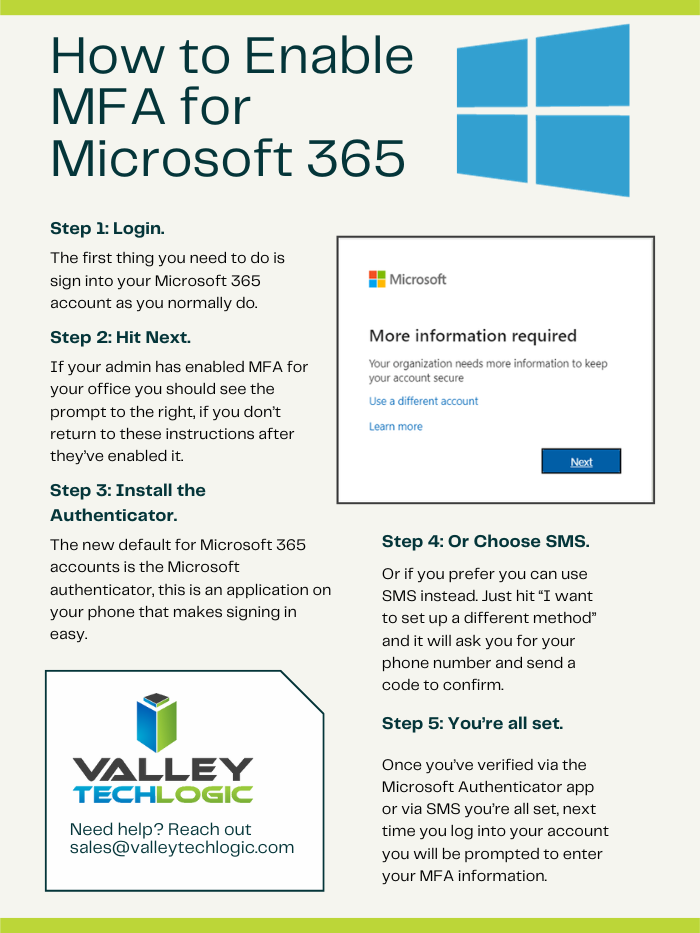
    Enabling MFA is strong protection against these methods and more. See our chart on how to set up MFA for your own Microsoft account.

    As you can see, it’s pretty easy to enable MFA for your own account but did you know you can also set it up from an organizational level to enable it for your employees?

    The steps doing that are as follows:

    1. Navigate to the Microsoft 365 admin center at https://admin.microsoft.com.
    2. Select Show All, then choose the Azure Active Directory Admin Center.
    3. Select Azure Active Directory, Properties, Manage Security defaults.
    4. Under Enable Security defaults, select Yes and then Save.

    Just to note, you must turn off legacy per-user MFA first before enabling global MFA in your organization. You can find that by navigating to Users > Active Users and you should see a tab on this page for multi-factor authentication. On this page should be a list of your users and you want to set each user to MFA disabled. Then you can loop back to our previous instructions and turn on the global MFA instead.

    There are also other global security settings in this section but before testing out different settings we suggest reaching out to your IT provider. MFA is a pretty non-intrusive security setting, but other settings may have unexpected consequences when it comes to you or your employee’s workflow. It’s best to evaluate your security options with a pro.

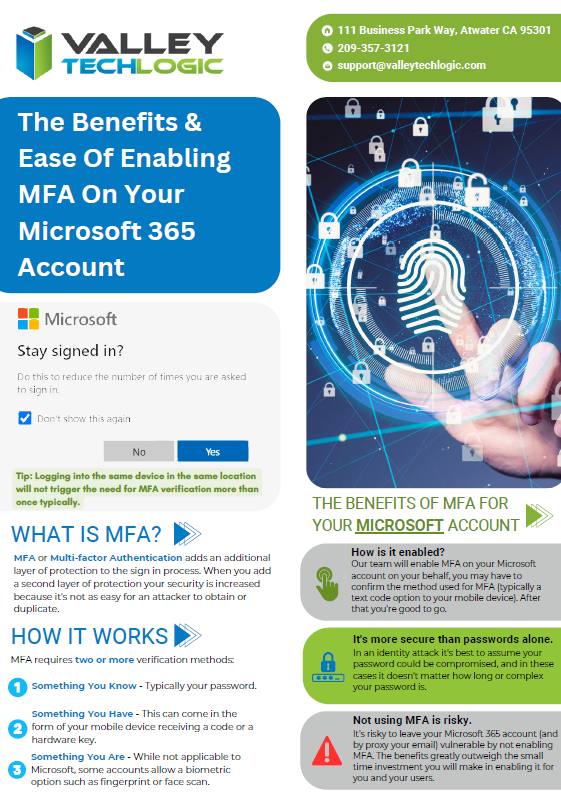
    Don’t have access to an IT pro? Valley Techlogic can assist. We are experts both in the field of cyber of security AND all things Microsoft. See our advertising flyer on our approach to enabling Microsoft 365 MFA for our customers.

    You can schedule a consultation with us today to learn more.

    Looking for more to read? We suggest these other articles from our site.

    This article was powered by Valley Techlogic, an IT service provider in Atwater, CA. You can find more information at https://www.valleytechlogic.com/ or on Facebook at https://www.facebook.com/valleytechlogic/ . Follow us on Twitter at https://x.com/valleytechlogic.

  • If you received a loud phone alert this week at 11:20 PST, you definitely were not alone

    If you received a loud phone alert this week at 11:20 PST, you definitely were not alone

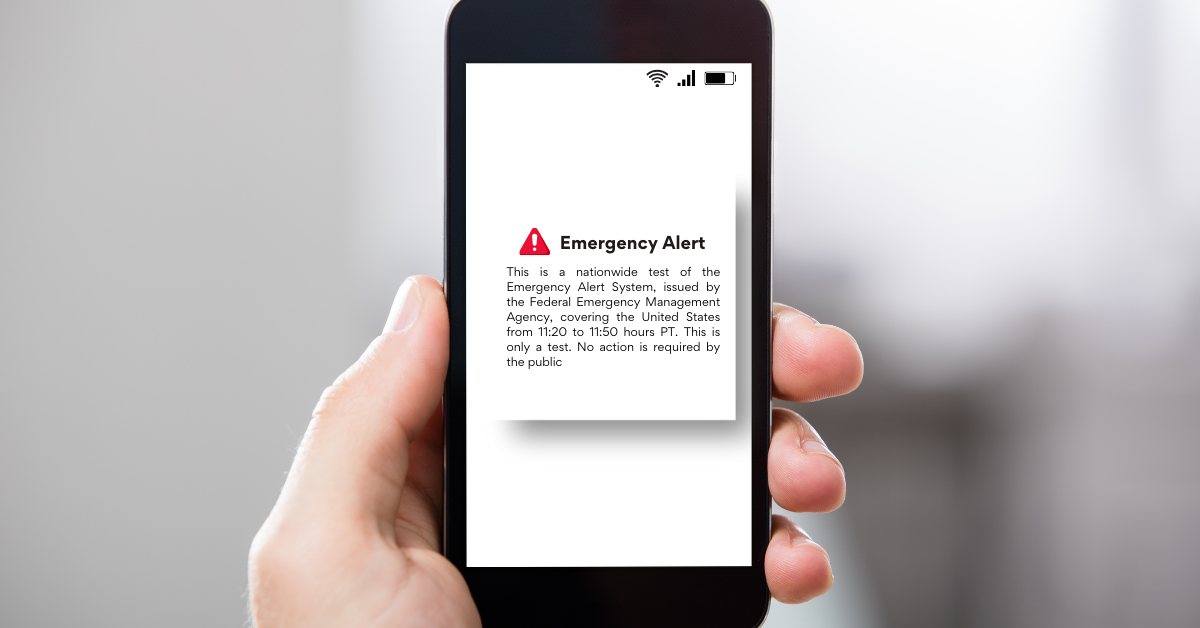
    At 11:20 PST on Wednesday phones across the nation blared a screeching sound with a prompt on the screen alerting users that this was a test of the National Wireless Emergency Alert system.

    In addition to cellphones across the nation this alert was also played on the TV and radio, although EAS (Emergency Alert System) alerts are common this was the first time a cellphone alert was used in conjunction with EAS simultaneously.

    The purpose of the EAS system was to be able to warn the public of any threats on a national scale. As television and radio viewership has declined in recent years. Adding cellphone alerts into the mix makes sense from an application level, though many were not aware that this was going to occur before this first alert hit their phones at a deafening volume.

    This test was conducted by FEMA and the Federal Communications Commission (FCC) and was conducted using the same systems that send alerts about severe weather or Amber Alerts locally. The tone and volume were chosen in addition to vibration to make the alert accessible to those with disabilities. In many cases the notification was received in English as well as Spanish.

    Legislation was passed in 2015 requiring FEMA to conduct nationwide tests every 3 years, so you can extrapolate that another test of this nature will be received in 2026. The test was designed so that even if your phone was able to opt out of alerts for weather etc. they would not be able to opt out of alerts from NWEA.

    Although having your phone on airplane mode during the testing window would prevent the alert from reaching your phone. The test was scheduled to last, until dismissed, for 30 minutes. The sound would also not be played for those currently on a call when the alert went out.

    There were some claims in advance of this test made by groups concerned that the government will have overarching control of your mobile phone during the test (or afterward) or concerns about their phones security.

    The system behind how this alert was delivered was constructed after an executive order by then President George W. Bush in 2006. Labeled Integrated Public Alert and Warning System (IPAWS) in a nutshell it’s a code that distributes an alert to supported wireless devices via the internet, though that also unfortunately makes it vulnerable to the same roadblocks that can make internet unavailable (such as being out of network).

    The Common Alerting Protocol (CAP) at the heart of the IPAWS system is not unique to the US but is instead a worldwide distributed protocol for both delivering alerts and studying the nature of the alerts that are being broadcast to look for trends and improve safety standards. CAP was adopted worldwide after a Geneva convention in 2006 and has been improved upon ever since.

    We realize we just delivered a lot of complicated information but in general, this alert was nothing to worry about and is a sign that the system is working. In the event of a national emergency, it’s important that the public can be warned so that they can take whatever safety measures necessary and to control widespread panic.

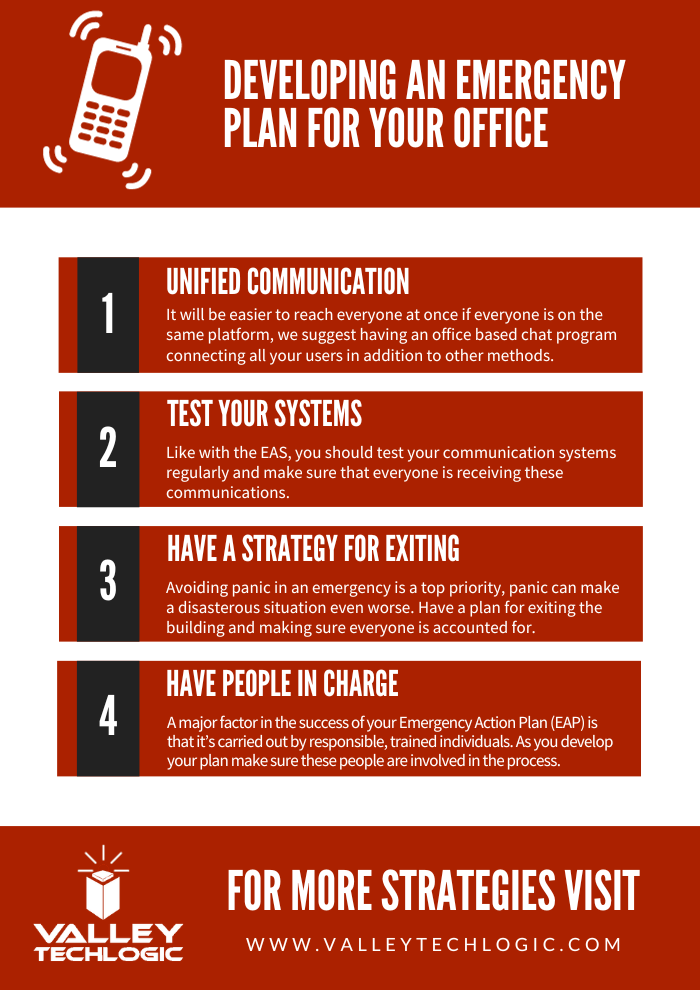
    This alert is an excellent example of effective communication and on a smaller scale, businesses can use this example to develop strategies in their own business for more effective communication. If you had to reach all your employees quickly, could you? If not, here are four things you can look at to develop a good emergency strategy for your office:

    If improving digital communication is something you would like to improve in your business, Valley Techlogic can help. We have experience in creating unified systems that includes increasing communication and collaboration, especially through our partnership with Microsoft. If you’d like to learn more, reach out today to schedule a consultation.

    Looking for more to read? We suggest these other articles from our site.

    This article was powered by Valley Techlogic, an IT service provider in Atwater, CA. You can find more information at https://www.valleytechlogic.com/ or on Facebook at https://www.facebook.com/valleytechlogic/ . Follow us on Twitter at https://x.com/valleytechlogic.
  • In the aftermath of the MGM cyberattack, five class action lawsuits have already been filed

    In the aftermath of the MGM cyberattack, five class action lawsuits have already been filed

    MGM Resorts are a staple on the Las Vegas strip, operating more than two dozen hotels and casinos around the world with nine of them being found in Las Vegas itself. You may have heard of the Bellagio, Mandalay Bay, and the Luxor? These are all MGM properties that host millions of visitors each year.

    Now some of those same visitors are wondering if the chain gambled with their private data. It was reported on September 11th that MGM was facing some kind of “cybersecurity issue” that trickled down to their facilities, with customers facing problems using the digital keys to their hotel rooms to slot machines not functioning as intended.

    Guests were left spending hours waiting to check in as the hotels shifted away from digital entry back to manual keys to get guests into the rooms they’d already paid for. It reportedly took 10 days for things to resume normal operations with some problems still occurring here or there.

    It’s now being reported that the cause of this hack was a persuasive phone call made by one of the members of a hacker group called “Scattered Spider” which has since claimed ownership of this attack. In a strange turn of events this group does not prioritize technology-based attacks such as malware or phishing but instead mostly engages in “Vishing”.

    “Vishing” or voice phishing is when someone calls you pretending to be someone else, they usually are purporting to be from a company you might do business with financially – such as your credit card company or banking institution.

    With number spoofing this type of attack can be very effective, and as the MGM attack shows even a massive organization is not necessarily immune from an attack if the bad actors is using the right attack vector for the job. That’s why it’s important to have several safeguards in place when it comes to protecting your systems and data.

    It’s alleged that a member of the Scattered Spider group found an MGM employee’s information on LinkedIn and was able to convince a member of their help desk to give them all the access they needed to perform the attack. Someone close to the group has said the original plan was to hack their slot machines but when that plan failed, they moved to plan B which was holding MGM’s data hostage for a payment in Crypto.

    Even though they’re now back to normal operations, MGM is not out of the woods yet. Five class action lawsuits have been filed with customers claiming the chain risked their personal identifiable information (PII) by falling for this attack. Two were filed against MGM directly, and three against their partner company Caesars Entertainment. We have talked about the legal ramifications. of cyber attacks before and it’s something companies should definitely be aware of, the insult of being hacked may not end just with the loss of data or systems being damaged – there may be legal consequences as well.

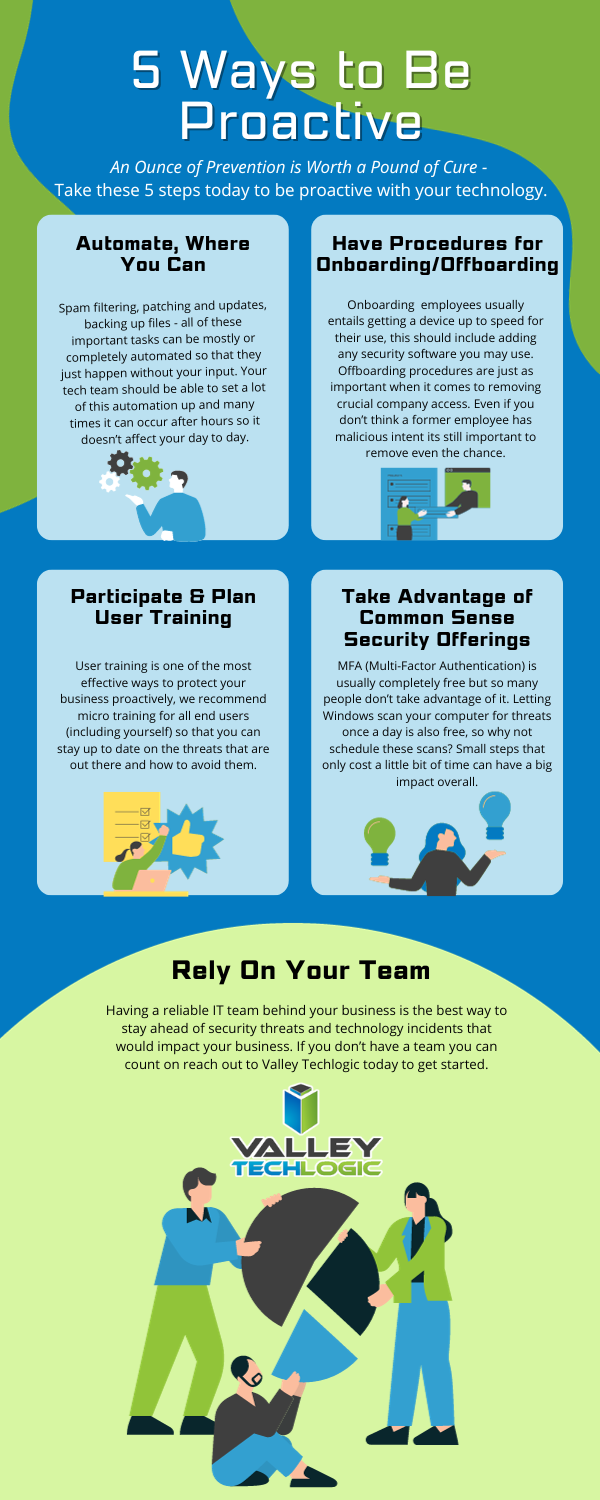
    Over 90% of successful attacks have a human element to them, with this most recent attack on MGM included in that figure. Cyber security training can go a long way in preventing cyber threats to your business, but vishing may still catch you or your employees off guard. You may be wondering how someone on the phone could possibly be so convincing that you give them access to your systems or financial accounts. We made a chart on the top 8 steps you need to take to guard against a vishing(voice phishing or)’ smishing (text message phishing) attack on your business.

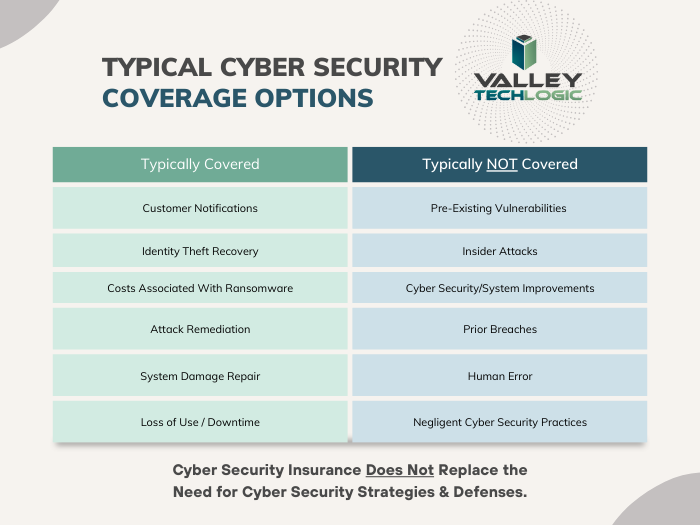
    Of course, as we mentioned the best defense against cyber attacks in general is a layered approach, that way if one wall is breached an attacker would still have to get through several more to do any damage to your business. That’s where a partnership with Valley Techlogic comes in – we take a layered approach to protecting your backups, protecting your systems, and protecting you and your employees from bad actors. Learn more today through a consultation.

    Looking for more to read? We suggest these other articles from our site.

    This article was powered by Valley Techlogic, an IT service provider in Atwater, CA. You can find more information at https://www.valleytechlogic.com/ or on Facebook at https://www.facebook.com/valleytechlogic/ . Follow us on Twitter at https://x.com/valleytechlogic.

  • Chrome browser extensions we recommend, and ones to avoid

    Chrome browser extensions we recommend, and ones to avoid

    Whether you use Chrome, Edge, Firefox, Opera or something else for your day to day browsing, there are browser extensions (or add-ons) that can make that browsing better – but which ones?

    All browser options these days have a dedicated section in your settings options to find extensions that are compatible with that particular browser. See our chart below for the steps to finding it in each of the browser options mentioned above.

    Reaching the extension store is really just the first step, actually choosing extensions that will make browsing more pleasant or more efficient for you is a whole other ball game. There are extensions for changing the appearance of your browser, adding functionality (like highlighting specific tabs) blocking ads and more.

    Since Chrome dwarfs the competition in market share (with a whopping 63.56% of traffic worldwide coming from Chrome) we’re going to focus on Chrome, but in most cases there will be a direct analog for these found in other browsers.

    Top 5 Chrome Browser Extensions We Recommend (And Actually Use Ourselves):

    1. LastPass: LastPass is a subscription-based password storage vault, and it has an extension that makes logging into your accounts super easy. For one low annual fee they will safeguard all of your passwords and via the extension, you can autofill those into sites you use to login. It will also alert you if you’re usually a duplicated password (giving you the option to make better choices there) and if you want to change that duplicated password – it also comes with a password generator built in.
    2. Ghostery: There are a lot of adblocker options available, but Ghostery is unobtrusive and also blocks something many of the other ones miss, trackers. If you’ve ever had an ad seemingly follow you around it’s because websites will deposit a “cookie” onto your computer through your browsing that then allows you to be tracked across the web. Ghostery puts these sneaky ads in their place and blocks that practice altogether.
    3. Loom: If you’ve ever wanted to quickly show staff how to navigate a website or service you use in your business, Loom can help. Loom lets you quickly record video and screen captures directly from your Chrome browser. You can also file share via Loom so you can send the videos you make directly via the same extension.
    4. Buffer: Managing your social media content and enacting a strategy that allows you to be consistent is harder than it sounds. When you get into the grind of your day it’s very easy to forget that daily Facebook post or to check in on that new LinkedIn campaign you started. Buffer allows you to publish, review analytics, add content ideas to a calendar and review social engagement all under ONE platform found directly in your browser.
    5. Dark Reader: This is a Chrome extension your retinas will appreciate. As a dark mode fan it can be glaring when you hit a website that doesn’t have a dark mode option, luckily there’s a Chrome extension that adds the Chrome Dark Theme to every site you visit.

    So now that we’ve covered some extensions we do recommend, what about ones we don’t? In general, it’s good to think of the extension stores as being similar to the application stores found on your mobile phone. These are added by independent developers and as with the Android/Apple shops there can be unscrupulous additions included with the intended features, like collecting your data or abusing your systems resources.

    As such we suggest using your best judgement when downloading and if you’re ever unsure, reach out to your tech support team to confirm. If you need guidance for this or other technology topics in your business, Valley Techlogic is here to help.

    We’ve been providing our technical expertise to businesses in the Central California area since 2004, reach out today to schedule a consultation.

    Looking for more to read? We suggest these other articles from our site.

    This article was powered by Valley Techlogic, an IT service provider in Atwater, CA. You can find more information at https://www.valleytechlogic.com/ or on Facebook at https://www.facebook.com/valleytechlogic/ . Follow us on Twitter at https://x.com/valleytechlogic.
  • Our Top 10 Technology Myths and Urban Legends, Debunked

    Our Top 10 Technology Myths and Urban Legends, Debunked

    The advent of the internet brought an influx of information right to our fingertips, and unfortunately not everything that proliferates on the internet is factual.

    With “fake news” undoubtedly being one of the official buzz word phrases of the 2020’s, how close are you reviewing these common place technology tropes? These are the top 10 technology myths and urban legends we see as a technology provider:

    1. Privacy/Incognito mode is DEFINITELY private: We’re sorry to say, if you think everything you’re doing in a private/incognito browser is hidden from view you would be incorrect. The way this mode works is it hides your browsing history from other people who may use your computer, but your ISP definitely can still see what you’re doing and depending on what’s been set up at work, possibly your IT Team/employer as well.
    2. Leaving your phone plugged in destroys your battery: Nope this one is also false, we’re not sure how the idea of “over charging” a battery came to be but there’s zero evidence that leaving your phone or laptop on a charger for an extended period of time will have a long-term effect on your device’s battery.
    3. At the same time, don’t let your device die completely before charging it: Letting a battery discharge completely before charging it again will not improve your phone’s battery life. Just charge your devices when they need a charge and let these myths about batter life go.
    4. Mac/Linux devices (basically anything not Windows) are virus proof: Nope again, the bad news is if a device has access to the internet, it’s going to be a target for hackers. If even your smart fridge Isn’t safe, what makes you think any computer or cellphone would be?
    5. Force killing apps save resources and speeds up your computer: If you have ever opened your computers task manager you’ve probably seen a lot of processes running, and you may have even force closed some of these processes to “speed” up your computer. It doesn’t really work that way unfortunately, many of the processes you see are background processes that your computer needs to run. Your computer will just open them again automatically, effectively making this activity a waste of time. You can, however, close applications you’re not using the regular way (and if you’re still having issues, it might be time to look at upgrading your device).
    6. Full bars mean the best service: We’ve heard it time and again, “I have four bars!” someone will exclaim, indicating that their cellphone service has reached its full potential. More bars just mean stronger signal strength, but unfortunately for you if you’re in a heavily populated urban area it means you’re sharing that same strong signal strength with everyone else in the area. Mobile service, just like any other internet service, is subject to bandwidth load so even with a strong signal you may still experience slow service depending on where you are and how many other people are around.
    7. You shouldn’t shut your computer down at night: This is another head scratcher for us, but we still see folks who believe they shouldn’t shut their computer down when they walk away for the evening. We’re happy to report that shutting down your computer will not harm it, in fact reducing the load on it each day by turning it off at night may even extend the life of your device.
    8. Magnets will wipe your data/destroy your device: There’s a little bit of truth to this one but it’s run amok for so long that the truth has been obfuscated for most folks – we’re happy to report your device will NOT be destroyed by a common refrigerator magnet. However, a really big industrial magnet could do some damage, so we suggest not placing your computer near one of those.
    9. Cellphones etc. can give you cancer: Nope, this one has been completely debunked. The radiofrequency that is emitted by your cellphone, tablet, laptop etc will NOT give you cancer.
    10. I’m a small business/single person, no hacker will bother with me: This is unfortunately, quite untrue. It’s estimated half a million U.S. accounts are hacked each day – many of these are just regular folks or small business owners like yourself.

    We hope this article helped in quashing some of these myths for you but if you have any other technical urban legends you’re not sure about, we’d be happy to weigh in (just jump on our live chat and ask away!).

    If the last one was a scary one for you and you’re a business owner in California, Valley Techlogic can assist. We provide cyber security services for our clients that make sure they won’t be part of that frightening statistic. Learn more through a consultation today.

    Looking for more to read? We suggest these other articles from our site.

    This article was powered by Valley Techlogic, an IT service provider in Atwater, CA. You can find more information at https://www.valleytechlogic.com/ or on Facebook at https://www.facebook.com/valleytechlogic/ . Follow us on Twitter at https://x.com/valleytechlogic.

  • Maximizing your tax deduction potential with Section 179

    Maximizing your tax deduction potential with Section 179

    It’s September which means we’re almost to the fourth quarter where most businesses look ahead towards end of year activities, it’s not unusual for us to see an increased interest in locking down new equipment and upgrades before year end.

    Each year we begin promoting the benefits of Section 179, you can learn more about it in our updated guide for 2023 or continue reading.

    In a nutshell, Section 179 is a tax savings benefit that allows you to deduct the cost of equipment you use for work from your (in some cases up to 100% of the total cost) from your tax expenses. When used correctly, this means you can purchase upgrades for your business and receive that money right back into your business when you file the following year.

    Section 179 is a permanent part of the tax code here in the United States but that doesn’t mean it’s static. Each year the deduction limits are adjusted for inflation. You can see on the chart below what this year’s limits are.

    You can choose to take the deduction in one lump sum or take a deduction for depreciation each year instead – it’s completely up to you.

    What equipment or technology purchases qualify for Section 179?

    1. New Equipment: This includes computers (as long as they’re used in your business at least 50 of the time), servers, backup devices, phone system hardware and more.
    2. Components: Such as hard drives and solid-state drives, RAM, video cards, monitors and more.
    3. Refurbished Equipment: You don’t have to buy new equipment to qualify for Section 179, in fact if you’re in the market for a new server and have been debating new vs refurbished, we have an article where we weigh in here. Equipment can also be financed or leased and still qualify.
    4. Software: If you’re looking to purchase software upgrades for your business this year – such as upgrading an older copy of Windows to the latest version – these would also qualify.
    5. Professional Services: Even professional services like ours can possibly be deducted under Section 179.

    We find many businesses are looking to make purchases before the year end because that’s when a clearer picture of their financials is available but be warned. For a purchase to qualify in 2023 these purchases must be made before December 31st. Even if the purchase was planned as part of this year’s budget, if it’s purchased January or later it will not count for this year’s taxes.

    If you’re looking for the exact math on a potential purchase and the savings you will net, we can recommend this calculator, it has been updated for 2023. It’s also important to note that the ceiling for your particular business is your net income, you cannot deduct more money than you made that year, however you can carry the deduction forward to the next year.

    We’ve spent some time discussing what does qualify under Section 179, but what about what doesn’t? The following items would not qualify under Section 179:

    1. Intangible Assets: This would include things like patents or copyrights as an example.
    2. Land: You cannot purchase land and claim a deduction for Section 179.
    3. Purchased from family: Unfortunately, you cannot claim purchases that are made through a family member. Even if the product itself would normally qualify, if the item was purchased through a sibling, parent’s or spouses’ separate business it will not qualify.

    Interested in making technology upgrades in your business and utilizing Section 179 in 2023? Valley Techlogic can help, we offer procurement services as well as technology solutions that are covered by this very useful tax code. Learn more today by scheduling a consultation.

    Looking for more to read? We suggest these other articles from our site.

    This article was powered by Valley Techlogic, an IT service provider in Atwater, CA. You can find more information at https://www.valleytechlogic.com/ or on Facebook at https://www.facebook.com/valleytechlogic/ . Follow us on Twitter at https://x.com/valleytechlogic.

  • Threat actors attack on cloud company leads to customers data being wiped completely

    Threat actors attack on cloud company leads to customers data being wiped completely

    Last week a Danish cloud provider called CloudNordic suffered a cyber attack that led to them losing all of their customers data in one fell swoop.

    The hackers who gained access to CloudNordic’s system immediately issued a financial demand that the company was unable and unwilling to meet and led to all of their data being encrypted by the hackers. The company said that no evidence of being hacked was left behind other than the encrypted data.

    This hack also effected their sister company, AzeroCloud, and both companies released identical statements on the ongoing issues they’re facing after this event, you can see the statement below translated to English from Danish.

    In an effort to start over the company has establish a new name and new servers and have offered to restore their clients to servers with the same name as they had previously, though they’ve also included instructions for customers who want to move their domains to new hosts.

    CloudNordic suspects the attack occurred while they were moving data centers, exposing them to already infected systems. As they were mid-migration it allowed the attackers access to their systems and even their own backups.

    CloudNordic states “”The attackers succeeded in encrypting all servers’ disks, as well as on the primary and secondary backup system, whereby all machines crashed and we lost access to all data,”.

    They’ve stated while the data was scrambled during the attack, they don’t believe the attackers copied customers data as is typical with ransomware attacks, so it’s unlikely individual customers will be targeted to be ransomed back their data.

    No known ransomware group has so far taken credit for this attack. The company CloudNordic and their sister company AzeroCloud have both said they plan to try to rebuild from here without access to their previous data.

    At Valley Techlogic, backups are an important puzzle piece when it comes to maintaining the security of your business. For many businesses, a cyber event where all of your data is lost would be difficult to impossible to recover from. Many businesses that suffer attacks like these end up going out of business.

    That’s why we created our triple layer backup plan, TechVault.

    With TechVault you not only have an onsite copy of your data, there’s also a cloud backup and what we call an archival backup.

    This archival backup is what makes this program we’ve created special, as it’s write once read many. Basically, the data can be copied back to you as many times as needed but once it’s on there, it cannot be deleted.

    This, in addition to the 24/7 monitoring we provide as well as firewall, antivirus and other protections means your data is virtually bullet proof.

    If you would like to learn more about what makes Valley Techlogic a cyber security leader in the Central Valley, schedule a consultation with us today.

    Looking for more to read? We suggest these other articles from our site.

    This article was powered by Valley Techlogic, an IT service provider in Atwater, CA. You can find more information at https://www.valleytechlogic.com/ or on Facebook at https://www.facebook.com/valleytechlogic/ . Follow us on Twitter at https://x.com/valleytechlogic.