Category: Backup and Disaster Recovery

  • Five Must Have Features in a Business Continuity Plan

    Five Must Have Features in a Business Continuity Plan

    While business continuity plans should cover topics that extend beyond the realm of technology, it makes sense that technology naturally moves to the forefront when much of the focus of a good business continuity plan focuses on the ability to perform business functions as normal.

    Business continuity is defined as “”the capability of an organization to continue the delivery of products or services at pre-defined acceptable levels following a disruptive incident”, and disruptive event can have many meanings. It could be a natural disaster, a cyberthreat, or even a short-term outage situation like if your office loses power or internet access.

    You should have plans for both short-term and long-term outages written into your plan. However some studies have shown that as high as 51% of businesses globally do not have a business continuity plan in place at all, and what’s worse – only 10% of businesses who experience a disaster and do not have a business continuity plan survive.

    Who should make plans for your business if not you? If you have no continuity plan in place you may find that you’re scrambling to make decisions under duress and attempting to delegate to third party vendors who have their bottom line in mind, not yours.

    So, how do you start in creating that plan? The first step is to have an honest look at your businesses risk factors. This includes environmental factors, does your area face brown outs when the heat starts to peak in the summer? Or snow that prevents employees from reaching the office in the winter at times?

    Maybe there are some things that are individual to you, such as touch and go internet access in your office building or phonelines that are less than reliable. Do you have a server on its last legs that’s been acting finicky? Its eventual failure should be written into your continuity plan.

    You also need to look at your cyber risks, if your employees aren’t being training on cybersecurity safety then that’s a huge factor that must be addressed and planned for. You need to ask yourself what you would do if your data was breached, or an employee email was compromised.

    It’s overwhelming but as with most things starting the process is the hardest part and having a candid look at your business could mean eliminating certain risk factors (like moving data away from the server on it’s last legs into a cloud solution).

    You may even find ways to make your business more efficient, if you know brown outs are common where your office building is located in the summer perhaps you would make a plan to have employees work from home more during that time. Or having your internet service provider address the issue of frequent outages rather than just rolling with them as they occur.

    All in all, these are the five things we would suggest you focus on as you make your business continuity plan:

    1. Technology – How will employees continue to work if your office operations have been waylaid.
    2. Power – If power goes out what kind of backup plan will you need to have in place, such as a generator to keep your server online.
    3. Communications – Do you have a standard way with communicating with your employees? If you need to get a message out quickly to all of them, could you presently do that?
    4. Vendors – Inform your vendors of the provisions you’ve put in place in case a disaster were to occur, and inquire what plans they have in place on their end (because a disaster for them could be a disaster for you).
    5. Data Protection – Most businesses require an online presence to continuing operations, you will need provisions for if your data is compromised or inaccessible. At Valley Techlogic we suggest having a multi-layer backup approach, so if one backup is compromised you will have the others to fall back on.

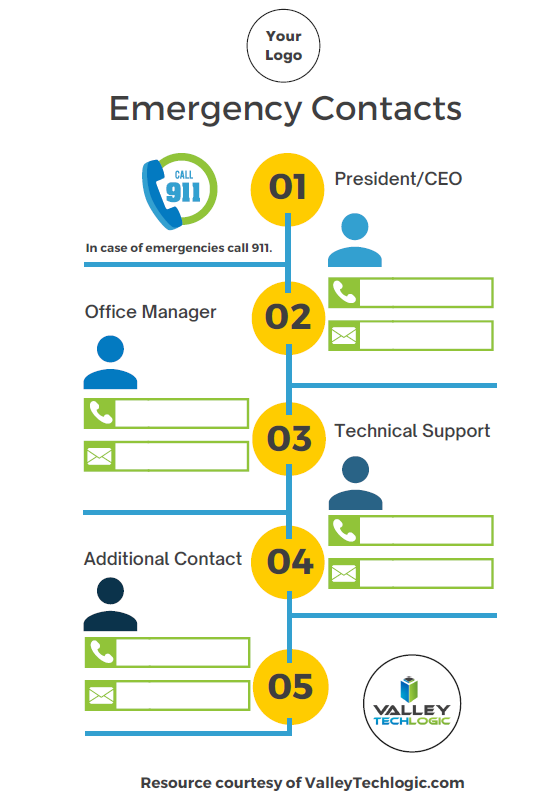
    To get you started, we’ve prepared this emergency contact worksheet for your employees. You can fill in who they should begin to reach out to and what steps they should take if an emergency occurs. If you would like us to personalize it with your logo just let us know.

    Click to grab the full size version for your business. Need it personalized? Contact us.

    Valley Techlogic can help you to begin establishing a business continuity plan and also help you with mitigating risks to your business, learn more today.

    Looking for more to read? We suggest these other articles from our site.

    This article was powered by Valley TechLogic, IT service provider in Atwater, CA. You can find more information at https://www.valleytechlogic.com/ or on Facebook at https://www.facebook.com/valleytechlogic/ . Follow us on Twitter at https://x.com/valleytechlogic.

  • The Massive Internet Outage and The Human Error Behind It

    The Massive Internet Outage and The Human Error Behind It

    A number of major websites were down yesterday morning, including Google, Amazon, Reddit and Twitch. The outage lasted for an hour and even broke services such as Twitter’s emoji.

    The outage occurred through Fastly which is a cloud computing provider and highlights how interconnected (and sensitive) the world wide web really is.

    The error occurred with something called the Content Delivery Network (CDN) which is a geographically distributed network of proxy services and data centers. They came about when performance bottlenecks in the 90’s were causing slowdowns, especially as use exploded.

    By distributing the load it allowed for the faster connectivity and increased bandwidth we enjoy today, along with better reliability. CDN nodes are deployed at multiple locations, and while the entire internet won’t go down if one is affected, as yesterday proves it can still cause significant issues.

    So, what caused yesterday’s issue in the first place?

    Believe it or not the thing that brought down all those major players was actually a customer error. A dormant bug in Fastly’s code reared it’s head on Tuesday when a customer changed updated their settings.

    This setting change (which was a valid configuration) triggered a specific circumstance which activated the bug and caused Fastly servers to begin reporting errors throughout 85% of their network.

    Fastly claims they detected the error within one minute which allowed them to contain the incident within an hour. They say they should have anticipated this error could occur in their messaging on the incident. Fastly maintains one of the largest CDN’s on the internet.

    While it was a relatively short outage, the cost to the websites that were down is still staggering, Early estimates indicated Amazon alone could have lost $32 million in sales.

    This outage indicates how truly disruptive technology related downtime is. Even for small business’s the costs can be extreme. Look at our chart below to see just how much downtime costs can add up.

    A Chart With Downtime Costs

    We know these numbers seem extreme, but if you tally up potential sales lost and the cost of just running your business during an outage – it really can add up fast.

    If you’d like to learn more about what downtime really costs you, as well as how to prevent it, we have a free report on this topic you can find here.

    We help the business’s we support prevent unnecessarily downtime every day. If you’re finding yourself navigating this and other technical problems – we can help. Visit our plan page to see if Valley Techlogic could be a good fit for your business.

    Looking for more to read? We suggest these tech articles from the last week.

    This article was powered by Valley TechLogic, an IT provider in Atwater, CA. You can find more information at https://www.valleytechlogic.com/ or on Facebook at https://www.facebook.com/valleytechlogic/ . Follow us on Twitter at https://x.com/valleytechlogic.

  • What’s the difference between a regular data backup and an archival backup?

    What’s the difference between a regular data backup and an archival backup?

    We regularly tout the necessity of data backups, but there’s one kind of backup we really haven’t spent much time on, and that is archival backups.

    Backing up your data is an ongoing task or at least it should be. Whether it’s done daily or weekly, regular snap shots of your data make it easy in a data loss event to pull the most recent backup and get back to business as usual.

    Archival backups are much different. With these your data is pulled once and then stored in a safe location or online. Since these backups aren’t updated it’s not going to feature any recent changes but when it comes to cyber security safety in particular, they’re a great tool for protecting your data.

    Another great feature of these backups is that they’re immutable/write once read many
    (WORM), that means to make any changes to them is nearly impossible (this includes bad actors trying to do so!).

    In the event your network is compromised that may mean the hackers have gained access to your regular backups as well, they may even be holding your accounts hostage in a ransomware attempt. If you have an archival data backup this may be the key to gaining access to your accounts again without paying the ransomware.

    Also, because this backup is separate from your network it will be almost impossible for it to become compromised.

    While we’re explaining the difference between regular backups and archival backups it might be a good time to also explain the different daily/weekly backups that can be performed.

    1. Full backups – A full backup entails all of your data being backed up every day. This will take more time and is in most cases not necessary but if you want a more detailed record of your files you may choose to do this.
    2. Incremental Backups – Incremental backups will only copy data that has changed since the last backup. Your backup application will track and record the details of that backup and update the files that have been changed or modified in some way.
    3. Differential Backup – This is similar to incremental backups, but the difference is it will pull a full backup once and then if things have changed since that backup it will again pull another full backup of those files. This will pull less data then a full backup but more data than an incremental backup.

    If you have a small set of data then a full daily backup may make sense for your business, if you have a lot of data incremental or differential data backups may be a better fit. Each situation is unique and it’s a good idea to have an evaluation done of your specific circumstances.

    Any kind of backup is better than no backups at all but one that falls short of your needs may still leave your business in the lurch if a data loss event occurs.

    Also figuring out where to store your data can be a complex topic too. At Valley Techlogic we’re recommending a triad approach to data storage. With onsite, cloud and archival data backups the businesses we support can rest assured their data is absolutely safe and retrievable.

    This all sounds very complex but once the solution is in place, you’ll feel better that you have it. Also, the integrity of your backups should be monitored regularly by your tech team as even a backup can fail. If you need some assistance in choosing the right backup solution to you we would be happy to have a consultation with you.

    Techvault


    Looking for more to read? We suggest these tech articles from the last week.

    This article was powered by Valley TechLogic, an IT provider in Atwater, CA. You can find more information at https://www.valleytechlogic.com/ or on Facebook at https://www.facebook.com/valleytechlogic/ . Follow us on Twitter at https://x.com/valleytechlogic.

    Looking for IT Services in Fresno, Modesto, Stockton, Ceres, Atwater, Merced, Visalia or Lodi? We cover all these areas and more!


  • Ransomware and Small Businesses: Why Some of Them Just Pay It

    Ransomware and Small Businesses: Why Some of Them Just Pay It


    One of the biggest misconceptions among small business owners is that their company is too small to be the target of many cyber crime events – including ransomware. Statistically, this couldn’t be further from the truth.

    In 2019 205,280 businesses submitted files that were victim to a ransomware attack, and 71% of those attacks were aimed at small to medium sized businesses. The average payout was $41,198, but many payments are significantly higher. Could your business withstand losing a lump sum of money right now?

    Luckily for many businesses the use of prevention tools and having a proactive tech team means you won’t have to, but what if you’re not so lucky? Why do some businesses just pay the ransomware?

    For many businesses their computer systems are directly tied to their day to day operations. So, if your files are being held by a hacker (or many times a group of hackers) you’re basically shut down. As a business you require your day to day operations to remain sustainable, but for many the margin for sustainability and being out of business is razor thin.

    This means their business won’t survive an extended downtime while they wait for authorities to try to get their files back (if they ever do). So, they just pay the ransom.

    Another scenario is if you’re in a sector where client confidentiality is paramount (think healthcare or finance), then the leaking of those details and the fines incurred will also put you out of business.

    When it comes to ransomware the best method of protection is prevention. This means making sure your computers remain up to date – as of this posting there is a dangerous worm targeting Windows machines that haven’t been updated (learn more here.) It also means having a comprehensive security suite protecting all the machines attached to your network (even mobile ones!).

    Finally, the best means of protection is having a good IT team backing your business – and backing up your important files! Your tech team will often be able to restore from backup if you DO get hit by ransomware despite having the other methods of protection in place. Their backup could literally save your business.

    If you’re in the Central Valley and don’t feel 100% confident your business will be protected in the event of a ransomware attack, reach out to us today.

    This article was powered by Valley TechLogic, an IT provider in Atwater, CA. You can find more information at https://www.valleytechlogic.com/ or on Facebook at https://www.facebook.com/valleytechlogic/ . Follow us on Twitter at https://x.com/valleytechlogic.

    Looking for IT Services in Fresno, Modesto, Stockton, Ceres, Atwater, Merced, Visalia or Lodi? We cover all these areas and more!

  • 10 Tips for Staying Safe Online When Working from Home

    Woman working at desk

    In light of the ongoing health crisis many of us are placed in the unusual position of working from home. While you may have concerns about keeping up your usual level of productivity and being able to communicate effectively with your coworkers while working in separate places there may be one issue flying under the radar, how do you stay safe online while working from home?

    It’s unfortunately not a given, in many work places you have an IT team that maintains (or should!) a high level of security for your office computers and network. These same measures are not in place on your home network or on your home computer.

    With so many of us working from home hackers may be seeing this as an opportunity to access your company’s private data via unsecured personal computers and home networks. These 10 tips will prevent this from happening.

    1. Don’t reuse passwords. If you’re able to choose your own work passwords it’s important they’re varied, if hackers get access to one of your accounts and you use the same password for everything then they have access to all of them.
    2. Practice good password safety. It’s imperative that passwords for your work accounts follow good password safety practices. Hackers may be able to use your work accounts to access the rest of your company’s data. If you set your own password make sure it follows the rules of 16 characters in length, mixing characters and avoiding dictionary words if possible.
      Also destroy any written copies of your password, real life phishing exists! Use a password manager like LastPass instead.
    3. Secure your home network. It’s shocking how many home networks don’t have a password at all, or if they do it’s a single word with no mixed characters or even your router’s default password.
      This is not a good idea! Hackers can use your network to access your home machine, and from there it may be game over. Like the tip above practice good password safety when it comes to your router’s password.
    4. Enable 2-factor authentication if it’s available to you. Many laptops these days feature security measures such as facial recognition or fingerprint readers that will help keep your device safe. Don’t forget to enable the same feature on your phone!
    5. Speaking of 2-factor authentication. You may find that your workplace uses 2-factor authentication to secure the applications you use on a daily basis to do your job, if they don’t bring it up! This will further prevent people from accessing your company data.
    6. Install updates. At work your IT team is probably installing updates for you, on your home device you’re responsible for doing so. In general, you shouldn’t be ignoring updates but while accessing your company accounts it’s even more important.
    7. Practice good online safety. The security measures enabled on your company network may prevent a total takeover in the case of someone accidentally downloading malware, this is not so at home.
      Don’t open attachments from senders you don’t know. Be careful which websites you visit, and always have your firewall enabled!
    8. Be careful with public networks. During this time, it might be tempting to get out and at least work outside at a café or somewhere with public Wi-Fi. However, this public Wi-Fi may leave your machine vulnerable, especially if you’re not practicing some of the safety measures above.
    9. Make sure your work is backed up. You’ll probably need some help from your IT team for this one but ensure the work you’re doing is backed up to your office servers or saved in some way. Recovering lost data from your home machine alone may be more difficult.
    10. Last but not least, use an anti-virus software. Find out which anti-virus software your company IT team recommends, or if you need a recommendation reach out to us. It’s extremely important for staying safe online.

    We hope these tips help. For those not working remotely or for tips on staying safe while in public right now, we recommend referring to the CDC Website for the most up to date information: https://www.cdc.gov/coronavirus/2019-ncov/index.html

    This article was powered by Valley TechLogic, an IT provider in Atwater, CA. You can visit us on Facebook at https://www.facebook.com/valleytechlogic/ . Follow us on Twitter at https://twitter.com/valleytechlogic.

  • Window’s 7 EOL of Life Is Coming Soon, But There’s Still Time to Prepare

    14th on a Calendar
    The January 14th is almost here.

    January 14, 2020 will be here in less than three short months, and there are probably many out there that haven’t prepared to make the switch off Windows 7 (or Windows Server 2008 which also ends support on the same day). In fact, an estimated 32.8% of all PCs running Windows are still running Windows 7.

    We know it can seem like a hassle to upgrade and you may be thinking what’s the harm in leaving my computer as is? We’d like to explain why that’s a bad idea and simple steps you can take to make the migration off Windows 7 easier.

    If you stay on Windows 7 after support ends your PC will still work, but it will be more vulnerable to malware and other security risks. Regular Windows updates provide crucial protection to exploits that may especially exploit vulnerabilities in your operating system or programs run by that operating system.

    Hackers may also choose to target those who have decided to stay with Windows 7 after January 14th. You may find yourself up creek without a paddle if something happens to your PC after Windows support ends.

    It doesn’t have to be this way though, making the switch from Windows 7 will probably not be as difficult as you may be expecting. In fact, a Windows 7 client upgrade may take an hour – or less – if your computer has a solid state drive (SSD).

    If you have an older mechanical drive it may take a bit longer, but it is probably not the multi-day event you may have been expecting.

    You shouldn’t attempt an update from Windows 7 to Windows 10 without a backup, and this is an excellent time to review your backup plan in general (especially if you don’t have one!). You most likely will not lose any files though and should find yourself up and running the same day with a brand new and more secure operating system.

    We’d like to take the time to note that migration from Windows 2008 server to newer editions of Windows server is a more complicated process that should not be attempted without professional help.

    If you own or work for a business in Central California, Valley TechLogic can assist you with this task. Reach out to us today at 209-357-3121.

    This article was powered by Valley TechLogic, an IT provider in Atwater, CA. You can also reach us on Facebook at https://www.facebook.com/valleytechlogic/ or on Twitter at https://www.twitter.com/valleytechlogic.

  • Why every business needs a documented backup and disaster recovery strategy

    Why every business needs a documented backup and disaster recovery strategy

    As the proverb goes, failing to plan is planning to fail. Now that businesses have become so reliant on modern technology, more hangs in the balance than ever before. Solutions such as cloud storage and automation offer better opportunities to secure your most valuable business asset — digital data. That’s why backup and disaster recovery are vital to your entire digital strategy.

    Protect your business from unexpected events

    Despite the availability of solutions that can secure the continuity of business operations during almost any type of incident, most organizations never reopen after a disaster or close their doors within a year. Disasters include cyberattacks, human error, hardware failures, and natural disasters. While there are many steps you can take to mitigate the effects of these disasters, you won’t get too far without a documented business continuity and disaster recovery strategy.

    Cloud computing makes it possible to build a location-independent business that transcends physical borders. Even if your primary workplace is rendered inoperable by a flood or fire, your employees can continue working from a secondary facility or even from home if all the apps they need are hosted in the cloud.

    Bring peace of mind to your employees and customers

    Today’s customers have more choices than ever before. That makes them a lot less forgiving of organizations that fail to address their needs and leave their data vulnerable. No one wants to hear excuses like your network falling victim to a cyberattack or a hardware failure. If you can’t provide the level of service they expect, it won’t be long before they set their sights on your competitors.

    When it comes to employees, the inability to recover quickly from an unforeseen incident will quickly put a dent in productivity and morale. Worse still, some might even be hesitant to use systems that aren’t adequately secured or backed up. No one wants to live in constant fear of making an apparently small and innocent mistake that ends up wreaking havoc to the entire business, which is why disaster recovery planning brings peace of mind to all concerned.

    Fulfill your data retention and compliance obligations

    Industry regulations make it a legal requirement for organizations to retain certain records for a predefined period of time, while also deleting personally identifiable data at the customer’s request. Many regulations require businesses to have a documented disaster recovery plan for this very reason. If, for example, your systems get taken down by a ransomware attack you haven’t taken every reasonable effort to prevent, your company could potentially end up facing litigation in addition to reputational damage and remediation costs.

    Backing up data isn’t just about securing your business through unforeseen events — it’s also about staying on the right side of the law by ensuring your critical assets are kept safe. Disaster recovery is a core component of compliance, even if many regulations are vague on the exact requirements involved. In the end, a documented backup and disaster recovery plan is about demonstrating accountability, confidentiality, integrity, and availability.

    Minimize disruption to your business

    Most businesses either never reopen after a disaster or close within one year due to suffering unacceptable losses. Fortunately, modern technology provides opportunities to greatly reduce or even eliminate any disruption to your operations during such an event. With a cloud-hosted backup and disaster recovery solution, your apps and data will always be available thanks to redundant servers and storage networks stored in off-site locations. With automatic rollovers and decentralized storage, there’s no need for your organization to suffer crippling downtime. That’s why backup isn’t just about keeping a copy of everything, it’s a process that covers every necessary step to ensure the continuity of your critical operations.

    Valley Techlogic provides backup and recovery services to businesses in Central California. Call us today to learn more about our tailor-made plans.