Category: Security

Security

  • When the business is you, how data brokers create and sell detailed information based on your browsing history

    When the business is you, how data brokers create and sell detailed information based on your browsing history

    This week, John Oliver of “Last Week Tonight with John Oliver” aired an eye-opening segment on the world of data brokers and how easy it is to create a very detailed profile about an individual simply from their online browsing history. We suggest watching that segment (which can be found on YouTube) but we also wanted to touch base on this topic ourselves and explain what happens, why this happens, and what you can do to browse safely (and privately) online.

    There are really five clear ways data brokers capture your information online. The first is browser cookies. A cookie is a piece of information that a website stores on your device that it can than retrieve at a later time. Most websites you visit now ask you to give them permission to store cookies and most of us do so without thinking about it because the process of declining can be complicated (or perhaps you won’t be allowed on the site without doing so).

    Data brokers both buy these cookies and also place cookies on your devices themselves, which allows them to offer you highly targeted advertising. We have two solutions to this once, Chrome and Firefox both have “Do Not Track” options which will not allow the cookies to track you from site to site. There’s also a browser extension called Ghostery which gives you the option of blocking trackers.

    The second way data brokers are able to obtain information about you is through mobile applications. Many mobile applications that are “free” are not really free, you’re paying for them through the wealth of information that’s gained about you, such as your GPS data or even your private pictures and videos on your device (as many of these applications ask for “permission” for every service on your phone).

    The solution to this one is to always research the applications you download on your phone, and never give them more permissions than they need. That “white noise” application you downloaded does not need permission to your location data for instance.

    The third way may seem obvious if you stop to think about it, social media. Data brokers will scrape social media sites for information about you to “complete” their profiles on you. The easiest way to combat this is to think twice about what you’re sharing online, information such as your birthdate or where you work not only put you at risk for receiving very targeted spam – it’s also a cyber security hazard.

    The fourth way is just public records. Court documents, census data, property records, vehicle registration records, marriage and divorce records are all public and all available to data brokers at their leisure. The best way to combat this one is to address the other ones we’ve mentioned so they cannot use this information combined with the above to create a highly detailed information package on you (a singular piece of data is less useful than a full picture). You can also sign up for alerts from Google so if your name is mentioned on the web you’ll be notified.

    The fifth way may surprise you, but it’s your credit card company. Data brokers are able to buy your “anonymized” credit card data directly from your credit card company. They can then combine this data with receipts they may have accessed in other ways and your social media posts “Look at what I just bought!” and voila, data brokers now know how you’re spending your money (and what they should try to sell you next).

    There Isn’t a good way to combat the last one and it illustrates the point the best, we need more restrictions on how our data is used and who is allowed to collect it. Some states are leading the way with this, such as the California Consumer Privacy Act (CCPA) which gives consumers more control over their online data (and the ability to remove it).

    We’ve created this chart to give you five things you can do RIGHT NOW to protect your privacy online.
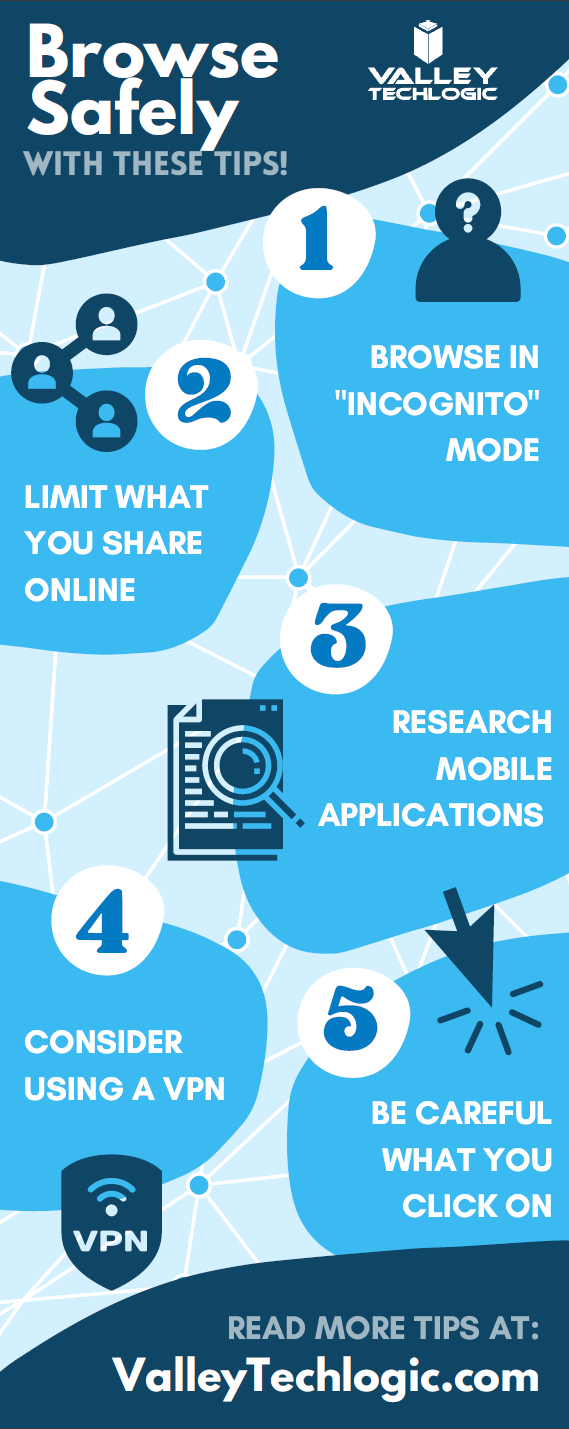
    Small Version of The Privacy Tips Chart
    Click to grab the full size version.

    While there are steps we can take to protect ourselves, more needs to be done to protect our privacy as we browse online. Privacy is also a concern for business owners and the businesses they run, if you would like to learn more about how Valley Techlogic can help schedule a consultation today.

    Looking for more to read? We suggest these other articles from our site.

    This article was powered by Valley TechLogic, an IT service provider in Atwater, CA. You can find more information at https://www.valleytechlogic.com/ or on Facebook at https://www.facebook.com/valleytechlogic/ . Follow us on Twitter at https://x.com/valleytechlogic.

  • Common tax return scams to watch out for in 2022

    Common tax return scams to watch out for in 2022

    The due date for filing your taxes is just 10 days away as of writing, and as tax filers scramble to gather needed information to finish (or start) their filing – scammers are looking for ways to take advantage of the mad dash that occurs for many Americans every year.

    The IRS has put together a compilation of scams they’re seeing this year, and they mention that scams may not be limited to the virtual space. Scammers may also call, mail or even show up to your door in person. So, it’s a good idea to be extra vigilant when protecting your PII (personal identifying information).

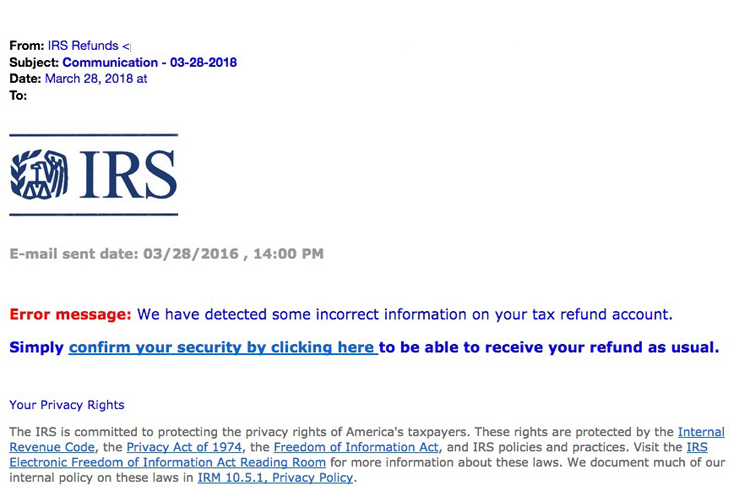
    The “Tax Transcript” scam is one that commonly targets businesses, many employees will use their business email when they sign up to do their taxes and may expect communication from the IRS to come there, but scammers will send fake communications with malware attached instead. Users may click without even thinking twice (especially as email scams of this nature can be very convincing). See below for an example.

    IRS Scam Email Example
    IRS Tax Email Scam Example. Credit: https://www.irs.gov/

    IRS scam calls are also another common tactic. It’s a good time to reiterate that the IRS will NEVER call you asking for personal information. This news segment found on YouTube shows a scammer in action, these calls may increase as we get closer and closer to the filing deadline. You shouldn’t give out your personal information even if they have things like your address or full name (scammers will often do some research on you before calling).

    Another scam aimed at businesses is one where the scammer will pose as a member of the accounting department where you work, they know many people will not question a call or email coming from a work authority. It may be a good idea if you’re a business owner to send out an email or have your accountant contact your employees to mention that like the IRS you will NEVER call or email unprompted requesting private information.

    Stolen Identity Refund Fraud or SIRF is a very lucrative business, 2.8 million false returns were filed in 2018 with a potential worth of $16 billion dollars. It’s important to guard the PII information criminals need to file a false tax return on your behalf. Here are 5 steps you can take to safeguard your information:

    1. The easiest? Have a good spam filter enabled on your email, that way many of these phishing scams won’t even make it to your inbox.
    2. Check emails for signs it’s a phishing scam, we wrote an article on what to look for. Two standouts are an email domain that doesn’t match the sender (an IRS email won’t come from a Gmail account) or links that when you hover on them don’t match where they say they go.
    3. Check with the purported sender, if the email looks like it’s coming from within your office network, but the email contents just don’t seem right – follow your gut and follow up with your department.
    4. If you receive a call from a number you don’t recognize claiming to be the IRS or the authorities, try Googling the number. Many people will share information about experiences with scam numbers online as a way to warn others.
    5. If you’ve already given your PII to a scammer, contact the major credit bureaus to freeze your credit and contact the IRS to report it ASAP. The IRS has steps in place for helping victims of identity theft, the sooner you act the sooner you can put a stop to the scammer’s activity under your identity.

    Employee training is the best defense for business owners who want to prevent scams such as these ones as well as other cyber threats from effecting their business. Valley Techlogic offers security awareness training as well as top of line cyber security defense systems as part of all of our technology packages. Learn more today.

    Looking for more to read? We suggest these other articles from our site.

    This article was powered by Valley TechLogic, an IT service provider in Atwater, CA. You can find more information at https://www.valleytechlogic.com/ or on Facebook at https://www.facebook.com/valleytechlogic/ . Follow us on Twitter at https://x.com/valleytechlogic.

  • This Malware is on Fire – Literally

    This Malware is on Fire – Literally

    There is a new malware out there that can trick your phones power brick into catching on fire.

    Cellphones and fires are not a new phenomenon, we all remember the debacle that was the Samsung Note 7. Due to the so called “aggressive” battery design, phones worldwide were exploding. This led to a swift recall and caused quite a dent in their public image.

    However, the fires being started right now are at no fault to the manufacturers and not tied to a single brand. A recently discovered malware being called by the lab that discovered it “BadPower” is causing cellphone power bricks across various brands to start on fire.

    Melted Cellphone
    An example of one of the affected phones. Attribution Nathanial Stern via Flickr

    It works by tricking the adapter into sending more electricity to the phone then it can handle, which over time will melt the internal components and start a fire. Xuanwu labs tested the BadPower malware with 35 different power bricks and they discovered 18 of those were vulnerable to the attack.

    What’s even worse, if your phone fell victim to this attack there would be no external signs that it was happening, your power brick would just start on fire.

    As with many things the solution to this problem is a firmware update provided by your cellphone manufacturer and this is yet another solid reminder to always keep the software on your devices updated.

    Cellphones are not the only things vulnerable to attacks that may damage hardware. While most malware on computers is directed at stealing information, it’s technically possible for a malware to cause your personal computer to overheat, thereby damaging its CPU.

    We may be entering a new age of malicious malware that’s aimed purely at destruction and not of the financial kind that we’re accustomed to.

    In this case the best defense is a good offense, and if you’re a business located in the Central Valley, Valley Techlogic would love to be your strategic partner in protecting your business. Reach out today for a free cyber security assessment, in less than 30 minutes over the phone we can give you a place to start.

    If you’re not ready for the assessment, we also have our free one-page cyber security checklist that was recently updated for 2020. We think it’s a great resource for your business.

    Looking for more to read? We suggest these tech articles from the last week.

    This article was powered by Valley TechLogic, an IT provider in Atwater, CA. You can find more information at https://www.valleytechlogic.com/ or on Facebook at https://www.facebook.com/valleytechlogic/ . Follow us on Twitter at https://x.com/valleytechlogic.

    Looking for IT Services in Fresno, Modesto, Stockton, Ceres, Atwater, Merced, Visalia or Lodi? We cover all these areas and more!


  • Tips for Using Zoom Safely

    Tips for Using Zoom Safely

    Dogs on ZoomMost of us are finding ourselves working from home either altogether or at least part of the time, and with that change also comes conducting work meetings from home. While we all probably had at least an awareness of video client tools such as Microsoft Teams and Skype, a new contender came through and became the working from home meeting tool du jour – I’m talking of course about Zoom.

    Zoom has added 2.22 million users so far in 2020 (the previous year they gained 1.99 million for the entire year). Unfortunately, with such unprecedent growth also comes growing pains in the form of unauthorized users jumping onto calls and even cyber security issues. So how can you use Zoom safely, and what led to it becoming such a popular option in the first place?

    Unlike many of its competitors Zoom allows you to see multiple participants at once, rather than one at a time while they’re talking. It also has the unique functionality of allowing users to join from a browser which lets participants avoid downloading the client if they don’t wish to or are unable to.

    You can also host an unlimited number of meetings with up to 100 participants with only the free client (up to 500 participants and concurrent meetings being paid features). Screensharing is also possible and a nice feature.

    With that said there have been some draw backs, call quality may be somewhat unpredictable compared to more seasoned products in this arena (although I think it would suffice to say they’ve all had some troubles in these heretofore unheard-of times). Users have also reported issues with scheduling and adding meetings to their calendars. The biggest issues though, have been in the avenue of security.

    Starting with so called “Zoom Bombers” – which have been one of the most publicized issues – it is described as having uninvited users join your private video call and start spamming unsavory materials either in the chat or via voice and/or video.

    Many of these intruders gained access via businesses posting the video chat link to their public social media accounts. The best method of protection against this by far is adding a password to your Zoom chats and not posting them publicly.

    It’s also come to light that there are some critical cyber security issues with Zoom, especially regarding user data.  500,000 Zoom user accounts and passwords were recently found for sale on the dark web due to a data breach by a cyber security firm.

    This serves as a good reminder to keep your passwords varied, change them periodically and use a password manager. You can check the whimsically named site https://haveibeenpwned.com/ to see if you’ve been a victim to this breach or any others.

    Suffice to say despite its faults Zoom is probably here to stay for the foreseeable future, especially as the country’s workforce continues to work from home. Taking some necessary steps will keep your work meetings intruder free and safe.

    This article was powered by Valley TechLogic, an IT provider in Atwater, CA. You can find more information at https://www.valleytechlogic.com/ or on Facebook at https://www.facebook.com/valleytechlogic/ . Follow us on X at https://x.com/valleytechlogic.

  • 10 Tips for Staying Safe Online When Working from Home

    Woman working at desk

    In light of the ongoing health crisis many of us are placed in the unusual position of working from home. While you may have concerns about keeping up your usual level of productivity and being able to communicate effectively with your coworkers while working in separate places there may be one issue flying under the radar, how do you stay safe online while working from home?

    It’s unfortunately not a given, in many work places you have an IT team that maintains (or should!) a high level of security for your office computers and network. These same measures are not in place on your home network or on your home computer.

    With so many of us working from home hackers may be seeing this as an opportunity to access your company’s private data via unsecured personal computers and home networks. These 10 tips will prevent this from happening.

    1. Don’t reuse passwords. If you’re able to choose your own work passwords it’s important they’re varied, if hackers get access to one of your accounts and you use the same password for everything then they have access to all of them.
    2. Practice good password safety. It’s imperative that passwords for your work accounts follow good password safety practices. Hackers may be able to use your work accounts to access the rest of your company’s data. If you set your own password make sure it follows the rules of 16 characters in length, mixing characters and avoiding dictionary words if possible.
      Also destroy any written copies of your password, real life phishing exists! Use a password manager like LastPass instead.
    3. Secure your home network. It’s shocking how many home networks don’t have a password at all, or if they do it’s a single word with no mixed characters or even your router’s default password.
      This is not a good idea! Hackers can use your network to access your home machine, and from there it may be game over. Like the tip above practice good password safety when it comes to your router’s password.
    4. Enable 2-factor authentication if it’s available to you. Many laptops these days feature security measures such as facial recognition or fingerprint readers that will help keep your device safe. Don’t forget to enable the same feature on your phone!
    5. Speaking of 2-factor authentication. You may find that your workplace uses 2-factor authentication to secure the applications you use on a daily basis to do your job, if they don’t bring it up! This will further prevent people from accessing your company data.
    6. Install updates. At work your IT team is probably installing updates for you, on your home device you’re responsible for doing so. In general, you shouldn’t be ignoring updates but while accessing your company accounts it’s even more important.
    7. Practice good online safety. The security measures enabled on your company network may prevent a total takeover in the case of someone accidentally downloading malware, this is not so at home.
      Don’t open attachments from senders you don’t know. Be careful which websites you visit, and always have your firewall enabled!
    8. Be careful with public networks. During this time, it might be tempting to get out and at least work outside at a café or somewhere with public Wi-Fi. However, this public Wi-Fi may leave your machine vulnerable, especially if you’re not practicing some of the safety measures above.
    9. Make sure your work is backed up. You’ll probably need some help from your IT team for this one but ensure the work you’re doing is backed up to your office servers or saved in some way. Recovering lost data from your home machine alone may be more difficult.
    10. Last but not least, use an anti-virus software. Find out which anti-virus software your company IT team recommends, or if you need a recommendation reach out to us. It’s extremely important for staying safe online.

    We hope these tips help. For those not working remotely or for tips on staying safe while in public right now, we recommend referring to the CDC Website for the most up to date information: https://www.cdc.gov/coronavirus/2019-ncov/index.html

    This article was powered by Valley TechLogic, an IT provider in Atwater, CA. You can visit us on Facebook at https://www.facebook.com/valleytechlogic/ . Follow us on Twitter at https://twitter.com/valleytechlogic.

  • 2020 is Here – Here’s your Technology and Cybersecurity Forecast

    2020 is Here – Here’s your Technology and Cybersecurity Forecast

    It’s 2020 and the start of a new decade. Technology has changed a lot since the beginning of the last decade. Inexpensive computer options like Raspberry Pi and Chromebook became available, the first iPad was released.

    Computing also got a lot faster, the first 8 core processors were released, solid state drives became a lot more widespread, and graphic cards reached new heights for computer gamers shattering the previously achievable FPS (frames per second) and ushering in a new era of high-end gaming.

    The previous decade also brought new records on cybersecurity issues but unfortunately not in a positive light. Malware became more sophisticated and harder to track, ransomware became widespread (it’s estimated it cost the US $7.5 billion in 2019). So, what’s on the horizon for 2020 and beyond in the realms of technology and cybersecurity?

    As wearable technology advances increase, we will see even more of it aimed at integrating tech with the world around us. Augmented reality devices will probably become more accessible and affordable. Sensor technology will continue to increase which will have a positive effect on healthcare and our ability to detect health scares before they advance to something serious (see watches now aimed at keeping track of our blood pressure and heart rate).

    Needless to say it will be something to look out for as our society becomes more dependent on the IoT (Internet of Things), for good and for bad.

    What about the field of cybersecurity? While it’s probably true hackers won’t stop trying to gain access to our private information – especially as it pertains to our financials – even the most layman user of technology is becoming keen to protecting their privacy.

    Consumers will demand corporations be made accountable for leaks of private data and businesses not wanting to shoulder the financial burden of an attack (or the bad press) will utilize the tools available to thwart would be bad actors in their tracks.

    On that front we can help. At Valley Techlogic we are on a mission to have the most comprehensive and effective cybersecurity tools available to protect our clients. We also offer 24/7 help desk so no matter when you have a problem, we’re on it.

    If you’re in the Central Valley or surrounding area reach out today for a free security audit and begin this new decade tackling your business’s technology needs.

    This article was powered by Valley TechLogic, an IT provider in Atwater, CA. You can visit us on Facebook at https://www.facebook.com/valleytechlogic/ . Follow us on Twitter at https://twitter.com/valleytechlogic.

  • Window’s 7 EOL of Life Is Coming Soon, But There’s Still Time to Prepare

    14th on a Calendar
    The January 14th is almost here.

    January 14, 2020 will be here in less than three short months, and there are probably many out there that haven’t prepared to make the switch off Windows 7 (or Windows Server 2008 which also ends support on the same day). In fact, an estimated 32.8% of all PCs running Windows are still running Windows 7.

    We know it can seem like a hassle to upgrade and you may be thinking what’s the harm in leaving my computer as is? We’d like to explain why that’s a bad idea and simple steps you can take to make the migration off Windows 7 easier.

    If you stay on Windows 7 after support ends your PC will still work, but it will be more vulnerable to malware and other security risks. Regular Windows updates provide crucial protection to exploits that may especially exploit vulnerabilities in your operating system or programs run by that operating system.

    Hackers may also choose to target those who have decided to stay with Windows 7 after January 14th. You may find yourself up creek without a paddle if something happens to your PC after Windows support ends.

    It doesn’t have to be this way though, making the switch from Windows 7 will probably not be as difficult as you may be expecting. In fact, a Windows 7 client upgrade may take an hour – or less – if your computer has a solid state drive (SSD).

    If you have an older mechanical drive it may take a bit longer, but it is probably not the multi-day event you may have been expecting.

    You shouldn’t attempt an update from Windows 7 to Windows 10 without a backup, and this is an excellent time to review your backup plan in general (especially if you don’t have one!). You most likely will not lose any files though and should find yourself up and running the same day with a brand new and more secure operating system.

    We’d like to take the time to note that migration from Windows 2008 server to newer editions of Windows server is a more complicated process that should not be attempted without professional help.

    If you own or work for a business in Central California, Valley TechLogic can assist you with this task. Reach out to us today at 209-357-3121.

    This article was powered by Valley TechLogic, an IT provider in Atwater, CA. You can also reach us on Facebook at https://www.facebook.com/valleytechlogic/ or on Twitter at https://www.twitter.com/valleytechlogic.

  • October Is National Cybersecurity Awareness Month

    October Is National Cybersecurity Awareness Month

    [img src=”/wp-content/uploads/2019/10/blog_191004_05.jpg” class=”aligncenter”]

    Every October National Cybersecurity Awareness Month (NCAM) is held to promote awareness of cybersecurity issues and allow government and other agencies to provide resources to the general public so they may be safer and more secure online.

    The theme this year is Own IT. Secure IT. Protect IT. and the focus will be on key areas including citizen privacy, consumer devices, and ecommerce security.

    In our own effort we will be covering topics related to cybersecurity and promoting resources we use to keep our clients data secure. To start with here is the homeland security website on this topic: https://niccs.us-cert.gov/national-cybersecurity-awareness-month-2019

    It covers in depth topics on online privacy, multi factor authentication, cybersecurity while traveling and more. There’s even a trivia game you can use in your organization as a fun and accessible way to introduce cybersecurity tips to your employees.

    Cybersecurity can be an intimidating topic, especially from a business standpoint. It’s important to do what you can to start implementing measures as soon as possible. Here is the checklist we personally use as a kicking off point to get you started.

    [img src=”/wp-content/uploads/2019/10/Untitled-Extract-Pages-page-001_01.jpg” class=”aligncenter”]

    This article was powered by Valley TechLogic, an IT provider in Atwater, CA. You can find more information at https://www.valleytechlogic.com/ or on Facebook at https://www.facebook.com/valleytechlogic/ . Follow us on Twitter at https://twitter.com/valleytechlogic.

  • 5 Things your employees need to do to combat cyberattacks

    5 Things your employees need to do to combat cyberattacks

    The common perception around cybersecurity is that IT departments are solely responsible for it. As such, it’s commonly considered a technical and administrative issue that employees play little or no part in. Unfortunately, its this perception that’s leaving so many businesses exposed to cyberattacks.

    Almost all data breaches start with a social engineering attack, typically delivered by email or over social media, targeted towards employees. Anyone can be a target, and all these attacks have something in common — rather than exploiting vulnerabilities in technology itself, they exploit human ignorance and unpreparedness. That’s why employees must develop good security habits, like the ones below.

    #1. Keep software up to date

    Although social engineering presents by far the biggest threat, outdated software gives hackers an easy way to infiltrate business systems. For example, a lot of ransomware attacks exploit outdated operating systems. Other attacks deliberately target victims who have failed to install a critical security update.

    There’s no denying that regular updates can be irritating, especially when you receive constant notifications to update whenever you open an app. While many modern apps keep up to date automatically, some require confirmation and additional steps. Employees should always be ready to install these updates to reduce the likelihood of cyberattacks.

    #2. Create stronger passwords

    The average US email address is associated with 130 online accounts ranging from internet banking to social media to online shopping and more. That’s a whole lot of login credentials to look after, so it’s perhaps hardly surprising that most people just use the same password for everything. Recycling passwords leaves you with many single points of failure. What’s more, a weak password is also easy to hack using a brute force attack, which guesses all possible character combinations until it finds the right one.

    Employees should be adequately trained in the use of passwords. This means they need to be setting longer and more complex passwords that contain a mixture of letters, numbers, and symbols. They should also enable multifactor authentication to add an extra layer of protection on your accounts in the form of temporary verification codes sent to your phone or biometric authentication (e.g., fingerprint scans and facial recognition).

    #3. Back up data regularly

    It has become commonplace for employees to work from home or on the move, typically using their own devices rather than those provided by the company. One of the biggest challenges of workforce mobility is that you can easily end up with important business data spread out across a huge range of different devices, therefore making it vulnerable to loss or theft.

    No one should ever underestimate the importance of backing up their data, and employees need to be aware of your backup and disaster recovery policy. If they’re not, it’s not worth the paper it’s printed on. Another option is to have your employees use cloud-hosted apps where all data is stored online and kept in a secure off-site facility.

    #4. Identify phishing scams

    Given the fact that most cyber incidents stem from human error, untrained employees are usually the weakest link when it comes to information security and compliance. This also means your brand’s reputation rests on your employees’ shoulders. Even a seemingly minor mistake, such as downloading attachments or clicking on suspicious links in an email, can lead to a far more serious incident. Regularly training employees to be critical of every website or email they encounter online can prevent a slew of cyberattacks from spreading in the first place.

    #5. Follow security policies

    Security policies are worth nothing if they’re not thoroughly understood by everyone in your organization and enforced as necessary. Your security policies should cover every digital asset and the employees who use them. It’s something everyone on your team needs to be fully aware of and onboard with.

    By following security policies to a T, employees will know exactly what constitutes the acceptable use of your company’s information resources, and they’ll know what to do during a cybersecurity incident. This helps create a culture of accountability and turn your employees from the weakest link into the first and last line of defense.

    Valley Techlogic provides network security services, cutting-edge solutions, and expert advice to help your business fend off the latest threats. Call us today to keep your most critical assets safe and sound.

  • 5 Key takeaways from Marriott’s massive data breach

    5 Key takeaways from Marriott’s massive data breach

    In November 2018, global hotel chain Marriott disclosed one of the biggest data breaches of all time where the records of half a billion customers were stolen. The misappropriated data included personally identifiable information, payment card details, and passport numbers. Aside from the immense scope of the attack, what also made it so notable was the fact that Marriott took three months to disclose the breach. Here’s what business owners in Atwater should learn from the event:

    #1. Don’t be fooled again
    Shortly following its acquisition by Marriott in 2015, Starwood reported a relatively minor data breach that targeted its point-of-sale systems used in various shops and restaurants. Although it remains unknown whether the two breaches were connected, what it does demonstrate is that victims of cybercrime can be targeted more than once.

    Hackers often target the same companies because they know them to be easy targets. However, some smaller attacks are actually carried out as smokescreens to draw attention away from more severe breaches.

    #2. Traditional security measures still play a role
    One of the first things you often hear from technology vendors and cybersecurity experts (including us!) after a severe breach is that victims should hurry to modernize their security infrastructures. That’s usually good advice considering how often hackers rely on exploiting old or unsupported systems. However, this doesn’t tell the whole story.

    A primarily proactive approach towards information security should still be accompanied by more traditional, reactive measures. Although things like training and next-generation antivirus are critical, conventional firewalls still play a role.

    #3. Mergers and acquisitions present serious technical challenges
    Mergers and acquisitions come with enormous technical challenges. These bring together two starkly different infrastructures, which inevitably creates incompatibility issues and information silos. During the process, security often ends up being compromised.

    For example, following the $13 billion purchase of Starwood, Marriott found itself needing to merge disparate reservation systems and loyalty programs with data stored in multiple databases. That’s why data migrations — whether large and small — need to proper planning and expert guidance.

    #4. Encryption keys should always be kept away from encrypted data
    The precise number of records compromised in the Marriott data breach remains unknown to this day and the approximation has been revised several times. The main reason for this is that the hackers encrypted the data they gained access to before misappropriating it. It was extremely difficult to identify which records had been stolen, since Marriott’s data loss prevention system couldn’t pick them up. To guard against such incidents, it’s necessary to store encryption keys on a network separate from the data itself.

    #5. Rapid detection and response planning are critical
    Because of the catastrophic data breach of 2018 and their failure to disclose it immediately, Marriott is now facing multiple class-action lawsuits. Breach notification laws require that companies disclose incidents within a given time frame, which is typically 45 days. They are also legally obligated to maintain an up-to-date and documented security policy and to take all reasonable precautions to protect customer data in the first place.

    In the end, the Marriott data breach should serve as a wake-up call to every organization, regardless of its size or industry, that a multilayered approach to information security is essential in this day and age. Everything from preventative measures to response procedures and 24/7 monitoring solutions should be included.

    Valley Techlogic serves businesses in Central California with dependable technology advice and solutions that help boost information security, enhance scalability, and reduce risk. Call us today to get the support you need.