Category: Web & Cloud

Web & Cloud

  • AWS vs Azure, what is your best option when choosing a cloud platform?

    AWS vs Azure, what is your best option when choosing a cloud platform?

    We’ve had articles in the past about why you should consider making the move from on-premises to the cloud, but we’ve never specifically addressed which provider you should consider when making this move.

    For many, AWS (Amazon Web Services) and Azure are the main players that they look to when making the jump the cloud. Brand recognition is obviously there for both choices, as well as a history of impeccable uptime. Uptime is a very important factor, obviously you want your data to be available when and how you need it, but there are more things to consider.

    First, let’s look at the players. AWS has been around since 2006 and offers a “pay as you go” model, which means you pay only for the data you actually use. Many of us are familiar with the webstore Amazon, and you’d probably be surprised to learn AWS is a much bigger venture for Amazon, with 74% of their profit coming from AWS.

    Azure was launched in 2010 and is also pay as you go. However, how they differ is that Azure actually lets users access their data through a virtual machine on a Virtual Hard Desk (VHD). This means their interface is slightly more user friendly from the start. For a similar interface in AWS you must rent an EC2 (their version of a virtual machine). EC2 is more customizable but Azures Virtual Machine may more easily work with existing Cloud computing tools.

    Both are similar in that they offer scalable storage solutions; however, their object size restrictions vary slightly, with AWS having a 5 TB object size limit and Azure having a 4.75 TB limit. For most of our customers this would be a very negligible difference, however.

    Both do an excellent job of securing your data, in AWS you customize your security settings on setup. With Azure, they use Microsoft’s Cloud Defender services which are similar to the Windows Defender services you probably already utilize.

    AWS has a dashboard that may be easier to use if it’s your first-time using cloud services when it comes to looking for documentation on how to use the service. Where Azure has them beat though is that Azure keeps all of your user account and information in one place. So, depending on which kind of information you’re looking for, you may prefer one over the other.

    If customizing your cloud experience via code is something you’re after, you probably want to stick with AWS. Through their SageMaker system you can utilize their artificial intelligence (AI) tools to develop a very specific and unique experience when it comes to tracking data, making modifications, and applying updates.

    Azure on the other hand has opted for a “Codeless” interface, even someone with zero coding knowledge can drag and drop pieces to customize their cloud’s AI interface.

    Of course, from a base level you can look at what operating system these are compatible with. AWS is more compatible with Linux while Azure offers compatibility through .net with Linux, Windows and MacOS.

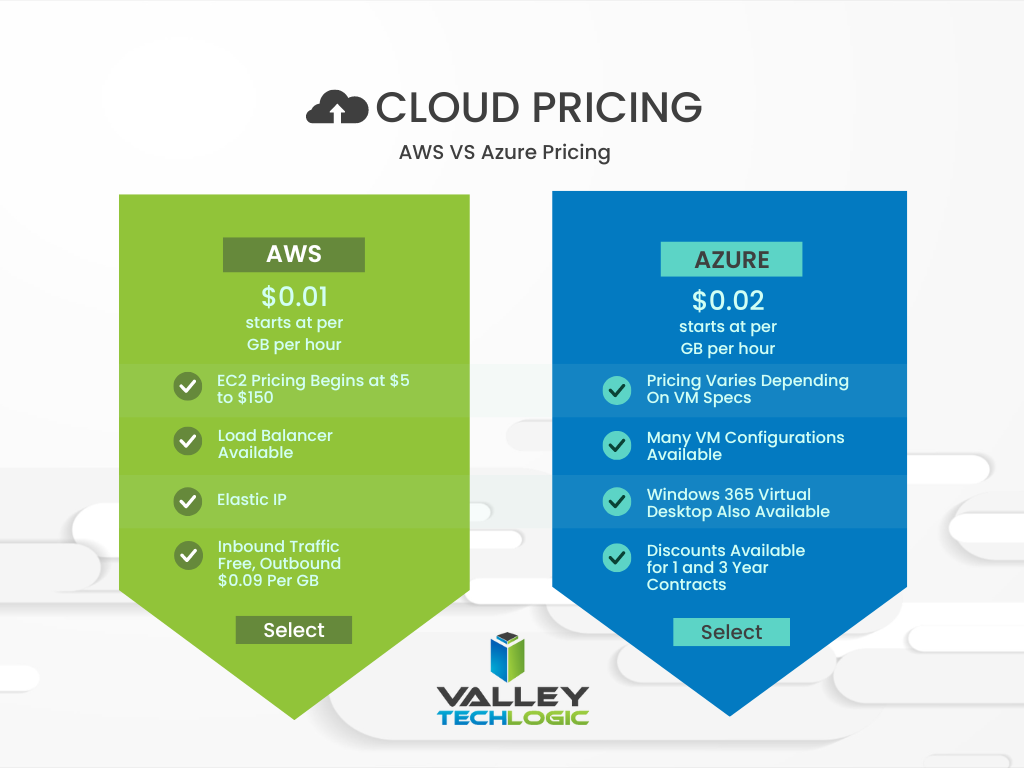
    In a nutshell, these two cloud behemoths are more alike than different but there are some factors that depending on your particular business sector or goals may lead you to shift one way or the other. We also want to spend a moment addressing a pricing breakdown for both AWS and Azure. You can see their pricing models in the chart below. We also want to note that both provide a free introductory period so you can test their services before committing to a plan.
    Are you considering a move to the cloud and aren’t sure which provider to go with, or even how to make it happen? Valley Techlogic can help. We’re experts in cloud computing and have managed many customer cloud migrations. Reach out today to schedule a free consultation.

    Looking for more to read? We suggest these other articles from our site.

    This article was powered by Valley Techlogic, an IT service provider in Atwater, CA. You can find more information at https://www.valleytechlogic.com/ or on Facebook at https://www.facebook.com/valleytechlogic/ . Follow us on Twitter at https://x.com/valleytechlogic.

  • Your data is safer in the cloud, period.

    Your data is safer in the cloud, period.

    Speaking in absolutes is not usually a good idea, but in the case of data storage we feel the onus is on us to speak plainly – and it’s the plain truth that your data is safer in the cloud.

    It’s natural to be hesitant to move everything into the cloud, especially when it really wasn’t that long ago in the grand scheme of things that all data was stored in filing cabinets. Safely tucked away and (hopefully) properly indexed to be pulled out as needed.

    Sure, we didn’t have to worry about malware with paper files, but theft and natural disasters were the enemy of on premises paper documents. Or just the ravages of time wreaking havoc on plain paper and ink. You also had to make sure to shred important documents and not just trash them lest they fall into the wrong hands.

    With the advent of computers most of our data moved to our personal computers and it greatly elevated our ability to communicate that data to others. Multi-million-dollar transactions can be easily completed by simply emailing a proposal and contract. Billing information, medical documents, all of the private information about an individual or business is often times found online and is available to be pulled up when needed.

    But this ease of information is also it’s downfall. Old fashioned robberies where thieves would break into brick-and-mortar establishments and steal private information to then be used to create false identities and/or use payment details for their own benefit have now been replaced with often a single user attacking a small business’s online accounts. They can dismantle everything that business has built in days or even hours and make recovering difficult or even impossible.

    That’s not even taking to account that a single on-premises server is just as vulnerable to fire or flood damage as your filing cabinet is. A singed or waterlogged hard drive has no more usefulness than the same data contained in a charred or dripping stack of papers.

    Like with many things in life this problem is solved by working together with others, and that’s where cloud data solutions come in. It’s still your data and we, like you, think it should have the same level of accessibility as it does when it’s on your personal computer or even a paper file on your desk.

    With the high-speed internet most of us have in our homes and offices downloading files from the cloud is often a nearly instantaneous click of a button and then you’re working on the file you were last night. Make a mistake a few hours in? Another benefit of the cloud is you can often times roll back to an earlier version.

    The cloud can sound nebulous but it’s not, it’s just using the resources of companies that put their whole stake into safeguarding data. Their existence as a business is in keeping your data safe, companies that fail at that task don’t stay in business long.

    It’s really not that different than utilizing the services of the power company for all of your power, or your local ISP for all of your networking needs. These services work best when they’re maintained by companies that dedicate themselves to the task and can provide a high level of continuity.

    And there are some major players in the game, players that have been in the business of data and even computers themselves as a whole for decades. At Valley Techlogic we greatly utilize the power of Microsoft’s cloud service – One Drive – to collaborate within our business. It’s even paved the way for our remote employees to maintain productivity with the whole team without missing a beat. The default storage capacity is 1 Terabyte (TB) which is more than most users will ever need.

    If our office ever burned down with no one inside, we can state with the utmost confidence it would not affect our ability to do business. Could you say the same?

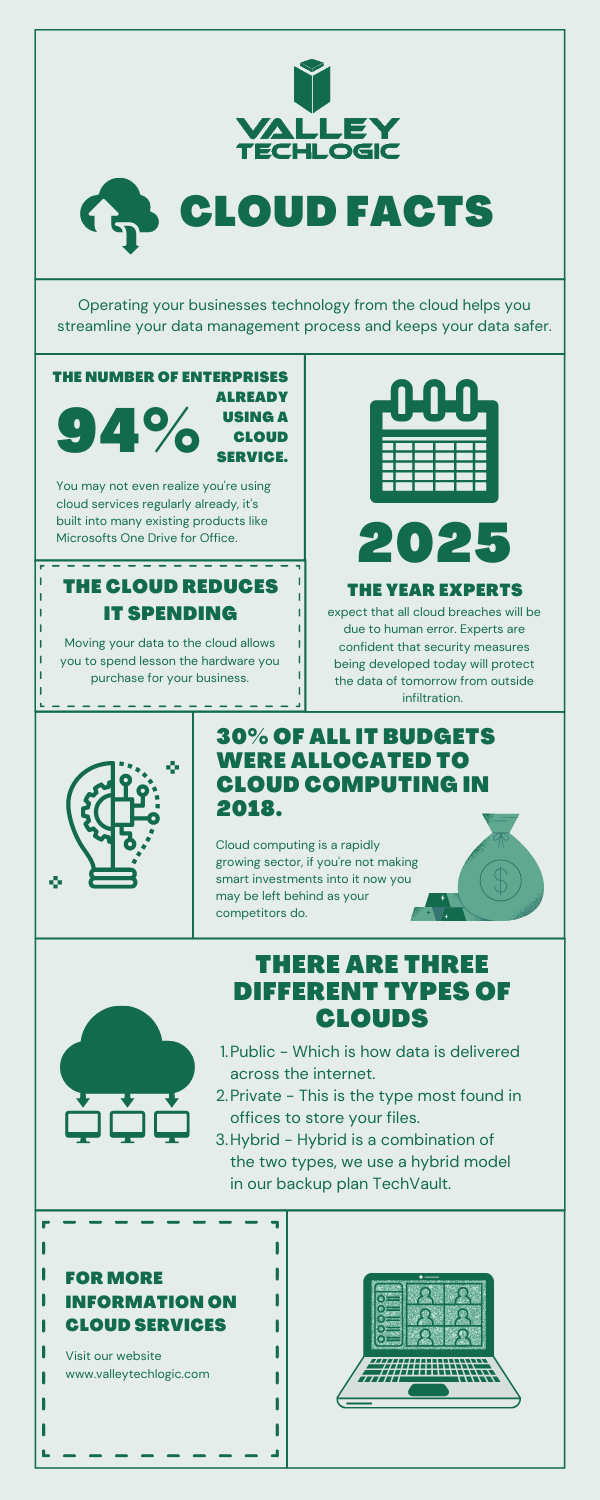
    Cloud Data Facts

    If you’re considering a move to the cloud for your business, we can help. Backups and data recovery solutions are a keystone piece of all of our service plans, learn more today.

    Looking for more to read? We suggest these other articles from our site.

    This article was powered by Valley TechLogic, an IT service provider in Atwater, CA. You can find more information at https://www.valleytechlogic.com/ or on Facebook at https://www.facebook.com/valleytechlogic/ . Follow us on Twitter at https://x.com/valleytechlogic.

  • Considering Moving to the Cloud? Here Are 5 Things You Should Know.

    Considering Moving to the Cloud? Here Are 5 Things You Should Know.

    Moving to the cloud makes sense for a lot of businesses. The infrastructure required for a business level technology setup can be difficult to budget for, and you also have to consider the ongoing maintenance required.

    Even if your business has an onsite server, it makes sense to have a cloud backup. This way if anything happens to your physical server, you have a backup ready. There are even archival backups available that are incredibly safe from cyber attacks (this is something we offer as part of our TechVault service, you can learn more here).

    Here are 5 things you should consider as you venture into the cloud computing space.

    1. Compatibility. You need to consider whether the cloud service you’re moving to is compatible with your existing software and services for a smooth roll out. Since cloud services are usually used to host remote setups, this is especially important if you don’t have all of your employees at a singular location. Also, if your business uses legacy systems, it may be more difficult and complex to move to the cloud but not necessarily impossible.
    2. Internet Connection. Another thing to consider is the type of internet connection your office has. If you have a slow or unreliable connection, it may make rollovers from backup more difficult. It may be worth looking to see if higher speed/increased bandwidth internet solution is available at your office location to help support your cloud solution.
    3. Service Level Agreements. Most cloud providers have guarantees they spell out in these agreements regarding uptime and maintenance. You will want to review these agreements carefully and make sure the arrangement will work for your particular business. We have a free report on the cost of downtime here.
    4. Disaster Recovery. Piggybacking off topic number 3, you also need sure they cover you on the off chance there is a disaster on their end as well as support your efforts to recover if something happens to your onsite backups. Many cloud service providers offer this type of support for an additional fee or as a service add-on.
    5. Scaling. Finally, you want to pick a provider that can grow with your business. One of the benefits of a cloud solution is the ability to scale without the expensive upfront cost. When it comes time to upgrade you should know how easily you can move from one plan to the next.

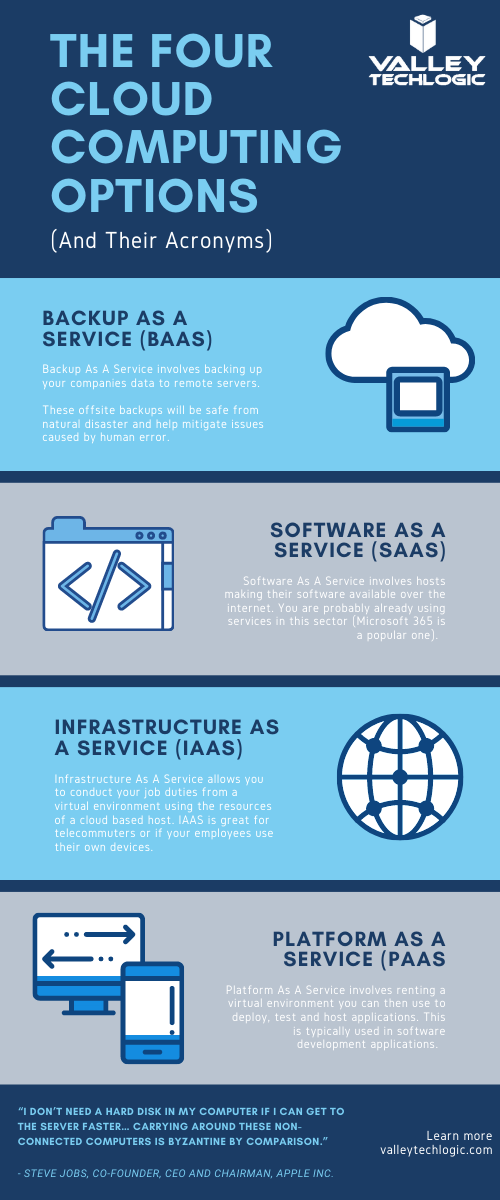
    As a bonus, here is our chart of common Cloud acronyms found in this space.

    Chart With Cloud Acronyms

    Backup solutions, including those in the cloud, can be a complex undertaking. You want to make sure It’s done correctly so if the time should come that you actually need to utilize that backup it goes as smooth as possible and doesn’t leave your business down for an extended period of time.

    At Valley Techlogic we are experts in the field of crafting backup solutions tailored to the businesses we service. If your business is located in the Central Valley and you need assistance in creating a reliable backup solution for your business, we’re happy to provide a free consultation. You can schedule one here.

    Looking for more to read? We suggest these tech articles from the last week.

    This article was powered by Valley TechLogic, an IT provider in Atwater, CA. You can find more information at https://www.valleytechlogic.com/ or on Facebook at https://www.facebook.com/valleytechlogic/ . Follow us on Twitter at https://x.com/valleytechlogic.