Category: Windows

Windows

  • Not ready for Windows 11? Microsoft has announced it’s possible to get free security updates for Windows 10 for a year – but there’s a catch

    Not ready for Windows 11? Microsoft has announced it’s possible to get free security updates for Windows 10 for a year – but there’s a catch

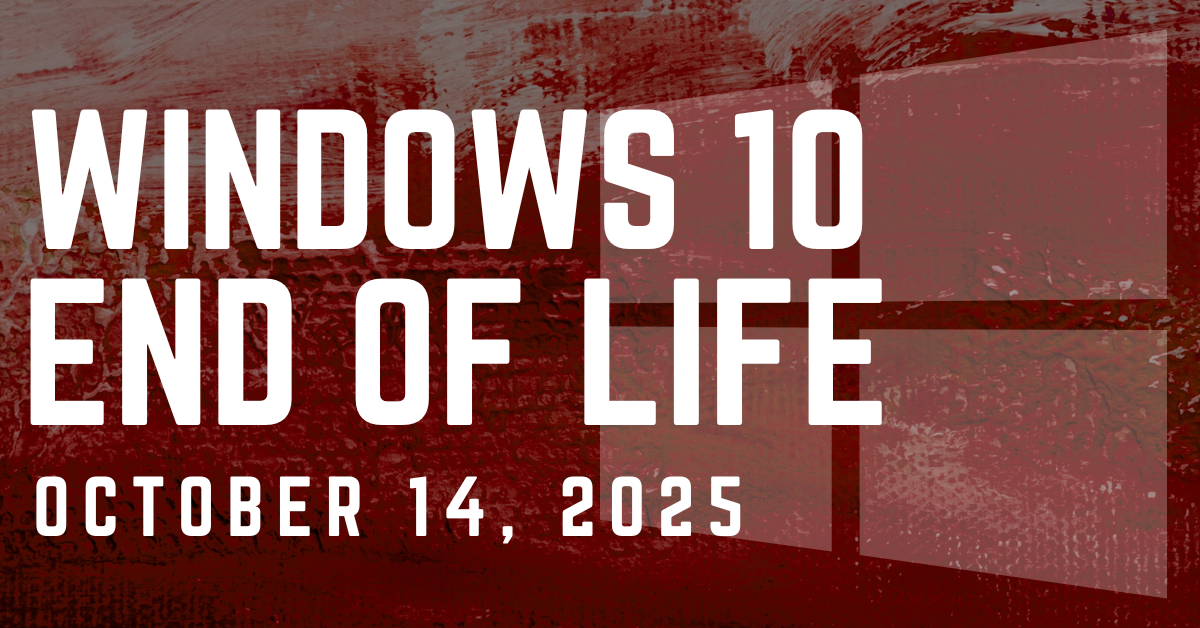
    Microsoft’s end-of-support date for Windows 10 is fast approaching: October 14th, 2025. After this date, regular security updates for Windows 10 will stop, leaving devices potentially exposed to cyber threats.

    But there’s new information that gives businesses a little breathing room. Microsoft has announced that it will offer free security updates for Windows 10 users for one additional year, providing some temporary relief for those not ready to migrate to Windows 11. However, before you put your upgrade plans on pause, you need to understand the catch.

    Historically, when Microsoft ends support for an operating system, businesses must either upgrade to a newer version or pay for Extended Security Updates (ESUs) to keep receiving critical patches. With this announcement, Microsoft is giving users a 12-month extension of free ESUs, allowing them to continue receiving vital security updates through October 2026.

    This is particularly helpful for organizations that:

    • Rely on legacy applications that don’t play well with Windows 11
    • Have hardware not yet compatible with the new OS
    • Need extra time to budget, plan, and test a smooth transition

    However, there is a catch for redeeming the free offer, you need to do one of the following steps:

    • Pay $30 in local currency.
    • Use Windows Backup to sync your settings to the cloud.
    • Redeem 1,000 Microsoft Rewards points.

    So this offer is only free if you utilize Windows Backup or have Microsoft points to redeem, otherwise it’s $30 which is still less than the $61 per user that was originally reported by Microsoft (and us).

    Also, while this free security patch extension buys time, it is not a long-term solution. Once the grace period ends, businesses will need to:

    • Upgrade to Windows 11 or beyond
    • Pay for extended security updates beyond the free year
    • Risk running unsupported devices that are vulnerable to cyberattacks

    It’s also important to note that Microsoft has not promised feature updates or full support during this period, only essential security patches. Outdated software and hardware may still experience compatibility and performance issues, leaving businesses at a disadvantage compared to those who make the switch sooner.

    Microsoft’s free Windows 10 security updates for an extra year are a welcome reprieve, but they’re not a permanent fix. The safest, most cost-effective path forward is to start planning your Windows 11 migration now, rather than waiting for the clock to run out. Contact Valley Techlogic today to schedule your Windows 11 readiness assessment and avoid the risks of running unsupported systems.
    Looking for more to read? We suggest these other articles from our site.

    This article was powered by Valley Techlogic, leading provider of trouble free IT services for businesses in California including Merced, Fresno, Stockton & More. You can find more information at https://www.valleytechlogic.com/ or on Facebook at https://www.facebook.com/valleytechlogic/ . Follow us on X at https://x.com/valleytechlogic and LinkedIn at https://www.linkedin.com/company/valley-techlogic-inc/.

  • Once the king of voice chat on the web, Skype is shutting down May 5th, 2025

    Once the king of voice chat on the web, Skype is shutting down May 5th, 2025

    Microsoft is no stranger to acquiring programs only to later shut them down (though they pale in comparison to Google’s own graveyard of acquisitions) and now Skype will be the latest casualty with a shutdown date of May 5th, 2025 being officially set.

    Skype, once the leader of online telecommunications and one of the original online video chat programs, began operating in 2022. Skype, which was a shortening of the original project name “Sky peer-to-peer” skyrocketed into popularity in the early 2000’s reaching 100 million users in 2006.

    After a tumultuous fall out with the early founders and buy outs that included eBay, Skype was sold to Microsoft in 2011 for $8.5 billion. Microsoft quickly integrated Skype into their Office platform but with the release of Microsoft Teams in 2017 the writing was on the wall for Skype as to which Microsoft based communications platform would succeed in the long run.

    Skype failed to keep up with competitors during the pandemic when video chat use was at an all time high due to restrictions on in-person activities. Zoom, WhatsApp, Facetime and even Teams itself performed better in the same space – it’s been reported in 2023 just 36 million people still used Skype daily compared to it’s peak of 300 million users which mirrors Teams current daily active users.

    So it makes sense that Microsoft is shuttering Skype in favor of Teams here in 2025, but for those that are new to Microsoft Teams or even those that have already made the switch, what benefits are available that puts it above other communications programs still competing in the space?

    1. Integration with Microsoft 365: Teams naturally integrates very well with Microsoft 365, from booking a Teams meeting right from your Outlook client to creating groups that have a shared SharePoint folder that allows users to share files while they’re chatting about them in real time. If you’re a Microsoft 365 subscriber you’re leaving features on the table if Team is not your communications platform of choice.
    2. Robust Team Collaboration Features: Unlike competitors like Zoom, which is mainly a video conferencing tool, Teams offers extensive team collaboration features like persistent chat, threaded conversations, shared workspaces, and built-in task management with Microsoft Planner and To-Do.
    3. Better Security and Compliance: Teams benefits from Microsoft’s enterprise-grade security, including end-to-end encryption, multi-factor authentication, and compliance with industry standards like HIPAA, GDPR, and ISO 27001.
    4. Unified Communication Hub: Microsoft Teams combines chat, video conferencing, file sharing, and project collaboration in one platform which will not be found in the competition which are largely standalone programs.
    5. Better Pricing for Enterprises: For businesses already using Microsoft 365, Teams is included at no extra cost, making it a more cost-effective solution. Other platforms may charge an arm and a leg for enterprise features such as longer meetings or hosting larger groups.

    Unifying communication in your company can be a game changer when it comes to making sure everyone is on the same page. Whether you’re looking to implement Microsoft Teams or optimize your existing communication tools, Valley Techlogic’s expert IT solutions can help you streamline collaboration, enhance productivity, and keep your business connected—anytime, anywhere. Reach out today for a consultation.

    Looking for more to read? We suggest these other articles from our site.

    This article was powered by Valley Techlogic, leading provider of trouble free IT services for businesses in California including Merced, Fresno, Stockton & More. You can find more information at https://www.valleytechlogic.com/ or on Facebook at https://www.facebook.com/valleytechlogic/ . Follow us on X at https://x.com/valleytechlogic and LinkedIn at https://www.linkedin.com/company/valley-techlogic-inc/.
  • Windows 10 reaches EOL October 2025, and those who don’t upgrade may have to pay

    Windows 10 reaches EOL October 2025, and those who don’t upgrade may have to pay

    Windows operating system end of life events are a big deal, with 1.6 billion active Windows devices as of 2024 Microsoft still holds a commanding lead over any other operating system provider. Even though Windows 11 was released almost 4 years ago at this point, it still only represents 28% of the global Windows market share (with 70% still using Windows 10).

    There are a lot of reasons for this, from users being comfortable with the Windows 10 interface to many devices that simply aren’t Windows 11 ready (interested in a Windows 11 device in 2025? Here’s our guide).

    Users hanging onto a previous version of Windows until the bitter end is nothing new for Microsoft, Windows 7 still had a 12% market share when Windows 11 was released October 2021 (almost 2 years since it’s own EOL date occurred).

    In the past, Microsoft has released critical security updates even for systems no longer receiving support. Users could also purchase optional extended support plans for devices that can’t be upgraded for one reason or another (the keyword being “optional”).

    Now Microsoft has announced for the first time ever that consumers looking to extend the life of their Windows 10 devices – or just remain on the operating system they prefer – will have to $30 for a single year of Extended Security Updates (ESU).

    Businesses will be charged even more for ESU, $61 for the first year with the price increasing steeply every year beyond 2025 – $122 for the second year and $244 for the third year respectively. This does not grant Windows 10 users the ability to receive support from Microsoft for these devices, it only means they will still receive critical and important security updates.

    Microsoft has been pushing Windows 11 adoption and we will likely see a stronger market share as consumers replace older devices especially as more AI ready devices become available on the market and Microsoft users look to also take advantage of Co-Pilot.

    There are also some compelling reasons not to use a device that’s reached EOL that go beyond user preference (and the first is covered by this article):

    1. Lack of Security Updates: EOL devices no longer receive critical security patches, leaving them vulnerable to cyberattacks and malware.
    2. Compliance Risks: Using outdated devices can lead to non-compliance with industry regulations, potentially resulting in fines or reputational damage.
    3. Performance Issues: EOL devices may struggle with newer applications and workloads, leading to inefficiencies and reduced productivity.
    4. Increased Maintenance Costs: Aging hardware is more prone to failures and often requires costly repairs or workarounds to maintain functionality.

    If navigating Windows 10 EOL in your office in 2025 keeps you awake at night, Valley Techlogic can assist. Whether it be evaluating whether your office devices are Windows 11 ready or procurement assistance, we are experts at helping our clients make strategic choices in the technology hardware used by their business. Reach out today to schedule a consultation.

    Looking for more to read? We suggest these other articles from our site.

    This article was powered by Valley Techlogic, leading provider of trouble free IT services for businesses in California including Merced, Fresno, Stockton & More. You can find more information at https://www.valleytechlogic.com/ or on Facebook at https://www.facebook.com/valleytechlogic/ . Follow us on Twitter at https://x.com/valleytechlogic and LinkedIn at https://www.linkedin.com/company/valley-techlogic-inc/.

  • 5 technology predictions for 2025 (and where to invest your tech spend in the New Year)

    5 technology predictions for 2025 (and where to invest your tech spend in the New Year)

    2024 was a busy year in technology, with a lot of the focus shifted to continuing advancements in AI, which job openings even being available for those who can craft the perfect prompt. 2025 is likely to bring even more focus this way, but what other advancements in technology should your business be focusing on in the new year? Here are our predictions:

    1. 5G capability: 5G is not a minor upgrade to 4G, 5G is 10 to 100 times faster and has a fraction of the latency (under 5 milliseconds vs 60-98 milliseconds for 4G – an eternity when it comes to page loading times). 5G also has much greater capacity which will make providing network access to areas previously underserved or underrepresented by cable companies possible.
    2. Edge computing: In conjunction with AI, edge computing brings data much closer to the source. Rather than accessing your data solely from the cloud, edge computing involves having a “edge gateway server” act as the middleman and brings more of your data closer to home, while prioritizing that only the most sensitive or critical data is uploaded to cloudz. AI ties it all together for seamless access on the users end. This is especially important as IoT (Internet of Things) devices become more ubiquitous even in workspaces, as it reduces latency to devices with less processing power.
    3. Zero-trust Architecture: Zero trust was previously thought as an insurmountable hurdle to the day-to-day user experience, making things inaccessible and acting as a roadblock to completing even simple tasks. Now companies have come around to the notion that not every user needs admin level access and the only roadblock it presents is in front of bad actors trying to gain entry to your company data. Simple solutions such as continuous monitoring for threats, enabling MFA and least privileged access are easier than ever to implement for low or no cost to your business.
    4. Quantum Computing: Often dubbed the final evolution in computing capacity – quantum computing advancements will continue to progress in 2025 with it being predicted that the technology will become more readily available to the general public sometime in the future. While it would be difficult to cover what quantum computing is in this snippet – what it will be able to do is enable us to solve complex in seconds, and improve and optimize many other aspects of computing as we know them today.
    5. Artificial Intelligence: As we mentioned, AI advancements were abound in 2024 and this will continue to be the case in 2025. As more advanced generative models are released and AI-powered automation becomes common place in workspaces it will be something to watch in the coming months, especially for business owners looking to use it strategically within their company.

    At Valley Techlogic we try to stay at the forefront of emerging technologies, including AI. We are Microsoft partners and can make recommendations for utilizing Microsoft’s Co-pilot in your business, as well as helping you navigate technology solutions for your business in 2025. Investing some of your tech spend into a partnership with us in 2025 will help your business reach new heights (we guarantee it). Reach out today to learn more and also take advantage of our end of the year offer.

    Looking for more to read? We suggest these other articles from our site.

    This article was powered by Valley Techlogic, leading provider of trouble free IT services for businesses in California including Merced, Fresno, Stockton & More. You can find more information at https://www.valleytechlogic.com/ or on Facebook at https://www.facebook.com/valleytechlogic/ . Follow us on Twitter at https://x.com/valleytechlogic and LinkedIn at https://www.linkedin.com/company/valley-techlogic-inc/.
  • 5 Ways Microsoft 365 Business Premium Elevates Your Operations and is the Superior Choice for Your Business

    5 Ways Microsoft 365 Business Premium Elevates Your Operations and is the Superior Choice for Your Business

    In today’s fast-paced digital landscape, having the right tools to streamline your business operations is essential. Microsoft 365 offers a suite of powerful applications designed to enhance productivity, collaboration, and security. Among its offerings, Microsoft 365 Business Premium stands out as the ultimate solution for businesses seeking a comprehensive suite of tools tailored to their needs. In this blog post, we’ll explore the five best ways to leverage Microsoft 365 Business Premium in your business and why it greatly surpasses Microsoft 365 Business Basic and Microsoft 365 Business Standard as our top choice in Microsoft 365 subscription options.

    1. Advanced Security Features

    One of the most compelling reasons we’ve found to opt for Microsoft 365 Business Premium is its advanced security features. With the increasing prevalence of cyber threats, protecting your business data is paramount. Microsoft 365 Business Premium offers built-in threat protection, advanced data loss prevention, and information protection capabilities. Features like Multi-Factor Authentication (MFA), and Advanced Threat Protection (ATP) safeguard your business from phishing attacks, malware, and other malicious activities. By investing in robust security measures, you can mitigate risks and safeguard your sensitive information effectively.

    1. Enhanced Collaboration Tools

    Effective collaboration is the cornerstone of success for modern businesses. Microsoft 365 Business Premium provides a suite of collaboration tools that facilitate seamless communication and teamwork. With Microsoft Teams, employees can chat, meet, call, and collaborate in real-time, regardless of their location. SharePoint Online enables secure document management and file sharing, allowing teams to access important resources from any device. Moreover, features like Microsoft Whiteboard and OneNote promote creativity and idea sharing, fostering a culture of innovation within your organization.

    1. Comprehensive Productivity Applications

    Microsoft 365 Business Premium offers access to a comprehensive suite of productivity applications, including office favorites like Word, Excel, PowerPoint, and Outlook. These applications are essential for creating, editing, and sharing documents, spreadsheets, presentations, and emails. By harnessing these productivity tools, your team can work more efficiently and deliver high-quality results.

    1. Simplified IT Management

    Managing IT infrastructure can be complex and time-consuming, especially for small and medium-sized businesses with limited resources. Microsoft 365 Business Premium simplifies IT management by providing centralized administration through the Microsoft 365 admin center. From one intuitive dashboard, administrators can manage user accounts, devices, security policies, and compliance settings. By streamlining IT management processes, you can focus on growing your business without being burdened by technical complexities. All of this can be set up by your IT provider (looking for an IT provider? Consider Valley Techlogic).

    1. Scalability and Flexibility

    As your business grows and evolves, your technological needs may change. Microsoft 365 Business Premium offers scalability and flexibility to adapt to your organization’s requirements. Whether you’re adding new users, expanding into new markets, or embracing remote work, Microsoft 365 Business Premium provides the flexibility to scale your IT infrastructure accordingly. With a predictable monthly subscription model, you can align your technology expenses with your business priorities and avoid the upfront costs associated with traditional software licensing.

    Why Microsoft 365 Business Premium?

    While Microsoft 365 Business Basic and Microsoft 365 Business Standard offer valuable features, Microsoft 365 Business Premium emerges as the superior choice for businesses seeking an all-inclusive solution that combines advanced security, enhanced collaboration, comprehensive productivity applications, simplified IT management, and scalability. By investing in Microsoft 365 Business Premium, you’re not just adopting a suite of tools – you’re empowering your business to thrive in today’s competitive landscape.

    Microsoft 365 Business Premium offers a compelling value proposition for businesses of all sizes, enabling them to unlock their full potential and achieve greater success. By leveraging its advanced features and capabilities, businesses can enhance productivity, foster collaboration, strengthen security, streamline IT management, and adapt to changing business needs with ease. Embrace the power of Microsoft 365 Business Premium and take your business to new heights. Learn more today by scheduling a consultation with Valley Techlogic.

    Looking for more to read? We suggest these other articles from our site.

    This article was powered by Valley Techlogic, an IT service provider in Atwater, CA. You can find more information at https://www.valleytechlogic.com/ or on Facebook at https://www.facebook.com/valleytechlogic/ . Follow us on Twitter at https://x.com/valleytechlogic.

  • Which Microsoft 365 subscription is right for you in 2024?

    Which Microsoft 365 subscription is right for you in 2024?

    Microsoft cemented its place in businesses with their productivity software suite Office in the 1990’s, combining many existing tools such as Word and Excel and PowerPoint under one umbrella and making it clear that Microsoft was not just it’s operating system Windows but a source for businesses looking to consolidate their work under one platform and expand their tech capabilities as computers became more ubiquitous in modern workspaces.

    Now running your business without utilizing Outlook, Word, Excel, Powerpoint and Sharepoint is unthinkable for many office’s, even today’s article was composed in a Word document before being posted here for your reading (and as we’ve mentioned before, we’re long time Microsoft partners here at Valley Techlogic).

    The landscape for Office has changed since the 90’s, Microsoft has been part of the growing trend to move away from steep one-time software purchases in favor of ongoing subscription models (with ongoing benefits). While it may seem like a better idea to buy your software one time and keep it forever, it’s rarely that simple.

    Software, like hardware, is on a timeline the moment it’s released. Companies will usually offer support for their software for a set number of years and then it will reach a point where they discontinue it in favor of new offerings. Technology is always improving and supporting outdated software is not cost effective for technology companies and risky from a cybersecurity point of view. New software will have the benefit of having protections against modern day threats that older, often buggier software will not have.

    With a subscription model, you are paying over time to constantly receive the latest and greatest offerings available. It’s more expensive overall when compared to paying a one time cost and using something for several years, but in turn for that added expense Microsoft in particular has offered many benefits to their subscription that you cannot get with a stand alone Office software purchase.

    Here are the benefits found for each of the three most popular Microsoft 365 subscription types, Microsoft 365 Business Basic, Microsoft 365 Business Standard & Microsoft 365 Business Premium.

    1. Microsoft 365 Business Basic: Microsoft 365 Business Basic is Microsoft’s no frills, low cost offering that is perfect for employees who may not be using a computer as often. This subscription type will get them an Outlook email and web versions of Word, Excel and more (so they can still be in the loop on what’s going on in your office) but if you have someone who’s not glued to a desk or are a part-time employee, this level of subscription is our recommendation. Microsoft 365 Business Basic started at $7.20 a month per user.
    2. Microsoft 365 Business Standard: Standard is truly the middle option; it includes the desktop versions of Office software but it’s missing out on the additional cyber security protections found under premium (which we believe are an excellent value). For your average employee Standard is a good option. Microsoft 365 Business Standard started at $15 a month per user.
    3. Microsoft 365 Business Premium: Microsoft 365 Business Premium is we believe, the best value when it comes to Microsoft’s subscription-based offerings. Not only do you get the all the benefits of Office but you also get superior cyber security detection delivered right to your device that’s constantly being updated to keep up with new threats with all the power of Microsoft behind it. It’s an excellent companion piece to your current cybersecurity protections and we believe this subscription is a must have for your management and C-suite level employees. Microsoft 365 Business Premium starts at $26.40 a month per user.

    Also, it’s important to note that Microsoft does offer a discount if you choose to enroll in an annual plan.

    As we mentioned, Valley Techlogic is experts in all things Microsoft and Windows, and we have been a Microsoft partner since 2004. If you would like assistance in choosing the right Microsoft 365 plan for your office, we’d be more than happy to assist. Schedule a consultation with us today.

    Looking for more to read? We suggest these other articles from our site.

    This article was powered by Valley Techlogic, an IT service provider in Atwater, CA. You can find more information at https://www.valleytechlogic.com/ or on Facebook at https://www.facebook.com/valleytechlogic/ . Follow us on Twitter at https://x.com/valleytechlogic.

  • Our how to guide on setting up MFA for your organization’s Microsoft 365

    Our how to guide on setting up MFA for your organization’s Microsoft 365

    In addition to major updates released for Microsoft Windows this month, Microsoft also released their Digital Defense Report for 2023. You can find it here.

    One page in the report caught our eye and that’s the five items you can enable that will block 99% of attacks. At the top of the list is enabling multi-factor (MFA). The other four items are: apply Zero Trust principles, use extended detection response (XDR) and anti-virus/malware, keep your systems up to date and protect your data.

    We’re zeroing in on enabling MFA today as it’s simple to implement (can be done today) and will increase the security of your account tenfold.

    The reason we say this is because the report also outlined that password-based attacks are also up tenfold, from 3 billion attempts per month in 2022 to 30 million per month in 2023. Microsoft says they have blocked an average of 4,000 password attacks per second over the last year. Attacks know many Microsoft users have not enabled MFA and are targeting those users specifically.

    It’s not a manual process either, many of these brute force attempts are being enacted by bots. Cyber criminals set these bots up and let them run, reaping the rewards from the stolen accounts they’re able to access. In addition to that, many credentials are still available on the web for a very low cost.

    We know many people have “breach fatigue”, news of yet another massive breach is not the major news topic it once was. It can feel much different though when it happens to you directly. If you currently re-use passwords for your accounts, it’s highly likely that password has been offered for sale on the web.

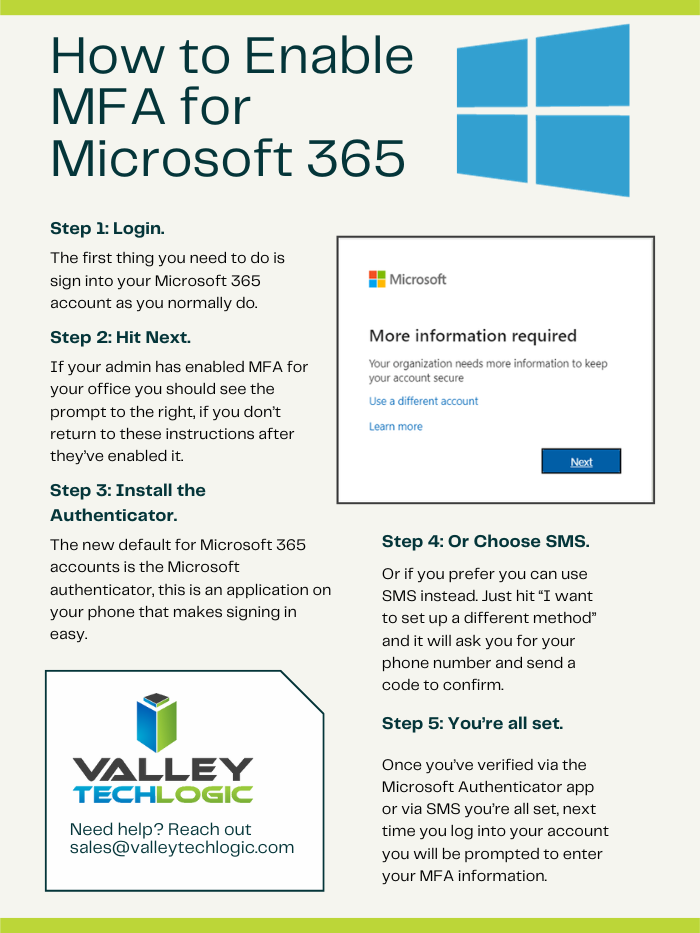
    Enabling MFA is strong protection against these methods and more. See our chart on how to set up MFA for your own Microsoft account.

    As you can see, it’s pretty easy to enable MFA for your own account but did you know you can also set it up from an organizational level to enable it for your employees?

    The steps doing that are as follows:

    1. Navigate to the Microsoft 365 admin center at https://admin.microsoft.com.
    2. Select Show All, then choose the Azure Active Directory Admin Center.
    3. Select Azure Active Directory, Properties, Manage Security defaults.
    4. Under Enable Security defaults, select Yes and then Save.

    Just to note, you must turn off legacy per-user MFA first before enabling global MFA in your organization. You can find that by navigating to Users > Active Users and you should see a tab on this page for multi-factor authentication. On this page should be a list of your users and you want to set each user to MFA disabled. Then you can loop back to our previous instructions and turn on the global MFA instead.

    There are also other global security settings in this section but before testing out different settings we suggest reaching out to your IT provider. MFA is a pretty non-intrusive security setting, but other settings may have unexpected consequences when it comes to you or your employee’s workflow. It’s best to evaluate your security options with a pro.

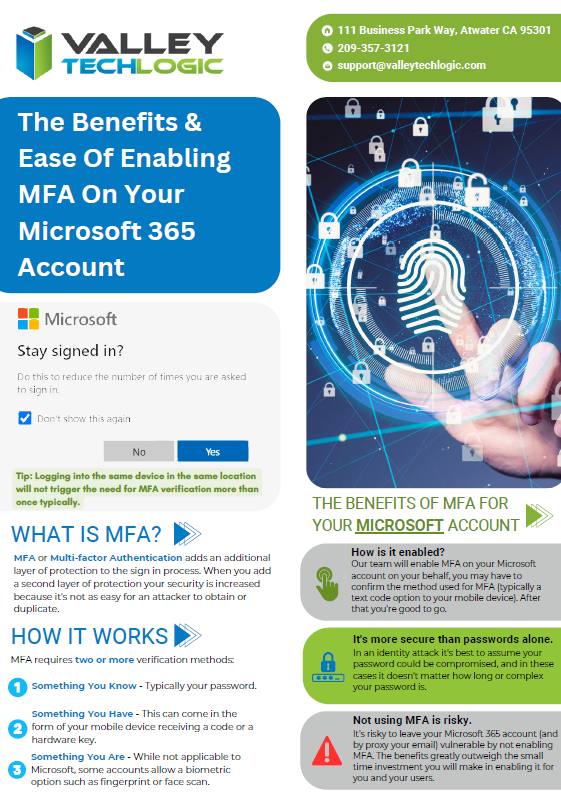
    Don’t have access to an IT pro? Valley Techlogic can assist. We are experts both in the field of cyber of security AND all things Microsoft. See our advertising flyer on our approach to enabling Microsoft 365 MFA for our customers.

    You can schedule a consultation with us today to learn more.

    Looking for more to read? We suggest these other articles from our site.

    This article was powered by Valley Techlogic, an IT service provider in Atwater, CA. You can find more information at https://www.valleytechlogic.com/ or on Facebook at https://www.facebook.com/valleytechlogic/ . Follow us on Twitter at https://x.com/valleytechlogic.

  • Windows Server 2012 R2 End of Life is just a couple months away, are you ready?

    Windows Server 2012 R2 End of Life is just a couple months away, are you ready?

    Windows Server 2012 and Windows Server 2012 R2 are quickly approaching their End-of-Life date of October 10, 2023. This is just over 2 short months away and in the world of data migration (especially as it relates to servers) that doesn’t give you a lot of time if you’re still using this operating system in your business.

    If you’re not in the loop you may be wondering what the big deal is with letting it lapse, it’ll still work right? Well yes and no. The timing of this End-of-Life event coincides with when Microsoft usually does their biggest feature and security updates for the year (typically October).

    This means that those still using Windows Server 2012 will miss out on these updates, and all future updates to come unless you sign up for extended support (at a cost) and even then, that will only provide you with some security updates, there will be no future feature updates for Windows Server 2012.

    You may be on the fence because you aren’t sure if you want to continue using an on-premises server or make the move to the cloud. We actually wrote a detailed article on this topic before and how it relates to the pros and cons of moving to the cloud or remaining with an on-premises server. You can find that article here.

    If you are planning on trying to upgrade soon, we have a couple of steps we can recommend as you prepare:

    1. Decide which operating system you’ll be upgrading to. Typically we recommend upgrading to the most current operating system to give you the longest span of time before an upgrade will be needed again, however depending on your hardware or even specific software you use in your business this may not be feasible. We suggest having your server evaluated to determine which upgrade makes sense (or if an upgrade is even possible.
    2. If you discover your server can’t be upgraded, you’ll need to make plans for a new system. If you have an older server (over 5 years) you’ll need to determine whether an upgrade to the most recent version of Windows Server is even possible. If it’s not, you’ll have to pivot to purchasing a new system instead. There are many benefits to upgrading to a new server and an IT provider like us can help you narrow down your choices based on your business’s needs.
    3. Decide whether a clean installation is possible. If most of the data on your server is backed up elsewhere, for example if you have duplicate copies of your data in the cloud (which we highly recommend) then you can do a clean install without having to worry about the data already on the device.
    4. If a clean installation is not possible, you will need to do a migration. A migration is a slower process of updating your server to the latest version. If you’ve ever upgraded the operating system on your computer, you can probably relate as it’s similar just much longer and with more potential pitfalls. We only recommend a migration be attempted by a qualified IT technician.
    5. Plan for the future now. Scrambling to figure out what to do when an End-of-Life event for your device is coming up is stressful and fortunately, avoidable. Modern versions of Windows Server can perform what’s called an “In-place upgrade” which means an upgrade can occur with very little downtime or stress. Staying on top of your Microsoft and Windows updates and upgrades will mean you have the most secure version of their systems available and much less chance of a catastrophic failure occurring on your devices.

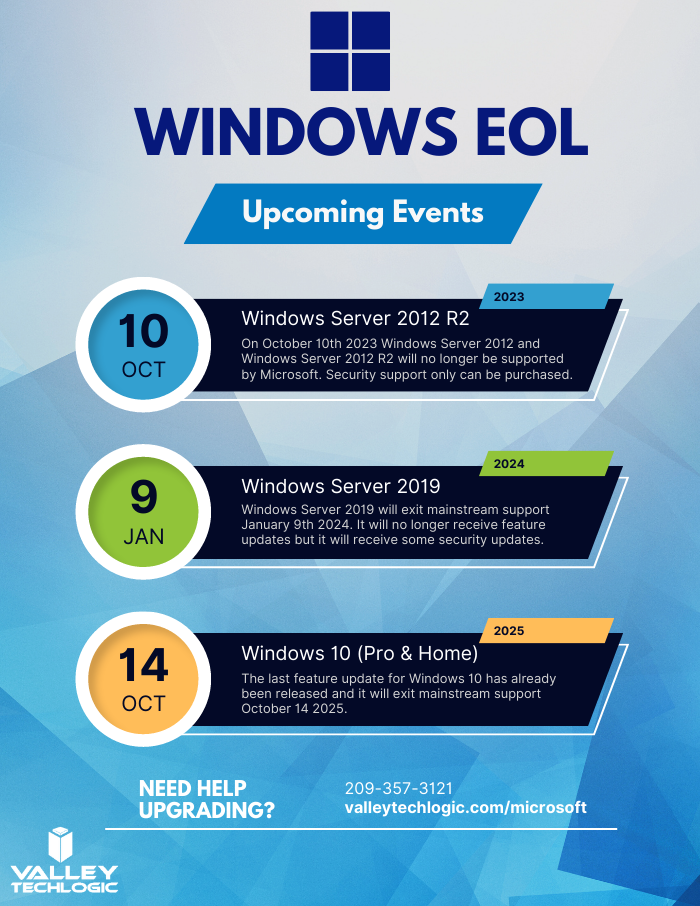
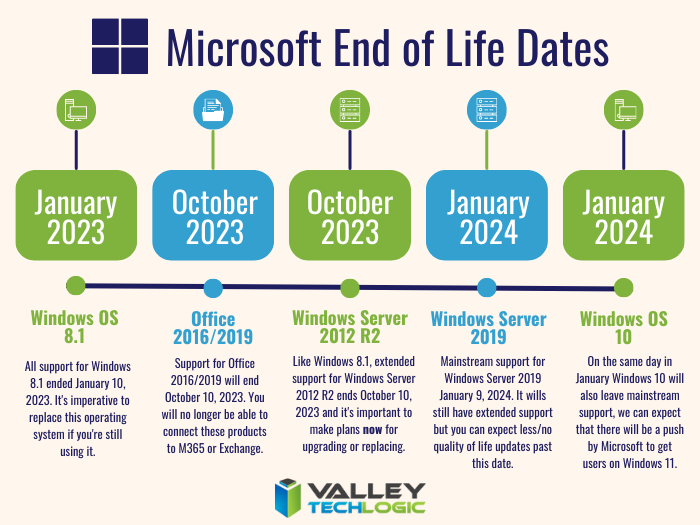
    To help with your planning for Microsoft’s upcoming End-of-Life events, we’ve created this chart with the latest dates to keep track of.

    If you need assistance with upgrading your Windows Server 2012 or Windows Server 2012 R2 device, or have questions about Microsoft products in general, Valley Techlogic can help. We are long time Microsoft partners, and our technicians have a wealth of experience in supporting Windows devices and navigating Microsofts offerings. Schedule an appointment today to learn more.

    Looking for more to read? We suggest these other articles from our site.

    This article was powered by Valley Techlogic, an IT service provider in Atwater, CA. You can find more information at https://www.valleytechlogic.com/ or on Facebook at https://www.facebook.com/valleytechlogic/ . Follow us on Twitter at https://x.com/valleytechlogic.

  • Another blow for Windows 7 and 8 hold outs, Steam announces they’re ending support for these devices January 1st 2024

    Another blow for Windows 7 and 8 hold outs, Steam announces they’re ending support for these devices January 1st 2024

    You might be thinking, why is Valley Techlogic a business IT service provider reporting on this? While it’s true, most of our content is aimed at our client base which is business owners, there is of course some overlap between that community and the gaming community. There is also the looming topic of what this signifies for those continuing to use outdated versions of Windows – business owners and gamers alike.

    The latest news from Steam officially announcing they’re cutting off support Windows 7, 8 and 8.1 devices on January 1st 2024. On that date the Steam client, which is how users access their games, will stop working on these devices. That’s because portions of the Steam client rely on a version of Chrome that has also ceased support for those versions of Windows as of February of this year.

    While Steam users still using Windows 7/8/8.1 are a minority at less than 3% of the total client base, around 7% of the population is still using devices featuring these operating systems (which doesn’t sound like a lot but represents millions of people). For context, Windows ended support for 7 as of January 2020 and for 8 and 8.1 January 2023.

    One of the obvious downsides which is connected to today’s news, beyond being unsupported by Microsoft themselves these operating systems will no longer be supported by the software platforms you use regularly, and they may cease functioning on those platforms altogether.

    There is also consequences to remaining on these operating systems that can fall way beyond losing access to your favorite games, without Microsoft support these devices are subject to more severe and more frequent security threats than modern operating systems that are still being actively supported.

    The WannaCry ransomware is one obvious example of ransomware that’s targeted these devices, infecting an estimate 16 million devices so far. The fix for this ransomware is restoring the device but that may be difficult on older machines still running Windows 7 and 8. You also run the risk of your device failing just because the components have reached their maximum lifespan.

    We always recommend replacing older devices BEFORE they fail because recovering the data on them is never a guarantee (especially without expert help).

    This especially includes servers, with support for Windows Server 2012 R2 ending October 10, 2023. Recovering the data from a server that has failed or been compromised can only be accomplished by experts – and the data recovery for servers is often lengthy and expensive.

    If you’re not sure of the end of life dates for your Microsoft products are coming up, here’s a chart you can keep as a reference:

    Microsoft End of Life Dates Coming up in 2023/4.

    It can be difficult to know whether you should update your device to the latest operating system, or if it needs to be replaced altogether. Your devices may technically run Windows 10 but if you have an older hard drive, or the device is more than 8 years old it probably makes sense to replace it instead.

    For businesses looking to replace older devices, we have partnered with both Dell and Lenovo and can help you navigate the process as well as give you access to the discounts and special offers available to us. Reach out today for a consultation.

    Also stay tuned, next week we’ll dive into whether it’s worth upgrading or replacing your on premises server or if it makes sense to move your data to the cloud and bypass a hardware purchase altogether.

    Looking for more to read? We suggest these other articles from our site.

    This article was powered by Valley Techlogic, an IT service provider in Atwater, CA. You can find more information at https://www.valleytechlogic.com/ or on Facebook at https://www.facebook.com/valleytechlogic/ . Follow us on Twitter at https://x.com/valleytechlogic.

  • Windows Server 2012 and Server 2012 R2 are approaching end-of-life, what should you do?

    Windows Server 2012 and Server 2012 R2 are approaching end-of-life, what should you do?

    Upgrading your personal computer with the latest Windows can come with some challenges and hesitancy due to changes that are made to every new consumer and business version of Windows for personal computers.

    UI changes and increased specifications both come to the forefront for our customers when making these changes, but for servers that decision process feels even more fraught with danger.

    On October 9th, 2023, Windows Server 2012 and 2012 R2 will be in their end-of-life. What this means is it will no longer be a primarily supported product by Microsoft, who understandably needs to focus their time and energy supporting more current products. What it means for customers still utilizing Windows Server 2012 (or 2012 R2) is that their servers may not receive crucial support updates that often prevent things like your server malfunctioning, software working as intended, or even security updates.

    With just under a year to go that gives you time to consider your options when upgrading to a more current software, or if it makes sense to pay for extended support through Microsoft.

    The Extended Security Updates (or ESU) program does not include any feature updates, the only updates your server will receive will be security updates only, and to expand on that further that will only be important or critical security updates.

    This may mean your server is still vulnerable to intrusion although much less so than devices going unpatched. Often times a device ending support is a green light to hackers to begin working on breaching these older devices now that they’re less secure.

    That problem is not unique to Microsoft either, even smaller devices such as routers or switches can fall under end-of-life and no longer receive critical security patches. Just look at the recent Cisco zero-day security announcement and their stance. They will not be patching the outdated routers to prevent security intrusion; the expectation is that customers that own those routers will need to upgrade to ensure their business is safe.

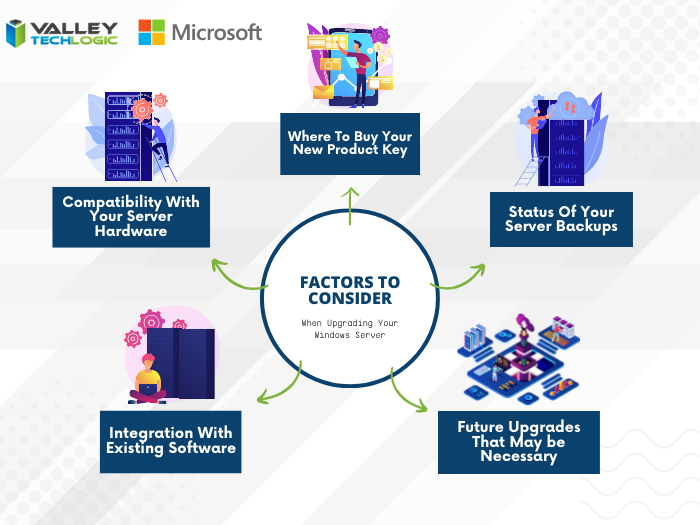
    There are some factors to consider however when it comes to upgrading your Windows serve, see our chart below:

    Five Considerations to Take When Replacing Your Windows Server

    The chart assumes an ideal scenario of either performing the update on a newly purchased server or taking the server offline temporarily. Performing an in-place Windows Server update can be risky and is best left for the professionals to decide whether it’s possible in each unique scenario.

    Purchasing a new server if your current server is too out of date to run the current version of Windows Server is tricky as well, there are more factors to consider with a machine that supports your entire business than with a device that’s only utilized by one or two employees.

    It’s also important no matter which avenue you take that you’ve properly backed up the existing server, if something were to go wrong not having that backup could mean losing all of your data. Which in many cases, is a catastrophic event.

    If we haven’t convinced you yet we’ll say it plainly, this is not a job that should be attempted by someone who’s just “computer savvy”. Upgrading your server requires an expert’s knowledge to execute in a timely manner and without losing your company data. Valley Techlogic can be that expert hand, learn more today with a free consultation.

    Looking for more to read? We suggest these other articles from our site.

    This article was powered by Valley Techlogic, an IT service provider in Atwater, CA. You can find more information at https://www.valleytechlogic.com/ or on Facebook at https://www.facebook.com/valleytechlogic/ . Follow us on Twitter at https://x.com/valleytechlogic.